Every Shopify store owner knows they should be testing things. Most never actually do it. They redesign their entire homepage based on a gut feeling, or change their pricing because a competitor did, or swap out product images because they are bored of the old ones — with zero data to support any of it.
What’s in This Article
Conversion Rate Optimisation is not about random changes and hoping for the best. It is a disciplined process of identifying problems, forming hypotheses, testing solutions, and measuring results. The stores that grow conversion rate by 0.5-1% every quarter are adding tens of thousands in revenue without spending more on traffic. Here is the CRO framework that actually works for Shopify.
Step 1: Find the Leaks Before You Fix Anything
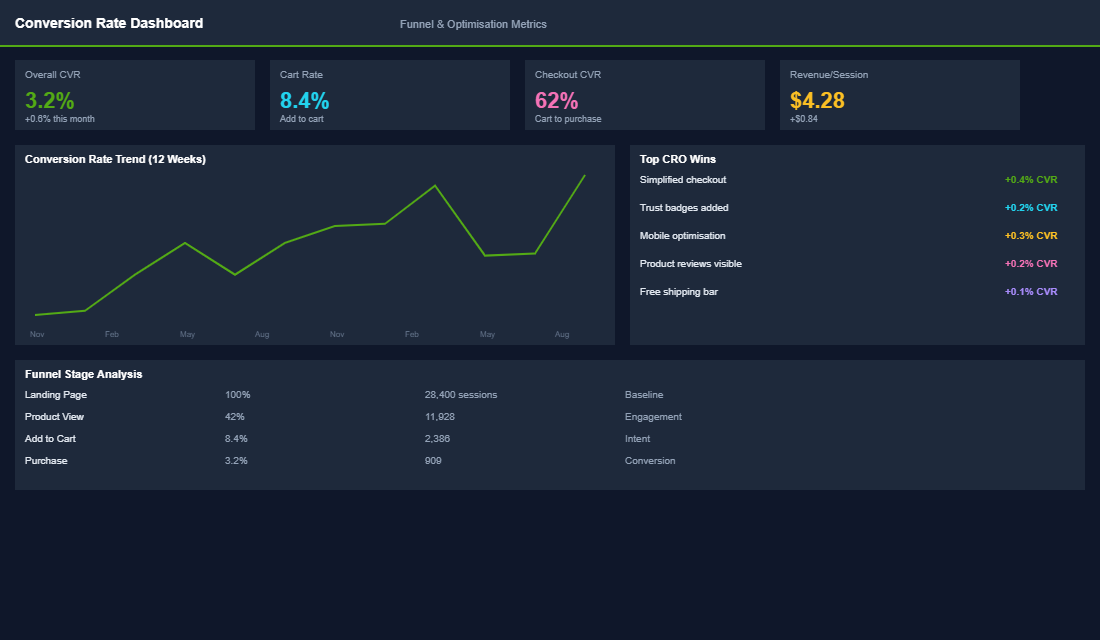
Before running any test, you need to know where your store is losing customers. Open Google Analytics 4 and look at three things:
Your purchase funnel drop-offs. What percentage of visitors add to cart? What percentage of add-to-carts reach checkout? What percentage of checkouts complete purchase? The biggest percentage drop between stages is your biggest opportunity. If 90% of add-to-carts never reach checkout, your cart experience is the problem — not your product pages.
Your highest-traffic, lowest-converting pages. In GA4, go to Engagement then Pages and Screens. Sort by sessions, then check conversion rate for each page. A page with 5,000 monthly sessions and a 0.8% conversion rate is bleeding money. Fixing that single page could generate more revenue than optimising ten low-traffic pages combined.
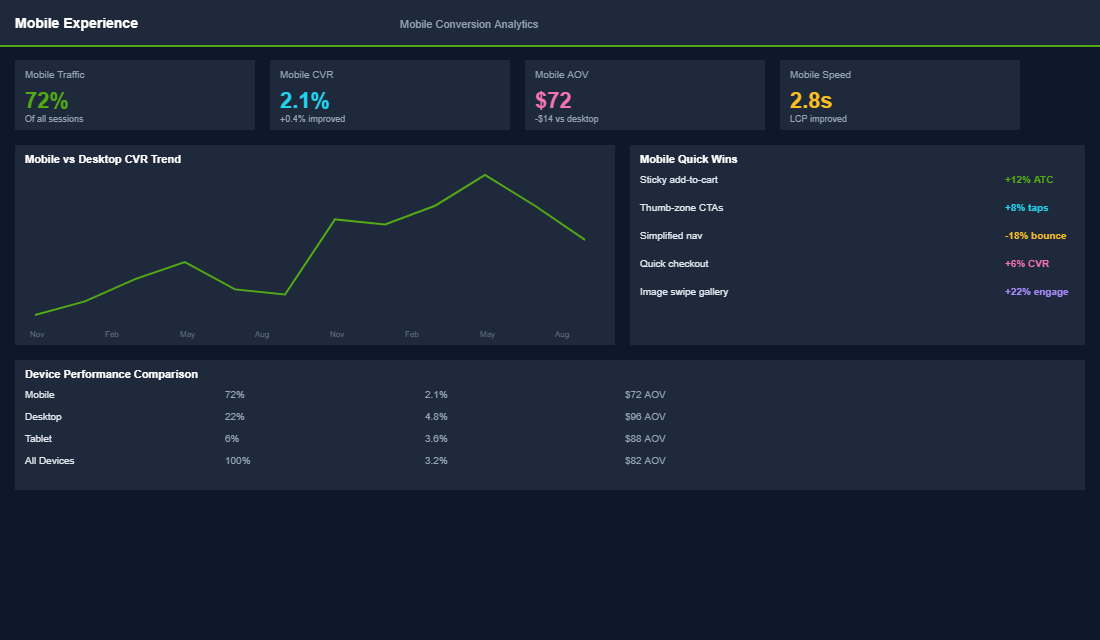
Device-specific performance. Compare your mobile conversion rate to desktop. If there is a gap wider than 40% (e.g., desktop at 3.2%, mobile at 1.8%), your mobile experience has specific issues that need addressing. Since mobile is 70%+ of traffic, mobile CRO often has the highest ROI.
Step 2: Prioritise Using the ICE Framework
You will find dozens of potential improvements. You cannot test them all at once. Use the ICE framework to prioritise:
- Impact: How much revenue will this change generate if it works? A test on your highest-traffic product page has more impact than a test on your about page. Score 1-10.
- Confidence: How certain are you that this change will improve conversion? A change backed by customer feedback and analytics data scores higher than a hunch. Score 1-10.
- Ease: How easy is this to implement and test? A copy change takes an hour. A full page redesign takes weeks. Score 1-10.
Multiply the three scores to get a priority number. Test the highest-scoring ideas first. This prevents the common trap of spending weeks on a complex test when a simple copy change could have been live in a day.
Step 3: Run Proper A/B Tests
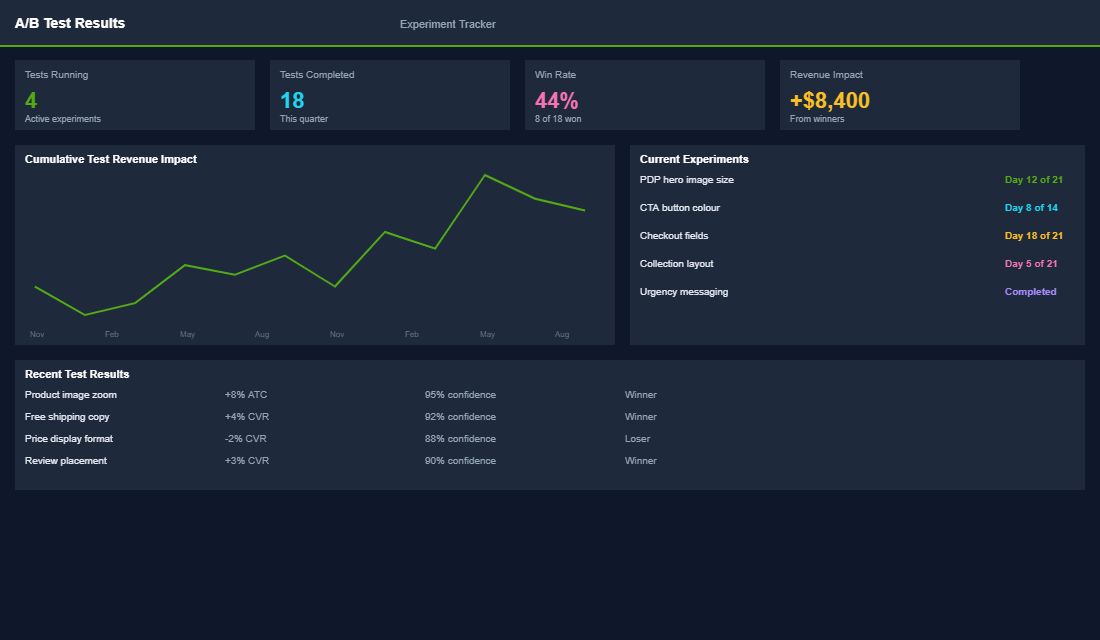
The most common CRO mistake is making changes and then checking whether revenue went up. That is not testing — that is guessing with a dashboard open. A proper A/B test splits your traffic so half sees version A (the original) and half sees version B (the change), and you measure the difference statistically.
For Shopify stores, the best testing tools are:
- Google Optimize replacement: Since Google Optimize shut down, use Convert.com, VWO, or ABTasty. These integrate with Shopify and handle the traffic splitting and statistical analysis automatically.
- Shopify native A/B testing: For simpler tests (different product images, price points, or descriptions), you can use Shopify apps like Neat A/B Testing or Shoplift. These are easier to set up but less powerful for complex tests.
- Manual split testing: For email subject lines and ad creatives, your platform (Klaviyo, Meta) has built-in A/B testing. Use it for every campaign — not just occasionally.
Critical rule: let your test run until you have statistical significance (typically 95% confidence). For most Shopify stores, this means at least 1,000 visitors per variation and at least 50 conversions total. Ending a test early because “it looks like B is winning” will lead you to implement changes that do not actually work.
The 10 Highest-Impact Tests for Shopify Stores
Based on hundreds of tests across eCommerce Circle member stores, these are the tests most likely to produce meaningful conversion lifts:
- Free shipping threshold. Test different threshold amounts ($80, $100, $120). The right threshold increases AOV while the “free shipping” messaging improves conversion rate. This single test often moves both metrics simultaneously.
- Product page hero image. Test lifestyle imagery vs. flat-lay product shots as the first image. For most brands, lifestyle imagery showing the product in use converts 15-30% better because it helps customers visualise ownership.
- Add-to-cart button colour and size. It sounds trivial, but a larger, higher-contrast “Add to Cart” button can lift conversion by 5-10%. Green and orange typically outperform grey or blue. Make it impossible to miss.
- Social proof placement. Test showing the star rating and review count above the fold vs. only in the reviews section. Above-the-fold placement almost always wins because it provides immediate credibility.
- Product description format. Test benefit-led bullet points vs. paragraph descriptions. Bullet points are easier to scan on mobile and typically outperform paragraphs by 10-20% on conversion rate.
- Trust badges at checkout. Test adding security badges, money-back guarantee icons, and payment logos near the checkout button. These reduce purchase anxiety and typically improve checkout completion by 5-15%.
- Urgency messaging. Test adding genuine stock levels (“Only 3 left”) or shipping cut-off times (“Order in 2 hours for next-day delivery”). When truthful, these create urgency that drives immediate action.
- Cart page upsells. Test adding a “Complete the Look” or “Add for $X more and get free shipping” widget to the cart page. Cart upsells convert at 8-12% and increase AOV without affecting the primary conversion rate.
- Mobile sticky cart button. Test a fixed “Add to Cart” button that follows the user as they scroll on mobile. This removes the friction of scrolling back to the top and typically lifts mobile conversion by 8-15%.
- Payment method visibility. Test showing all available payment methods (credit card, Shop Pay, Apple Pay, Afterpay) in a visual row below the price. Customers who see their preferred payment method are more likely to buy.
Building a Testing Rhythm
CRO is not a one-off project. It is an ongoing discipline. The brands that consistently improve their conversion rate run 2-4 tests per month and compound the gains over time.
Here is the monthly testing rhythm that works:
Week 1: Analyse. Review last month’s test results. Update your testing log with wins, losses, and learnings. Analyse your analytics for new opportunities. Prioritise the next round of tests using ICE scoring.
Week 2: Design and build. Create the test variations. For simple tests (copy, images, button colours), this takes a few hours. For structural tests (page layout, navigation changes), allow a full week.
Week 3-4: Run and monitor. Launch the tests and let them run until statistically significant. Monitor for errors or unexpected behaviour but resist the urge to end early. Document everything — even failed tests teach you something valuable about your customers.
Keep a testing log spreadsheet with: test name, hypothesis, variation details, start date, end date, sample size, result, and learning. After six months, this log becomes your most valuable marketing asset because it contains validated knowledge about what your specific customers respond to.
The Compound Effect of Systematic Testing
A single test might lift conversion by 5-10%. That is nice but not transformative. But when you run 2-4 tests per month and compound the winners, the cumulative effect is dramatic. A 5% lift this month, a 7% lift next month, and an 8% lift the month after compounds to a 21% total improvement in three months.
On a store doing 30,000 monthly sessions at a 2.5% conversion rate with $90 AOV, that 21% lift translates to an extra 158 orders and $14,200 in monthly revenue. Over a year, that is $170,000 in additional revenue — from the same traffic you are already paying for.
One eCommerce Circle member ran 24 tests over six months. Eight produced statistically significant improvements. The combined effect was a 34% increase in conversion rate — from 2.2% to 2.95%. On their traffic volume, that meant an extra $18,400 per month in revenue. Their ad spend stayed flat, but their effective ROAS improved because every click was worth more.
Start Your First Test This Week
Do not overthink it. Pick the highest-traffic page on your store, identify the most obvious improvement (usually images or social proof placement), and run a simple A/B test for two weeks. Even if your first test does not win, you will have learned something about your customers — and that knowledge makes every future test more likely to succeed.
Inside the eCommerce Circle, CRO is a systematic part of our Performance framework. We help members identify their highest-impact testing opportunities, design proper experiments, and build the testing discipline that compounds conversion gains quarter after quarter.
You are already paying for the traffic. CRO makes sure you are not wasting it.