You’re spending money on ads. You’re driving traffic. People are landing on your product pages. And then… they leave. No add-to-cart. No purchase. Just a bounce.
What’s in This Article
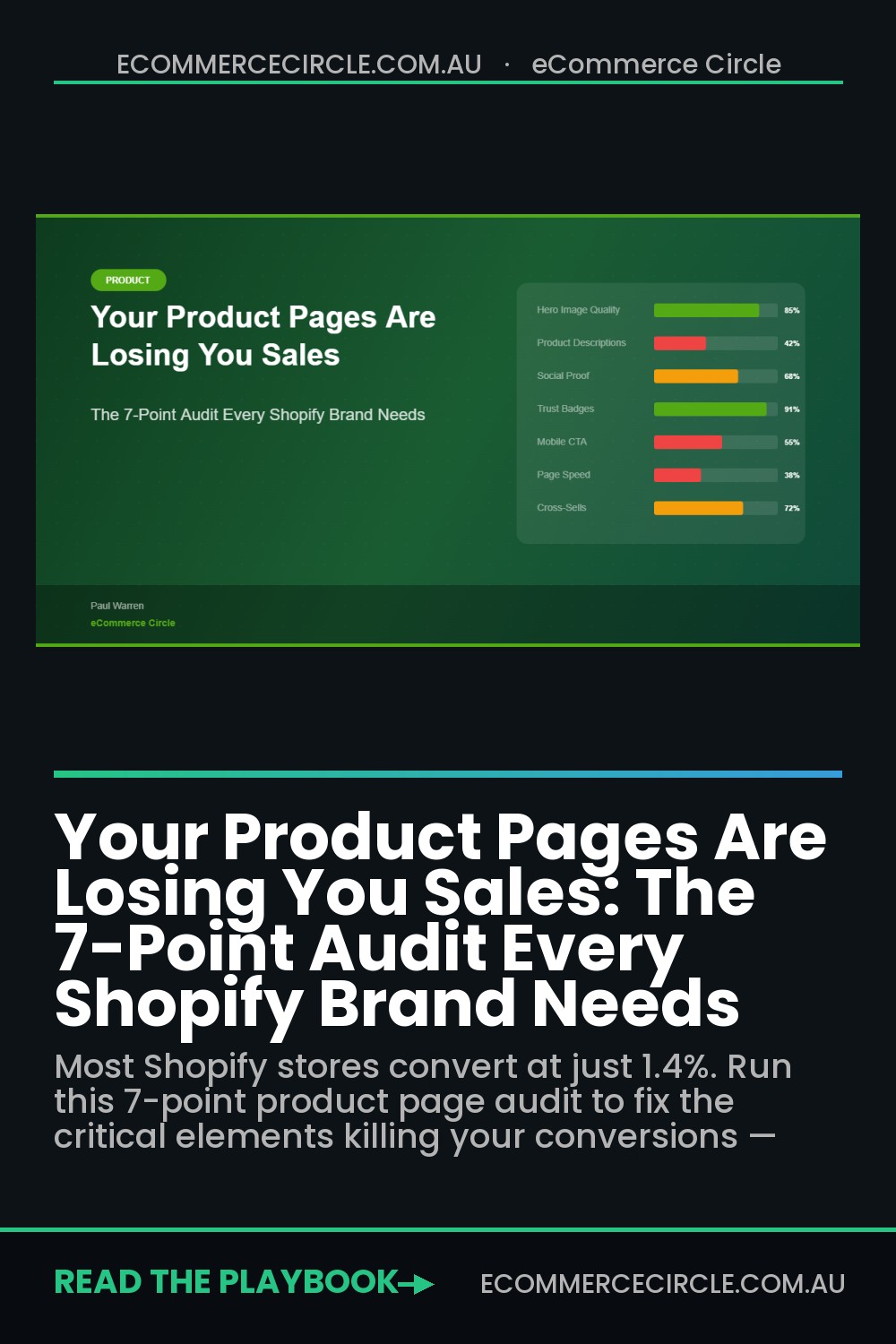
Here’s the uncomfortable truth most Shopify store owners don’t want to hear: your product pages are probably costing you more sales than your ads are generating. The average Shopify store converts at around 1.4%. The top performers? They’re hitting 3-4%. That gap isn’t luck — it’s product page optimisation.
The brands we work with inside eCommerce Circle consistently see conversion rate lifts of 50-100% after running a proper product page audit. Not by redesigning their entire site. Not by switching themes. Just by fixing the seven critical elements that most brands get wrong.
Why Most Product Pages Fail (And Why Yours Probably Does Too)
Most Shopify stores build their product pages backwards. They start with what they want to say about their product — the features, the specs, the ingredients. But your customer doesn’t care about your product. They care about what your product does for them.
A product page isn’t a spec sheet. It’s a sales conversation. And like any good sales conversation, it needs to address objections, build trust, and make it dead easy to say yes.
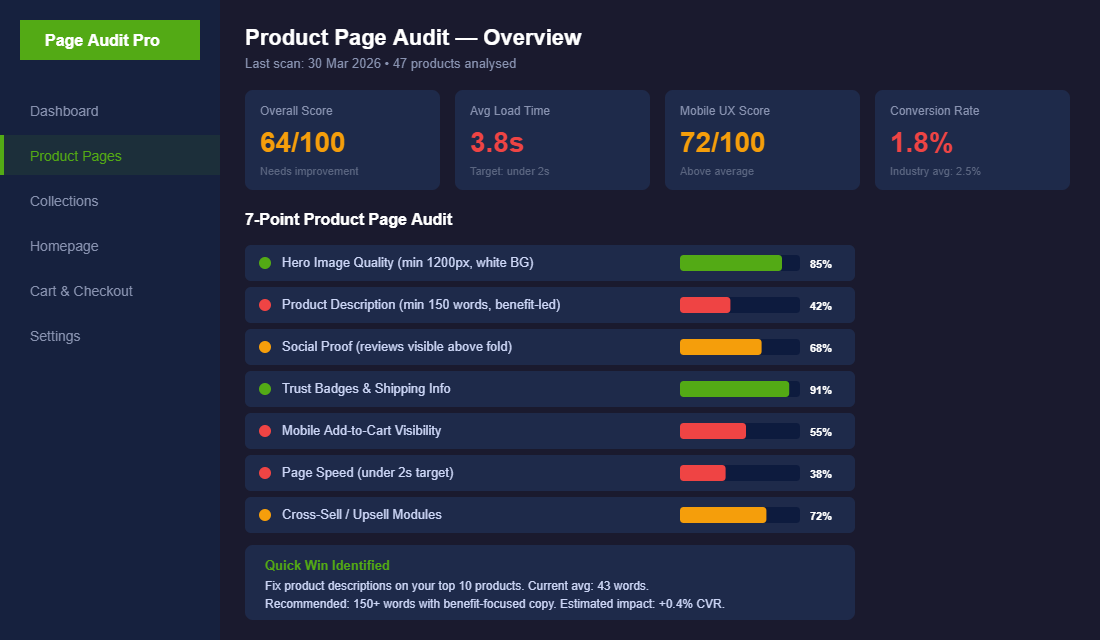
Let’s walk through each of the seven audit points. For every one of these, ask yourself honestly: does my product page nail this or not?
Audit Point 1: Hero Image Quality
Your hero image is the first thing a customer sees. On mobile — which is 70%+ of your traffic — it’s basically the only thing they see before deciding to scroll or bounce.
The minimum standard: 1200px wide, clean white background, shot from multiple angles. But that’s just table stakes. The brands that convert well go further. They include lifestyle shots showing the product in use, scale shots so customers understand the actual size, and close-up detail shots for texture or material quality.
If you’re selling anything over $50 AUD, you need at least 5-6 images per product. Under $50, you can get away with 3-4 — but they need to be sharp. Blurry, poorly lit product photos are the fastest way to kill trust before the customer even reads a word.
Audit Point 2: Product Descriptions That Sell
This is where most Aussie brands drop the ball hardest. The average product description we see in our audits? 43 words. That’s barely a sentence or two. You can’t build desire, overcome objections, and communicate value in 43 words.
Your product description should be 150 words minimum, and it should follow a simple formula: benefit headline → pain point → solution → proof → specifics. Lead with what the product does for the customer, not what it’s made of.
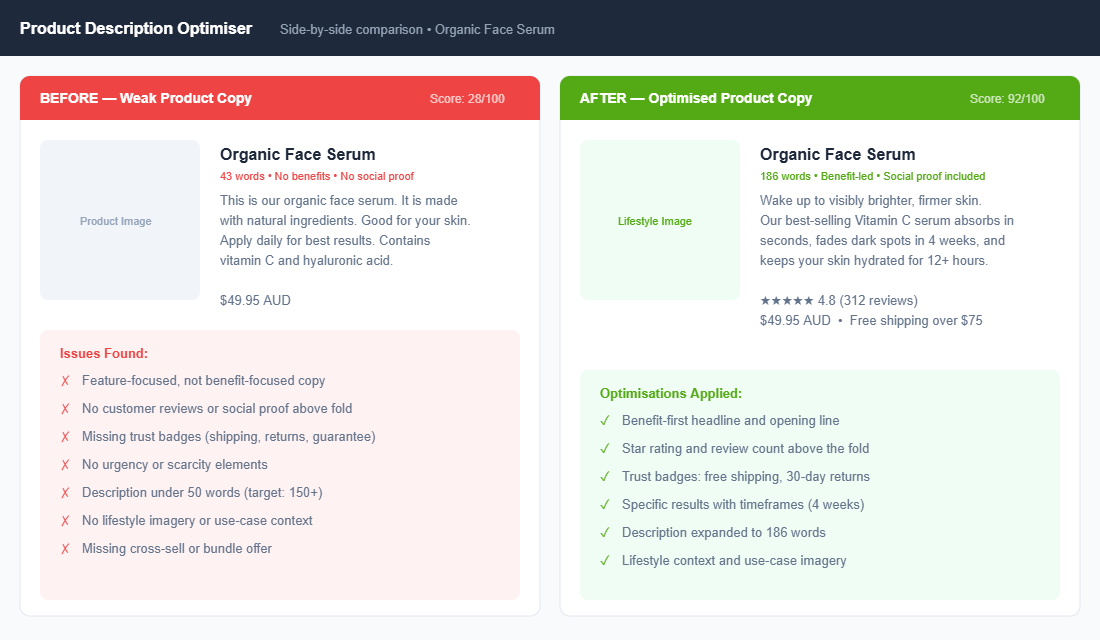
A quick test: read your product description out loud. Does it sound like a human talking to another human about why this product is great? Or does it sound like it was copied from a supplier catalogue? If it’s the latter, rewrite it today.
Audit Point 3: Social Proof Above the Fold
Around 93% of customers read reviews before buying. But here’s what most brands miss: it’s not enough to have reviews buried at the bottom of the page. Your star rating and review count need to be visible without scrolling.
The ideal setup is a star rating with review count directly under your product title, linked to the full reviews section below. Apps like Judge.me or Loox (for photo reviews) make this easy on Shopify. If you’ve got fewer than 10 reviews on a product, focus on getting those first — send post-purchase emails specifically asking for reviews, and consider offering a small incentive like a discount code on next purchase.
Audit Point 4: Trust Badges and Shipping Info
Trust badges aren’t just decoration. They directly address the #1 reason customers abandon product pages: uncertainty. “Is this site legit? Will my order actually arrive? What if I don’t like it?”
At minimum, you need three things visible near your Add to Cart button: shipping info (free shipping threshold or estimated delivery), a returns policy summary (e.g., “30-day hassle-free returns”), and payment security indicators (secure checkout badge, accepted payment methods). Australian customers in particular want to see local shipping details — “Ships from Sydney, 2-5 business days” converts way better than no shipping info at all.
Audit Point 5: Mobile Add-to-Cart Visibility
Pull up your product page on your phone right now. Can you see the Add to Cart button without scrolling? If the answer is no, you’re losing sales every single day.
The best-converting Shopify stores use a sticky Add to Cart bar on mobile — a small bar that stays fixed at the bottom of the screen as the customer scrolls. Apps like Sticky Add to Cart by Starter or built-in theme features handle this. It sounds like a small change, but we’ve seen it lift add-to-cart rates by 15-25% on its own.
Audit Point 6: Page Speed
Every additional second of load time costs you roughly 7% in conversions. If your product pages take 4 seconds to load instead of 2, you’re leaving 14% of potential conversions on the table. On a store doing $50K/month, that’s $7,000 in lost revenue.
The usual culprits: uncompressed images (use TinyPNG or Shopify’s built-in compression), too many apps loading scripts on the frontend, heavy theme code, and unoptimised third-party embeds. Run your product page through Google PageSpeed Insights and aim for a mobile score above 60. Most Shopify stores sit around 25-40 — there’s almost always low-hanging fruit to grab.
Audit Point 7: Cross-Sell and Upsell Modules
Your product page shouldn’t be a dead end. Every product page should include at least one mechanism to increase average order value: a “Frequently Bought Together” bundle, a “You Might Also Like” carousel, or a volume discount (e.g., “Buy 2 and save 15%”).
Apps like ReConvert, Frequently Bought Together, or Bold Upsell make this straightforward. The key is relevance — don’t just show random products. Show items that genuinely complement what the customer is already looking at. Done well, cross-sells can lift AOV by 10-30%.
The Compound Effect: When All Seven Work Together
Here’s where it gets exciting. Each of these audit points delivers a measurable lift on its own. But when you fix all seven? The improvements compound.
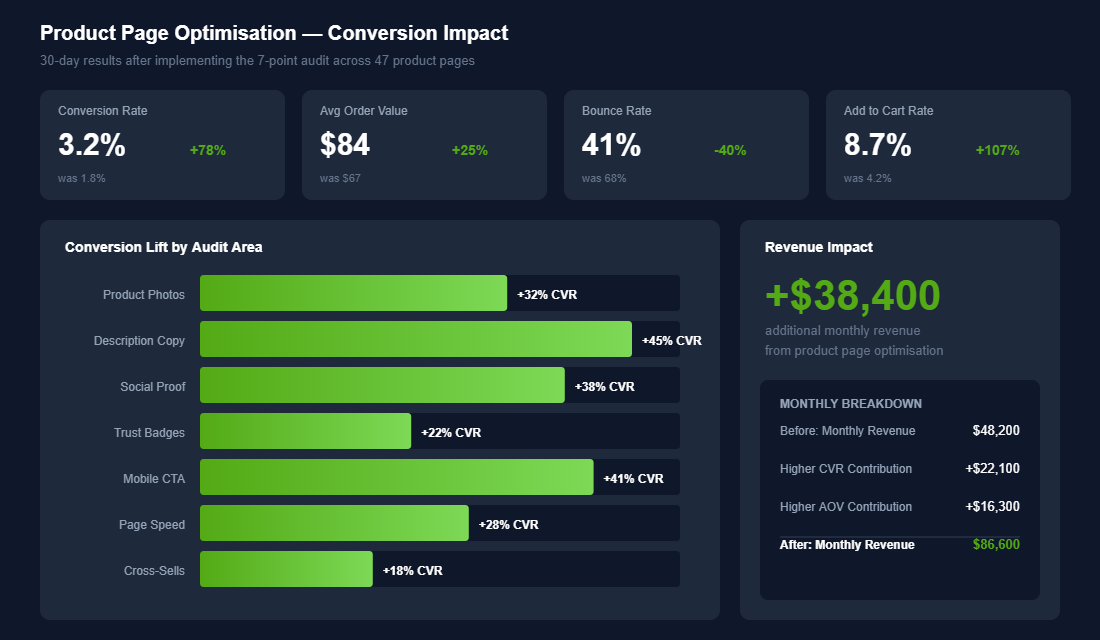
Better images build trust. Better copy communicates value. Social proof overcomes hesitation. Trust badges remove risk. A sticky CTA captures intent at the right moment. Fast load times keep people engaged. And cross-sells increase basket size.
A store doing $50K/month with a 1.8% conversion rate that lifts to 3.2% after a full audit isn’t just getting more orders — they’re getting dramatically more revenue from the exact same traffic. That’s the power of product page optimisation. You don’t need more visitors. You need more of your existing visitors to buy.
Your Next Step
Go through your top 10 products — the ones driving most of your traffic and revenue — and score them against each of the seven audit points. Be brutal. If a page scores below 70 on any point, that’s your priority fix.
Inside the eCommerce Circle, product page optimisation is one of the first things we work on with every member — because it’s the fastest lever you can pull to increase revenue without spending an extra cent on ads. If you want hands-on help running this audit on your store, let’s talk.
Real Numbers: What Top-Performing Product Pages Actually Hit in 2026
Numbers cut through the noise. Before you start tweaking buttons and rewriting bullet points, you need to know what good looks like. These are the benchmarks the brands inside eCommerce Circle measure their product pages against every quarter.
- Product page conversion rate: 1.4% is the Shopify average, 3-4% is the goal for established brands, and 5%+ is what category leaders hit on hero SKUs.
- Add-to-cart rate: Aim for 8-12% on cold traffic and 18-25% on returning visitors. Below 6% means your hero image, price, or trust signals are off.
- Mobile vs desktop conversion gap: Mobile should sit within 30% of desktop. If mobile is converting at half the rate, you have a sticky add-to-cart, page speed, or layout problem.
- Largest Contentful Paint (LCP): Under 2.5 seconds on mobile. Google PageSpeed Insights will flag anything over 4 seconds, and you will lose roughly 7% of conversions for every extra second of load time.
- Average Order Value lift from upsells: A well-placed cross-sell module typically lifts AOV by 8-15%. If your “frequently bought together” widget is not adding at least $5-10 to AOV, it is decoration, not revenue.
- Reviews displayed above the fold: Stores showing star rating plus review count above the fold convert 12-18% better than those that hide reviews further down the page.
Pull these numbers for your own store this week. If you are running Shopify Analytics plus GA4, you can have all six of these benchmarks in a spreadsheet inside an hour. That spreadsheet becomes your audit baseline.
The Tool Stack Aussie Shopify Brands Use to Run This Audit
You do not need a $20K conversion rate optimisation agency to run a proper product page audit. You need three things: a way to measure, a way to watch real users, and a way to ship changes fast. Here is the stack we recommend to brands inside the More Orders Operating System:
- Hotjar or Microsoft Clarity for session recordings and heatmaps. Clarity is free and gives you 90% of what Hotjar offers. Watch 20 mobile sessions on your top product page. You will spot 3 friction points in the first hour.
- GA4 with the Shopify integration for funnel analysis. Build a custom funnel: product page view → add to cart → checkout started → purchase. The biggest drop-off is your single biggest opportunity.
- PageSpeed Insights and GTmetrix for technical performance. Run both desktop and mobile. If your mobile score is under 50, page speed is your number one fix.
- Klaviyo or Omnisend for browse abandonment flows. If a customer hits your product page but does not buy, they should get an email within 4 hours. Browse abandonment recovers 1-3% of lost product page traffic.
- Shopify Search & Discovery (free) for cross-sell recommendations. Most stores leave this disabled. Switch it on, configure related products, and you will see AOV move within a week.
- Loox, Judge.me or Yotpo for review collection and display. Stores using verified-buyer photo reviews convert 18-22% better than text-only reviews.
How to Prioritise the Seven Points When You Cannot Fix Them All
You have a list of seven problems and one developer with four hours a week. Fixing them in order is the wrong move, because the seven points do not carry equal weight.
Score each audit point on two axes: how far your store is from the benchmark, and how much traffic that element actually touches. Then work the top-right quadrant first.
- Fix first if broken: page speed and mobile add-to-cart. These two gate everything else. A 4 second mobile load or a buried add-to-cart button means your beautifully written description is never read. Roughly 75% of Aussie DTC traffic is mobile, so a mobile-only fault costs three times what a desktop one does.
- Fix second: social proof above the fold. Highest return per hour of work on this list. Moving a star rating from below the fold to beside the product title is a 20 minute theme edit that regularly lifts add-to-cart rate 5% to 12%.
- Fix third: shipping and trust information. Cheap to fix, and it addresses the single most common reason Aussie shoppers abandon, which is not knowing what delivery costs or when it arrives.
- Fix fourth: hero imagery. High impact but expensive and slow. Worth doing properly rather than quickly.
- Fix last: cross-sell and upsell modules. These multiply an already-working page. Adding a cross-sell module to a page converting at 0.9% just moves a small number slightly. Get the page converting first, then add the multiplier.
The trap to avoid is fixing the point you find most interesting. Founders love rewriting descriptions and hate arguing with theme code, so descriptions get rewritten four times while a 3.8 second LCP sits untouched for a year. Score honestly, then work the score, not the mood.
The 30-Day Product Page Testing Cadence
An audit tells you what is wrong once. A testing cadence keeps the page improving after you stop paying attention, and that is where the compounding happens.
Here is the rhythm that works for Aussie brands doing $50k to $500k AUD a month, where traffic is real but not infinite.
- Week 1: ship one change to your top 3 products only. Not the whole catalogue. Your top 3 SKUs usually carry 30% to 50% of revenue, so they reach significance fastest and the risk is contained.
- Weeks 2 and 3: let it run untouched. The most common testing failure is calling a result on day four because the first 40 sessions looked good. At 2,000 sessions a week on a product page, you need about 14 days to detect a realistic 10% to 15% lift.
- Week 4: read, decide, document. Keep, kill, or extend. Write down what you learned in one line, even the losers. Especially the losers.
- Then roll winners across the catalogue. A change that lifted your hero product 9% will not lift every SKU 9%, but it will usually move in the same direction.
On tooling: you do not need an enterprise testing platform. Shopify’s built-in analytics plus GA4 will get you to a defensible read on most single-element tests, and Hotjar or Microsoft Clarity (free) will show you the session recordings that explain why. Clarity in particular is underused by Aussie brands and costs nothing. If your GA4 data is not clean, fix that before you run a single test, because testing on untrustworthy data is worse than not testing at all.
What to test, roughly in order of historical return: the add-to-cart button treatment, the position of reviews, the first three lines of the description, the shipping message, the hero image, and the number of images in the gallery. Test one at a time. Two simultaneous changes on the same page tells you something moved but not what.
Twelve tests a year at a 30% win rate and an average 6% lift per winner compounds to roughly a 23% improvement in product page conversion rate over 12 months. On a store doing $200k AUD a month at 1.9% conversion, that is close to $45,000 AUD of additional monthly revenue by the end of the year, with no additional ad spend. That is the whole argument for a cadence over a one-off audit.
Quick Wins You Can Ship This Week
Audits are useless without action. If you only have five hours this week, here is the priority order based on what moves the conversion needle fastest for the brands we coach:
- Replace your hero image with lifestyle context (60 minutes). If your current hero is a product on a white background, swap it for the product in use. Lifestyle imagery typically lifts add-to-cart by 10-25%.
- Move reviews above the fold (30 minutes). Use your theme settings or a Loox/Judge.me block to surface star rating and review count near the price. Do not bury them down the page.
- Add a sticky mobile add-to-cart bar (90 minutes). Most premium themes have this built in. If yours does not, apps like Sticky Add to Cart Booster handle it for around $10/month and pay back inside a week.
- Compress your hero image (15 minutes). Run it through TinyPNG or Squoosh. A 2MB hero becoming a 200KB hero will move your mobile LCP by 1-2 seconds.
- Configure cross-sells on your top 5 SKUs (90 minutes). Use Shopify Search & Discovery to add 3-4 related products to your highest traffic listings. AOV will move within seven days.
Imagine you run a $1.2M Shopify store doing 1.4% conversion. Lifting that to 2.1% (a realistic target after these five fixes) is an extra $600K in annual revenue from the same traffic. That is the maths the brands inside eCommerce Circle live by.
Want to dig deeper on each lever? Our guide on product page copywriting that converts walks through the exact language framework, and the customer avatar guide shows you how to write copy that lands with the buyer you actually want.
Ready to Run Your Audit With a Coach in the Room?
Running this audit on your own works. Running it with a coach who has audited 200+ Shopify product pages works faster. Inside eCommerce Circle, every member gets their product pages reviewed by experienced operators who have scaled brands past $5M, $10M, and $20M.
Let’s Talk About Your Product Pages