Most Aussie Shopify founders find out their business has no disaster recovery plan the same way: an email arrives at 6:47am.
What’s in This Article
Shopify Payments has frozen your payouts pending review. Your supplier in Guangzhou has gone quiet for nine days. Your last theme deploy wiped six months of section work. Your Klaviyo flows got accidentally deleted by a contractor. Your store email is locked because the founder’s phone died and the 2FA codes were on it. Pick one. Each of these has happened to a founder we work with inside eCommerce Circle in the last twelve months.
The numbers are not gentle. According to the Australian Cyber Security Centre, 60 percent of Aussie small businesses fail within six months of a major data incident. The average cost of a single breach to an Australian SMB has climbed to 56,600 dollars in the most recent reporting period, up 14 percent year on year. And nearly half of all data breaches in Australia hit businesses with fewer than 200 staff. Yet the same Shopify operators who track AOV and CAC down to the dollar will not have done a backup test, written down a recovery plan, or held a single fire drill since they launched.
This article is the 5-stage disaster recovery system we use with our members. It is not glamorous, it will not lift conversion rate this week, and it is the closest thing in your business to insurance you actually control. The founders who scale past 5 million in revenue without a heart attack along the way have all done one thing the founders who flame out have not: they built the recovery system before they needed it.
The 5 Disasters That Hit Aussie Shopify Stores Most
Before we build the playbook, you need to know what you are defending against. After watching hundreds of Aussie Shopify founders run their businesses, five disasters show up over and over. The exact mix changes by category, but the list is remarkably consistent.
- Account suspension or termination. Shopify suspends a store the moment your chargeback ratio crosses 1 percent on Shopify Payments, when an Acceptable Use Policy violation gets flagged, or when billing fails three times in a row. Reinstatement for billing issues runs 24 to 72 hours. AUP appeals can take 7 to 14 days. Termination is a one-shot appeal via the email link. No second chances.
- Data loss inside the store. Theme updates that overwrite custom sections. A staff member who deletes the wrong product collection. A Klaviyo flow that gets unplugged. An app uninstall that wipes its own data. None of these are hacks. All of them happen weekly.
- Payment processor freeze. Shopify Payments holds funds for 30 to 120 days when fraud signals trip. Stripe does the same. PayPal will hold pending balance for new accounts. If your only processor freezes, your cash flow stops while your AdSpend keeps running.
- Supplier or 3PL collapse. A Chinese supplier disappears. Your local 3PL hits a system outage at 1pm on Thursday. Your only freight forwarder loses a container at sea. The rest of your business keeps running, but you cannot ship.
- Cyber incident. Account takeover via reused passwords. Phishing email that captures your Shopify staff login. Ransomware via a contractor’s laptop. The cost to clean up averages 4.26 million dollars across all Australian businesses, with SMBs absorbing the worst proportional damage.
The five-stage playbook below addresses every one of these. Follow it in order. Each stage compounds on the last.
Stage 1: The Daily Data Backup System That Pays For Itself in One Bad Theme Update
Shopify is explicit about this in their own documentation: their internal backups protect the platform, not your individual store. If a staff member deletes 400 products by mistake on a Tuesday, Shopify cannot pluck them back out of a vault for you. The backup responsibility sits with the merchant. Most Aussie founders learn this the hard way.
The system we run with members has three layers, and the whole stack costs about 100 dollars a month for a store doing under 5 million in revenue.
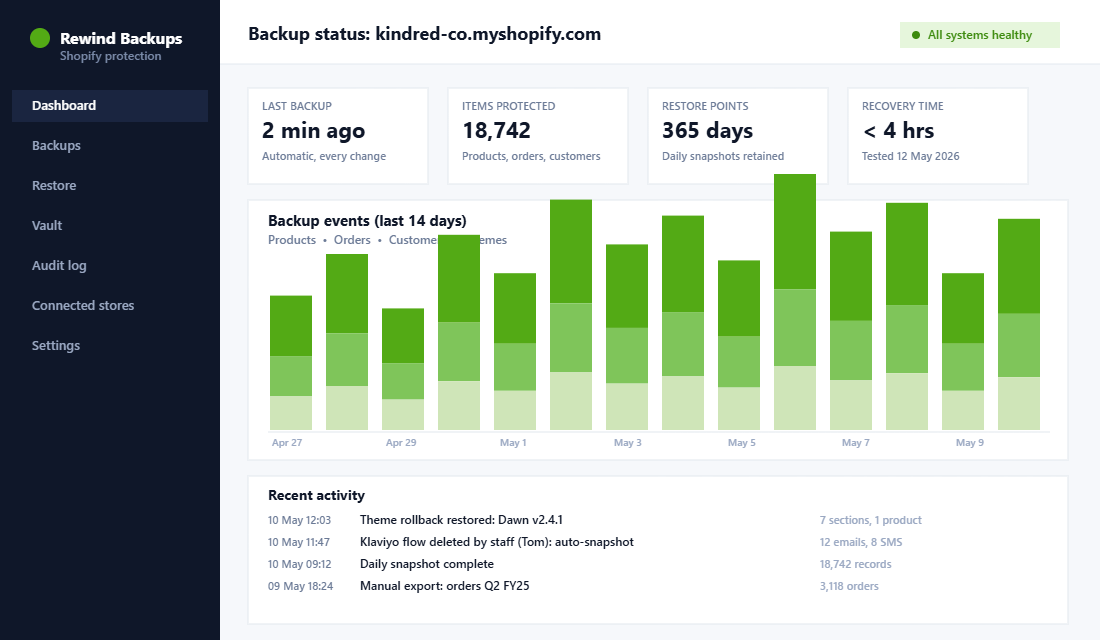
- Layer 1: An automated Shopify backup app. We default to Rewind for most stores. It snapshots products, collections, themes, customers, orders, blog posts, pages, navigation, and discount codes on a continuous basis, and lets you restore individual items rather than rolling back the whole store. Setup takes about 15 minutes: install the app, authorise the data scopes, set retention to 365 days, turn on auto-backup of theme changes, and add a second admin email so alerts never live in a single inbox. Rewind also supports backing up Klaviyo and Mailchimp from the same dashboard, which closes one of the most common gaps.
- Layer 2: Weekly manual exports. Once a week, export your customer list, product CSV, order history, and discount codes from Shopify admin and drop them into a dated folder in Google Drive or Dropbox. Yes, the backup app already covers this. You do it anyway. If your Shopify account is suspended, the app you used to back it up is also offline. Manual exports living outside the platform are the only thing you can reach when you cannot log into Shopify.
- Layer 3: Theme version control. Every time you launch a new theme version, duplicate the live theme in admin first. Keep the last three versions named with the date. If a deploy breaks the homepage, you can publish the previous version inside ten seconds.
Stage 2: Account and Access Hardening
The fastest way to lose a Shopify store is not a hack. It is a phone reset, a forgotten 2FA backup, and a customer-service queue at 2am on a Sunday.
Account access is the single point of failure that most founders never harden. Here is the checklist we run with every new ECC member in the first month.
- Owner email lives on a domain you own. If your Shopify owner email is paul@gmail.com and Google decides your account looks suspicious, you lose access to your store and there is no faster path back in. Move the owner email to founder@yourdomain.com. Set the MX records yourself. Lock it down.
- Two-factor authentication on every account. Use an authenticator app (Authy, 1Password, or Google Authenticator), not SMS. SMS is vulnerable to SIM-swap attacks, which are now the leading vector for ecommerce account takeover in Australia.
- Recovery codes saved in two places. Print them. Store one set in a fireproof safe at home and one in your password manager vault. Not in your email. Not in a Google Doc.
- Staff accounts on individual logins, never shared. Every contractor and staff member gets their own Shopify account with the minimum permissions they need. When they leave, you revoke one login, not the master credential.
- Password manager is mandatory. 1Password or Bitwarden, with a strong master password and a backup recovery key stored physically. Banned: any password reused across two services. The 2024 Verizon breach report had 49 percent of all breaches starting with reused or stolen credentials.
- Backup phone for SMS-based 2FA. Have a second physical device tied to your account. The number of founders who lost a phone overseas and could not log in for nine days is higher than you would guess.
A 90-minute Saturday afternoon doing this once will save you a week of panic later. Treat it like brushing teeth: not exciting, non-negotiable.
Stage 3: Payment Processor and Cash Flow Redundancy
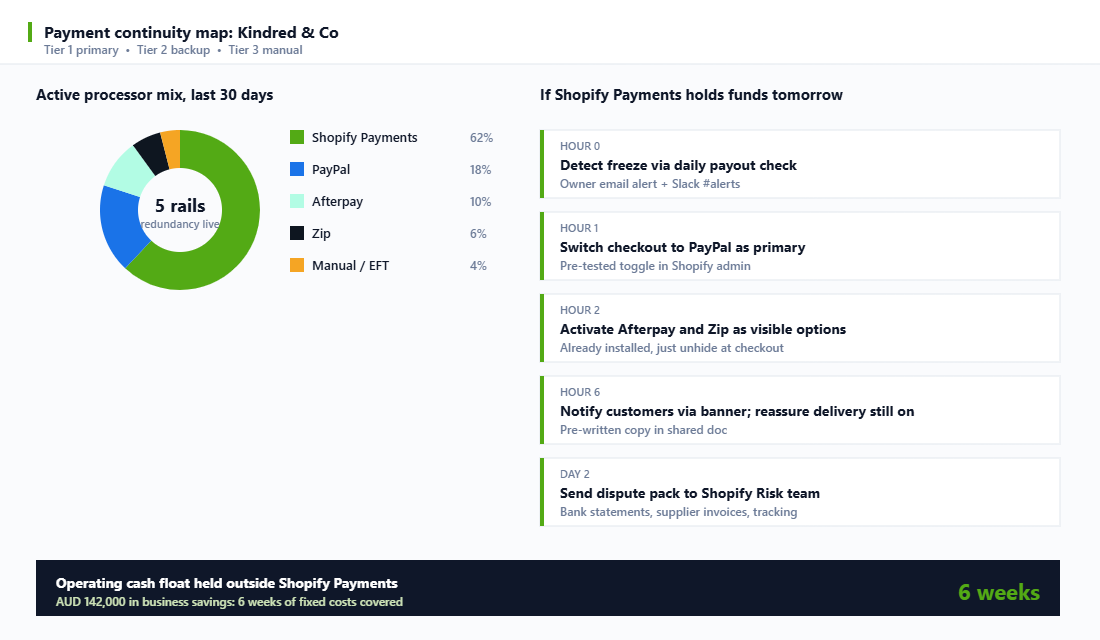
The fastest way to take a profitable store from healthy to dead in 14 days is a Shopify Payments freeze with no backup processor and no cash float. We have seen this exact pattern wipe out three founders in the last 18 months. Each one was doing more than 200,000 dollars a month in revenue. Each one was running a single processor.
Redundancy here is not a complicated concept. It is a checklist.
- Run at least two visible payment processors at checkout. Shopify Payments as primary plus PayPal as a tested backup is the minimum. Add Afterpay and Zip on top because Aussie shoppers expect them, and because they get processed through entirely separate banking infrastructure. If Shopify Payments freezes, those rails keep clearing.
- Test the failover monthly. Once a month, set Shopify Payments to deactivate temporarily and place a real test order. Confirm PayPal processes. Confirm Afterpay processes. Confirm the email receipt looks correct. Re-enable. The whole drill is 20 minutes.
- Keep an operating cash float outside Shopify Payments. The rule of thumb we coach: hold 6 weeks of fixed costs (rent, payroll, software, fixed advertising) in a separate business savings account that has nothing to do with your processor. If a payout freezes, you can keep the lights on while you fight the dispute.
- Document the dispute pack template. When Shopify or Stripe holds funds, they want bank statements, supplier invoices, shipping tracking proof, and customer correspondence. Have a template document with placeholders so when the freeze hits, you spend 30 minutes filling it in, not 8 hours building it from scratch.
- Daily payout check in the morning. Make the first thing you do every morning glance at the Shopify Payments payout queue. A held payout flagged on Monday gives you four working days to act. A held payout you notice on Friday gives you three weeks of unnecessary panic.
Stage 4: Supplier, Inventory, and Logistics Continuity
The supply chain is the disaster zone every founder underestimates because the last fifteen orders went fine. Then your sole supplier in Shenzhen ghosts on a Lunar New Year backlog, and you have 6 weeks of zero stock right before BFCM.
Continuity here is about pre-built relationships, not heroic late-night emails.
- Two qualified suppliers per hero SKU. For your top 5 SKUs, have a second supplier already approved, sampled, and price-checked. They do not need to fulfil orders today. They need to be ready to onboard in 14 days if your primary fails. The cost is one round of samples and a paid call. The benefit is sleeping at night.
- Safety stock buffer of 30 days minimum. Hold 30 days of cover for hero SKUs in your 3PL. For seasonal stock, double that ahead of peak. The carrying cost is real. The cost of a stock-out during your highest-converting week of the year is much higher.
- A second 3PL or pick-and-pack agreement on standby. Even if you do not actively use them, having a paper agreement with a second 3PL means you can shift inventory in days if your main partner has a fire, a system outage, or a labour stoppage. A handful of Aussie founders learned this in 2024 when a major 3PL hit a multi-day WMS outage.
- Diversified freight routes for inbound stock. Sea is cheaper. Air is faster. The smart play is to keep a small standing relationship with both. Sea by default, air for emergencies. Do not let your sea freight forwarder be the only relationship you have.
- Documented contact tree. Every supplier, freight forwarder, 3PL, and customs broker has an after-hours phone number and a backup contact recorded in a single document. When the issue hits, you do not want to be searching email for a number.
The pattern is simple: never run any critical link with a single point of failure. The cost of redundancy is small. The cost of a stock-out, a supplier collapse, or a freight outage at the wrong moment is enormous. As we cover in our 90-day Shopify growth sprint, planning for predictable disruption is part of every quarterly review.
Stage 5: The Annual 4-Hour Recovery Drill
Backups you have never tested are not backups. They are wishes. The only way to know whether your recovery system actually works is to run a fire drill. Once a year. Block the calendar.
Here is the drill we run with members. Block 4 hours on a Saturday morning when traffic is lowest. Pick a date you can repeat every May.
The drill. Pretend your live store is gone. Your team gets a Slack message at 9am that simulates the disaster (account suspended, ransomware, full data wipe, pick one). Then you and the relevant team members work through your recovery plan in real time, with a stopwatch running. The goal is to have a fully working version of the store back online inside 4 hours.
What you are testing. Can you actually access the backup app? Are the API keys for Klaviyo, Rebuy, Recharge, and your 3PL findable inside ten minutes? Can you provision a fresh Shopify dev store, point a backup domain at it, and re-import core data? Does your team know who calls customers, who posts to social, who emails Klaviyo lists explaining the situation?
What you log. Every milestone gets a timestamp. Every hiccup gets noted as a “lesson captured” with a fix to apply before the next drill. The lessons are where the value is. Almost every team finds at least three things wrong: stale password manager entries, DNS TTL set too long, a missing API key, a contractor with admin access who left months ago.
The hardest thing. Resisting the urge to declare it a pass at three hours and stop. The drill is only useful if you take it seriously. Pretend the brand is at stake. Because if you ever need to do this for real, it will be.
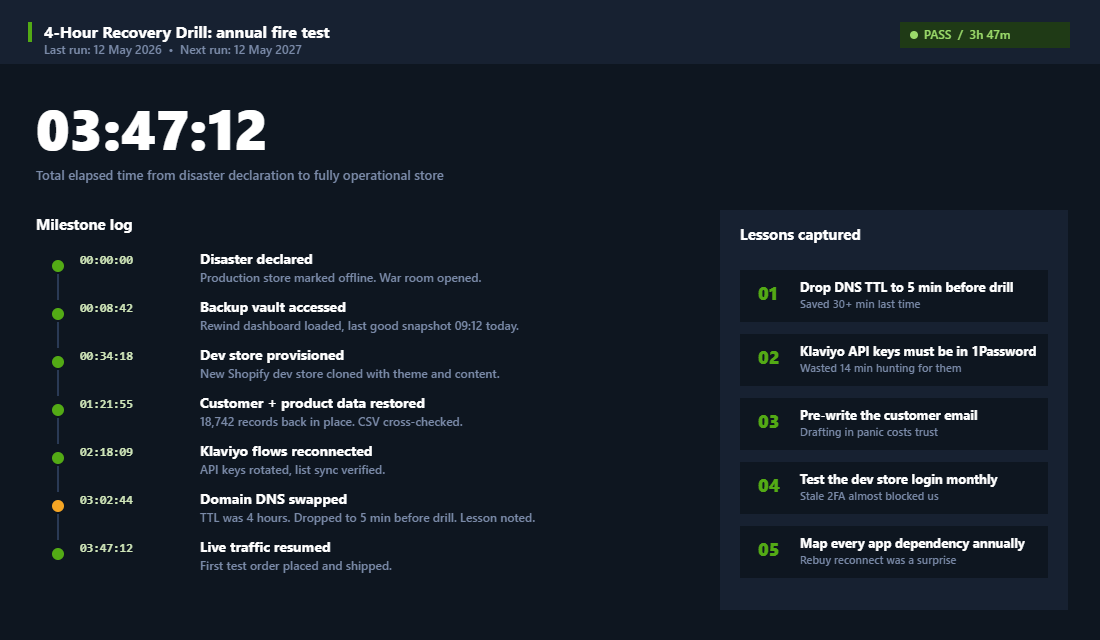
The first time you run this, the drill takes 6 to 8 hours and you find a dozen things wrong. By year three, it takes 3 to 4 hours and the lessons list shrinks. That is the goal.
The One-Page Business Continuity Document Every Founder Needs
A continuity document is the thing your future self, your business partner, or your senior team member will read when something goes wrong and you are not reachable. It lives in two places: a printed copy in a fireproof folder at home, and a digital copy in a shared password-protected doc your business partner can access.
We give every member a template. The document is one page, but the page is dense. Here is what is on it.
- Critical accounts. Shopify owner login, domain registrar, email host, Shopify Payments, PayPal, Stripe, Afterpay, Klaviyo, ad accounts, accounting software, bank, 3PL portal. For each: the URL, the username, where the password lives (1Password vault path), and the 2FA recovery method.
- Supplier and logistics contacts. Top 3 suppliers, primary and backup 3PL, freight forwarder, customs broker. For each: name of the person, their direct mobile, their backup colleague, and what their average response time is.
- The recovery decision tree. A flowchart that says “If X happens, the first three actions are Y, Z, A.” Not paragraphs. A decision tree. When someone is stressed, they cannot read paragraphs.
- The customer communication templates. Pre-written customer email for each major scenario: shipping delay, payment issue, store outage, brand crisis. These templates have been battle-tested. Drafting them in the moment is how brands say things they regret.
- The escalation order. Who picks up the phone in what order. Founder, COO, agency contact, lawyer, accountant. Names. Numbers. Order matters.
This document gets reviewed every six months. Every time someone joins or leaves the business. Every time you change a major tool. We go deeper on documentation systems in our weekly operating rhythm guide, but for disaster planning specifically, the rule is simple: if it is not written down, it does not exist.
The First 60 Minutes: What to Do While the Panic Is Still Fresh
Every stage above is preparation. This section is the part you actually run on the morning it happens, when your hands are shaking and your judgement is worse than you think it is. Print it. Put it in the continuity document. The whole point of a sequence is that you do not have to invent one at 6:47am.
Minutes 0 to 10: contain, do not fix. Resist the urge to start solving. Your first job is to stop the bleeding spreading. Rotate the password on the affected account and force a sign-out of all sessions. Revoke any API keys or app tokens tied to that account. If a staff login is suspected, disable it rather than deleting it, because a deleted account takes its audit trail with it. If it is a payment or fraud event, pause paid media so you are not buying traffic into a broken checkout.
Minutes 10 to 25: establish what is actually true. Pull the evidence before it rolls off. Shopify admin keeps a staff activity log under Settings, then Users, and it shows who changed what and when. Export it. Screenshot the suspension notice or the payout hold in full, including timestamps and reference numbers. Check your email rules for anything that forwards or auto-deletes, which is the classic tell for a compromised inbox. Write a plain timeline in a shared doc as you go, because you will need it twice: once for the platform, once for your insurer.
Minutes 25 to 45: open the right ticket the right way. Support queues reward specificity. Lead with your store URL, the exact error or notice text, the timestamp in AEST, what you have already done to contain it, and what outcome you are asking for. Vague tickets get templated replies and templated replies cost you days. If funds are held, attach the dispute pack from Stage 3 immediately rather than waiting to be asked.
Minutes 45 to 60: communicate before customers ask. Silence is what turns an incident into a reputation problem. Post a short holding note on the affected channel and load the pre-written template for that scenario. Tell customers what happened in one sentence, what you are doing, and when they will hear from you next. Then actually hit that next update time even if the news has not changed.
The Legal Clock You Did Not Know Was Running
Here is the part almost no Aussie founder has thought about until it is happening. If the incident involved customer data, you are not just dealing with a technical problem. You are dealing with a statutory obligation, and the clock started the moment you became aware.
Australia’s Notifiable Data Breaches scheme, administered by the OAIC, requires organisations covered by the Privacy Act to assess a suspected eligible data breach within 30 days of becoming aware of it. If that assessment finds the breach is likely to result in serious harm, you must notify the OAIC and affected individuals as soon as practicable. Serious harm is a broad test and it covers financial, identity, and reputational harm, not just leaked card numbers.
The threshold question most founders get wrong is whether the scheme applies to them at all. Small businesses with annual turnover under $3 million have historically sat outside the Privacy Act, but the carve-out has exceptions, and the reform direction has been steadily narrowing it. If you hold customer names, addresses, phone numbers, and purchase history, plan on being covered rather than hoping you are not. Document your assessment either way, because “we decided it was not serious” carries a lot more weight when it is written down with a date on it.
Three things to do this month, before anything goes wrong. Confirm whether you carry cyber liability cover and what it actually pays for, because the ecommerce insurance guide covers the gaps that catch most stores out. Tighten the technical controls in the cybersecurity playbook so the incident is less likely in the first place. And make sure your privacy policy, consent capture, and data retention actually match what you do, which is the ground the privacy compliance playbook covers. If chargebacks are your exposure rather than data, the chargeback and fraud protection guide is the one to read next.
Add one line to your annual recovery drill: a data-breach scenario where the assessment clock is running. Practise writing the customer notification. It is a very different piece of writing to a shipping delay email, and the first time you draft one should not be the day you have to send it.
The Compound Effect: From Vulnerable to Bulletproof
Each of the five stages is independently useful. None of them on their own makes you bulletproof. Stacked together, they change the entire risk profile of the business.
A founder running zero of these stages is one phishing email, one chargeback spike, or one staff mistake away from a six-figure setback. We have watched it happen. We have helped pull two brands back from the brink. We do not want to do it again.
A founder running all five stages has what we call operational antifragility. Backups mean a data loss is reversible. Account hardening means an attack does not become a takeover. Payment redundancy means a freeze does not become a cash crisis. Supplier redundancy means a supplier collapse does not become a stock-out. The annual drill means your systems are tested, not theoretical. The continuity doc means knowledge does not live in one head.
The cost of running all five is small. About 3 to 5 hours of setup time once, then about 1 hour per month of maintenance, plus the annual drill. The financial cost lands somewhere around 200 dollars a month for most stores doing under 10 million in revenue.
The cost of not running them is the business. It is not theoretical. Two of the founders we know best lost their first stores to a single failure point that any one of these five stages would have stopped. They rebuilt. The lesson got expensive. There is a faster way to learn it. Read the playbook above and commit one Saturday this month. Future you will be grateful. Our work on the customer lifetime value framework assumes the store keeps trading. This article is what makes that assumption safe.
This is one of the things we mean when we talk about the Protection P inside the More Orders Operating System. It is not optional. It is the foundation that lets the other nine P’s compound without a single bad day taking the whole system down. Brands that get past 10 million without a major scare have all built this layer, almost without exception.
Your Next Move
Inside eCommerce Circle, Protection is one of the core pillars we work on with every member. If you want a second opinion on your continuity setup, let’s talk.