There is a moment, usually around the $40k to $60k a month mark, where every Aussie Shopify founder I work with hits the same wall. The business is growing. The team is small. And every single decision still flows through one person. That is not a growth problem. It is an SOP problem.
What’s in This Article
Most founders try to solve it by hiring more people. They bring on a VA, then a marketing manager, then a customer service lead. And the workload keeps growing. Why? Because nothing is documented. Every question still ends up in the founder’s inbox. Every fire still gets put out by the founder. The team is bigger, but the bottleneck is unchanged.
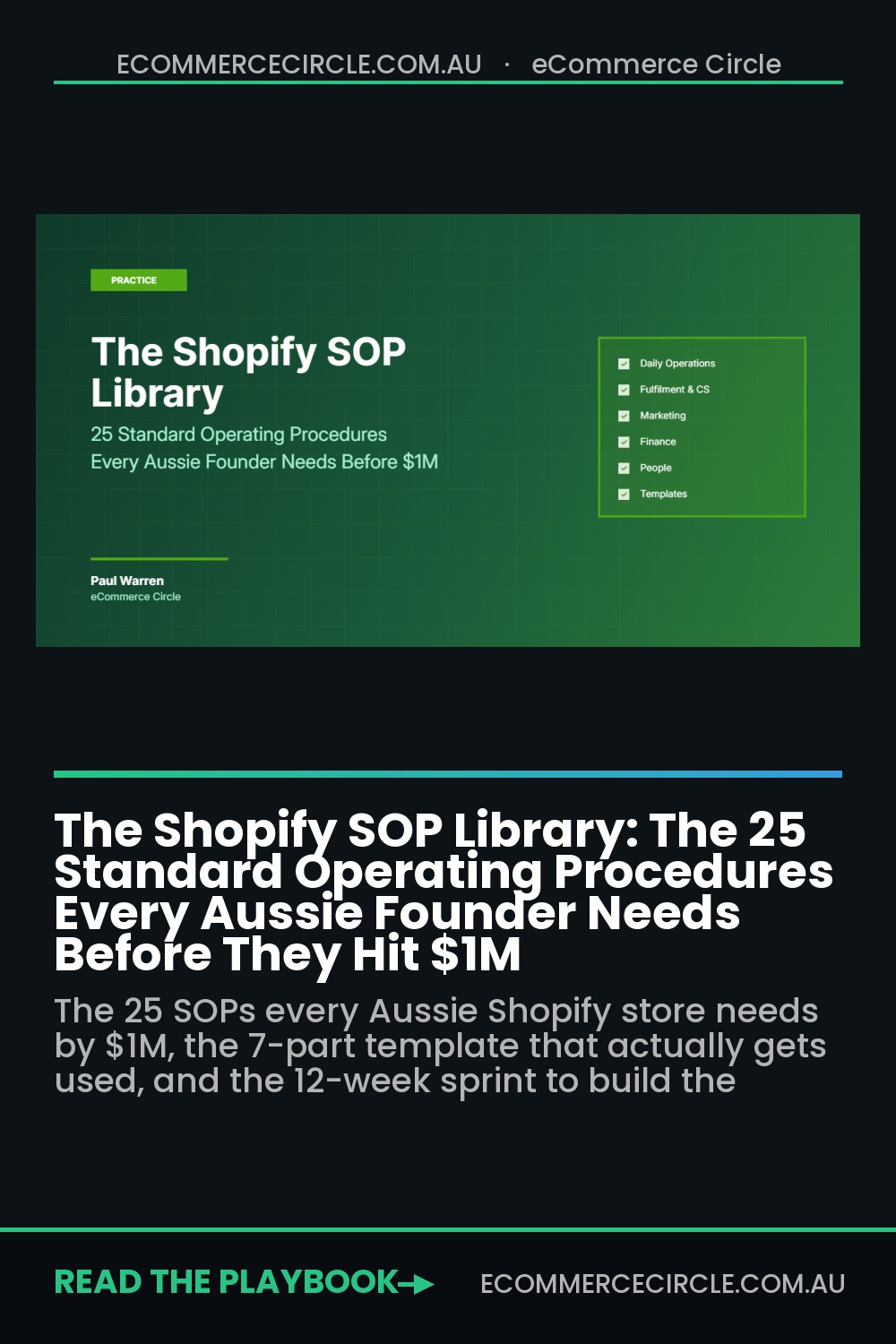
The Shopify brands that scale past $1M do something different. They build the SOP Library before they need it. By the time the team is six people, every recurring task has a written procedure. By the time they hit $1M, the founder is making strategic calls, not operational ones. This article walks you through the 25 SOPs every Aussie Shopify store needs, the template that gets used (instead of buried in Notion), and the 12-week sprint to build the whole library without losing a quarter of revenue.
What an SOP Actually Costs You (When You Don’t Have One)
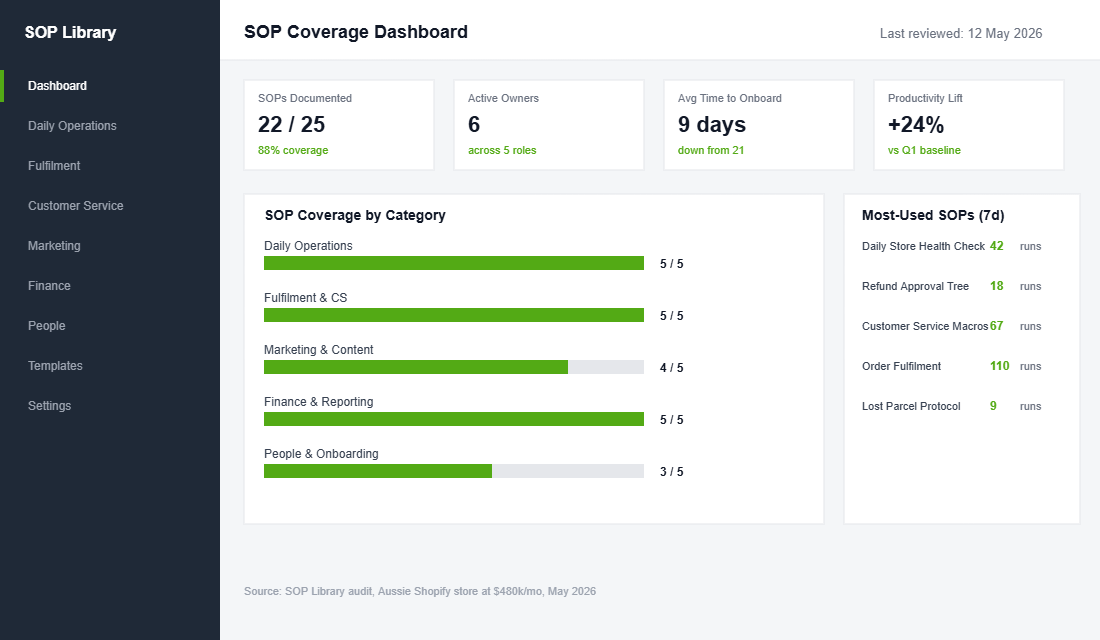
The stats here are not soft. McKinsey research shows businesses with well-documented operating procedures lift productivity by up to 25%. That is the difference between a team of four doing the work of three or doing the work of five. Same payroll, very different revenue.
The cost of not having SOPs is even more brutal. Industry research suggests the average mid-size business loses millions in productivity per year from inefficient knowledge sharing. Scaled to a $1M Shopify store with five staff, that lost-productivity number usually lands somewhere between AUD 60k and AUD 120k a year. Hidden in slower onboarding, repeat mistakes, missing handovers, and the founder-bottleneck queue.
Around 42% of institutional knowledge in any small business is held by one person and never shared. When that person leaves (and at an 18% annual turnover rate, someone will), 42% of their job has to be relearned by the next hire. Replacing a $70k a year employee costs the business between 50% and 200% of their annual salary in lost productivity, recruitment, and ramp-up. That is AUD 35k to AUD 140k per departure. For an SOP Library that takes 8 weeks to build, the maths is not subtle.
If you would not run a Shopify store without analytics, you should not run one without SOPs. Both are the same kind of bet: invest a little now to avoid a lot of pain later.
The 25 SOPs Every Aussie Shopify Store Needs
Not every process needs an SOP. The test is simple: if more than one person does the task, or it gets done more than once a month, write the SOP. Below are the 25 that come up in nearly every store I audit. Build them in this order.
Daily Operations (SOPs 1 to 5)
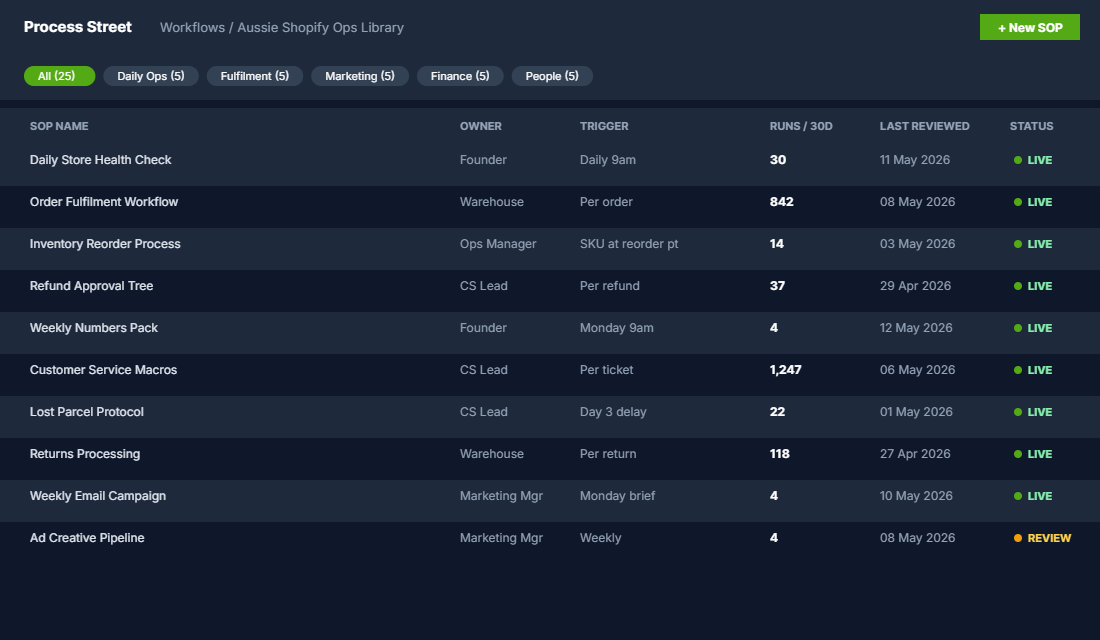
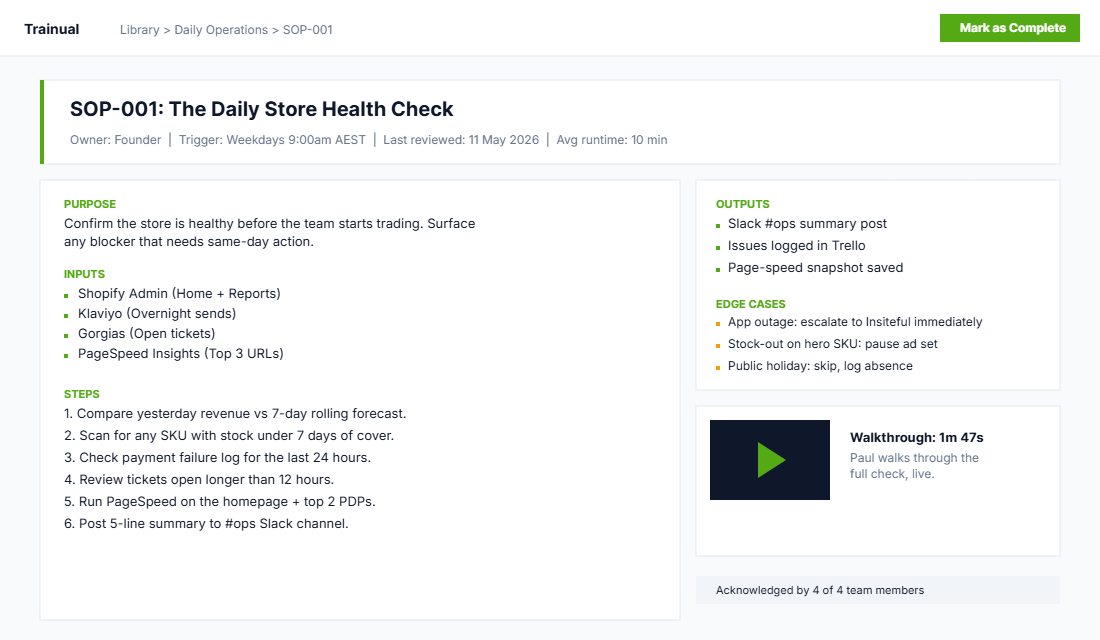
- The Daily Store Health Check. A 10-minute morning walk-through: yesterday’s revenue vs forecast, any product out of stock, any payment failures, any unanswered tickets older than 12 hours, top three slowest pages on PageSpeed. One Slack post, every morning.
- The Order Fulfilment Workflow. From order received to dispatch confirmation: pick, pack, label, photograph the pack, scan into Australia Post or Sendle, mark as fulfilled in Shopify. Time-stamped checklist. Pack-time SLA of 24 hours weekdays.
- The Inventory Reorder Process. When a SKU hits a defined reorder point, who raises the PO, who approves the spend, who follows up with the supplier, who updates the ETA in Shopify. Tied directly to your reorder-point calculation.
- The Refund Approval Tree. Under $50: VA approves. $50 to $200: customer service lead approves with reason logged. Over $200: founder approves. Every refund triggers a tag in Shopify so you can run a weekly refund-rate report.
- The Weekly Numbers Pack. Every Monday at 9am, the same five numbers land in a Slack channel: revenue, orders, AOV, blended ROAS, cash balance. Five numbers, one chart each, a one-line note from the person who pulled them. No more, no less.
Fulfilment and Customer Service (SOPs 6 to 10)
- The Customer Service Macro Library. The 20 most common questions (shipping times, returns, sizing, gift cards, out-of-stock ETAs), each with a saved response in Gorgias or Reamaze. Reviewed monthly. First-response SLA under 4 business hours.
- The Lost Parcel Protocol. Day 3 after expected delivery: ask the customer to check with neighbours. Day 5: open the Australia Post claim. Day 7: replacement or refund offered. Documented as a decision tree, no ad-hoc founder calls.
- The Returns Processing SOP. Inbound returns inspected within 24 hours of arrival. Photographed if there is a quality concern. Re-shelved or sent to outlet depending on grade. Customer refunded same day. Track return rate by SKU.
- The Damaged Goods Workflow. Customer reports damage, requests photos and order number, triggers a replacement (not a refund) by default. Insurance claim opened with the carrier. Damaged item kept for 30 days in case of dispute.
- The Out of Stock Communication SOP. When a product sells out, what happens on the PDP (waitlist on, hide if rebuy is 60+ days away), what happens to the email flow (paused or rerouted), what happens to the ad set (paused). One person checks every Tuesday.
Marketing and Content (SOPs 11 to 15)
- The Weekly Email Campaign SOP. Brief written by Wednesday, design done by Thursday, copy reviewed by Friday, sends Monday and Wednesday. Same cadence every week. Subject line tested against the best historical performer in that segment.
- The Product Photography Brief. Every new product gets four shots: hero, lifestyle, scale reference, detail. Same lighting setup. Same retouching style. Shot list signed off before the shoot day, not after.
- The UGC Sourcing Workflow. Post-purchase email asks for photos at day 14. Customers tag the brand on Instagram, get a 10% discount code. Sourced content is logged in Airtable with rights confirmation and rotated through ad accounts.
- The Ad Creative Production Pipeline. Concept brief, hook scripts, mid-roll variations, end-card variations, edit and export. Four creative variants per week, every week. Approved by Thursday, live by Friday.
- The Blog Publishing Workflow. Topic chosen against keyword research, briefed Monday, drafted Tuesday, edited Wednesday, screenshots and featured image Thursday, published Friday. Linked into at least two existing articles. Indexed in Search Console within 48 hours.
Finance and Reporting (SOPs 16 to 20)
- The Monthly Bookkeeping Close. Categorise all Xero transactions by the 5th. Reconcile bank by the 7th. P&L delivered by the 10th. Founder reviews by the 12th. No exceptions.
- The BAS and GST Lodgement SOP. Quarterly check on what is owed, payment scheduled by the 21st of the month after quarter-end. ATO portal screenshot saved as proof of lodgement.
- The Cash Flow Forecast Update. Every Friday: the 8-week rolling forecast updated in Google Sheets. Inflows from forecast revenue and outflows from supplier POs, payroll, rent, ad spend, BAS. Cash balance projection updated.
- The Margin Audit SOP. Every 90 days: pull cost-of-goods, freight, payment fees, ad spend per SKU. Compute contribution margin. Any SKU under 30% contribution gets a price review or a delist decision.
- The Supplier Payment Run. Twice a month (1st and 15th), supplier invoices reviewed and paid. Late penalties tracked. Net 30 terms negotiated where volume justifies it.
People and Onboarding (SOPs 21 to 25)
- The New Hire Onboarding 30-60-90. Day 1 access setup checklist. Week 1 buddy assigned, key tools tour, role expectations written. 30-60-90 milestones written before the offer is signed.
- The Performance Review Cadence. Quarterly one-on-ones using the same template: what is working, what is blocking, what skill to develop next, comp conversation if it lands at end of year.
- The VA Brief Format. Every brief follows the same shape: objective, context, exact steps, what success looks like, Loom video, deadline. Pasted into the same Trello card template every time.
- The Holiday and Leave SOP. Annual leave requested in BambooHR or similar. Coverage plan written before approval. Out-of-office macros set, Slack notifications adjusted. Founder gets a single weekly handover note.
- The Knowledge Capture Habit. Anyone who solves a non-trivial problem twice writes the SOP that prevents it being solved twice again. A weekly check at the team meeting: “What did we figure out this week that should be a procedure?”
The SOP Template That Actually Gets Used
The reason most Notion SOP libraries get abandoned is simple. The SOPs are too long, too wordy, written for an audience of one (the founder), and they all live in different formats. Within a month, no one opens them.
The SOPs that get used follow a 7-part template. Every SOP, every time. The template:
- Purpose (1 sentence): what business outcome this SOP delivers.
- Owner (1 line): the role responsible, not a person. Roles do not leave.
- Trigger (1 line): when this SOP runs (every Monday at 9am, every refund over $200, every new SKU launch).
- Inputs (bullet list): what the person running the SOP needs before they start.
- Steps (numbered, max 12): the actual procedure. One verb per step.
- Outputs (bullet list): what gets produced, and where it gets stored.
- Edge cases (bullet list): the 3 to 5 things that commonly go wrong, with the workaround.
Two extras the best SOPs add: a 60-second Loom video at the top showing the procedure in action, and a “last reviewed” date in the footer. A quarterly review keeps the library alive instead of slowly rotting.
Trainual vs Process Street vs Notion (And When to Pick Each)
Every founder asks me the same question: which tool. Honest answer: the tool matters less than the discipline. But there are three real options, and they suit different stages of the business.
Notion. Free up to a point, then around AUD 15 per user per month. Best for stores under $50k a month with a team of 1 to 3. Fast to start, no learning curve, plays nicely with anything else you use. The downside: no built-in role-based assignment, and no automated reminders. The SOPs become reference docs, not workflows.
Process Street. Around AUD 30 per user per month for the Pro plan. Best for stores at $50k to $250k a month with 3 to 8 staff. Real workflow engine. Conditional logic (“if refund over $200, route to founder”). Automated reminders. Plugs into Zapier or Make for full process automation. The downside: takes a week of setup to get right.
Trainual. Around AUD 450 a month for up to 50 employees. Best for stores past $250k a month with onboarding pain. Built for training, not just documentation. Org charts, role-specific learning paths, tests, e-signature compliance. Onboarding a new hire becomes a 1-day exercise instead of a 2-week ramp.
The wrong question is “which one is best.” The right question is “where will my team actually open the SOPs?” If your team lives in Slack, an SOP linked in a Slack message is more useful than the same SOP buried in Trainual. Match the tool to the workflow, not the other way around.
For more context on how SOPs plug into the operating system of the business, the article on the weekly operating rhythm walks through the 5 meetings that actually need to happen each week. And for hiring people who can run the SOPs once they exist, the 30-60-90 day onboarding framework shows you exactly how to ramp them.
The 12-Week SOP Sprint (How to Build the Library Without Killing Q3)
Trying to write 25 SOPs in a week is the fastest way to burn out and end up with 25 half-finished documents nobody uses. The brands that get this right run a 12-week sprint, one category per fortnight.
- Weeks 1 to 2: Daily Operations (SOPs 1 to 5). The foundation. Founder writes the first draft, ops manager refines.
- Weeks 3 to 4: Fulfilment and Customer Service (SOPs 6 to 10). Customer service lead and warehouse lead co-author. Tested in the first week, refined in the second.
- Weeks 5 to 6: Marketing and Content (SOPs 11 to 15). Marketing manager owns. Each SOP runs through a full cycle before being signed off.
- Weeks 7 to 8: Finance and Reporting (SOPs 16 to 20). Bookkeeper and founder co-author. Templates linked to actual Xero, Google Sheets, and Shopify reports.
- Weeks 9 to 10: People and Onboarding (SOPs 21 to 25). Founder writes from scratch with the next hire in mind.
- Weeks 11 to 12: Review, gap-fill, and adoption. Each SOP gets a Loom video. Each team member assigned 2 SOPs to “own.”
Set a 90-minute SOP block on the calendar twice a week. That is the only standing time required. Sprint by sprint, the library builds itself without consuming a whole quarter.
A trick that compounds the value: every quarterly review, the team rates each SOP on a 1 to 5 scale for usefulness. The 1s and 2s get rewritten or retired. The 4s and 5s stay. The library stays sharp because the worst SOPs do not survive contact with the team.
The Compound Effect (Why Documented Beats Brilliant)
Here is what most founders miss. The brilliance is not in any single SOP. It is in the system the SOPs create.
When the founder writes the Daily Store Health Check, every morning starts with the same five data points and the same questions. The team learns what matters. When the customer service macros are right, response time drops from 18 hours to 4, CSAT lifts from 78% to 89%, and refund rates fall by a third. When the marketing pipeline is documented, the new hire ships their first campaign in week 2 instead of week 8. When the cash flow forecast is updated every Friday, the founder never gets surprised by a tax bill or a slow month.
None of these wins is huge on its own. Stack them, and the business runs without the founder being in every conversation. That is the moment scale becomes possible. Around 50% of business owners experience some level of burnout, and the average Aussie Shopify founder I work with is doing 60+ hours a week before SOPs. Both numbers come down sharply when the SOPs are running the business and the founder is running the strategy.
The brands that hit $1M without burning out share one trait. They built the SOP Library before the team was big enough to need it. The library waited for the team, not the other way around.
For the brands that already have their financial discipline documented, the next layer is to tie the SOPs into a 90-day growth sprint so the documented operations feed into clear quarterly outcomes.
Your Next Move
The single highest-ROI move you can make this month is to schedule two 90-minute SOP blocks per week and start with the Daily Store Health Check. One SOP, then the next. By the end of week 2, you will have the morning rhythm running without you. By the end of month 3, you will have 25.
The founders who do this stop being the bottleneck. They start being the brand.
Inside eCommerce Circle, the SOP Library is one of the first things we work on with every new member. If you want a second opinion on yours, let’s talk.