Here are the two most expensive words on your Shopify store: “Sold out”.
What’s in This Article
Most founders treat a stockout as a dead end. The product page goes grey, the add-to-cart button vanishes, and the visitor who was ready to buy quietly leaves. No email captured, no follow-up, no second chance. That shopper found you, wanted your product, and you handed them to a competitor for nothing.
The numbers behind this are brutal. Stockouts cost the average Shopify store 4 to 8% of annual revenue, and 70% of shoppers who hit an out-of-stock product buy from someone else rather than wait. Globally, retailers leave close to a trillion dollars on the table every year because of poor availability. The brands that win do the opposite of going quiet: they treat “sold out” as the start of a capture sequence, not the end of one.
This is the five-part system to turn every stockout into recovered revenue, and into a live demand signal that tells you exactly what to reorder next. Work through it once and you will never look at a sold-out product page the same way again.
What “Sold Out” Actually Costs You (Run the Numbers First)
Before you fix anything, you need to feel the size of the hole. Most founders have no idea what stockouts cost them because the loss never shows up on a report. It is invisible. There is no line item called “sales we could have made but the product was not there”.
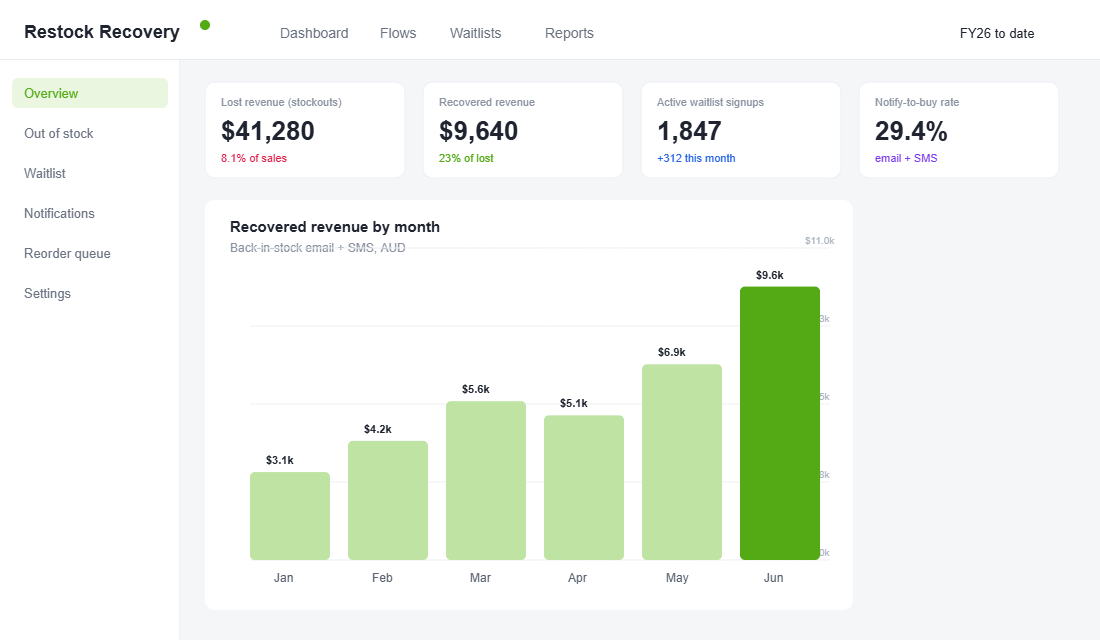
Run a quick back-of-envelope calculation. Take a store doing $500k a year. At a conservative 8% stockout loss, that is roughly $40k of demand walking out the door annually. Back-in-stock notifications typically recover 15 to 25% of that lost revenue, so even a basic setup is worth $6,000 to $10,000 a year. For a brand doing $2m, you are looking at $24,000 to $40,000 recovered from work you do once and leave running.
The damage is not only the lost sale. 87% of ecommerce brands say poor inventory availability directly hurts repeat purchase rates, and 91% of consumers say they are less likely to shop with a retailer again after a bad experience like a stockout. One out-of-stock moment can cost you the first sale and the lifetime value behind it. That is why this sits inside Product, not just logistics: availability is part of the offer.
Not All Stockouts Are Equal (Know Which to Chase)
Before you wire everything up, a quick bit of judgement saves you from spreading effort thin. Stockouts fall into three buckets, and they do not deserve the same response.
- Temporary stockouts on proven sellers. The product is coming back, the demand is real, and the only question is timing. This is where back-in-stock pays off hardest. Capture aggressively and notify fast.
- Permanent or end-of-line stockouts. You are not reordering this SKU. Do not send people to a dead end. Redirect the Notify Me to the nearest alternative, or capture the email and route them into a “you might also like” message instead.
- Variant stockouts inside a live product. The product is available, but the Medium in Sand is gone. These are the most common and the most ignored. Variant-level capture turns a near-miss into a recovered sale without losing the customer to a competitor.
Put 80% of your energy into the first and third buckets. They are where the recoverable revenue actually sits, and they are the ones that compound into the demand signal you will use to buy smarter next season.
Part 1: Capture Every Out-of-Stock Visitor
The single biggest leak is that most sold-out product pages capture nothing. The shopper sees “unavailable”, feels the friction, and bounces. One-third of mobile shoppers exit the site entirely the moment they hit an unavailable product. Your job is to give that high-intent visitor one obvious thing to do instead of leaving.
Replace the dead “sold out” state with a working Notify Me button. When the product is out of stock, the add-to-cart button is swapped for a clear “Email me when it is back” prompt. Tap it, and a small form captures their email and, ideally, their mobile number. That is it. You have converted a bounce into a lead with proven purchase intent.
- Make the button impossible to miss. Same size and position as add-to-cart, in your brand colour, not a grey afterthought buried under the fold.
- Capture at the variant level. Someone wants the Medium in Sand, not just “the shirt”. Variant-level signups make your later demand data far sharper.
- Offer email and SMS. Let the shopper choose. The fast movers will want a text so they do not miss the restock.
- Set expectations. A one-line “We will only message you about this product” keeps opt-ins clean and your sender reputation healthy.
Tools that do this well on Shopify include Klaviyo’s native back-in-stock feature, plus dedicated apps like Notify! Back in Stock and Stok. If you already run Klaviyo for email, use its built-in option so the data lives in one place.
Part 2: Build the Back-in-Stock Flow That Actually Converts
Capturing the signup is half the job. The money is in the automation that fires when stock lands. This is the highest-intent flow you will ever build, because every person in it has already raised their hand for a specific product. Treat it like the asset it is.
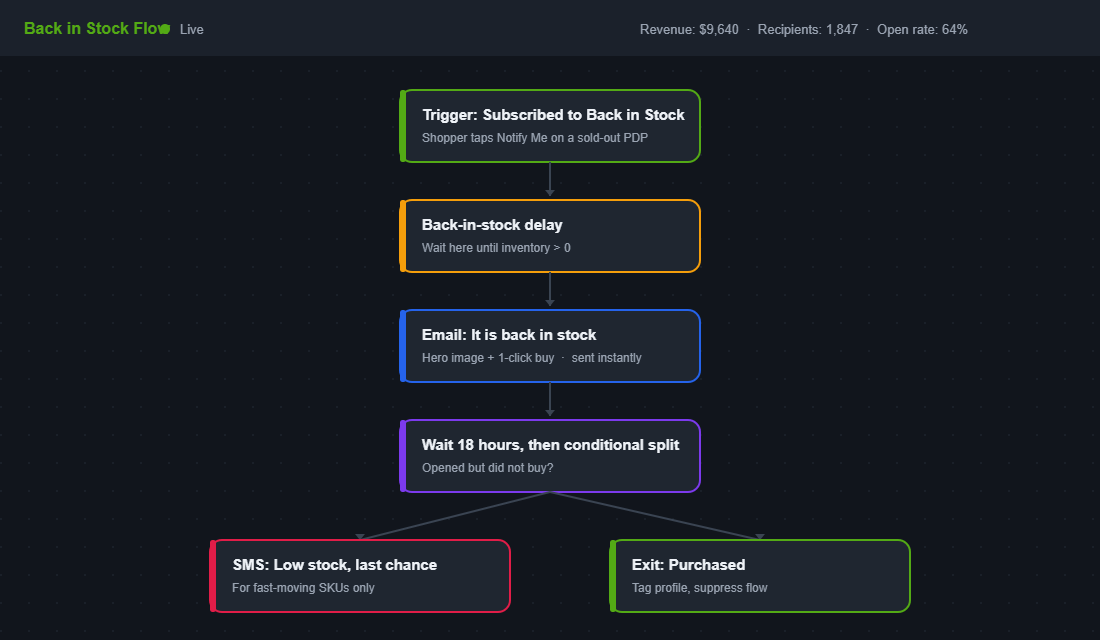
The core of a Klaviyo back-in-stock flow is the “back-in-stock delay” step. A shopper who taps Notify Me triggers a Subscribed to Back in Stock event and then waits at that delay until inventory goes above zero. The instant you restock, the flow releases and the alert sends. Speed is everything here, because intent decays by the hour.
Do not send a single email and call it done. Build a short sequence that respects the urgency without being obnoxious:
- Message 1, instant. “It is back.” Hero image, the exact variant they wanted, and a one-click path to the product. Keep it short. The job is the click, not the story.
- Message 2, 18 to 24 hours later. A gentle nudge to anyone who opened but did not buy, ideally with a genuine low-stock line if the restock quantity is small.
- Message 3, last chance. Reserved for fast-moving SKUs where selling out again is a real risk. Honest scarcity only.
The payoff is real. Back-in-stock emails routinely hit 65% open rates, multiples of a standard campaign, and well-built flows convert 25 to 35% of the waitlist into buyers. That is the difference between a notification and a revenue channel.
Part 3: Add SMS for the Products That Sell Out Fast
For your hero products and any item that sells out in hours, email alone is too slow. By the time the restock email is opened, the second batch is gone and your waitlist is annoyed instead of grateful. This is where SMS earns its place.
A back-in-stock text lands in seconds and gets read in minutes. When you are racing a limited restock against a 400-person waitlist, that speed is the whole game. The play is simple: offer SMS as a notify option on your fastest movers, then send a single tight message the moment stock lands, with the variant named and a direct link.
- Reserve SMS for genuine urgency. Use it on the SKUs where stock disappears fast, not every product. Texting someone about a slow-moving line burns goodwill and money.
- One message, one job. “Your size is back. Limited stock: [link].” No preamble. The click is the entire point.
- Stay compliant. Collect clear consent at signup and keep your sender details in order. Australian senders should be across the ACMA Sender ID rules landing on 1 July 2026.
If you have not built a proper SMS channel yet, the back-in-stock alert is the perfect first flow to justify it, because the intent is so high the revenue is almost guaranteed. For the full build, see our Shopify SMS Marketing Architecture.
Part 4: Turn the Waitlist Into a Demand Signal
This is the part almost everyone misses, and it is where back-in-stock quietly becomes one of the most valuable tools in your business. Every Notify Me signup is not just a lead. It is a customer telling you, with their email address as proof, exactly what they want and which variant they want it in.
Aggregate that data across your whole catalogue and you have a live demand forecast that costs you nothing. Instead of guessing your next reorder from last season’s spreadsheet, you can rank sold-out products by waitlist size and projected recoverable revenue, and buy against real intent. Which colours have the longest lists. Which sizes you keep underbuying. Which “dead” SKU actually has 200 people waiting.
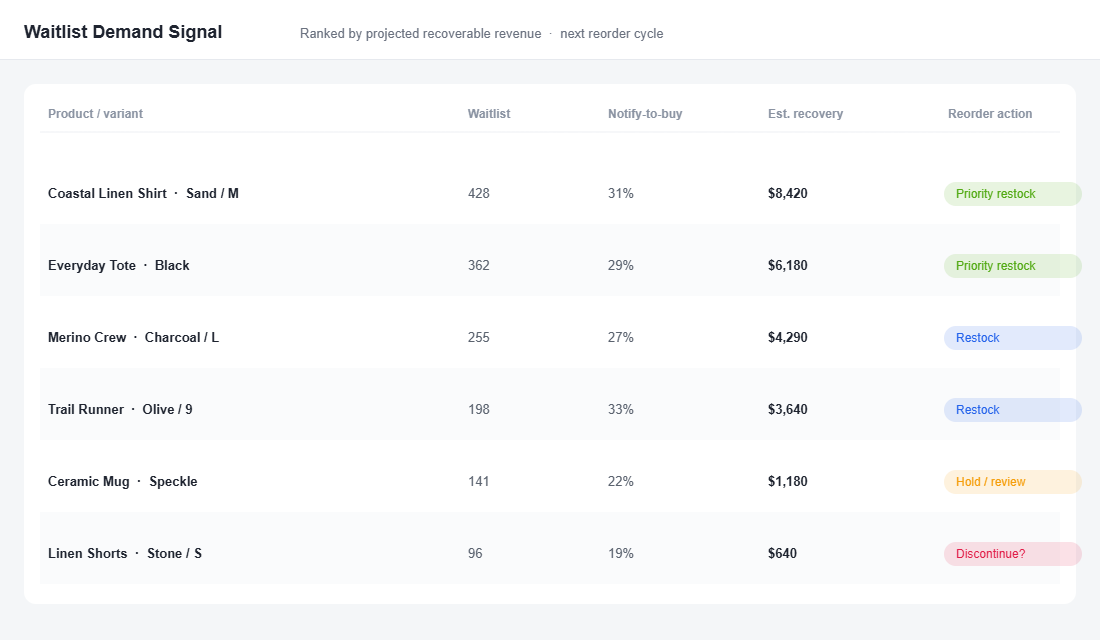
Use the signal three ways. First, prioritise reorders for the high-waitlist, high-conversion SKUs so you stop starving your winners. Second, justify bigger buys on your hero products with hard demand evidence instead of gut feel. Third, feed it into your range planning: a long waitlist on a discontinued line is the market asking you to bring it back. Pair this with your SKU rationalisation work and you make sharper buying and cutting calls than competitors who are still flying blind.
Part 5: Use Scarcity Honestly (Pre-Orders and Drops)
Once you are capturing demand properly, a stockout stops being a problem and becomes a lever. The brands that do this best turn “sold out” into momentum, not apology. The key word is honest: real scarcity builds trust, fake countdown timers destroy it.
Australian B-corp Who Gives A Crap built part of its reputation on this. When demand outran supply, they leaned into transparent “we sold out, here is when it is back” messaging and waitlists rather than hiding it, and turned a shortage into a story customers actually shared. Aussie fashion brand Princess Polly runs the same muscle at scale, with notify-me alerts on sold-out sizes that recapture shoppers who would otherwise be gone for good.
- Offer pre-orders on known winners. If a hero product is between batches, sell it on pre-order with a clear dispatch date. You bank the cash and fund the reorder before stock even lands.
- Run restocks as events. Tell the waitlist a date and time. A scheduled drop concentrates demand and can sell a batch in minutes.
- Only show low-stock when it is true. Real “3 left” beats invented urgency every time, and one caught lie costs you the trust of your best customers.
How the Five Parts Compound
Run these in isolation and each one helps a little. Run them as a system and they compound into something far bigger than recovered sales.
Here is the loop. The Notify Me button (Part 1) captures intent you used to throw away. The flow (Part 2) and SMS (Part 3) convert that intent into revenue at 25 to 35% the moment stock lands. The waitlist data (Part 4) tells you what to reorder, so you sell out of the right things less often and capture more demand when you do. And honest scarcity (Part 5) turns the whole cycle into a marketing event that builds your list and your brand at the same time.
Each part feeds the next. Better capture means better data, better data means smarter buying, smarter buying means your restocks are events people wait for. You stop bleeding revenue out the back of every stockout and start running a flywheel that gets stronger every time you sell out. That is the difference between treating availability as an accident and treating it as part of your offer.
Three Mistakes That Quietly Kill Your Back-in-Stock Revenue
Plenty of stores switch on a Notify Me button, see a trickle of revenue, and assume that is all the channel can do. Usually the channel is fine and the setup is leaking. These are the three mistakes that cost the most, and they are all quick to fix.
Mistake one: the alert is slow. If your restock notification depends on a manual export or a once-a-day sync, you have already lost the race. High-intent buyers move within hours, and 43% of shoppers will go to a competitor the moment a product is unavailable. Your trigger needs to fire on the live inventory event, not on a schedule. Connect the flow directly to your Shopify inventory so the email and text go out within minutes of stock landing, not the next morning.
Mistake two: you notify, then you run out again. Nothing burns a waitlist faster than telling 400 people a product is back when you only restocked 50 units. The first 50 are delighted. The other 350 click through to a sold-out page, feel misled, and stop trusting your alerts. If your restock quantity is smaller than your waitlist, stagger the send or be upfront about limited stock. Use the waitlist size from Part 4 to size the reorder properly in the first place.
Mistake three: you treat it as one email, not a channel. A single “it is back” send leaves money on the table. The shopper who did not open the first email, the one who opened but got distracted, the one who needs the low-stock nudge to act: each needs a different touch. A two or three step flow lifts conversion well beyond a one-and-done blast, and because the audience is so warm, the extra messages rarely cost you unsubscribes. Build the sequence once and it works on every stockout from now on.
Fix these three and most stores see their recovered revenue jump without adding a single new signup. You are simply collecting what the existing demand was always worth.
Your Back-in-Stock Setup Checklist
Work through this in order. Most stores can have the first four live in an afternoon.
- 1. Add a Notify Me button to every out-of-stock product page, same prominence as add-to-cart, capturing at the variant level.
- 2. Turn on “continue selling when out of stock” off for products in the flow, so the restock trigger fires correctly.
- 3. Build the back-in-stock flow: trigger, restock delay, instant email, an 18 to 24 hour nudge, and a last-chance step for fast movers.
- 4. Add SMS as a notify option on your fastest-selling SKUs, with clean consent and a single tight message.
- 5. Build a waitlist demand report ranking sold-out SKUs by signups and projected recovery, and review it before every reorder.
- 6. Decide your scarcity policy: where you will use pre-orders, where you will run scheduled restock drops, and a rule that low-stock messaging is only ever shown when it is true.
- 7. Track recovered revenue monthly so the channel earns its keep and you can see the dollars you used to lose.
That is the whole system. It is not complicated, it is not expensive, and it works on stores of every size. The only reason most brands do not have it is that “sold out” feels like the end of the conversation. For the ones who get this right, it is the start of the most profitable one.
Inside eCommerce Circle, turning availability into recovered revenue is one of the core Product pillars we work on with every member. If you want a second opinion on what your stockouts are quietly costing you, let’s talk.