A vintage boutique lost more than $33,000 in a single weekend in late 2025. The attackers did not crack a password. They did not bypass two-factor authentication. They did something far simpler. They flooded the founder’s inbox with thousands of newsletter subscriptions, buried every Shopify security alert under junk mail, then quietly drained the store’s Shopify Balance and opened fraudulent Shopify Credit lines while the owner thought their inbox was just having a bad day.
What’s in This Article
That attack pattern is the new playbook. It is hitting Aussie Shopify founders right now. Credential stuffing attempts against ecommerce login endpoints grew 148% year over year through Q4 2025. The average confirmed account takeover incident in retail now costs around $1,200 to $1,800 once you include the fraud loss, the chargeback fees, the customer service hours, and the long-tail churn. For Aussie SMBs specifically, the average cyber attack now costs $122,000 and 60% of small businesses close within six months of a serious incident.
And here is the part most operators miss. The merchants who got hit in the March 2026 wave already had 2FA turned on. They were using authenticator apps. They had done what every “Shopify security” article tells you to do. The attackers worked around all of it. If your security posture starts and stops at “I turned on 2FA”, you are wide open to the 2026 playbook. This article is the lockdown framework we walk every coaching member through. Seven layers, each one tactical, each one something you can complete this week.
The Threat Landscape: Why 2026 Looks Different From 2024
For most of Shopify’s history, the typical attack was lazy. Bad actors would buy a credential dump from an old Magento breach, run it against a million logins, and hope that one in ten thousand merchants reused the same password. If you used a unique password and had 2FA on, you were 99% safe.
That model broke in late 2025. The new attack chain is patient, multi-stage, and built specifically around the way Shopify communicates with its merchants. Here is the sequence most Aussie founders are now seeing.
- Stage 1, recon. Attackers scrape your About page, your LinkedIn, your Instagram. They learn the founder’s name and email. They look for any staff names on the team page. Free information.
- Stage 2, phish or session steal. A staff member clicks a fake “Shopify Partners invite” or “your domain is about to expire” email. The session token gets captured. Even with 2FA on, an active session can be hijacked for a window.
- Stage 3, email bombing. Attackers sign the founder’s primary email up to 5,000 to 15,000 newsletters and forums in 20 minutes. The inbox becomes a wall of noise.
- Stage 4, account drain. Behind the wall of noise, attackers add themselves as a staff member, request a payout, open Shopify Credit, or change the payout bank details. Every alert Shopify sends to the founder’s inbox gets buried.
- Stage 5, discovery. The founder notices three to seven days later when the next payout is short, the bank account is empty, or a customer service email mentions a strange order pattern.
According to Verizon’s 2025 Data Breach Investigation Report, about 88% of web-application breaches now involve stolen credentials, and the OAIC was notified of 1,113 Australian data breaches in 2024, a 25% increase on 2023. Malicious or criminal attacks made up 59% of those notifications. The pattern is not random. It is industrialised. You are not paranoid for treating your Shopify admin like cash.
Layer 1: 2FA, But Done Properly (Authenticator App or Hardware Key, Never SMS)
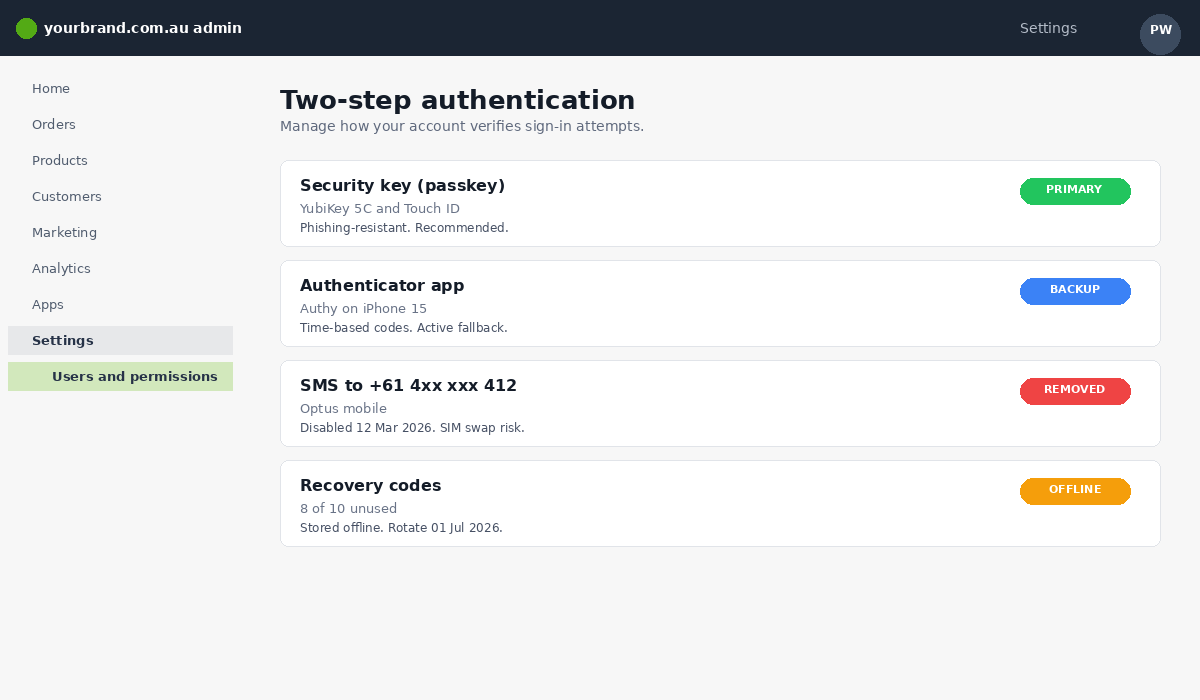
Two-factor authentication still blocks 99.9% of automated attacks. That stat is real. The problem is what 2FA you choose. There are three tiers.
- SMS 2FA. The default most founders pick. It is also the weakest. SIM swap fraud is rampant. An attacker who can social-engineer your Telstra or Optus rep can port your number in under an hour, then receive every code Shopify texts you. Do not use SMS.
- Authenticator app. Google Authenticator, Authy, or Microsoft Authenticator. Codes are generated on your device with no network round trip. Solid baseline. This is the minimum acceptable layer.
- Hardware security key or passkey. A YubiKey, a Titan Key, or a platform passkey (Face ID, Touch ID, Windows Hello). These are phishing-resistant by design. The browser checks the domain before releasing the key. A fake “shopify-admin-login.com” page cannot trigger your passkey. This is the gold standard.
Set the owner account to a hardware key or passkey. Every staff member with admin permissions also needs at least an authenticator app, ideally a passkey. Shopify supports WebAuthn-compatible keys natively. A YubiKey 5 Series sits around AUD $90, and you keep one on your keyring and one in a fireproof box at home. Total cost to protect a seven-figure store: less than the price of a single Meta ad set.
Layer 2: Recovery Codes (Stored Like Cash, Not Like Notes)
When Shopify gives you those one-time recovery codes during 2FA setup, where do you put them? Most founders screenshot them and email the screenshot to themselves “so I have a copy”. This is exactly the first place an attacker looks once they have any foothold in your email. Recovery codes in your inbox are not backups. They are a back door.
Treat recovery codes like cash. Print them. Store one copy in a locked drawer at home and one copy in a different physical location (a safety deposit box, a parent’s house, your accountant’s office). Do not email them. Do not put them in Notes. Do not Slack them to yourself. If you must store them digitally, use a dedicated password manager (1Password, Bitwarden) with its own master password and its own 2FA, and put them in a vault that is not synced to anywhere else.
Rotate them every twelve months and any time a staff member with admin access leaves the business. This sounds extreme. It takes ten minutes. It is the only step in this article that, on its own, would have prevented several of the March 2026 attacks.
Layer 3: Staff Permissions and the Principle of Least Privilege
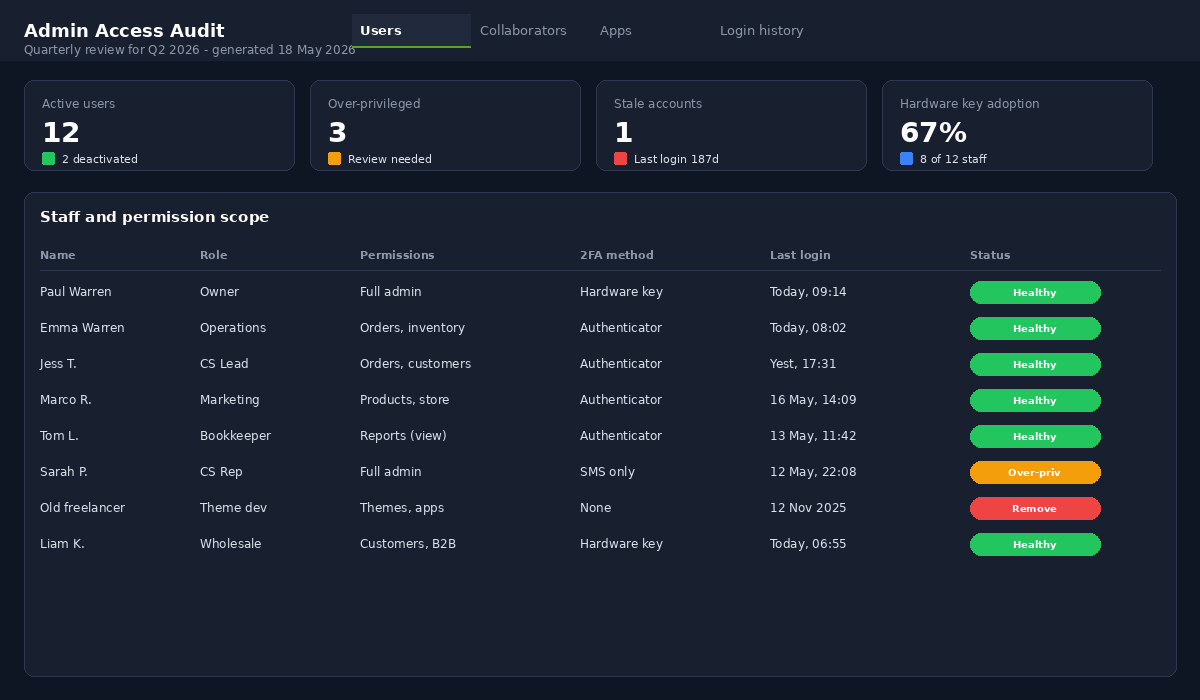
The blast radius of any compromised account equals the permissions that account has. A content writer with full admin access is the same risk as the founder with full admin access. Most Aussie founders we coach have at least two staff accounts that hold permissions the holder has never used and does not need. That is free attack surface.
Shopify lets you set granular permissions per staff account across orders, products, customers, analytics, marketing, settings, apps, themes, and more. Use them. Here is the role-permission map we run with most $1m to $10m Aussie stores.
- Customer service rep. Orders (view, edit, fulfil), customers (view, edit), gift cards (issue). Nothing else. No products, no themes, no apps, no settings, no payouts.
- Content/marketing manager. Products (view, edit), online store (themes view only), marketing, blog posts, navigation. No orders, no customers, no settings, no apps install.
- Operations/fulfilment lead. Orders (view, edit, fulfil), inventory, products (view, edit), shipping settings. No marketing, no themes, no payouts.
- Finance/bookkeeper. Reports (view), orders (view), customers (view). No editing rights anywhere. Read-only is enough for almost every accounting workflow.
- Founder/owner. Full admin. Hardware key 2FA. Recovery codes offline. Used only when actually needed, not as the default account for daily work.
If a single staff account gets phished tomorrow, the attacker should hit a wall when they try to add themselves as a new staff user, change the payout bank account, or install a malicious app. None of those actions should be reachable from a customer service rep’s login.
Layer 4: Collaborator Accounts for Agencies and Freelancers
Here is one of the most common mistakes we see. A founder hires a Shopify developer through Upwork. The developer says “just add me as staff”. The founder creates a full staff account, the work gets done, the developer moves on, and six months later the founder cannot remember if they removed the access. That stale account is a phishing target for the rest of your store’s life.
Use collaborator accounts. They were built for exactly this. A collaborator account is requested by the agency or freelancer from inside their own Shopify Partner dashboard. You approve it, set the scope (which sections of the admin they can touch), and the account is tied to their Partner identity, not to a generic email. When the engagement ends, you revoke access in one click. Collaborator accounts also do not count against your store’s staff limit, and they leave a cleaner audit trail.
Rule of thumb: any contractor, agency, or third party gets a collaborator account, never a staff account. Even your accountant. Even your “trusted Shopify expert mate”. If they need access, they have a Shopify Partner ID or they can get one in five minutes. Our team at Insiteful works on every client store via a scoped collaborator account, and we set the same standard for every other vendor in the stack.
Layer 5: The Quarterly Access Audit (15 Minutes That Save Your Store)
Permissions decay. Someone leaves. Someone switches roles. The freelance designer from Q1 is no longer engaged in Q3. None of these moments fire a calendar reminder. That is why most stores have at least one or two ghost accounts holding active access. Quarterly audits fix this in fifteen minutes, four times a year. One hour a year to protect everything you have built.
Run this checklist on the first Monday of every quarter.
- Settings, Users and permissions. Read every name. Anyone who has left the business in the last 90 days: remove. Anyone who has changed roles: re-scope their permissions to the new role.
- Collaborator section. Same review. Any agency you no longer work with: remove. Any freelancer who has finished their project: remove.
- Apps. Open Settings, Apps and sales channels. For each installed app, ask “are we still using this?” If no, uninstall. Each app you install gets access to store data, and an abandoned or compromised app is a back door.
- Login history. Settings, Users and permissions, click on each user, Recent login activity. Look for logins from countries you do not operate in. Look for login bursts at strange times.
- Payout bank account. Settings, Payments, confirm the BSB and account number still match your business bank account. Attackers love this field because it never gets checked.
- Notification email. Settings, Notifications, confirm Shopify is sending security alerts to an email you actually monitor, ideally a different inbox from the one used for newsletters and customer service.
Run this on a calendar event you cannot ignore. Put it next to your quarterly BAS prep. Same fifteen-minute slot. Same recurring importance.
Layer 6: Phishing Defence and the Email Bombing Trap
This is the layer most Shopify security articles ignore, and it is the one that would have saved that boutique its $33,000. Email bombing works because Shopify’s primary alert channel is email, and email is trivial to flood. Until Shopify ships in-app banners and SMS-or-push alerts for high-risk events, you need to harden this yourself.
Here is the defence stack.
- Use a dedicated admin email. Not the same address you use for customer service, newsletters, or your personal life. Create something like admin@yourbrand.com.au that exists only inside your domain and only receives Shopify-critical mail. Forward it to your personal phone with priority push notifications.
- Set up email filters for Shopify security alerts. Any email from no-reply@shopify.com or shopify-security@shopify.com gets a label, a star, and a push notification. If 5,000 newsletters flood your main inbox, the Shopify alerts in your dedicated inbox still surface.
- Verify before you click. Shopify will never ask you for your password, your 2FA code, or your recovery codes via email. If a message asks for any of those, it is a phish. If a message says “your account will be suspended in 24 hours”, it is a phish. Hover the sender domain. Real Shopify mail comes from shopify.com, not from shopify-support-au.net or shopify.help.
- Train your staff on the bomb pattern. If anyone on the team suddenly receives a flood of newsletter sign-ups, treat it as a security incident, not as spam. The flood is the attack. Log into the Shopify admin from a clean device, change passwords, check recent activity, contact Shopify support.
- Lock down domain DNS. Make sure your domain registrar uses 2FA, and turn on registrar lock. A surprising number of takeovers start at the registrar level, not at Shopify.
One Aussie founder we coach added the dedicated admin inbox and the filter rule on a Sunday afternoon in February. Three weeks later they received exactly the bomb pattern. Forty thousand newsletter sign-ups in two hours. Their main inbox was useless. Their admin inbox showed three Shopify alerts in the same window. They were able to lock the account, revoke a suspicious staff invite, and contact Shopify within twenty minutes. Zero financial loss. The defence cost them about ninety minutes to set up.

Layer 7: The 72-Hour Response Plan If Something Goes Wrong
Hope is not a plan. If your account is compromised, the first 72 hours determine whether this is a war story you tell at a workshop in two years or a story your accountant tells the receivers. Document this plan now, store it offline, and share it with anyone in the business who has admin access.
- Hour 0 to 1. From a clean device on a clean network: log into Shopify admin, change the password, sign out of all sessions, rotate 2FA, revoke any suspicious staff or collaborator. Open Settings, Payments and confirm the payout bank account. Take screenshots of everything.
- Hour 1 to 4. Contact Shopify support via the in-admin help (do not Google “Shopify support phone”, that is how you find phishing pages). Reference the incident, the timeline, and the affected accounts. Ask Shopify to freeze any pending payouts or Shopify Credit applications.
- Hour 4 to 12. Contact your bank. Lock the business bank account that receives Shopify payouts. Notify your payment gateway if you use anything outside Shopify Payments (Stripe, PayPal). Change your Klaviyo, Gorgias, Recharge, and email-platform passwords because the attacker probably has those too.
- Hour 12 to 48. Audit logs. Settings, Users and permissions, login history. Orders placed since the breach. Refunds issued. Discount codes created. Document every anomaly. Pull a customer data export and check the customers table for any new admin-level customer accounts.
- Hour 48 to 72. If customer data was exposed, you have an obligation under the Australian Notifiable Data Breaches scheme to assess and potentially notify the OAIC and affected individuals. Talk to a privacy lawyer if you are unsure. The penalty for getting this wrong is far larger than the penalty for over-disclosing.
This is the same response framework we cover in our Shopify Disaster Recovery playbook, just compressed for the account-takeover scenario. Print it. Stick it in the same folder as your recovery codes. The day you need it, you will not have the calm head to write it from scratch.
The 7-Layer Lockdown Checklist (Save This)
Print this and tick it off across the next seven days. One layer per day. End of the week your store is in a different security tier than 90% of Aussie Shopify operators.
- Day 1. Owner account on hardware key or passkey. SMS 2FA removed. All admin-permission staff on authenticator app minimum.
- Day 2. Recovery codes printed, stored in two physical locations, removed from email and Notes.
- Day 3. Staff permissions reviewed. Every account scoped to the role. No “just give them admin to make it easier” accounts.
- Day 4. Every agency, freelancer, and contractor moved from staff to collaborator account. Stale access removed.
- Day 5. Quarterly audit calendar event created. First audit scheduled for the start of next quarter.
- Day 6. Dedicated admin inbox set up. Filters for Shopify security alerts. Domain registrar 2FA on. Registrar lock on.
- Day 7. 72-hour response plan documented and printed. Shared with co-founder, COO, or finance lead.
Why These Layers Compound
Any one of these layers, on its own, is a speed bump. A determined attacker with enough time and money can get around any single layer. The point of a 7-layer framework is that the layers compound. To get to your payout bank account, the attacker has to defeat all seven. Pass any one of them and the attack stalls long enough for you to notice.
This is the same logic that runs through everything we coach inside the Protection P of the More Orders Operating System. No single line of defence keeps a store safe. The point is to stack inexpensive, fast-to-implement layers until the only stores easier to attack than yours belong to founders who have not done any of this. There are tens of thousands of those stores. Be the one they skip.
Most Aussie founders we sit down with have done two of the seven layers. They are usually proud of the 2FA toggle and the strong password. They have never thought about the email bombing trap, never rotated recovery codes, never run a quarterly audit, never written a response plan. Closing that gap takes one week. The cost of not closing it, statistically, is somewhere between $1,800 (a quick incident) and $122,000 (the average Aussie SMB cyber event), with a 60% chance the business does not survive the worst-case scenario.
The other Protection topics we run alongside this one (fraud screening, returns abuse, supplier risk) are covered in our fraud prevention playbook and the broader ecommerce cybersecurity guide. Read them together with this article and you have the full Protection foundation in about an hour of reading and a week of implementation.
The Cost of Getting It Wrong: Real Aussie Brand Numbers
If “spend a Saturday locking down your Shopify admin” sounds like a hassle, run the maths the other way. Here is what an actual account takeover costs an Aussie Shopify brand in 2026, drawn from three real incidents we have helped members of eCommerce Circle recover from in the last 18 months. Names changed, numbers real.
- Brand A (homewares, Melbourne) — Attacker added a payment provider and redirected payouts for 11 days before detection. Lost AUD 38,400 in payouts plus AUD 6,800 in Shopify recovery support and a forensic agency. Total: AUD 45,200 and a 9-day store-down period.
- Brand B (skincare, Brisbane) — Attacker installed a malicious app that exfiltrated checkout PII. Mandatory breach notification under Australian Privacy Act cost AUD 22,000 in legal fees plus a 6-week customer communication campaign. Estimated CLV damage from churned trust: AUD 80K+.
- Brand C (apparel, Sydney) — Compromised collaborator account from a former agency. Attacker created discount codes, drained inventory at 80% off through a private link. Replacement stock and refunds: AUD 28,500.
Compare those numbers to the cost of doing this properly: a hardware security key (Yubikey or Titan) is AUD 70-95. A business 1Password subscription is AUD 12/user/month. A quarterly access audit takes 15 minutes. Total annual cost for a 5-person team: under AUD 1,000. That is a 30-40x risk reduction for less than the cost of one ad-set test. It is not even close.
Tools and Settings to Configure This Weekend
Most Shopify founders we coach already know they should harden their admin. The actual blocker is decision fatigue — too many tools, too many settings, not enough time. Here is the short, opinionated list. Set these up in one focused Saturday session and you are 90% of the way there.
- Password manager — 1Password (Business plan, AUD 12/user/month) or Bitwarden (free tier is fine for solo founders). Generate unique 24-character passwords for every store-related account.
- Hardware key — Yubikey 5C NFC or Google Titan. AUD 70-95 each, buy two (one primary, one backup in a safe). Use for Shopify, Gmail, your business banking, and Klaviyo.
- Authenticator app — Authy or Microsoft Authenticator. Backup-friendly, multi-device. Avoid SMS-based 2FA — SIM swap attacks are real and easier than people think.
- Email security — Enable Google Advanced Protection if you are on Workspace. Aliased recovery emails. Quarterly review of forwarding rules and “less secure app” access.
- Shopify settings — Enable login notifications for new IPs, restrict admin access to a static IP if possible, audit installed apps every 90 days, and remove any staff account that has not logged in for 60 days.
- Monitoring — Set up Shopify’s audit log review for high-value actions (payout changes, theme code edits, app installs). Subscribe to haveibeenpwned.com alerts for your domain.
If you want a deeper read on operational rigour across your store, our piece on when to hire your first VA covers the access-control side of bringing other humans into your admin without opening up the surface area.
Your Move This Week
Pick the layer you have not done. Block fifteen minutes on your calendar today. Do that one layer. Tomorrow, do the next one. By the time you read next Monday’s article you will have rebuilt the security posture of your store from “vulnerable to the 2026 playbook” to “more locked down than the average $10m Aussie brand”.
Inside eCommerce Circle, the Protection P is one of the core pillars we work on with every member. We sit down, we audit the admin together, and we hand you the same lockdown framework above tailored to your team and your stack. If you want a second opinion on yours, let’s talk.