Your store probably has thousands of customers who have bought from you and cannot remember your brand name. They checked out as a guest, the order arrived, the box went in the bin, and the relationship ended there. No login, no saved details, no reason to come back except whatever ad you pay to put in front of them again.
What’s in This Article
Most Aussie founders treat customer accounts as a technical setting. Something you switch to “optional” in the admin and never think about again. That is the mistake. The average Shopify store sits at a 28.2% repeat purchase rate, while the brands at the top clear 40%, and a big slice of that gap comes down to whether buyers ever create an identity with you.
There is also a deadline attached to this one. Shopify deprecated legacy customer accounts in February 2026, with a full sunset date to be announced later this year. If you are still running the old password-based login, you are not just leaving retention revenue on the table, you are sitting on a template that will eventually be locked and removed. This playbook is the 5-part system for getting it right.
Why Guest Checkout Quietly Caps Your Repeat Rate
Let’s be fair to guest checkout first. Forcing account creation before someone can pay is one of the oldest conversion killers in ecommerce. Offering guest checkout can cut cart abandonment by as much as 24%. Nobody is suggesting you put a wall in front of a first-time buyer holding their credit card.
The problem is what happens after the sale. A guest buyer is a transaction. An account holder is a customer you can recognise, segment, and bring back without paying for the click twice. Repeat buyers drive around 44% of total revenue and 46% of orders while making up roughly a fifth of your customer base, and their average order value runs about 20% higher than a first-time buyer.
So the play is not “force accounts at checkout”. The play is to make the account so obviously useful that people opt in after they have already bought, or on their second visit, when the friction cost is near zero and the value is clear.
Part 1: Give the Account a Reason to Exist
Open your own account page right now and ask honestly: what does a customer get here that they cannot get from the order confirmation email? For most stores the answer is a list of past orders and an address form. That is not a reason to log in. That is a filing cabinet.
Build a value stack instead. Five things earn the login, and you want at least three of them live before you promote the account anywhere:
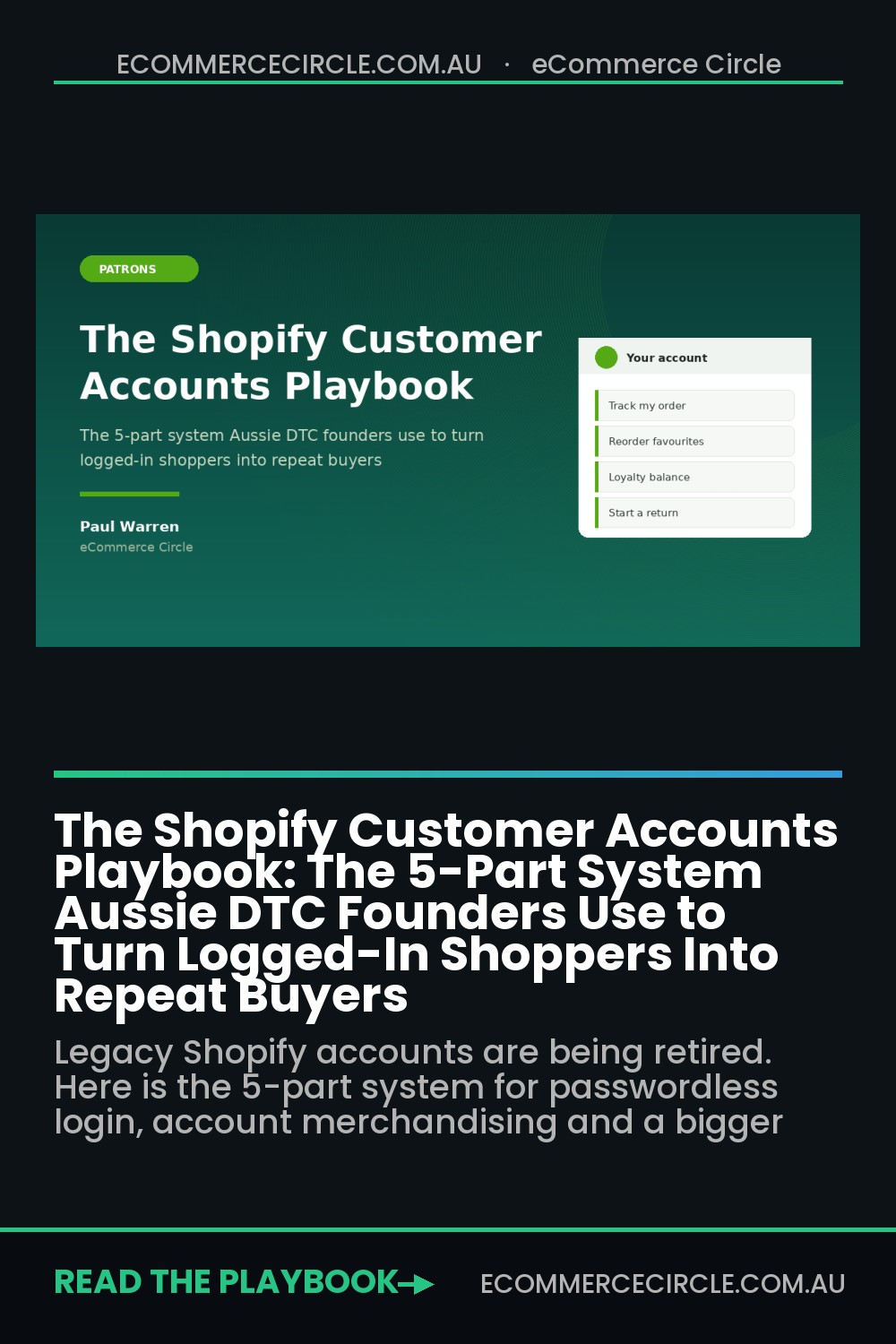
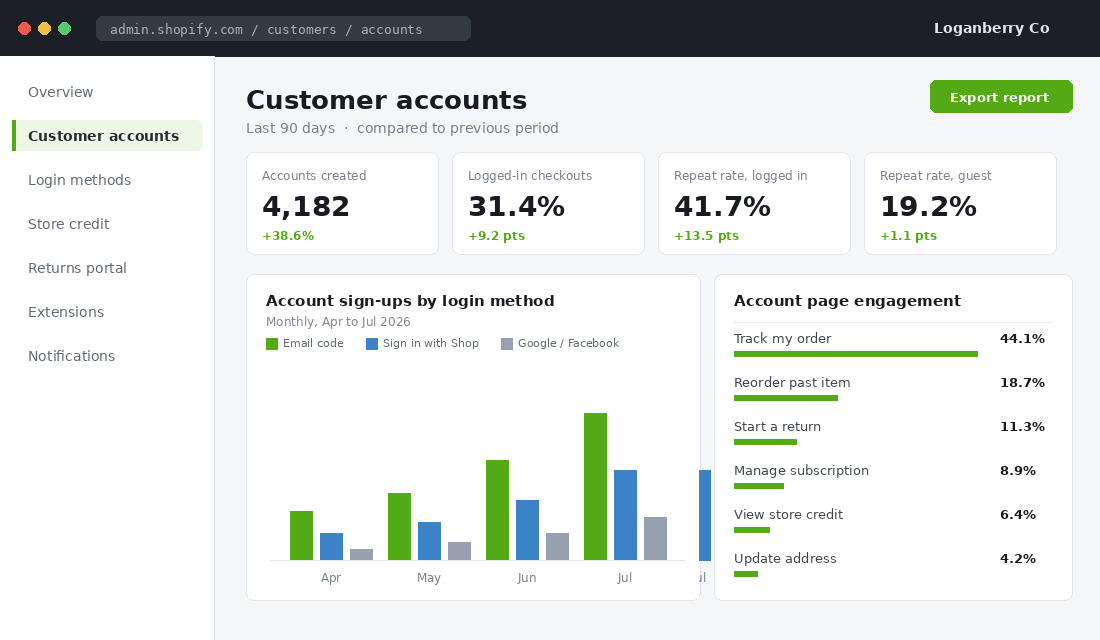
- Live order tracking. The single most-used feature on any account page. Customers checking “where is my order” is the number one driver of support tickets for Aussie stores shipping interstate, and Australia Post delays make it worse. Put the tracking status on the account landing page, not three clicks deep.
- One-tap reorder. A “buy again” button beside each past order. For consumables this is the highest-leverage block on the page.
- Loyalty balance. Points and tier status visible on login. If a customer has 1,240 points sitting there, they will come back to spend them.
- Self-serve returns. Now standard with the new customer accounts. Customers start a return themselves and your inbox gets quieter.
- Store credit. Refund to store credit where the customer agrees, show the balance in the account, and watch how much of it converts back into orders.
Bared Footwear, the Melbourne podiatrist-founded shoe brand, is a good example of the thinking. They run retail, online and repeat fittings off one customer record, so a buyer who was fitted in store is recognised online. That continuity is the whole point of an account.
Part 2: Kill the Password Before It Kills the Login
Passwords are the single largest source of drop-off on account pages. Nobody remembers the password they set 11 months ago for a candle store, and the reset email lands in promotions. The new customer accounts remove that problem entirely, and this is the biggest practical reason to migrate off legacy.
Here is the exact setup, and it takes about ten minutes:
- In Shopify admin go to Settings, then Customer accounts.
- Select Customer accounts (the new version), not legacy.
- Turn on sign-in links. Customers now enter an email address and receive a six-digit code. No password ever.
- If Shop Pay is active, enable Sign in with Shop. Returning Shop users get a one-tap login with a saved passkey.
- Enable Google and Facebook social sign-in for the customers who prefer it.
- Set account creation to optional at checkout, then add a “create your account” prompt on the thank-you page and in your post-purchase email.
One caution worth planning for. Migrating from legacy does not carry across the old password hashes, which is by design, and any hard-coded links to /account/login in your theme or emails need checking. Audit your footer, your navigation, and your Klaviyo templates before you flip the switch.
Part 3: Treat the Account Page as a Merchandising Surface
This is where most stores stop, and it is where the money is. The new customer accounts are extensible. You add app blocks and Customer Account UI Extensions the same way you build a homepage, and there are already more than 800 apps integrated with the system.
A logged-in customer on your account page is the warmest traffic you will ever get. They know the brand, they have paid you before, and they arrived on purpose. Merchandise to them accordingly.
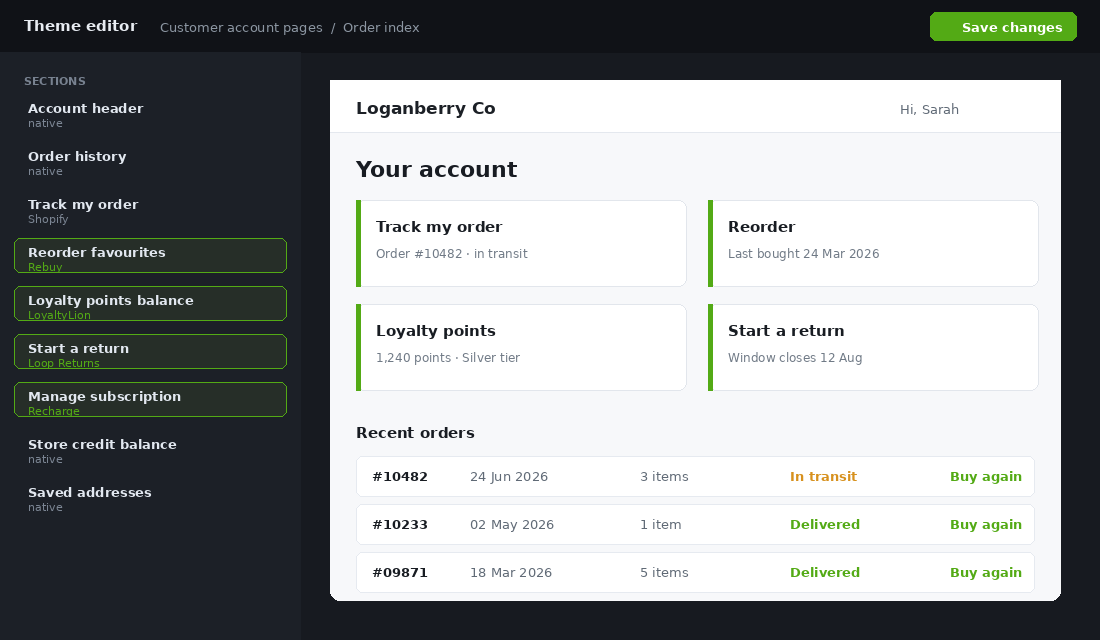
A stack that works well for a store between $40k and $500k a month:
- Rebuy or a native recommendation block for “reorder favourites” and complementary items based on order history.
- LoyaltyLion, Okendo or Yotpo for the points balance, tier progress, and a “you are 260 points from Gold” nudge. If you have not built the programme yet, start with our Shopify loyalty program playbook.
- Loop Returns or Shopify’s native self-serve returns, with exchange-first framing so a return becomes a swap. Our returns playbook covers the policy side.
- Recharge or Shopify Subscriptions so subscribers can skip, swap or resume without emailing you.
Order the page by what customers actually do. Tracking first, reorder second, loyalty third, returns fourth, profile last. Nobody logs in to update their address.
Part 4: Wire the Account Into Your Email and SMS Flows
An account page nobody visits is decoration. The account needs to be the destination your lifecycle marketing points at, and that means rewriting a handful of flows.
Four changes, in the order I would make them:
- Post-purchase email, message two. Swap the generic “thanks for your order” for “create your account to track this order”. You are asking at the exact moment they most want the tracking link. Expect 25 to 40% of buyers to take it.
- Shipping notifications. Point the tracking button at the account page rather than the carrier site. You get the visit, the carrier does not.
- Replenishment flow. For consumables, send at the predicted reorder date with a deep link straight to the account reorder block. One tap from email to repeat order.
- Win-back. Lead with what is sitting in the account. Unspent points, store credit, or a saved cart beats a blanket 15% off every time.
Test the sign-in link email itself. It is a transactional send and it must land in the primary inbox every time, or the whole system breaks at the first step.
Part 5: Measure Logged-In and Guest Buyers as Two Separate Businesses
Blended repeat rate hides everything. If you are running 28% overall, that could be 41% from account holders and 19% from guests, and those two numbers demand completely different responses.
Build a cohort report that splits the two. In Shopify analytics or your reporting tool, tag customers by whether they hold an account, then chart the percentage placing a second order at month one, two, three and beyond.
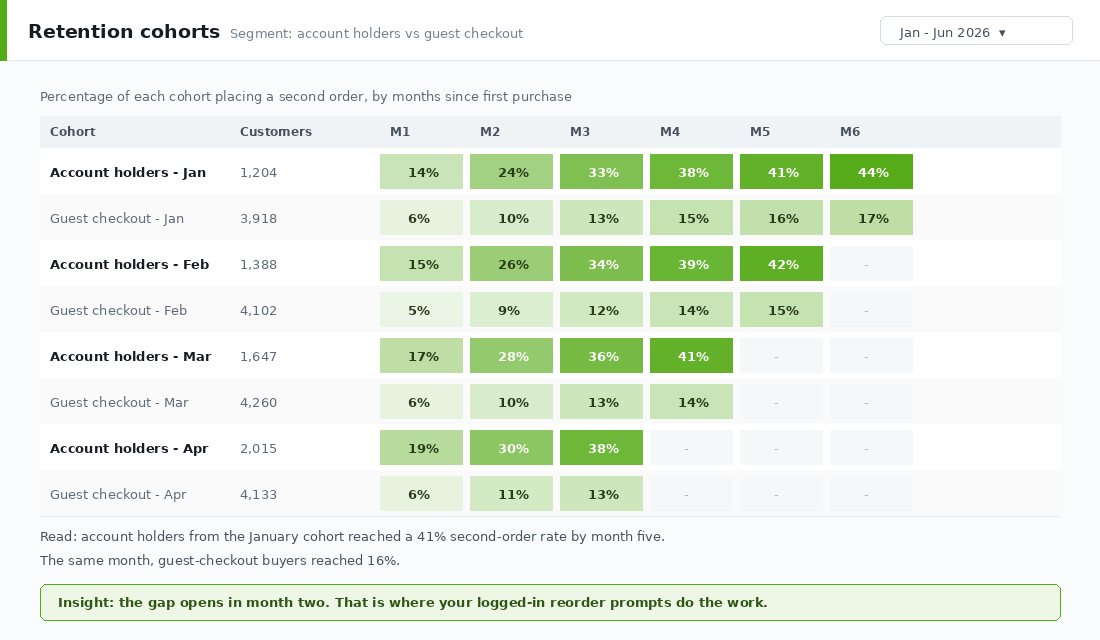
Four numbers to review monthly:
- Account creation rate. Accounts created divided by orders. Under 20% means your value stack is too thin or you are not asking.
- Logged-in checkout share. What percentage of orders come from a signed-in customer. Healthy stores push past 30%.
- Repeat rate by account status. The gap between the two lines is the value of the whole programme.
- Account page click-through to a product. If nobody clicks through from the account into the store, your merchandising blocks are in the wrong order.
For the deeper measurement work, our repeat purchase playbook goes through cohort construction properly.
Backfilling the Guest Buyers You Already Have
Everything above works for the next customer. But you probably have two or three years of guest buyers sitting in your customer list, all with a verified email address and a purchase history. That is a one-off campaign worth running before you do anything else.
Segment your list into three groups and treat each differently.
- Bought in the last 90 days, no account. Your best group. Send a single email with the subject line built around their most recent order: “Track your order and save your details”. The sign-in link does the work, they click, the account exists. Aim for a 15 to 25% activation on this segment.
- Bought 90 to 365 days ago, no account. Lead with the incentive rather than the utility. If you run a loyalty programme, backdate their points and tell them the balance is waiting. A real number in the subject line beats a generic invitation.
- Bought more than a year ago. Fold this into your normal win-back rather than a separate account push. If they come back and buy, the account prompt happens naturally on the thank-you page.
Send the first two segments over separate weeks, not the same day. You want to read the results independently, and a passwordless sign-in blast to your whole list in one hit is exactly the sending pattern that gets you flagged by inbox providers.
One more thing worth doing here. Before you send, dedupe. Australian stores frequently carry the same buyer twice because they used a work email once and a personal email later, and merging those records first means the order history in the new account actually looks complete when they log in. An account that shows one order when the customer knows they bought four times destroys trust immediately.
Three Mistakes That Kill Account Adoption
I see the same three problems on nearly every store that has tried this and concluded it does not work.
Mistake one: asking too early. Putting the account prompt on the product page or, worse, gating checkout behind it. You are asking someone to commit to a relationship before they have decided to buy a candle. The right moment is immediately after payment, when they want the tracking link, and again on the second visit when the brand is already familiar.
Mistake two: hiding the account behind a person icon. A grey silhouette in the header corner is not a call to action. Once a customer has an account, greet them by name in the header and show a live signal: order in transit, points balance, credit available. Recognition is the entire product.
Mistake three: leaving the mobile experience untested. The majority of Australian ecommerce traffic is on a phone, and the passwordless flow involves the customer leaving your site to fetch a code from their email app and coming back. Walk that path yourself on an actual phone, on mobile data, not on desktop with two browser tabs. If the return trip loses their place in the journey, fix that before you promote the account anywhere.
None of these are hard to correct. They are just invisible from the admin, which is why they survive for months.
How the Five Parts Compound
Each part on its own is a modest improvement. Together they change the shape of the business.
Passwordless login lifts the number of people who can actually get in. A real value stack gives them a reason to try. Merchandising blocks convert that visit into an order rather than an admin task. Lifecycle flows drive traffic back to the page on a schedule instead of hoping. And cohort measurement tells you which of those four to fix next.
TileCloud, the Australian tile retailer, built a dedicated logged-in experience with personalised pricing and a simple checkout for their trade buyers. In the first year they saw a 24% rise in new signups and a 34% lift in average order value. Different customer type to most DTC stores, same mechanism: recognise the buyer, remove the friction, show them what is relevant.
The compounding matters because none of this needs more traffic. You are not buying another click. You are converting buyers you already paid for into customers who come back on their own, and every point of repeat rate you add drops straight through to the bottom line.
Your 30-Day Customer Accounts Rollout
Work it in four weeks. One focus per week, no heroics.
- Week 1, migrate and audit. Move to the new customer accounts. Turn on sign-in links, Sign in with Shop, and social login. Audit every hard-coded account link in your theme, footer, navigation and email templates. Confirm the sign-in code email is landing in the primary inbox.
- Week 2, build the value stack. Add order tracking to the landing view, then a reorder block, then the loyalty balance. Enable self-serve returns. Order the blocks by expected usage, not by what looks tidy.
- Week 3, drive the traffic. Rewrite post-purchase email two around account creation. Repoint shipping notification buttons at the account page. Add an account prompt to the thank-you page. Update the replenishment and win-back flows to deep link into the account.
- Week 4, measure and set the baseline. Build the logged-in versus guest cohort report. Record your account creation rate, logged-in checkout share, and repeat rate by account status. That is your baseline. Review it monthly.
If you only do one week of it, do week one. The migration is coming whether you plan for it or not, and doing it deliberately beats doing it the week Shopify locks your legacy templates.
Inside eCommerce Circle, retention architecture like this is one of the core pillars we work on with every member. If you want a second opinion on your account experience, let’s talk.