Open your Shopify admin right now and count the things you do by hand every single week. Tagging orders so your 3PL knows what to prioritise. Checking which products are about to sell out. Copying VIP customers into a spreadsheet so Klaviyo can find them. Refreshing the orders page at 9pm to see if anything looks dodgy.
What’s in This Article
None of those tasks are hard. That is exactly the problem. They are easy, they are small, and they are relentless, which is why they never make it onto a to-do list and never get fixed. They just quietly eat your week.
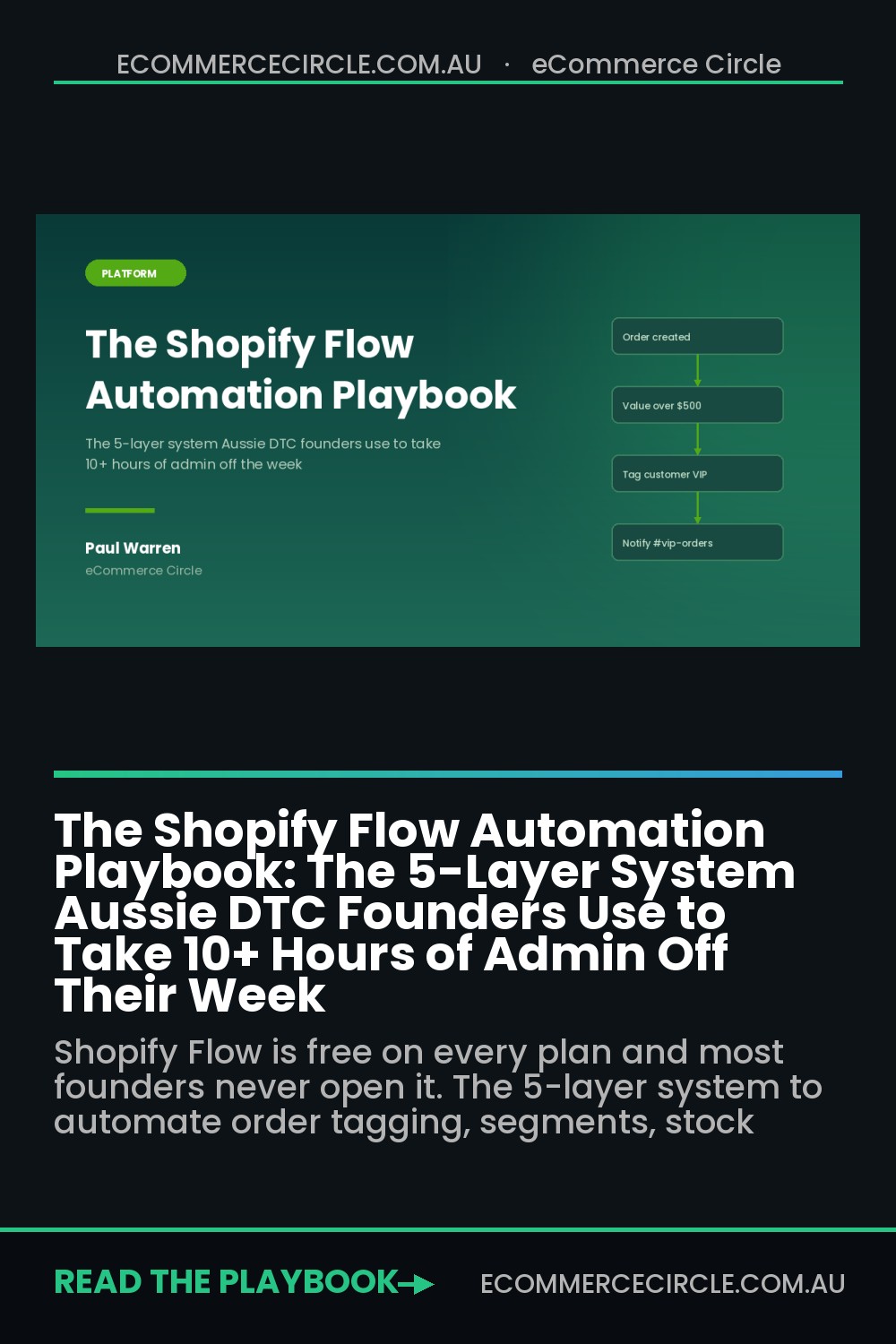
The average Australian small business owner spends 15 to 20 hours a week on administrative work, and the Australian Small Business and Family Enterprise Ombudsman consistently ranks admin burden among the top three challenges facing small businesses. For a Shopify operator doing $80k a month, that is roughly two and a half days a week you are not spending on product, offers or customers. Shopify Flow is free on every plan from Basic up, it takes about twenty minutes to learn, and most founders I work with have never opened it. This is the playbook for fixing that.
Why Most Shopify Automation Dies in the First Fortnight
Here is the pattern I see. A founder discovers Flow, gets excited, and spends a Saturday building one enormous workflow with fourteen conditions that is meant to run the entire fulfilment process. It breaks in week two. Nobody can work out which branch failed. They turn it off and decide automation is not for them.
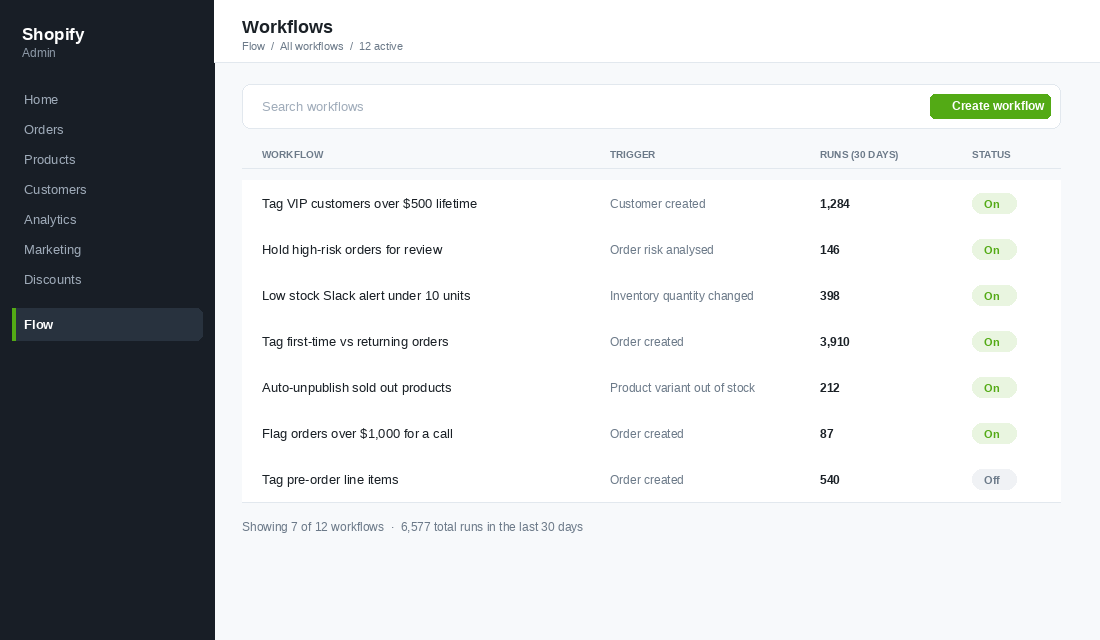
The brands that make automation stick do the opposite. They build small, single-purpose workflows that each do one thing and are obvious when they break. Tagging is the single most popular Shopify automation for exactly this reason, accounting for around 14% of all workflows merchants build. It is boring, it is tiny, and it compounds.
The second failure is automating the wrong layer. Founders reach for the shiny stuff (AI-generated customer replies, dynamic pricing) before they have automated the dull mechanical work that actually consumes the hours. Automate the boring layer first. It is lower risk, it fails visibly, and it buys you back the time to think about the clever stuff later.
So we work in five layers, in order. Admin audit, order operations, customer intelligence, inventory and merchandising, then alerts. Each layer takes an afternoon. By the end you have a dozen small workflows running quietly in the background instead of one fragile monster.
Layer 1: The Admin Audit (Find the Tasks Worth Automating)
You cannot automate what you have not named. Before you open Flow, spend one week keeping a running note of every repetitive task you or your team touch inside the Shopify admin. Not the big projects. The small stuff you do without thinking.
For each task, write down three things: how long it takes, how many times a week it happens, and whether the decision behind it follows a rule. That last one is the filter that matters. If a task requires judgement that changes case by case, leave it alone. If it follows a rule you could explain to a new hire in one sentence, it is a candidate.
Score each task with a simple formula: minutes per instance multiplied by instances per week. Anything over 30 minutes a week goes on the build list. Anything under stays manual for now.
- Rule-based, high frequency. Tagging orders by value, source or product type. Build these first.
- Rule-based, low frequency but high stakes. Holding suspicious orders, flagging large wholesale enquiries. Build these second.
- Judgement-based. Deciding whether to refund a difficult customer, approving a collaboration. Never automate these.
- Already broken manually. If a task is inconsistent when a human does it, automating it just makes the inconsistency faster. Fix the rule first.
Most founders finish this audit with 15 to 25 tasks and are genuinely shocked at the total. If you want a broader version of this exercise across your whole week rather than just the Shopify admin, work through the founder time audit and delegation framework first, then come back here for the mechanical layer.
Layer 2: Order Operations (Tag Everything, Touch Nothing)
Order tagging is the foundation of every other automation you will ever build. Tags are how Shopify, your 3PL, your email platform and your reporting all talk to each other. Get tagging right and half your other problems solve themselves.
Start with these four workflows. Each one is a single trigger, one condition, one action.
- First-time versus returning. Trigger on order created, check whether the customer has more than one order, tag accordingly. This one tag gives you accurate new-customer acquisition cost reporting, which most stores get wrong because they blend repeat revenue into it.
- High-value order flag. Trigger on order created, condition on order total above your threshold (for most Aussie DTC brands somewhere between 400 and 800 dollars), tag it and notify yourself. These are the orders worth a personal thank-you.
- Fulfilment priority. Tag express shipping orders, pre-orders and anything containing a fragile or oversized SKU so your warehouse sees it on the packing slip instead of learning the hard way.
- Channel and campaign tags. Tag orders by landing page, discount code or referring channel so your post-purchase reporting is not entirely dependent on platform-reported attribution.
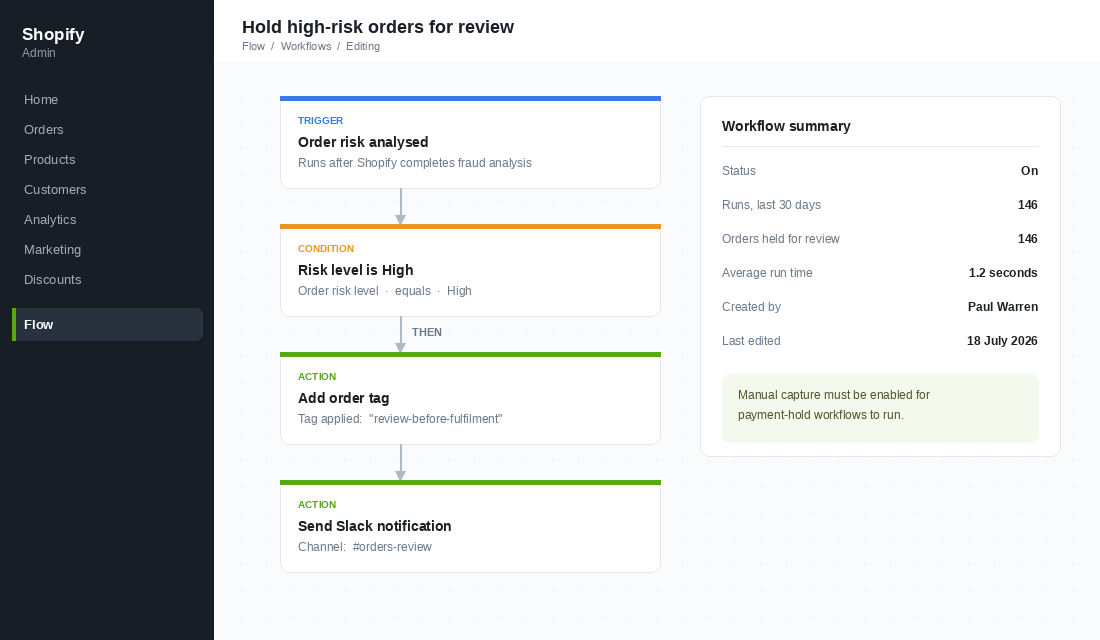
Then build the risk workflow, which is the single highest-value automation in this article. Use the Order risk analysed trigger rather than Order created. Shopify’s fraud analysis takes a moment to finish after an order lands, so a workflow that fires on order creation will read an empty risk field and do nothing useful. That one detail catches almost everyone.
Keep the action conservative to start. Tag the order “review-before-fulfilment” and post it to a Slack channel. Do not auto-cancel. Shopify’s risk scoring is good, not perfect, and legitimate orders do get flagged. Cancelling a real customer’s order automatically is a worse outcome than a two-minute manual review. If you want the full picture on the disputes side of this, the chargeback defence playbook covers what happens after a bad order slips through.
One caution worth knowing before you build: workflows that manage payment capture will not run if automatic capture is switched on. If you want Flow to hold payment on risky orders, you need to set credit card authorisation to manual capture first.
Layer 3: Customer Intelligence (Turn Orders Into Segments)
Most stores segment their email list based on what people click. That is behaviour data about your marketing, not about your business. The far more valuable segmentation is based on what people actually buy, and Flow is how you get that data out of Shopify and into Klaviyo without a spreadsheet.
Customer tags sync to Klaviyo as properties. That means every tag you apply in Flow becomes a segment condition you can build flows against. Build these four:
- VIP threshold tag. When a customer’s lifetime spend crosses your top-decile mark, tag them VIP. Your top 10% of customers typically drive a disproportionate share of profit, and they should never receive the same discount-led emails as a cold list.
- Category buyer tags. Tag customers by the collection they purchased from. A skincare brand should never send a body wash campaign to someone who only ever buys sunscreen.
- Second-purchase milestone. Tag the moment someone places their second order. The jump from one order to two is the single biggest retention cliff in DTC, and you want a specific flow celebrating it rather than a generic post-purchase sequence.
- Discount dependency tag. Tag customers who have only ever purchased with a code. This is an uncomfortable segment to look at and an extremely useful one to have.
The trick with customer tagging is to keep the tags descriptive rather than prescriptive. Tag “lifetime-over-500”, not “send-vip-email”. The tag describes a fact about the customer. What you do with that fact is a decision you make later in Klaviyo, and you will change your mind about it three times. If you want to go deeper on the underlying scoring model, the RFM segmentation playbook shows how recency, frequency and monetary value combine into a proper customer scoring framework that these tags can feed.
Layer 4: Inventory and Merchandising (Stop Selling What You Do Not Have)
Nothing burns customer trust faster than taking money for something you cannot ship. Nothing burns ad spend faster than sending traffic to a sold-out product page. Both are entirely preventable with two workflows.
The first is a low-stock alert. Trigger on inventory quantity changed, condition on available quantity below your reorder point, action is a Slack message or an email to whoever owns purchasing. Set the threshold per product type rather than globally. A hero SKU with a twelve-week lead time from an overseas supplier needs a very different trigger point to a locally made accessory you can restock in a fortnight.
The second is automatic merchandising hygiene. When a variant goes out of stock, tag the product so your collection template can sort it to the bottom of the page rather than leaving a sold-out item in the top-left position where your best-converting real estate is. When it comes back into stock, remove the tag.
A few more worth building once those two are live:
- Auto-publish scheduled products. Tag a product with a launch date and let Flow publish it, so nobody has to be awake at 9am on a Monday to hit a button.
- Ageing stock flag. Tag products that have not sold a unit in 90 days so they surface in your monthly review instead of quietly sitting in the warehouse.
- Supplier reorder trigger. When stock hits the reorder point, create a draft purchase order note or push a row to a Google Sheet your supplier can see.
Flow supports actions across more than 100 connected apps, so if your inventory forecasting, helpdesk or ERP tool is a common one, there is a decent chance it exposes triggers and actions you can wire straight in without any code.
Layer 5: The Alert Layer (Get Told, Stop Checking)
This is the layer that changes how your day feels, and it is the one founders skip. Every time you open the Shopify admin “just to check”, you are doing manual polling that a computer should be doing for you. The goal is simple. You should never need to open the admin to find out whether something needs your attention. Something should tell you.
Set up a small number of Slack channels or email alerts, each with a clear job.
- Orders needing review. High-risk flags, unusually large orders, orders with a shipping address that does not match the billing country.
- Stock warnings. Low stock on your top 20 SKUs only. If everything is an alert, nothing is.
- Customer signals. A VIP customer places an order, or a customer leaves a review under three stars.
- Wins. Genuinely worth doing. A daily message when you cross a revenue milestone keeps a small team connected to the scoreboard.
The discipline here is ruthless pruning. If an alert fires more than a few times a day and nobody acts on it, it is noise and it is training your team to ignore the channel. Review your alert workflows monthly and delete the ones nobody responds to.
How to Build Your First Workflow in Shopify Flow
Shopify Flow is a free app available on Basic, Grow, Advanced and Plus. It used to be a Plus-only feature, which is why a lot of the advice you will find online still assumes you cannot use it. You can.
Here is the exact sequence for building the first-time versus returning customer tag, which is the workflow I would start every store with.
- Install the app. Search “Shopify Flow” in the Shopify App Store and install it. It appears in your admin sidebar under Apps.
- Start from a template, not a blank canvas. Flow ships with hundreds of free templates. Browse the library and filter by category. Editing a working template teaches you the logic far faster than starting empty.
- Choose your trigger. Select Order created. This fires once for every order placed on the store.
- Add a condition. Add a check on Customer / Number of orders. Set it to “is greater than 1”.
- Add the THEN action. Choose Add customer tag and enter “returning-customer”.
- Add the OTHERWISE action. Choose Add customer tag and enter “first-time-customer”.
- Name it properly. Use a name that says what it does, not what it is about. “Tag first-time vs returning on order” beats “Customer tagging v2”. In six months you will thank yourself.
- Turn it on and place a test order. Use a discount code for 100% off, place a real order through the storefront, then check the customer record for the tag. Never trust a workflow you have not seen fire.
- Check the run log after 48 hours. Flow logs every run and every failure. If a workflow is erroring, this is where it tells you.
One structural note. Stores on Grow, Advanced and Plus can use the Send HTTP request action, which lets Flow talk to any tool with an API even if there is no official integration. If you are on Basic and you hit that ceiling regularly, it is one of the more honest reasons to move up a plan.
The Compound Effect: Why Five Small Workflows Beat One Big One
Here is what the layers do together that none of them do alone.
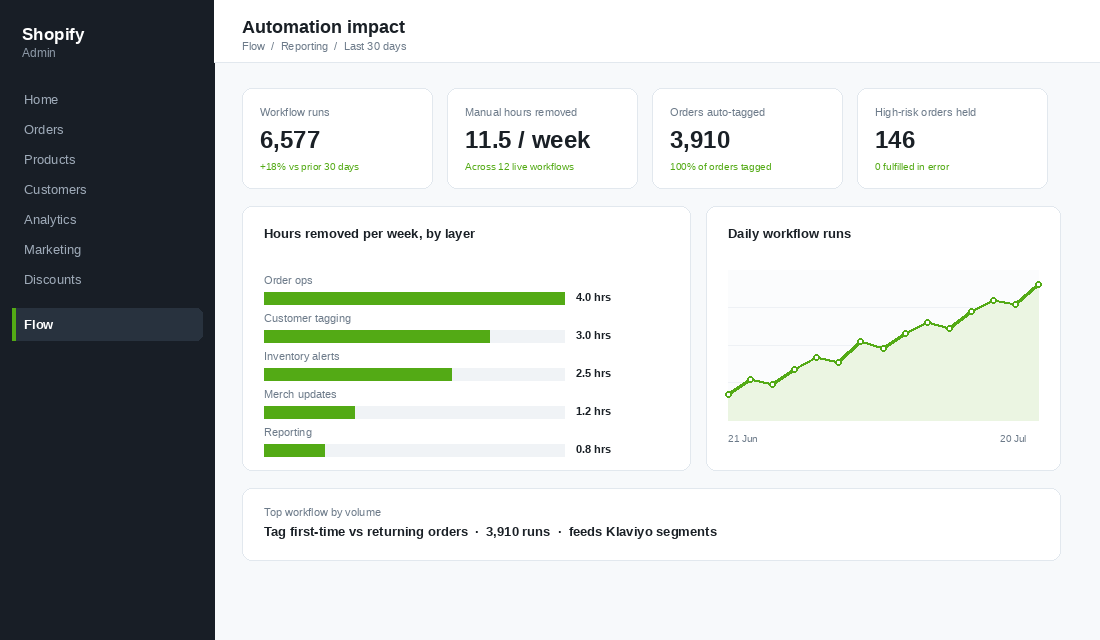
Layer 2 tags every order the moment it lands. Layer 3 turns those order facts into customer tags. Those customer tags sync to Klaviyo, so your email segmentation is now built on purchase reality rather than click behaviour. Layer 4 makes sure the products those emails point at are actually in stock and correctly merchandised. Layer 5 tells you the moment any of it goes sideways.
Each workflow on its own saves maybe twenty minutes a week. Unimpressive. But the data quality improvement compounds in a way the time saving does not. Once every order is tagged correctly and consistently, your reporting gets trustworthy. Once your reporting is trustworthy, you stop making decisions on vibes. That is the real return, and it is much larger than the hours.
The other compounding effect is on your team. Automated tasks do not get forgotten when someone is on leave, do not degrade when you are busy in November, and do not need to be retrained when you hire. Every workflow you build is a piece of your operating system that stops depending on a person remembering. That is also why automation and documentation belong together. Anything you cannot automate should end up in your SOP library instead.
A word on the AI features now appearing inside Flow and adjacent tools. They are genuinely useful for the fuzzy jobs that rules cannot handle, like classifying a support enquiry or summarising a review. They are not a substitute for the mechanical layer. Build the rules-based workflows first, because they are deterministic, auditable and free.
Your Five-Layer Flow Audit
Print this, work through it over four afternoons, and tick each line only when you have watched the workflow fire on a real order.
- Layer 1, Admin audit. One week of task logging complete. Every task scored on minutes multiplied by weekly frequency. Judgement-based tasks marked as never-automate. Build list ranked.
- Layer 2, Order operations. First-time versus returning tag live. High-value order flag live. Fulfilment priority tags live. Risk workflow live using the Order risk analysed trigger, tagging and notifying rather than cancelling.
- Layer 3, Customer intelligence. VIP threshold tag live. Category buyer tags live. Second-purchase milestone tag live. All tags confirmed syncing through to your email platform as usable segment conditions.
- Layer 4, Inventory and merchandising. Low-stock alert live with per-product-type thresholds. Out-of-stock products auto-tagged for collection sorting. Ageing stock flagged at 90 days.
- Layer 5, Alerts. No more than four alert destinations. Every alert has a named owner. Monthly review scheduled to delete alerts nobody acts on.
- Ongoing. Flow run log checked monthly for failures. Every workflow named descriptively. Any workflow off for more than 30 days deleted rather than left sitting there confusing the next person.
If you build nothing else, build layer 2. Order tagging is twenty minutes of setup, it is nearly impossible to get wrong, and it makes every reporting and segmentation decision you make for the next two years more accurate.
The founders who scale past a million a year are not working harder than the ones stuck at three hundred thousand. They have just stopped personally performing tasks that a rule could perform. Flow is the cheapest way to start doing that, and it is already sitting in your admin.
Inside eCommerce Circle, building your automation layer is one of the core pillars we work on with every member. If you want a second opinion on yours, let’s talk.