If your homepage looks like a catalogue dump with a hero banner and a grid of products, you are doing it wrong. Your Shopify homepage is not a product page — it is a conversion page. It is the first impression for the majority of your traffic, and most brands waste it by throwing everything at the wall and hoping something sticks.
What’s in This Article
The data is clear: you have about 3-5 seconds to convince a first-time visitor that your store is worth exploring. In that tiny window, they need to understand what you sell, who it is for, and why they should care. Most Shopify homepages fail at all three.
The top-converting Shopify stores we work with treat their homepage like a sales funnel — guiding visitors through a deliberate sequence of trust signals, social proof, and category navigation that moves them toward a purchase. These stores consistently see homepage-to-product-page click-through rates of 35-50%, compared to the industry average of 15-20%.
The Homepage Framework That Converts
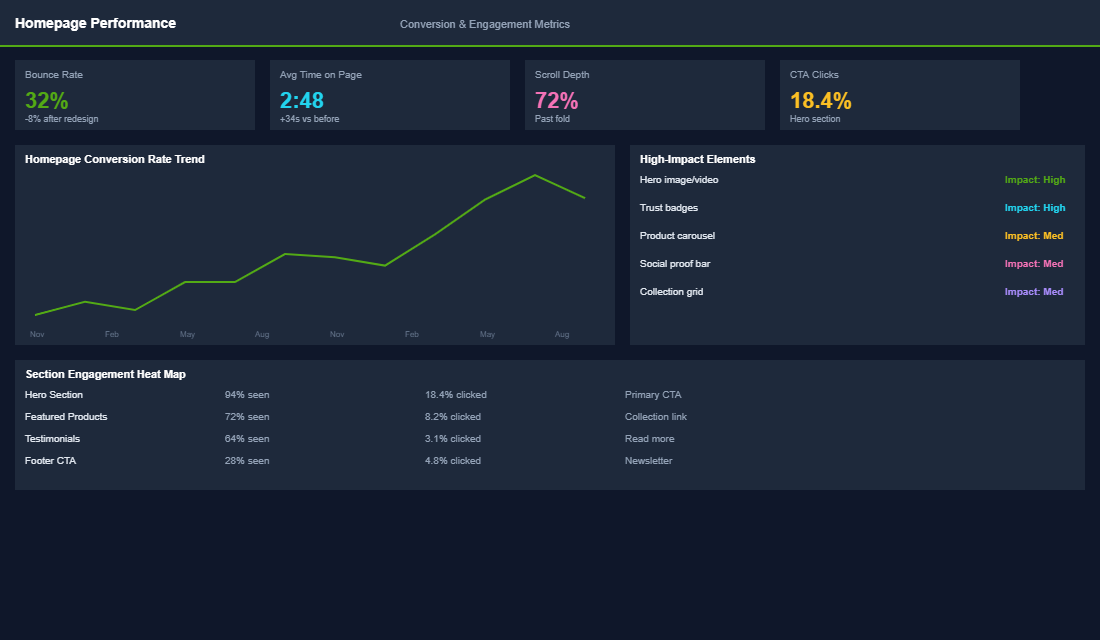
Every high-converting Shopify homepage follows a similar structure. Think of it as a vertical sales page with distinct zones, each designed to do a specific job.
Zone 1: The hero section (above the fold). This is your 3-second pitch. It needs a clear headline that communicates your value proposition — not a clever tagline, but a direct statement about what you sell and why it matters. Pair it with a high-quality lifestyle image (not a product shot on white) and one clear call-to-action. Not two. Not three. One. “Shop Best Sellers” or “Shop [Category]” works far better than “Learn More.”
Zone 2: Trust bar. Immediately below the hero, add a horizontal strip of trust signals: “Free shipping over $100 AUD,” “4.8 stars from 2,400+ reviews,” “Proudly Australian owned,” “30-day easy returns.” These micro-commitments reduce anxiety and keep the visitor scrolling. Keep it to 3-4 elements maximum.
Zone 3: Category navigation. Most visitors arrive without a specific product in mind. Give them 3-5 curated category tiles with lifestyle images and clear labels. This is not about showing every collection — it is about guiding visitors to your highest-converting product categories. Think “Best Sellers,” “New Arrivals,” and your 2-3 core categories.
Social Proof: The Section Most Stores Get Wrong
Social proof is not optional on your homepage — it is the single most persuasive element after your products themselves. But most Shopify stores either skip it entirely or bury a tiny review widget in the footer where nobody sees it.
Feature real customer reviews with photos. A scrolling carousel of 5-star reviews with customer photos is significantly more convincing than a text-only testimonial. Tools like Loox, Judge.me, or Okendo can pull photo reviews directly into your homepage. Position this section in the middle third of your homepage where it acts as a trust bridge between browsing and buying.
Add press mentions and “as seen in” logos. If you have been featured in any publications — even small niche blogs — display those logos. The mere presence of recognisable media logos triggers an authority response that makes visitors more likely to trust your brand. If you do not have press mentions yet, focus on getting 2-3 by pitching Australian lifestyle publications or industry blogs.
Show real numbers. “Join 12,000+ happy customers” or “Over 50,000 orders shipped across Australia” provides concrete evidence of your credibility. Specificity builds trust — “12,347 five-star reviews” is more convincing than “thousands of happy customers” because it feels real and verifiable.
Product Showcases That Drive Clicks
Your homepage should feature products, but strategically. Here is what works best for Shopify stores.
Best sellers section. Feature your top 4-8 products with a clear “Best Sellers” or “Most Popular” heading. These products have already proven they convert, so putting them front and centre gives new visitors the easiest path to purchase. Include the product price, a short review snippet, and an “Add to Cart” or “Quick View” button.
New arrivals or seasonal collection. Repeat visitors need a reason to come back. A “New Arrivals” section signals that your store is active and fresh. Rotate this section monthly at minimum. If you have seasonal collections, this is where they shine — “Winter Essentials” or “Summer Edit” creates urgency and relevance.
Bundle or value proposition section. If you offer bundles, subscription boxes, or starter kits, feature them prominently. Bundles typically have 20-30% higher AOV than individual products and they simplify the buying decision for new customers who do not know where to start.
The Bottom Half: Content That Closes
The bottom half of your homepage catches visitors who are interested but not yet convinced. These sections work together to overcome remaining objections and drive action.
Brand story section. A 2-3 sentence brand story with a compelling image humanises your business. Focus on the “why” — why you started, who you serve, and what makes your approach different. Australian customers particularly respond to local origin stories, sustainability commitments, and founder-led brands.
FAQ or objection-handling section. Address the top 3-4 questions that stop people from buying. “How long does shipping take?” “What is your returns policy?” “Are your products [specific quality claim]?” This section can be a simple accordion or a designed grid. Either way, it removes friction right before the visitor leaves.
Email capture with a real offer. Your homepage footer area should include an email signup with a compelling incentive — typically 10-15% off the first order. Use a clear value proposition: “Get 10% off your first order plus weekly style tips” is better than “Subscribe to our newsletter.” This captures visitors who are not ready to buy today but might be in a week.
Technical Optimisation: Speed and Mobile
Your homepage design means nothing if it loads slowly or looks terrible on mobile. Over 70% of Australian ecommerce traffic is mobile, and every extra second of load time costs you roughly 7% in conversions. If you want a deeper look at the email side of the funnel that picks up where your homepage leaves off, our abandoned cart recovery system covers the next stage in detail.
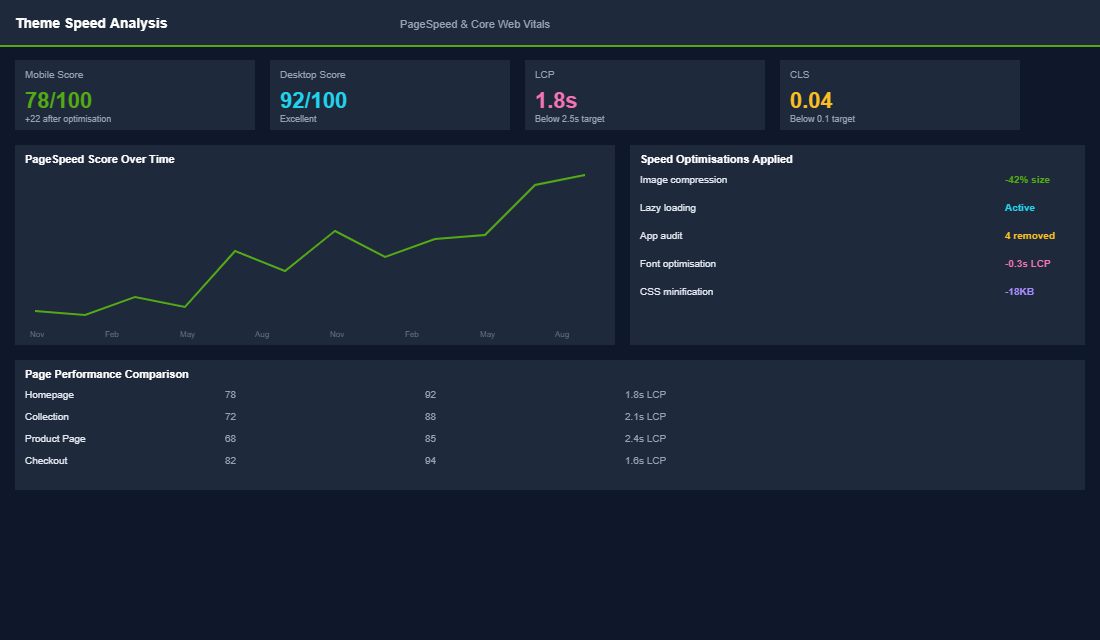
- Target a 2.5-second load time. Use Google PageSpeed Insights to benchmark. Compress all images (TinyPNG or Shopify built-in optimisation), lazy-load images below the fold, and minimise apps that inject JavaScript into your homepage.
- Design mobile-first. Preview every homepage change on mobile before desktop. Your hero image, trust bar, and category tiles should all be optimised for thumb-friendly navigation on a phone screen.
- Reduce homepage app bloat. Every Shopify app that runs on your homepage adds JavaScript weight. Audit your apps quarterly and remove anything that is not directly contributing to conversions. Common culprits include chat widgets, pop-up tools, and social feed embeds.
The 7 Homepage Mistakes That Are Quietly Costing You Sales
After auditing hundreds of Aussie Shopify homepages, the same mistakes show up over and over. Each one is fixable in under an hour, and each one is bleeding conversions every single day.
- Carousel sliders in the hero. Industry research from Nielsen Norman Group shows only about 1% of users click anything past the first slide. A static hero with one strong message outperforms a 4-slide carousel almost every time.
- Generic stock photography. If your hero image could appear on any other store, it is doing nothing for you. Custom lifestyle photography lifts hero engagement by 30 to 40% in tests we have run inside the Circle.
- Two or more competing CTAs above the fold. “Shop Now” plus “Watch Video” plus “Learn More” splits attention. Pick one primary action. Track click-through rate for 14 days. Iterate.
- Hidden trust signals. Free shipping, money-back guarantees, and Australian-owned badges live below the fold on 80% of Shopify stores. Move them up. They reduce purchase anxiety in the first 5 seconds.
- No clear category path. If a visitor lands on your homepage and cannot tell what you sell within 3 seconds, they will not scroll. Replace generic “Shop” links with category-specific tiles (“Men’s”, “Skincare”, “Under $50”) that match real shopper intent.
- Review widgets that look like SaaS dashboards. A wall of generic stars converts worse than 3 strong, named testimonials with photos. Authenticity beats volume.
- No urgency on featured products. Stock counters (“Only 7 left”), shipping cutoffs (“Order in 4hr 22min for delivery Friday”), and bundle savings drive a 10 to 15% lift on featured items when used honestly.
Knock out three of these in a single afternoon and you will usually see a measurable conversion rate improvement within a fortnight. None of this requires a developer or a new theme.
What Top Aussie Shopify Stores Actually Do Differently
The top 10% of stores we work with are not running radically different platforms. They are running disciplined homepages. Here is the pattern that shows up again and again.
They obsess over the first scroll depth. Tools like Hotjar and Microsoft Clarity show exactly where visitors stop scrolling. The best brands track this weekly and rework anything below the 50% scroll point that is not earning its space. Imagine you run a homewares store and Hotjar shows visitors bouncing at the testimonials section. That is a signal to move social proof higher or change the format completely.
They rotate hero content monthly. A static hero that has not changed in 6 months tells repeat visitors there is nothing new to see. Top brands rotate hero campaigns every 2 to 4 weeks, often tied to a new arrival drop, a seasonal angle, or a high-margin product they want to push. Average homepage CTR on rotated heroes runs 35 to 50% versus 15 to 20% on stale heroes.
They prioritise the Shop Pay and Apple Pay buttons. Express checkout buttons on the homepage hero or featured product cards lift conversion by 8 to 12% for stores doing over $1m AUD a year. The reduction in friction for repeat buyers is enormous.
They publish customer-generated content prominently. Real customer photos, video testimonials embedded from Instagram, and unboxing clips outperform polished brand photography in social proof zones. Apps like Loox, Okendo, and Stamped make this easy to surface. A homepage with at least 3 pieces of UGC visible on first scroll converts 12 to 18% better than one with zero.
The pattern is simple. The best stores treat their homepage as a living asset, not a brochure. They measure, iterate, and ship updates monthly. Most Shopify operators ship a homepage once and never touch it again.
Your 30-Day Homepage Optimisation Roadmap
If you want a structured way to fix your homepage, here is the exact 30-day sequence we walk Circle members through. It is built around one rule: change one zone at a time and measure before moving on.
Week 1: Audit and baseline. Install Hotjar or Microsoft Clarity (both free at the entry tier). Capture a heatmap, scroll map, and 20 session recordings. Note your current homepage-to-product CTR in GA4 (target benchmark: 35 to 50%). Document your current conversion rate, average order value, and bounce rate.
Week 2: Hero and trust bar. Replace generic stock with one strong lifestyle hero. Cut to one CTA. Move trust signals (free shipping, reviews, Australian-owned) immediately under the hero. This single change typically lifts CTR by 10 to 25%.
Week 3: Featured products and social proof. Rebuild your best sellers section with proper product cards, real review snippets (3 to 5 stars only, with the reviewer’s first name), and quick-view enabled. Add a UGC strip pulled from Instagram or your review platform.
Week 4: Mobile polish and speed. Audit on a real phone, not Chrome devtools. Run Google PageSpeed Insights. Aim for a mobile score above 70 and a Largest Contentful Paint under 2.5 seconds. For deeper performance work, our deep dive on tracking your Marketing Efficiency Ratio pairs well, because homepage CRO directly impacts your blended ROAS.
Run the cycle once a quarter. Most stores never optimise their homepage at all, which is why the gap between top and bottom converters keeps widening. A monthly rhythm puts you in the top 10%.
Your Homepage Is Your Hardest-Working Employee
Think of your homepage as an employee who greets every single visitor to your store. If that employee rambled incoherently, showed random products, and provided no guidance, you would fire them. Yet that is exactly what most Shopify homepages do. A structured, intentional homepage with clear zones, strong social proof, and strategic product placement can double your homepage-to-product click-through rate within 30 days of implementation.
The Five Homepage Numbers That Tell You If It Is Working
Most founders judge a homepage on whether they like looking at it. That is the wrong test. Your homepage has five measurable jobs, and every one of them has a number attached. Pull these from GA4 and Shopify Analytics before you change a single pixel, then again 30 days after.
- Hero click-through rate. The percentage of homepage visitors who click your primary hero CTA. Healthy sits between 8% and 15%. Under 5% means your hero is decoration, not a doorway.
- Homepage to product page rate. Of everyone who lands on your homepage, how many reach a product page? Aim for 35% to 50%. Below 25% and your navigation and product showcases are failing.
- Scroll depth to 50%. If fewer than half your visitors reach the middle of the page, everything you built below the fold is invisible. Microsoft Clarity gives you this free.
- Homepage bounce or exit rate. A homepage exit rate above 45% usually means a mismatch between the ad or search result that sent them and what the hero says.
- Assisted conversion value. In GA4, check how much revenue the homepage contributed to as a step in the path, not just as a last click. On most Aussie DTC stores it is the highest-assist page on the site by a wide margin.
Write the five numbers on a whiteboard. If you cannot name your hero CTR from memory, you are redesigning blind. The product page architecture that catches this traffic matters just as much, because a great homepage that hands visitors to a weak PDP just moves the leak downstream.
How to Test Homepage Changes Without Fooling Yourself
Here is the trap. You redesign the homepage, revenue goes up 12% the next fortnight, and you credit the redesign. Then you find out a stockist shout-out and a payday weekend both landed in the same window. You have learned nothing, and you will repeat the mistake on the next redesign.
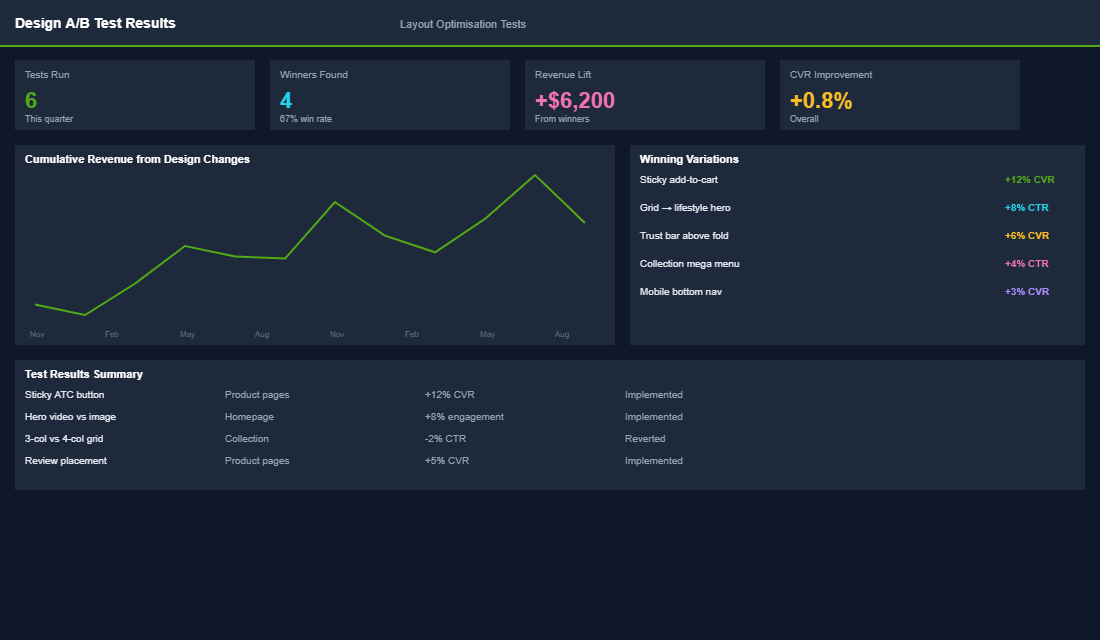
Test one variable at a time and run it long enough to mean something. On a store doing 30,000 sessions a month, a homepage hero test needs roughly two weeks to reach a readable sample. Under 10,000 sessions a month, split testing will rarely reach significance, so run sequential tests instead: four weeks of version A, four weeks of version B, same day-of-week coverage, and compare like for like.
For tooling, Shopify natively supports theme A/B testing through apps like Intelligems and Convert Experiences. If budget is tight, Microsoft Clarity is free and gives you heatmaps, scroll maps and session recordings, which will usually tell you what is broken faster than a formal test will. Watch 20 recordings of people landing on your homepage. You will find your answer inside an hour.
One rule that saves a lot of arguing: decide the winning metric before you launch the test. If the metric is revenue per session, do not switch to conversion rate halfway through because it looks better.
The Returning Visitor Homepage Almost Nobody Builds
On a typical Australian Shopify store, 30% to 40% of homepage traffic is people who have been there before. Many of them have already bought. You are showing all of them the same first-time-visitor hero, the same brand story, the same offer they have already taken.
The fix does not need a replatform. Shopify customer tags plus a personalisation app such as Rebuy or Nosto lets you swap a single hero block based on whether the visitor has an order history. Even a simple two-state version pays: new visitors see the offer and the proof, returning customers see restock, new arrivals and a link straight back into the collection they browsed last.
If you want the manual version, use Shopify Markets and theme sections with visibility conditions to run a different hero for returning sessions, and measure it against the five numbers above. Brands that do this typically lift returning-visitor conversion by 10% to 20%, because they stop making loyal customers scroll past a pitch they have already accepted. It also feeds directly into your retention flows, since the homepage stops being a dead end for people already in your database.
Speed Is a Design Decision, Not an IT Problem
Every section you add to a homepage costs milliseconds. A hero video, three app embeds and a carousel of 12 products will comfortably push a mobile Largest Contentful Paint past four seconds, and mobile is where most of your traffic lives. Google treats anything over 2.5 seconds as needing improvement, and shoppers treat it as a reason to leave.
Before you sign off a homepage design, run the URL through PageSpeed Insights on mobile and check three things: LCP under 2.5 seconds, Cumulative Layout Shift under 0.1, and total page weight under about 2MB. If the design cannot hit those numbers, the design changes, not the target. The full site speed playbook walks through where the weight usually hides on Shopify themes.
Inside eCommerce Circle, homepage optimisation is one of the core pillars of our Platform P, and it is the single area where most members see the fastest lift in conversion rate. If your homepage is not pulling its weight, we can help you rebuild it using the framework that works for Aussie Shopify operators. Let’s talk.