You’re staring at your Meta Ads Manager and the numbers don’t add up. Your Shopify dashboard shows 47 orders yesterday, but Meta only reported 29 conversions. Google Ads claims 8 purchases, but you know at least 15 came from search.
What’s in This Article
Something is broken. And it’s costing you real money every single day.
Here’s the thing most Shopify store owners don’t realise: your ads probably aren’t the problem. Your tracking is. Since Apple’s iOS 14.5 update rolled out, 85% of iPhone users have opted out of cross-app tracking.
That means Meta’s pixel can’t see 40-60% of your Shopify conversions. Google’s tracking isn’t much better. And with Safari now limiting cookies to just 7 days, the gap is only getting wider.
The result? You’re making decisions based on half the picture. You’re killing campaigns that are actually profitable.
You’re scaling campaigns that are actually losing money. And you’re leaving tens of thousands of dollars on the table because your ad platforms can’t optimise properly without complete data.
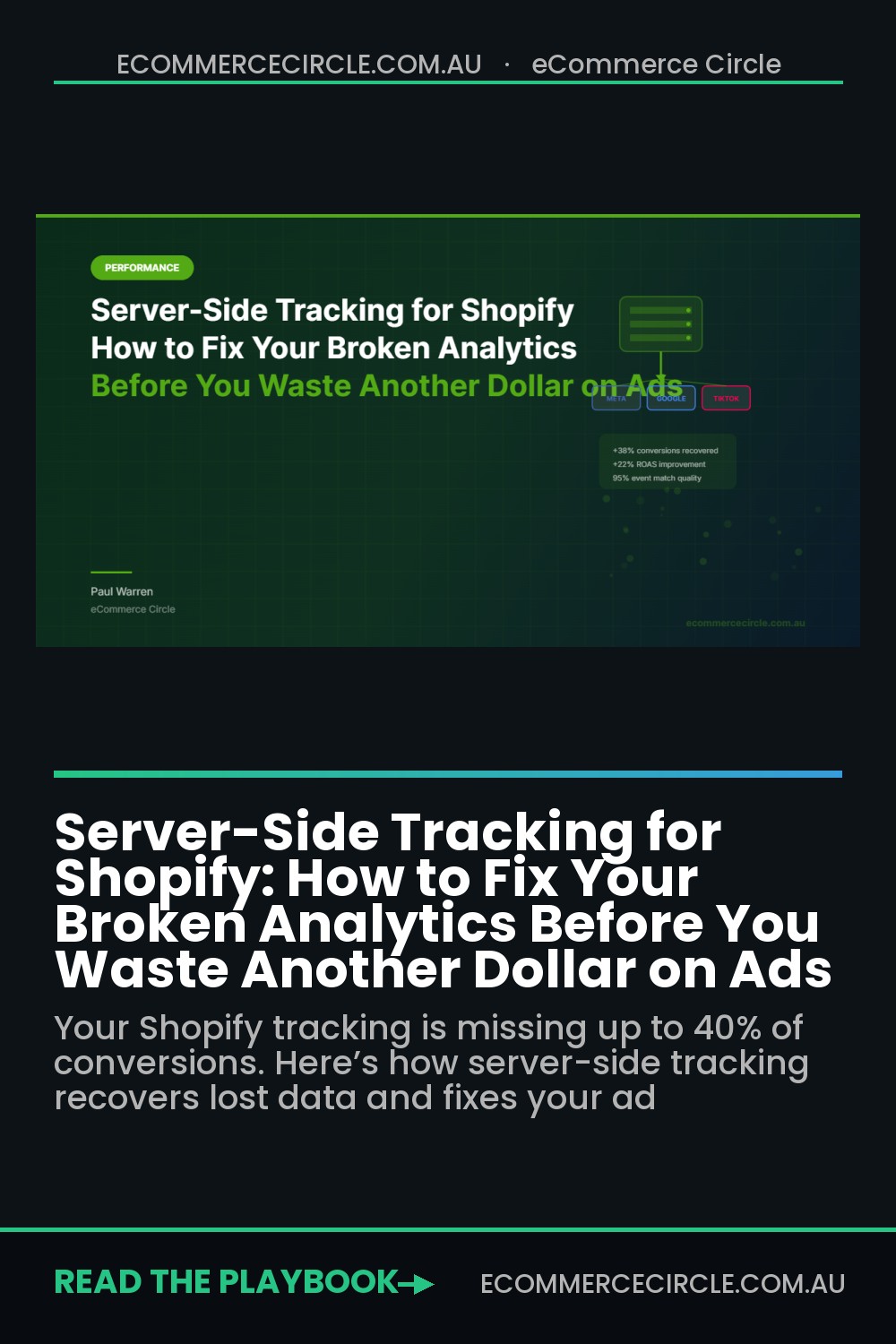
Server-side tracking fixes this. It bypasses the browser entirely and sends conversion data directly from your Shopify server to Meta, Google, and TikTok. No ad blockers.
No iOS restrictions. No cookie limitations.
Brands that implement it properly recover 20-40% of previously invisible conversions. And see ROAS improvements of 10-25% without changing a single thing about their ad creative or targeting.
This guide walks you through exactly what server-side tracking is, why your Shopify store needs it right now, and how to set it up step by step, even if you’re not technical.
What Browser-Based Tracking Actually Misses (And Why Your Data Is Lying to You)
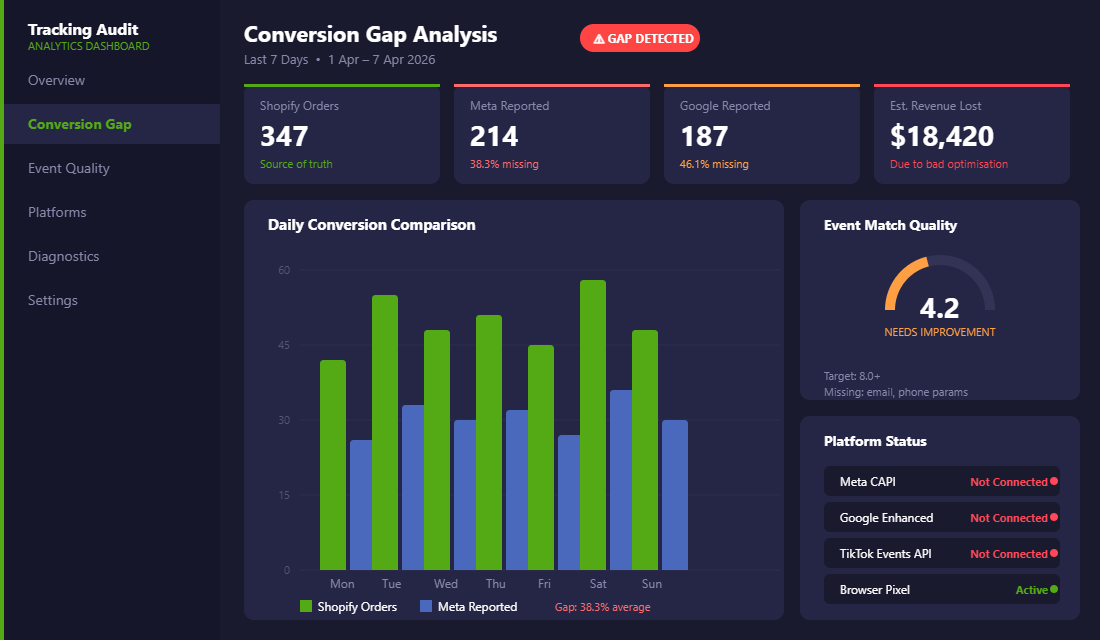
Traditional Shopify tracking works like this: when a customer lands on your store, a small JavaScript snippet (the Meta Pixel, Google Tag, etc.) fires in their browser. That snippet watches what they do (page views, add-to-carts, purchases) and reports it back to the ad platform.
The problem is that this browser-based approach has been decimated by three forces that aren’t going away.
iOS App Tracking Transparency. When Apple introduced ATT with iOS 14.5, it gave every iPhone user a simple choice: allow or deny tracking. 96% of US users denied it within the first month. That single change cost Meta an estimated $10 billion in annual ad revenue.
And it cost your store accurate conversion data. If 50-70% of your customers are on iPhones (which is typical for most Australian ecommerce brands), you’re flying blind on the majority of your traffic.
Ad blockers and privacy browsers. Around 32% of internet users now run ad blockers, and browsers like Brave and Firefox block tracking scripts by default. Every one of those users is invisible to your Meta Pixel and Google Tag. They buy from you, but your ad platforms never see the conversion.
Cookie restrictions. Safari limits third-party cookies to 7 days. Starting January 2026, Shopify itself deprecated key tracking cookies (_shopify_y and _shopify_s).
Chrome has been tightening restrictions too. The result is that returning customers who come back after a week look like brand new visitors, destroying your attribution data and making your customer acquisition costs look artificially high.
Put these three together and the picture is grim: your browser-based tracking is missing 20-40% of your actual conversions. That means Meta’s algorithm is optimising on incomplete data, Google’s Smart Bidding is making decisions with blind spots, and you’re almost certainly underspending on channels that are actually working. If you want to understand which marketing channels are actually driving your sales, fixing your tracking is step one.
What Server-Side Tracking Is (And Why It Changes Everything)
Server-side tracking flips the entire model. Instead of relying on a JavaScript snippet running in your customer’s browser, it sends conversion events directly from your Shopify server to the ad platform’s server. Browser to server?
Gone. It’s server to server.
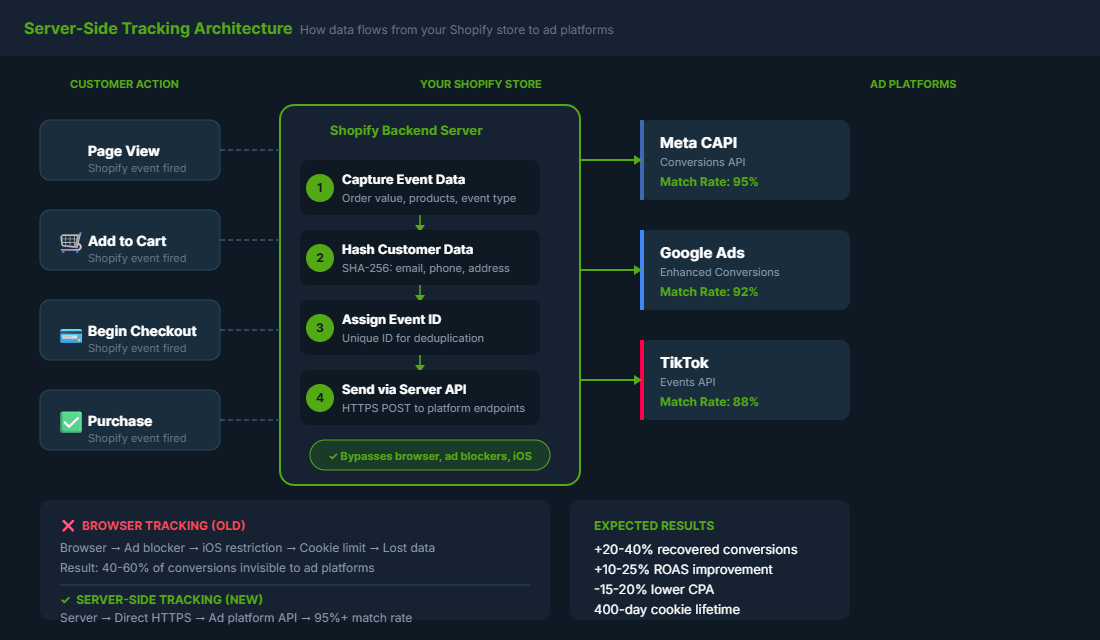
When a customer makes a purchase on your Shopify store, the order data (hashed email, phone number, order value, product IDs) gets packaged up and sent straight to Meta’s Conversions API, Google’s Enhanced Conversions endpoint, or TikTok’s Events API. No browser involved.
No ad blocker can touch it. No iOS restriction can block it.
The impact on your data quality is dramatic. Meta reports that advertisers using their Conversions API alongside the pixel see 10-20% more attributed conversions on average.
Server-side Google Tag Manager deployments achieve match rates of 70-80% compared to just 50% for standard pixel implementations. And because the data is first-party (it comes from your own server, not a third-party cookie), it’s higher quality and more trusted by the algorithms.
Here’s what that means in real terms: if you’re spending $10,000/month on Meta Ads and your pixel is only reporting 60% of conversions, Meta’s algorithm thinks your ROAS is much lower than it actually is. It pulls back spend on audiences that are converting. It fails to find lookalikes based on your best customers.
Fix the tracking, and suddenly Meta can see the full picture. And optimise accordingly. Most brands see ROAS improvements of 10-25% without changing their creative or targeting at all.
The Three Platforms You Need to Connect
Server-side tracking isn’t a single setup. It’s a connection you need to establish with each ad platform individually. Here are the three that matter most for Shopify brands in Australia.
Meta Conversions API (CAPI)
This is the big one. Meta’s Conversions API lets you send purchase, add-to-cart, initiate-checkout, and other events directly from your server to Meta. It works alongside your existing pixel (not as a replacement), giving Meta two data streams to cross-reference.
The key metrics to watch after setup: your Event Match Quality score in Events Manager should be above 6.0 (ideally 8.0+), and you should see your attributed conversions increase by 15-30% within the first two weeks. If you’re running a structured Meta Ads account, clean CAPI data makes every campaign perform better because Meta’s machine learning finally has complete information to work with.
Google Enhanced Conversions
Google’s version of server-side tracking is called Enhanced Conversions. It sends hashed first-party customer data (email, name, address) alongside your conversion tags, allowing Google to match conversions that would otherwise be lost to cookie restrictions.
For Shopify stores running Google Shopping or Performance Max campaigns, this is critical. Google reports that Enhanced Conversions recover an additional 5-15% of conversions on average. That might sound modest, but when Smart Bidding uses that extra data to optimise your bids, the downstream ROAS impact compounds significantly.
TikTok Events API
If you’re advertising on TikTok (and if you’re selling to under-35s in Australia, you probably should be), TikTok’s Events API works on the same principle. Server-side events get sent directly to TikTok, bypassing browser limitations.
TikTok’s pixel is particularly vulnerable to tracking loss because the platform’s audience skews heavily toward mobile, where iOS restrictions hit hardest. Setting up the Events API typically recovers 25-35% of lost TikTok conversions for Shopify stores.
How to Set Up Server-Side Tracking on Shopify (Step by Step)
You’ve got two paths here: the native Shopify integration (free, basic) or a dedicated tracking app (paid, more powerful). I’ll walk you through both.
Option 1: Shopify’s Native Data Sharing (Free, 15-Minute Setup)
Shopify has a built-in Conversions API integration for Meta that’s surprisingly decent for most stores under $50K/month in revenue.
- Step 1: In your Shopify admin, go to Settings → Customer Events.
- Step 2: Connect your Meta pixel if you haven’t already (you’ll need your Pixel ID from Meta Events Manager).
- Step 3: Under Data Sharing, set the level to “Maximum.” This enables server-side event sending via Meta’s CAPI automatically.
- Step 4: In Meta Events Manager, verify that you’re receiving both “Browser” and “Server” events. You should see both sources appearing within 24-48 hours.
- Step 5: Check your Event Match Quality score. If it’s below 6.0, you may need to ensure your checkout is collecting email addresses early (before payment) to improve match rates.
For Google, Shopify’s native Google channel app also supports Enhanced Conversions. Install the Google & YouTube app from the Shopify App Store, connect your Google Ads account, and enable Enhanced Conversions in the app settings.
Option 2: Dedicated Tracking App (For Stores Scaling Past $50K/Month)
If you’re spending serious money on ads and need bulletproof tracking accuracy, a dedicated app gives you more control, better deduplication, and support for more platforms. Here are the three best options for Shopify in 2026.
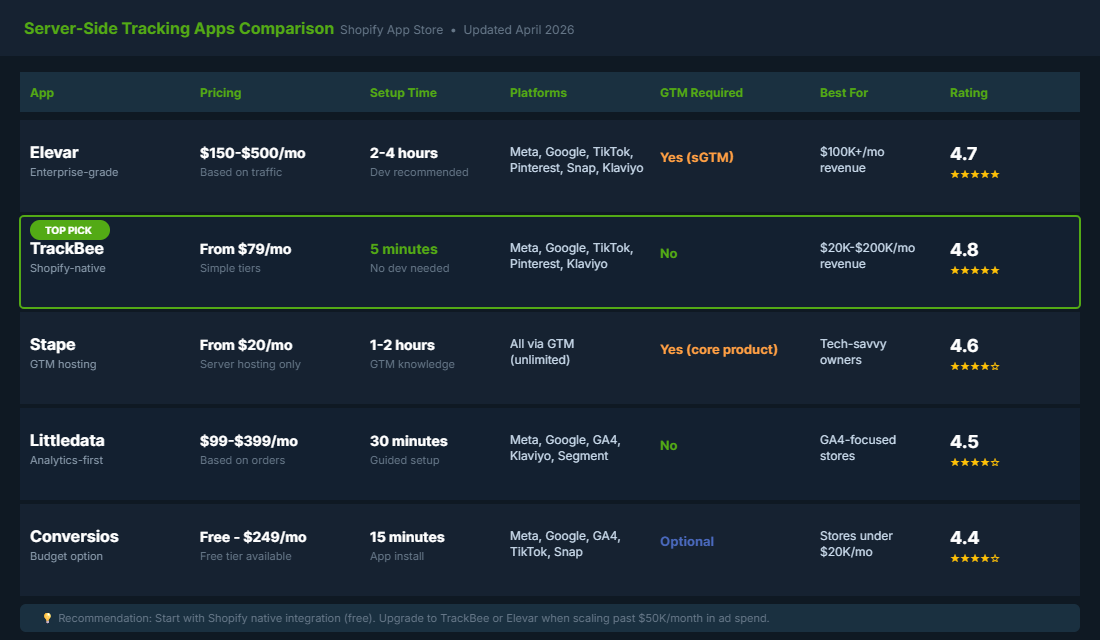
Elevar ($150-$500/month) is the most established player. It uses a server-side Google Tag Manager setup to route events to all your ad platforms. The advantage is flexibility: if you have a custom tracking setup or need advanced event mapping, Elevar handles it.
The downside is complexity: you’ll need some GTM knowledge or a developer to configure it properly. Best for: stores doing $100K+/month with complex multi-channel ad setups.
TrackBee (from $79/month) is built exclusively for Shopify and installs in about five minutes from the App Store. No GTM containers, no cloud server setup, no ongoing maintenance.
Events are captured from Shopify’s backend and sent to Meta, Google, TikTok, Pinterest, and Klaviyo automatically. Best for: stores doing $20K-$200K/month that want accuracy without the technical overhead.
Stape (from $20/month for hosting) provides managed server-side GTM hosting. It’s the most affordable option if you’re comfortable with Tag Manager but don’t want to manage your own cloud server.
Stape handles deployment, scaling, and maintenance automatically. Best for: technically-minded store owners who want maximum control at a lower price point.
Event Deduplication: The Mistake That Doubles Your Data
Here’s where most Shopify brands mess up their server-side tracking setup. And it’s a costly mistake.
When you run both browser-based tracking (your pixel) and server-side tracking (CAPI) simultaneously, both systems report the same conversion. If you don’t set up deduplication, Meta counts that one purchase as two conversions. Your ROAS looks incredible on paper.
But it’s fiction. And worse, Meta’s algorithm starts optimising based on inflated data, leading to poor ad decisions down the line.
Deduplication works by assigning a unique event_id to each conversion event. When both the pixel and CAPI send the same event with the same ID, Meta knows it’s one conversion, not two. Here’s how to verify it’s working:
- Check Events Manager. Go to your pixel in Meta Events Manager, click “Test Events,” and look at the event details. Each Purchase event should show a single entry with both “Browser” and “Server” sources. Not two separate entries.
- Watch for the “Redundant Events” warning. If Meta detects duplicates, you’ll see a warning in Events Manager. Don’t ignore it.
- Compare conversion counts. After enabling CAPI, your reported conversions should increase by 15-30% (the previously invisible ones). If they suddenly double, deduplication isn’t working.
If you’re using Shopify’s native integration with data sharing set to “Maximum,” deduplication is handled automatically. If you’re using a third-party app like Elevar or TrackBee, they handle it too. The risk is mainly when you’ve done a manual or custom CAPI setup, so make sure your developer has event_id matching configured correctly.
What to Do After Setup: Validating Your Data
Don’t just set up server-side tracking and assume it’s working. You need to validate it. Here’s the checklist I run through with every eCommerce Circle member after they’ve implemented CAPI.
- Event Match Quality (Meta). In Events Manager, check your EMQ score for each event. Purchase events should be 7.0+ for good performance. Below 6.0 means you’re not sending enough customer parameters (email, phone, address). Fix this by ensuring your checkout captures email early.
- Server vs Browser event ratio. In Events Manager → Overview, you should see events coming from both “Browser” and “Server” sources. If server events are missing, your CAPI connection is broken.
- Google Ads diagnostics. In Google Ads, go to Tools → Conversions → select your conversion action → Diagnostics. Check that Enhanced Conversions status shows “Recording conversions” and the tag coverage is above 90%.
- Compare Shopify orders vs platform-reported conversions. Run a 7-day comparison. Shopify orders should be your source of truth. Meta-reported conversions should be within 10-15% of Shopify orders (some gap is normal due to attribution windows). If the gap is larger than 30%, something is still broken.
- Test with a real purchase. Make a test order on your own store. Within 15 minutes, verify it appears in Meta Events Manager as a server-side event with correct value, content IDs, and customer parameters.
Using tools like heatmaps alongside your tracking data gives you the complete picture. Not just whether conversions are being recorded, but what’s happening on your site that leads to (or prevents) those conversions.
The Compound Effect: How Clean Data Fixes Everything
Here’s what happens when you get server-side tracking right. And it’s more than just seeing accurate numbers in a dashboard.
Your ad algorithms get smarter. Meta’s machine learning needs conversion data to optimise. When you’re only feeding it 60% of your conversions, it’s optimising on incomplete information.
Feed it 95%+ of your conversions via CAPI, and it finds better audiences, sets better bids, and delivers better ROAS. Most brands see a 10-25% ROAS improvement within 30 days.
You stop killing profitable campaigns. How many times have you paused a campaign because Meta reported a 1.5x ROAS, only to wonder later if it was actually working? With server-side tracking, you see the conversions that were previously invisible. That “underperforming” campaign might actually be your best one.
Your customer acquisition cost drops. When algorithms optimise on better data, they spend your budget more efficiently. Customer acquisition costs typically drop 15-20% within the first 60 days of implementing proper server-side tracking. Not because you changed your ads, but because the platforms finally know what’s working.
Your attribution becomes trustworthy. With server-side tracking extending cookie lifetimes to 400+ days (compared to Safari’s 7-day limit), you can finally see the real customer journey. That Google Ads click from three weeks ago that led to a Meta retargeting purchase?
Now you can track the full path. Your media mix decisions become grounded in reality, not guesswork.
You scale with confidence. The biggest barrier to scaling ad spend isn’t budget. It’s trust in the data.
When you know your numbers are accurate, you can confidently increase spend on channels that are genuinely performing. That’s the difference between growing from $50K to $100K/month cautiously versus scaling aggressively with conviction.
Your Tracking Audit Template
Before you start setup, run this quick audit to understand how broken your current tracking actually is. Grab a pen. This takes 10 minutes.
- Shopify orders (last 7 days): _____ (check Shopify Admin → Orders)
- Meta reported conversions (last 7 days): _____ (check Events Manager → Purchase events)
- Google reported conversions (last 7 days): _____ (check Google Ads → Conversions)
- Gap percentage: (Shopify orders – platform conversions) ÷ Shopify orders × 100 = _____%
- Meta Event Match Quality score: _____ (check Events Manager → Data Sources → your Pixel → EMQ)
- Server events active? Yes / No (check Events Manager → Overview → look for “Server” source)
- Estimated monthly revenue lost to bad optimisation: _____ (if your gap is 30%+, you’re likely losing 10-20% of potential revenue)
If your gap percentage is above 25% or your Event Match Quality is below 6.0, server-side tracking should be your top priority this week. Not next month.
This week. Every day you wait is another day of ad platforms making decisions on bad data.
Keep It Legal: Consent, Hashing and the Australian Privacy Act
Server-side tracking sends more customer data to ad platforms, so it raises the stakes on privacy. Australia’s Privacy Act reforms passed in late 2024, and a new statutory tort for serious invasions of privacy has applied since June 2025.
Most Shopify stores under $3 million in turnover sit below the Privacy Act’s small business threshold, but that threshold is under review, and your ad platforms’ own terms already require proper disclosure. Build it right now and you will not have to rebuild it later.
Four rules keep your setup clean:
- Hash before you send. Email addresses and phone numbers should leave your store SHA-256 hashed. Shopify’s native integration, Elevar, TrackBee and Stape all do this by default. Check it in Meta Events Manager under event details.
- Respect consent signals. Turn on Shopify’s Customer Privacy settings and a cookie banner if you sell into the EU or UK. Server-side events should honour the same consent choice as your pixel.
- Say it in your privacy policy. Name the platforms you share data with (Meta, Google, TikTok) and why. One plain-English paragraph is enough.
- Send only what you need. Order value, product IDs, hashed email and phone, and city or postcode. Never send full names in product data or notes fields.
None of this lowers your match quality. Hashed data matches just as well, and a store that handles data properly is one less risk sitting under your ad account. If you are also cleaning up GA4, our GA4 setup guide covers the consent side of analytics.
Worked Example: What a 30% Tracking Gap Costs a $20k/Month Ad Account
Imagine you run a Perth skincare brand spending $20,000 a month on Meta. Shopify shows 500 ad-driven orders at a $90 average order value, so $45,000 in revenue and a true ROAS of 2.25x. But your pixel only sees 70% of those orders, 350 purchases, so Meta reports a ROAS of 1.58x.
Here is what that gap does to your decisions:
- You kill winners. If your break-even ROAS is 1.8x, three campaigns that truly run at 2.1x to 2.4x look like 1.5x to 1.7x and get paused.
- The algorithm learns from the wrong buyers. The missing 150 purchases skew toward iPhone users and returning customers, often your most valuable segment.
- Your CPA looks $17 worse than reality. $57 reported against a true $40, so you cap budgets that should be scaling.
After a server-side setup with good deduplication, the same account typically recovers 15 to 25% of missing events. Event Match Quality climbs from around 5 to 8 or better, and Meta’s cost per purchase tends to fall 10 to 20% within four to six weeks as optimisation improves.
On $20,000 a month, a 15% efficiency gain is worth $3,000 a month, or $36,000 a year, from an app that costs $79 to $500 a month. That is why tracking sits ahead of new creative in our Meta ads account structure rebuild order.
Stop Guessing, Start Measuring
Your Shopify store is generating more conversions than your ad platforms can see. That’s not a minor reporting issue. It’s a fundamental problem that affects every decision you make about where to spend your marketing budget, which campaigns to scale, and which channels to invest in.
Server-side tracking isn’t optional in 2026. With iOS restrictions tightening, cookies disappearing, and Shopify deprecating its own tracking cookies, browser-based tracking alone will only get less reliable from here. The brands that fix their tracking now will have a compounding advantage over the ones that keep guessing.
The setup takes less than an hour for most Shopify stores. The ROI shows up within weeks.
And the confidence you gain from knowing your numbers are accurate? That changes how you run your entire business.
Inside the eCommerce Circle, server-side tracking and analytics accuracy are core pillars we work on with every member as part of the Performance framework. If you want help auditing your tracking setup and building a data foundation you can actually trust, let’s talk.