Walk into any decent Aussie Shopify store today and the photography is sharp. White backgrounds, three angles, a model shot, maybe a lifestyle photo if the brand is feeling generous. It looks fine. It also explains why most product pages stall at a 2% conversion rate while best-in-class brands sit on 8% or higher.
What’s in This Article
The shopper has changed. They have spent the last four years scrolling TikTok, Reels and Shorts. Their brain expects motion. When they land on your PDP and see five static images and a wall of bullet points, their first thought is not “wow”. It is “do I trust this enough to risk my $89 and a 14-day return cycle?”.
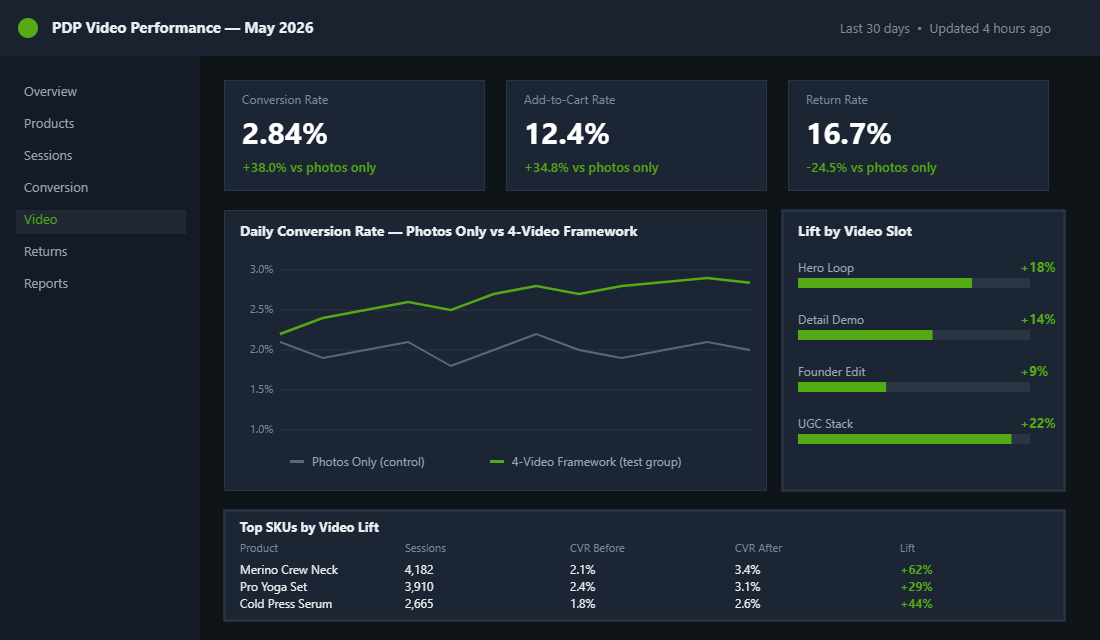
That trust gap is exactly what product video closes. Embedding video on a PDP can lift conversion by up to 86%. Shoppable video implementations report 30% conversion lifts and a 225% jump in add-to-cart rate. Shoppers who watch the video are 1.81 times more likely to buy. And the kicker, returns drop by 25% on average because expectations match reality. If you are running an Aussie Shopify store and you are still treating video as “nice to have”, this article is the wake-up.
Why Static Photos Have Hit a Conversion Ceiling
Let’s start with the numbers most founders ignore. The average ecommerce conversion rate in Australia sits between 1% and 3%. Best-in-class direct-to-consumer brands push past 8% on hero SKUs. The gap is not pricing or traffic quality. We have audited hundreds of Aussie Shopify stores at this point and the pattern is identical. The brands punching above 5% have video on every important product page. The brands stuck under 2% have a slideshow of stills.
The same gap shows up in add-to-cart rate. Industry average sits at 8 to 10%. Best PDPs hit 12 to 15%. Adding a single hero loop video above the fold typically pulls add-to-cart up 10 to 15% on its own. That is before you have written a single new line of copy or run a single A/B test.
And the back end matters just as much. Average ecommerce return rates in 2026 are forecast at 20.4 to 24.5%, depending on category. Fashion runs higher. Every return is a margin hit, a fulfilment cost, and a customer who is now less likely to repurchase. Product videos cut returns by an average of 25% because the shopper sees the true colour, the actual texture, the real scale on a real body. The product they receive matches the product they ordered.
If you stack those two numbers together (more conversions on the front, fewer returns on the back), video stops being an aesthetic decision and becomes a P&L decision. That is the lens to keep for the rest of this article.
The 4-Video Framework That Belongs on Every PDP
Most founders, once they decide video is worth the spend, make the same mistake. They book a videographer, pay $3,000 for a 60-second hero film, drop it onto the PDP, and wait for conversion to magically jump. It does not, because one generic brand video is not what the shopper needs.
The shopper has four different questions running in their head when they hit your PDP. Each question deserves a different video answer. We call this the 4-Video PDP Framework. Here it is at a glance, then we will break each one down.
- Video 1: The Hero Loop. 10 to 15 seconds. Above the fold. Answers “what is this product, in motion”.
- Video 2: The Detail Demo. 20 to 30 seconds. Mid gallery. Answers “what does it look like up close, on, or in use”.
- Video 3: The Founder or Insider Edit. 30 to 60 seconds. Below the gallery. Answers “why should I trust this brand”.
- Video 4: The UGC Stack. Three to six clips of 15 seconds each. Below the reviews. Answers “do real people actually use this”.
Each video has a job. Each video lives in a specific spot on the page. Each video is short enough to watch without commitment. Together they form a layered conviction stack. Static photography simply cannot do this work, no matter how beautiful the lighting.
Video 1: The Hero Loop (10 to 15 Seconds)
This is the single most important video on your PDP. It sits inside the product gallery as the first slide, set to autoplay muted, looping silently while the shopper reads your title and price. You have one second to hook attention before they scroll. Treat it like a billboard, not a film.
What goes in it. The product, in motion, in a context that signals lifestyle and use. A skincare serum being pumped onto a model’s hand. A pair of sneakers walking down a Bondi laneway. A coffee blend being ground, brewed, and poured. The hero loop sells the feeling, not the spec.
Production rules for the hero loop:
- Open on movement. A static product shot for the first half second loses the eye. Have something already moving when the loop starts.
- No talking, no sound. Autoplay is muted by default. If your loop relies on audio, you have built it wrong.
- Vertical or square. Mobile is 80% of traffic for most Aussie Shopify stores. Shoot 9:16 or 1:1 first, crop wider later if you need it for desktop.
- Loop point invisible. The first and last frame should look almost identical so the loop joins cleanly.
- Caption on screen. A two-word overlay like “wear-tested” or “100% silk” gives the eye something to land on. Bake it into the video.
Cost honesty. You do not need a $5,000 production. The best hero loops we have seen this year were shot on a phone, in golden hour, with a clip-on light. The product, the motion, and the framing matter. The gear does not. Brands like Frank Body and Bondi Sands built their entire visual identity on this principle long before “content-first DTC” was a phrase.
Video 2: The Detail Demo (20 to 30 Seconds)
If the hero loop sells the feeling, the detail demo sells the substance. This is the video that closes the gap between expectation and reality. It is what cuts your return rate by 25%. It sits as the second or third slide in the gallery and it is built to answer the question every shopper has when their cursor hovers near “Add to Cart”. Is this actually what I think it is.
What to shoot, by category:
- Fashion and apparel. A 360-degree spin on a real body, two body types if you can. Then a close-up of fabric, stitching, hardware. Then a “how it moves” shot. Walk, sit, raise an arm.
- Skincare and beauty. Texture pour, hand-rub, on-skin absorption. Show the formula. Show what happens when it touches skin.
- Homewares and furniture. Scale shot with a known reference object (a coffee mug, a hand, a doorway). Set up shot. Use shot. Surface-finish close-up.
- Food and supplements. Open the packaging. Pour or scoop. Mix or prep. Final result on a plate or in a glass.
- Electronics and gadgets. Unboxing in ten seconds. Setup in ten. One real-use moment in ten.
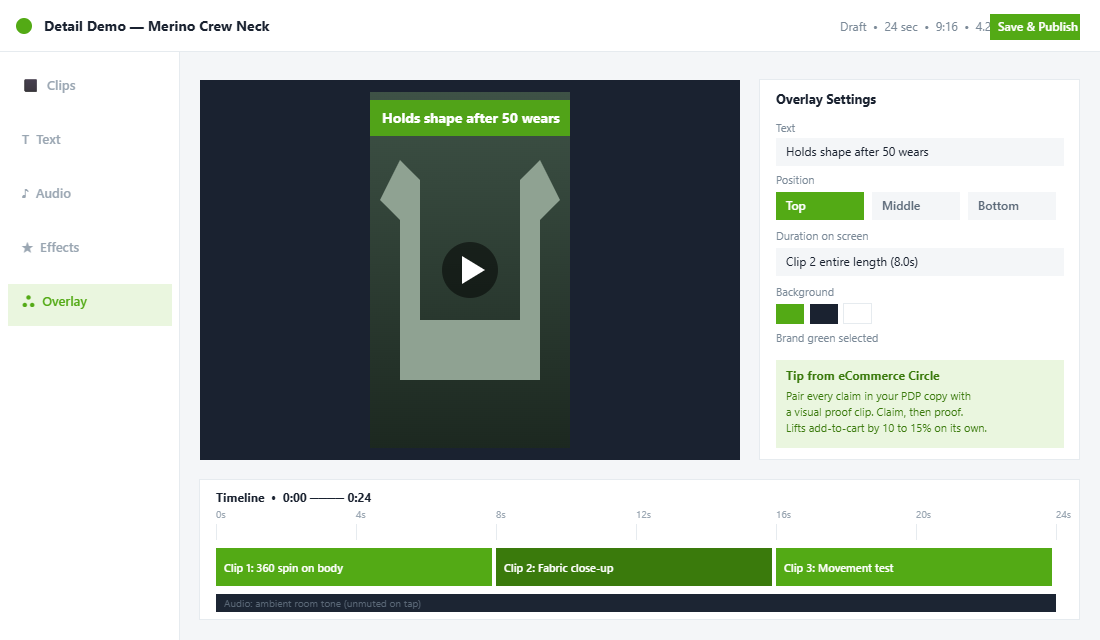
For the detail demo, sound is allowed but not required. A subtle product sound (the snip of scissors, the click of a clasp, the fizz of a tonic) builds authenticity. The shopper will probably tap to unmute. That tap is a buying signal. Capture it with quiet, high-quality ambient audio rather than music.
Bonus tactic: name the demo with a benefit overlay at the top corner. “Holds shape after 50 wears.” “Absorbs in 8 seconds.” “Fits a 38cm laptop.” The video proves the claim and the claim teaches the viewer what to look for in the footage. This is the same principle we use in the 5-Block PDP Copy System. Claim, then proof.
Video 3: The Founder or Insider Edit (30 to 60 Seconds)
This is the video most Aussie Shopify brands skip. They think it is too “personal” or too “founder-heavy”. They are wrong. The founder edit is the highest-trust asset on the page. 74% of shoppers who watch an explainer-style video go on to buy the product. The number is that high because the format is so rare. Static photos can never deliver the same thing.
The founder edit lives below the gallery, often in its own block alongside the long-form description. It is one person on camera, looking down the barrel, explaining the product in plain language. If you are not comfortable on camera, send a senior team member, a head of design, or a product developer. The credibility comes from someone who actually built or chose the product.
Structure for a 45-second founder edit:
- Seconds 0 to 5. Name the product, say why it exists. “This is our merino base layer. We built it because every other one we tried lost shape after a winter.”
- Seconds 5 to 20. The one differentiator that matters. The material, the fit, the source, the process. One thing, not five.
- Seconds 20 to 35. Who it is for. Who it is not for. Honest, not salesy. “If you want a fashion-fit, this is not your shirt. If you want something you can wear ten years from now, it is.”
- Seconds 35 to 45. A care or use tip that signals expertise. “Wash on cold, hang to dry. It will last you a decade.”
Production is dead simple. Phone on a tripod, natural light from a window, lapel mic costing around AUD 40 from any local electronics retailer. Do not over-script. Bullet points on a card behind the camera are enough. The slight imperfection is the point. Polished founder videos look like ads. Slightly raw ones look like trust.
Video 4: The UGC Stack (15-Second Clips, Rotating)
The fourth slot is not one video, it is a rotating gallery of three to six creator and customer clips. This sits below your written reviews and on top of your “you might also like” block. It is the closing argument. Real people, in real bedrooms, with the actual product, on the actual phone camera the shopper is holding.
The performance numbers on UGC video are absurd. Brands using shoppable UGC video on PDPs report 30%-plus conversion lifts and 225% higher add-to-cart rates compared to static page visitors. Princess Polly, one of the most data-driven fashion brands in Australia, ran 56 PDP tests over 17 months with their CRO partner. UGC video iterations were among the consistent winners.
How to source the clips:
- Branded hashtag pull. If customers already post in your hashtag, request usage rights through a simple comment-reply DM template. Aim for one new clip per week per hero SKU.
- Seeding program. Send free product to 20 micro-creators per quarter (5,000 to 50,000 followers). Brief them on the one shot you need. Pay nothing if the deal is product-for-content, or AUD 100 to AUD 300 per usable clip if you want to lock in rights.
- Review video uploads. Most modern review apps (Yotpo, Judge.me, Loox) let customers attach a video to their review. Tag a 10% discount on the next order onto any review that includes a video over five seconds long. You will fill a UGC library in a quarter.
- TikTok and Reels import. If a creator posts about your product, ask permission and pull the content. Apps like Tolstoy can auto-import directly from TikTok and Instagram.
Rotate three to six clips per PDP, change them every four to six weeks, and you will keep the page feeling alive without re-shooting anything. This is the lowest-cost, highest-impact video work you can do, and it stacks on top of the rest of the 7-Layer Anatomy of a high-converting PDP.
Where to Host, and How Not to Tank Your Site Speed
This is the section where founders usually trip up. They commit to the videos, shoot the content, and then upload 40MB MP4 files straight to Shopify. Lighthouse scores collapse. Page load times triple. Conversion gets worse, not better. Do not let that happen on your store.
You have four sensible hosting options:
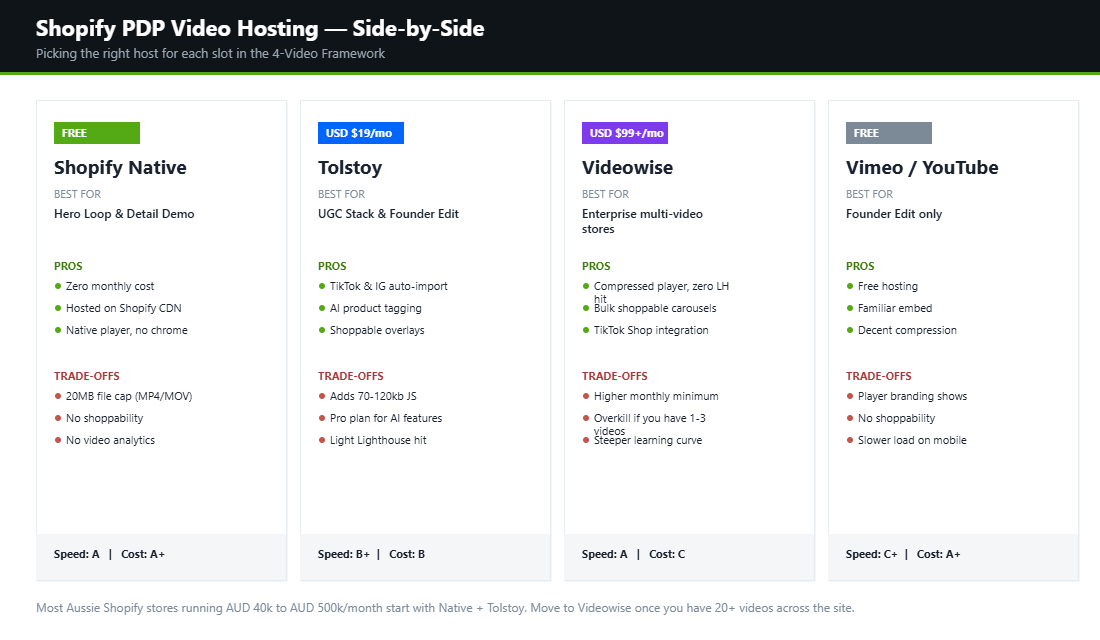
- Native Shopify upload. Free, simple, capped at 20MB per file and MP4 or MOV only. Works fine for the hero loop and the detail demo if you compress to 1080p at 4-6Mbps bitrate. Use this for your first two videos by default.
- Tolstoy. Pro plan around USD 19 per month. Best for the UGC stack and the founder edit. Built-in TikTok and Instagram import, AI product tagging, shoppable overlay. Reasonable for stores doing AUD 40k per month and up.
- Videowise. Heavier platform, used by larger DTC operators. Proprietary compressed player with near-zero Lighthouse impact. Worth it once you are running 20+ videos across the site.
- Vimeo or YouTube embed. Free, but you give up shoppability and you import the platform’s player chrome onto your PDP. Workable for the founder edit only. Avoid for the rest.
Setting up Tolstoy on a Shopify PDP (5 steps):
- Install the Tolstoy app from the Shopify App Store and connect your storefront.
- Upload your four videos or import them from Instagram and TikTok by handle.
- Tag each video with the product it relates to. AI will auto-suggest matches, you confirm.
- Pick the embed type. Carousel for the UGC stack, single-video block for the founder edit.
- Paste the Tolstoy block into your PDP template (Online Store 2.0 themes support drag-and-drop) and preview on mobile. Done.
Compression tip that saves most stores. Run every video through Handbrake (free, open-source) before upload. Target H.264 codec, 1080×1080 for square, 1080×1920 for vertical, 5Mbps average bitrate, AAC audio at 128kbps. A 60-second video should land at 4 to 6MB. Anything bigger and you are punishing your mobile shoppers.
How to Prove Your Videos Are Paying for Themselves
Shooting the four videos is the fun part. Knowing whether they moved the needle is what justifies the next production budget. You can get a clean read inside two tools you already have, plus one cheap addition.
- GA4 engagement comparison. Build a comparison between PDPs with video and PDPs without. Look at engagement rate, average engagement time, and add-to-cart rate. Pages with product video typically hold visitors 30 to 60% longer, and that dwell time is the leading indicator that conversion will follow.
- Shopify Analytics conversion funnel. Check the product-level view-to-cart rate for the 30 days before and after the video went live. A healthy Aussie store sits around 8 to 10% view-to-cart; a strong hero loop routinely adds 1 to 2 points to that number on its own.
- Hotjar or Microsoft Clarity heatmaps. Watch whether visitors actually press play, and how far they scroll afterwards. If under 15% of visitors interact with the video, the problem is placement, not the video: move it into the second slot of your media gallery where it inherits the gallery’s attention.
- Returns rate by product. Video sets accurate expectations, which is why stores adding detail demos see returns drop 20 to 25% on affected SKUs. Track it per product in Shopify, not store-wide, so the signal is not diluted.
Give each test 30 days or 1,000 PDP sessions, whichever comes first, before you call it. And feed the winners back into acquisition: a hero loop that lifts on-page conversion nearly always outperforms as a Meta ad creative too, because it has already proven it can stop a buyer who is one step from purchase. The same discipline applies across your whole product page: our 7-layer PDP anatomy shows where video sits among the other conversion levers, and if you sell customisable products, pair video with the personalisation playbook to show the configurator in motion.
The Compound Effect: What You Should Expect
Now the maths. Let’s say your store sits at the Australian DTC average: 2% conversion rate, 9% add-to-cart rate, 22% return rate, AUD 110 average order value, 30,000 unique product page views per month.
Today, that PDP traffic produces roughly 600 orders per month at AUD 66,000 in gross sales, with around 132 returned orders worth AUD 14,520 going back out the door.
Add the four-video framework and you can reasonably model:
- Conversion rate up to 2.8% (modest 40% lift, well below the 80% maximum reported in the research).
- Add-to-cart rate up to 12% (a normal lift once a hero loop is above the fold).
- Return rate down to 16.5% (25% reduction, consistent with the benchmark).
The same 30,000 sessions now produce 840 orders at AUD 92,400 in gross sales, with returns at AUD 15,246. Net revenue lift sits at roughly AUD 25,000 per month, or AUD 300,000 per year, from a content investment most Aussie founders can fund in a single weekend of shooting plus a sub-AUD-50 app stack.
And that is before you factor in the second-order effects. Higher session time (videos lift it 2.6 times). Better paid social retargeting (you can now point ads at “video viewed 75%”). Lower CAC, because retention improves when expectation and reality match. Your existing photography still does its job. Video does the job photography was never built for.
Your 30-Day PDP Video Action Plan
Do not try to roll all four videos out at once across every SKU. Sequence it.
- Week 1. Pick your top three revenue-driving SKUs. Shoot the hero loop for each. Phone, tripod, golden hour. Upload natively to Shopify. Measure CVR baseline before and after.
- Week 2. Shoot the detail demo for the same three SKUs. Three short clips per demo, benefit overlays baked in. Upload natively.
- Week 3. Record one founder edit covering the brand category as a whole. You can use the same founder edit across multiple related SKUs to start. Install Tolstoy if you have not already.
- Week 4. Brief five micro-creators or run a review-video discount campaign to seed the UGC stack. Launch the Tolstoy carousel block under the reviews section.
By the end of the month you have the full framework live on your three most important products and the workflow nailed down for the next round. Most Aussie founders who follow this exact sequence see a measurable PDP conversion lift inside the first four weeks. Compound that across your top 20 SKUs and the maths gets very interesting.
Static photography was the right answer for 2015. In 2026, your PDP needs to move. Get the four videos in place, host them properly, and let the numbers do the convincing.
Inside eCommerce Circle, PDP video and conversion architecture is one of the core pillars we work on with every member. If you want a second opinion on yours, let’s talk.