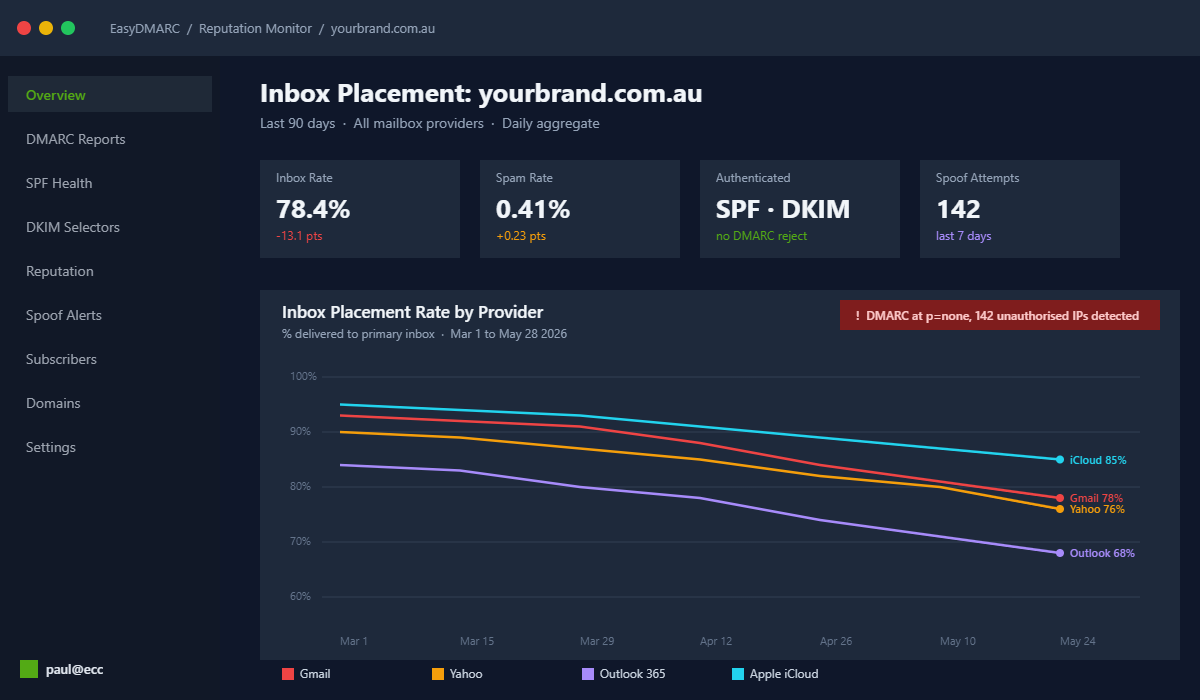
You spend forty hours a month building Klaviyo flows. You write subject lines that would make a copy chief proud. You pour budget into capturing the right subscribers. Then your inbox placement quietly slides from 93% to 78% over six weeks, your campaigns mysteriously stop earning, and someone on the team tells you it must be a Klaviyo problem.
What’s in This Article
It is almost never Klaviyo. It is almost always email authentication. And in 2026, the cost of getting it wrong is bigger than it has ever been. Klaviyo inbox rates dropped 13.24% from Q1 2024 to Q1 2026, the global inbox placement rate now sits at 83.5% (meaning one in six emails is never seen), and Microsoft inboxes are filtering at a 75.6% acceptance rate, the toughest in the market.
What makes this brutal is the trap most Aussie operators fall into. DMARC adoption hit 52.1% of major domains in 2026, but only 9% of those domains are actually protected, because the policy is parked at p=none and the reports never get read. The records exist. The protection does not. This playbook gives you the 5-layer system we run inside eCommerce Circle to fix that, written so you can audit your own store on a Friday afternoon and have it locked down by Monday lunch.
Why Email Authentication Became a Trapdoor in 2026
The shift started in February 2024 when Google and Yahoo introduced bulk sender requirements: SPF, DKIM and DMARC are now mandatory if you send more than 5,000 marketing emails a day. Microsoft followed in May 2025. La Poste in France joined in September 2025. That gives you four of the largest mailbox providers on the planet running the same rulebook, and the rulebook gets stricter every quarter.
The spam complaint thresholds are now hard ceilings, not soft warnings. Gmail will tolerate up to 0.3% spam complaints. Google recommends staying below 0.1% for reliable inbox placement. Yahoo follows the same 0.3% rule. Hit either ceiling for a few sends and your domain reputation takes weeks to rebuild. The Promotions tab on Gmail now captures the vast majority of ecommerce sends. Primary inbox placement for ecommerce on Gmail sits between 2.7 and 4.4% according to 2026 benchmarks. That is not a typo.
The deeper issue is what authentication actually does. SPF, DKIM and DMARC are the three locks on your domain. SPF says which servers are allowed to send mail. DKIM signs the message so the receiver can prove it was not tampered with. DMARC tells receivers what to do when SPF or DKIM fails. Without all three, every flow you ship is a chance for a competitor, scammer or bot to impersonate your brand. With all three configured correctly, you stop the impersonation and you build the sender reputation that Klaviyo, Gmail and Microsoft use to decide whether your Welcome Flow opens at 50% or 12%.
The compounding cost is real. Email marketing returns $36 to $42 for every dollar spent in DTC. A 10 point drop in inbox placement across a list of 100,000 subscribers usually costs an Aussie brand $40,000 to $90,000 a quarter, depending on AOV. That is the spreadsheet you are protecting when you do this work.
Layer 1: SPF (The Permission Slip Most Operators Get Wrong)
SPF stands for Sender Policy Framework. It is a single TXT record on your domain that lists every server allowed to send mail on your behalf. Klaviyo, Shopify transactional, Postmark, Google Workspace, Gorgias, Loop Returns, your help desk: every tool you authorise to send mail in your name needs to be inside that record.
The trap is the 10-lookup limit. SPF only allows ten DNS lookups per record. Most Aussie Shopify stores blow past that the moment they connect Klaviyo, Google Workspace, Microsoft 365 and a help desk. The record looks valid, but receivers like Gmail return a permerror and silently treat all your mail as if SPF does not exist. That alone can cost you 6 to 12 points of inbox placement.
Run this audit on your store today:
- Check your current record. Open MXToolbox and run an SPF lookup on your root domain (yourbrand.com.au). The tool will count your DNS lookups and flag anything over 10.
- List every service that sends mail. Klaviyo, Shopify transactional, your support inbox, your accounting tool, your loyalty platform. Anything that emails a customer under your domain belongs here.
- Flatten where you can. Use a tool like EasyDMARC SPF flattening or Valimail Monitor to consolidate include: records into a single hostname. This is the single highest impact fix for most Aussie operators.
- Remove zombie senders. Old apps you disconnected still leave SPF includes behind. Remove every include for a tool you no longer use.
- End your record with a hard fail. The closing mechanism should be
-all, not~all. The soft fail tells receivers to deliver suspicious mail anyway and undermines DMARC alignment.
An Aussie haircare brand we work with, similar in shape to BondiBoost, hit this exact ceiling when they added a fourth send tool. The record validated visually but failed silently for Gmail. Inbox placement on a 90,000 subscriber list slid from 91% to 76% over five weeks before anyone noticed in the revenue report. Flattening the record and trimming three legacy includes recovered the placement inside fourteen days.
Layer 2: DKIM (The Signature That Proves It Is Actually You)
DKIM stands for DomainKeys Identified Mail. Where SPF says “this server is allowed”, DKIM says “this exact message was signed by the owner of this domain and has not been changed in transit”. The receiver looks up your public key in DNS, verifies the cryptographic signature on the message, and treats it as legitimate. No signature means the message is unauthenticated, which is almost as bad as failing SPF.
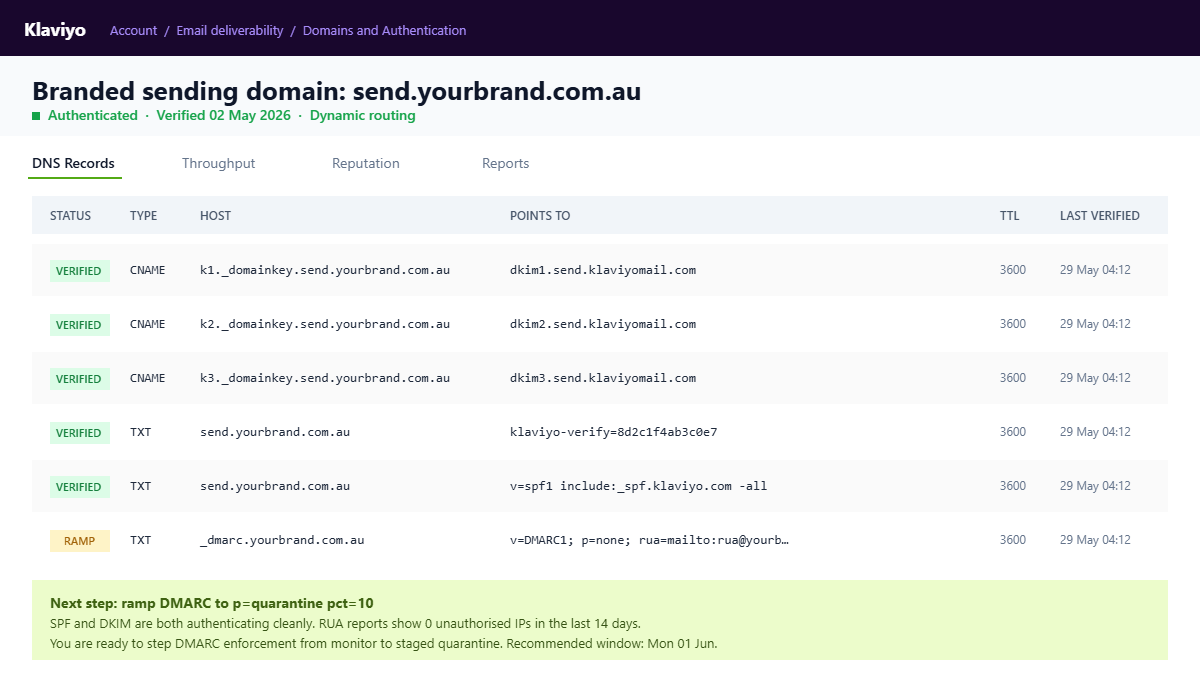
For Klaviyo specifically, DKIM is configured by setting up a branded sending domain. You pick a subdomain like send.yourbrand.com.au or email.yourbrand.com.au. Klaviyo gives you three CNAME records (or three NS records if you choose dynamic routing) plus a TXT record for ownership. You add them to your DNS provider, wait up to 48 hours for propagation, then verify inside Klaviyo. Until those green checkmarks appear, every Klaviyo send goes out from send.klaviyomail.com, and the alignment between your visible From address and the underlying authenticated domain falls apart. That misalignment is the single most common reason DMARC fails for Shopify stores.
Pick dynamic routing (NS records) over static routing (CNAME records) where your DNS provider supports it. Klaviyo can rotate keys, add IP pools and adjust the configuration without you needing to touch DNS again. If you are on Shopify-managed DNS, NS delegation is not supported, so static CNAME is your only option. Either is fine. The choice that matters is finishing the setup, not which protocol you pick.
The audit checklist for DKIM:
- Confirm Klaviyo’s branded sending domain is green. Open Klaviyo, Account, Email deliverability, Domains and Authentication. Anything other than three green ticks is a problem.
- Run a DKIM lookup for every selector. Use MXToolbox and check
k1._domainkey.send.yourbrand.com.au,k2._domainkey.send.yourbrand.com.au,k3._domainkey.send.yourbrand.com.au. All three should return a TXT or CNAME with a valid public key. - Send a test to gmail and check headers. In Gmail, open the test, click the three dots, “show original”. The DKIM line should read
PASS with domain send.yourbrand.com.au, notsend.klaviyomail.com. - Repeat for transactional senders. Shopify transactional, Postmark, Gorgias, anything that sends in your domain needs its own DKIM record. Each one is a separate subdomain selector.
Layer 3: DMARC (The Policy That Actually Stops the Bleeding)
SPF and DKIM tell receivers what is authentic. DMARC tells them what to do when something fails. Without DMARC, a forged email from support@yourbrand.com.au can still hit a customer inbox, your sender reputation gets dragged down by every spoof attempt, and you lose the visibility to even know it happened.
The policy comes in three flavours:
- p=none. Monitor mode. Receivers report on failures but deliver the mail anyway. This is where you start.
- p=quarantine. Suspicious mail goes to spam. This is the working policy for most brands after the first 30 days of monitoring.
- p=reject. Receivers refuse the mail outright. This is the finish line. It is what Gmail, Yahoo and Microsoft now treat as the gold standard for legitimate senders.
Here is the trap that catches 91% of brands that publish DMARC. They publish p=none, never read the reports, and assume they are “DMARC compliant”. They are not. Receivers know the policy is at none and quietly weight your reputation accordingly. The Valimail State of DMARC report shows only around 9% of published DMARC domains are at quarantine or reject with active monitoring. The other 91% are leaving the trapdoor open.
Use this staged ramp to move from monitor to reject without nuking a legit send:
- Week 1 to 2: Publish
v=DMARC1; p=none; rua=mailto:reports@yourbrand.com.au; ruf=mailto:reports@yourbrand.com.au; aspf=r; adkim=r;. Start collecting reports. - Week 3 to 4: Review the reports. Fix any legitimate senders that are failing. Add missing services to SPF. Confirm DKIM is signing every send tool.
- Week 5: Move to
p=quarantine; pct=10;. This applies the quarantine policy to 10% of failing mail. Watch reports for a week. - Week 6: Step
pctup to 25, then 50, then 100 over the next two weeks if reports stay clean. - Week 8 to 10: Switch policy to
p=reject; pct=100;. You are now fully protected and gmail, Yahoo and Microsoft treat you accordingly.
Set aspf=r and adkim=r (relaxed alignment) rather than strict on the first pass. Relaxed alignment lets send.yourbrand.com.au match against yourbrand.com.au. Strict alignment requires an exact match and breaks a lot of legitimate flows the first day. You can tighten to strict once you have full visibility on every sender.
Layer 4: Reporting (RUA and RUF, Your Inbox Black Box)
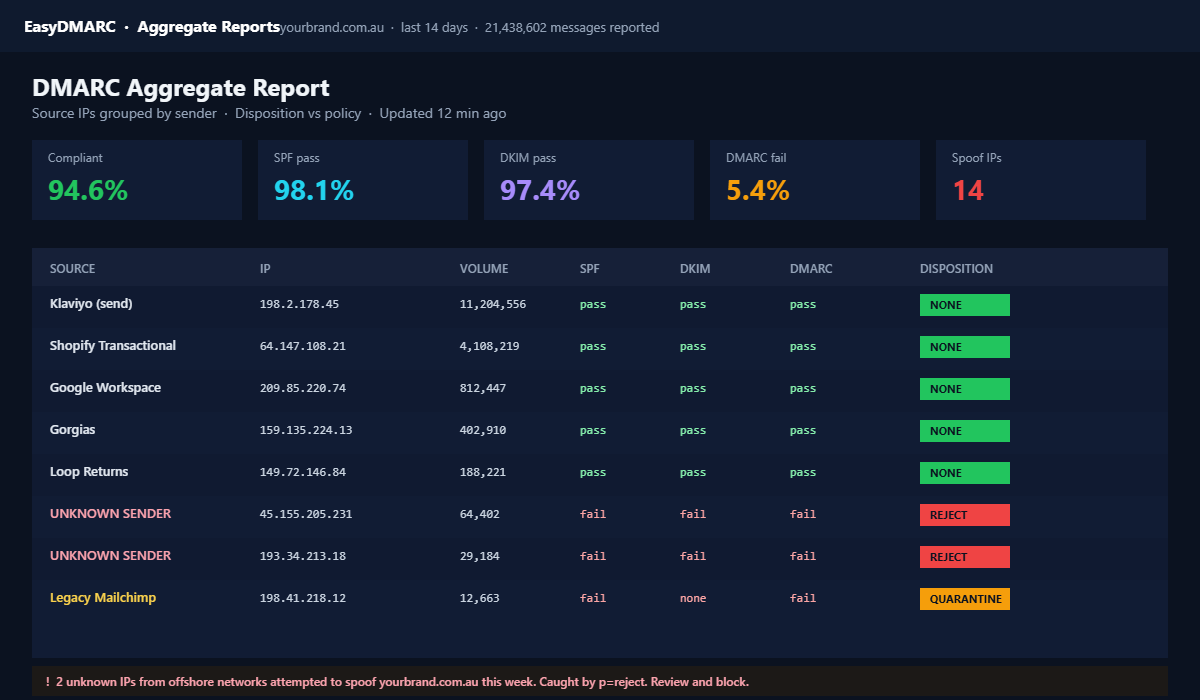
The reason most brands camp at p=none forever is that DMARC reports arrive as raw XML files emailed daily by every receiver on the planet. Twenty four hours after a send, Google, Yahoo, Microsoft and a hundred smaller mail servers each drop a zipped XML attachment into your inbox listing every IP that sent in your name, what the receiver decided, and why. Without tooling, the reports are unreadable. With tooling, they are the single most valuable diagnostic in your inbox.
The two types you care about:
- RUA (aggregate reports). Daily summary. Receiver, source IP, count, disposition (none, quarantine, reject), and SPF/DKIM result. This is what you read 95% of the time.
- RUF (forensic reports). Per-failure detail with the actual headers of the failed message. Useful for spoofing investigations. Most receivers no longer send these for privacy reasons, so do not depend on them.
For Aussie operators, the practical tool choice comes down to three options:
- EasyDMARC. Free tier up to 5,000 daily messages. Clean dashboard, good alerts. Best for sub $5m brands.
- DMARCian. Free for low volume, paid from around USD 25 a month. Strong on forensic detail.
- Valimail Monitor. Free version with optional paid enforcement automation. The cleanest setup if you are scaling fast.
Whichever you pick, point your DMARC rua to the tool’s reporting address, log in once a week, and look for three things: every IP your legitimate sending tools use should show 100% pass, any unknown IP signals either a misconfigured app or an active spoofing attempt, and the failure trend over time should be flat or declining.
Layer 5: Engagement Hygiene (The Layer Nobody Mentions but Everybody Needs)
Authentication gets you in the door. Engagement keeps you there. Gmail and Yahoo now make sender reputation the single biggest input into inbox placement. They watch open rates, reply rates, “mark as not spam” actions, and the spam complaint rate. Cross 0.3% spam complaints for too many sends, and even a perfectly authenticated domain ends up in the bulk folder.
For Aussie Shopify brands sending to a mature list, the highest impact hygiene moves are:
- Run a sunset flow on dormant subscribers. Anyone who has not opened or clicked in 90 days goes through a 2-email reactivation series, then gets suppressed. Shopify’s 2025 deliverability study showed a 15 to 22% inbox placement lift from this single move.
- Suppress role-based addresses. info@, admin@, sales@ rarely engage and often complain. Filter them at the form layer.
- Add real one-click unsubscribe. RFC 8058 requires List-Unsubscribe and List-Unsubscribe-Post headers, plus a single-action endpoint. Klaviyo, Mailchimp and Brevo now ship this by default, but you must enable it in the email template settings.
- Segment by engagement, not list. Send to 30, 60 and 90 day engaged segments separately and stop blast-mailing the whole list. Shopify’s 2025 economics data shows broadcast emails generating $0.04 per recipient versus $0.31 for segmented sends. Almost 8x.
- Warm new sending domains slowly. If you just switched to a branded sending domain, start at 5,000 sends a day and scale 25% per day for the first two weeks. Klaviyo handles part of this automatically, but you still need to throttle your own campaign cadence.
This is where authentication meets list strategy and sender reputation. If you have not yet locked down the front end of your list, the Shopify Email Pop-Up Playbook is the companion piece to this audit. Capture quality at the top, hygiene at the bottom, authentication in the middle.
The 5-Layer Email Authentication Defence Audit (Run This Weekend)
Here is the checklist we hand members inside eCommerce Circle. It takes 90 minutes from start to first fix, and the impact shows up in inbox placement within a fortnight. Open MXToolbox, EasyDMARC and your Klaviyo deliverability dashboard in three browser tabs. Then work through the layers in order.
- Layer 1: SPF audit (15 minutes). Run MXToolbox SPF lookup. Count includes. If above 8, flatten. Confirm record ends with
-all. Document every sending tool. Remove zombies. - Layer 2: DKIM audit (20 minutes). Confirm Klaviyo branded sending domain is fully green. Run MXToolbox DKIM lookup on every selector. Send a Gmail test and check headers. Repeat for Shopify transactional, help desk, ESP.
- Layer 3: DMARC audit (15 minutes). Run MXToolbox DMARC lookup. If missing, publish
p=nonewith reporting. If atp=nonefor more than 60 days, plan the staged ramp top=quarantinewithpct=10next Monday. - Layer 4: Reporting setup (10 minutes). Sign up for EasyDMARC, DMARCian or Valimail free tier. Update your DMARC rua address to the tool’s inbox. Set a weekly 15 minute review block in your calendar.
- Layer 5: Engagement hygiene (30 minutes). Build a 90-day sunset flow in Klaviyo. Add an active 30, 60, 90 day engagement segmentation. Enable List-Unsubscribe headers. Plan your warm-up cadence if you have just authenticated a new subdomain.
If you can only do one of these this weekend, do Layer 2. Branded sending domain on Klaviyo is the single biggest inbox-placement upgrade in this entire playbook. If the green ticks are not there today, every other improvement is fighting against a leaky bucket.
The Compound Effect (Why This Works as a System)
None of these layers is impressive on its own. SPF on its own gets bypassed by anyone who can sign messages. DKIM without SPF leaves a path open for unauthenticated mail. DMARC without monitoring is theatre. Engagement hygiene without authentication is polishing a sinking ship. Stack the five together and you build a sender reputation that Gmail, Yahoo, Microsoft and Apple all treat as legitimate, week after week, send after send.
What that looks like in practice for an Aussie store doing $200k a month in email revenue is roughly this. An inbox placement lift from 78% to 91% recovers around 13% of your previously sent volume. On $200k of email revenue that is $26k a month in recovered earnings, before you have changed a single subject line, flow, or segment. The math holds at every list size we have audited inside the workshop, from $40k a month founders up to $1m a month brands. Authentication is the closest thing in email to a free quarter of growth.
This is also why authentication sits inside the Protection P, not Promotion. You are not running an offer or testing a CTA. You are protecting the value of the asset you have already built. The relationship between authentication and the rest of the protection stack matters too. The same instinct that drives you to fix DMARC is the one that drives the Shopify Admin Lockdown Playbook: protect the domain, protect the storefront, protect the assets. If you have not run the broader ecommerce cybersecurity audit yet, this email authentication work is the natural starting point.
The Aussie Founder Reality Check
Three things you should know before you start. First, Shopify’s DNS hosting works fine for SPF, DKIM and DMARC, but it does not support NS delegation for dynamic Klaviyo routing. Static CNAME is your path. Second, .com.au domains carry no inbox-placement penalty in 2026. Australian senders are treated identically to .com and .co at every major mailbox provider. Third, your hosting provider (Crazy Domains, Synergy Wholesale, VentraIP, Cloudflare) will affect how easy this is to set up. Cloudflare is the easiest. Synergy Wholesale and VentraIP are clean. Crazy Domains usually requires their support to add specific record types and adds a 24-hour delay to the project.
Plan the work into one calendar block: a 90 minute Friday afternoon audit, a 30 minute Monday morning review of the first weekend of DMARC reports, and a 30 minute fortnightly check-in for the next 60 days. After that, the system runs itself and you only intervene when the report alerts fire.
Your Next Move
Open MXToolbox right now and run an SPF lookup on your root domain. Then run a DMARC lookup. The two readings tell you, in about 90 seconds, whether your inbox placement is being silently dragged down by something you can fix this weekend. If both records exist and both are configured correctly, you are in the 9% of domains that are actually protected. If either is missing, broken, or sitting at p=none with no reporting, you have just found the cheapest growth lever in your business.
Inside eCommerce Circle, email authentication is one of the protection pillars we walk every member through in their first month. If you want a second set of eyes on your SPF, DKIM and DMARC before you ramp the policy, let’s talk.