The phone call comes at 7:43 on a Saturday morning. Your support inbox is jammed with 90+ replies overnight. Half of them are screenshots of order confirmations they never placed. A handful name addresses that are not theirs but used to be. One of them is from a journalist at the Sydney Morning Herald asking for comment.
What’s in This Article
You realise, before you have even made coffee, that someone has been inside your Shopify customer data.
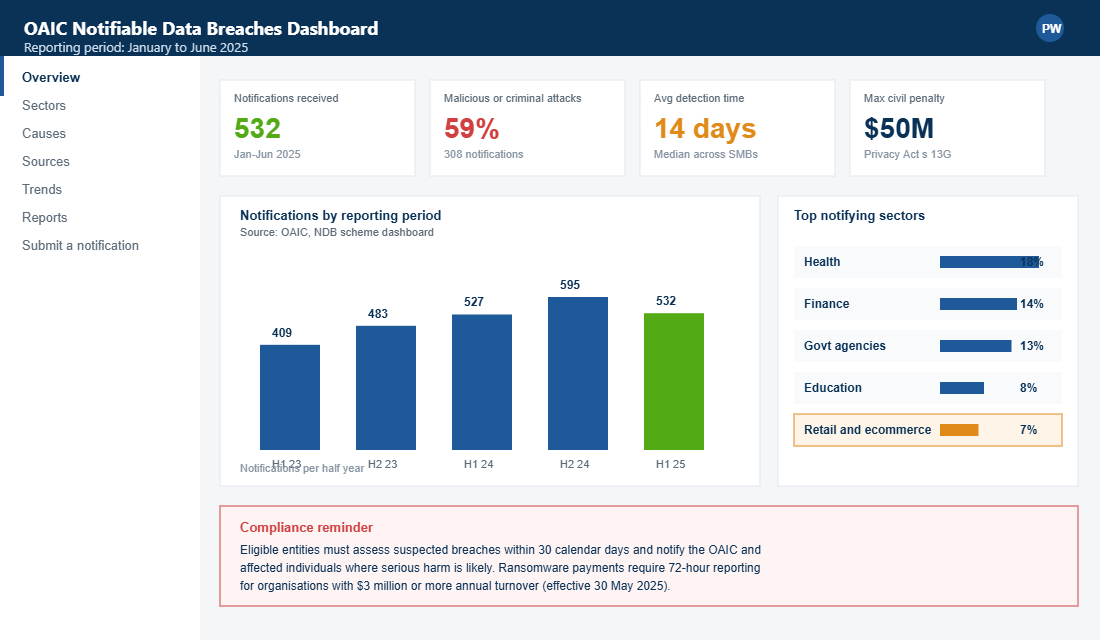
The next 48 hours decide two things. Whether you keep the customers you spent three years acquiring. And whether the Office of the Australian Information Commissioner adds your store to the 1,127 data breach notifications they logged in 2024, with a potential $50 million civil penalty waiting at the end of it.
Most founders waste the first six hours on the wrong things. They call their developer. They post a vague apology on Instagram. They wait for “more information” before doing anything. By the time they actually call a lawyer, the OAIC clock has started ticking and the customer trust chart is already in free fall.
This is the 5-phase incident response playbook we run with eCommerce Circle members the moment a breach is suspected. It is built around three Aussie realities: the Notifiable Data Breaches (NDB) scheme, the 2022 Privacy Act amendments that pushed maximum penalties to $50 million, and the fact that 45% of Australian breaches now hit businesses with fewer than 200 staff. Shopify operators are squarely in that bucket.
Why Shopify Stores Are Targets You Probably Don’t Realise
Founders running a $1m to $20m Shopify store usually assume the breach risk lives somewhere else. With the big banks. With Optus. With the health insurers. Not with a homewares brand from Brunswick or a swim label from the Gold Coast.
The OAIC’s January to June 2025 report flips that assumption. 532 notified breaches in six months. 59% from malicious or criminal attacks. Retail and ecommerce sit in the top five sectors notifying breaches, behind only health, finance, government agencies, and education. The reason is simple. A mid-sized Shopify store holds the exact dataset ransom crews want: full names, residential addresses, mobile numbers, email addresses, partial payment information, and a record of buying behaviour they can use for follow-on phishing.
The 2025 IBM Cost of a Data Breach Report put the average Australian breach cost at AUD $4.26 million. Detection and escalation alone averages $1.65 million of that figure. Even if your breach is one tenth the size of those benchmarks, you are still staring down a six-figure clean-up. That is before the OAIC penalty, which under the December 2022 amendments can now hit $50 million, three times the benefit you received, or 30% of adjusted turnover, whichever is highest.
The first time we ran this playbook with a $4.5m Aussie skincare brand inside Circle, we contained the breach in 38 hours. Their final reportable customer count was 280. The bill came in just under $40,000 including legal review and customer comms. The brand stayed off the front page of the AFR. That outcome is not luck. It is a documented sequence the founder ran while the rest of the team was still arguing about what to put on Instagram.
Phase 1. Detection: The 6 Signals That Tell You a Breach Has Already Happened
You cannot respond to a breach you do not see. And in our experience auditing hundreds of Aussie Shopify stores, founders miss the first warning for a median of 14 days. That is two weeks the attacker has to download data, sell it, or use it for follow-on fraud against your customers.
These six signals are the watchlist we install on every Shopify store inside Circle. They are visible from the standard admin without paying for a third-party security stack.
- Unusual spikes in failed login attempts on /admin. Open Settings, then Users and permissions, then click “View activity”. A jump from 4 attempts a week to 40 in a day is your first canary.
- Staff 2FA reset requests you did not authorise. Shopify emails the owner on every reset. Treat each one as a potential breach in progress until proven otherwise.
- New private or custom apps installed in the last 48 hours that nobody on the team built. Apps are the most common backdoor. The attacker rarely needs Shopify staff credentials when an app with read access to customers will do.
- Order spikes from a single device or IP that look almost-but-not-quite right. Card testing fraud uses your store to validate stolen cards before using them elsewhere. Tiny order values, multiple cards, same shipping postcode.
- Customer support tickets reporting password reset emails they did not request. This is credential stuffing landing in your store from a list that was already leaked elsewhere.
- A Google Search Console alert that someone has added a property under your domain. Attackers do this to verify control of the domain and pivot to other systems.
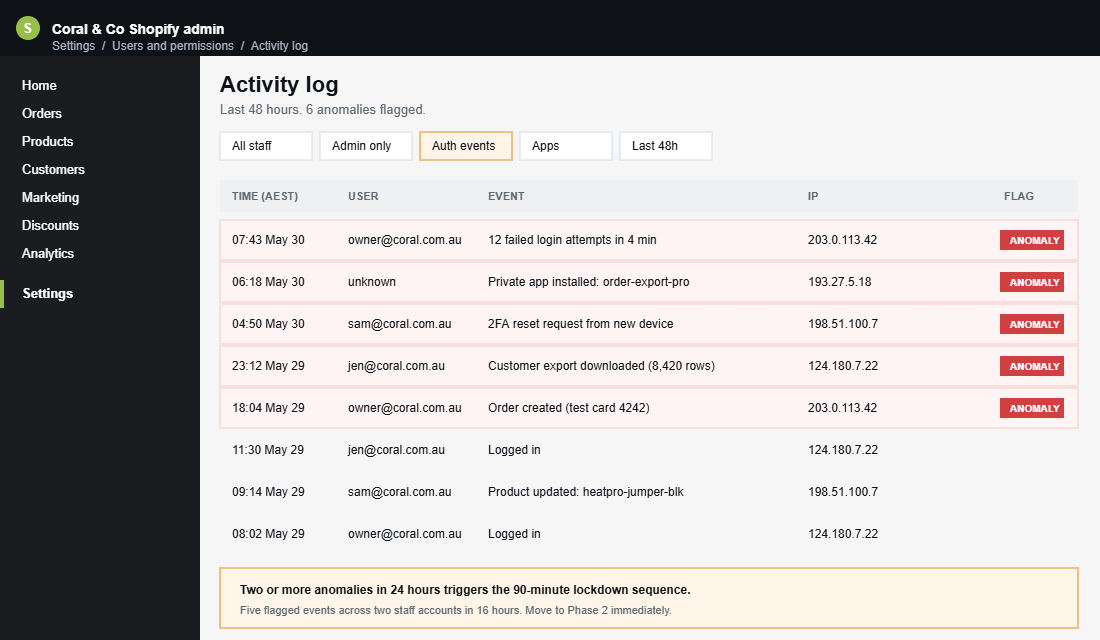
The trigger to escalate is simple. Two or more signals in 24 hours. One signal is noise. Two is a pattern. Three and you are already late. The moment two land, you move to Phase 2.
Phase 2. Contain: The 90-Minute Lockdown Sequence Before You Tell Anyone
Containment is the only phase where speed beats accuracy. Every additional minute the attacker has access compounds the customer data exposed. The Medibank breach went from initial intrusion to 9.7 million exposed records in part because the lockdown phase took days, not hours.
Run this sequence in this order, without stopping to draft Slack messages or call your lawyer.
- Minute 0 to 15. Rotate the Shopify owner password and force 2FA on every staff account. From Settings, then Users and permissions, click each staff user and enable “Require two-step authentication”. Revoke any staff account whose owner is on leave or has left the business.
- Minute 15 to 30. Audit and remove every Shopify app installed in the last 90 days you cannot personally vouch for. Go to Settings, then Apps and sales channels. Click each one, check who installed it and when. Unrecognised app? Uninstall it now, investigate later.
- Minute 30 to 45. Rotate every API key, webhook, and private app secret. This includes Klaviyo, Rebuy, Yotpo, Loop, Smile, ShipStation, anything that has read access to customer data. Each rotation is one command away from done.
- Minute 45 to 60. Lock down all third-party integrations. If your CRM, ESP, analytics, or shipping app can read order data, those are extraction paths. Either pause them or rotate the auth tokens.
- Minute 60 to 75. Pull Shopify’s customer export and snapshot it. You need a “known good” baseline of who your customers were before the breach. This becomes the comparison file in Phase 3.
- Minute 75 to 90. Notify your team via a single secured channel. Not the main team Slack. A new private channel, two-factor authenticated, with only the founder, your lead developer, and your insurance or legal contact.
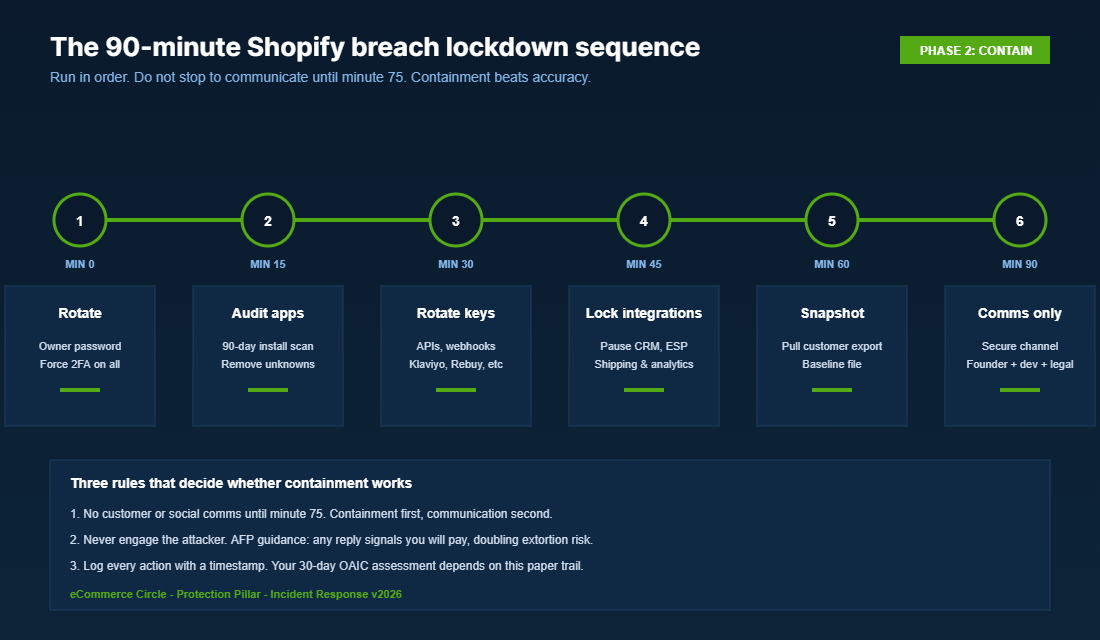
Notice what is not in this list. You are not posting on social yet. You are not emailing customers yet. You are not calling the OAIC yet. You are stopping the bleed. Communication comes in Phase 4 after the assessment is done.
The most common mistake we see in this phase is the well-meaning founder who tries to “talk to the attacker” through whatever ransom note appeared in their inbox. Do not. Australian Federal Police guidance is consistent on this point. Engagement signals that you will pay, which increases your risk of follow-on extortion attempts. The same principle is baked into the Shopify Admin Lockdown Playbook we walk every Circle member through. Containment first, conversation never.
Phase 3. Assess: The OAIC “Likely to Cause Serious Harm” Test in Plain English
By hour four, you should have stopped the bleed and started the formal assessment. This is the phase where most Aussie founders trip the OAIC obligations, because the language in the Act is deliberately broad and they treat “we’ll figure it out later” as a strategy.
The OAIC test for whether a breach is notifiable comes down to one question. Is the breach likely to result in serious harm to one or more of the individuals whose data was accessed?
You have 30 calendar days from the moment you became aware of a suspected breach to complete this assessment. Not 30 days from when the breach happened. From when you knew about it. Time-stamping your “knew” moment is critical for your audit trail.
The assessment runs across four dimensions. Score each one honestly. If you would not be comfortable showing your working to the OAIC, you have already failed the test.
- Sensitivity of the data. Address plus full name plus DOB is high risk. Just an email address is lower risk. Payment data is automatically high risk if the BIN range was exposed.
- Volume of records. 5 records is materially different from 5,000. The OAIC weighs scale.
- Likelihood of identification. If the data was hashed, encrypted at rest, and the keys were not also stolen, the harm threshold drops.
- Foreseeable harm. Identity theft, financial fraud, reputational damage, physical safety risks. If any apply, you are very likely in notifiable territory.
The output of Phase 3 is a written breach record, signed by you, with a timestamp. Even if you decide it is not notifiable, you need that document. It is your defence if the OAIC ever audits the call.
For most Shopify breaches we have walked founders through, the answer to “is this notifiable?” is yes. Customer addresses plus order history plus email is enough to meet the serious harm threshold, especially under the post-2022 enforcement appetite. If you are inside the $3 million annual turnover threshold and an Australian Privacy Principle entity, plan as if every breach is notifiable until you can prove otherwise.
Phase 4. Notify: The 30-Day Clock, the 72-Hour Ransom Rule, and What to Send Customers
This is the phase that creates or destroys customer trust. The Medibank breach response, while imperfect, was praised for the speed and clarity of its customer communications. The Optus breach response was hammered for the opposite. Same incident category, opposite reputational outcomes.
If the assessment concludes the breach is notifiable, there are three things to send, in this order.
- 1. OAIC notification. Within 30 days of becoming aware. Use the OAIC Notifiable Data Breach form online. You need a description of the breach, the kinds of information involved, the steps you have taken to mitigate harm, and recommendations to individuals on what they should do next.
- 2. Affected individual notifications. Send these as soon as practicable after notifying the OAIC. The email must clearly state what happened, what data of theirs was involved, what you have done, what they should do (change passwords, monitor for phishing, request a free credit check via IDCare on 1800 595 160), and how to contact you.
- 3. Public statement (optional but usually wise). A short page on your site, linked from the homepage for at least 60 days. The Medibank approach of a dedicated breach response microsite is the gold standard for transparency.
There is a separate 72-hour clock that started on 30 May 2025 and catches most growing Shopify brands. If your business has $3 million or more in turnover in a financial year and you make a ransomware or cyber extortion payment, you must report that payment within 72 hours of making it. The penalty for missing that window is significant and creates a paper trail you do not want.
Inside Circle, we coach founders to draft the breach customer email template before they ever need it. The principles are simple and worth printing.
- Lead with what happened in one sentence. Not “an incident occurred”. Say “Between [date] and [date], an attacker accessed our Shopify customer records and took the following information about you.”
- Tell them the specific data involved. Vague language reads as cover-up. “Your name, email address, postal address, and order history” is more trustworthy than “personal information”.
- Give them three concrete actions. Change your password. Monitor your inbox for phishing for 90 days. Contact IDCare on 1800 595 160 if you are concerned about identity theft.
- Tell them what you are doing to stop a repeat. Vague is dishonest. Specific is reassuring. Name the technical changes.
- Sign it personally as the founder. Not “the team”. You.
This goes hand in hand with the Shopify Email Authentication Defence Playbook. If your DMARC, SPF and DKIM are loose, attackers will spoof breach notifications to your customers using your own domain and double the damage. Lock that down before you ever send a real breach email.
Phase 5. Recover: The Post-Breach Audit That Stops It Happening Twice
Most founders take their foot off the pedal once the notifications are out. That is the moment to push harder, not slower. Phase 5 is where you turn the breach into the catalyst for the security upgrades you should have done last year.
Run this post-incident audit in the first 14 days after Phase 4.
- Root cause documentation. Write up the actual access path the attacker used. Not “we got hacked”. The specific app, account, or technical weakness. Without this, you cannot fix it.
- Tabletop the same scenario. Get the team together and rerun the breach as a roleplay. Find the steps that took too long. Build a runbook so the next person on call does not have to think.
- Re-issue every Shopify staff account password and 2FA token. Not just the compromised ones. All of them. Treat the entire account stack as untrusted until reset.
- Cyber insurance review. If you do not have a policy, get one quoted. Aussie cyber insurance for a $5m Shopify store typically runs $4,000 to $9,000 a year and covers most of the response cost we just walked through. If you have a policy, send it to your broker for a coverage review based on the actual incident.
- Third-party app whitelist. Lock down which apps can be installed without founder approval. Inside Shopify, audit app permissions monthly using the admin activity log.
- OAIC follow-up report. If you committed to remediation steps in the original notification, document and report progress to the OAIC at the 90-day mark.
This rebuilds the Shopify Admin Lockdown system at a higher standard than where you started. The two playbooks are paired. Lockdown is the prevention layer. Breach response is the worst-case fallback. The brands that run both quarterly have fewer notifications, lower exposure when they do, and a documented response time that any cyber insurer will reward with a better premium.
The Compound Effect: How One Well-Run Response Builds Trust You Cannot Buy
Here is the counterintuitive truth about breach response. Done well, it can be a long-term trust accelerator.
Customers know breaches happen now. They are not surprised by the incident itself. They are watching how you behave under pressure. The brands that communicated cleanly, owned the problem, and showed real remediation came out of breaches with higher trust scores than they started with. The brands that hid, blamed, or delayed lost a chunk of their customer base permanently.
The Ponemon Institute analysis baked into IBM’s 2025 report showed organisations with a tested incident response plan saved an average of USD $1.49 million per breach versus those without one. The savings come from speed. Faster containment, fewer records exposed, lower regulatory penalties, lower remediation costs, lower customer churn.
For Aussie Shopify founders the same logic compounds with three additional layers. The OAIC penalty exposure under the 2022 amendments is now severe enough to threaten an otherwise healthy business. The reputational damage in a connected Aussie market moves faster than in larger overseas markets. And the small-business assumption that “we are too small to be a target” is mathematically wrong, with 45% of Australian breaches now hitting sub-200-employee businesses.
The founders who treat breach response as a one-page playbook they read every quarter, with a designated incident commander (usually them), with a pre-drafted customer email template, and with the right technical and legal contacts on speed-dial, sleep better than the founders who tell themselves it will not happen. The first group will move from detection to OAIC notification in under 48 hours. The second group will still be arguing about who to call after 72 hours have already passed.
This is the same logic we apply across every Protection pillar inside the More Orders Operating System. Stack the systems before you need them. Document the responses before you face them. The cost of preparation is small. The cost of improvisation is sometimes the business itself.
Your 5-Phase Breach Response Quick Reference
Print this and tape it to the inside of the office cupboard. The Aussie Shopify founder who runs this in order will be on the right side of every metric: containment time, records exposed, OAIC posture, and customer retention.
- Phase 1: Detect. Two anomalies in 24 hours triggers escalation. Watch failed logins, 2FA resets, new apps, suspicious orders, password reset complaints, and Search Console verification alerts.
- Phase 2: Contain. 90 minutes, six steps, no comms. Rotate passwords, audit apps, rotate keys, lock integrations, snapshot customers, notify the inner circle on a secured channel.
- Phase 3: Assess. 30-day clock. Apply the OAIC serious harm test across sensitivity, volume, identification likelihood, and foreseeable harm. Document the decision in writing.
- Phase 4: Notify. OAIC first, customers second, public statement third. 72-hour clock applies separately if a ransomware payment is made and turnover is $3 million or more.
- Phase 5: Recover. 14 days. Root cause, tabletop, password reset for all, cyber insurance review, app whitelist, 90-day OAIC follow-up.
Inside eCommerce Circle, the data breach response playbook is one of the core systems we work on with every member, alongside the broader Protection pillar of the More Orders Operating System. If you want a second opinion on your incident response plan before you need it, let’s talk.