You hit a wall. The app you wanted does not exist, your theme will not do the thing you need, and a customer just emailed asking for something your store cannot deliver. So you do what most founders do: you either spend three weekends trying to edit code you do not understand, or you hand a stranger on the internet $8,000 and hope for the best.
What’s in This Article
Both roads end in the same place. The Standish Group has tracked software projects for decades, and the numbers are brutal: only around 4% are delivered fully on time, on budget, and on scope. Roughly 49% are “challenged” (late, over budget, or missing features) and another 19% fail outright. Custom Shopify work is not exempt from that maths.
Here is the part nobody tells you. The difference between a $2,000 fix that lifts revenue and a $20,000 project that breaks your store has almost nothing to do with the developer’s skill. It comes down to whether you knew what you were buying, who you bought it from, and how you structured the deal. That is a decision you control, and this is the framework for getting it right.
Before You Hire Anyone, Run the Build vs Buy Test
The most expensive developer is the one you did not need. Most founders skip straight to “who can build this” without asking the cheaper question first: does this actually require custom code at all?
Shopify’s ecosystem is enormous. There are over 8,000 apps in the App Store, and Shopify paid more than $1 billion to its partners in 2024 alone. That ecosystem exists because the vast majority of “I need a custom feature” requests have already been solved by someone else, for a fraction of what bespoke development costs.
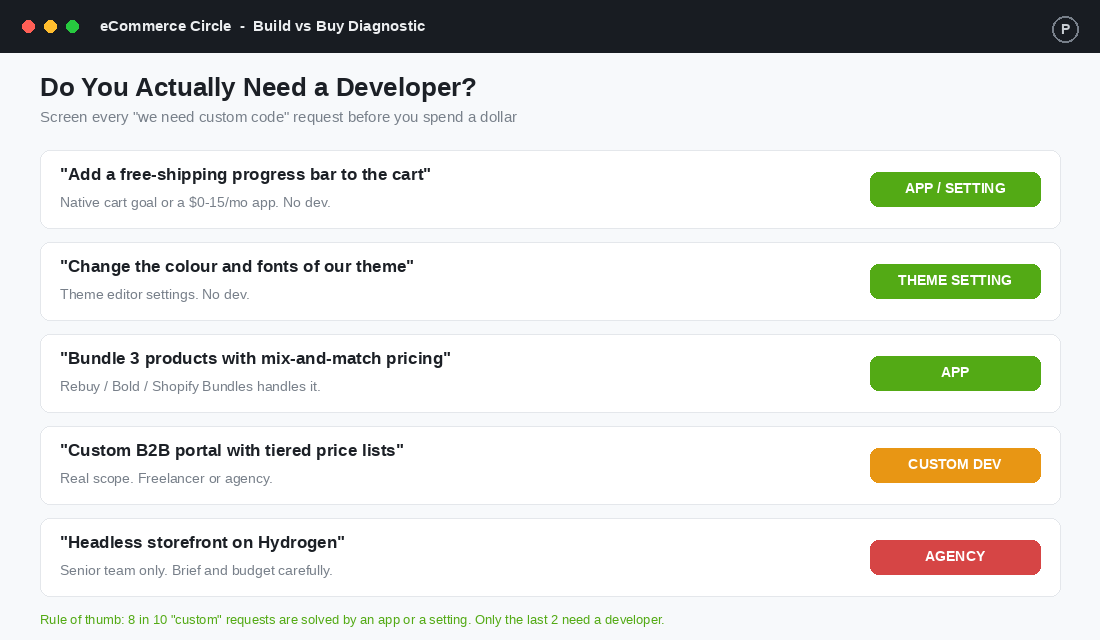
Run every request through four filters before you spend a cent on a developer:
- Is it a setting? Free-shipping bars, announcement banners, colour and font changes, and most layout tweaks live inside your theme editor or theme settings. Zero code required.
- Is there an app? Bundles, subscriptions, upsells, reviews, loyalty, and back-in-stock alerts are all $0 to $50 a month off the shelf. An app you can switch off beats code you have to maintain forever.
- Is it a one-off or forever? A one-off data migration suits a freelancer. A feature that needs to evolve every month is a different conversation.
- Does it touch checkout or core flows? If yes, the risk profile jumps. This is where you want a vetted specialist, not the cheapest quote.
The rule of thumb after auditing hundreds of Aussie Shopify stores: roughly 8 in 10 “custom” requests are solved by an app or a setting. Only the last 2 genuinely need a developer. Get that filter right and you have already saved yourself most of the cost and most of the risk.
The Three Ways to Get Shopify Work Done
Once you have confirmed you genuinely need a developer, you have three models to choose from. Each one fits a different size of job, and the most common mistake is matching the wrong model to the work. Founders hire an agency for a two-hour fix, or stretch a $40-an-hour freelancer across a build that needed a real team.
1. The Freelancer (best for scoped, finite work)
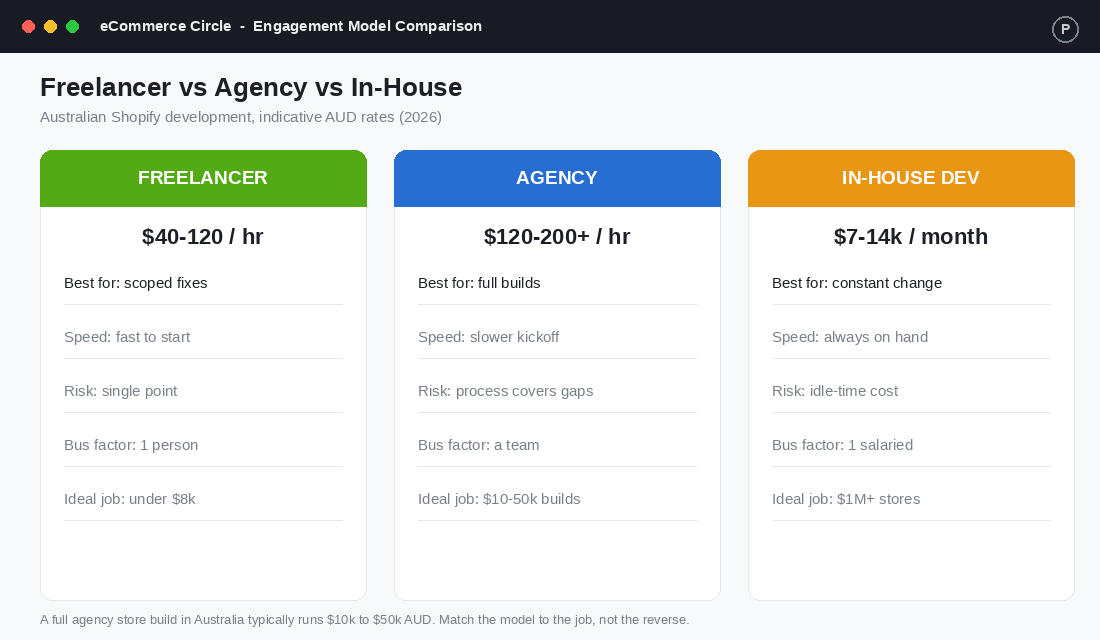
A good freelance Shopify developer is the right call for defined, bounded jobs: a custom section, a metafield setup, a Liquid bug, a third-party integration. In Australia, freelance rates typically run AUD 40 to 120 an hour depending on experience, with mid-level Sydney developers often sitting at AUD 100 to 150.
The upside is speed and price. The downside is the bus factor. You are relying on one person, and if they vanish, go on holiday, or simply stop replying, your project stalls with no one to pick it up. Freelancers shine on jobs under roughly $8,000 where the scope is crystal clear.
2. The Agency (best for full builds and complex scope)
An agency brings a team: a project manager, a designer, and one or more developers, wrapped in a process. In Australia, agency rates commonly sit between AUD 120 and 200+ an hour, and a full store build typically lands somewhere between $10,000 and $50,000 depending on complexity.
You pay more per hour, but you are buying coverage. If one developer is sick, another picks it up. The process catches the gaps that sink solo projects. Agencies earn their rate on builds, migrations, and anything that spans multiple disciplines at once.
3. The In-House Developer (best for constant change)
Hiring a developer onto your payroll only makes sense when you have a steady, ongoing pipeline of work. A full-time Shopify developer in Australia runs roughly AUD 7,000 to 14,000 a month all-in. If they are idle half the time, that is dead money.
As a rough gate, in-house starts to pay off once you are comfortably past $1 million a year and changing the store most weeks. Below that, a freelancer on retainer or an agency on call is almost always cheaper and lower risk. For the wider sequence of who to bring on and when, the Operations Manager hire playbook maps how technical help fits into your org chart.
The Brief That Prevents 70% of Failed Projects
Here is the single highest-impact move you can make, and almost no founder does it properly. Info-Tech Research Group found that around 70% of software project failures trace back to requirements, not code. Poor planning alone is blamed for 39%. The project did not fail because the developer was bad. It failed because nobody wrote down clearly what “done” looked like.
A vague brief is how a $4,000 quote becomes a $12,000 invoice. Every “oh, I also assumed it would do this” becomes a change request, and change requests are where budgets go to die. A tight brief protects both sides and turns a fuzzy idea into a fixed price.
A brief a developer can actually quote against has six parts:
- The problem, in plain English. Not “build a bundle feature” but “customers want to buy any 3 candles for $50 and the cart needs to apply that automatically.” Describe the outcome, not your guess at the solution.
- What success looks like. The exact behaviour, on mobile and desktop, including edge cases. What happens if they add 4 items? What if a product is out of stock?
- What is in scope and what is explicitly out. The “out of scope” list is the one that saves you. Write it down.
- Screenshots or a Loom. A two-minute screen recording walking through what you want removes more ambiguity than three pages of text.
- Your stack. Theme name and version, key apps, anything custom already in the store. Developers price unknowns as risk.
- Timeline and budget range. Yes, share a range. It lets a good developer tell you what is realistic and stops you both wasting time.
Spend a focused hour on this before you contact anyone. It is the cheapest insurance you will ever buy, and it instantly separates the developers who ask sharp questions from the ones who just say “yep, easy” and disappear.
How to Find and Vet a Shopify Developer
Once your brief is written, you need someone good to hand it to. The internet is full of people who will take your money. Your job is to filter fast and avoid the ones who will cost you a re-do. Bad hires are expensive everywhere: studies put the cost of a wrong hire at 30% or more of first-year earnings, and on a project basis a botched build often means paying twice.
Use the Shopify Partner Directory as your starting filter
The official Shopify Partner Directory (shopify.com/partners/directory) is the most efficient place to start, because Shopify already does a layer of vetting for you. Here is how to use it properly:
- Filter by location and service. Set country to Australia (or stay global if you want a wider pool) and choose the service you need, such as “store customisation” or “custom development.”
- Sort by reviews, not by rank. Read the written reviews, not just the star count. Look for reviews that describe a project like yours.
- Shortlist 3 to 5. Never brief just one. Three quotes give you a read on fair pricing and surface anyone who is wildly off.
- Send the same brief to all of them. Identical brief in, comparable quotes out. You are testing their questions as much as their price.
- Score the response, not just the number. The developer who replies “before I quote, what happens when X?” is worth more than the one who quotes blind in five minutes.
Your five-point vetting checklist
- Relevant work, shown. Live store URLs you can click, not a PDF of screenshots. Ask “what exactly did you build on this one?”
- Two reference calls. Past clients who had a project like yours. Ask one question: “what went wrong, and how did they handle it?”
- They push back. A specialist who never disagrees with you is a worry. You want someone who says “that is not the cheapest way to get that result.”
- Clear communication. If replies are slow and vague during the sales process, that is the best version of working with them you will ever see.
- They work on a staging copy. Any developer who wants to edit your live theme directly, with no backup, is an instant no.
Red flags that should end the conversation: a quote with no written scope, a request for full payment upfront, no contract, and admin access demanded before any agreement is signed. None of those are how professionals operate.
Structure the Engagement So You Never Get Held Hostage
You have a brief and a shortlisted developer. Now structure the deal so the project cannot drift, the money is protected, and you keep control of your own store. This is the part that separates founders who get burned from founders who get results.
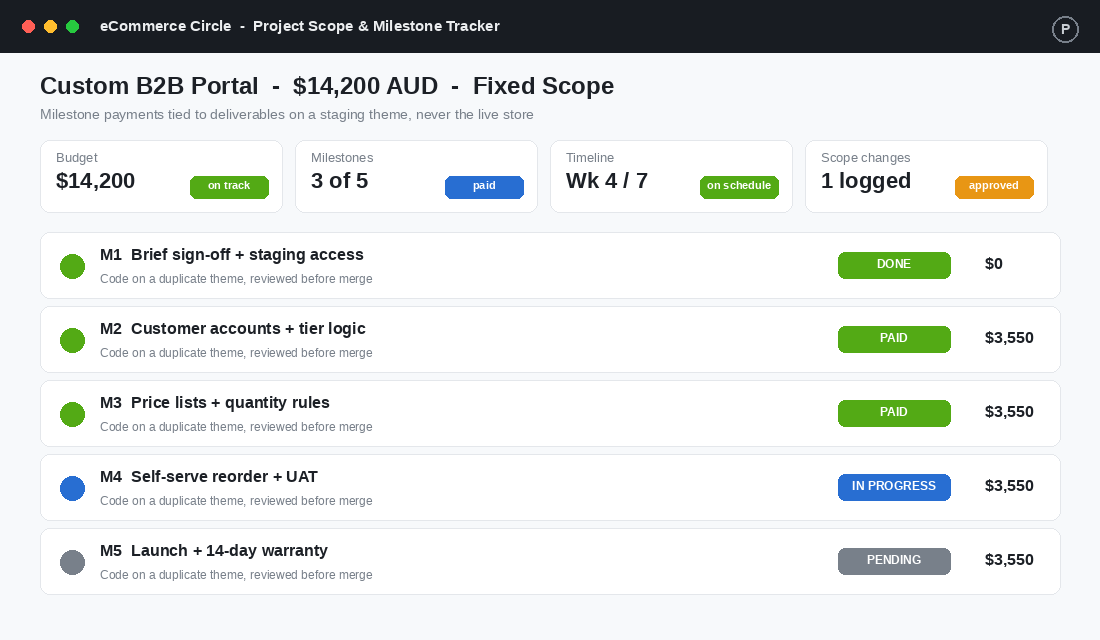
- Fixed scope, milestone payments. For defined projects, agree a fixed price split across milestones. Pay a deposit, then a payment per deliverable as it is approved. Never pay 100% upfront, and never let the final balance go before launch and testing.
- Hourly only with a cap. If the work is genuinely open-ended, hourly is fine, but set a not-to-exceed ceiling and ask for weekly hour logs. No surprises at invoice time.
- Everything happens on a duplicate theme. Work is done on a copy of your theme, reviewed on a preview link, and only merged to live once you approve. Your live store keeps trading the whole time.
- You own the code and the accounts. The store is your Shopify account. Add the developer as a staff member with the access they need, and remove it when the job is done. Never let a build sit inside an account you do not control.
- A short warranty period. Agree that bugs found within 14 to 30 days of launch are fixed at no charge. Professionals offer this willingly.
Treat scope changes as a formal log, not a Slack message. When you want something new mid-project, it gets written down, priced, and approved before work starts. That single habit is what keeps a $14,000 project at $14,000.
The Handover, Maintenance, and the Bus Factor
The project is not finished when the feature works. It is finished when you could lose this developer tomorrow and still run your store. Most founders forget this, then panic six months later when the person who built their custom checkout logic stops replying.
Insist on three things at handover. A short written summary of what was built and where it lives in the theme. Any logins or API keys, stored in your password manager, not the developer’s. And a quick Loom walking through anything you will need to touch. This is the same discipline you apply when you document any part of the business, and it pairs naturally with a proper SOP library so the knowledge survives the person.
For ongoing work, decide between a retainer and ad-hoc. A retainer (a set number of hours a month) makes sense if you are constantly tweaking and you want priority access. Ad-hoc is cheaper if your needs are occasional, as long as you have accepted that a busy freelancer may not be free the week you need them. There is no wrong answer, only an unmade decision.
A final note on technical debt. Every custom modification is something future apps and theme updates have to work around. Cheap, rushed code creates problems that surface as slow load times and broken features down the track. If your store already feels sluggish, the fix is often a clean-up rather than more features, and our page speed audit shows where to look first.
Three Ways These Projects Quietly Go Sideways
Even with a good developer, a few predictable patterns turn a clean project into a slow-motion mess. Watch for these three.
- Scope creep dressed up as small asks. “While you are in there, can you also…” is how a fixed price stops being fixed. Each extra is reasonable on its own. Together they blow the budget and the timeline. Log every one and price it.
- Skipping the staging review. Approving work by glancing at a screenshot the developer sent, rather than clicking through the preview link yourself on your own phone, is how bugs reach customers. Test it like a buyer before you sign off.
- Going dark between milestones. A fortnight of silence is not a developer “heads down.” It is a risk. Agree a weekly check-in, even a two-line message, so a stall is visible in days, not at the deadline.
None of these are about talent. They are about cadence and discipline, and they are entirely inside your control as the person paying the invoice.
What a Good Developer Relationship Is Actually Worth
Run the maths on a realistic example. Say you run a $1.2 million a year store converting at 2.1%. You hire a vetted freelancer for $6,500 to rebuild your product page and cart drawer properly, on a staging theme, against a tight brief.
That work lifts conversion to 2.4%. On $1.2 million of traffic value, a 0.3 point conversion gain is roughly $170,000 in additional annual revenue. At a 25% contribution margin, that is about $42,000 in profit, from a one-off $6,500 spend. The project pays for itself in weeks and keeps paying every month after.
Now flip it. The same job handed to the cheapest quote with no brief, no staging, and no milestones: a broken cart for a fortnight, a developer who stops replying, and a second developer hired to untangle the first one’s code. You have spent $11,000 and gone backwards. Same feature, opposite outcome. The variable was never the talent. It was the system around the hire.
This is exactly why getting the right work off your plate matters more as you grow. Deciding what to keep, what to outsource, and what to systemise is its own skill, and the delegation playbook is the companion piece to this one.
Your Shopify Developer Hire Checklist
Save this and run it before your next custom project. Every box you tick lowers the odds of joining the 49% of projects that miss.
- Filtered the request. Confirmed it is not a setting or an off-the-shelf app before paying for code.
- Matched the model to the job. Freelancer for scoped fixes, agency for builds, in-house only past $1M with constant change.
- Written a six-part brief. Problem, success criteria, in and out of scope, a Loom, your stack, and a budget range.
- Shortlisted 3 to 5 from the Partner Directory. Same brief to all, scored on their questions, not just price.
- Vetted properly. Live work, two reference calls, evidence they push back, and that they work on staging.
- Structured the deal. Fixed scope, milestone payments, staging theme, you own the accounts, short warranty.
- Logged scope changes formally. Priced and approved before any new work begins.
- Planned the handover. Written summary, your logins, a walkthrough Loom, and a retainer-or-ad-hoc decision made.
Inside eCommerce Circle, knowing when to buy an app, brief a freelancer, or back an agency is one of the calls we work through with members before they spend the money, not after. If you want a second opinion on a build you are weighing up, let’s talk.