Someone lands on your store from an Instagram ad. They click into a product, read the description, swipe through the photos, check the price. They like it. But payday is nine days away, or they cannot decide between the sage and the black, or they have two other tabs open comparing options. So they leave. On most Shopify stores, that person is gone for good. You paid to get them there, they showed real interest, and you handed them nothing to come back to.
What’s in This Article
That is the quiet leak in almost every store we audit. Around 75% of shoppers who get as far as adding something to a cart still leave without buying, and the larger group who never reach the cart at all walk away just as quietly. These people were interested. They simply were not ready in that exact 90 seconds. A wishlist is the one tool built to catch them.
Most Aussie founders treat the wishlist as a nice-to-have, a little heart icon they noticed on The Iconic and never got around to building. That is a mistake. Done properly, a wishlist is three things at once: a demand-capture net for undecided shoppers, a zero-cost retargeting list you actually own, and a live forecast of what your customers want you to stock next. This is the five-part system we use with members to set one up and turn it into orders.
Why the Wishlist Is the Most Underrated Tool on Your Store
Think about where your money goes. You pay rising ad costs to send traffic to a product page, and the page converts somewhere between 2% and 4% on a good day. The global add-to-cart benchmark sits near 7%, and most Shopify stores land between 4% and 5%. That means 95 out of every 100 interested visitors leave without buying and, on most stores, without leaving a trace. A wishlist gives that 95 a reason to identify themselves and a way for you to follow up.
The numbers on wishlists themselves are strong. Stores that add a proper wishlist feature report average sales lifts of around 19% once it is wired into their email program, and average order value tends to climb roughly 20% because savers come back with a considered basket rather than a single impulse buy. The reason is simple. A saved item is a hand raised. The shopper has told you exactly what they want, which is far better intent data than a page view or an ad click.
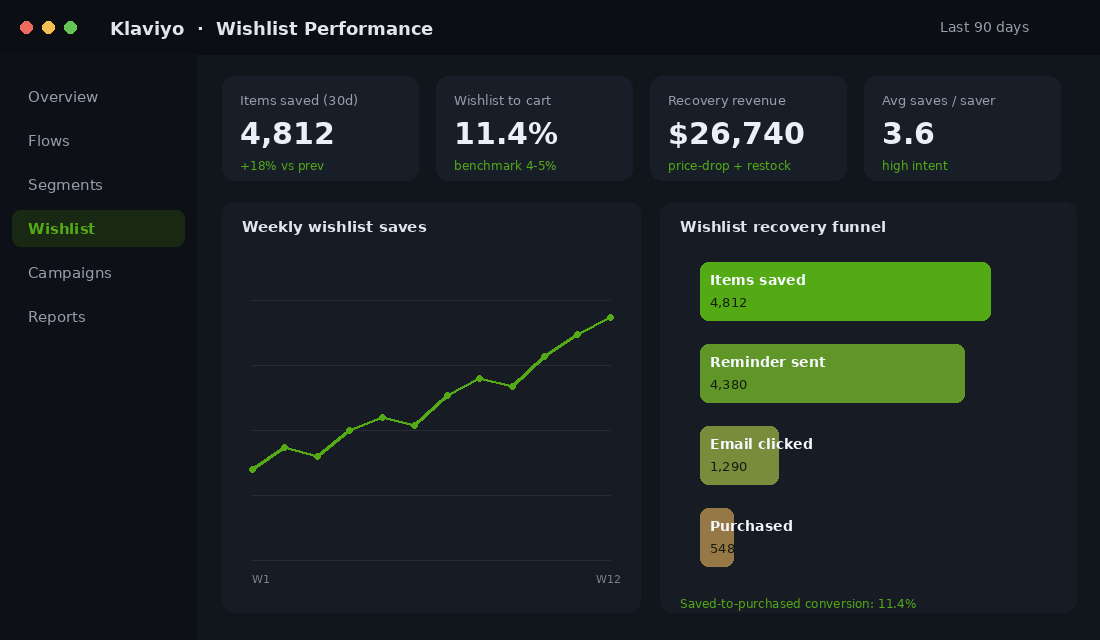
The other reason this matters in Australia specifically is timing. A big share of your customers shop on a fortnightly pay cycle, and a lot of considered purchases (fashion, homewares, anything over $80) get deferred to the next pay run. Without a wishlist, that deferral is a lost sale. With one, it is a scheduled follow-up that lands at the right moment. Here is what good wishlist reporting looks like once it is running.
Part 1: Make Saving Effortless (No Login, One Tap)
The single biggest thing that kills wishlist adoption is forcing a login before someone can save. Princess Polly, for all its strengths, makes you sign in to keep a wishlist, and that wall stops a huge chunk of first-time visitors who are not ready to create an account for a brand they met two minutes ago. Do not copy that. Your wishlist should work for a guest on the first tap, then quietly attach to their profile later when they give you an email.
Place the save control where the decision happens. That means a clear heart or ‘Save’ button on the product page next to the add-to-cart button, and a smaller heart on every collection-page card so shoppers can save while they browse a category. On mobile, keep it clear of the sticky add-to-cart bar so thumbs do not mis-tap. Your collection and product templates are where this lives, so it pairs naturally with the work in our Shopify product page conversion playbook.
Three rules make saving effortless:
- No account required. Let guests save on tap one. A good app holds the wishlist against a browser cookie, then merges it into the customer record the moment they log in or hand over an email.
- Cross-device by default. Someone saves on the train on their phone, then buys on a laptop that night. If the list does not follow them, you lose the sale. Email-linked wishlists fix this.
- Visible confirmation. When an item is saved, show it. A filled heart, a small toast message, a wishlist counter in the header. Shoppers need to trust the save happened or they will not rely on it.
The Iconic, Australia’s largest fashion marketplace, is the model worth studying here. Its wishlist saves instantly across the app and the web, syncs to a shopper’s account without nagging them up front, and feeds restock and price alerts. The lesson is not that you need their budget. It is that saving has to feel weightless, because every extra tap between wanting an item and saving it costs you savers.
Part 2: Capture the Email Behind Every Save
An anonymous save is almost worthless. If you do not know who saved the linen dress, you cannot tell them when it drops in price or sells out. So the moment of the save is your highest-intent email capture opportunity on the entire store, higher than a generic popup, because the shopper is asking for something specific.
Make it a value exchange, not a tax. After the first save, show a small prompt: ‘Want us to let you know if this goes on sale or runs low? Drop your email and we will keep an eye on it for you.’ That framing converts well because you are offering a genuine service, not begging for a subscriber. The email you collect here is zero-party data of the best kind, tied to a named product, and it should flow straight into the same nurture system as your welcome email flow so new savers get your brand story while their interest is hot.
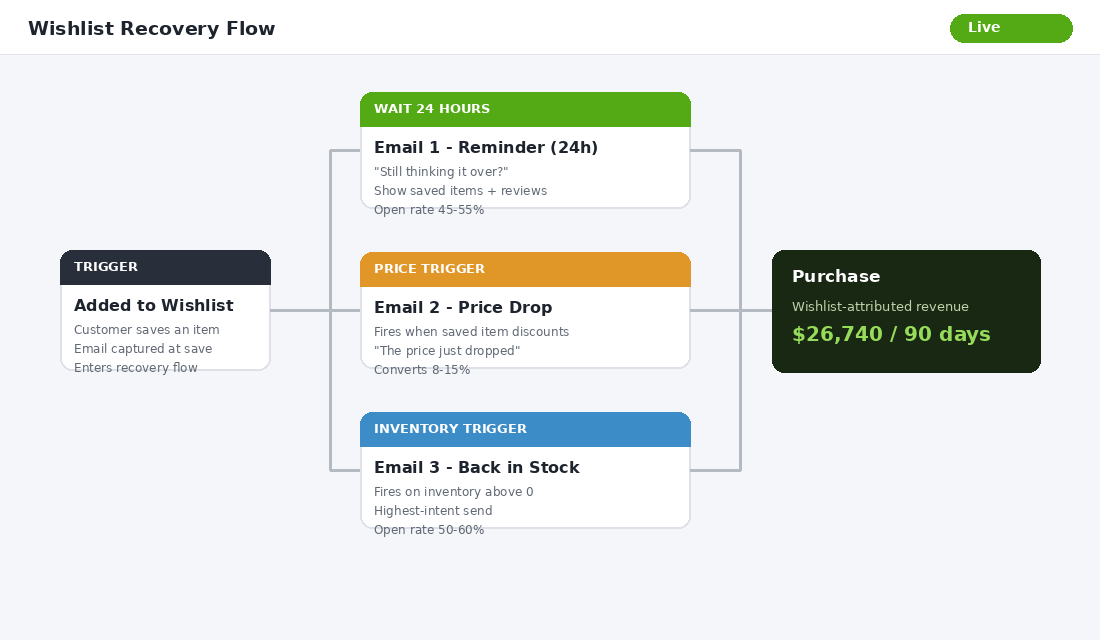
Then segment. In Klaviyo, tag the profile with a ‘wishlist saver’ property and store the saved product. That tag lets you build the recovery flow in Part 3 and lets you exclude savers from broad discount blasts so you only ever message them about the thing they actually want. The flow below is the engine that turns those captured emails into revenue.
Part 3: Build the Wishlist Recovery Flow (Where the Money Is)
This is the part most stores skip, and it is where the revenue lives. A wishlist with no follow-up is just a digital shoebox. A wishlist wired into three automated triggers is a recovery channel that runs while you sleep. It is the close cousin of the system in our abandoned cart recovery flow, applied to saved items instead of carts.
Build three triggers, in this order of value:
- The reminder (24 to 48 hours after the save). Simple and gentle. ‘Still thinking it over?’ Show the saved item, a couple of real reviews, and an easy path back to the product page. No discount. You are removing friction, not bribing. Reminder emails to savers routinely open at 45% to 55% because the shopper asked for this.
- The price-drop alert (fires when the saved item discounts). This is the highest-converting message in the set. When something a customer saved goes on sale, an automated ‘the price just dropped on your saved item’ email converts in the 8% to 15% range, against 1% to 2% for a generic sale blast, and opens at 50% to 60%. You are telling someone the exact thing they wanted is now cheaper. That is as warm as email gets.
- The back-in-stock alert (fires when inventory returns). If a saved item sold out, the restock email is pure intent. These shoppers effectively raised their hand and said ‘I have my card ready for this specific thing.’ Send it within the hour of restocking and watch it clear units before you spend a cent on ads.
Two details lift this flow more than anything else. Timing: send the reminder while the memory is fresh, inside two days, not a week later when the impulse has cooled. Specificity: every email should lead with the saved product image and name, not a generic banner. The whole reason this channel outperforms is that you are messaging one person about one thing they personally chose, so the second the email looks like a mass campaign, the advantage is gone.
Sequence beats single send every time. Klaviyo’s own analysis found three-email flows produced US$24.9 million against US$3.8 million from single emails, a 6.5x difference. Apply the same logic here: a reminder, then conditional price-drop and restock alerts, will out-earn a lone ‘you saved this’ email many times over. Keep the copy specific to the saved product, never generic.
Part 4: Read Your Wishlist Data Like a Demand Forecast
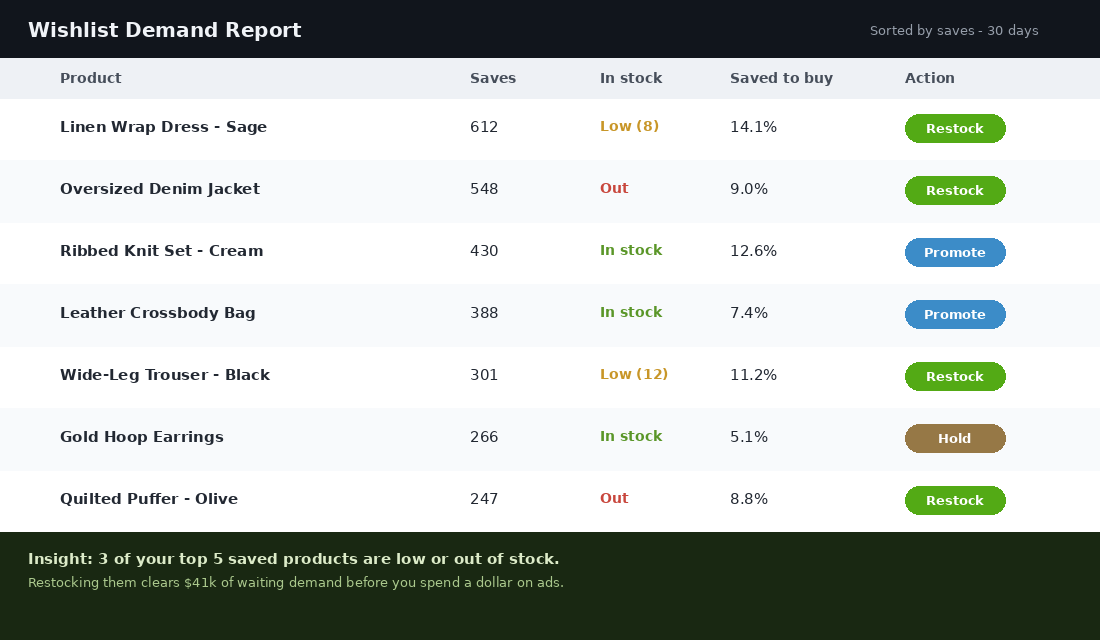
Here is the use almost nobody talks about. Your wishlist is the cleanest demand signal you own. Every save is a customer voting with intent for a product, before they spend a dollar. Sort your saves by volume and you have a ranked list of what the market wants from you next.
Use that data four ways. First, restock priority: if your three most-saved items are low or out of stock, you are sitting on a pile of waiting demand. Restock those before you chase new traffic. Second, discount discipline: do not blanket-discount a product that already gets saved heavily, because it sells on desire, not price. Save your markdowns for items with saves but weak conversion. Third, ad audiences: export wishlist savers as a custom audience and retarget them with the exact product, which lifts return on ad spend because the creative matches proven intent. Fourth, product validation: a new line racking up saves but few sales usually has a price or photography problem, not a demand problem, and that is a far cheaper fix than killing the product.
This signal gets sharper around the moments that matter. In the weeks before a major sale window like end of financial year or Black Friday, savers spike as shoppers build their lists ahead of the discounts. Reading that pre-sale wishlist data tells you which products to make sure you have deep stock on, and which to feature first when the sale opens, so you go in with inventory matched to proven demand rather than guessing.
A demand report turns the wishlist from a customer convenience into a merchandising tool. This is the view that should sit on your Monday dashboard.
Part 5: Set Up Swym Wishlist Plus in an Afternoon
You do not need a developer for this. Swym Wishlist Plus is the most widely used wishlist app on Shopify, sitting at a 4.7 rating across more than 1,400 reviews, and it covers everything in this playbook out of the box: guest saves with no login, cross-device syncing, and price-drop and back-in-stock alerts that plug into Klaviyo, Omnisend and Mailchimp. Pricing starts around US$29.99 per month, which a single recovered fashion order usually covers.
The setup runs like this:
- Install from the Shopify App Store. Search ‘Swym Wishlist Plus’ by Swym Corporation and add it to your store. No code required.
- Style the buttons to your brand. Set the heart and ‘Save’ button colours, then preview on your live theme through the theme editor so they sit correctly on product and collection pages.
- Turn on guest wishlists. Confirm shoppers can save without an account, with the list held against a cookie and merged on login. This is the setting that makes or breaks adoption.
- Connect your email platform. Link Klaviyo (or your tool of choice) so saved-item, price-drop and restock events flow through as triggers you can build flows on.
- Build the three flows from Part 3. Reminder, price-drop, back-in-stock. Switch them live and check the test emails render on mobile before you walk away.
If budget is tight at the start, Wishlist by Square offers a free tier to get saving live, and Growave bundles wishlists with reviews and loyalty if you want one app doing several jobs. Whatever you choose, the non-negotiable is that it captures an email and fires automated alerts. A wishlist that only stores items is not worth installing.
Four Mistakes That Kill Wishlist ROI
- Hiding it behind a login. The moment you force an account before a save, you lose the majority of first-time visitors, who are exactly the people a wishlist exists to catch.
- Letting saves stay anonymous. No email means no follow-up. If you are not capturing a contact at or near the save, you have built a feature with no payback.
- Treating it as storage, not a flow. A wishlist with no reminder, price-drop or restock emails is a shoebox. The automation is the product, not the heart icon.
- Discounting everything in the price-drop email. If shoppers learn that saving an item guarantees a discount soon, you train them to wait. Let price-drop alerts fire on genuine, scheduled markdowns only, and keep the reminder email discount-free.
The Compound Effect: What This Looks Like Over a Year
Run the maths on a store doing around $2 million a year. Say you get 60,000 sessions a month and just 3% of visitors save an item. That is 1,800 saves a month. Capture an email on 60% of them and you are adding roughly 1,080 high-intent contacts to your list every month, tied to named products, at zero extra ad spend.
Now apply the recovery flow. If that system converts a conservative 11% of savers into buyers over the following weeks at a $95 average order value, that is around 120 extra orders a month, or about $11,400 in monthly revenue you were previously leaking. Over a year that is roughly $137,000 in incremental sales, most of it at near-zero acquisition cost because you already paid to bring these shoppers in once.
Then add the merchandising upside. Restocking your most-saved items ahead of demand recovers sales you would otherwise lose to stockouts, and retargeting savers with the exact product they wanted lifts your ad efficiency across the board. The wishlist stops being a checkbox feature and becomes one of the better-performing channels on your store, built on intent you were already generating and throwing away.
Wishlist Benchmarks: How to Know If Yours Is Actually Working
Once the system is live, you need a baseline to judge it against. These are the numbers we see across Aussie DTC stores running wishlists properly.
- Save rate: 3 to 6% of product page visitors should be saving items once the wishlist button is prominent. Under 2% usually means the button is invisible or demands a login.
- Email capture from saves: 40 to 60% of guest savers should hand over an email when the value exchange is framed properly (“save it so you don’t lose it”).
- Wishlist email performance: price-drop and back-in-stock alerts routinely pull 45 to 60% open rates and 10 to 15% click-through — roughly triple a standard campaign, because the customer pre-declared the interest.
- Wishlist-to-purchase conversion: 8 to 12% of saved items should convert within 90 days. Saved-but-stalled items are your retargeting goldmine, not dead weight.
Review these monthly inside the same dashboard rhythm as the rest of your store metrics — if you do not have that rhythm yet, the Monthly Business Review Playbook gives you the 1-page format. And remember the wishlist is one layer of a bigger browser-recovery system: pair it with the Back-in-Stock Playbook so the two flows hand off to each other instead of double-emailing the same shopper.
Your 30-Day Wishlist Rollout
Here is the checklist to take this from idea to live revenue in a month.
- Week 1 (Set up saving): Install Swym Wishlist Plus, style the buttons, enable guest wishlists, and add the heart to product and collection cards. Test it on mobile.
- Week 2 (Capture the email): Add the value-exchange prompt after the first save, connect Klaviyo, and tag savers with a wishlist property plus the saved product.
- Week 3 (Build the flow): Launch the reminder, price-drop and back-in-stock emails. Write product-specific copy and confirm each trigger fires correctly.
- Week 4 (Read the data): Pull your first wishlist demand report. Restock the top saved items that are low or out, and build a retargeting audience from your savers.
- Ongoing: Review saves and recovery revenue every Monday alongside your other channels. Adjust stock and discounts based on what is actually being saved.
Inside eCommerce Circle, capturing and converting saved-item intent is one of the core pillars we work on with every member. If you want a second opinion on your wishlist and recovery flows, let’s talk.