Here is an uncomfortable truth most Aussie founders do not want to hear: your slowest pages are quietly refunding your ad spend. You pour money into Meta and Google to win the click, the shopper taps through on their phone, the hero image stalls for three seconds, and they bounce before your add-to-cart button has even rendered. You paid for that visit. You just did not get to sell to them.
What’s in This Article
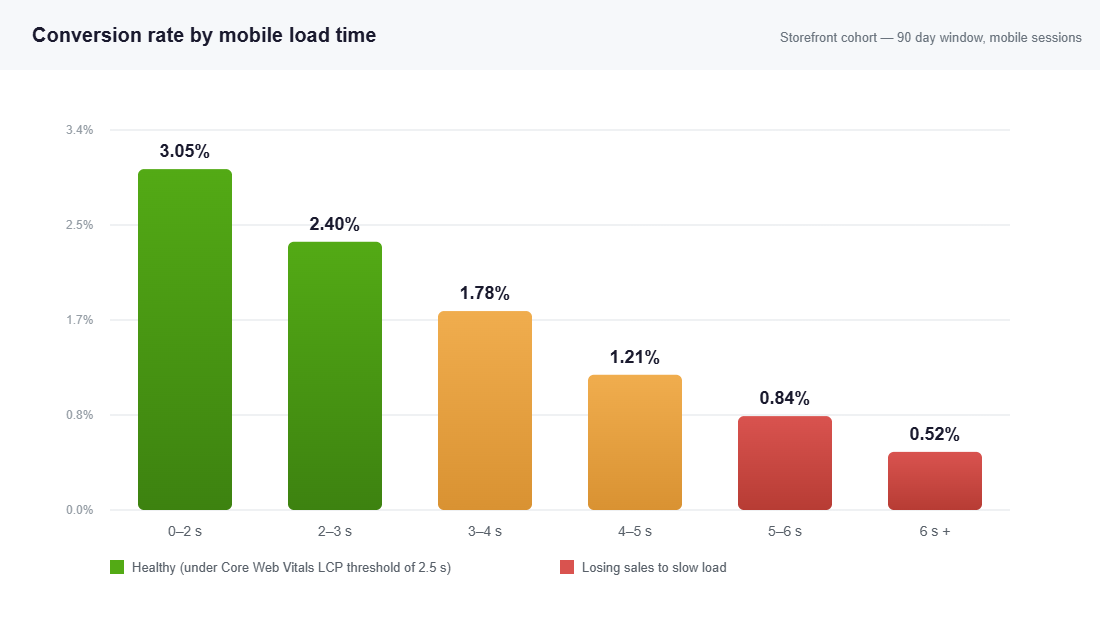
Most operators treat site speed like a developer problem. Something abstract, technical, parked in the “we will get to it” pile behind the next sale and the next product drop. That is the wrong frame. Speed is a revenue lever, and the numbers are not subtle. Conversion rates drop by an average of 4.42% for every extra second of load time, and the highest converting stores load in one to two seconds, where average conversion sits around 3.05%.
The good news for you is that almost nobody fixes this properly, so it is a genuine edge. Only 48% of Shopify stores pass all three Core Web Vitals on mobile, even though around 75% pass overall. That gap between desktop and mobile is where your competitors are leaking sales. This is the exact 6-step system we walk through with members to close it.
Why Speed Is a Revenue Lever, Not an IT Job
Think about where your traffic actually comes from. For most Aussie DTC brands, 70% or more of sessions are on mobile, often on a patchy 4G connection somewhere between the train and the couch. Your desktop store might feel snappy on the office wifi, but that is not the experience your buyer is having.
The behaviour data is brutal. More than half of mobile users (53%) abandon a page that takes longer than three seconds to load. When load time slips from one second to three, the probability of a bounce climbs by 32%. Stretch it from one second to five and bounce probability jumps 90%. You are not losing customers because your product is wrong. You are losing them in the loading bar.
Here is the reframe that makes founders take this seriously. A collaborative study between Google and Deloitte across 30 million sessions found that improving load time by just 0.1 seconds lifted conversions by 8.4%. You do not need a rebuild. You need to claw back a few hundred milliseconds in the right places, and the compounding effect on a store doing 40k to 500k a month in AUD is real money every single day.
The Three Numbers That Actually Matter
Google measures page experience with three metrics, collectively called Core Web Vitals. Ignore the alphabet soup of every other speed score for a minute, because these three are the ones tied to both rankings and conversions. Get these into the green and the rest tends to follow.
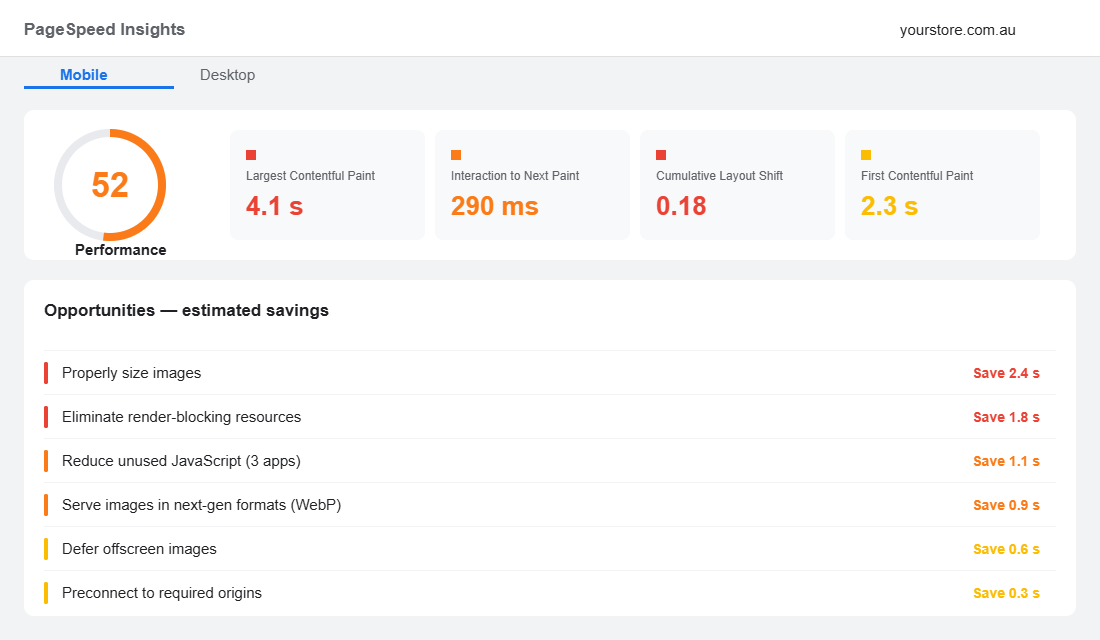
- LCP (Largest Contentful Paint) under 2.5 seconds. How long until the biggest thing on screen, usually your hero image or product photo, has actually painted. This is the metric that makes a store feel slow. It is almost always an image problem.
- INP (Interaction to Next Paint) under 200 milliseconds. How quickly the page responds when a shopper taps. Lag here is caused by heavy JavaScript, which almost always traces back to apps. INP replaced the old First Input Delay metric in 2024, and it is stricter.
- CLS (Cumulative Layout Shift) under 0.1. How much the page jumps around as it loads. If a shopper goes to tap “add to cart” and a banner shoves it down so they tap something else, that is CLS, and it kills trust instantly.
Google has confirmed Core Web Vitals is a ranking factor, and the March 2025 core update leaned harder on page experience signals. So a slow store is a double loss: fewer of the people who arrive convert, and fewer people arrive in the first place because you rank lower. Speed work pays you twice.
Step 1: Measure The Way Google Actually Measures
You cannot fix what you are guessing at. Before you touch a single setting, get a real baseline, and understand the difference between two kinds of data, because this trips up nearly everyone.
- Lab data is a single simulated test run in a controlled environment. Run it in PageSpeed Insights (free, from Google) on your homepage, a top collection page, and your best-selling product page. Always toggle to the Mobile tab. The desktop score is vanity.
- Field data is what real visitors experienced over the last 28 days, pulled from the Chrome User Experience Report. This is the data Google actually uses for rankings, and it is the only score that reflects your real customers on their real phones.
Record three numbers for each page: LCP, INP, and CLS, on mobile, from the field data section. Drop them in a simple spreadsheet with today’s date. That single sheet becomes your scoreboard. The Shopify admin also has a Online Store Speed report under Analytics, which is useful for spotting a sudden drop after you install a new app, but treat PageSpeed Insights as your source of truth.
Step 2: Fix Your Images First (The Biggest LCP Win)
For most Shopify stores, images are 60% or more of total page weight, and your hero image is usually the exact element LCP is measuring. This is where you get the fastest, cheapest win, so start here before anything clever.
Three things move the needle. First, serve images in WebP, the modern format that is far smaller than JPEG or PNG. Shopify serves WebP automatically to supported browsers, but only once your source files are sensible, so do not upload a 4MB camera original and expect magic. Second, compress and resize every image so you are never shipping a 3000px file into a 600px slot. Third, lazy load everything below the fold so the browser only fetches images as the shopper scrolls toward them, which can cut initial load by 50% to 60%.
The simplest tool to automate this is TinyIMG (also listed as TinySEO) from the Shopify App Store. Here is the setup that gets results without breaking your theme:
- Install and run a backup first. TinyIMG keeps originals, but take a theme duplicate before any bulk action so you can roll back in one click.
- Bulk compress existing images using the “lossy” or “smart” setting (roughly 70 to 80% quality). The eye cannot tell, the browser can.
- Enable automatic compression on upload so every new product photo is handled going forward without you thinking about it.
- Turn on lazy loading and JS/CSS minification from the speed settings, then immediately re-test on PageSpeed Insights to confirm nothing visual broke.
- Set your hero and first product image to preload so LCP fires fast, while everything else defers.
This single step is what took the store Kadam Haat from a mobile LCP of 4.8 seconds down to 2.1 seconds. Through image compression, script restriction, and code cleanup, they pushed their PageSpeed score to 82, and the outcome was a 33% increase in mobile conversion rate plus an 18% lift in organic search traffic. Same products, same traffic, just a faster store.
Step 3: Audit Your App Stack (The Silent Killer)
Every app you install can inject JavaScript and CSS into your storefront, and that code runs on every page whether the feature is used there or not. This is the number one cause of bad INP scores and the thing founders most underestimate. A store with 25 apps is almost never a fast store.
Worse, uninstalling an app does not always remove its code. Many apps leave behind snippets in your theme files, so you can be carrying the weight of a tool you stopped paying for months ago. This is why an app audit is a recurring job, not a one-off.
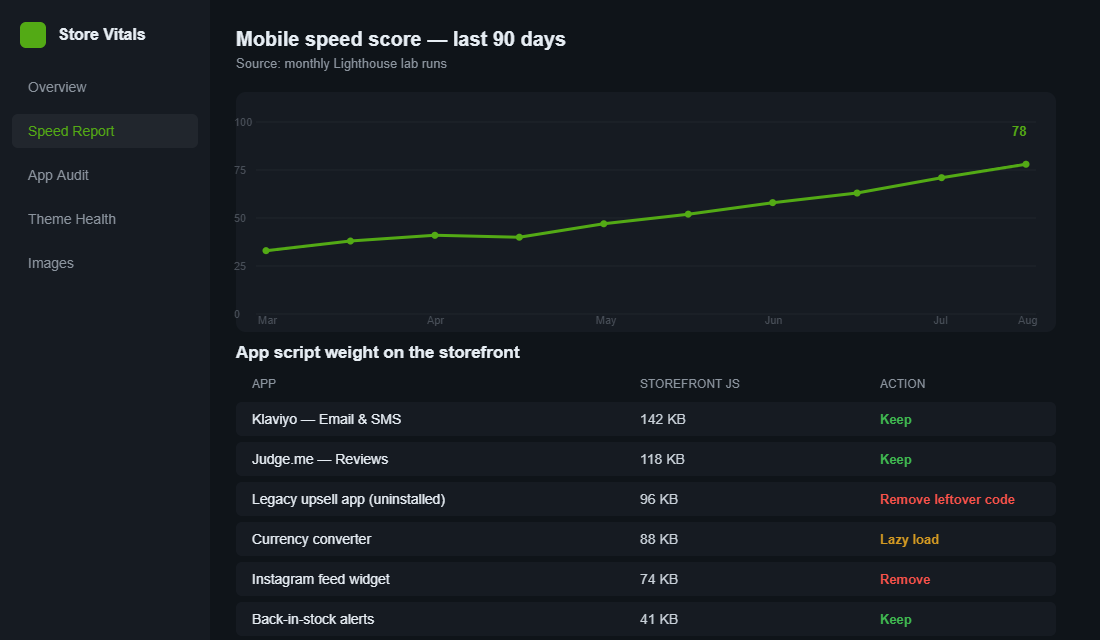
Run this audit once a quarter. List every app, note what it actually does for revenue, and be honest about whether it earns its place. Use these three buckets:
- Keep. The app drives clear revenue or retention (your email and SMS platform, your reviews app). Leave it, but check it is only loading where it is needed.
- Lazy load or scope. The feature matters but does not need to fire on every page. A currency converter or an Instagram feed can be deferred or limited to specific templates.
- Remove. The app is unused, duplicated, or “nice to have”. Uninstall it, then have a developer check your theme files for leftover snippets so the code actually leaves.
If your reviews and trust widgets are part of the bloat, do not just rip them out, because social proof still has to convert. The fix is to load them efficiently, not abandon them. We cover how to place that proof without tanking speed in the Shopify trust signals framework.
Step 4: Tame Your Theme and Your Fonts
Your theme is the foundation, and not all themes are built equally. Heavily customised older themes, or themes loaded with page-builder sections, carry render-blocking CSS and JavaScript that delays the moment your store becomes usable. If you are on an ageing theme that has been patched a dozen times, a move to a clean Online Store 2.0 theme is often the single biggest structural speed gain available.
Fonts are the quiet offender almost nobody checks. Every custom web font is a file the browser has to download before it can paint text, and stacking three or four font weights adds real delay plus layout shift as text reflows. Tighten this up:
- Limit yourself to two font families, two weights each. Most brands genuinely need a heading font and a body font, nothing more.
- Use a system font where you can. Shopify’s font picker includes system options that load instantly because they are already on the device.
- Preload your primary font and set font-display to swap so text shows immediately in a fallback while the brand font loads, which protects both LCP and CLS.
- Reserve space for images and embeds with set dimensions so nothing jumps as it loads. This is the cheapest CLS fix there is.
While you are in the theme, give your product page the same scrutiny, because it is where the buying decision happens and where speed and conversion design meet. Our product page conversion playbook pairs neatly with this work.
Step 5: Set a Performance Budget and Defend It
Here is why most stores get fast for a week and then slowly bloat again: there is no rule stopping the next app, the next pop-up, the next “quick” tracking script from being bolted on. Speed is not a project you finish. It is a standard you hold.
A performance budget is a simple set of limits your store is not allowed to cross. Write it down and make it the gate every change has to pass. A sensible starting budget for an Aussie mobile-first store looks like this:
- Mobile LCP stays under 2.5 seconds on your homepage, top collection, and hero product page.
- Total page weight stays under 2MB on key templates, with images the first thing trimmed when you go over.
- No new app ships without a before-and-after PageSpeed test. If it costs you more than a few hundred milliseconds, it has to earn that back in revenue or it does not go live.
- Quarterly app audit is locked in the calendar as a recurring task, not a someday job.
The discipline is the point. A budget turns speed from a heroic one-off cleanup into a habit that protects the gains you just fought for.
Step 6: Re-test, Then Connect Speed to Dollars
After each round of changes, re-test on PageSpeed Insights and log the new numbers next to your baseline. But do not stop at the score, because a green score is not the goal. Revenue is the goal. Watch your mobile conversion rate, your bounce rate, and your add-to-cart rate in the two to four weeks after the work, and tie the movement back to the speed gain.
If you want proof this maps to dollars, look at the controlled test agency Render Better ran on a Shopify Plus store. Over an 18-day split test covering 115,248 visits and more than 564,000 in purchases, the faster version was 95% likely to outperform the original, and it generated an additional 2,625 AUD in revenue per day from speed alone. No new traffic, no new offer, just a quicker store. That is the kind of math that makes speed the easiest yes on your roadmap.
The Compound Effect: Why These Six Steps Work as a System
None of these steps is dramatic on its own. Compress images and you might save a second. Trim two apps and you claw back another. Tidy your fonts and you steady the layout. Individually they feel small. Together they move you from a four second store to a two second store, and that shift crosses the exact threshold where conversions stop falling and start climbing.
Remember the compounding numbers. If 0.1 seconds is worth 8.4% in conversions, then the full second or two you recover from this system is not a rounding error. It is a structural lift to every campaign you run from now on, because a faster store makes the same ad spend, the same email, and the same post-purchase experience all convert harder. Speed is the multiplier sitting underneath everything else you do.
Third-Party Scripts: The Weight That Is Not an App
You audited your apps and your score barely moved. That is because a large share of the JavaScript on an average Shopify store never came from an app at all. It was pasted into theme.liquid or added through Google Tag Manager, often years ago, by someone who no longer works with you.
Open your theme’s theme.liquid file and read every script tag between the head tags. Then open Tag Manager and list every active tag. On most stores you will find pixels for platforms the brand stopped advertising on, a chat widget from a trial, two analytics tools doing the same job, and at least one heatmap script left running from a test 18 months ago.
- Delete anything for a channel you are not currently running. A dormant TikTok or Pinterest pixel still costs you 30 to 90ms and a DNS lookup on every single page view.
- Consolidate duplicate analytics. Running GA4, a Shopify analytics app and a third tracker means paying the performance cost three times for one answer.
- Defer anything not needed for first paint. Chat widgets, review widgets, back-in-stock popups and social embeds should load after interaction or on scroll, not in the head. Deferring a chat widget alone commonly returns 200 to 500ms of Interaction to Next Paint.
- Move server-side where you can. Shopify’s Customer Events and a server-side GTM container shift tracking off the browser thread. It is more setup, but on a heavily tracked store it is often the single biggest remaining win.
- Set a script budget: no more than 12 to 15 third-party requests and under 300KB of third-party JavaScript. Write it down, and make anyone adding a script justify it against the budget.
Use the Coverage tab in Chrome DevTools to see how much of each script is actually executed on a page load. Seeing that a 180KB file uses 4 percent of its code makes the decision to remove it much easier. The app stack audit is the natural companion to this pass.
Speed on Real Aussie Networks: Why Your Test Is Lying to You
Your store feels fast because you are testing it on a fast connection, on a recent phone, with everything cached. Your customer is on a train between Southern Cross and Footscray on a mid-range Android with 40 tabs open. Those are not the same test.
Two numbers matter here and they usually disagree. Lab data (Lighthouse, PageSpeed Insights) runs a simulated device under controlled conditions. Field data (the Chrome User Experience Report, shown as “Discover what your real users are experiencing” in PageSpeed Insights) is what actually happened to real visitors over the last 28 days. When they conflict, believe the field data. It is the one Google uses.
- Test throttled: in DevTools set the network to Slow 4G and CPU to 4x slowdown. That approximates a mid-range Android on suburban mobile data far better than your desktop on the NBN.
- Test the entry point, not the homepage. Most paid and organic traffic lands on a product or collection page. Those are usually heavier than the homepage and almost never the page that gets tested.
- Test cold. Use an incognito window with cache disabled. A returning-visitor load tells you nothing about the first impression that decides whether someone stays.
- Check regional latency. If your apps or fonts are served from US origins, an Australian visitor pays 150 to 250ms of round-trip time before a single byte arrives. Self-host your fonts and prefer apps with a local or global edge presence.
- Segment by device in GA4. Compare mobile and desktop conversion rate against load time. On most Aussie stores mobile is 65 to 75 percent of traffic but converts at roughly half the desktop rate, and a meaningful slice of that gap is speed rather than design.
Set your target against the field data, not the lab score, and re-check monthly rather than after a big project. Speed regresses quietly with every app install and theme tweak. If mobile is where your gap is widest, the Shopify Mobile Conversion Playbook covers the design side of the same problem.
Your Shopify Site Speed Checklist
Run this top to bottom. Do not move to the next line until the current one is done and re-tested.
- Baseline. Record mobile LCP, INP, and CLS for homepage, top collection, and hero product page in PageSpeed Insights.
- Images. Bulk compress, convert to WebP, resize to display size, enable lazy loading, preload the hero image.
- Apps. List every app, sort into keep, lazy load, or remove, and clear leftover code from anything uninstalled.
- Theme. Move off any heavily patched old theme, reserve dimensions for images and embeds to stop layout shift.
- Fonts. Two families, two weights, preload the primary, set font-display to swap.
- Budget. Write down your limits: LCP under 2.5s, page weight under 2MB, no app without a speed test.
- Re-test and attribute. Log new scores, then watch mobile conversion and bounce for four weeks and tie the change back to dollars.
Work that list and you will land in the top half of Shopify stores on mobile, the half that actually converts the traffic it pays for. Most of your competitors never will, because they keep treating speed as a developer’s chore instead of a founder’s lever.
Inside eCommerce Circle, store speed and the conversion architecture that sits on top of it are core pillars we work on with every member. If you want a second opinion on where your store is leaking sales, let’s talk.