Ask most Shopify founders why people do not buy and you get a shrug and a guess. Price. Postage. The economy. Maybe the photos need work.
What’s in This Article
Those guesses are almost always wrong, and they are expensive. The average documented cart abandonment rate sits at 70.22% across Baymard’s benchmark data, and Baymard also found that roughly 30% of shoppers walk because of insufficient or unclear product information. That is not a price problem. That is an unanswered question problem, and it is fixable in an afternoon once you know which question to answer.
Here is the uncomfortable part. Your store already contains a complete, ranked list of every reason people hesitate. It is sitting in your support inbox, your site search log, your one-star reviews, and the pre-checkout drop-off in your funnel. Nobody has bothered to pull it into one document. That document is what I call the Objection Ledger, and building it is one of the highest-return two-week projects an Aussie operator can run.
Why Your Best Guesses About Objections Are Usually Wrong
Founders are the worst people in the business to guess at objections. You know why the fabric costs what it costs, you know the strap is rated for 15kg, you know the dispatch cut-off is 2pm AEST. None of that is on the page, because it is obvious to you.
The second problem is that founders over-index on price. Price is the objection customers say out loud because it is socially easy. It is rarely the objection that actually stopped the sale. When Baymard breaks down abandonment reasons, unexpected extra costs account for 48% of abandoned carts and a checkout that is too long or complicated accounts for another 26%. Neither of those is “your product costs too much”. Both are “you surprised me” and “you made me work”.
The third problem is the biggest. A further 42% of shoppers abandon because they were just browsing and not ready to buy. That group is not lost. They are unresolved. They had a question, the page did not answer it, and browsing was easier than asking.
So the job is not to argue with objections. The job is to find them, rank them by what they cost you, and answer them before the shopper has to ask. Everything below is the system for doing that.
Source One: Your Support Inbox Is the Highest-Signal Channel You Are Not Mining
Every pre-purchase support ticket is a customer telling you, in their own words, exactly what your product page failed to do. It is free qualitative research that most stores delete after 30 days.
Pull the last 90 days of tickets, live chat transcripts and Instagram DMs. Split them into two buckets: pre-purchase (asked before an order exists) and post-purchase (order already placed). Only the pre-purchase bucket goes into the Objection Ledger. Post-purchase tickets belong in a different project.
Now read 100 of them and write the question in the customer’s language, not yours. Not “sizing enquiry”. The actual sentence: “I’m normally a 12 in Country Road, what should I get?” That verbatim is what you will paste onto the page later, because it is how the next 500 shoppers will phrase it in their head.
- Tag every pre-purchase ticket with an intent. Sizing, materials, delivery time, compatibility, care, warranty, stock, gifting, comparison.
- Count the raw volume per intent. Not percentages yet. Raw counts tell you what is loudest.
- Flag the tickets that never got a reply within four hours. Those are the ones where the shopper very likely bought elsewhere.
- Note which product or collection triggered it. Objections are rarely evenly distributed. One SKU usually generates a third of the noise.
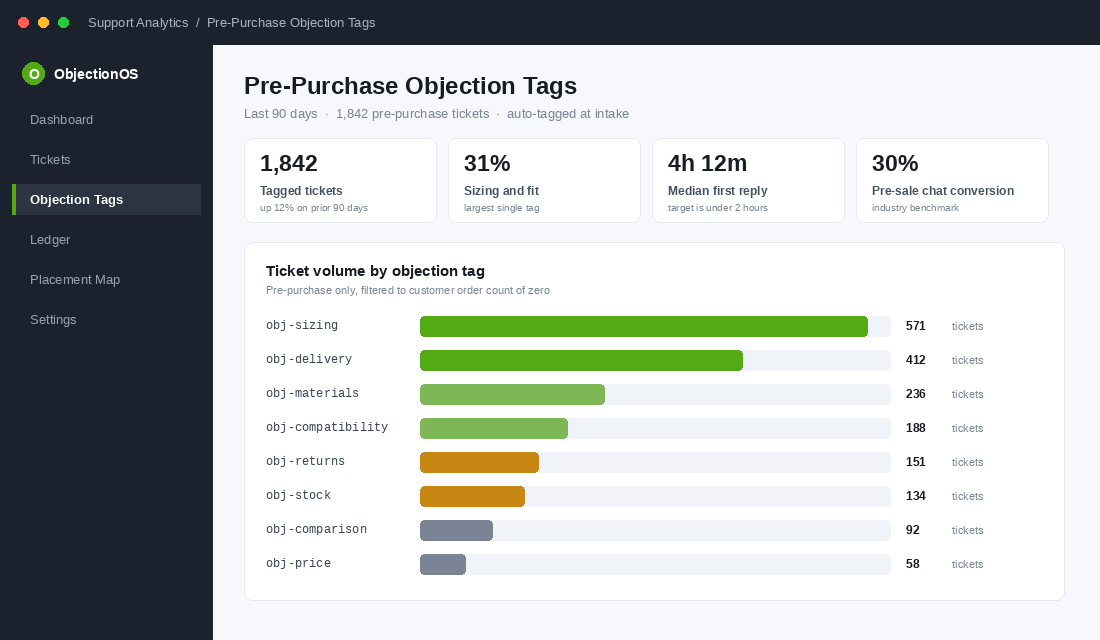
This channel is worth taking seriously as a revenue line, not a cost line. Gorgias publishes case data on brands running pre-sale chat where roughly 30% of chats convert. If a third of the people who ask a question go on to buy, then every unanswered question on a product page is a sale you are choosing not to make.
Source Two: Site Search and Exit Surveys Catch the Silent Majority
For every shopper who emails you, dozens type the question into your search bar instead. Your Shopify search log is an unfiltered list of what people expected to find and could not.
In Shopify admin go to Analytics, then Reports, then “Top online store searches” and “Top online store searches with no results”. That second report is the gold. Zero-result searches are objections in their purest form: the shopper wanted something specific, believed you might have it, and got a dead end.
- Search terms for attributes you do not display. “Waterproof”, “vegan”, “made in Australia”, “gluten free”, “TGA approved”. If people search it, the attribute belongs on the page and in your filters.
- Search terms for policies. “Returns”, “shipping”, “afterpay”, “warranty”. Policy searches on a product page mean your PDP is missing a trust block.
- Competitor and comparison terms. People searching a rival brand name inside your store are comparison shopping while standing in your aisle.
- Size and fit terms. Especially relevant given fit and sizing drives somewhere between 53% and 70% of all fashion returns.
Then add an exit survey. Tools like Fairing or Zigpoll let you fire a single question at visitors leaving the cart. Keep it to one question with pre-set options plus a free-text field: “What stopped you from ordering today?” Run it for two weeks. You will collect a few hundred responses and the free-text answers will be more useful than the multiple choice, every time.
If you want the fuller version of this research discipline, our voice of customer playbook covers the five-channel system for collecting this on an ongoing basis rather than as a one-off sprint.
Source Three: Mine Reviews, Q and A, and Your Competitors’ One-Star Pile
Your own reviews tell you what went wrong after purchase. Your competitors’ reviews tell you what your shoppers are afraid of before purchase. Both belong in the ledger.
Start with your three-star reviews. Five-star reviews are marketing and one-star reviews are usually logistics. Three-star reviews are where the expectation gap lives, and that gap is an objection you failed to pre-empt. “Lovely quality but much smaller than I pictured” is a photography and sizing objection dressed up politely.
Then go and read 50 one and two-star reviews on the two competitors your customers mention most. Every complaint there is a fear your shopper carries into your product page. If the market leader is getting hammered for slow delivery from overseas warehouses, “ships from Melbourne, dispatched same day” is not a logistics detail. It is your single strongest objection killer and it should be above the fold.
The case for putting a proper Q and A block on your product pages is strong. PowerReviews measured a 177.2% conversion lift among shoppers who interacted with Q and A content on a product page, and found 24% of consumers are less likely to purchase when there is no Q and A section at all, rising to 33% among Gen Z. Nearly three quarters of shoppers read Q and A regularly or always. It is not a nice-to-have widget. It is the objection-handling layer of your PDP.
Source Four: The Five-Minute Non-Buyer Call
This is the one nobody does, and it is the one that changes the most minds. Take 20 people who abandoned a cart in the last fortnight and offer them a $20 gift card for five minutes on the phone. You will get four or five yeses, which is plenty. Ask exactly three questions and then shut up:
- “Walk me through what you were trying to solve when you landed on our site.” This gives you the job the product is being hired for, which is often not the job your copy is selling.
- “What was going through your head at the moment you decided not to order?” Do not accept “I just got busy”. Ask what they were looking at on screen when they got busy.
- “What would have had to be true for you to hit buy that day?” This is the money question. The answer is your objection, stated as a requirement.
Five calls will surface two or three objections you would never have guessed and that never appear in support tickets, because these people did not care enough to email you. That is exactly why their input is valuable.
Source Five: The Objections You Can Measure in Checkout Data
Some objections do not need interpreting. They show up as numbers, and they are usually the biggest ones.
- Cart to checkout drop-off. A steep fall here almost always means shipping cost shock. Extra costs at checkout drive 48% of abandonment, and Australian shipping is expensive enough that this is our national conversion tax.
- Shipping-method step drop-off. If people bail on the delivery screen, the objection is speed or choice, not price. The Australia Post eCommerce Report 2026 found 69% of shoppers want a range of delivery options including out-of-home collection, and 32% would choose one retailer over another based on that alone.
- Payment step drop-off. Usually a missing method. If Afterpay, Zip or PayPal is absent on an A$120 average order value, you are filtering out a real slice of the Australian market.
- Mobile versus desktop gap. If mobile conversion is less than half of desktop, your objections are being caused by the interface, not the product.
Context matters when you read these numbers. Aussie shoppers spent a record A$82.6 billion online in 2025, up 14% year on year across 9.8 million households, but average basket sizes fell. People are still buying. They are just being far more deliberate about it, which means every unresolved doubt costs more than it did two years ago.
Building the Objection Ledger: Score What Actually Costs You Money
You now have a messy list of 40 or 50 things people worry about. If you try to fix all of them you will fix none of them. The ledger exists to force a ranking.
Open a spreadsheet with seven columns: Objection (in customer language), Source, Frequency, Revenue Impact, Fixability, Score, and Owner. Then cap the list at 12 objections. Twelve is enough to cover a real product range and few enough that a small team can actually close them inside a quarter. Score each of the three middle columns from 1 to 5, then multiply them together for a score out of 125.
- Frequency (1 to 5). How often it appears across your five sources. An objection that shows up in tickets, search, reviews and calls scores a 5. Something one person mentioned once scores a 1.
- Revenue Impact (1 to 5). How close to the buy button does it bite? An objection that stops someone on the product page scores higher than one that stops them on the blog. Objections on your top three SKUs score higher than objections on the long tail.
- Fixability (1 to 5). A 5 is “I can write a sentence and ship it today”. A 1 is “we need to renegotiate with the supplier”. Be honest here, because fixability is what turns a research document into shipped work.
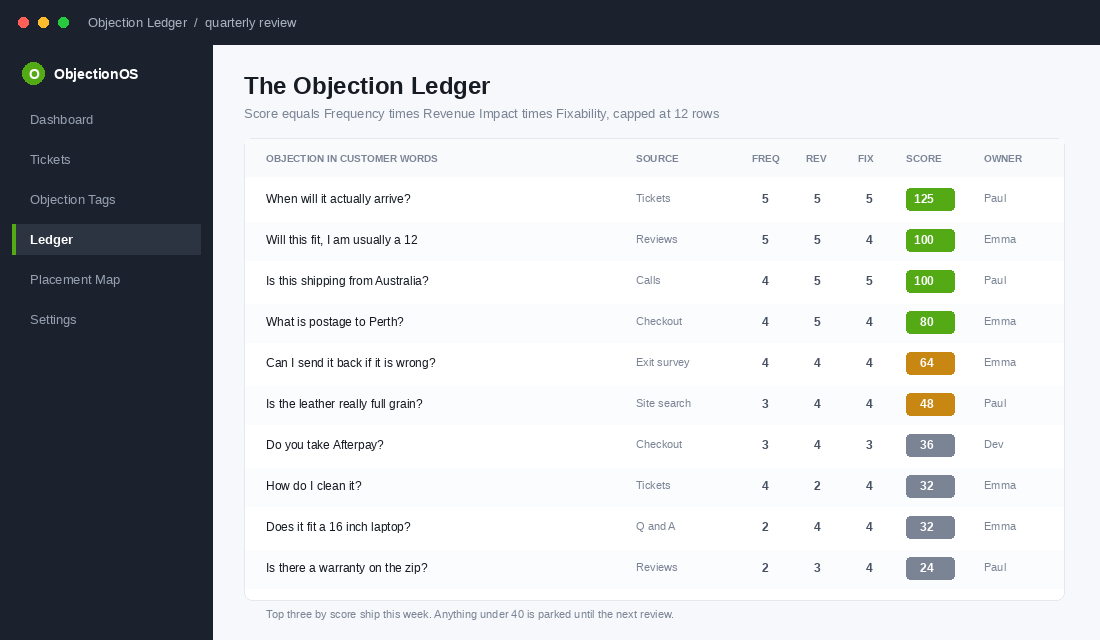
Sort by score descending. What usually happens is that the top three are embarrassingly easy: a missing delivery timeframe, an unclear returns window, and a sizing question that a two-line note would settle. Those three are worth more than the CRO test you were about to run.
Give every row an owner and a due date. An objection with no owner is a note, not a fix.
The Placement Map: Where Each Answer Actually Goes
Here is where most brands undo their own work. They gather the objections, then dump every answer into an FAQ page nobody visits. An answer buried two clicks from the buy button is not an answer. Every objection gets placed at the exact point in the journey where the doubt appears. Use this map:
- Above the fold on the PDP. The one objection that kills the most sales. Usually delivery speed or a risk reversal. One line, no accordion, always visible.
- Inside the buy box. Sizing help, stock status, dispatch cut-off, payment options. These sit within 200 pixels of the add-to-cart button because that is where the hesitation happens.
- First accordion below the buy box. Materials, care, compatibility, warranty. Ordered by ledger score, not alphabetically.
- Product Q and A block. The long tail. Seed it with your top 10 real support questions rather than waiting for organic submissions.
- Cart drawer. Shipping threshold, returns window, and the delivery estimate. This is where cost shock gets defused before it happens.
- Checkout. Trust badges, payment options, and a plain-English returns line. Nothing new should appear here that was not already promised earlier.
- Abandoned cart email. The single highest-scoring objection, answered directly in the first email rather than a discount code.
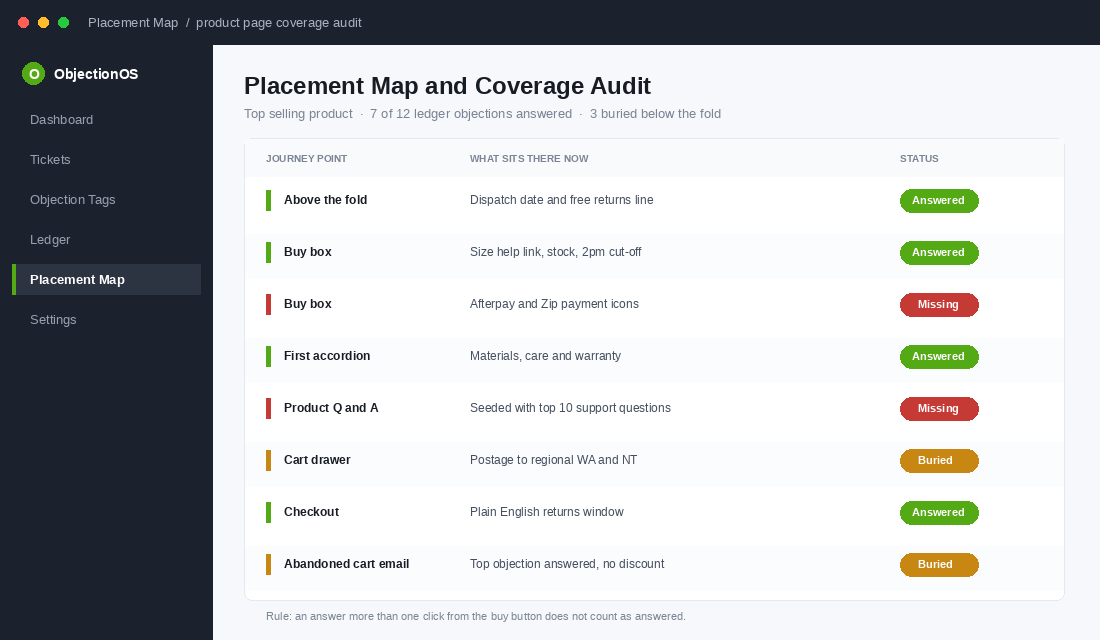
Then audit coverage. Go through your top-selling product page with the ledger open and tick off which of the 12 objections are answered, and where. Most stores discover they have covered four and buried three. Our PDP conversion architecture framework maps out the nine blocks a high-converting product page needs, which pairs neatly with this placement exercise.
Set Up Objection Auto-Tagging in Gorgias in About 30 Minutes
Doing this once as a sprint is good. Making it self-updating is what stops you repeating the whole exercise every six months. If you are on Gorgias, here is the setup.
- Create your tag taxonomy first. Settings, then Tags. Build tags with a consistent prefix so they group in reporting:
obj-sizing,obj-delivery,obj-materials,obj-compatibility,obj-returns,obj-stock,obj-price,obj-comparison. Eight to ten tags is plenty. - Build a rule per tag. Settings, then Rules, then Add Rule. Set the trigger to “Ticket is created”, add a condition on message body containing your keyword set, and the action to add the matching tag.
- Write real keyword sets. For
obj-sizing: “size”, “fit”, “true to size”, “measurements”, “what size”, “runs small”. Forobj-delivery: “when will”, “how long”, “dispatch”, “express”, “before christmas”, “arrive by”. - Add a pre-purchase filter. Add a second condition on customer order count equals zero, or route those to a separate
pre-purchasetag. This keeps buyer questions out of your prospect research. - Let it run for 30 days, then read the report. Statistics, then Tickets, then group by tag. You now have a live objection frequency chart that updates itself.
- Set a monthly 20-minute review. Any tag that grew more than 25% month on month becomes a ledger row and gets an owner.
If you are on Zendesk, Re:amaze or Shopify Inbox instead, the same logic applies with different menu names. The principle that matters is that the tag is created at intake, not retrofitted later, because nobody ever goes back and tags 4,000 old tickets.
The Australian Objections Most Brands Never Answer
Some objections are specific to selling into this market, and imported CRO advice from US blogs will never surface them. These belong on the ledger of every Aussie store by default.
- “Is this actually shipping from Australia?” After years of drop-shipped goods arriving in six weeks, Australian shoppers are trained to be suspicious. If you hold local stock, say the suburb. “Dispatched from our Brunswick warehouse” outperforms “fast shipping” every time.
- “What does this cost to send to me?” Regional and WA customers assume they will be gouged or excluded. Publish the regional rate and the regional timeframe explicitly rather than making them add to cart to find out.
- “Is the price in AUD?” Trivial to fix, and still missing on a surprising number of stores selling to multiple markets.
- “What happens if I need to send it back?” Koala publishes a 120 day trial with free pickup across metro Sydney, Melbourne, Brisbane, Adelaide, Canberra and Perth, and states plainly that regional customers must drop off at a fulfilment centre. The honesty about the exception is what makes the promise credible.
- “Can I get it before the weekend?” Australia Post found 43% of shoppers will pay extra for same or next-day delivery when it matters. A date converts better than a range.
- “Do you take Afterpay?” On a category with an A$95 to A$150 average order value, buy now pay later is often the difference between a considered purchase and an abandoned one.
Bellroy, the Melbourne accessories brand now shipping to more than 160 markets, built an entire product philosophy around removing friction, and it shows in how their product pages pre-empt questions about capacity, dimensions and leather care before a shopper thinks to ask. That is objection mapping done as a design principle rather than a patch job.
Write the Answer Once, Then Use It in Six Places
An objection answer is a reusable asset, but most teams write it once for the product page and let every other channel keep guessing. Take your number one ledger objection, write a single tight answer of 25 to 40 words with the specific number in it, then deploy that same sentence across:
- Abandoned cart email one, replacing the “you left something behind” line entirely.
- Your Meta ad primary text. If it stops people on your site, it stops them in the feed too.
- Your support macro library, so every reply uses the same wording and the same numbers.
- Welcome flow email two. New subscribers carry the same doubts as new visitors.
Consistency is what builds belief. When a shopper sees the same specific promise in the ad, on the page, in the cart and in the email, it stops reading as marketing and starts reading as fact.
The Compound Effect: One Ledger Feeds Five Parts of the Business
This is why objection mapping outperforms almost every other two-week project. The output is not one fix. It is a shared input every function draws from.
- Conversion rate. Answering the top three objections on the PDP typically moves conversion before you have run a single A/B test, because you are removing friction rather than shuffling layout.
- Paid media. Your best-performing ad angles come straight off the ledger. Objections are hooks with the polarity reversed.
- Returns. Unanswered sizing and expectation objections become returns three weeks later. Fit and sizing account for 53% to 70% of fashion returns, and the fix happens on the product page, not in the returns portal. Our returns reduction playbook goes deeper on that link.
- Support load. Every objection you answer on-page is a ticket that never gets created. Teams that do this properly see repetitive pre-sales volume fall noticeably within a month.
- Product and range. Objections that keep appearing and cannot be answered are product problems. If 40 people a month ask for a size you do not make, that is not an objection. That is a roadmap item.
The stores that run this well treat the ledger as a living document reviewed monthly, not a one-time audit. The objections change as you grow. The discipline of writing them down does not.
Your 14-Day Objection Mapping Sprint
Here is the whole thing as a schedule. Two weeks, mostly part-time, and no developer needed for the first pass.
- Day 1 to 2: Pull the raw material. Export 90 days of pre-purchase tickets, chat logs and DMs, plus your Shopify search reports including zero-result searches.
- Day 3: Read and transcribe. Log 100 tickets as verbatim customer sentences. Do not summarise into categories yet.
- Day 4: Mine reviews. Your three-star reviews plus 50 competitor one and two-star reviews.
- Day 5: Launch the exit survey. One question on cart exit, collecting while you do the rest.
- Day 6 to 8: Run five non-buyer calls. Three questions each, five minutes, gift card as thanks.
- Day 9: Pull the funnel numbers. Cart to checkout, shipping step, payment step, mobile versus desktop.
- Day 10: Build the ledger. Cap at 12 objections. Score frequency, revenue impact and fixability. Sort by score.
- Day 11: Build the placement map. Assign each of the 12 to a specific location in the journey. Audit your top SKU for current coverage.
- Day 12: Write the answers. 25 to 40 words each, with a real number in every one.
- Day 13: Ship the top three. Above the fold, buy box and cart drawer. These need no developer.
- Day 14: Set up auto-tagging. So the next round of this research collects itself.
Then diarise a 20-minute ledger review on the first Monday of every month. Add new objections, retire the closed ones, re-score. If you want to fold this into a wider research cadence, the post-purchase survey playbook covers the buyer-side counterpart to this work.
Stop Guessing and Start Writing It Down
Seven in ten carts get abandoned, and around a third of that traces back to information that was missing, unclear or buried. That is not a traffic problem or a pricing problem. It is a question that went unanswered at the moment it mattered.
You do not need more visitors to fix it. You need to know, in writing and in priority order, the twelve things standing between the people already on your site and the buy button, then answer them where the doubt appears, in the words your customers used. Most operators never do this because it feels like admin rather than growth. It is the best-paying admin work in the business.
Inside eCommerce Circle, objection mapping is one of the core pillars we work on with every member, because it sits underneath conversion, paid media, retention and returns all at once. If you want a second opinion on yours, let’s talk.