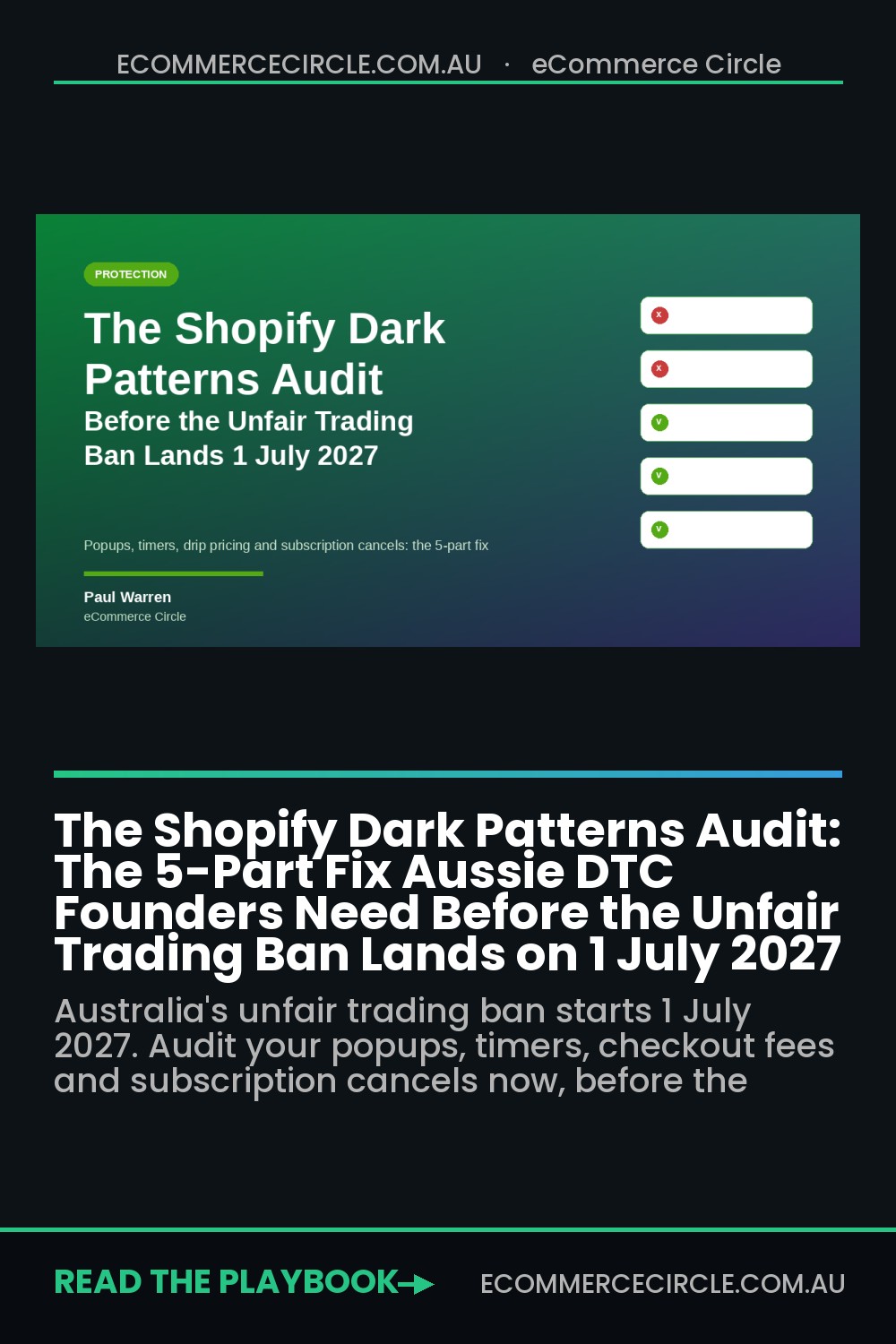
Somewhere on your Shopify store right now there is a countdown timer that resets when the page reloads, a popup where the decline button says “No thanks, I like paying full price”, or a shipping fee that only shows up on the last screen of checkout. You did not put it there to trick anyone. Your theme, your popup app or a conversion “best practice” article put it there, and it has been quietly doing its job for years.
What’s in This Article
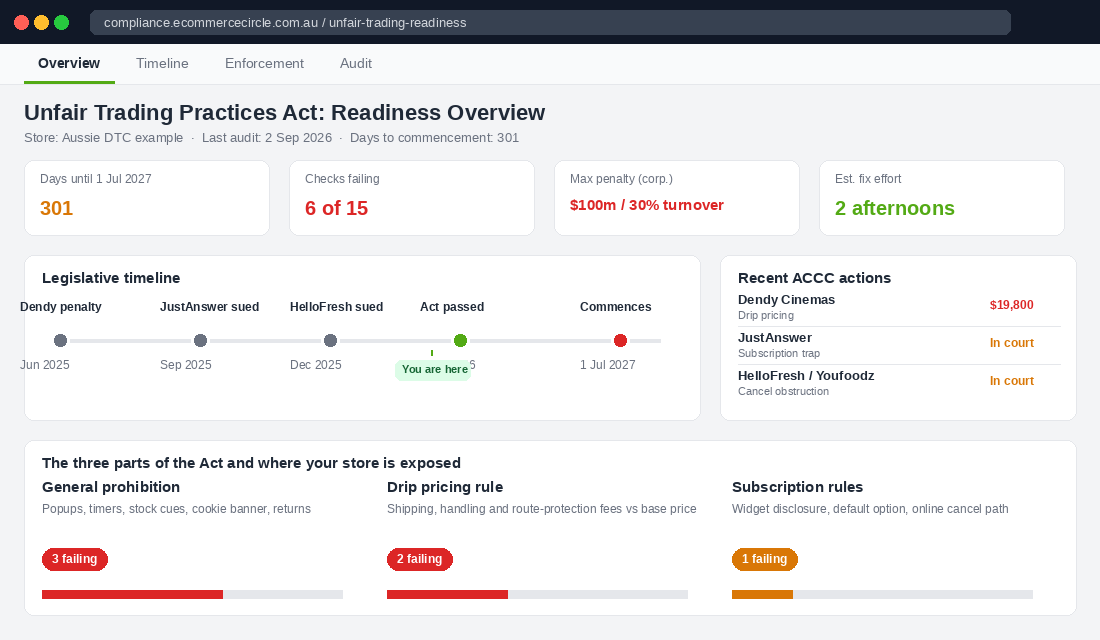
On 1 July 2026, Federal Parliament passed the Competition and Consumer Amendment (Unfair Trading Practices) Act. From 1 July 2027 it becomes illegal to manipulate a consumer or “unreasonably distort” the environment they make a decision in, if that conduct is likely to cause them detriment. The maximum penalty for a company is the greater of 100 million dollars, three times the benefit gained, or 30% of turnover. Those are the same penalties the ACCC already uses for misleading conduct, and they doubled in March 2026.
Most Aussie founders will read “dark patterns” and assume it is a problem for HelloFresh and the airlines. It is not. The Consumer Policy Research Centre surveyed 2,000 Australians and found 83% had a negative experience caused by manipulative design, one in five spent more than they meant to, and 30% stopped using the site altogether. That last number is the one that should worry you, because it means the practices you are about to be fined for are already costing you customers. This is the five-part audit we run with eCommerce Circle members to find and fix them, ten months before the regulator starts looking.
What Actually Changed on 1 July 2026 (and Why the 2027 Start Date Is Closer Than It Looks)
The Australian Consumer Law has always banned misleading conduct. The gap was everything that was technically true but designed to push you: a real discount hidden behind a guilt-trip button, an unsubscribe link buried four menus deep, a booking fee revealed at the final click. None of that was clearly illegal, so the ACCC spent five years asking Parliament for a general “unfairness” prohibition. It now has one.
The new law has three parts, and every Shopify store touches at least two of them:
- A general prohibition on unfair trading practices. Conduct is caught if it manipulates a consumer or unreasonably distorts their decision-making environment, and is likely to cause detriment. Detriment includes wasted time and inconvenience, not just money. The Act lists examples: false urgency, confirm shaming, hiding material information, and interface design that puts people under unreasonable pressure.
- A drip pricing rule for transaction-based charges. If a delivery, handling or booking fee applies, you must show the amount (or how it is calculated), that it is per transaction, whether it will or may apply, and whether the base price includes it, in close proximity to that base price. Optional charges, payment surcharges and GST are excluded.
- Subscription contract rules. Any auto-renewing, free-trial or discounted-intro subscription must disclose that it is a subscription, the payments, the period, the renewal terms, any notice period and how to cancel. If a customer can sign up online, they must be able to cancel online, and the steps must be limited to what is reasonably necessary.
Why act now rather than in June next year? Because the ACCC is not waiting. It has already used the existing law to hit exactly this behaviour: Dendy Cinemas paid $19,800 in June 2025 for revealing a per-ticket booking fee only at the final checkout step. JustAnswer was taken to court in September 2025 over a “one-off $2” offer that was really a monthly subscription. HelloFresh and Youfoodz were sued in December 2025 because the online cancel button that customers were promised either did not exist or did not work. Every one of those cases is a pattern you can find on Shopify stores today.
Part 1: The Popup and Consent Audit (Confirm Shaming Is the First Thing They Will Look For)
Start where your customer starts: the email popup. This is the highest-traffic interface on your store and the one where the Explanatory Memorandum gives its clearest example of a dark pattern, a decline button written to make the shopper feel stupid for saying no.
Open your Klaviyo, Privy or Justuno form and check four things:
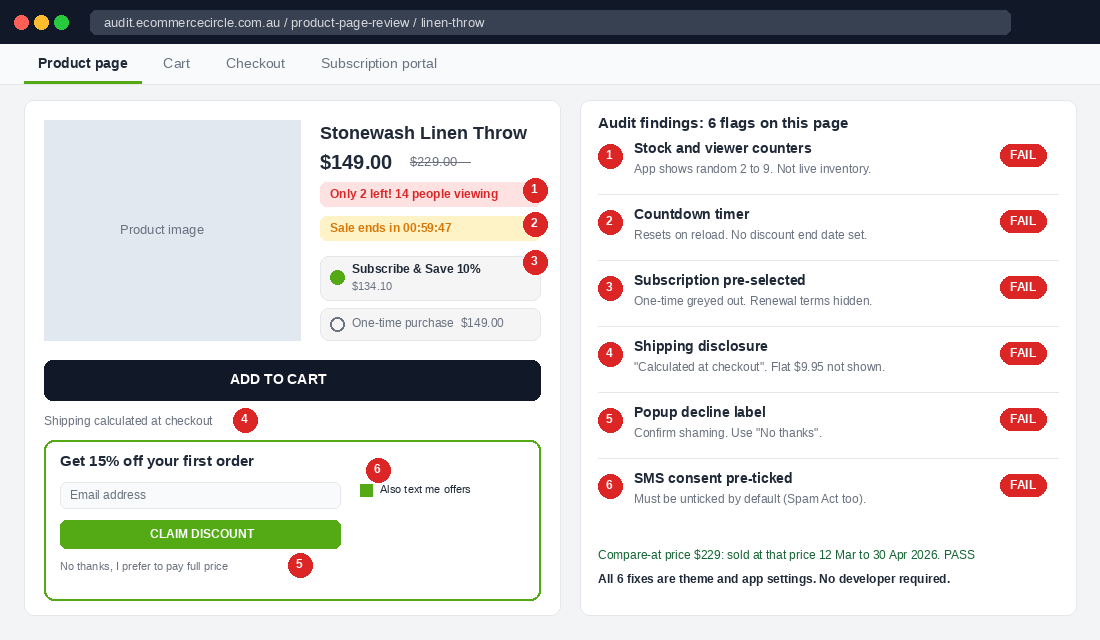
- The decline label. “No thanks” is fine. “No, I don’t want 15% off” or “I prefer to pay full price” is confirm shaming and is named in the Act’s examples. Change it today. Our members who tested a neutral decline saw no measurable drop in opt-in rate, because the people who click decline were never going to convert on guilt.
- The close path. A popup with no visible close button, or an X that only appears after a five-second delay, is “obstructing consumer decision-making”. Make the X visible on load, at least 24 pixels on mobile.
- Pre-ticked SMS consent. A pre-ticked “Yes, also text me” box under the email field fails both the new law and the Spam Act. Marketing consent must be an active choice. Untick it by default and write the SMS frequency and “Reply STOP to opt out” next to the box.
- The discount promise. If the popup says 15% off, the code must work sitewide on the first order without a minimum spend you did not mention. A hidden $150 minimum is “disclosing material information in an untimely way”.
Do the same pass on your cookie banner. A banner where “Accept all” is a big green button and “Reject” is grey text in the corner is precisely the kind of interface design the ACCC flagged in its Digital Platforms Inquiry. Give both options equal weight. The full capture architecture, including what a compliant form still converts at, is in the Shopify Email Popup Playbook.
Part 2: The Urgency Audit (Every Timer and Stock Counter Has to Be True)
Urgency is not banned. False urgency is. The line is simple to state and surprisingly hard to pass: could you prove to an ACCC investigator that every urgency cue on your site reflects something real?
Walk through your product pages, cart and checkout with a notepad and list every cue. Then apply this test to each one:
- Countdown timers. The offer must end when the timer hits zero, and stay ended. A timer that restarts on refresh or resets at midnight every day is the textbook example of manipulation in the new Act. If your theme has a “sale ends in” block, either wire it to a real Shopify discount end date or delete it.
- Low stock messages. “Only 3 left” must read from live Shopify inventory. Apps that show a random number between 2 and 9 are a liability now. Set the threshold at your actual reorder point and let the number be whatever it is. Some days that means nothing shows, which is fine.
- “X people are viewing this” and “Y sold in the last hour”. Unless these pull from real session and order data, remove them. Most social-proof apps fabricate the figure. If you cannot see where the number comes from in the app settings, assume it is invented.
- Fake “was” prices. A compare-at price that the product has never actually sold at is already illegal under the ACL, and the new law adds a second charge. Keep a record of the date range each product sold at its compare-at price.
The founders who think this will hurt conversion have usually never tested honest urgency against fake urgency. Real scarcity on a real drop, with a real end date, outperforms an evergreen timer because your returning customers learn that when you say a sale ends, it ends. We covered how to build that credibility, and the numbers behind it, in the Shopify Urgency and Scarcity Playbook.
Part 3: The Drip Pricing Audit (Show Shipping Where the Price Is)
This is the part of the new law with the most prescriptive wording, and the part most Shopify stores fail without knowing it. The rule is that any unavoidable per-transaction charge must be disclosed in close proximity to the base price, in a legible, prominent and unambiguous way. Shipping is the obvious one. Handling fees, “small order” fees, packaging fees and mandatory insurance all count too.
The commercial case for fixing this is stronger than the legal one. Baymard’s 2025 research puts the average cart abandonment rate at 70.19%, and the number one reason shoppers give, at 48%, is extra costs they did not expect at checkout. Every dollar of shipping you hide until the last screen is already costing you carts. The regulator is just adding a fine on top.
Here is how to bring a Shopify store into line:
- Put the shipping rule on the product page. Under the price, one line: “Free shipping over $99. Otherwise $9.95 flat rate Australia-wide.” That single sentence satisfies the amount, the per-transaction nature, the condition under which it applies, and whether the base price includes it. Most Shopify 2.0 themes have a text block or a metafield slot under the price for exactly this.
- Turn on the cart shipping estimator. In your theme editor, open the cart page section and enable “Show shipping calculator” or the equivalent. Customers should see the delivery cost before they hit the checkout button, not after.
- Kill the “calculated at checkout” line. That phrase is now a red flag. If your rates depend on postcode, state the range: “Shipping from $9.95, calculated by postcode in cart.”
- Audit every fee in Shopify Payments and your apps. Route protection apps that add a $2.95 line by default, ticked, are a double problem: it is a pre-selected charge (a dark pattern) and, if it is not clearly optional, it is a transaction-based charge you did not disclose next to the price. Make it opt-in and name the amount on the cart.
- Check your Google Shopping feed and Meta catalogue. The disclosure rule applies to advertising, not just the website. If the ad shows $49 and the customer cannot buy for less than $59, that is drip pricing.
Payment surcharges are excluded from the drip pricing rule, but do not relax: the Reserve Bank’s surcharging ban is a separate, live issue that we covered in the payment processing audit. GST is also excluded, and Australian consumer prices must already be shown GST-inclusive, so nothing changes there.
Part 4: The Subscription Audit (Disclose It, Then Make It Easy to Leave)
Where subscribe and save quietly breaks the law
If you run Subscribe & Save on Shopify through Recharge, Skio, Loop, Appstle or Shopify’s native Subscriptions app, this part applies to you. The Act captures any contract that renews automatically, continues after a free trial, or increases in price after an introductory discount. That is every subscription widget on every Aussie DTC store.
The disclosure test is easy to run. Go to a product page in incognito, look at the subscription option and ask whether a first-time shopper can see, without clicking anything: that it is a recurring charge, how much, how often, when the first renewal happens, whether there is a minimum number of orders, and how to cancel. If any of those six is hidden behind a “Learn more” link or lives only in your FAQ, you fail. Move it into the widget, in plain words, in the same font size as the price.
Pre-selecting the subscription option as the default, with the one-time purchase greyed out, is the subscription equivalent of confirm shaming. The ACCC’s JustAnswer case is built on a customer believing they made a one-off purchase. Default to one-time, or at least make both radio buttons visually equal.
The cancellation rule that ended HelloFresh’s excuse
The Act says the steps to cancel must be limited to those reasonably necessary, and if you sell subscriptions online, cancellation must be available online. Not “email us”. Not “call between 9 and 5”. Online, self-service, for every subscriber.
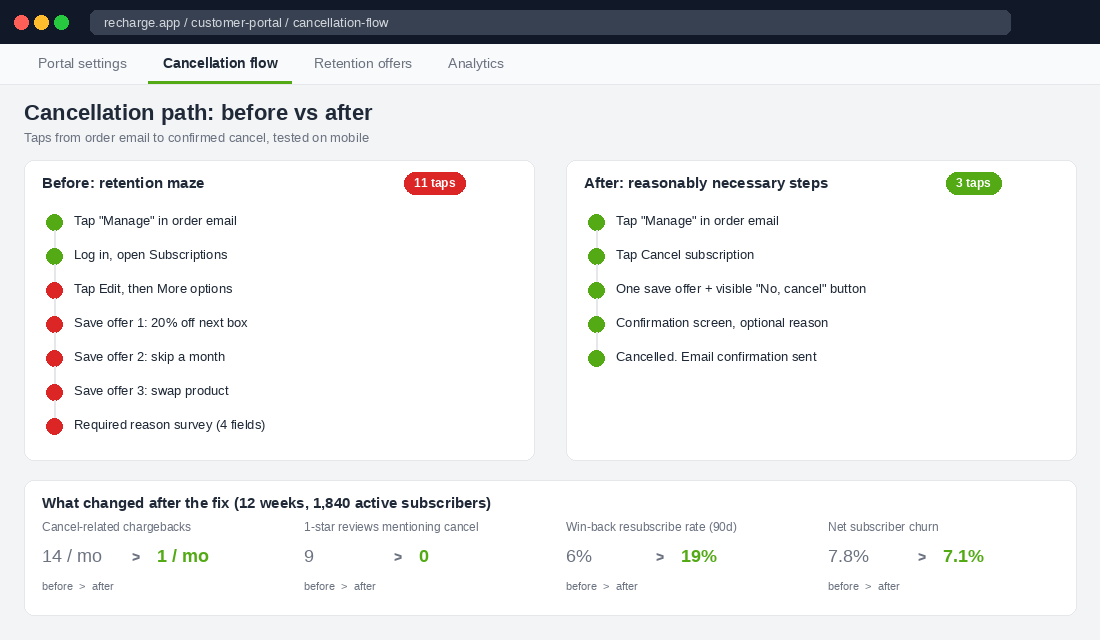
Test yours right now. Sign up for your own subscription with a personal card, then try to cancel from your phone. Count the taps and the screens. What we typically find on member stores:
- A “retention flow” of three to five save offers before the cancel button appears. One save offer, presented once, with a clear “No, cancel my subscription” button on the same screen, is defensible. Five sequential screens is the kind of obstruction the Explanatory Memorandum calls out.
- A mandatory reason survey. Ask, but do not require. The Act specifically says forcing extensive feedback is unlikely to be reasonable.
- Cancel hidden under “Manage” then “Edit” then “More options”. Put “Cancel subscription” in the customer portal at the same level as “Skip” and “Swap”.
- A “pause” button where the cancel button should be. Offering pause is good. Offering only pause is a trap.
Fixing this costs you less churn than you think. Subscribers who cancel cleanly come back; subscribers who had to fight their way out leave a one-star review and a chargeback. The full retention system, including the save-offer sequence that works within these limits, is in the Shopify Subscription Playbook.
Part 5: The Rights and Returns Audit (Do Not Make Them Fight for What the Law Gives Them)
The first example the Act gives of unfair conduct is not a timer or a popup. It is “impeding the consumer’s ability to exercise legal rights”. For a Shopify store, that means your returns flow, your warranty claims process and your customer support wall.
Audit these five points:
- “No refunds on sale items.” Consumer guarantees under the ACL apply regardless of price, and a blanket statement that they do not is already a breach. Rewrite it: “Change-of-mind returns are not accepted on sale items. Your rights under the Australian Consumer Law for faulty goods are unaffected.”
- Return requests that need a phone call. If a customer can buy in two taps, a faulty-item claim should not need a phone call in business hours. Use a returns portal (Loop, ReturnGO or Shopify’s native self-serve returns) and put the link in the order confirmation email.
- Proof requirements beyond the reasonable. Asking for a photo of the fault is reasonable. Asking for the original packaging, a video, a stat dec and the courier’s name to claim a consumer guarantee is “requiring unnecessary information”, which the ACCC named explicitly.
- Chatbot walls with no exit. If your AI support agent cannot hand off to a human for a refund or guarantee claim within two messages, it is obstructing a legal right. Build the escalation trigger for the words “refund”, “faulty”, “broken” and “consumer law”.
- Store credit as the only remedy. For a major failure the customer chooses refund or replacement, not you. Store credit can be offered, never imposed.
This is also where the money-back guarantee you use as a conversion lever gets checked. A “100% satisfaction guarantee” with a 7-day window, a restocking fee and a requirement to return at your own cost is a guarantee in headline only. Either make the guarantee real or drop the headline.
The Tool That Fixes Part 4 in an Afternoon: Recharge Customer Portal Settings
Most of this audit is theme and copy work. The subscription cancellation piece is a settings job in your subscription app, and since Recharge runs the majority of Aussie Shopify subscriptions, here is the exact setup that meets the new standard.
- Step 1: Recharge admin, Storefront, Customer portal. Under “Subscription management”, tick “Allow customers to cancel subscriptions”. Set “Minimum charges before cancellation” to 0 unless you have a real, disclosed minimum-order commitment.
- Step 2: Cancellation reasons. Keep the reason list, but set it to optional, not required. Add a free-text field as an optional extra.
- Step 3: Retention offers. Under “Cancellation prevention”, enable at most one offer (a skip, a swap or a discount). Turn off “Show multiple offers sequentially”. The cancel button must be visible on the same screen as the offer.
- Step 4: Portal navigation. In “Customer portal settings”, make “Cancel” a top-level action alongside “Skip next order” and “Swap product”. Do not nest it under “Edit”.
- Step 5: Disclosure copy in the widget. In the Recharge widget settings, edit the subscription description to read something like: “Delivered every 4 weeks at $54 (10% off). Renews automatically until you cancel. No minimum orders. Cancel any time from your account or the link in every order email.”
- Step 6: Test on mobile. Sign up with a real card, receive the first order email, tap the manage link, cancel. If it takes more than three taps from the email, keep simplifying.
If you are on Skio, Loop or Shopify Subscriptions, the same settings exist under different names. The test at the end is what matters, not the app.
Why the Honest Version of Your Store Converts Better
Here is the part most compliance articles miss. Every fix in this audit is also a conversion fix, because dark patterns work on first orders and quietly destroy second orders.
Shipping shown on the product page removes the biggest single reason for cart abandonment. An honest timer trains customers to buy when you say a sale is ending, which lifts the yield on every future launch. A neutral popup decline stops annoying the 90% who were never going to opt in and keeps them on the page. A clean subscription cancel turns a churned subscriber into someone who will resubscribe in three months, instead of someone who charges back and warns their friends.
Remember the CPRC figure: 30% of Australians have stopped using a site because of manipulative design. On a store doing 4,000 sessions a month, that is not a rounding error. It is the difference between a 55% and a 35% repeat rate, and repeat rate is the number that decides whether your Meta spend ever pays back.
The five parts compound. Fix the popup and the urgency cues and your trust signals improve. Fix the pricing and your checkout completion rises. Fix subscriptions and returns and your lifetime value climbs. Do all five and you have a store that would pass an ACCC review and that outperforms the version of itself that would not.
The 90-Minute Dark Patterns Audit Checklist
Block 90 minutes, open your store in an incognito window on your phone, and work through this list. Score each line pass or fail. Anything that fails goes into a ticket with an owner and a date before 1 July 2027.
- Popup: neutral decline label, visible close on load, SMS unticked by default, discount works as promised.
- Cookie banner: accept and reject given equal visual weight.
- Timers: tied to a real discount end date, do not reset.
- Stock counters: read live inventory, no random numbers.
- Social proof counters: real session or order data, or removed.
- Compare-at prices: product actually sold at that price, dates on record.
- Shipping: amount and condition stated under the product price and in cart.
- Fees: no “calculated at checkout”, no pre-ticked add-ons, every mandatory fee named next to the price.
- Ads and feeds: advertised price is a price the customer can actually pay.
- Subscription widget: recurring, amount, frequency, renewal, minimums and cancel method visible without clicking.
- Subscription default: one-time purchase selected, or both options equal.
- Cancellation: online, self-serve, one save offer maximum, optional survey, three taps or fewer from the order email.
- Returns copy: no “no refunds” statements, consumer guarantee rights acknowledged.
- Claims process: self-serve portal, reasonable proof only, human handoff from chat within two messages.
- Remedies: refund or replacement offered for major failures, store credit optional.
Fifteen lines. Most stores we look at fail between four and seven of them on the first pass, and none of the fixes need a developer. If you want a second pair of eyes on yours before the regulator provides one, this is the sort of thing we do with members every week.
Inside eCommerce Circle, Protection is one of the 10 P’s we work through with every member, and the unfair trading changes are on the agenda for every store running subscriptions or paid shipping this year. If you want a second opinion on your audit, let’s talk.