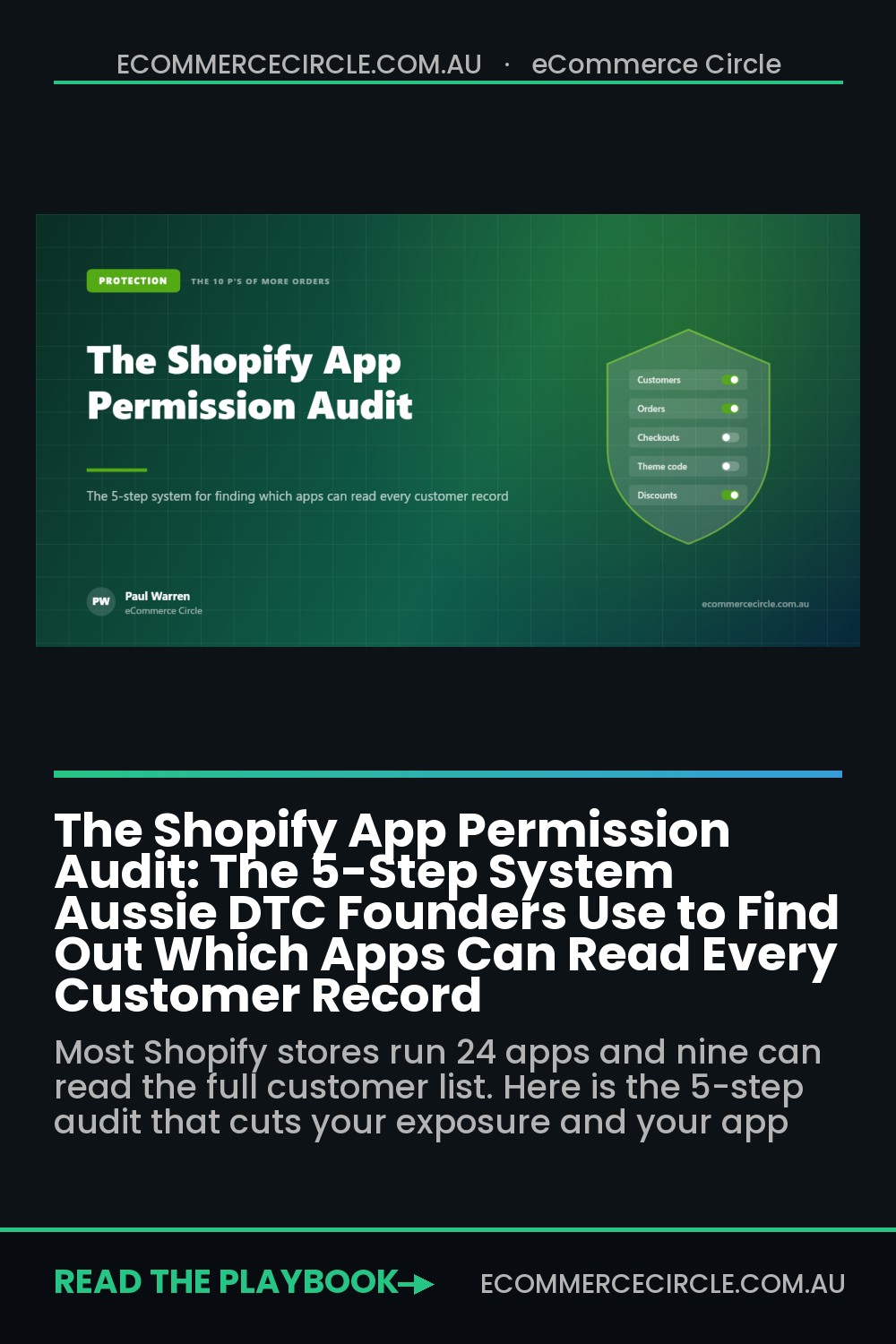
Open your Shopify admin right now and click “Apps and sales channels.” Count them. If you’re like most Australian stores doing between $500k and $5m a year, you’ll find somewhere between 18 and 30 apps installed — and you’ll be able to explain what maybe half of them do.
What’s in This Article
That’s not a tidiness problem. Nine of those apps can probably read your entire customer list — names, emails, phone numbers, shipping addresses, order history, marketing consent status. Several of them you haven’t opened since the year you installed them. One or two belong to companies that no longer exist.
The brands that get burned here aren’t careless. They’re busy. Every app was installed for a sensible reason by a founder solving a real problem on a Tuesday afternoon. The problem is that nobody ever runs the reverse process. Installing is a two-click decision; removing is a decision nobody schedules. This is the audit that fixes it — five steps, about ninety minutes, and it usually pays for itself in cancelled subscriptions before you even get to the security benefit.
Why Your App Drawer Is the Biggest Blind Spot in the Business
Here’s the part most founders have never had spelled out: under the Privacy Act 1988, handing customer data to a third-party app doesn’t hand over the responsibility for it. Australian Privacy Principle 11 requires you to take reasonable steps to protect the personal information you hold. “We didn’t know the app had it” has never been one of those steps.
If an app you forgot about gets breached and your customers’ details are exposed, you are the one with a Notifiable Data Breaches obligation. You’re the one assessing whether serious harm is likely, notifying the OAIC within 30 days, and emailing 18,000 customers to tell them their address was in someone else’s database. The app vendor sends a status page update. You send the apology.
Businesses turning over less than $3m are currently outside most of the Act, but that exemption has been flagged for removal in the next tranche of privacy reform — and it has never protected anyone from the commercial damage of a breach anyway. Your customers don’t check your turnover before they decide whether to trust you with a credit card again.
There’s a second cost that lands sooner. App sprawl quietly eats margin. A store paying $1,284 a month in app subscriptions is spending over $15,000 a year — and in most audits we run, 20-25% of that is going to software nobody has opened in three months. That’s a full-time freelancer’s worth of budget sitting in a drawer.
Step 1: Build the Inventory Before You Judge Anything
Don’t start by deleting. Start by seeing. Open a spreadsheet and give it six columns: App name, Category, Date installed, Last time anyone opened it, Data it can read, Monthly cost. Fill a row for every single app in Shopify admin, including the free ones and the ones bundled with your theme.
Two of those columns do the heavy lifting. Last opened is the honesty column — if nobody on the team can remember logging into it this quarter, write “unknown” and treat that as a fail. Monthly cost comes straight from your Shopify billing export, not from the pricing page, because almost everyone is on a plan tier they picked eighteen months ago at a different order volume.
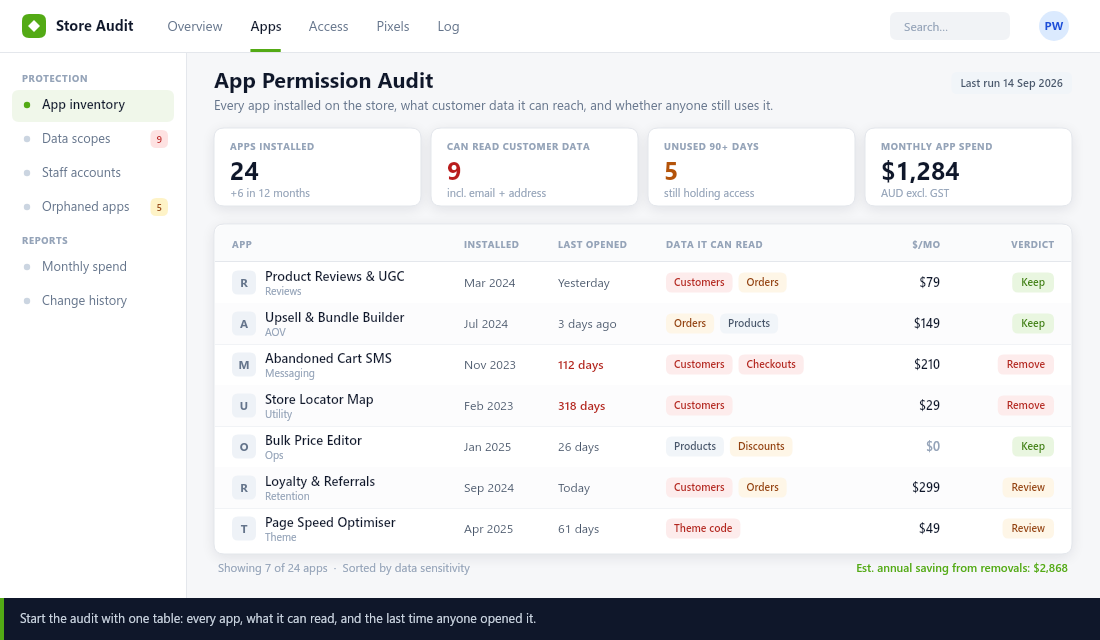
Budget forty minutes for this and do it with your 2IC or ops person in the room, because they’ll know which tools the team actually touches. You’re looking for three patterns: apps installed for a campaign that ended, apps that duplicate something your theme or Shopify now does natively, and apps whose champion has left the business.
Step 2: Read the Scopes, Not the App Store Listing
This is the step that changes how founders think about their stack. An app’s marketing page tells you what it does. Its access scopes tell you what it can do. Those are very different documents, and only one of them matters when something goes wrong.
In Shopify admin, open any app and look at the permissions listed on its page. Translate them honestly:
- read_customers. Full names, email addresses, phone numbers, every saved shipping address, lifetime order count and marketing consent state. This is your list.
- read_all_orders. By default apps only see the last 60 days of orders. This scope removes that limit and hands over your entire trading history. Shopify requires apps to justify it — ask yourself whether the justification still applies.
- write_script_tags or theme access. The ability to inject JavaScript that runs on your storefront for every visitor. A compromised app with this scope is a compromised storefront.
- read_checkouts. Abandoned checkout data, which is customer contact details plus intent — one of the most valuable and most frequently leaked datasets in ecommerce.
- write_discounts or write_price_rules. Not a privacy risk, a revenue one. This scope can create codes on your store.
Mark every app that holds read_customers, read_all_orders or read_checkouts in red. In a typical 24-app stack, you’ll end up with eight or nine reds. That number is the honest measure of your exposure — not how many apps you have, but how many organisations outside your business can currently pull a copy of your customer list.
While you’re there, check one more thing: does each red app have a data processing agreement and a listed data location? Many smaller apps sub-process through vendors of their own. If you can’t answer “where does my customer data physically sit,” neither can your customers when they ask.
Step 3: Plot Every App on the Risk Matrix
Now you make decisions, and you make them on two axes only. Vertical axis: how much customer data does this app touch? Horizontal axis: how much revenue breaks if it disappears tomorrow? Everything else — how much you like the interface, how long you’ve had it, what you paid to set it up — is noise.
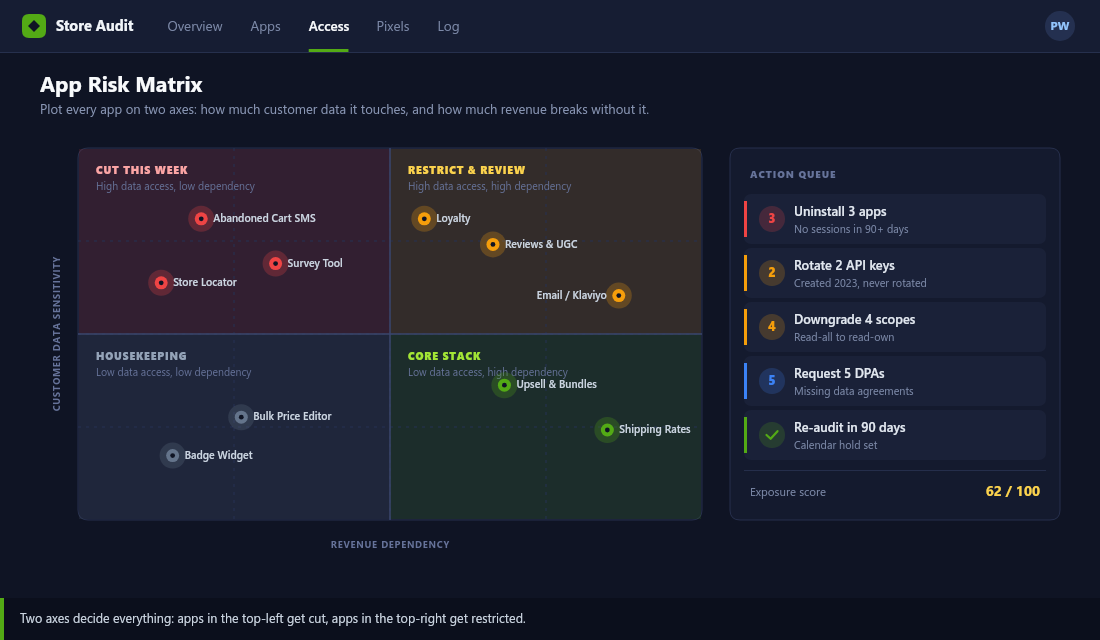
The four quadrants each get a standing instruction:
- Top-left — cut this week. Deep access to customer data, nothing breaks without it. There is no argument for keeping these. This is usually three to five apps and it’s the fastest risk reduction available to you.
- Top-right — restrict and review. Deep access and genuinely load-bearing: your email platform, your reviews app, your loyalty program. You’re keeping these, so the work is tightening them — reduce scopes where the app allows it, confirm the DPA, and check who on your team has admin logins.
- Bottom-left — housekeeping. Low data access, low dependency. Not urgent, but every one of these is a subscription and a line of code on your storefront. Clear them out when you’re cutting the top-left.
- Bottom-right — core stack. Low data access, high dependency. Leave them alone and be glad they’re there.
The matrix does something a checklist can’t: it kills the “but we might need it one day” argument. An app sitting in the top-left with 112 days since anyone opened it isn’t a maybe. It’s a decision you’ve already made and haven’t actioned.
Step 4: Cut, Restrict, Rotate — In That Order
Here’s the thing almost nobody does correctly. Uninstalling an app is not deleting your data. Uninstalling revokes the app’s future access. The copy of your customer list already sitting on their servers stays exactly where it is until you ask for it to be erased — and most vendors keep it for 30 to 180 days by default, some indefinitely.
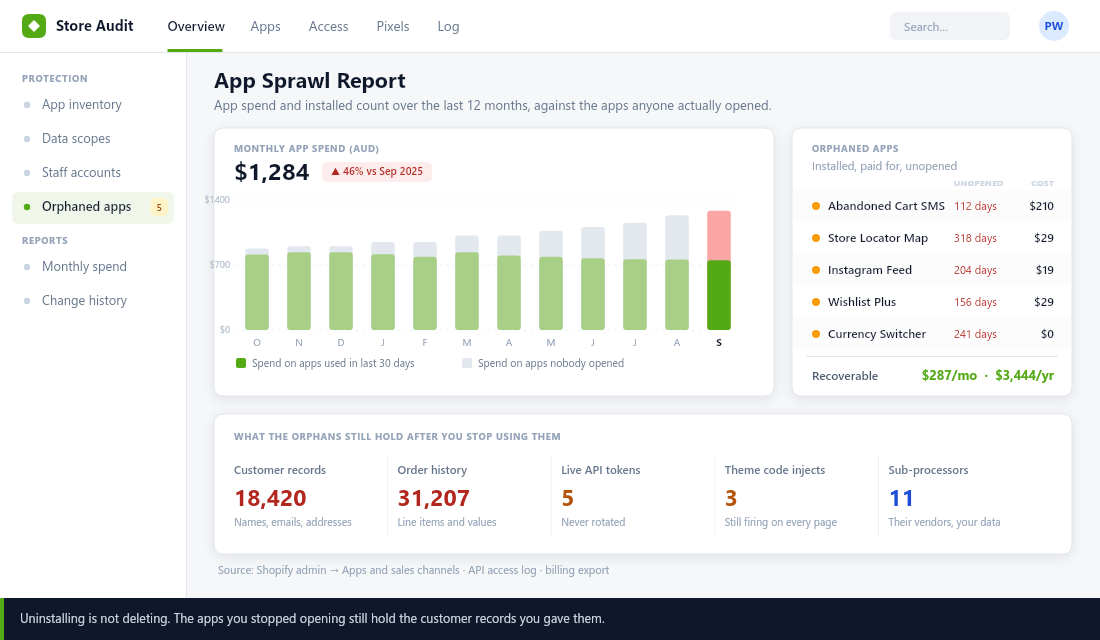
So run the removal in a fixed sequence for each app you’re cutting:
- Export anything you need first. Reviews, loyalty balances, subscriber tags. Once the app is gone this gets hard, and for reviews it can get expensive.
- Email the vendor and request deletion in writing. One paragraph: “We are uninstalling on [date]. Please confirm deletion of all personal information relating to our customers and provide the completion date.” Keep the reply. This email is the entire difference between a controlled exit and a liability.
- Uninstall from Shopify admin. Not just “disable” inside the app’s own dashboard — that leaves the connection live.
- Check your theme for leftovers. Many apps leave script tags or theme code behind after uninstall. In your theme editor, search the code for the app’s name. Dead scripts still slow your storefront and still call the vendor’s servers.
- Rotate anything shared. Any custom app tokens, API keys or shared staff logins associated with that tool get regenerated the same day.
Step four is the one people skip, and it’s why stores that have “cleaned up their apps” still load six third-party scripts from tools they cancelled last winter. Check your storefront’s network requests after the cull — if a domain you don’t recognise is still firing, you haven’t finished.
Step 5: Put a Gate on the Front Door
An audit you run once is a spring clean. An audit you run on a cadence is a system. The difference is a gate and a calendar entry.
The gate is three questions, answered in writing, before any new app gets installed by anyone on your team:
- What does it need to read, and why? If the answer includes customer data, it needs a second pair of eyes — yours.
- What is it replacing? New app in, old app out. Without this rule, stacks only ever grow.
- Who owns it, and what’s the review date? Every app gets a named owner and a 90-day check-in. Unowned apps are the ones that become orphans.
Then put a recurring 45-minute block in the calendar every quarter to re-run steps one to three. It takes a fraction of the time once the spreadsheet exists. Pair it with your quarterly review so it happens alongside decisions you’re already making about budget and tech.
Also set staff permissions properly while you’re in there. Most stores have full-admin accounts belonging to a developer who finished a job in 2024 and a former VA who moved on. Shopify lets you scope staff permissions — use it, and remove accounts the day someone stops working with you, not the month after.
How the Five Steps Compound
Run individually, these steps look like admin. Run together, they change three numbers at once.
The inventory and the matrix cut your subscription spend — typically $200 to $400 a month back into the business for a store of this size, which is real margin, not a saving on paper. The scope audit and the deletion requests cut your exposure from nine organisations holding your customer list to three or four you’ve actually vetted. And the theme cleanup in step four almost always produces a measurable speed improvement, because every orphaned script was still loading on every page view.
That last one is the part founders don’t expect. Protection work and Platform work turn out to be the same work. The scripts creating your risk are the scripts slowing your store, and removing them improves conversion while it reduces liability.
The deeper shift is what happens to your decision-making. Once every app has an owner, a scope and a review date, your stack stops being something that accumulates and starts being something you direct. That’s the whole difference between a business that reacts to its tooling and one that chooses it.
Inside eCommerce Circle, Protection is one of the ten engines we work through with every member — because the exposures that hurt most are the ones nobody has looked at in two years. If you want to see exactly where your store is being capped, take the free More Orders Scorecard. It takes two minutes, it’s no-obligation, and it shows you which of the 10 P’s to fix first.