Most Shopify owners have no idea how much their app stack is actually costing them.
What’s in This Article
It’s not just the line items on your monthly invoice — though those add up fast. It’s the slower site speed, the duplicated functions, the “we installed it for that promo last year and forgot about it” apps that are still running scripts on every page of your store. Walk into most six and seven-figure Shopify businesses and you’ll find the same pattern: 15 to 25 apps installed, 7 or 8 of them genuinely load-bearing, and the rest are either redundant or actively slowing the site down while quietly charging AUD every 30 days.
The average Shopify store runs 6.4 apps, but the stores I see in coaching calls are usually well north of that. When I audit them, I routinely find $300–$800 a month in pure waste — plus another $1,000 to $3,000 a month in lost conversions because the bloat has dragged mobile page speed into the red. That’s the real cost of an un-audited app stack. And the fix is a structured audit you can do in about two hours once you know what you’re looking for.
Here’s exactly how to run one.
Why Your App Stack Is Costing More Than You Think
Every app you install carries three separate costs, and only one of them shows up on your invoice.
The subscription cost. This is the obvious one — the monthly fee Shopify charges you on behalf of the app developer. $29 here, $49 there, $199 for the “growth” tier. For most brands I work with, the total app bill sits between $400 and $1,500 a month. For Shopify Plus stores it’s often $2,500+. That alone is reason enough to audit, but it’s the smallest of the three costs.
The speed cost. Every app that injects a script into your theme adds weight to every page load. Industry analysis suggests each app script can add between 20KB and 200KB of JavaScript and an additional HTTP request to your page. Multiply that by 15 apps and you’ve added up to 3MB of JavaScript and 15 extra network calls to every visit. Google’s research with Deloitte found that every 1-second improvement in mobile load time lifts conversion by roughly 7%. The math is brutal: a slow stack doesn’t just frustrate customers, it compounds with every visitor who bounces.
The dead code cost. This is the one nobody talks about. When you uninstall a Shopify app, Shopify removes the app itself — but the code it injected into your theme stays behind. Every ex-app you’ve ever installed is probably still firing scripts against your store, loading from servers that no longer care, occasionally throwing console errors and always adding weight. Stores I audit often have 5 to 10 ghost apps still running in the theme.
Combined, a bloated stack on a $20K/month store typically bleeds $3,000 to $8,000 in annual revenue between subscriptions and lost conversions. That’s a junior salary’s worth of cash disappearing because nobody ran the audit.
The Healthy Benchmark: What Your App Stack Should Actually Cost
Before we get into the audit, here’s the benchmark to anchor yourself against.
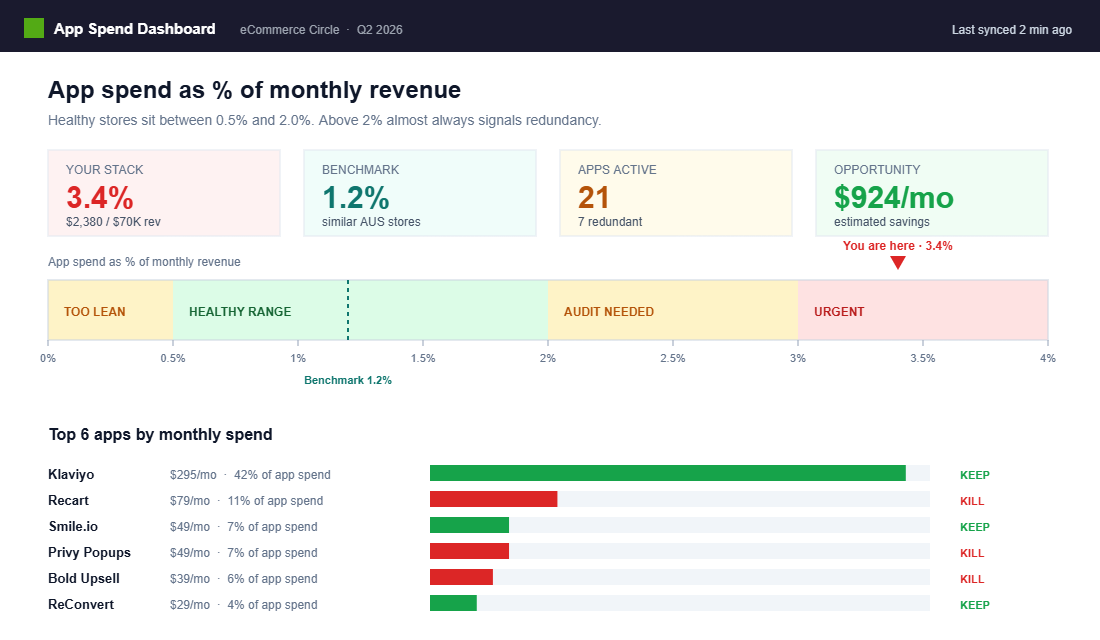
App spending should sit between 0.5% and 2% of your monthly revenue. Below 0.5% usually means you’re leaving revenue on the table (no email platform, no reviews, no analytics). Above 2% almost always means you have redundancy and bloat. Right in the middle — around 1–1.5% — is where the healthy, scaling stores live.
So for a store doing $100K/month AUD, you should expect to spend $500 to $2,000 on apps. Anything over $2,000 on that revenue level is an audit waiting to happen. For a store doing $30K/month, healthy spend is $150 to $600 — anything significantly over that should raise flags.
The other rule of thumb: most high-performing brands run fewer than 15 apps. Not because 15 is a magic number, but because beyond that you start hitting redundancy, integration headaches, and compounding performance hits. If your store is over 20 apps, you’re almost certainly running duplicates.
Write your number down now. Count your apps, pull your last three app invoices, and calculate app spend as a percentage of revenue. That number is the “before” metric for your audit.
The 7-Step Shopify App Stack Audit
This is the framework I use with coaching clients. It takes about two focused hours to work through, and you should run it every quarter. Not every six months, not whenever you remember — quarterly, on a calendar reminder.
Step 1: Export Your Current App Stack to a Spreadsheet
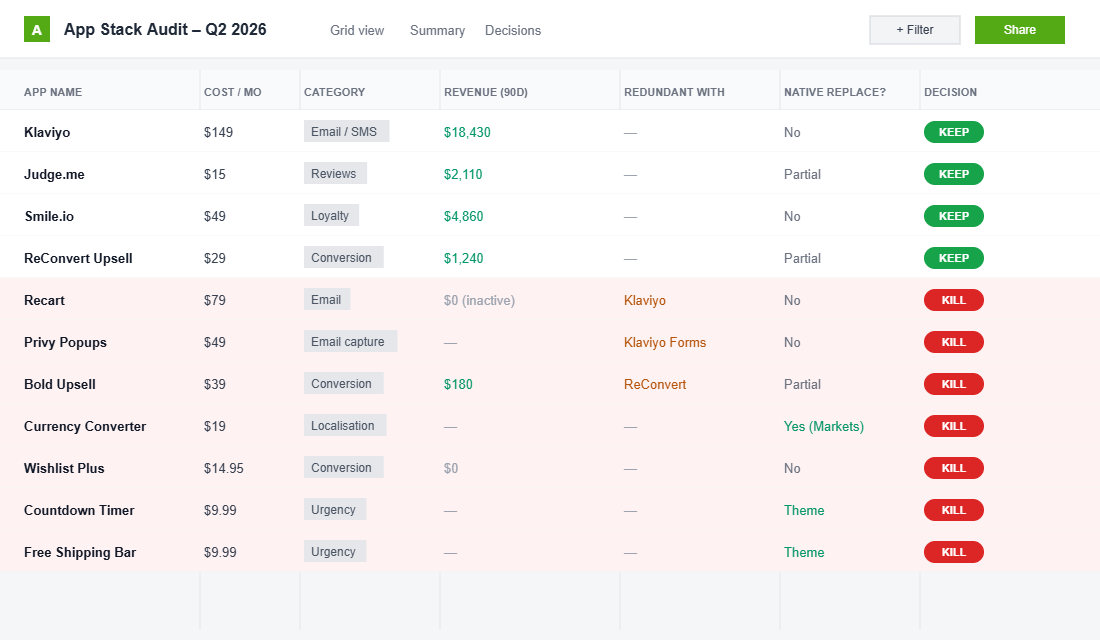
Go to Shopify admin → Apps. Build a spreadsheet with these columns: App Name, Monthly Cost (AUD), Function (in one sentence), Who Uses It, Last Time It Moved a Number, Native Shopify Replacement, Decision (Keep / Kill / Consolidate).
Do not skip the spreadsheet. The magic of this exercise is that the act of writing “Last Time It Moved a Number” next to each app forces brutal honesty. If you can’t name the last time an app drove a real metric — revenue, AOV, conversion rate, retention — it’s a candidate for the kill list.
Step 2: Kill Every Zombie App
Zombies are apps you installed for a specific reason, that reason no longer applies, and you forgot about. Classic zombies include:
- A countdown timer app from last year’s Black Friday
- A wishlist app that no one actually uses (check your analytics)
- A pop-up app that you replaced with Klaviyo’s native form but never uninstalled
- An inventory sync app from a channel you stopped selling on
- A review import app that was supposed to be a one-time thing
- A “free shipping bar” app from three themes ago
Every zombie you uninstall saves subscription dollars, but more importantly, stops firing scripts on your live site. Kill them ruthlessly. The one-click test: if removing it today would not cause a single customer complaint, it’s a zombie.
Step 3: Find Your Redundancies
The single most common pattern I see is two apps doing the same job. Email marketing and SMS both running pop-ups. Two separate upsell apps, one in cart and one on PDP. Klaviyo plus an additional abandoned cart app. A “loyalty” app plus a “rewards” app. Three different review apps because each was installed for a different collection.
Pick the better one, migrate, uninstall the other. Even if the two apps collectively only cost $60/month, the real gain is usually cleaner data and fewer conflicting scripts.
Step 4: Map Each App Against Shopify’s Native Features
Shopify has quietly rebuilt many of the features that used to require third-party apps. Before you pay another subscription, check whether native is now good enough.
Native Shopify can now handle: abandoned cart emails, basic discount codes and automatic discounts, subscription-style recurring billing (via Shopify Subscriptions), product bundles (via Shopify Bundles), customer accounts with order history, basic gift cards, multi-currency and multi-language via Shopify Markets, and a growing list of checkout extensibility features.
If you’re still paying for a $29/month app to do something Shopify now does natively, that’s a hundreds-of-dollars-a-year saving with zero downside. Map every app you have against the native equivalent and write the replacement down in your spreadsheet.
Step 5: Test Page Speed Before and After
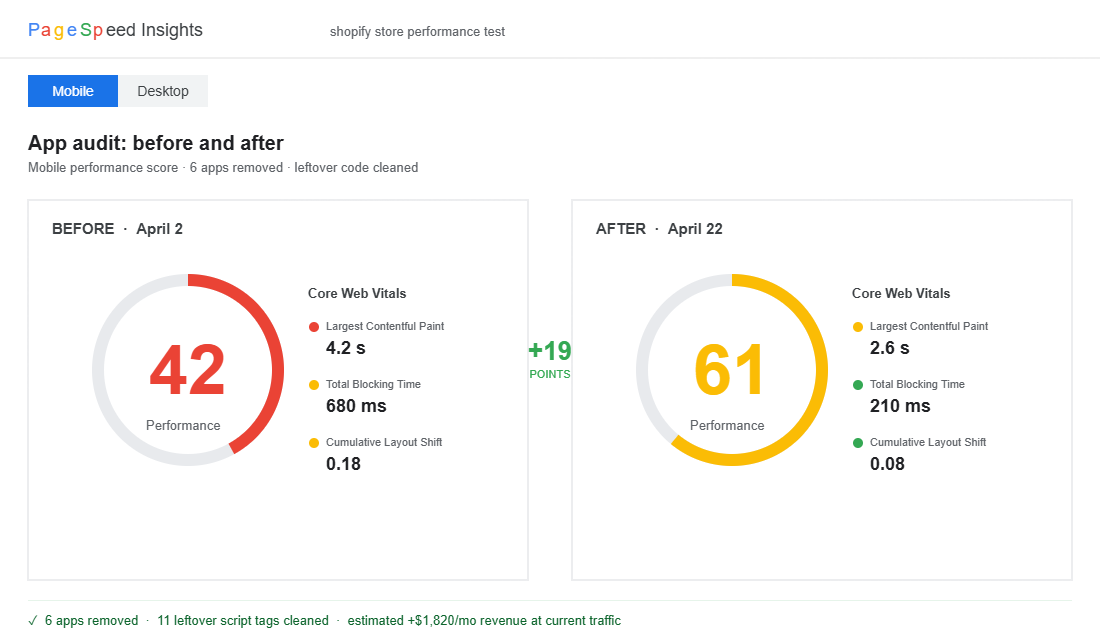
This is where the real ROI shows up. Run your homepage, a collection page, and a product page through Google PageSpeed Insights before you make any changes. Write down the mobile score, LCP, and Total Blocking Time.
Then after each app removal, run it again. Most stores I audit show a 5–15 point mobile speed score improvement just from removing 4–6 redundant apps. That’s huge — and it’s measurable.
For deeper analysis, use GTmetrix to see the waterfall of every script loading on your page. You’ll spot the app scripts that are still firing even after you’ve uninstalled the app (we’ll get to that). Shopify’s own built-in speed report in admin is useful for tracking progress over time, but PageSpeed Insights is the source of truth.
If you want the full framework for this, my Shopify site speed playbook walks through exactly which numbers matter and how to read them.
Step 6: Remove Leftover App Code From Your Theme
This is the step almost everyone skips, and it’s where the biggest stealth performance gains are hiding.
Go to Online Store → Themes → Edit code. Open theme.liquid and search for the name of each app you’ve ever uninstalled — slugs like “recart”, “privy”, “bold”, “zoorix”, “loox”, “judgeme”, whatever you’ve removed over the years. You’re looking for:
<script src="https://app-name.com/...">tags in the head or before</body>- Snippet files in the
snippets/folder named after the app - Random CSS blocks with the app’s class prefix
- Meta tags or schema injections
Every one of these is a ghost. Remove the block, save the file, and reload your store to confirm nothing visible broke. If you’re nervous, duplicate the theme first so you have a rollback.
One Australian apparel brand I worked with had 11 separate ghost script tags in their theme.liquid from apps they’d uninstalled over two years. Removing them cut 180KB off every page load and improved their mobile speed score by 9 points. No app changes, no design changes. Just cleaning up code Shopify couldn’t remove for them.
Step 7: Document the Stack You Keep
Once you’ve killed, consolidated, and cleaned up, create a one-page document that lists every app in your new stack, what it does, who’s responsible for it internally, and what metric justifies it. Store this alongside your core ecommerce dashboards so the justification is right next to the data.
This is the document you reopen every quarter. When you’re tempted to install something new, you have to be able to add a metric row. No metric, no install.
The Apps Most Stores Can Safely Kill (And What To Replace Them With)
Here’s the honest kill list based on the audits I run most often. Not every app on this list is bad — a lot of them are genuinely good tools. The issue is almost always that they’re duplicating something you’re already paying for, or you’re paying for a feature that has become native.
- Dedicated abandoned cart apps. If you’re on Klaviyo or Omnisend, you already have this natively in your email platform. Kill the standalone app.
- Countdown / urgency apps. Most add zero measurable lift and add heavy scripts. If you run seasonal promos, build urgency through your email platform and a simple theme snippet instead.
- “Free shipping progress bar” apps. Every decent Shopify theme now has this built in, or it’s a 10-line theme snippet. You should not be paying $19/month for a progress bar.
- Wishlist apps. Check your analytics. If fewer than 2% of visitors use the wishlist, kill it. Most Shopify stores don’t have the customer density to make wishlists meaningful.
- Product review apps you don’t use. If you haven’t imported reviews in 90 days or reviews don’t show on your product pages prominently, you’re paying for a dormant tool. Either commit to a review flywheel or downgrade to the free tier.
- Multi-currency apps (if you’re on a recent Shopify plan). Shopify Markets now handles multi-currency, multi-region, and local payment methods natively. Most stores running paid currency apps can switch off.
- Generic “AI personalisation” apps with no measurable lift. If you can’t point at a revenue number the app produced in the last 90 days, it’s overhead.
- “Sales pop” apps. These were hot in 2019. Customers have become blind to them and the heavy scripts cost more than the social proof delivers. Replace with static trust badges and real reviews.
The rule isn’t “everyone should kill these.” It’s that every app should justify its existence with a number. If yours can’t, it’s on the list.
What Your App Stack Should Look Like at Every Revenue Stage
One mistake I see constantly: owners install a seven-figure-brand app stack on a startup-revenue store. You don’t need enterprise attribution software when you’re doing $15K a month. Match the stack to the stage.
Early stage ($0–$30K/month): Keep it lean. You need email (Klaviyo or Omnisend), reviews (Judge.me, Loox, or Okendo), and basic analytics. That’s usually it. Maybe one conversion-focused app if there’s a specific funnel leak you’ve identified. Seven apps or fewer is normal.
Growth stage ($30K–$200K/month): Now you earn the right to add SMS (Postscript or similar), a better upsell engine (ReConvert or cart drawer upgrade), a proper loyalty program (Smile, LoyaltyLion, or Rise), and a search app if your catalogue is large (Searchanise or Klevu). Eight to twelve apps.
Scale stage ($200K+/month): You can justify attribution (Triple Whale or Northbeam), subscription platform if applicable (Recharge or Shopify Subscriptions native), custom CRO tools (a heatmap app like Lucky Orange), and headless-friendly performance tooling. Twelve to fifteen apps, maybe pushing into Plus territory.
Shopify Plus ($500K+/month): Here the stack often gets leaner again because you can replace multiple apps with better-built integrations. A lot of Plus brands I work with run 10–12 apps total because their tech team has built native alternatives for the rest.
The pattern: complexity should earn its place by revenue, not the other way around.
The App Stack Audit Checklist (Steal This)
Here’s the exact template I use. Copy it into Google Sheets, Airtable, or Notion and run through it this week.
- App Name
- Monthly Cost (AUD)
- Category (email, reviews, analytics, conversion, retention, operations, other)
- Function in One Sentence
- Script Impact (run PageSpeed Insights with app active vs removed)
- Last 90-Day Revenue Attributed (if trackable)
- Internal Owner (who checks this app weekly)
- Native Shopify Replacement (yes / no / partial)
- Redundant With (name any other app in the stack doing the same job)
- Decision (Keep / Kill / Consolidate / Downgrade)
- Action Date
Add one row per app. The apps that can’t fill in “Last 90-Day Revenue Attributed” are almost certainly not paying for themselves. The apps with “Redundant With” filled in are the easiest wins.
Building the Quarterly Audit Rhythm
One-off audits are useful. Quarterly audits are how you stay lean.
Put a recurring reminder in your calendar for the first week of every quarter. The agenda is simple: pull your current app invoices, add every new app installed in the last 90 days to the spreadsheet, review the existing rows, and mark the decision column. Budget two hours. Include whoever on your team installs apps (usually you, your marketing lead, and your developer).
This is the rhythm used by every high-performing ecommerce team I’ve worked with. Treat app stack management like a line of the marketing calendar — scheduled, recurring, and not negotiable.
The reason this rhythm matters: app creep is a slow leak, not a flood. You’ll never wake up to discover you’ve installed 20 apps in a month. What happens is you install one app for that Black Friday promo, another one because a Facebook group recommended it, another one because your VA wanted to test something. Over 18 months, you accumulate 12 apps that don’t quite justify their existence. The quarterly audit is the only thing that catches this.
The Compound Effect: What a Properly Audited Stack Delivers
When you do this right, here’s what you should expect in the 30 days after your first audit.
Your monthly app bill drops by 20 to 50%. On a stack of 18 apps, killing 6 zombies and consolidating 3 duplicates typically lands you in this range. For most brands I work with, that’s a $200–$800 AUD saving per month. That money goes straight to profit.
Your mobile page speed score improves by 5 to 20 points. The lower you started, the bigger the gain. This is the part owners underestimate — cleaner code doesn’t just feel good, it converts better. Given Google’s benchmarks on mobile speed and conversion, a 10-point speed gain on a $30K/month store usually translates to $900–$2,100 a month in additional revenue.
Your data gets cleaner. Fewer duplicated apps means fewer conflicting data sources. Attribution starts to make sense again. Klaviyo’s data stops fighting with your email app’s data. GA4 events stop firing twice.
Your team stops getting confused. When there’s one email platform, one reviews engine, one loyalty program, everyone knows where things live. Onboarding new staff gets faster. Documentation gets shorter.
And finally: you earn the right to install the next app. The cleaner your stack, the easier it is to evaluate a new tool honestly. When your spreadsheet is up-to-date, adding a new row forces the same discipline every time. This is how lean stacks stay lean.
Most brands don’t have a tooling problem. They have an audit rhythm problem. Running this exercise once is useful. Running it every 90 days is how you build a store that gets faster, cheaper, and more profitable every year — instead of the default trajectory of most Shopify stores, which is the opposite.
One Last Thought Before You Start
If you only take one thing from this article: pull your app invoices today and calculate app spend as a percentage of monthly revenue. Write that number down. That one metric will tell you within five minutes whether you have an audit problem.
If it’s under 2% and you have fewer than 15 apps, you’re probably fine — run the audit anyway for maintenance. If it’s over 2%, or you have more than 20 apps, you’re sitting on thousands of dollars of annual waste, and a Saturday morning audit will pay for itself for years.
Inside the eCommerce Circle, app stack auditing is one of the foundational quarterly rituals we run with every member. The stores that scale past seven figures aren’t the ones with the most apps — they’re the ones with the leanest, most intentional stack. If you want a sounding board as you run your first audit, or you want someone to tell you which apps can safely go, let’s talk.
Real-World Audit: A M Aussie Brand That Cut 0 a Month in 90 Minutes
One of the brands inside eCommerce Circle ran this audit on a Tuesday afternoon. They were on Shopify Plus doing roughly $4M in annual revenue, with 47 active apps and a $1,840/month app bill. Here is what came out:
- 3 zombie apps still installed from a Black Friday campaign in 2024, charging $87/month between them. Uninstalled in 4 minutes.
- 2 overlapping review apps (Loox and Yotpo) both displaying widgets on product pages. Loox stayed, Yotpo went. Saved $199/month and shaved 0.4 seconds off mobile LCP.
- A $300/month bundle builder app doing what Shopify Functions could now do natively. Replaced over a weekend by a developer for a flat $400 build fee. Saved $300/month forever.
- An abandoned cart app that overlapped with their Klaviyo flows. Two emails were going out for the same cart. Customers were unsubscribing. Disabled the duplicate, saved $89/month and lifted Klaviyo unsubscribe rates back under 0.3%.
- A page builder charging $49/month they used twice a year. Switched to a free Shopify section template for the two seasonal pages.
Total monthly saving: $724. Annualised: $8,688. Payback on the 90 minutes of audit time: instant. And the store loaded faster, the customer email experience got cleaner, and the team had fewer dashboards to log into. That is what a clean app stack actually buys you.
The Hidden Tax: How App Bloat Slows Your Store (And Costs You Conversions)
The monthly bill is the visible cost. The invisible cost is what app bloat does to your store speed, and what slow stores do to conversion rates. Some numbers worth holding onto:
- Every additional app typically adds 50-300ms to your page load. A store with 40 apps is often 4-8 seconds slower than the same store with 15 apps.
- Every 1 second of mobile page speed delay costs around 7% in conversion rate. A store with a 5 second LCP converting at 1.4% would likely be at 1.85-2.0% with a 2.5 second LCP.
- Bounce rate climbs by 32% when mobile load time goes from 1 second to 3 seconds, and by 90% when it hits 5 seconds (Google data).
- Apps loading scripts in the head section are the worst offenders. Use PageSpeed Insights to find them, then ask the app developer to load asynchronously or remove the app entirely.
Run your homepage and your top product page through PageSpeed Insights right now. Note your mobile LCP, FID, and CLS scores. Then check again the week after you finish your app audit. Most brands see their mobile LCP drop by 1.5-3 seconds after a proper cleanup. Pair that with the wins from our 7-point product page audit and you have a free conversion rate lift of 15-30% inside a fortnight.
The 30-Day App Stack Discipline
Audits are events. Discipline is what keeps the bill flat once you have cut it. The brands that stay lean run this rhythm:
- Quarterly app audit on the same day every quarter. Block 90 minutes in the calendar. Make it a recurring event so it actually happens.
- 30-day trial rule. Any new app gets installed on a 30-day trial. If it has not delivered measurable revenue or saved a measurable hour by day 30, it goes. No exceptions.
- One-in, one-out for non-critical apps. If you want to add a new merchandising or marketing app, an existing one of similar scope has to go. This forces real prioritisation.
- Track the bill in your monthly performance review alongside your other operating costs. What gets measured gets managed.
Treat your app stack like you treat your team. Every app should be earning its salary. The ones that are not should be respectfully exited.
Want a Coach to Run This Audit Beside You?
The audit is straightforward. The hard part is being honest about which apps you actually use, and being decisive about cutting them. Inside eCommerce Circle, members run their app stack audit alongside an experienced operator who has done this on dozens of stores.
Let’s Talk About Your App Stack