Most Shopify founders I work with have the same argument with themselves every October. One voice says, “Send more emails, it’s peak season, everyone else is.” The other voice says, “People will unsubscribe, I don’t want to be that brand.” So they split the difference, send whatever feels right that week, and hope for the best.
What’s in This Article
That’s the wrong question. How often you email isn’t one number. It’s five numbers, one for each level of engagement on your list. Your best customers can happily take four or five emails a week in November. The people who haven’t opened anything since March shouldn’t get more than one, and some of them shouldn’t get any.
The brands that win BFCM on email don’t send more to everyone. They send more to the people who’ve earned it, less to the people who haven’t, and they watch three or four guardrail numbers after every send. This playbook gives you that five-tier system, built for Klaviyo or Omnisend on Shopify, so you can lift your send volume this quarter without torching the list you’ll need in January. It sits in Promotion, the P in the More Orders Operating System that covers how you create demand.
Why “How Often Should I Email?” Is the Wrong Question
Let’s start with what the data actually says, because most frequency advice is opinion dressed up as fact.
Klaviyo’s 2026 email benchmarks, drawn from more than 183,000 customers, found campaigns make up 94.7% of email send volume but flows generate nearly 41% of email revenue from just 5.3% of sends. Flow revenue per recipient is roughly 18 times higher than campaigns. Click rates on flows sit at 5.58% against 1.69% for campaigns.
Read that carefully. It doesn’t say “send fewer campaigns”. It says relevance beats volume. A campaign that lands on someone who just browsed your site behaves a lot more like a flow than a campaign that lands on someone who forgot you exist.
Now the other side of the ledger. In Sinch Mailgun’s consumer survey on unsubscribes, the number one reason people leave a list is too many emails from the brand (19.8%), followed by losing interest (17.9%) and irrelevant content (17.3%). But the same research found 22.8% of consumers actually expect promotional emails daily, and 25.7% expect them weekly.
So some of your subscribers want to hear from you every day. Others will hit unsubscribe after the second email in a week. If you send everyone the same frequency, you’re guaranteed to annoy one group and under-serve the other.
That’s why the answer is tiers, not a single cadence.
Tier Your List by Engagement (The Five-Tier Model)
Before you change your calendar, you need to know who’s actually on your list. Build these five segments in Klaviyo (Audience, then Lists and Segments) or Omnisend (Audience, then Segments). Use the definitions below as a starting point, then adjust the windows to your purchase cycle.
- VIP: placed 3 or more orders, with the last one in the past 180 days. These people love you. They can take the highest frequency.
- Hot: clicked an email, viewed a product or purchased in the last 30 days. They’re in market right now.
- Warm: opened or clicked between 31 and 90 days ago. Still interested, not urgent.
- Cool: last engaged between 91 and 180 days ago. Drifting away.
- At risk: no engagement in 180+ days. They’re dragging your deliverability down and not buying.
A quick note on opens. Since Apple Mail Privacy Protection, a big share of “opens” are machine opens, so don’t build your Hot tier on opens alone. Use clicks, site activity (Klaviyo’s “Active on Site” or “Viewed Product” metrics) and orders as your primary signals, and treat opens as a tiebreaker.
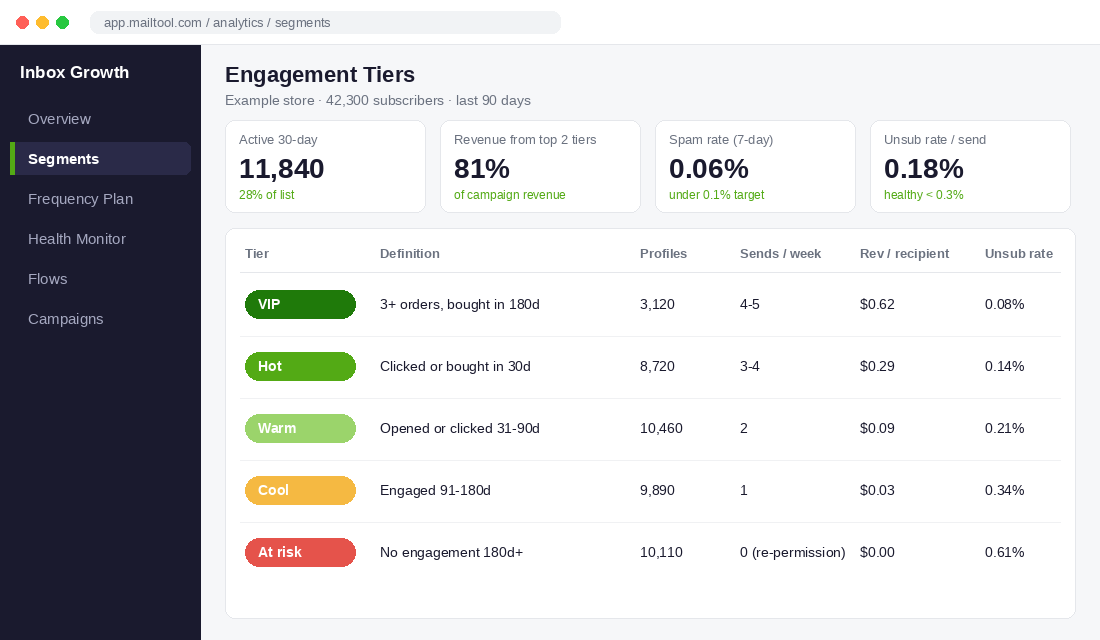
When founders tier their list for the first time, the split usually surprises them. In the example store above, only 28% of a 42,300-person list is active in the last 30 days, yet the top two tiers drive 81% of campaign revenue. That’s the core insight: most of your list isn’t where your money is, but it’s where most of your risk is.
If your segments look messy, that’s normal. Our email metrics audit walks through cleaning up the numbers first so you’re tiering off data you trust.
Set a Frequency Ceiling for Each Tier
Now give each tier its own weekly ceiling for campaign sends. Flows run on top of this, and we’ll deal with the overlap in a minute.
Here’s the baseline I start most members on outside of peak season:
- VIP: 3 to 4 campaigns a week
- Hot: 2 to 3 a week
- Warm: 1 to 2 a week
- Cool: 1 a week, maximum
- At risk: zero campaigns. They get a re-permission sequence only (more on that below).
This isn’t guesswork. Take the Klaviyo case study of US seafood brand Svenfish. In August 2024 they sent 27 campaigns in a single month, close to one a day, and attributed nearly 70% of ecommerce revenue to Klaviyo. The trick is that no subscriber got 27 emails. Each send was cut by purchase recency, purchase frequency and distance from their retail store, so every campaign went to a narrow slice that cared about that day’s catch.
That’s the model. High brand-level send volume, moderate individual-level frequency. Your calendar can have a campaign almost every day while any one customer only sees the two or three that are relevant to them.
Build the ceiling into your tools
In Klaviyo, turn on Smart Sending. It skips anyone who received another email from you within the Smart Sending window, which is 16 hours by default according to Klaviyo’s help centre. To change it, go to your account name (bottom left), then Settings, then Email, then Sending preferences, and update the Smart Sending Period.
My setup for most Shopify stores:
- Campaigns: Smart Sending on, window at 16 to 24 hours.
- Revenue flows (abandoned cart, browse abandonment, welcome): Smart Sending on, so a campaign doesn’t land an hour after a cart reminder.
- Transactional and post-purchase service flows: Smart Sending off. Order and shipping updates should always go.
In Omnisend, the equivalent is to exclude recently emailed contacts via a segment filter on “Email sent” in the last day, and to use campaign “Exclude segments” so your At risk tier never lands in a promotional send.
Build the Q4 Ramp Before You Need It
Here’s where most brands go wrong. They send one email a week all year, then fire off twelve emails across Black Friday week to their whole list. Inbox providers see a sudden spike from a sender that’s been quiet, engagement per email falls off a cliff, and complaints spike.
Omnisend’s holiday deliverability guidance is blunt about this: mailbox providers are sensitive to sudden volume jumps, so grow send volume by 25% to 40% per campaign rather than jumping straight to your full list. Their example goes from 100,000 to 125,000 to 156,000 recipients. They also warn that subscribers used to weekly emails who suddenly get several a day will produce higher unsubscribes and complaints.
So you ramp in two directions at once: how many people you send to, and how often the engaged tiers hear from you.
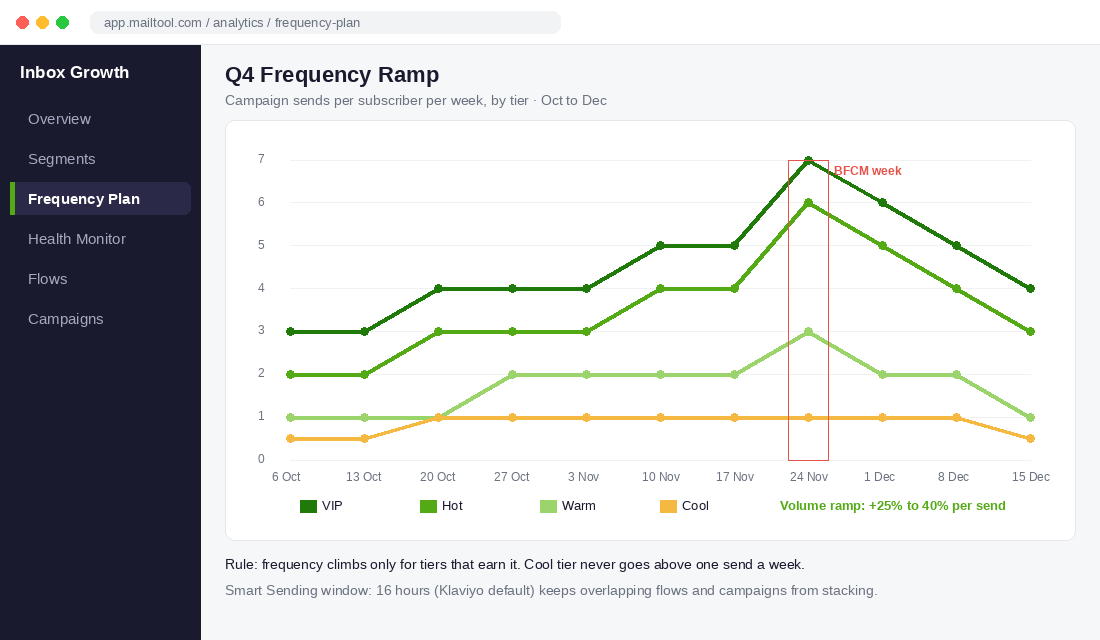
Here’s a ramp you can copy for a store running BFCM in late November:
- Early October (now): hold baseline frequency. Start adding Warm subscribers into one campaign a week to warm up volume.
- Mid to late October: lift VIP and Hot by one send a week. Introduce a pre-Black Friday “early access” list sign-up so your most eager buyers raise their hands.
- Early November: Warm moves to 2 a week. Cool stays at 1. At risk stays at zero.
- BFCM week: VIP and Hot can go to daily or close to it (6 to 7 sends including early access, launch, reminder, last chance). Warm gets 3. Cool gets 1, the launch email only.
- December: step back down gradually, and use shipping cut-off emails as your natural reason to send. Our BFCM playbook covers the full offer calendar these sends sit inside.
The rule underneath all of it: frequency only climbs for tiers that earn it. If a Cool subscriber clicks during November, they move up to Warm or Hot automatically, because your segments are dynamic. Your list sorts itself.
Know the Hard Limits: Inbox Providers and the Spam Act
Frequency isn’t just a revenue question. It’s a compliance and deliverability question, and the rules got stricter.
The inbox provider rules
Google and Yahoo’s bulk sender requirements, now enforced alongside similar rules from Microsoft, set two numbers every Aussie brand emailing Gmail addresses needs to know:
- Spam complaint rate: keep it under 0.1%, and never let it reach 0.3%. Above that you risk bulk folder placement or outright rejection. (Source: Google’s email sender guidelines FAQ.)
- One-click unsubscribe: marketing emails must support one-click unsubscribe in the header, and requests must be honoured within two days.
Here’s the link to frequency. When someone feels over-emailed and can’t find the unsubscribe link quickly, they hit “Report spam” instead. Every over-send to a disengaged tier pushes that complaint rate up for your whole domain, including the VIPs you actually want to reach. If you haven’t set up Google Postmaster Tools yet, do it this week. Our email deliverability playbook has the step-by-step.
The Australian rules
Australia’s Spam Act 2003 requires consent, clear sender identification and a working unsubscribe that’s actioned within five business days. The ACMA enforces it hard, and big names aren’t exempt.
In 2023 Kmart paid a $1.3 million penalty after the ACMA found it sent 212,471 marketing emails to customers who had already unsubscribed, between July 2022 and May 2023, due to a mix of technology, system and process failures. It also signed a two-year court-enforceable undertaking.
That’s a lesson for any Shopify brand ramping up in Q4. When you add new sending tools, import lists from pop-ups or giveaways, or sync SMS and email platforms, check that unsubscribes flow across every system. A higher send frequency multiplies the damage of a broken suppression list. Our Spam Act compliance guide has a checklist you can run in an afternoon.
Give Subscribers a “Less” Button Instead of an Exit
Most brands give subscribers two choices: get everything, or leave. That’s why “too many emails” drives so many unsubscribes. The fix is a third option.
Add a frequency preference to your emails and your preference page:
- “Just the big stuff”: one email a week, plus sale launches.
- “Everything”: the full cadence for their tier.
- “Take a break for 30 days”: pause campaigns, keep order and shipping emails.
In Klaviyo, you can do this with a hosted preference page that sets a custom profile property (for example, frequency_pref = weekly), then exclude that property value from your extra campaign sends. In Omnisend, the same works with a custom property set from a link in the footer.
Put the “less email” link above the unsubscribe link in your footer, in plain words. Something like: “Getting too many emails from us? Switch to one a week.” In November especially, this saves subscribers you’d otherwise lose for good. We go deeper on building the page in our email preference centre playbook.
Re-permission the At risk tier
Your At risk tier shouldn’t get BFCM emails. Instead, send them a short re-permission sequence in October, before the ramp starts:
- Email 1: “Still want to hear from us?” with a one-click “Yes, keep me on the list” button. No discount, just a clear question.
- Email 2 (5 days later): a best-sellers or new-arrivals email, to non-clickers only.
- Email 3 (5 days later): “We’ll stop emailing you on [date]”, with one more chance to stay.
Anyone who clicks moves back into Warm and gets the BFCM calendar. Anyone who doesn’t gets suppressed (not deleted) from campaigns. Omnisend’s guidance suggests that if you do want to test inactive contacts in peak season, cap them at around 10% of total send volume. I’d rather clean them out a month earlier.
Watch Four Guardrail Numbers After Every Send
Frequency is a dial, not a set-and-forget setting. Once you start the ramp, check four numbers within 48 hours of every campaign and act on them the same day.
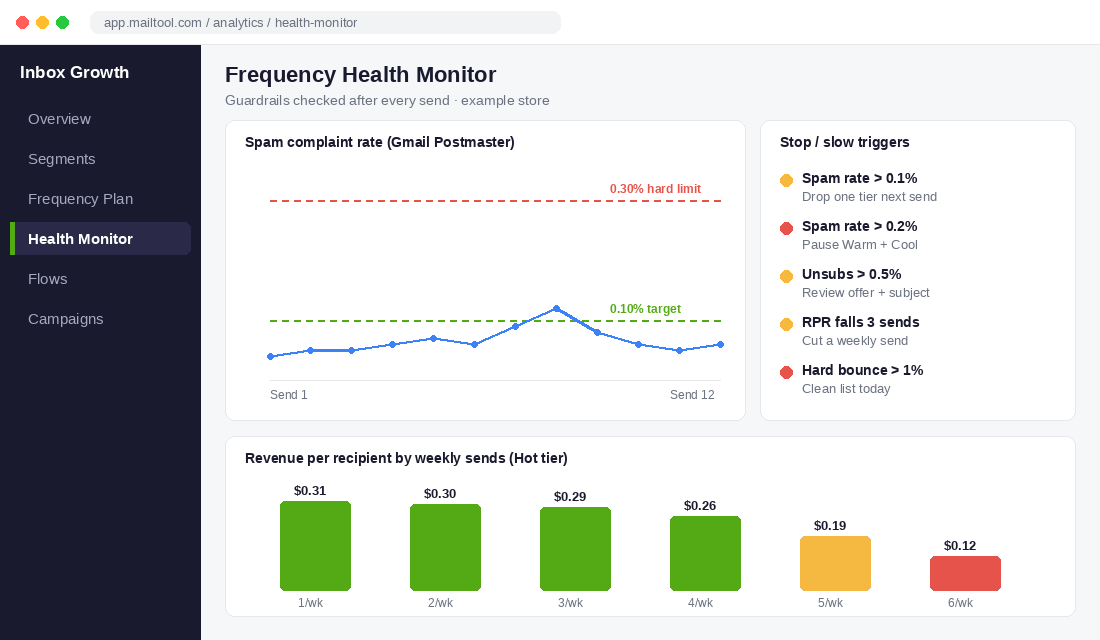
- Spam complaint rate (Gmail Postmaster Tools): under 0.1% is healthy. Over 0.1%, drop your send by one tier next time (for example, send the next campaign to VIP and Hot only). Over 0.2%, pause Warm and Cool campaigns until it settles.
- Unsubscribe rate per send: under 0.3% is fine for most Aussie DTC lists. Above 0.5% on a single send, look at the offer and subject line before you look at frequency. It’s usually a relevance problem.
- Revenue per recipient (RPR) by tier: this is the number that tells you when you’ve hit the ceiling. If RPR for a tier drops for three sends in a row while you’re adding frequency, you’ve passed the point of diminishing returns. Cut one weekly send for that tier.
- Hard bounce rate: anything over 1% means old or fake addresses have crept in, often from giveaway entries. Clean the list that day.
The RPR test is the one most brands skip, and it’s the most useful. In the example above, the Hot tier holds roughly the same RPR from one to four sends a week, then drops sharply at five and six. Total revenue still rises a little at five sends, but the complaint rate and unsubscribes rise faster. Four is that tier’s ceiling. Your numbers will be different, and the only way to find them is to watch this chart as you ramp.
Set up the weekly report
In Klaviyo, build a custom report under Analytics with campaign revenue per recipient, unsubscribe rate and spam complaint rate, grouped by the segment each campaign was sent to. Add a Google Postmaster Tools check to your weekly marketing meeting. In Omnisend, use the campaign reports and export them into a simple sheet with one row per send and one column per tier.
How the Five Tiers Work Together as a System
Here’s why this beats “email more” or “email less”.
When your list is tiered, the frequency increase goes to the people most likely to buy, which lifts revenue per send. Because your disengaged tiers get fewer emails, your complaint rate stays low. A low complaint rate protects inbox placement, so your VIP and Hot emails actually land in the primary inbox during the busiest email week of the year, when everyone else’s are fighting the Promotions tab and spam folder.
Meanwhile, the preference link catches people who would have left, and the re-permission sequence removes the dead weight before it can hurt you. The guardrail numbers tell you when to stop. And because your segments are dynamic, any Cool subscriber who re-engages during the sale moves up a tier on their own.
It’s a loop: engagement earns frequency, frequency drives revenue, and low complaints protect deliverability for the next send. Flat frequency breaks the loop in both directions. You either leave money on the table with your best customers or burn your reputation with your worst.
And it compounds into January. The brands that blast their full list in November start the new year with a smaller list, a damaged sender reputation and a pile of complaints. The brands that tier their sends start January with a cleaner list and a VIP group that’s just bought twice.
Your Email Frequency Checklist for the Next 30 Days
Copy this into your project tool and work through it before BFCM:
- ☐ Week 1: Build the five tiers. VIP, Hot, Warm, Cool, At risk, using clicks, site activity and orders, not opens alone.
- ☐ Week 1: Check your baseline. Pull RPR, unsubscribe rate and spam rate for the last 10 campaigns, by tier.
- ☐ Week 1: Set up Google Postmaster Tools for your sending domain if it isn’t already live.
- ☐ Week 2: Turn on Smart Sending for campaigns and revenue flows (16 to 24 hours). Leave it off for transactional flows.
- ☐ Week 2: Add a frequency preference link above the unsubscribe link in every campaign footer.
- ☐ Week 2: Launch the re-permission sequence to your At risk tier. Suppress non-responders from campaigns.
- ☐ Week 3: Audit suppression across every tool. Confirm unsubscribes sync between Shopify, your email platform, SMS and any pop-up or giveaway app.
- ☐ Week 3: Map your Q4 ramp. Weekly ceilings per tier from October through December, with volume rising 25% to 40% per send.
- ☐ Week 4: Build the guardrail report. Spam rate, unsubscribe rate, RPR by tier, hard bounces. Review within 48 hours of every send.
- ☐ BFCM week: Stick to the tiers. VIP and Hot go daily. Cool gets the launch email only. At risk gets nothing.
Send More to the People Who Want It
The question was never “how often should I email?” It’s “how often should I email this person?” Once you answer that five times instead of once, you can send more in Q4 than you ever have and still end the year with a healthier list than you started with.
Inside eCommerce Circle, email is one of the core pillars we work on with every member, and a tiered frequency plan is one of the fastest wins in the Promotion P before peak season. If you want to see exactly where your store is being capped, take the free More Orders Scorecard. It takes two minutes and shows you which of the 10 P’s to fix first.