Most Shopify brands use AI ad creative the wrong way round. They type a prompt, get 40 shiny images in ten minutes, upload all of them, and then wonder why cost per purchase got worse. AI made the cheap part of advertising cheaper. It did nothing for the hard part, which is knowing what to say and to whom.
What’s in This Article
The brands getting real value use AI for volume and speed, and keep a human on the brief, the review and the decision. That is the whole system, and this article shows you how to build it, which tools earn a place in your stack, and where AI creative will quietly cost you sales.
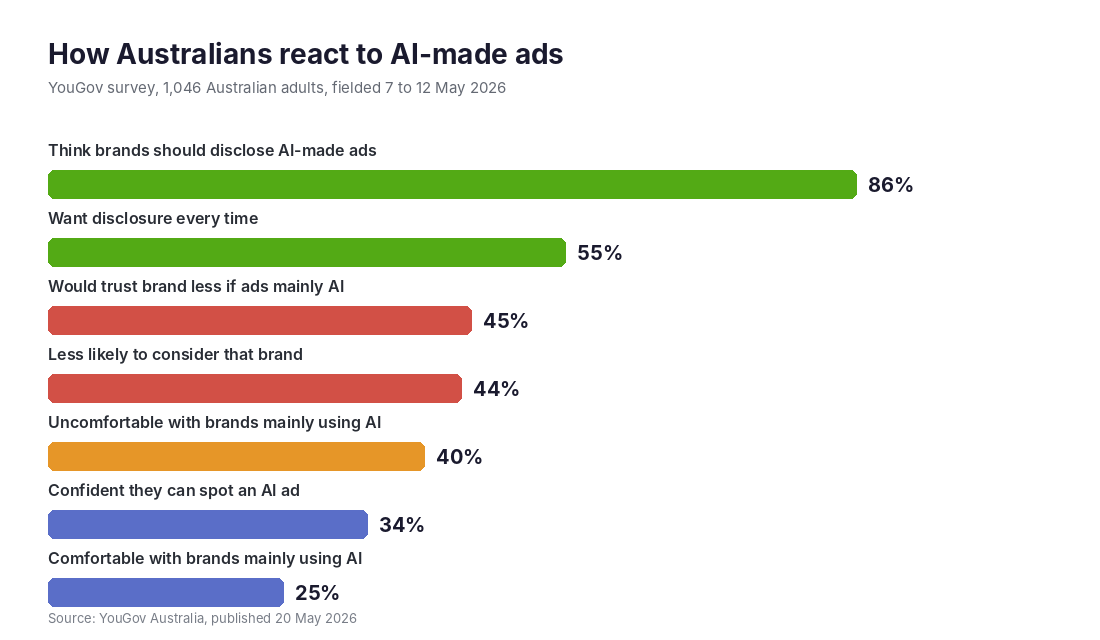
One number to keep in mind before you spend a dollar. In a YouGov survey of 1,046 Australian adults in May 2026, 45% said they would trust a brand less if they learned its ads were mainly AI-made. That is your downside, and it is why the workflow below matters more than the tool you pick.
Why AI Ad Creative Is Now Part of Your Meta Setup Whether You Like It or Not
Meta’s own numbers show how fast this moved. According to its Q1 2026 results, more than 8 million advertisers use at least one AI ad creative tool, up from 4 million at the end of 2024. In a large-scale test, advertisers using Meta’s video generation saw a 3% conversion rate gain over those who did not.
Earlier beta results were bigger. EMARKETER reported that advertisers using the AI video tool for most of their campaign ads saw average gains of 10% in click-through rate and 8% in conversion rate. These are Meta’s figures about Meta’s tools, so treat them as a sign of direction, not a promise for your store.
The more useful point is structural. Meta’s delivery system now rewards creative variety. If you have not read it yet, our breakdown of Meta Andromeda and what it means for Shopify ad creative explains why five genuinely different ads beat fifty near-identical ones. AI is the cheapest way to produce that variety, provided you brief it properly.
The Three Jobs AI Does Well (and the Three It Does Badly)
Before picking tools, get clear on where AI earns its keep. After watching Shopify brands run these tools for the last two years, the split is consistent.
Where AI creative works
- Production grunt work. Resizing one hero image to 1:1, 4:5 and 9:16, removing backgrounds, extending canvases, and cleaning up lighting. This used to cost a designer hours and now takes minutes.
- Variation at volume. Ten headline angles, five caption lengths, three background settings for the same product. Cheap to generate, cheap to test.
- First drafts of copy and scripts. A rough UGC-style script or a hook list gives you something to edit instead of a blank page. The edit is where your brand voice comes in.
Where AI creative fails
- Showing how a product really looks or fits. Colour, texture, scale and fit are the top reasons for returns. An AI render that flatters the product creates a refund later.
- Anything that depends on trust. Testimonials, before and afters, results claims. If an AI invented it, you should not publish it. That is both a conversion problem and a legal one under the Australian Consumer Law.
- Original ideas. AI remixes what already exists. Your angle, your customer’s exact words and your offer have to come from you.
If you want a deeper rule for deciding what to automate and what to keep, our AI or hire test gives you a simple way to sort tasks.
Step 1: Write the Brief Before You Open Any Tool
The brand-killing mistake is starting in the tool. A tool with no brief gives you generic output, and generic output gets generic results. Your brief only needs four lines.
- The offer. What is the customer getting, at what price in AUD, and what is the risk reversal (returns, guarantee)?
- One customer pain. Pull it from reviews, support tickets or survey answers, in the customer’s own words. “Sheets that stay cool in a Darwin summer” beats “premium bedding.”
- Three hooks to test. One problem-led, one outcome-led, one proof-led. These become your three creative angles.
- Proof you can back up. Review counts, a verified result, a press mention. Only real proof goes in.
Our creative brief guide goes deeper on the research side. The point here is that AI should receive the brief, not write it.
Step 2: Pick Your Stack (Start With Two Tools, Not Ten)
There are hundreds of AI ad tools and most overlap. A lean Shopify store needs two things: a way to clean and restage product images, and a way to let Meta test variations inside the platform.
Tool 1: Photoroom for product images
Photoroom’s pricing as at mid-2026 starts free (watermarked, no commercial use), with Pro at US$7.99 a month and Max at US$26.99 a month. It has a native Shopify app that pulls your catalogue and lets you batch edit, with background removal, AI backgrounds, shadows, and colour variants. Publishing finished images straight back to Shopify is a Max feature, not Pro, so check which tier you need.
Setup in under 30 minutes:
- Install the Photoroom app from the Shopify App Store and approve the catalogue permissions.
- Pick your five best-selling products and run them first. Do not batch the whole catalogue.
- Create one background template per hero setting, for example clean white, warm kitchen bench, outdoor light. Reuse it so your ads look like one brand.
- Export 1:1, 4:5 and 9:16 versions of each winner.
- Compare the output to your real product. If a colour, logo or texture is off, reshoot or do not use it. Photoroom itself is weaker on reflective products and complex scenes, so check jewellery, glassware and metallics closely.
Tool 2: Advantage+ creative inside Meta
This is already in your ad account and costs nothing extra. When you build an ad, scroll to the Advantage+ creative section and click Edit. You can use the all-optimisations slider, or switch individual enhancements on and off. Jon Loomer’s walkthrough covers the full list, and the caveats matter: enhancements do not apply to every placement, they can be personalised, and Meta says it stops using changes that underperform but that is not guaranteed.
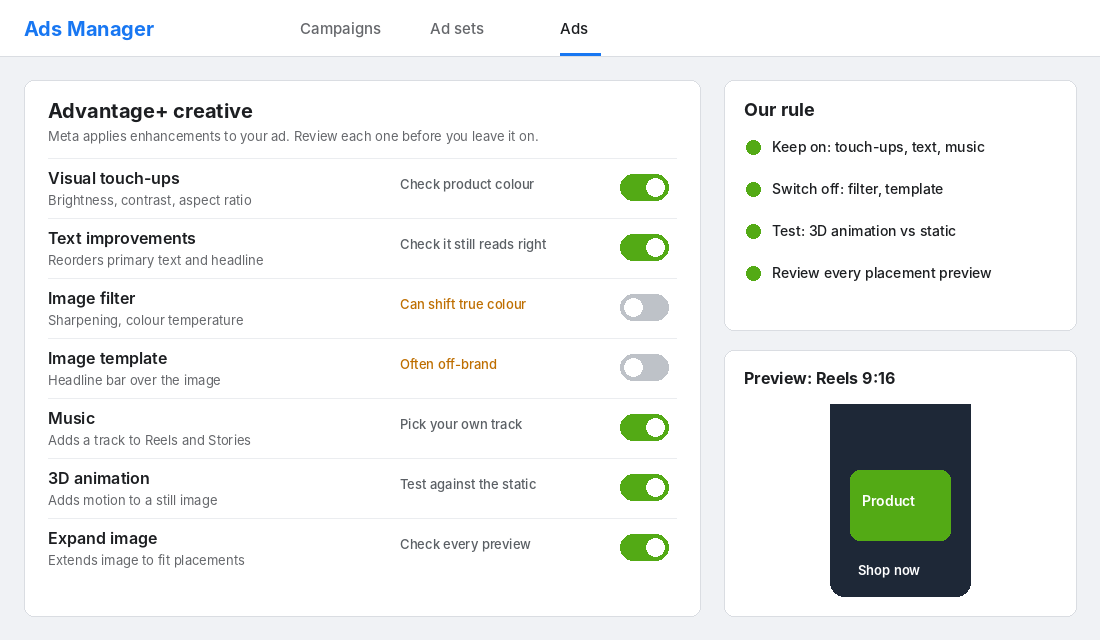
Our default settings for a Shopify store selling physical products:
- On: visual touch-ups, text improvements, music (pick the track yourself), expand image. Check every placement preview.
- Off: image filters and image templates. Filters can shift product colour, and templates add a headline bar that looks off-brand.
- Test, do not assume: 3D animation. Run it against the static version and let the numbers decide.
Step 3: Generate Variations With a Rule Set
Now you can generate. Use this rule set so AI stays on a leash.
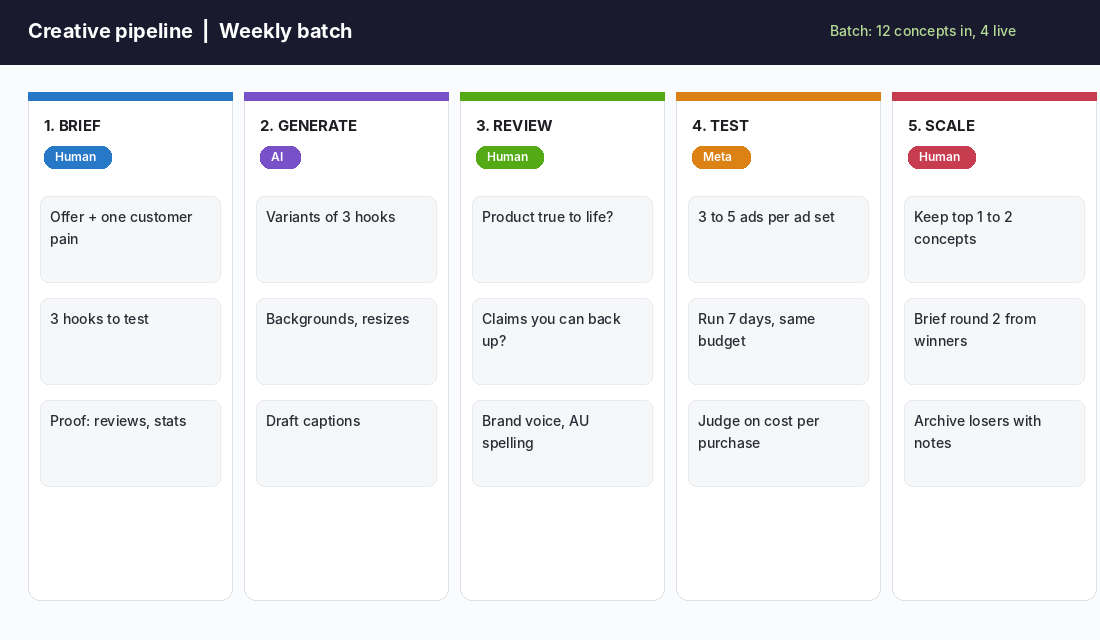
- Change one variable per variant. Hook, background or format, never all three. Otherwise you cannot tell what won.
- Keep the product pixel-true. The product is never generated. Only the background, copy and layout around it are.
- Write Australian. Prompt for AUD prices, “colour”, “afterpay”, local delivery windows. Generic US copy reads wrong to local buyers.
- Cap the batch. Twelve concepts in, three to five ads live per ad set. More than that and Meta spreads thin budget across variants that never get a fair run.
For a cleaner method of running these tests, see our Meta creative testing engine.
Step 4: The Human Review Gate (Where Most Brands Skip and Pay)
Every AI-assisted ad should pass a 60-second review before it goes live. Treat it like a pre-flight check.
- Does it look like the thing we ship? Hold the ad next to the real product. If a customer would feel misled, it fails.
- Can we prove every claim? “Rated 4.8 by 2,300 customers” needs a screenshot you can point to. Invented urgency and fake reviews are out.
- Does it sound like us? Cut anything that reads like a template. Phrases like “unlock” and “game-changer” give away machine copy straight away.
- Are the hands, text and faces right? Extra fingers and garbled words in an image are the most obvious tells of lazy AI creative.
The Trust Problem: What Australians Actually Think of AI Ads
Here is the part most “AI marketing” posts skip. Your customers have opinions, and the research is not flattering to brands that lean on AI alone.
The YouGov survey published in May 2026 found that 40% of Australians feel uncomfortable when brands mainly use AI to make ads, and only 25% feel comfortable. 44% would be less likely to consider a brand whose ads were mainly AI-made. And 86% think brands should clearly disclose AI-made ads, with 55% saying disclosure should always happen.
Retail and packaged goods was one of the least comfortable categories, at just 12% comfortable. Gen X and Baby Boomers were the most sceptical, while Gen Z and Millennials were more open. That matters if your buyers skew older.
There is a wider pattern too. EMARKETER cited CNET research showing 60% of US social media users look for clear AI cues in images and videos, and 30% want labels or disclosures. EMARKETER’s conclusion was that Meta “hasn’t fully proven” its tools can overcome consumer scepticism.
What this means for you: AI-assisted is fine, AI-led is risky. Backgrounds, resizes and copy drafts are invisible to customers. An AI-generated person wearing your product, or an AI-written testimonial, is not.
Two Brand Examples: One Warning, One Lesson
Coca-Cola: Tested well, then got torched
In November 2024, Coca-Cola released an AI-powered remake of its 1995 “Holidays Are Coming” ad. According to Adweek, System1 gave it a perfect 5.9 score in both the US and UK for emotional response. Then public sentiment turned, with critics saying AI drained the warmth from a classic. The lesson: a good test score is not the same as brand goodwill. If your brand sells on warmth and craft, AI-led creative can damage the very thing you sell.
Atoir on The ICONIC: The disclosure lesson
In July 2025, Melbourne fashion label Atoir drew criticism on Reddit for using AI-generated visuals to sell clothing on The ICONIC, as Pedestrian.tv reported. The product description disclosed that the imagery used “AI generated visuals” and did not feature a real model, yet one Redditor still called it “deceptive”. Others said the point of model photos is seeing how clothes fit and move on a real body. Atoir’s founder had told Ragtrader that AI sped up production and cut the high cost of shoots, so the commercial logic is real.
The lesson: disclosure helps but does not erase the problem. For fit-driven categories like apparel, shoppers want proof the product looks that way in real life. Use AI to cut costs on backgrounds and campaign variety, and keep real photography for the product itself.
A Worked Example: Running This on a a Day Budget
Here is how the workflow looks for a store spending about A$60 a day on Meta. This is an illustration of the method, not a benchmark, so swap in your own numbers.
On Monday you write the brief for your best-selling product and generate twelve concepts: three hooks, each in four visual treatments. On Tuesday you review them against the checklist and cut it to five. You launch the five in one ad set at A$60 a day, which is A$12 a day per ad if Meta splits evenly, though it rarely does.
By the following Monday you have seven days of data. Ignore anything with fewer than a handful of purchases, because small samples lie. Look at cost per purchase against your break-even, which our Meta ads ROAS benchmark guide helps you calculate. Keep the one or two ads beating your target, pause the rest, and write them into a “winners” doc with the hook, the visual and the result.
Week two, you brief from the winners. If the problem-led hook won, you generate four new problem-led angles instead of starting from scratch. That is how a small budget produces a creative library that keeps getting sharper.
Stay on the Right Side of the Law
Under the Australian Consumer Law, ads must not mislead, and that applies whether a human or a model made the image. An AI render that overstates quality, colour or results can still be misleading conduct. Keep a record of the proof behind every claim, and avoid AI-generated reviews and fake before-and-after images altogether. If you are unsure, check the ACCC’s guidance on advertising and selling.
The Compound Effect: How the Pieces Work as a System
Look at what the workflow does once the four steps run weekly. The brief removes guesswork, so AI output is on-message. Generation gives Meta the creative variety Andromeda wants. The review gate protects trust and keeps returns down. Testing then tells you which angles earn money, and those winners feed next week’s brief.
Each round is cheaper and sharper than the last. After a month you have a library of proven hooks and backgrounds. After a quarter you stop guessing what to make. That compounding is the real prize, not the time saved on one image.
Skip any step and the system leaks. No brief gives generic ads. No review gives refunds and complaints. No testing gives you volume without learning. No scaling decision means you keep paying for ads that never earn their spot.
Your AI Ad Creative Checklist (Copy This)
Run this before every batch goes live.
- Brief: offer, one customer pain, three hooks, real proof written down.
- Tools: Photoroom for images, Advantage+ settings reviewed line by line.
- Variants: one variable changed per ad, product never generated.
- Batch size: 12 concepts made, 3 to 5 live per ad set.
- Review: true to product, claims provable, voice sounds like you, no garbled text or hands.
- Disclosure: no AI people, no AI testimonials. If a person is AI-generated, say so.
- Test: 7 days, equal budget, judged on cost per purchase, not click-through rate.
- Scale: keep the top one or two, write next week’s brief from the winners.
Common Mistakes to Avoid
- Judging by CTR. A pretty AI image can pull clicks and still lose money. Judge on cost per purchase and blended ROAS.
- Leaving every Advantage+ toggle on. Check the placement previews. Some enhancements change how your product looks.
- Using AI faces for the brand. It is cheap, and it is where trust drops fastest.
- Never archiving losers. Note why an ad lost. That is how the next brief improves.
Where to Start This Week
Do not rebuild your ad account. Pick your best-selling product, write the four-line brief, run it through Photoroom for three backgrounds, check your Advantage+ toggles, and launch three variants against your current best ad. Review the numbers after seven days and decide what stays.
Inside eCommerce Circle, creative and testing are core pillars we work on with every member. If you want to see exactly where your store is being capped, take the free More Orders Scorecard. It takes two minutes and shows you which of the 10 P’s to fix first.