You spent three weeks agonising over the name. The range is called Bellbird. The quilt cover is The Alto. The towels are Marlo. It sounds like a brand, it photographs beautifully, and your designer loves it.
What’s in This Article
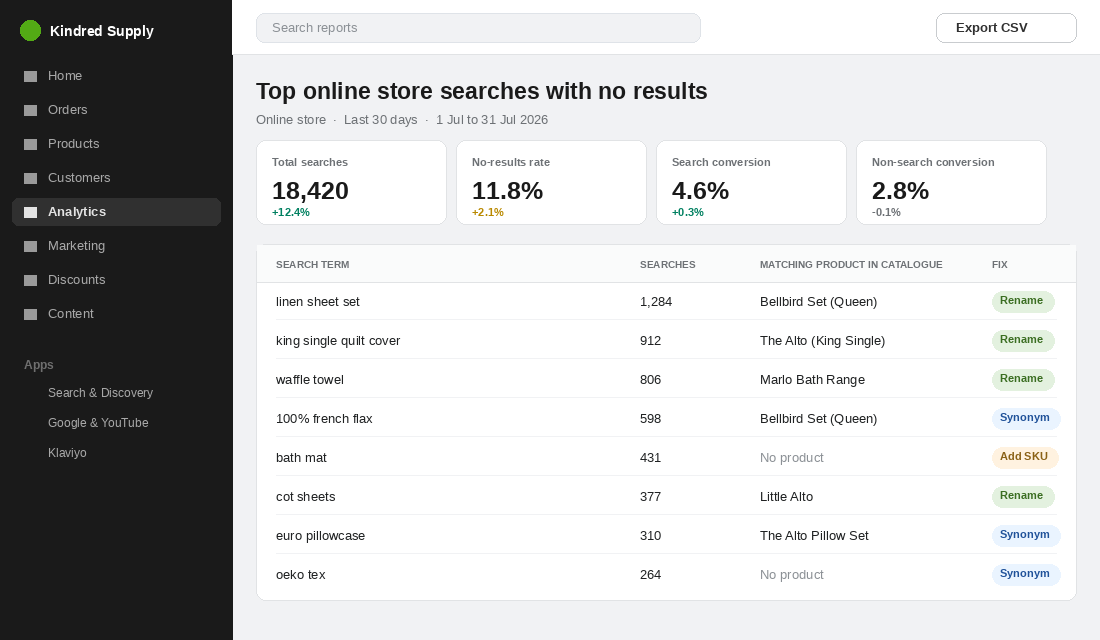
Then you open your Shopify search report and find 1,284 people typed “linen sheet set” into your search bar last month. Your product is called The Bellbird. Shopify returned nothing. Those shoppers were not browsing. They knew exactly what they wanted, they told you in plain English, and your catalogue answered with silence.
Here is the number that should stop you cold. Shoppers who use your site search make up roughly 24% of visitors but generate about 44% of revenue and 45% of add-to-cart activity, and they convert at 4.63% against 2.77% for everyone else. Your product name is the string that decides whether those people find anything at all. Most Aussie brands treat it as a branding exercise. It is closer to infrastructure.
The Most Expensive Sixty Characters on Your Store
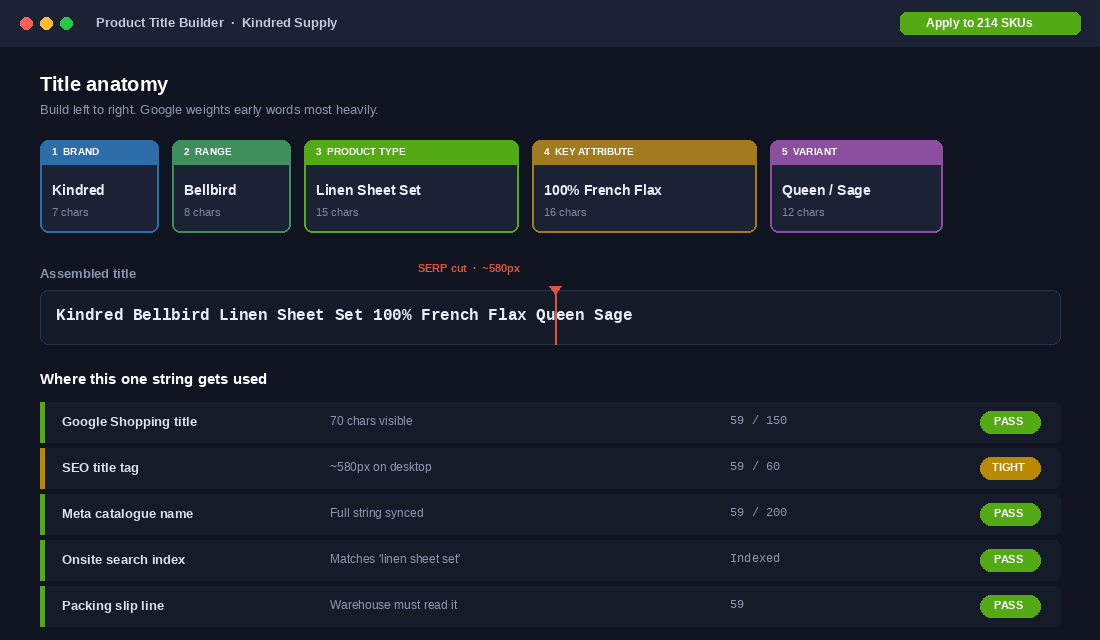
Your product title is not one field. It is one string that gets copied into at least six places, and every one of them is a place a sale can die.
- Onsite search index. Shopify matches queries against the title first. No keyword in the title, no match.
- SEO title tag. By default Shopify builds your page title from the product title. Google truncates at roughly 580 pixels on desktop, which lands around 50 to 60 characters.
- Google Shopping feed. Google allows 150 characters but only about 70 are visible in the ad, and roughly 80% of your click-through rate depends on what a shopper sees before the cut.
- Meta catalogue. Same string, syncing straight through to Advantage+ and catalogue ads.
- Order confirmations and packing slips. If your warehouse cannot tell The Alto from Little Alto at a glance, you are paying for mispicks.
- The customer’s memory. Three weeks later they want to reorder. They remember “the sage linen sheets”, not “Bellbird”.
Six systems, one string, and most founders write it in about eleven seconds while adding the product.
Why Clever Names Quietly Cost You Money
IKEA is the usual defence. STOCKSUND, KIVIK, BILLY. Nobody argues IKEA has a naming problem, so why should you?
Because IKEA never uses the name on its own. Baymard’s usability research found that names like STOCKSUND and KIVIK only work as unique identifiers for a product series, and that adding the product type, “3-seat sofa”, is what makes the listing clear to a shopper scanning a page. Test participants were repeatedly observed falling back on the product title or the product type when a thumbnail was hard to read at a glance.
Look at Aesop. Every product is “Resurrection Aromatique Hand Balm”. Poetic first half, brutally literal second half. Who Gives A Crap sells “Recycled Toilet Paper 48 Rolls”, not “The Classic”. Bed Threads names sheets by material and colour, not by mood board. These brands did not give up on branding. They stopped asking the name to do a job it cannot do.
The rule is simple. A brand name earns loyalty from people who already know you. A descriptive name earns traffic from people who do not. You need both in the same field, in that order.
The 5-Part Naming Formula
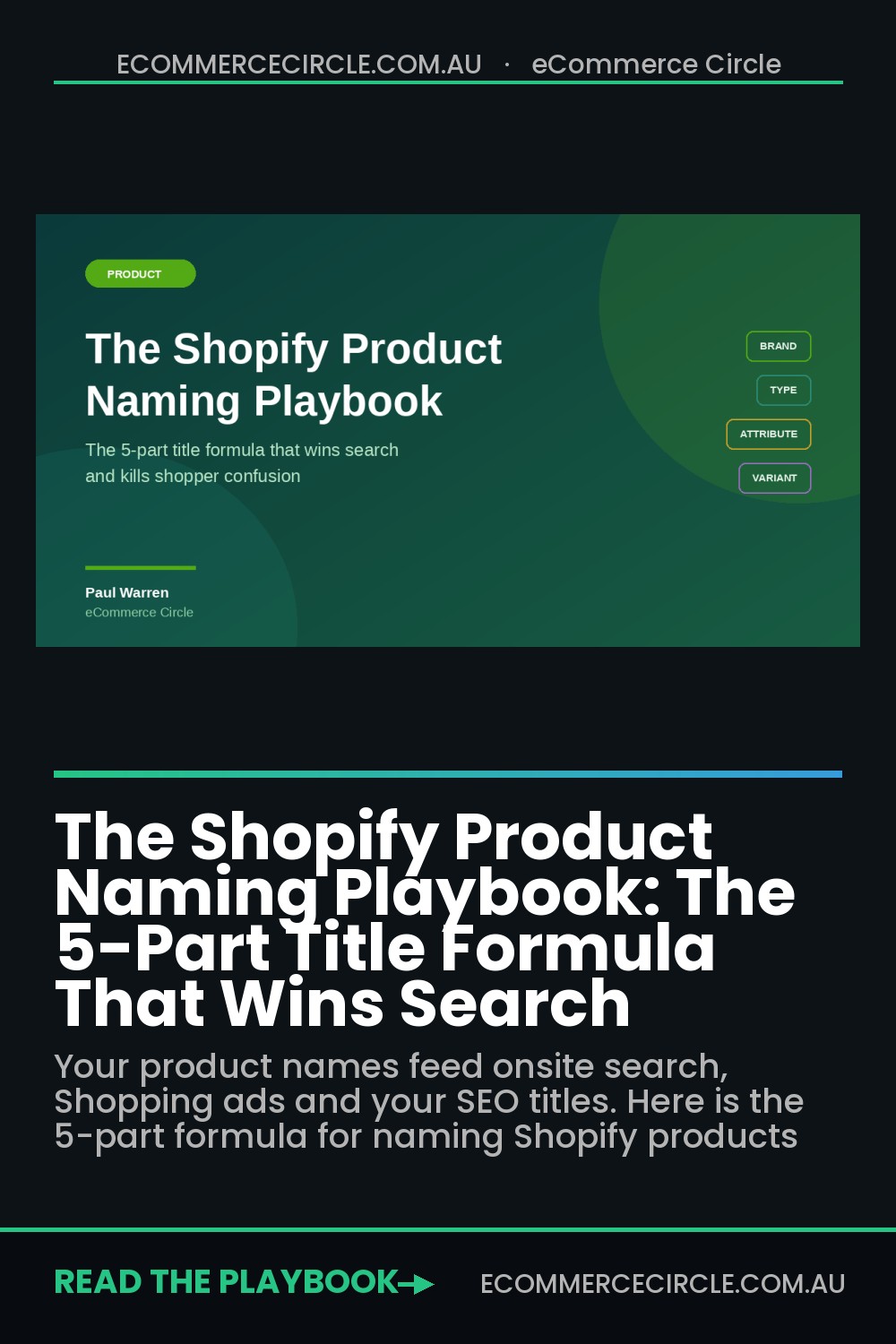
Every product title on your store should be built from the same five blocks, left to right. Google reads left to right and weights early words more heavily, so word order is not cosmetic.
- Brand. Your store name. Kindred. Non-negotiable for Shopping feeds and it anchors the SEO title.
- Range or model. Your poetic bit. Bellbird. This is where the creative name lives, and it is the only place it lives.
- Product type. The words a stranger would type. Linen Sheet Set. Quilt Cover. Waffle Bath Towel. Use the plain term, not your internal term.
- Key attribute. The one specification that drives the decision. 100% French Flax. 600GSM. Stonewashed. Pick one, not four.
- Variant. Size, colour, or capacity. Queen. Sage. King Single.
Assembled: “Kindred Bellbird Linen Sheet Set 100% French Flax Queen Sage”. Fifty-nine characters. Every word is doing work.
Two guardrails. Do not stuff. Adding “bedding bed linen sheets bedsheets” after the variant reads as spam to shoppers and gets you nothing extra from Google. And do not put pricing, promotions, or “SALE” in a product title, because Google will disapprove the item and your title becomes a permanent record of a discount that ended in March.
The 70-Character Rule and What Survives the Cut
Length is where most rewrites fall apart. Founders discover descriptive titles work, then write 130-character monsters that get sliced in half on every surface that matters.
Work to three thresholds and test against all of them before you bulk-apply anything.
- Under 60 characters keeps your SEO title tag inside Google’s roughly 580-pixel desktop limit about 90% of the time.
- Under 70 characters keeps the whole thing visible in a Shopping ad on most devices.
- Under 150 characters is Google’s hard feed limit, useful only if you are appending extra keywords through a feed rule rather than the product title itself.
The practical answer for most Aussie stores: aim for 55 to 65 characters in the Shopify product title, then use a feed app or a supplemental feed to append the longer keyword tail for Shopping only. That keeps your product pages readable while the feed does the heavy matching. If you have not audited your feed lately, the Shopify Google Shopping feed playbook covers the attribute mapping that sits underneath this.
One more thing to check: your theme’s SEO title template. Plenty of Australian themes append ” – Store Name” automatically, which means a 58-character product title becomes a 74-character page title and gets cut anyway. Set the SEO title manually on your top 30 products.
Mine Your Own Search Bar Before You Rename Anything
Do not guess the vocabulary. Your customers have already handed it to you.
In your Shopify admin go to Analytics, then Reports, then “Top online store searches” and “Top online store searches with no results”. Set the range to the last 90 days and export both to CSV. Across ecommerce, zero-result rates typically sit between 10% and 15%, sites with weak search push past 20%, and well-optimised catalogues get closer to 5%. Anything above 5% on your store is a naming problem before it is a search-technology problem.
Now sort the no-results list by volume and put every term into one of three buckets.
- Rename. You stock the thing, your title just does not contain the words. “linen sheet set” against a product called The Bellbird. This is the highest-value bucket and it is usually the biggest.
- Synonym. The term is regional or informal and you will never put it in a title. “doona” for quilt cover. “manchester” for bedding. “esky” for cooler. These are pure Australian vocabulary that no US-built theme will ever match on its own.
- Range gap. Real demand, no product. “bath mat” at 431 searches a month is a product decision, not a copy decision.
That last bucket is the one founders underrate. Around 12% of shoppers who cannot find what they are looking for do not stay to browse, they go to a competitor. A search term with volume and no result is a customer already halfway out the door. There is more on the mechanics of this in our guide to Shopify site search.
Variants and Collections: Where Aussie Stores Leak Most
Product titles get all the attention. Variants and collections get none, and they leak just as badly.
Variant names. Three rules. Use the term a customer uses, not your supplier’s code: “Sage”, not “PAN-4472”. Include the unit, because “70x140cm” beats “Large” for a towel and “King Single” is a size that exists in Australia and confuses every American-built app you install. And keep the option set consistent across the catalogue, so Size is always Size and never Sizing on one product and Dimensions on another. Inconsistent option names break your filters, and broken filters push shoppers back into the search bar you have not fixed yet.
Collection names. A collection called “New In” ranks for nothing. “Linen Bedding” ranks. Name collections after what people search, and use the collection description and handle to carry the intent. Your handle is permanent-ish, so get it right the first time: /collections/linen-sheet-sets beats /collections/collection-2.
Product category. While you are in there, set the Shopify Standard Product Taxonomy category on every SKU. It is not strictly mandatory, but missing or wrong category mapping reduces your impression share for relevant queries, and Shopify pushes that value through to Google and to Meta Commerce Manager. It takes about four seconds per product and most stores have it blank on a third of the catalogue.
The Australian Naming Traps Most Themes Get Wrong
Almost every Shopify theme, app and feed template you install was built for a US catalogue. That shows up in your product names in ways that are easy to miss and expensive to leave alone.
- Sizing words do not translate. King Single does not exist in the US. Our Double is their Full. Our Queen and King are different dimensions to theirs. If your titles or filters were built from an imported template, you are ranking for sizes nobody here searches and missing the ones they do. Put the Australian size word in the variant and the centimetre dimensions in the description.
- Local vocabulary is invisible to search. Doona, manchester, esky, thongs, singlet, jumper, ute, boardies, nappy. None of these will ever match a US-derived product title. They belong in your synonym groups on day one, not after you notice the traffic gap.
- Units need to be explicit. GSM for towels and bedding, grams not ounces, centimetres not inches, millilitres not fluid ounces. “600GSM” in a towel title is a decision-driving specification for an Australian buyer. “Heavyweight” is not.
- Seasonal words invert. A “winter weight” quilt sells here in May and June. If you inherited a content calendar or a naming convention from a Northern Hemisphere brand, your seasonal descriptors are six months out of phase.
- Origin claims carry legal weight. Do not put “Australian Made” in a product title unless the product genuinely meets the country of origin requirements the ACCC enforces. A claim in the title propagates to your Shopping feed, your Meta catalogue and your packing slip, which makes a careless one very hard to walk back.
The fix is a one-page naming standard your team works from. Approved product type words, approved size words, approved unit format, and a short banned list. Ten minutes to write, and it stops the drift that happens the moment someone other than you starts adding products.
Set Up Shopify Search and Discovery in About Twenty Minutes
You do not need a paid search app to fix most of this. Shopify’s own Search & Discovery app is free, built by Shopify, and handles synonyms, filters, boosts and product recommendations. Here is the exact setup.
- Install it. Shopify App Store, search “Search & Discovery”, install. No plan change, no monthly fee.
- Load your synonym list. Go to Apps, then Search & Discovery, then Search, then Synonyms. Click Create synonym group, add each term, click Add after each one, name the group, save. Start with your Australian vocabulary: doona and quilt cover, manchester and bedding, thongs and sandals, jumper and sweater, singlet and tank.
- Add product boosts. Under Search, set boosts so your best sellers and in-stock items rank above discontinued lines for the same query. Sorting by best-selling as a tiebreak is the sane default.
- Fix your filters. Under Filters, expose the attributes people actually shop by. For bedding that is size, material and colour. Remove filters with fewer than three products behind them, because an empty filter is a dead end.
- Set a review cadence. Put a 30-minute block in your calendar on the first Monday of each month to reopen the no-results report and clear the new terms.
Synonyms are the fast win, but they are a patch. Every synonym you create is a note-to-self that a product title is wrong. Fix the title, then keep the synonym for the terms you would never put in a title anyway.
How to Rename 200 Products Without Torching Your SEO
This is where founders freeze. Renaming feels like it will undo years of ranking. Done properly it does not, because in Shopify the product title and the URL handle are separate fields.
- Export first. Products, Export, All products, CSV for Excel. Save a copy untouched. This is your rollback.
- Do not change handles on ranking products. Editing the title in Shopify offers to update the URL. On any product with organic traffic, decline it. You get the new title with zero redirect risk.
- Rewrite in the CSV, not the admin. Build the five blocks in separate columns, concatenate, then check the character count with a LEN formula. Anything over 65 gets trimmed before it goes anywhere near the store.
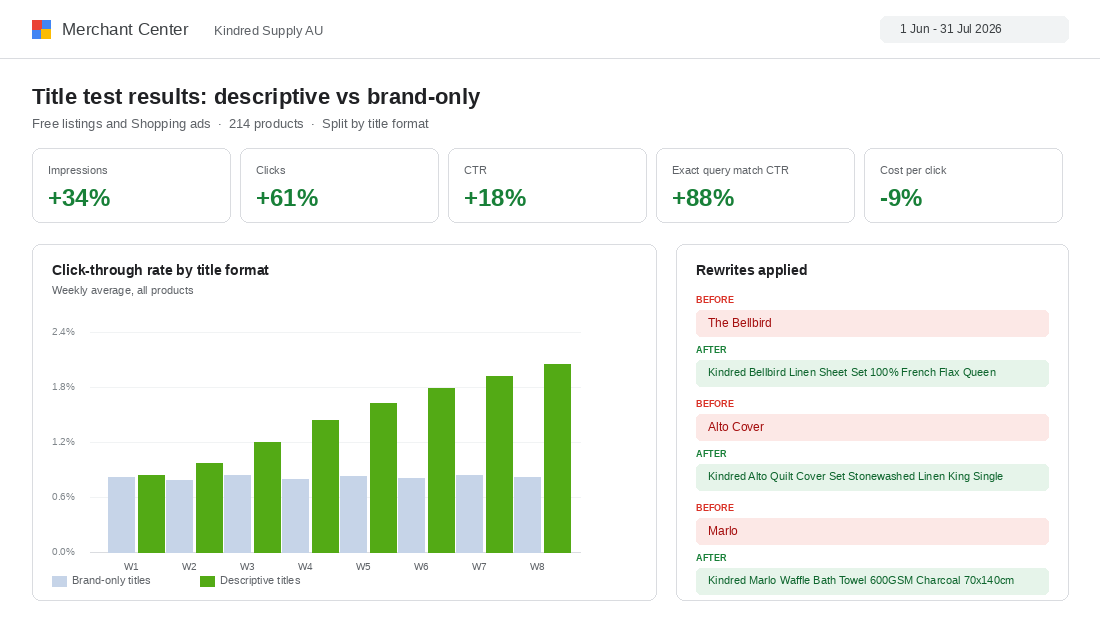
- Pilot on 20 products. Pick your top 20 by revenue, apply, then leave them for 14 days. Watch Shopping impressions and click-through in Merchant Center and organic clicks in Search Console. Roll the rest only if the pilot holds.
- If you must change a handle, redirect it. Content, then URL Redirects, then Create URL redirect. Old path to new path, 301, before you publish the change.
- Resubmit and recrawl. Push the feed to Merchant Center, then request indexing on the changed URLs in Search Console. Give Google two to three weeks before you judge anything.
Budget half a day for a 200-SKU catalogue. Most of it is spreadsheet work, and the pilot does the risk management for you.
Why This Compounds Harder Than Almost Anything Else
Most conversion work improves one surface. You fix the cart, the cart converts better. Naming is different, because the same string is feeding six systems at once.
Rewrite one title and your onsite search starts matching a query that used to return nothing, which pulls those shoppers into the group converting at 4.63% instead of 2.77%. The same string lifts your Shopping click-through, and better click-through with the same bid means more clicks for the same spend. The same string sharpens your SEO title, which improves organic click-through on a page you already own. The same string makes your Meta catalogue ads more specific. The same string makes the packing slip unambiguous.
None of those individually is dramatic. Together they compound, they cost you nothing in ad spend, and they do not degrade. A better title keeps working in two years. A creative test does not.
The founders who resist this are usually protecting the brand. Fair enough. But the brand name is still there, sitting in block two, in front of every customer who ever reads the title. You have not lost it. You have just stopped asking it to do search engine optimisation, which it was never built to do. Once the titles are right, the next lever is the body copy underneath them, which we break down in the Shopify product description playbook.
Your Product Naming Checklist
Run this against your top 30 products this week. Print it, tick it off, then apply it to the rest of the catalogue.
- Title follows Brand, Range, Product Type, Key Attribute, Variant, in that order
- The plain-English product type appears in the title, not just the range name
- Total length is 55 to 65 characters
- SEO title checked with the theme suffix included, still under about 60 characters
- No pricing, no promotional words, no keyword stuffing
- Shopify Standard Product Taxonomy category is set
- Variant options use customer language and include units
- Option names are consistent across the whole catalogue
- Collection names and handles reflect real search terms
- No-results report exported and bucketed into rename, synonym, or range gap
- Australian synonym groups loaded into Search & Discovery
- Zero-result rate is under 5%
- Handles left untouched on ranking products, or 301 redirects in place
- Pilot of 20 products run for 14 days before the full rollout
- Monthly 30-minute review booked in the calendar
Fifteen checks. Most of them take minutes. Together they decide whether the person who typed exactly what they wanted into your search bar finds it, or finds nothing and buys it somewhere else.
Inside eCommerce Circle, product naming and catalogue structure is one of the first things we audit with every member, because it is usually the cheapest revenue sitting on the store. If you want a second opinion on yours, let’s talk.