Product photography in Australia costs about $25 to $75 for a white-background image, $75 to $200 or more for a styled or hero image, and $400 to $2,000 or more for a photographer’s half or full day. A first shoot for a 12-product store usually lands between $1,800 and $2,700 once styling and retouching are counted.
Most store owners get this wrong in one of two ways. They pick the cheapest per-image price and get hit with retouching, setup and minimum-order fees. Or they book a day rate for a job that only needed 40 catalogue shots.
The brands that get value from a shoot do something different. They decide which images each product needs, match the pricing model to that list, and get the usage rights in writing before anyone picks up a camera. It matters, because Salsify’s 2026 consumer research found 61% of shoppers rate images and video as the most important element on a product page, narrowly ahead of pricing and availability (60%).
This guide gives you the real numbers: published rates from Australian studios, the extras that blow out a quote, a worked budget, and a brief you can copy. All prices are in Australian dollars unless I say otherwise, and were checked on 20 November 2026.
What Product Photography Costs in Australia (The Short Answer)
There is no single price, because photographers charge in four different ways. But the published ranges are tighter than most people expect.
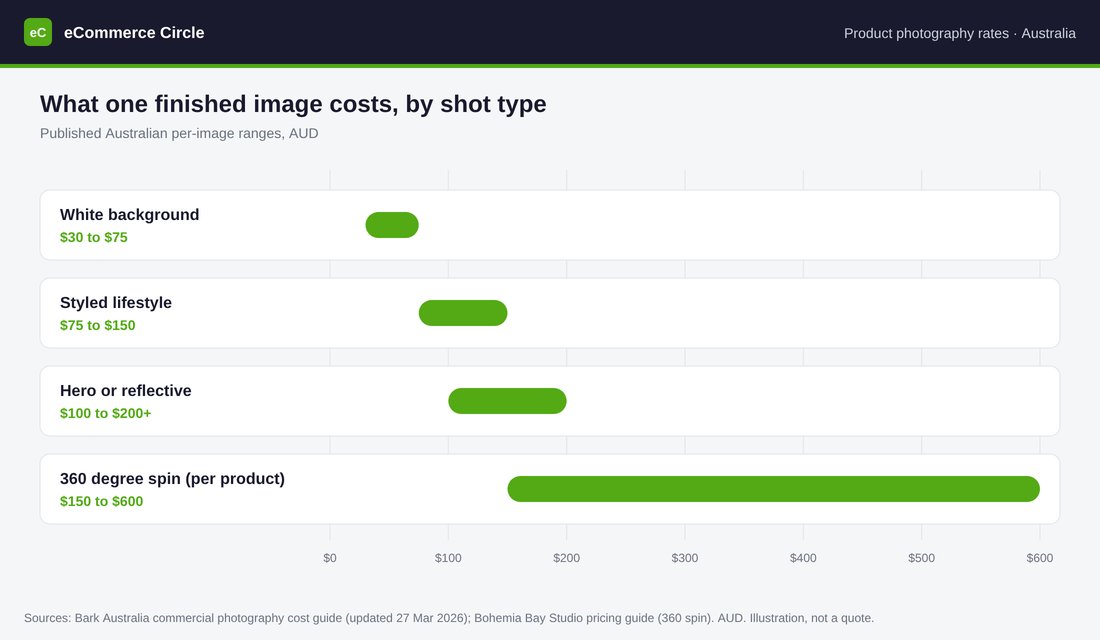
Bark’s Australian commercial photography cost guide (updated 27 March 2026, drawing on more than 1,180 photographers on its platform) puts product work at these levels:
| Shot type | Typical price | Charged |
|---|---|---|
| White or plain background | $30 to $75 | Per image |
| Styled lifestyle | $75 to $150 | Per image |
| Hero or reflective product (glass, chrome, jewellery) | $100 to $200+ | Per image |
| Half-day product shoot | $400 to $800 | Per shoot |
| Full-day product shoot | $800 to $2,000+ | Per shoot |
| Advanced retouching | $30 to $100 | Per image |
| Rush delivery (24 to 48 hours) | 25% to 50% extra | On the standard rate |
Two other reference points are worth having. Airtasker’s price guide puts product photographers at $100 to $150 an hour, with a one-hour shoot at $109 to $280, a half day at $1,200 and a full day at $2,200. Its page is dated December 2023, so treat it as a rough guide.
And volume studios go lower than Bark’s range. Several Sydney and Brisbane studios publish white-background rates from $24 to $30 an image, which I break down below.
The quick rule: if someone quotes you under $25 an image, ask what is excluded. If someone quotes over $100 for a plain white-background shot of a simple product, ask what is included.
The Four Ways Photographers Charge (and Which Suits You)
The pricing model matters more than the headline number. The same 60 images can cost $1,500 or $4,000 depending on how the job is priced.
1. Per image
You pay a set price for each finished, edited image. This is how volume ecommerce studios work, and it suits catalogue shots: front, back, side, detail, on white.
Use it when you can write down exactly how many images you need. Watch for minimum orders, setup fees and retouching quoted separately.
2. Hourly
You pay for time. It suits a quick job with a local freelancer, such as reshooting three products.
Before you book, ask how many finished images an hour you should expect for your product type. Without that number you cannot compare an hourly quote with a per-image one.
3. Half day or full day
You pay for the photographer’s time on set, usually four or eight hours. This is the model for styled, lifestyle and campaign images where setup takes longer than shooting.
Use it when you need a look, not a count. Watch for the stylist, studio hire, models and usage fees that sit on top of the day rate.
4. Project or retainer
A fixed price for a defined set of deliverables, or a monthly fee for ongoing content. Bark lists monthly content retainers at $600 to $1,500. It suits stores launching new products every month.
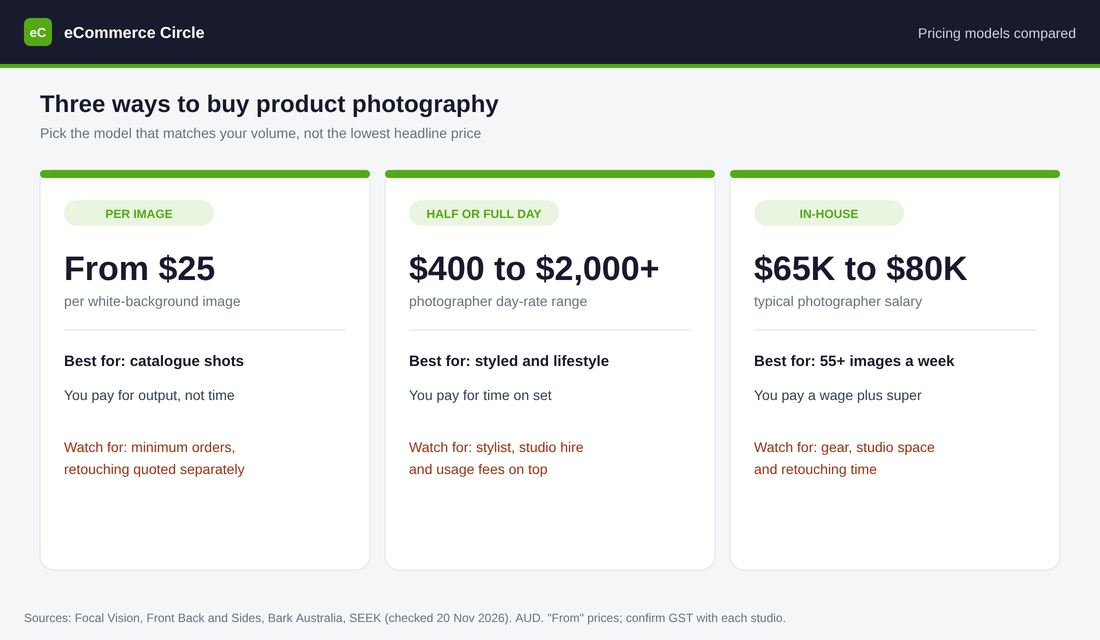
My view: most stores under $1 million a year need two things. A per-image catalogue shoot for every product, then one half-day styled shoot for the hero images that go on the homepage, ads and emails. Buy them separately and you will pay less than bundling both into day rates.
Real Published Rates From Australian Studios
Guides give ranges. Studios give prices. Here is what four Australian businesses publish on their own websites, read on 20 November 2026.
| Studio | Published price | Fine print |
|---|---|---|
| Front Back and Sides (Alexandria, Sydney) | Standard ecommerce images from $25 a shot. Half day from $1,950, full day from $3,650, hourly $485. | All prices exclude GST. The FAQ lists a minimum order of 12 images at $26.50 each plus an $85 setup fee. Reflective products may cost more. |
| Focal Vision (Sydney) | Basic from $25 an image, Standard from $35, Premium from $45. | Bulk rates for 50+ products by quote. One-week turnaround for up to 120 products. Free Sydney metro pickup on orders over $750. GST basis not stated. |
| Brisbane Product Photography | $30 for one image, $28 each for 2 to 30, $27 for 31 to 40, $24 for 41 to 49. | Post-production is charged separately by product type. Express turnaround is $3 extra an image. 50+ images by phone quote. GST basis not stated. |
| Bohemia Bay Studio (Cheltenham, Melbourne) | Self-access studio hire from $109 an hour, equipment included. | This is the space only. You bring the photographer, or shoot it yourself. |
Sources: Front Back and Sides pricing, Focal Vision ecommerce photography, Brisbane Product Photography and Bohemia Bay Studio’s pricing guide. Every one of these is a “from” price, so your quote will depend on the product.
Three things stand out.
- Per-image catalogue work has settled around $24 to $30. Three studios in two cities sit inside a $6 band.
- The campaign day rate is a different world. A Sydney studio half day from $1,950 before GST is roughly the cost of 78 catalogue images at $25.
- GST is not always stated. One studio says its prices exclude GST. Two do not say. On a $2,000 job that is a $200 question, so ask it.
The Extras That Blow Out a Quote
The per-image price is the part studios advertise. These are the lines that turn a $1,200 job into a $2,400 one.
- Retouching. Basic colour correction is usually included. Advanced retouching (removing scratches, fixing reflections, reshaping fabric) runs $30 to $100 an image on Bark’s figures. Brisbane Product Photography charges post-production separately for every job.
- Setup and minimums. Front Back and Sides lists an $85 administration and setup fee on its minimum order. On 12 images that adds about $7 an image.
- Difficult products. Glass, chrome, jewellery and anything reflective takes longer to light. Expect the hero rate of $100 to $200 or more, not the catalogue rate.
- Stylists and models. Bark lists prop and wardrobe stylists at $500 to $1,200 a day and models at $700 to $2,500 or more a day, before GST.
- Studio hire. If your photographer does not own a studio, Melbourne hire runs $80 to $150 an hour.
- Rush fees. A 24 to 48 hour turnaround adds 25% to 50%.
- Freight. You pay to get stock to the studio and back. Focal Vision only offers free pickup inside Sydney metro on orders over $750.
- Reshoots. If the brief was vague, the reshoot is on you.
Action step: ask every studio for an all-in price per finished image, including retouching, setup, GST and return freight. That single number is the only fair way to compare two quotes.
Who Owns the Photos? Usage Rights in Plain English
This is the part most founders skip, and it is the part that costs the most later.
In Australia, the photographer generally owns the copyright in commercial photos they take for you unless your agreement says otherwise. What you are buying is a licence to use the images. So the question is not “do I own them”, it is “what am I allowed to do with them”.
The studios above handle it differently:
- Brisbane Product Photography states worldwide, unlimited usage with no licence fees.
- Focal Vision states full, perpetual commercial usage rights across web, print, ads and social media.
- Front Back and Sides includes standard commercial use for websites, ecommerce and social media, and says advertising, packaging, billboards and TV may need additional licensing.
That third position is common with campaign photographers. Bark’s guide says website and social use is typically included, print and brochures add about 25% to the shoot fee, and in-store, digital advertising, outdoor and broadcast use add 75% to 200%.
Read that again if you run Meta ads. If your licence covers “website and social” but not paid advertising, the photo you put in an ad may not be covered. Get these four things in writing before the shoot:
- Where you can use the images: website, marketplaces, email, organic social, paid ads, packaging, print.
- For how long. Ask for perpetual.
- In which countries. Ask for worldwide if you ship overseas.
- Whether you receive the high-resolution files, and whether you can edit or crop them.
This is general information, not legal advice. If a shoot is large or the images are central to your brand, have the agreement checked. Our content rights guide covers how to keep proof of what you are licensed to use.
DIY, AI or Pro: Where Each One Earns Its Place
You do not have to pay a studio for every image. But you should know what each route is good and bad at.
DIY with a phone
Good for: new arrivals, low-margin lines, social content and testing a product before you invest in it. A modern phone, a window, a white sweep and a tripod will get you a clean catalogue shot. Our DIY studio setup guide walks through the kit.
Bad at: consistency across 50 products, reflective surfaces, and colour accuracy. And your time is not free. If you value your hour at $100 and it takes you two days to shoot and edit 48 images, you have spent $1,600 to save $1,200.
AI-generated images
Good for: cleaning up backgrounds, extending a canvas for a banner, and mocking up scene ideas before a shoot.
Bad at: trust. Baymard’s June 2026 survey of 2,273 US online shoppers found 60% would feel less confident buying if they knew a product image was AI-generated, and 17% said they would not feel confident enough to buy at all. That is one shopper in six walking away.
There is also a legal line. Your product images are a representation of what the customer will receive. If an AI tool changes the colour, texture or scale of the product, you have a problem with returns at best and with Australian Consumer Law at worst. Use AI on the background, never on the product.
Professional photography
Good for: your top sellers, your homepage, your ads, and anything reflective, textured or expensive. This is where image quality moves revenue.
The evidence backs spending here. Baymard’s product page testing found 56% of users’ first action on a product page is to explore the images, yet 25% of ecommerce sites do not offer images with enough resolution or zoom. And a separate Baymard study found 42% of users try to judge a product’s size from its images, while 28% of the 60 large sites benchmarked had no in-scale image at all.
The split I recommend: pay a professional for the products that make up 80% of your revenue. DIY the long tail. Use AI for background cleanup only.
Tool Setup: Clean Up Backgrounds in the Shopify File Editor
Before you pay for anything, fix the photos you already have. Shopify has a background editor built into the admin, and Shopify’s help page says it is available on all plans at no extra cost for a limited time.
Here is how to put a consistent background on an existing product photo:
- In your Shopify admin, open the product and click the image you want to edit. The file editor opens.
- Click Color background. The editor detects the product automatically.
- If it selects the wrong area, click Choose subject and adjust it.
- Pick a colour from Monochrome or Standard colors, or click Custom and enter your brand’s exact colour code. Pure white is #FFFFFF.
- Click Save as new so the original stays untouched.
- Repeat for every image of that product, using the same colour code each time.
Two limits to know. The default output is about one megapixel, which is fine for a collection grid but light for a zoomable hero image. And Shopify applies an invisible watermark to generated images that cannot be removed.
If you need to process hundreds of images, a dedicated tool is faster. Photoroom’s pricing page lists its Pro plan at $7.50 a month billed yearly with 1,000 exports a month, and its Max plan at $20.99 a month with 3,000 exports and a Shopify integration. The page shows a dollar sign with no currency code, so confirm the amount at checkout. For more options, see our list of AI tools worth paying for.
A Worked Budget for a 12-Product Store
Here is how the numbers come together. This is an illustration built from the published rates above, not a quote.
Say you sell 12 products. Each needs four catalogue images on white (front, back, detail, in scale), and your six best sellers each need one styled hero image for the homepage and ads.
| Line | Quantity | Rate | Cost |
|---|---|---|---|
| White-background catalogue images | 48 images | $25 (Focal Vision basic rate) | $1,200 |
| Styled lifestyle images | 6 images | $75 to $150 (Bark range) | $450 to $900 |
| Advanced retouching on the hero images | 6 images | $30 to $100 (Bark range) | $180 to $600 |
| Total for 60 images | $1,830 to $2,700 |
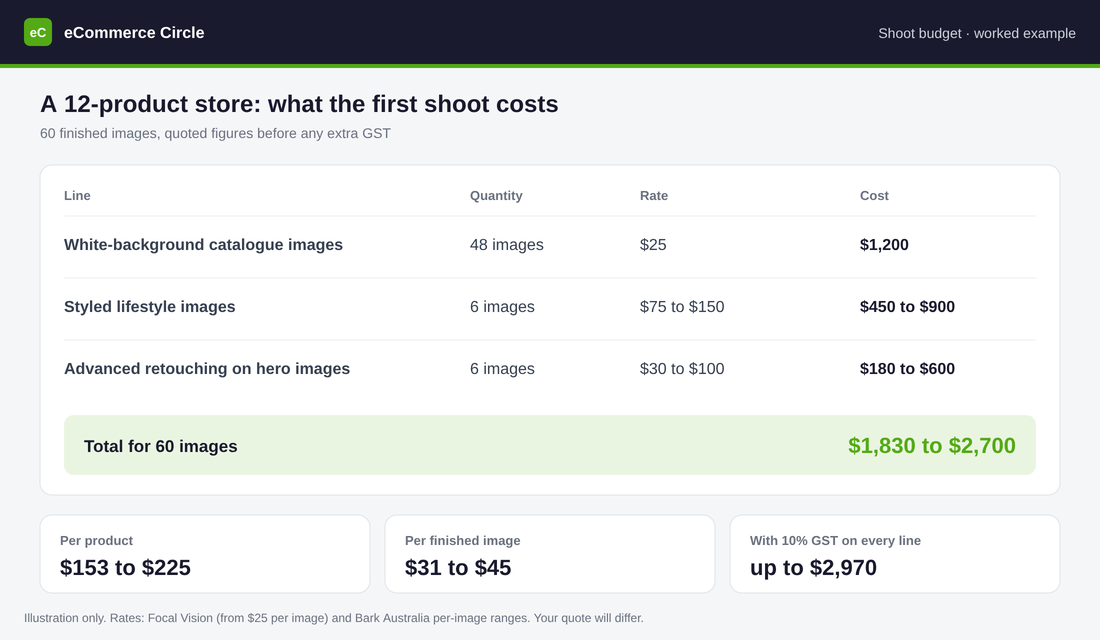
That works out to $153 to $225 a product, or $31 to $45 a finished image. If GST is added to every line, the top end reaches $2,970.
Is it worth it? Run your own numbers. If your average order is $80 and your gross margin is 40%, each order contributes $32. A $2,700 shoot pays for itself after 85 extra orders. Spread across 12 months, that is about seven extra orders a month from better images on every product page, ad and email.
One real-world reference: New Zealand beauty brand Ethique, which is stocked by Australian retailers, replaced the hero images on its Amazon listings with professional photos and saw a 16% lift in Amazon sales over the following 14 days, according to a case study published by its photography supplier, soona. It is a supplier’s case study, so read it as a best case. But the mechanism is the one you are paying for.
When an In-House Photographer Pays Off
At some point, per-image pricing stops making sense and a salary starts to.
SEEK’s salary data puts the average photographer salary in Australia at $65,000 to $80,000. Add the 12% superannuation guarantee and you are at $72,800 to $89,600 a year, before gear, studio space and software.
At $25 an image, $72,800 buys 2,912 studio images a year. That is 56 images a week. So the break-even is simple:
- Under about 55 finished images a week: outsource per image.
- Over that, every week of the year: an in-house hire starts to win, and you gain speed and control.
This is why fashion and accessories brands bring it inside. Bellroy, the Melbourne carry-goods brand, was advertising for a Senior Photographer and Retoucher based at its Collingwood office when I checked on 20 November 2026. The ad says a single product with multiple SKUs “can need 100+ images”. Jewellery chain Lovisa has also advertised for an eCommerce Photographer to shoot in the in-house ecommerce studio at its Hawthorn head office.
If you launch a handful of products a quarter, you are nowhere near that volume. If you are weighing up other creative hires, our guide to social media manager costs in Australia uses the same salary-versus-outsource maths.
The Quote Brief Checklist (Copy This)
Send the same brief to three studios and you will get three quotes you can compare. Send a vague email and you will get three numbers that mean nothing. Copy this list.
- Product count and type. “12 skincare products in glass jars, 5cm to 15cm tall.” Mention anything reflective, transparent or fabric.
- Shot list per product. Front, back, detail, in scale, packaging. Our product photography shot list has the nine images a product page needs.
- Total image count. Products multiplied by shots. State the number.
- Background. Pure white (#FFFFFF), a brand colour code, or transparent PNG.
- Styled images. How many, with two or three reference images of the look you want.
- File specs. Square, at least 2048 pixels wide, JPEG for web, plus the high-resolution originals.
- Retouching level. Colour correction only, or dust, scratches and label fixes as well.
- Usage. Website, marketplaces, email, organic social, paid ads, packaging. Perpetual and worldwide.
- Turnaround. The date you need finished files, and whether you would pay for express.
- Logistics. Who pays freight both ways, and how long the studio holds your stock.
- Price format. Ask for one all-in figure per finished image, with GST shown separately.
- Reshoot policy. What happens if an image does not match the brief.
For styled work, add a one-page creative brief so the photographer knows the mood before the day. Our creative brief guide has a seven-part version you can reuse.
How It All Fits Together
Photography spend goes wrong when each decision is made on its own. It works when the pieces line up in order.
- The shot list sets the image count. You know you need 60 images, not “some photos”.
- The image count picks the pricing model. Catalogue shots go per image. Hero shots go on a half day.
- The brief makes quotes comparable. Every studio prices the same job, all-in.
- The usage terms protect the spend. The same image runs on your product page, in your ads and in your emails without a second invoice.
- The file editor stretches the budget. You fix what you already have and only pay a professional where it moves revenue.
Do it in that order and a $2,000 shoot produces assets you use for two years across every channel. Skip the first step and you pay twice.
Product Photography Cost FAQs
How much does product photography cost per image in Australia?
Published rates start at $24 to $30 an image for white-background catalogue shots at volume studios in Sydney and Brisbane. Bark’s 2026 guide puts the wider range at $30 to $75 for plain backgrounds, $75 to $150 for styled lifestyle images and $100 to $200 or more for hero or reflective products.
How much does a product photographer charge per day?
Bark lists product day rates at $400 to $800 for a half day and $800 to $2,000 or more for a full day. Studio-based campaign shoots cost more: one Sydney studio publishes half days from $1,950 and full days from $3,650, before GST.
Do I own the photos after a shoot?
Usually you hold a licence, not the copyright, unless your agreement says otherwise. Check that the licence covers paid advertising and packaging as well as your website, and get it in writing.
Is it cheaper to take product photos myself?
In cash, yes. In time, often not. DIY suits low-volume and low-margin products. For your best sellers, a per-image studio at about $25 a shot is hard to beat once you count your own hours.
Can I use AI instead of a photographer?
Use it for backgrounds, not for the product. Baymard’s 2026 survey found 60% of shoppers lose confidence when they know a product image is AI-generated, and an altered product image can mislead customers.
Inside eCommerce Circle, Product is one of the 10 P’s we work on with every member, and product imagery is usually the fastest fix on a store that gets traffic but not orders. If you want to see exactly where your store is being capped, take the free More Orders Scorecard. It takes two minutes and shows you which of the 10 P’s to fix first.