Your Klaviyo dashboard says the campaign sent to 48,000 contacts. Open rate looks healthy. Revenue per recipient looks decent. You move on to the next campaign and call it a good week.
What’s in This Article
Here is the part the dashboard does not tell you. Roughly 17% of those emails never landed in an inbox. Some bounced. Some were filtered. Most were quietly deposited into the spam folder, where your customer will never see them. Industry-wide testing shows that 16.9% of marketing emails vanish before they reach a real human, and that 10.5% land directly in spam (Mailmend, 2026).
For an Aussie Shopify brand sending 200,000 emails a month, that is 34,000 messages a month going nowhere. If your email channel is doing 30% of revenue (which is around the benchmark for a healthy DTC brand), every percentage point of inbox placement you reclaim is a real percentage point of revenue. Most operators do not realise this is happening because nothing on the surface looks broken. The campaign sent. The numbers reported. The damage is invisible until you go looking for it.
Email deliverability is the most under-coached lever inside the entire 10 P’s stack. It sits between your sender domain, your list hygiene, and the inbox provider’s filter, and it is governed by a set of technical signals you cannot fake your way past. This guide walks through the exact authentication stack, list discipline, and monitoring routine we use with hundreds of Aussie Shopify founders to keep emails landing in the primary inbox, not the promotions tab and not the spam folder.
What 16.9% Inbox Loss Actually Costs at Scale
Run the numbers on your own brand for a second. Take last month’s Klaviyo email revenue. Multiply by 0.169. That is the floor of what poor deliverability is costing you, assuming your sender reputation is average. If it is below average (and most Shopify brands we audit are), the number is closer to 25 to 30%.
A few benchmarks worth burning into your dashboard:
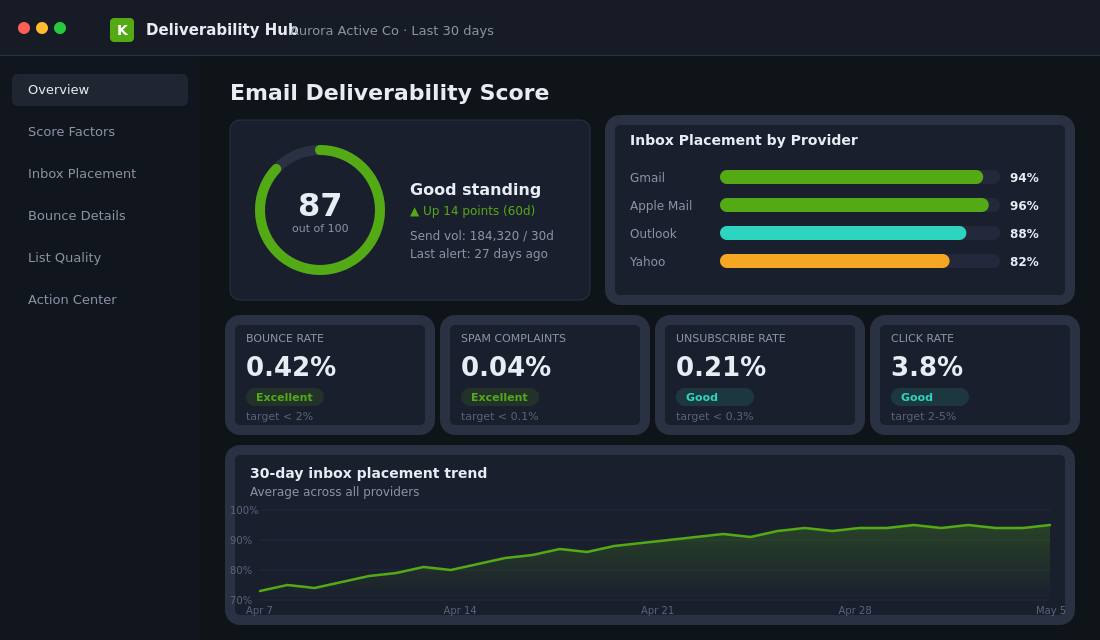
- Bounce rate must stay under 2%. Klaviyo flags accounts above this and inbox providers start punishing the sending domain. Aim for under 1%.
- Spam complaint rate must stay under 0.1%. Google’s Postmaster Tools treats anything over 0.3% as a kill signal and will throttle or reject your sends (Google, 2024).
- Click rate of 2% to 5% is the healthy band. Below 1% means your list is stale, your subject lines are weak, or your offers are missing the mark.
- Email ROI sits at $36 for every $1 spent when deliverability is intact. Every spam-folder email is a direct subtraction from that ratio.
- 52.7% of consumers say they lose trust, get frustrated, or unsubscribe when they regularly find a brand’s emails in spam (Mailmend, 2026). Deliverability is a brand-equity problem, not just a revenue problem.
Here is the kicker. The cost is hidden because it is invisible from inside Klaviyo. Your reports show sends, opens, clicks, and revenue. They do not show you how many of your emails the inbox provider quietly buried. To see that, you need a different set of tools, which we cover further down. First, the foundation.
The Authentication Stack: SPF, DKIM, DMARC and a Branded Sending Domain
Inbox providers (Gmail, Yahoo, Outlook) do not care how clever your subject line is if they cannot verify you are who you say you are. Authentication is the equivalent of showing your ID at the door. Without it, the bouncer assumes you are spam.
From February 2024, Google and Yahoo made authentication mandatory for any domain sending more than 5,000 messages a day to personal Gmail or Yahoo accounts. As of November 2025, both providers ramped up enforcement, with non-compliant traffic facing temporary and permanent rejections (Google Workspace). If your brand sends Klaviyo flows and one weekly campaign to a 30,000-person list, you are well past the threshold. There is no opt-out.
The four pieces you need:
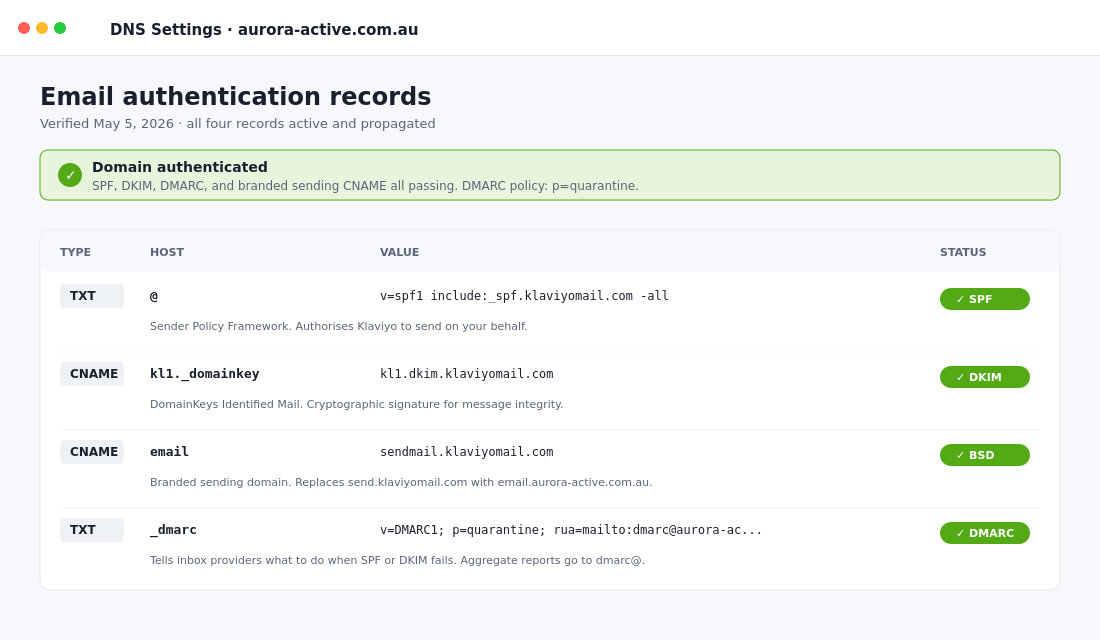
- SPF (Sender Policy Framework). A TXT record on your domain that lists every server allowed to send on your behalf. Without SPF, inbox providers cannot verify that the email actually originated from a system you authorised.
- DKIM (DomainKeys Identified Mail). A cryptographic signature attached to every email. The receiving server checks the signature against a public key in your DNS to confirm the message was not altered in transit and was sent by an authorised system.
- DMARC (Domain-based Message Authentication, Reporting and Conformance). A policy that tells inbox providers what to do if SPF or DKIM fails. Minimum requirement is
p=none, which monitors but does not block. Gold standard isp=quarantineorp=rejectonce you are confident in your setup. - Branded sending domain. Instead of sending from
send.klaviyomail.com(a shared domain you have no reputation control over), you send fromemail.yourbrand.com.au. This is the single biggest lever you can pull, and 99% of Aussie brands we audit have not done it correctly.
Setting Up a Branded Sending Domain in Klaviyo (the 10-Minute Version)
Inside Klaviyo, head to Settings, then Domains, and click Add Domain. You will be prompted to choose between dynamic routing (Klaviyo recommended) and static routing. Dynamic generates four NS records plus one TXT record. Static generates three CNAME records plus one TXT record. Pick dynamic unless you have a specific compliance reason not to.
Klaviyo will give you the records to add to your DNS. If your domain is registered through Shopify, head to Shopify admin, Settings, Domains, click on your domain, and add the records under DNS settings. If it is registered through Cloudflare, GoDaddy, VentraIP, or another provider, log in there. Add every record exactly as Klaviyo provides it. One mistyped character and the domain will not verify.
After adding the records, return to Klaviyo and click Verify Domain. DNS propagation takes anywhere from 15 minutes to 48 hours. Once you see green checkmarks across all records, you are authenticated and ready to start the warming process (covered in the next section). Then publish a DMARC record at _dmarc.yourbrand.com.au with the value v=DMARC1; p=none; rua=mailto:dmarc@yourbrand.com.au; to start receiving aggregate reports about who is sending on your behalf.
Why Apple Mail Broke Open Rates (and What to Watch Instead)
If your open rates have looked suspiciously high since 2021, there is a reason. Apple released Mail Privacy Protection in iOS 15 in September 2021, and it routes every email opened in the Apple Mail app through an Apple proxy server that pre-loads images regardless of whether the recipient has actually opened the email. To Klaviyo, every Apple Mail user looks like an open. As of January 2025, Apple Mail accounts for 49.29% of all email opens globally (Litmus, 2025).
What this means for your business:
- Open rate is now a vanity metric. Anyone reporting “we hit a 45% open rate” without context is either lying or measuring inflated Apple opens. Real human engagement is roughly half of what your dashboard says.
- Click rate is the new open rate. Apple does not pre-load clicks. A 2.5% click rate on a campaign is a more honest read than a 38% open rate.
- Engagement-based segmentation needs to use clicks. If you trigger a re-engagement flow when someone has not opened in 60 days, you will be sending it to people who actually open every email but use Apple Mail. Switch the trigger to “has not clicked in 60 days” plus “has not made a purchase in 90 days.”
- Conversion per delivered email is the truth metric. This is the only number that survives Apple’s privacy changes intact. Track it weekly per flow and per campaign.
This matters for deliverability because inbox providers also use engagement signals to decide whether your future emails go to the inbox or the spam folder. If you are not segmenting on real engagement (clicks, purchases, site visits), you are mailing dead contacts, your spam rate creeps up, and your sender reputation slides. The Apple change made this worse, not better, because it hid the rot inside open-rate metrics that no longer reflect reality.
List Hygiene: The 90-Day Engagement Rule
Klaviyo’s own deliverability research shows that disengaged contacts can drag inbox placement down by 12 to 18% across your entire list when more than 3% of recipients show zero engagement over 90 days (Klaviyo Help Center). The mechanism is simple. Inbox providers track per-domain engagement. If your sender domain consistently mails people who never open, click, or reply, the algorithm decides you are a low-quality sender and starts filtering more of your future sends to spam.
Most Shopify brands have a list problem they refuse to face. Subscribers from a Black Friday giveaway three years ago. People who entered an early-access form and never bought. A pile of Shopify “agreed to marketing at checkout” emails that were collected without genuine intent. None of these are mailable any more, but the brand keeps sending to them because the list size feels reassuring.
The Sunset Flow Every Shopify Brand Should Run
Build a Klaviyo segment defined as: “has not clicked any email in the last 120 days AND has not placed an order in the last 180 days AND was created more than 180 days ago.” This is your dead weight. Run a final two-email re-engagement sequence to this segment (“we miss you, click here to stay subscribed”), then suppress everyone who does not click. Yes, it feels brutal to suppress 15 to 30% of your list. Yes, your campaign open rates will jump 10 to 15 percentage points within two weeks. Yes, your spam rate will drop. Yes, your inbox placement will improve and your deliverable revenue will rise.
Pablo and Rusty’s, the Sydney specialty coffee roaster, did exactly this when they switched to Klaviyo. They stopped newsletter blasts to disengaged contacts and shifted toward targeted flows triggered by purchasing behaviour. The result: 30% of total ecommerce revenue attributed to Klaviyo and a 61x return on investment in 2024 (Klaviyo case study). The list got smaller. The revenue got bigger. That is the trade.
If you are still building list hygiene as a habit, our breakdown of the 7 customer segments that drive 5x revenue per send is the practical companion piece. Segmentation and deliverability are two sides of the same lever. Mail the right people, and inbox providers reward you. Mail everyone, and they punish you.
Sender Reputation: How to Warm a New Domain (or Repair a Burnt One)
If you are setting up Klaviyo for the first time, migrating to a new branded sending domain, or your sender reputation has tanked from years of bad list hygiene, you need to warm. Warming is the process of sending small, high-engagement volumes to your most active contacts first, then gradually expanding the audience as inbox providers learn to trust your domain.
The Klaviyo recommended sequence:
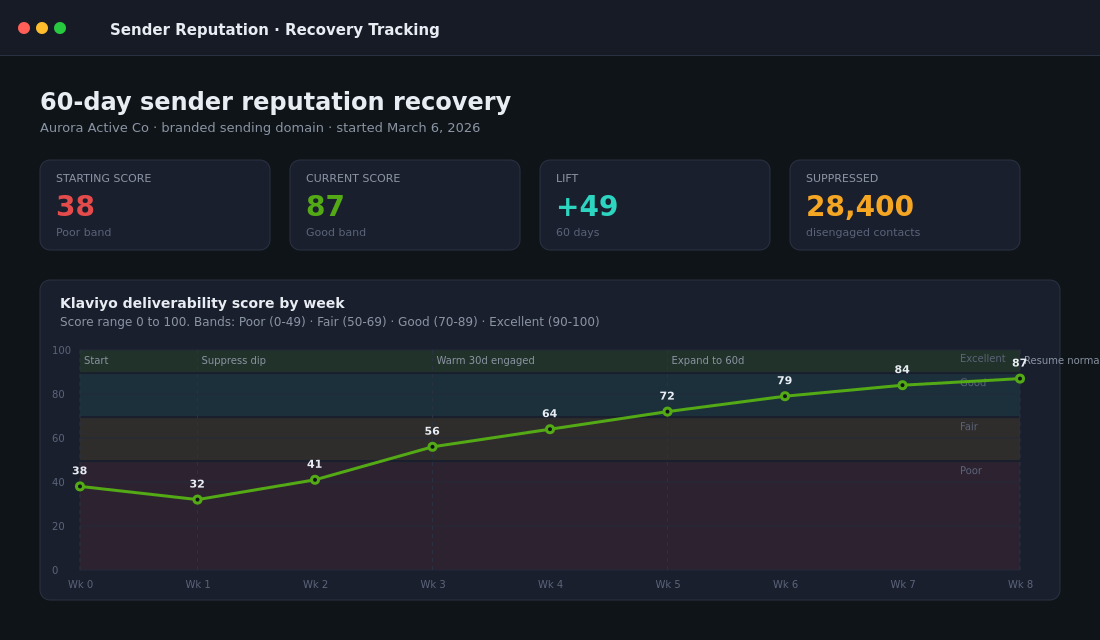
- Days 1 to 14: Send only to your “engaged in last 30 days” segment. Keep volume low and frequency consistent. Watch for bounce rate under 1%, unsubscribe under 0.3%, spam under 0.01%.
- Days 15 to 21: If engagement is holding (open rate above 20% on the engaged segment, click rate above 2%), expand to “engaged in last 60 days.”
- Days 22 to 30: If still strong, expand to “engaged in last 90 days.”
- Day 30+: Resume normal campaign send patterns. Do not jump back into mailing your whole list on day 31. The reputation you have built is on a specific volume profile, and inbox providers notice sudden spikes.
If your open rate dips below 20% during warming, do not advance to the next segment. Hold position, fix the issue (subject lines, send times, content angles), then resume. Skipping ahead because the calendar says it is day 22 is the most common warming mistake we see.
Repairing a Burnt Reputation
If your reputation is already damaged (the sign is when your inbox placement at Gmail drops below 80% or your Klaviyo deliverability score falls into the “fair” or “poor” band), repair takes the same warming process but starts even tighter. Begin with a 14-day engaged segment only. Send three to four campaigns to that group with strong subject lines, clean creative, and a clear call to action. Watch the deliverability hub for two weeks before broadening. Recovery typically takes 30 to 60 days. There is no shortcut.
One Aussie brand we worked with had a Klaviyo deliverability score sitting in the “poor” band after years of mailing a 90,000-person list with no segmentation. Within six weeks of suppressing 28,000 disengaged contacts, properly authenticating the domain, and warming back up through engaged-only sends, their score moved to “good,” their Gmail inbox placement climbed from 71% to 94%, and email-attributed revenue rose 22% on a smaller list. The lesson: your reputation is more valuable than your list size.
Monitoring: The Three Tools That Actually Tell You What Is Happening
Klaviyo reports tell you sends, opens, clicks, and revenue. They do not tell you what percentage of your emails are landing in the primary inbox versus the promotions tab versus spam. For that you need three tools, all of which take less than an hour to set up and which together give you the full picture.
- Klaviyo Deliverability Hub. Found inside Klaviyo under Analytics, the Deliverability Hub provides a sender reputation score (you need at least 1,000 sends in the last 30 days for it to calculate), broken down by inbox provider. It also flags specific deliverability alerts (high bounce on a specific provider, sudden spam-rate spike) and gives you an action centre with onboarding tasks. Check it weekly.
- Google Postmaster Tools. Free from Google. You verify your sending domain (the same one Klaviyo authenticated), and Google gives you per-domain spam rate, IP reputation, domain reputation, and authentication pass rates for every email you send to Gmail addresses. This is the single most accurate read on how Gmail sees your brand. If your domain reputation here drops to “low,” you are in serious trouble. Check weekly.
- A DMARC analyser. Tools like Valimail, dmarcian, or PowerDMARC parse the aggregate DMARC reports your domain receives and turn them into a readable dashboard. They show you every system sending on your behalf, flag unauthorised senders, and confirm SPF and DKIM alignment. Most have a free tier that handles up to a few thousand reports a month.
Build a 15-minute weekly check into your operating rhythm. If you do not have one, our breakdown of the 5-meeting cadence that turns Shopify founders into real CEOs includes a marketing review slot where deliverability metrics belong. Five minutes on Klaviyo’s hub, five on Postmaster, five on DMARC. That is enough to catch every reputation issue before it costs you a campaign.
The Compound Effect: How Deliverability Becomes a Profit Lever
Here is what happens when you fix all four layers (authentication, list hygiene, warming, monitoring) at once. The numbers we see consistently across Aussie Shopify brands inside our coaching programs:
- Inbox placement rises from 71-83% to 94-97% within 60 days.
- Click-to-open rate stays roughly flat, but absolute click volume rises 15 to 25% because more emails are actually being seen.
- Email-attributed revenue rises 18 to 35% on the same or smaller list.
- Spam complaint rate drops below 0.05%, which keeps you safely inside Google’s and Yahoo’s enforcement thresholds.
- Sender reputation score stabilises in the “good” or “excellent” band, which compounds month on month rather than degrading.
The compound effect is the part most operators underestimate. Deliverability is not a one-off project, it is a flywheel. Better hygiene leads to better engagement signals, which leads to better inbox placement, which leads to better engagement, which leads to better placement again. The reverse is also true. A few weeks of mailing dead contacts and the flywheel runs in the wrong direction.
This is why we treat deliverability as a Promotion-pillar fundamental inside the More Orders Operating System. It does not feel like a growth lever the way a new ad creative or a homepage redesign feels like one. It is invisible, technical, and unsexy. But it sits underneath every dollar of email revenue, and a brand doing 30% of revenue from email cannot afford to leave 17% of those emails in the spam folder.
Your 7-Step Deliverability Audit (Start Today)
Run this checklist on your store this week. Each step takes 10 to 30 minutes. The full audit is a half-day project that will pay back inside the first month.
- Confirm a branded sending domain is set up in Klaviyo. Settings, Domains. If you are still sending from a Klaviyo subdomain, fix this first.
- Check your DMARC record. Go to mxtoolbox.com, run a DMARC lookup on your domain. If it does not exist, publish one with
p=noneas a starting policy. - Verify SPF and DKIM alignment. Same tool, run an SPF and DKIM lookup. Confirm Klaviyo is listed in your SPF record and your DKIM record returns a public key.
- Set up Google Postmaster Tools. Verify your sending domain. Check your domain reputation, spam rate, and IP reputation.
- Build your sunset segment. 120 days no clicks, 180 days no orders, created more than 180 days ago. Run a final re-engagement, then suppress.
- Switch all engagement-based flows from “opened” to “clicked.” Re-engagement, win-back, browse abandonment exits. Clicks are the only honest signal post-Apple MPP.
- Check your Klaviyo Deliverability Hub score. If it is below “good,” start the warming protocol. If it is “good” or “excellent,” set a recurring weekly 15-minute review.
That is the entire audit. Most brands find at least three of the seven steps need fixing. Bondi Sands, the Australian beauty brand, made a similar shift when they consolidated their CRM stack onto Klaviyo, gaining a single customer view and the first-party data needed to drive disciplined segmentation rather than blasting their full list (Tracksuit case study). The pattern repeats across every Aussie DTC brand at scale: deliverability is a discipline, not a destination.
Inside eCommerce Circle, deliverability is one of the core diagnostics we run on every member’s email program in the first month. If you want a second opinion on yours, let’s talk.