Most Aussie Shopify founders pick a plan once, on the day they launch, and never look at it again. Then two years later they are doing $90,000 a month on Basic and quietly overpaying on every order. Or the opposite happens: someone gets excited after a big month, jumps to Advanced “because we’re serious now”, and starts paying an extra $3,800 a year for features nobody on the team opens.
What’s in This Article
Both mistakes come from the same place. The plan gets treated as a status decision instead of a maths decision. The brands that get this right run a simple break-even calculation every year, add a short list of capability triggers, and only upgrade when the numbers or the operation actually demand it.
The timing matters more than usual this year. From 1 October 2026, the Reserve Bank’s reforms remove card surcharging on eftpos, Mastercard and Visa. Whatever you pay to process a card is now 100% your cost, which means the processing rate your plan gives you goes straight to your margin. This playbook gives you the exact break-even points for Basic, Grow, Advanced and Plus in AUD, a five-step system to run your own numbers in under an hour, and a decision sheet you can reuse at every renewal.
Why Your Shopify Plan Is a Profit Decision, Not a Features Decision
Shopify’s pricing page leads with features. Staff accounts, reports, shipping options. That is the wrong place to start, because for most stores under $2 million a year the card rate is worth more than any feature on the list.
Here is what the Australian plans look like right now, based on Shopify’s published AUD pricing as summarised by Plain Speak Online Services and White Peak Digital:
- Basic: A$56 a month, or A$42 a month billed annually. Domestic online cards through Shopify Payments at 1.75% + 30c.
- Grow: A$149 a month, or A$114 billed annually. Domestic cards at 1.6% + 30c.
- Advanced: A$575 a month, or A$431 billed annually. Domestic cards at 1.4% + 30c.
- Plus: from US$2,300 a month on a three-year term. Domestic cards at 1.2% + 30c.
Notice what changes between tiers. The 30c per order is the same on every plan. Only the percentage moves: 0.15 points from Basic to Grow, 0.2 points from Grow to Advanced, and another 0.2 points from Advanced to Plus. That gap is small per order and very large across a year of orders.
Two more fees sit quietly in the background. If you run a payment gateway other than Shopify Payments, Shopify adds its own transaction fee of 2% on Basic, 1% on Grow, 0.6% on Advanced and 0.2% on Plus, on top of whatever that gateway charges. And GST gets added to your subscription unless a valid ABN sits in your billing settings. That second one takes two minutes to fix and is worth checking before you read another word.
Now add the surcharge change. The RBA’s conclusions paper confirms that from 1 October 2026 surcharging ends on the designated eftpos, Mastercard and Visa networks, with the interchange cap on domestic consumer credit cards dropping from 0.8% to 0.3% (ABC News). If you were recovering some of your processing cost through a checkout surcharge, that door closes this week. We covered the pricing side of this in the Shopify Surcharge Ban Playbook. This article covers the other lever: making sure the rate you pay is the right one for your volume.
The Break-Even Numbers Every Aussie Founder Should Know
The maths is simple. An upgrade pays for itself when the processing you save is bigger than the extra subscription you pay. Written as a formula:
Break-even monthly volume = extra monthly plan cost ÷ rate saving
Run that for each step up, using annual billing (which is how you should be paying once you are past your first few months):
- Basic to Grow: an extra A$72 a month ÷ 0.15% = A$48,000 a month in domestic card sales through Shopify Payments. On monthly billing the extra cost is A$93, which pushes break-even to A$62,000.
- Grow to Advanced: an extra A$317 a month ÷ 0.2% = A$158,500 a month. On monthly billing it is A$426 extra, so A$213,000 a month.
- Advanced to Plus: US$2,300 is roughly A$3,500 depending on the exchange rate. The extra A$3,069 a month ÷ 0.2% = about A$1.5 million a month. On card fees alone, Plus does not pay for itself until you are well past A$18 million a year in domestic card volume.
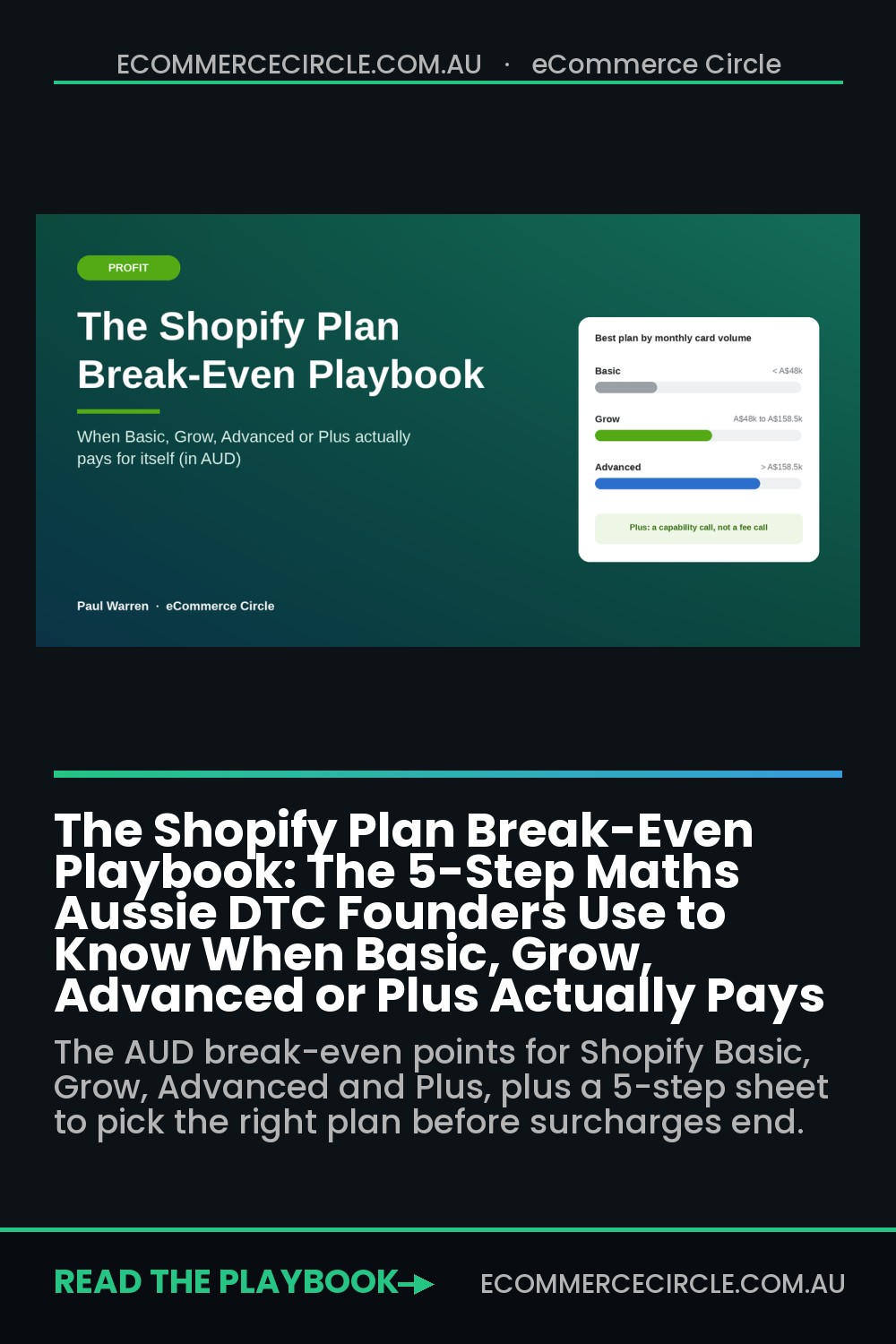
Put those together and you get the zones. Under A$48,000 a month, Basic is cheapest. Between A$48,000 and A$158,500, Grow wins. Above A$158,500, Advanced wins on processing alone. Plus is never a processing decision for a typical Aussie DTC brand. It is a capability decision, and we will get to that.
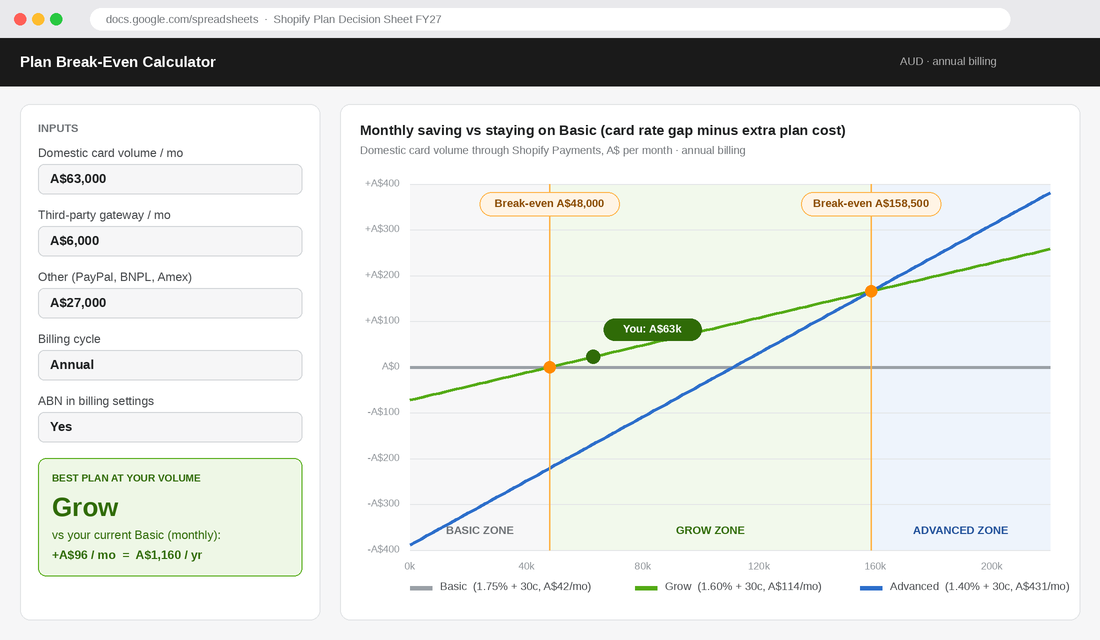
One important catch. That “volume” is not your total revenue. It is only the revenue that actually gets the cheaper rate. Which brings us to the step most founders skip.
Step 1: Pull Your Real Payment Mix (Not Your Revenue Headline)
A store doing A$100,000 a month does not have A$100,000 of volume getting the plan discount. Some of it goes through PayPal. Some through Afterpay or Zip. Some is Amex or overseas cards, which sit at a higher rate (around 2.9% + 30c on the standard plans) and barely move between tiers. Some might be bank transfers from wholesale accounts.
So before you touch the break-even table, you need twelve months of payment mix. Here is how to pull it in Shopify:
- Go to Finance, then Payouts in your Shopify admin and export the transactions for the last 12 months. This gives you every Shopify Payments charge with its card type.
- Open Analytics, then Reports, and pull your sales by payment method for the same period. This shows how much went through PayPal, BNPL providers and any other gateway.
- Open Settings, then Billing, and look at your last 12 bills. Any line labelled “transaction fees” is volume going through a third-party gateway that Shopify is charging you extra on.
- Put the three numbers in a sheet: domestic card volume through Shopify Payments, third-party gateway volume that attracts transaction fees, and everything else.
If you have never looked at this before, the result is usually a surprise. It is common to see a store with A$1.2 million in annual revenue where only 60 to 70% is domestic card volume getting the plan rate. That drops their “eligible” monthly volume from A$100,000 to something closer to A$65,000, which changes the answer.
If you like working in ShopifyQL rather than exported spreadsheets, our guide to the 7 ShopifyQL reports that replace your dashboard app shows how to build the payment reports once and reuse them every quarter.
Step 2: Separate the Two Savings Buckets
An upgrade can save you money in two different ways, and they behave very differently.
Bucket one is the card rate saving. This applies only to domestic card volume through Shopify Payments. It is the 0.15 or 0.2 point gap we covered above. Small per order, steady, and it grows with you.
Bucket two is the third-party transaction fee saving. This applies to any volume that goes through a gateway other than Shopify Payments and attracts Shopify’s extra fee. The gap here is much bigger: 1 full point from Basic to Grow, 0.4 points from Grow to Advanced. A store pushing A$10,000 a month through a third-party gateway on Basic is paying Shopify A$200 a month for the privilege. On Grow, that becomes A$100.
Two points to be careful with here:
- PayPal Express is excluded. When Shopify Payments is active, Shopify does not charge its transaction fee on PayPal Express, Shop Pay or Shop Pay Installments orders, or on manual methods like bank transfer (Synctrack). Don’t count PayPal in bucket two.
- The best fix for bucket two is often not an upgrade. If a third-party gateway is costing you a 2% Shopify fee, ask whether you still need that gateway at all. Moving that volume onto Shopify Payments usually saves more than any plan change.
Once you have both buckets, the full formula looks like this: monthly saving = (domestic card volume × rate gap) + (third-party volume × transaction fee gap). Compare that to the extra subscription cost and you have your answer on the fees side.
Step 3: Run the Maths on a Real-World Example
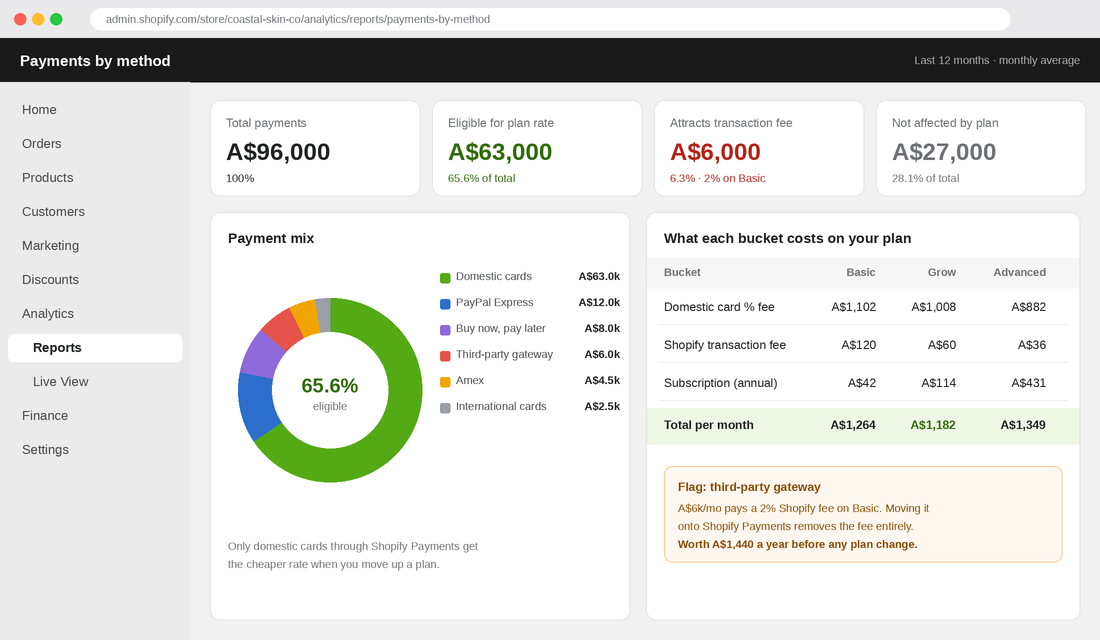
Let’s make it concrete. Picture a Melbourne skincare brand doing A$96,000 a month. They launched on Basic with monthly billing in 2023 and never changed it. Their payment mix from step 1 looks like this:
- A$63,000 in domestic Visa, Mastercard and eftpos through Shopify Payments
- A$6,000 through a third-party gateway that attracts Shopify’s transaction fee
- A$27,000 through PayPal, BNPL, Amex and international cards
Option A: stay on Basic but switch to annual billing. Saving: A$14 a month on the subscription. Tiny, but free.
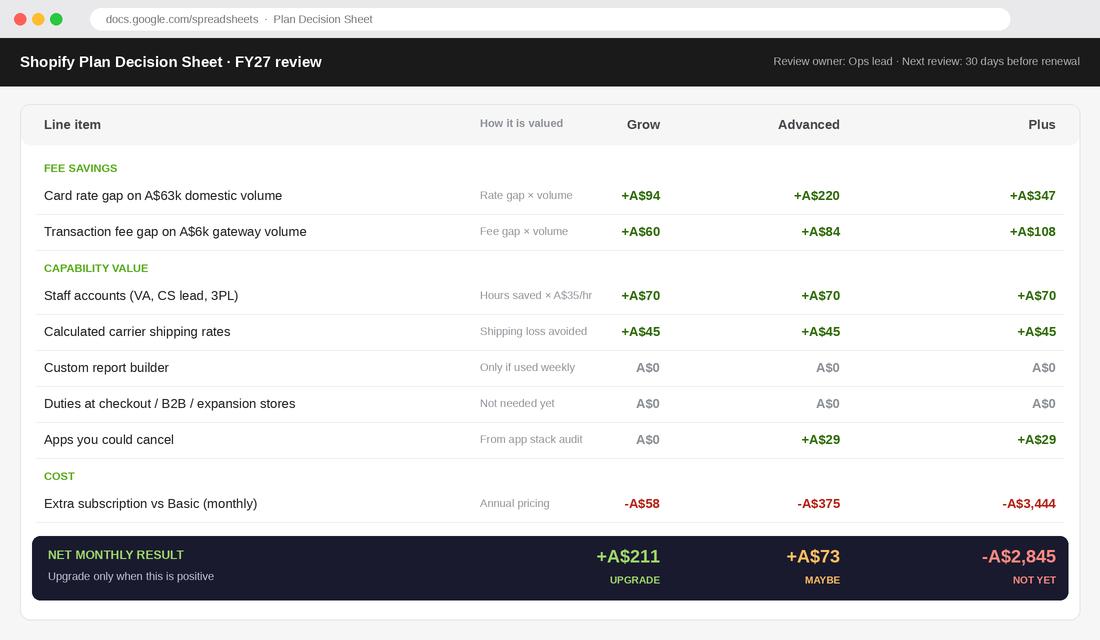
Option B: move to Grow on annual billing. Extra subscription versus their current Basic monthly bill: A$58. Card saving: A$63,000 × 0.15% = A$94.50. Transaction fee saving: A$6,000 × 1% = A$60. Total saving A$154.50, net gain about A$96 a month, or A$1,160 a year.
Option C: jump to Advanced on annual billing. Extra subscription: A$375. Card saving: A$63,000 × 0.35% = A$220.50. Transaction fee saving: A$6,000 × 1.4% = A$84. Total saving A$304.50, net loss of about A$70 a month. And that is before the founder realises nobody will use the custom report builder.
Option D: move to Grow and kill the third-party gateway. Push that A$6,000 onto Shopify Payments and the transaction fee disappears entirely, with the card rate on that volume dropping from the gateway’s rate to 1.6%. That is the best result of the four, and it didn’t need Advanced at all.
Here is the honest takeaway. For most stores, the right plan is worth somewhere between A$1,000 and A$5,000 a year. That is real money, but it is not going to save a business with broken unit economics. If you want to see where the bigger margin leaks sit, start with the Contribution Margin Playbook and treat the plan as one line inside that picture. The Profit section of the free More Orders Scorecard checks exactly this kind of leak.
Step 4: Score the Capability Triggers (Where Upgrades Really Earn Their Keep)
Fees get you to the right plan most of the time. But there are moments where a higher plan earns its money through what it lets your team do, even if the fee maths says “not yet”. The trick is to put a dollar figure on each capability instead of upgrading on a feeling.
These are the triggers worth scoring, in the order we see them come up with Aussie DTC brands:
- Staff accounts. Grow gives you up to five staff accounts, where Basic is much tighter. If your VA, customer service lead and 3PL contact are sharing one login, that is a security problem as well as a workflow one. Value it at the time lost chasing passwords plus the risk of one person leaving with access.
- Calculated carrier shipping rates. If you ship heavy or bulky products, flat-rate shipping either loses you margin on the far-away orders or loses you conversions on the close ones. Third-party calculated rates are available on Grow with annual billing or as a paid add-on. Value it at your average shipping loss per order times your order count.
- Custom reports. Advanced opens the custom report builder. Worth it if someone on your team will use it weekly. Worthless if the founder opens it once and goes back to a spreadsheet.
- Duties and import taxes at checkout. If international is a real growth channel (US, UK or beyond), collecting duties upfront cuts refused parcels and surprise bills. This sits higher up the plan ladder, so value it against your current international refusal rate.
- Checkout customisation, B2B and expansion stores. These are the classic Plus triggers. If wholesale is a meaningful channel, or you need a separate store per market with its own content and team, Plus starts to make sense on capability.
Look at how two well-known Aussie brands made the jump to Plus. According to Shopify’s Culture Kings case study, the streetwear retailer used Plus to launch and manage multiple global storefronts, sell in several currencies, and build custom experiences like a “Shop The Look” page curated by its in-house team. That is a capability decision driven by an international operation, not a processing rate.
Bared Footwear is the other good example. The Aussie shoe brand, founded by podiatrist Anna Baird in 2008, moved to Shopify Plus after its custom-built site kept struggling during high-volume sale events. Their trigger was reliability under peak load. Both brands upgraded because the operation demanded it. Neither did it because a bigger plan felt more grown-up.
One more thing to add to the capability column: the apps you might be able to cancel. If a higher plan includes something you are currently paying an app for, that app fee counts as a saving. Our Shopify App Stack Audit walks through how to find those overlaps.
Step 5: Lock In the Review Rhythm (So This Never Drifts Again)
The reason founders end up on the wrong plan is not bad maths. It is no maths, for years. Your volume changes, your payment mix changes, Shopify’s pricing changes, and the plan sits still. Fix that with three simple checkpoints.
- At every annual renewal. Before your annual plan rolls over, rerun steps 1 to 4. If you are switching plans, this is the cleanest moment to do it.
- Before BFCM. Check your projected November and December volume. If peak pushes you well past a break-even point, it can be worth moving up before the season. Just make sure the higher volume holds after peak too, or you will be paying for a plan that only made sense for eight weeks.
- Any time your mix shifts by more than 10 points. Launching Afterpay, dropping a gateway, opening wholesale or adding a new market can all change your eligible volume overnight.
Put a calendar reminder 30 days before your renewal date and assign it to one person. That single habit is worth more than any plan choice you make today.
Also, a note on the interchange changes landing on 1 October. The RBA’s cut to credit card interchange caps is expected to save Aussie businesses an estimated A$910 million a year (ABC News). Shopify Payments uses a flat blended rate, so you won’t automatically see that saving on your statement. Keep an eye on Shopify’s AU rate card over the next six months, and check the RBA’s own surcharging FAQs if you are unsure what you can and can’t charge customers from here.
The Mistakes That Cost Aussie Founders the Most
After running this maths with a lot of Shopify brands, the same five mistakes come up over and over:
- Paying monthly after year one. Annual billing saves 25% on Basic, Grow and Advanced. If you know you are staying on Shopify, monthly billing is a donation.
- Paying GST on the subscription. No ABN in your billing settings means 10% extra on every bill. Two-minute fix.
- Using total revenue in the break-even maths. Only domestic card volume through Shopify Payments gets the rate gap. Using total revenue makes upgrades look better than they are.
- Keeping a third-party gateway “just in case”. On Basic, that costs 2% of every dollar that goes through it. Most stores can move that volume to Shopify Payments.
- Upgrading for a peak month. One huge BFCM is not a trend. Use a rolling 12-month average for the decision, and treat peak as a separate conversation.
Your Shopify Plan Decision Sheet (Copy This)
Copy this into a Google Sheet, fill it in once a year, and you will never guess at your plan again:
- Current plan and billing cycle: ________ (monthly / annual). ABN entered in billing settings? Yes / No
- 12-month domestic card volume through Shopify Payments ÷ 12: A$________ a month
- 12-month third-party gateway volume with transaction fees ÷ 12: A$________ a month
- Everything else (PayPal Express, BNPL, Amex, international, manual): A$________ a month
- Card saving for the next plan up: line 2 × rate gap (0.15% Basic to Grow, 0.2% Grow to Advanced) = A$________
- Transaction fee saving: line 3 × fee gap (1% Basic to Grow, 0.4% Grow to Advanced) = A$________
- Capability value: staff accounts, carrier rates, reports, duties, apps you can cancel = A$________ a month
- Extra subscription cost: A$________ a month (use annual pricing)
- Decision: if lines 5 + 6 + 7 are bigger than line 8, upgrade. If not, stay, and check whether you can move line 3 onto Shopify Payments instead.
- Next review date: ________ (30 days before renewal) and owner: ________
Quick reference for the fee side, annual billing, domestic card volume only: Basic under A$48,000 a month, Grow from A$48,000 to A$158,500, Advanced above A$158,500, and Plus only when capability demands it.
How It All Adds Up
On its own, each step looks minor. Switching to annual billing saves a few hundred dollars. Entering your ABN saves a bit more. Killing a stray gateway saves a few thousand. Getting the plan right saves another A$1,000 to A$5,000 a year. Avoiding a premature jump to Advanced or Plus stops you from giving back even more.
Stack them together and a typical A$1 million-a-year brand can recover somewhere in the range of A$3,000 to A$8,000 a year in pure margin, without selling a single extra unit. With surcharges gone from 1 October, every one of those dollars now comes directly out of your profit line if you leave it on the table.
More importantly, you build a habit. The founders who run this sheet every year are the same founders who know their contribution margin, their cost to serve and their real payment mix. They make platform decisions from numbers, and it shows in the rest of the business too.
Inside eCommerce Circle, Profit is one of the core pillars we work on with every member, and platform costs are one of the first places we look. If you want to see exactly where your store is being capped, take the free More Orders Scorecard. It takes two minutes and shows you which of the 10 P’s to fix first.