Next Thursday, 1 October 2026, the little “card fee” line at the bottom of thousands of Aussie checkouts disappears. Not because founders decided to be generous. Because the card networks now ban it.
What’s in This Article
Most Shopify owners I talk to have one of two reactions. Either “we never surcharged, so this doesn’t touch us” or “we’ll just switch the app off on the 30th”. Both are wrong, and both leave money on the table. The stores that treat this properly are using the deadline to find out what payments actually cost them, and most discover their real card rate sits around 2.3%, not the 1.7% on the pricing page.
This playbook walks you through exactly what changes, what it costs you, and the seven-day plan to protect your margin before the switch flips. It sits across two of the 10 P’s: Profit, because every dollar of surcharge you lose has to come from somewhere, and Protection, because getting this wrong after 1 October is a compliance problem, not just a margin one.
What Actually Changes on 1 October (And What Doesn’t)
After an 18-month review, the Reserve Bank’s Payments System Board published its final conclusions in March 2026. The RBA removed its prohibition on “no-surcharge” rules, and eftpos, Mastercard and Visa have each confirmed they will ban surcharging on credit, debit and prepaid cards from 1 October 2026, according to the RBA’s own FAQ. American Express, which isn’t formally regulated by the RBA, has aligned too, and CommBank notes JCB and UnionPay are removing surcharging from the same date.
Here’s what that means for a Shopify store in plain English:
- No card-specific fee at checkout. Whether it was 1%, 1.5% or a flat 50 cents, any fee charged because the customer paid by card is out. That includes Amex.
- Renaming it won’t save you. Calling it a “processing fee” or “admin fee” doesn’t change what it is if it only applies to card payments.
- Discounts are still allowed. The RBA confirms businesses can still offer a discount for a preferred payment method. Surcharge the expensive option: banned. Reward the cheap one: fine.
- Invoices issued before 1 October aren’t grandfathered. If the card payment lands on or after 1 October, the RBA says surcharging may no longer be available, even on an older invoice. That matters for wholesale and B2B.
- Genuine service fees are separate. The rules target card surcharges, not booking fees or fees that apply however the customer pays. Those still have to be disclosed properly under Australian Consumer Law.
The scale is bigger than most founders assume. The RBA estimates consumers pay $1.6 billion of the $1.8 billion in card surcharges collected each year, and that 16% of merchants currently surcharge (RBA Conclusions Paper). If you’re in that 16%, this is a direct hit to your contribution margin. If you’re in the 84%, keep reading anyway, because the second half of this reform is where the upside sits.
The Good News Nobody’s Talking About: Interchange Is Falling
The surcharge ban came packaged with lower wholesale card costs. From 1 October, the interchange cap on consumer credit cards drops from 0.8% to 0.3%, and the debit cap falls from 10 cents to 8 cents. The RBA expects merchants to save around $910 million a year across the system, with small merchants benefiting most because they typically pay at or near the caps.
Interchange is the biggest slice of what your payment provider pays on every card transaction. When that cost falls, your provider’s cost falls. Whether your rate falls is another question entirely.
Some providers are moving fast. CommBank announced it will cut its single-rate merchant service fee from 1.1% to 0.99% for in-store transactions from 1 October, and that merchants on interchange-plus pricing will see the new caps flow through automatically. Blended plans, which is what Shopify Payments, PayPal and most online gateways use, don’t adjust automatically. The provider decides.
One more date to diarise: a cap on interchange for foreign-issued cards starts on 1 April 2027. The RBA found foreign cards make up about 3% of card transactions but roughly 20% of interchange fees paid by Australian merchants. If you sell to international customers, that’s a second saving to chase next year.
Your move: put a calendar reminder for your November payout statement. Compare your effective rate for October against August. If it hasn’t moved, you have a negotiation (or a switching conversation) to start. The RBA is also requiring acquirers to publish their fees and a measure of interchange pass-through, so you’ll have public data to point to.
Step 1: Work Out Your Real Effective Card Rate
Before you decide anything about pricing, you need one number: your effective card rate. That’s total payment fees divided by total card revenue. It’s almost never the headline rate.
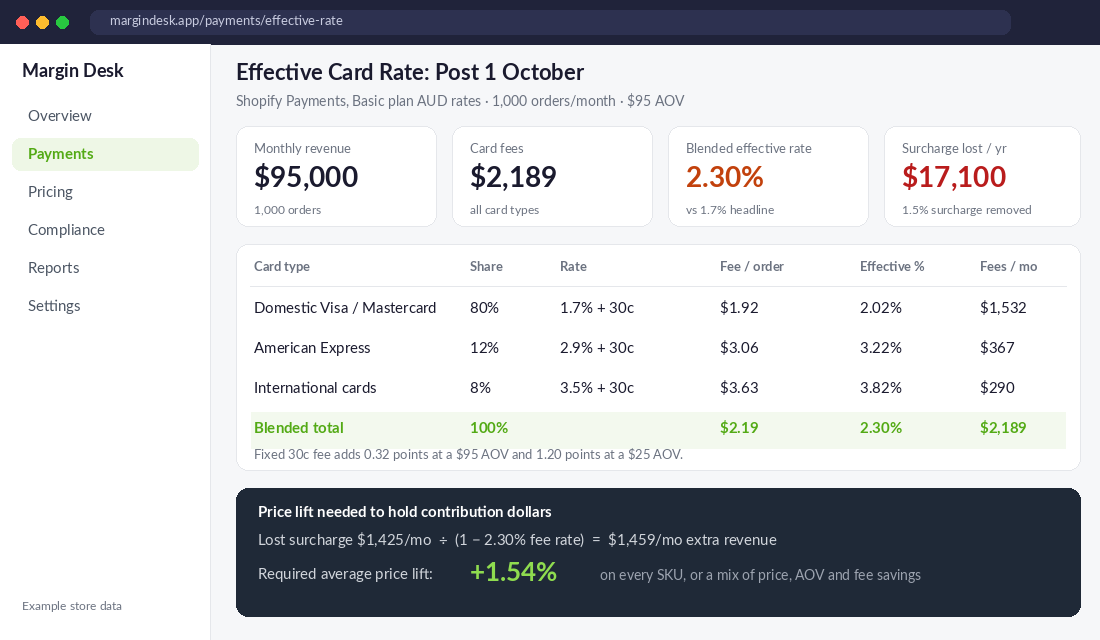
On Shopify’s current Australian pricing, the Basic plan charges 1.7% + 30c for standard domestic cards, 2.9% + 30c for Amex and 3.5% + 30c for international cards. Grow, Advanced and Plus step the domestic rate down to 1.55%, 1.35% and 1.15%. That fixed 30 cents is the silent killer. On a $95 order it adds 0.32 percentage points. On a $25 order it adds 1.2 points.
How to pull it from Shopify in 15 minutes
- In Shopify admin, go to Finance → Payouts and open View transactions.
- Filter to the last 90 days and click Export. You’ll get a CSV with amount, fee and net for every transaction.
- Open it in Google Sheets. Sum the Fee column and divide by the sum of the Amount column. That’s your effective rate.
- Add a pivot by card brand or type if your export includes it, so you can see how much Amex and international cards are dragging the blend up.
- If you run PayPal, Afterpay or a second gateway, repeat the export there. Each has its own rate, and third-party gateways on Shopify also attract Shopify’s transaction fee (2% on Basic, down to 0.2% on Plus).
Now do the surcharge maths. Take the surcharge revenue you collected last quarter (your surcharge app or gateway will report it, or search orders for the fee line). That’s the money that stops arriving next week. In the example above, a 1.5% surcharge on $95,000 a month was quietly bringing in $1,425 a month, $17,100 a year. For a store running 15% contribution margin, that’s the profit from roughly $114,000 of sales.
Step 2: Find Every Place the Surcharge Lives
Switching off the checkout app is step one of about eleven. Lauren McKee from LegalVision told Power Retail that businesses should identify “everywhere a card surcharge appears, not just at the point of sale”. She’s right, and online stores have more hiding spots than cafés do.
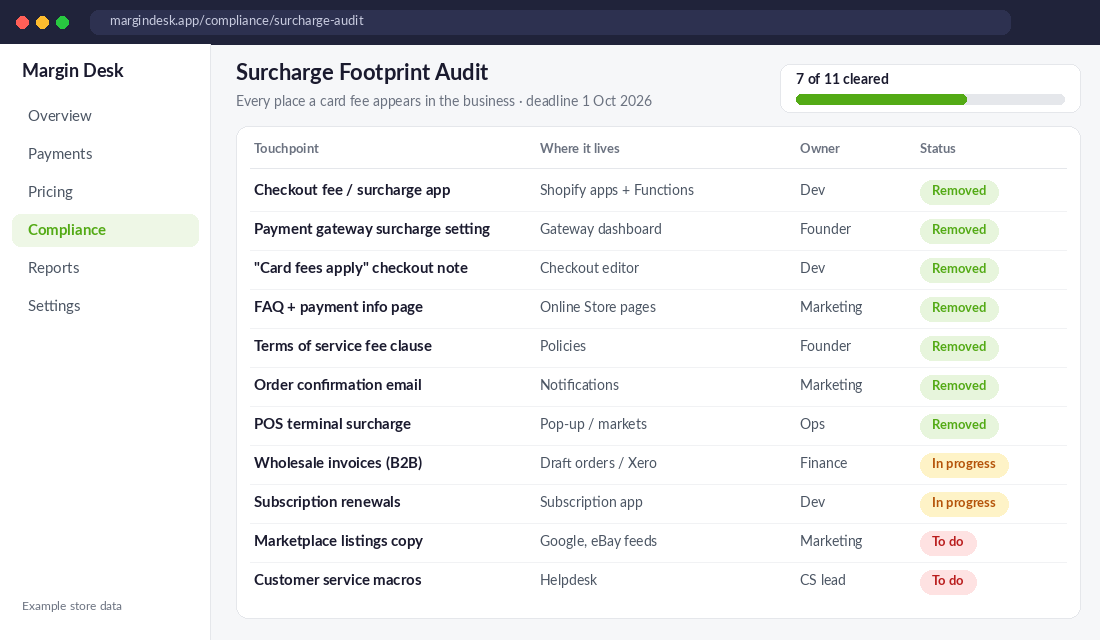
Work through this list and assign an owner to each line:
- Checkout fee or surcharge apps. Uninstall them, don’t just disable them. Check for any custom Shopify Function or checkout extension a developer added.
- Gateway settings. Stripe, PayPal, eWAY and others may have their own surcharge toggle. Some providers are disabling the feature on 1 October, but don’t assume.
- Checkout and cart copy. “Card fees apply” notes, payment icons with fee badges, cart drawer messages.
- Policy pages. Terms of service, FAQs and payment information pages that describe the fee.
- Notification templates. Order confirmations and invoices that itemise a card fee.
- POS and markets. If you run Shopify POS or a third-party terminal at pop-ups, the terminal setting needs to go too.
- Wholesale and B2B. Draft orders, Xero or MYOB invoice templates, and payment links. Remember: a card payment on or after 1 October can’t carry a surcharge, even on a September invoice.
- Subscriptions. Recurring orders created before the change may still carry a fee line. Check your subscription app’s order template.
- Marketplace and feed copy. Google Merchant Center, eBay and any comparison listings that mention fees.
- Customer service macros. The saved reply explaining “why was I charged 1.5%?” becomes a liability overnight.
Here’s the Protection angle: after 1 October, a surcharge isn’t just a bad look. It breaches the card network rules your provider has signed you up to, and your provider can act on that. Treat the audit like a compliance task with a deadline, because it is one.
Step 3: Choose Your Recovery Play (Absorb, Reprice or Re-route)
Once the surcharge is gone, the cost doesn’t vanish. You have three ways to recover it, and the right answer is usually a mix. Big brands are already choosing. Australian Frequent Flyer reports Qantas plans to lift airfares in October rather than absorb card costs, with the writer expecting fares across airlines to rise by around 1 to 2%. CommBank, on the other side, is cutting its own fee to win merchants.
Play A: Absorb it
Right for stores with strong gross margins (65%+), a high AOV where the 30c fixed fee barely registers, and a surcharge that was small or only applied to Amex. If your lost surcharge revenue is under about 0.5% of sales, absorbing it and chasing fee savings elsewhere is usually cleaner than touching prices.
Play B: Reprice
Right for most stores that surcharged every card. The maths is simple: divide the lost surcharge dollars by (1 minus your effective rate). In our example, that’s $1,425 ÷ 0.977 = $1,459 a month, a 1.54% average price lift. You don’t have to spread it evenly. Put more of it on hero products with low price sensitivity and less on entry products that drive first orders.
If you’re going to move prices, do it properly. Our price increase playbook covers how to stage it without spooking repeat customers. And watch your promotional reference prices: if you lift prices this week and run a “was/now” sale in November, the ACCC will want the “was” price to be genuine. The sale price compliance guide explains the rules.
Play C: Re-route the cost
Rather than moving the price, reduce the fee or lift the order value it’s spread across:
- Raise AOV above the fixed-fee pain point. On Basic, a $30 order pays an effective 2.7% on domestic cards. At $80 it’s 2.08%. Bundles, free shipping thresholds and minimum-spend offers do double duty here.
- Reward cheaper payment methods. A small discount for bank transfer on wholesale orders is allowed. Surcharging card is not.
- Check your plan. The next section shows when upgrading your Shopify plan pays for itself.
- Review BNPL separately. Afterpay and similar products already prohibit surcharging and usually cost more than cards. The RBA noted card networks will now compete on a more level playing field with them. Our BNPL playbook covers when BNPL earns its fee.
Most stores we coach land on a blend: a 0.5 to 1% price lift on core lines, an AOV push, and a plan or provider review. Nobody needs to wear the full hit in one lever.
Step 4: Check Whether Your Shopify Plan Is Now Costing You
Here’s the part most founders skip. When you could push card costs onto customers, your plan’s card rate barely mattered. From 1 October, every basis point comes out of your margin, so the plan decision changes.
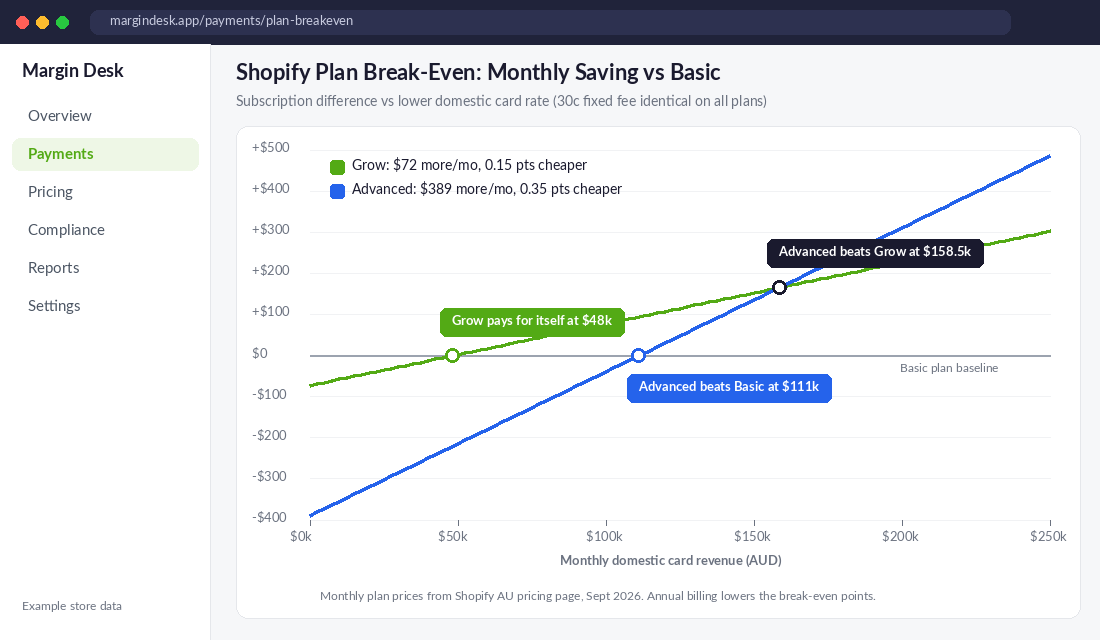
Using Shopify’s monthly AU plan prices and domestic card rates:
- Basic ($42) to Grow ($114): you pay $72 more a month and save 0.15 percentage points on domestic cards. Break-even is $48,000 a month in domestic card revenue.
- Basic to Advanced ($431): $389 more a month for 0.35 points. Break-even is about $111,000 a month.
- Grow to Advanced: $317 more for 0.2 points. Break-even is about $158,500 a month.
Amex and international rates also drop by 0.1 points per plan tier, so if those make up a big share of your mix, the break-even comes in even lower. Annual billing lowers it again. And if you’re on a third-party gateway, add Shopify’s transaction fee into the comparison, because it falls from 2% on Basic to 1% on Grow.
Plans also bring features (staff accounts, shipping discounts, reporting), so this isn’t purely a fee decision. But if you’re doing $60k a month on Basic, you’ve probably been overpaying for a while and the surcharge was hiding it.
Step 5: Tell Customers (Briefly) and Protect Conversion
Removing a surcharge is a rare piece of good news you can share. Customers hated the fee. The RBA’s consumer research found a large majority would rather payment costs be built into the advertised price. Use that.
- If you absorbed it: say so. A cart message like “No card fees, ever. The price you see is the price you pay” is a genuine conversion lift at the moment of hesitation.
- If you repriced: don’t announce the price rise as a surcharge replacement. That invites a “so you just hid it” reaction. Lead with the simpler checkout instead.
- Update email and SMS flows that reference fees, especially abandoned checkout flows where the fee may have been the reason people left.
- Brief your CS team with one sentence on what changed and why, so they don’t improvise.
If customers ask where to learn more, point them to cardsurcharge.com.au, the industry site AusPayNet and the card networks launched to explain the change.
The 7-Day Surcharge Switch-Off Checklist
It’s Thursday 24 September. Here’s the day-by-day plan to be clean, priced and protected by 1 October. Copy it into your task tool and assign owners today.
- Day 1 (Thu): Export 90 days of payment transactions from every gateway. Calculate your effective card rate and last quarter’s surcharge revenue.
- Day 2 (Fri): Run the footprint audit. List every surcharge touchpoint with an owner and a due date.
- Day 3 (Sat/Sun): Decide your recovery mix: absorb, reprice, re-route. Write the number down (for example, “recover $1,459 a month: 1% price lift, $5 AOV lift, plan upgrade”).
- Day 4 (Mon): Model price changes by SKU. Protect entry products and bestsellers used in ads; put more of the lift on low-sensitivity lines. Check any November sale reference prices.
- Day 5 (Tue): Stage everything: new prices scheduled, policy and FAQ copy drafted, email templates updated, CS macro rewritten, plan comparison done.
- Day 6 (Wed 30 Sep): Final check. Test a live order on desktop and mobile with Visa, Mastercard and Amex. Confirm the fee line is gone from checkout, confirmation email and invoice.
- Day 7 (Thu 1 Oct): Go live. Uninstall the surcharge app, publish prices and copy, and set a reminder to compare your October effective rate against August when the November statement lands.
The one-line test for Day 6: could a customer paying by Amex on 1 October see or pay any amount that a customer paying by debit card wouldn’t? If yes, you’re not done.
How It All Fits Together
Look at the pieces as a system. The effective rate tells you the real cost. The footprint audit removes your compliance risk. The recovery mix decides who funds that cost: you, your price, or a lower fee. The plan review shrinks the cost itself. And the customer message turns a regulatory change into a conversion win.
Do only the first step (switch off the app) and you lose the surcharge revenue, keep paying 2.3% without knowing it, and miss the interchange savings your provider may quietly pocket. Do all five and most stores come out of 1 October with the same contribution margin, a cleaner checkout, and a payments line they actually understand for the first time.
That’s the pattern with every rule change we see. The founders who treat it as admin lose a little. The ones who treat it as a reason to look under the hood usually find more than the rule took away.
Inside eCommerce Circle, margin protection and payment costs are among the first things we review with every member, because they compound on every single order. If you want to see exactly where your store is being capped, take the free More Orders Scorecard. It takes two minutes and shows you which of the 10 P’s to fix first.
This article is general information, not legal or financial advice. Card network rules can change; confirm the details with your payment provider and, for pricing displays, the ACCC.