Your container is stuck. The factory slipped three weeks, the freight forwarder has rebooked you onto a later sailing, and the hero product you built the whole spring campaign around now lands in mid November instead of mid October. Most Aussie founders respond the same way. They flip the product to Sold Out, push the ad spend onto second-tier SKUs, and quietly write off six figures of demand.
What’s in This Article
That is the expensive reflex. The traffic still arrives, the intent is still there, and the customer who wanted that coat this week is perfectly willing to wait for it. They just need to be told what they are buying and when it turns up. Across a dataset of more than one million preorders worth over eighty five million US dollars, the average cancellation rate sits at 5.4%. Nineteen out of twenty people who commit to a preorder stay committed.
Here is the number that should really change how you think about this. 90.4% of preorders sell at full price with no discount attached. People are not preordering to save money. They are preordering to be first. If you are treating a stock delay as a discount event, you are paying for the privilege of solving a problem your customers were never that upset about.
This playbook is the six-step system we run with eCommerce Circle members when stock timing goes sideways, or when they want to fund a production run out of customer cash instead of a bank facility. It works for a delayed restock, a brand new launch, and a made-to-order range.
Step 1: Decide Which Products Have Actually Earned a Preorder
Preorders are not a universal patch for bad inventory planning. Run them on the wrong SKU and you convert a stock problem into a trust problem. The filter is simple. A product earns a preorder when you are genuinely confident it is coming, you know roughly when, and the customer wants that specific thing rather than a category.
Products that pass the test:
- Proven repeat sellers that sold out. You have the sales history, the reviews, and a confirmed PO with the factory. This is the lowest risk preorder you will ever run.
- New launches with a locked spec. Samples approved, photography shot, tooling paid for. The design is not going to change.
- Limited editions and seasonal drops. Scarcity and a date are already part of the story, so a preorder reads as access rather than a delay.
- Higher-ticket items. Products above 250 AUD make up 26.8% of preorder listings. People commit early to things they have been researching for weeks.
- Made-to-order ranges. Frahm Jackets built their whole model on it, and they are blunt about why: each design is made once a year, and they deliberately do not make enough to meet demand so they never overbuy.
Products that fail the test: anything shipping inside seven days (just take the normal order), anything where the final spec or supplier is still moving, and anything where you cannot commit to sending update emails. Preorders are a communication product with a physical good attached. If you cannot do the communication, do not take the money.
Category matters too. Apparel accounts for 16.7% of preorder listings and beauty and fitness another 13.9%, which tracks with what we see in Australia. Fashion, homewares, and considered-purchase gear all preorder well. Impulse consumables rarely do.
The variant discipline most brands miss
Do not put a whole collection on preorder because two sizes ran out. Preorder at the variant level. If Large and XL are gone but Small is sitting on the shelf, only Large and XL get the preorder treatment. The rest of the range keeps converting normally, and your reporting stays clean enough to actually learn something from.
Step 2: Match the Payment Model to Your Lead Time
This is the decision that determines whether a preorder helps or hurts your working capital, and it is where most founders default to whatever the app installed first. There are four models, and the split across a million-plus preorders tells you what experienced operators actually pick.
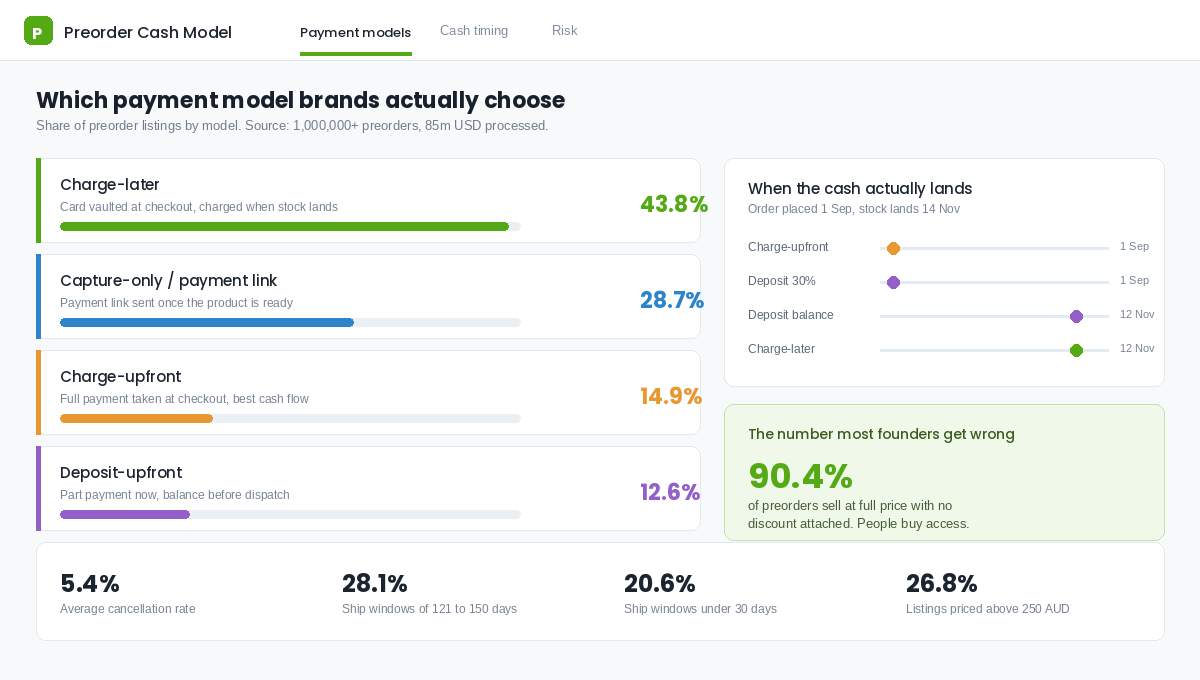
- Charge-later (43.8% of listings). The card is vaulted at checkout and charged when the product is ready to ship. Lowest friction for the customer, no cash for you until dispatch. The default for anything more than about six weeks out.
- Capture-only or payment link (28.7%). You collect the commitment, then send a payment link when stock lands. Useful if you would rather not hold card details for months, but it introduces a second conversion step that will leak 5 to 15% of orders.
- Charge-upfront (14.9%). Full payment at checkout, exactly like a normal order. Best cash flow, highest obligation. Only use this when the ship date is close and certain.
- Deposit-upfront (12.6%). Part payment now, balance before dispatch. The sweet spot for higher-ticket goods where asking someone to part with 900 AUD four months early is a stretch.
Map it to your lead time. The most common preorder shipping window in the dataset is 121 to 150 days at 28.1% of listings, with another 20.6% shipping inside 30 days. That is a wide spread, and the same payment model cannot serve both ends of it.
A practical rule we use with members: under 30 days, charge upfront. Thirty to ninety days, take a deposit of 20 to 30%. Over ninety days, charge later. The deposit band is the one most Australian brands underuse, and it is the one that funds the production run without asking the customer to carry all the risk.
Be honest about what upfront cash actually costs you. Taking 180,000 AUD in charge-upfront revenue in September for stock that lands in November means you are holding a liability, not a profit, for ten weeks. If that money gets spent on Meta before the goods land, you have built a very fragile business. If you want the full picture of how preorder cash moves through your accounts, work through it alongside the cash conversion cycle playbook.
Step 3: Write Terms That Hold Up Under Australian Consumer Law
This is the section most preorder guides skip because most preorder guides are written for the US market. Australia is stricter, and the ACCC has been paying specific attention to this exact area.
Two things you need to know. First, businesses must have reasonable grounds for any delivery timing claim they make on a website or in advertising. Publishing a ship date you privately suspect will slip is a misleading representation, not an optimistic estimate. Second, consumer guarantees under the ACL are automatic and cannot be contracted out of. A line in your terms saying preorders are final sale does not survive contact with a consumer guarantee failure.
The ACCC has run sweeps of online retailer terms and conditions and issued warnings over exactly the kind of language brands paste in without thinking: no refunds on opened items, restocking fees, refund windows that undercut the guarantees. Delivery timeframe conduct was named as a specific enforcement focus. Preorders sit right in the middle of that.
What to publish on the page
- An estimated dispatch date, not a delivery date. Write it as a specific month and range, for example “Estimated dispatch: 10 to 21 November 2026”. Then add the transit time separately so the two are not conflated.
- The basis for that date. One line is enough. “Stock departs our supplier 8 October and clears Melbourne customs mid November.” This is your reasonable grounds, in writing.
- The payment mechanics in plain English. When the card is charged, how much, and what triggers it.
- A cancellation right before dispatch. Give customers an unconditional right to cancel a preorder for a full refund any time before it ships. It costs you almost nothing at a 5.4% cancellation rate and it removes the single biggest reason someone hesitates.
- What happens if the date moves. Commit to notifying within a set window and offering a refund if the new date does not suit. Put the number in writing: “If dispatch moves by more than 14 days we will email you within 48 hours with the option of a full refund.”
Keep your consumer guarantees language intact and separate. Nothing in your preorder terms limits rights under the Australian Consumer Law, and saying so explicitly is both accurate and reassuring.
Step 4: Build the Product Page So Waiting Feels Like Access
A preorder page is not a normal product page with a different button label. The job changes. On a normal PDP you are removing doubt about the product. On a preorder PDP you are removing doubt about the timeline, then reframing the wait as a reason to buy rather than a reason to leave.
The elements that do the work, in order of position on the page:
- Replace the button, not just the text. “Preorder now” in your primary button style, full width, same visual weight as Add to Cart. Do not grey it out. A disabled-looking button reads as broken.
- Put the dispatch date directly under the button. Not in a tab, not in an accordion. Directly under it, in the same visual block, so it is impossible to miss and impossible to claim you hid it.
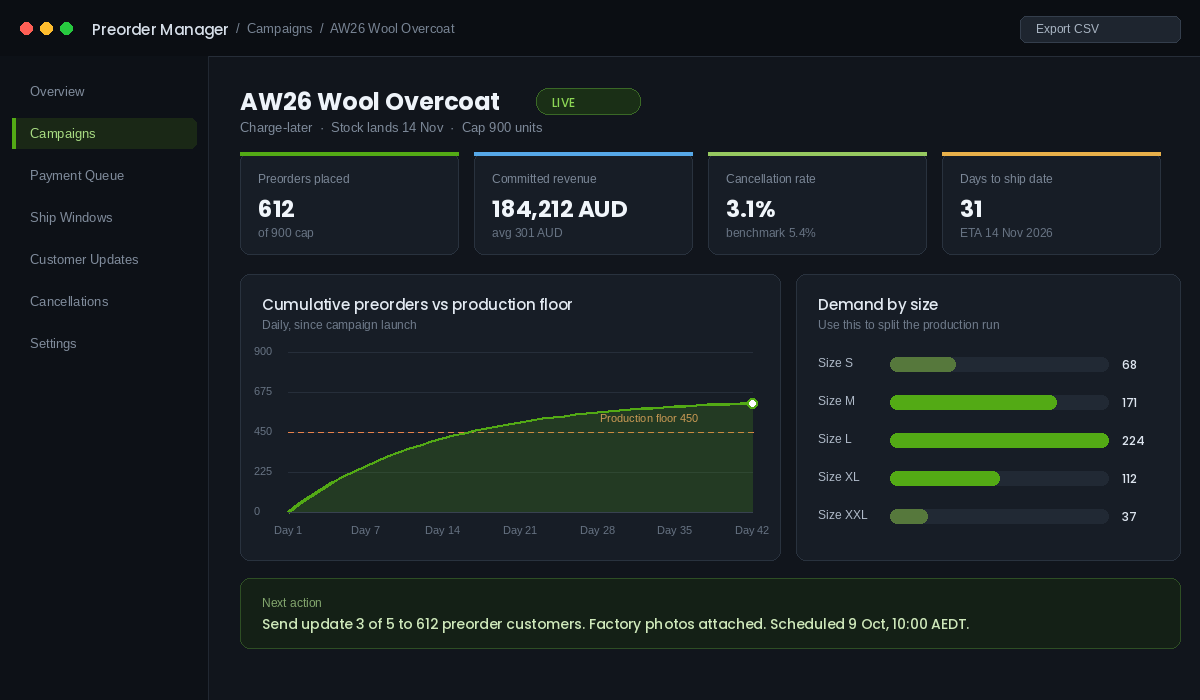
- Add a scarcity counter only if it is real. “612 of 900 reserved” works because it is true and verifiable. A fake countdown on a preorder is the fastest way to convert a patient customer into an ACCC complaint.
- Show the payment terms as a one-line badge. “No charge today. Card charged when your order ships.” This single line does more work than anything else on a charge-later preorder page.
- Answer the three fears in an FAQ block. Can I cancel? What if it is late? When exactly am I charged? Put them on the page, not in a policy link.
For variants that are genuinely not coming back, keep running your normal back in stock notification flow rather than a preorder. The two mechanics do different jobs and mixing them confuses both your customers and your reporting. Speed matters on the notification side: every hour of delay after a restock goes live cuts conversion on those alerts by 5 to 8%, and well-run waitlists convert at 25 to 35% when the notification actually lands on time.
One more thing on the page. Your delivery promise messaging sitewide needs to stay coherent with what the preorder page says. If your header banner still promises three-day dispatch while the PDP says November, you have created a contradiction that support will pay for. The delivery promise playbook covers how to keep those layers consistent.
Step 5: Run the Five-Message Cadence That Keeps Cancellations Low
Cancellation rate is the scoreboard for a preorder campaign, and it is almost entirely a function of communication. The 5.4% benchmark is the average across brands with a cadence. Brands without one routinely run double that, and every one of those cancellations is a customer who now believes you are unreliable.
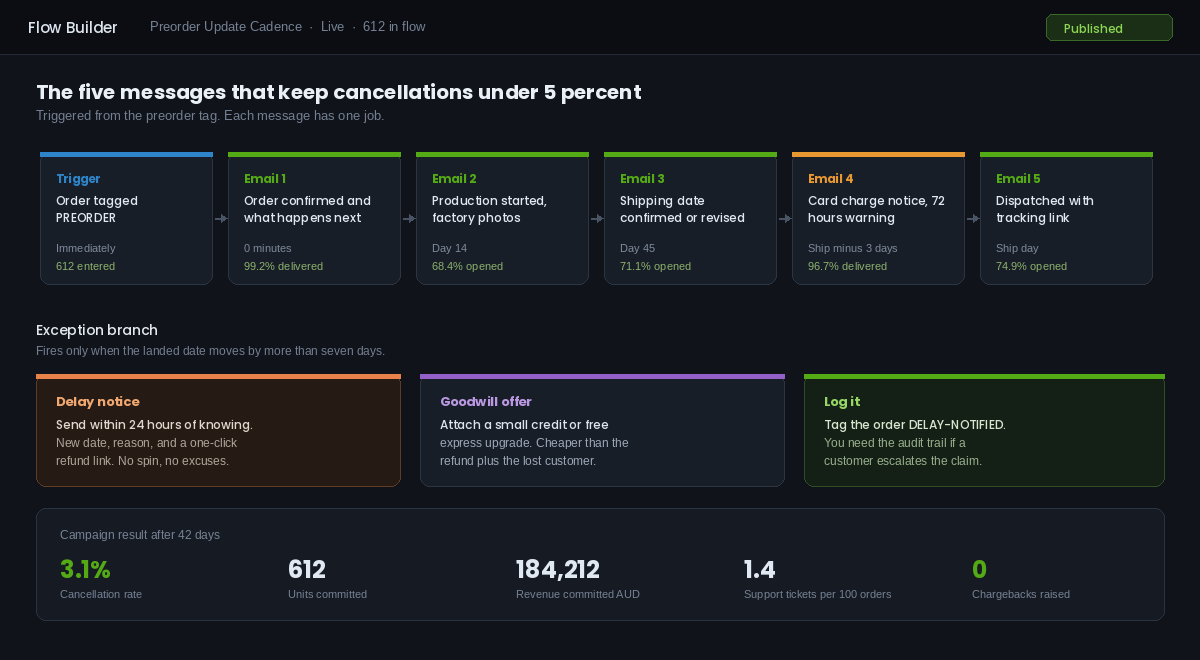
Build it as a single flow in Klaviyo triggered off a PREORDER tag applied at order creation. Five messages:
- Immediately: order confirmed and what happens next. Restate the dispatch window, restate when the card is charged, and tell them exactly how many more emails they will get. Setting the expectation of contact is what stops the “has this brand forgotten me” spiral.
- Day 14: production started. A photo from the factory floor, a shot of the fabric, a note from you. This email has no commercial job. It exists purely to prove the thing is real.
- Day 45: dispatch date confirmed or revised. Either “still on track for 14 November” or the new date. Send it either way. An email confirming nothing has changed is worth more than silence.
- Three days before dispatch: charge notice. On charge-later, this is mandatory. Tell them the card ending in 4242 will be charged 301 AUD in 72 hours and give them a link to update the card. This one email is the difference between a smooth capture and a wall of failed payments.
- Dispatch day: it has shipped. Tracking link, expected delivery, and a thank you that acknowledges they waited. This is your highest-goodwill moment of the entire relationship. Use it to ask for the review.
The exception branch
Separate from the five, build one branch that fires when the landed date moves by more than seven days. Three actions: send the delay notice within 24 hours of you knowing (not 24 hours before the old date), attach a small goodwill gesture like store credit or a free express upgrade, and tag the order DELAY-NOTIFIED so you have an audit trail if it ever escalates.
Founders resist this email because it feels like admitting failure. It is the opposite. A brand that emails you unprompted about a three-week slip and offers a refund reads as competent. A brand that goes quiet and hopes reads as a brand that has taken your money. The refund take-up on a well-written delay notice is usually under 10%.
Step 6: Wire Preorders Into Ops Before You Take a Single Order
The failure mode nobody warns you about is not marketing. It is the 3PL shipping a preorder as a normal order, or your inventory going negative and Shopify quietly overselling by 200 units. Sort this before you turn the campaign on.
The setup, using PreProduct as the reference app (Purple Dot and Timesact solve the same problem with different pricing):
- Install the app and add the theme snippet. On Online Store 2.0 themes this is an app block you drag into the product template. Place it directly above the Add to Cart block so the preorder messaging renders in the buy box, not below the fold.
- Create the campaign at the variant level. Select only the variants that are out of stock or unreleased. Set the payment model, the dispatch window, and the unit cap. The cap matters: it stops you selling 1,400 units of a 900 unit production run.
- Set the fulfilment hold. Every preorder line item should carry a tag and a fulfilment hold so it cannot be picked. Push that tag through to your 3PL or WMS and confirm they filter on it. Test with a real order before you launch.
- Turn off Continue selling when out of stock on those variants. Native oversell and an app-managed preorder do the same job twice and will double-count your committed units.
- Split the reporting. Add a preorder tag to the order and exclude preorder revenue from your daily sales dashboard, or at minimum show it as a separate line. Booked revenue is not banked revenue and your weekly numbers should never blur the two.
- Dry-run the capture. Place a test preorder on your own card, then trigger the charge manually. You want to see the customer-facing charge email, the failed-payment retry logic, and the fulfilment hold releasing before 600 real customers are relying on it.
On the inbound side, your preorder cap should be set off the confirmed PO quantity, not the quantity you hope to get. If the factory has confirmed 900 units and your forwarder has a booking, 900 is the cap. Everything upstream of that is covered in the inbound freight playbook, and the two systems need to agree on the same date.
Why the Six Steps Compound Into a Real Advantage
Individually these are housekeeping tasks. Together they change what your business is capable of.
Start with cash. A deposit-based preorder on a 900 unit run at 301 AUD average order value with a 25% deposit puts roughly 67,000 AUD in the bank before you pay the factory balance. That is a production run funded by demand instead of debt, and it is available to brands well below the size where a bank would take the call.
Then demand data. A preorder is a purchase, not a survey. When 224 people commit to Large and 37 to XXL, you have a size curve with money behind it. Every subsequent buy gets more accurate, which shrinks the end-of-season markdown pile that quietly eats most apparel brands alive.
Then conversion. The average Shopify store converts at around 1.4%, with the top 20% clearing 3.2%. A sold-out variant converts at zero. Recovering even a slice of the traffic that currently hits a dead page is pure incremental revenue on ad spend you have already committed.
And then the compounding piece: reliability. A customer who preordered, got four honest updates, and received the product on the date you promised has learned something about you that no amount of ad creative can teach. They are dramatically more likely to preorder the next drop, which means your next launch starts with committed revenue on day one instead of a cold start.
The brands that win at preorders are not the ones with the best products. They are the ones whose customers believe the date on the page.
Your Preorder Readiness Checklist
Run this before you turn on any preorder campaign. If you cannot tick all twelve, you are not ready and the cancellation rate will tell you so.
Product and commercial
- The PO is confirmed with the supplier and I have a freight booking or a firm ETA
- Only the out-of-stock or unreleased variants are on preorder, not the whole product
- The unit cap equals the confirmed PO quantity, not the hoped-for quantity
- The payment model matches the lead time (upfront under 30 days, deposit 30 to 90, charge-later beyond 90)
Page and compliance
- Estimated dispatch window is published directly under the buy button
- The basis for that date is stated in one line on the page
- Payment timing is stated as a badge, not buried in a policy
- An unconditional pre-dispatch cancellation right is published
- The page states that nothing limits rights under the Australian Consumer Law
Systems
- Five-message flow is built, tested, and live in Klaviyo off the PREORDER tag
- Fulfilment hold is applied and my 3PL has confirmed they filter on the tag
- A test preorder has been placed, charged, and released end to end on my own card
Twelve boxes. Most brands can clear them in an afternoon, and once the flow and the fulfilment hold exist, every future preorder is a fifteen minute setup rather than a project.
Stock delays are not going away. Shipping windows out of Asia are still volatile, peak freight books out earlier every year, and the brands that treat a slipped container as an automatic revenue loss are handing that revenue to whoever is willing to take the order and communicate properly.
How to Read Preorder Demand Before You Commit to the Next PO
The underrated benefit of preorders has nothing to do with the revenue you take early. It’s the forecasting signal. A preorder window is the only time a customer tells you, with their credit card, exactly how much they want a product before you’ve spent a cent on it. Most brands take the cash and ignore the data.
Treat every preorder window as a paid demand test. Three numbers matter, and you should record all three in the same sheet every time you run one.
- Preorder conversion rate. Preorders divided by product page sessions during the window. A preorder page typically converts at 30 to 50% of what the same product does in stock, because the wait is real friction. If yours is converting above 60% of in-stock rate, demand is strong enough to increase the PO.
- Variant mix. Which size, shade or colour actually sold. This is the number that saves you the most money. Brands routinely order to last season’s mix and end up with 200 units of a size that preorder buyers didn’t touch.
- Velocity curve. Units per day across the window. Front-loaded demand that dies after 72 hours means you tapped your existing list and that’s it. Steady daily volume across two weeks means there’s cold-traffic demand behind it and the product can carry paid spend.
A rough sizing rule that holds up well: if the preorder window ran for 14 days with paid traffic behind it, your first 90 days of in-stock sales will usually land at three to five times the preorder volume. Order accordingly, and weight the variant split to what preorder buyers chose rather than what you assumed. On a $60 product, getting the size curve right on a 1,000-unit order is worth more than any conversion tweak you’ll make that quarter.
The Cancellation Rate That Tells You Something Is Broken
Cancellations are the honest scorecard for a preorder program. A well-run window with clear dates and a five-message cadence should sit at 3 to 8% cancellations. Between 8 and 15% means your communication is thin or your date slipped without a proactive heads-up. Above 15% and something structural is wrong – usually an unrealistic ship date published to win the sale.
Log a reason code on every cancellation. In practice they cluster into four buckets: waited too long, found it elsewhere, changed their mind, and didn’t realise it was a preorder. That last one is the dangerous bucket. If more than a quarter of your cancellations say they didn’t understand they were preordering, your product page is failing the disclosure test under Australian Consumer Law, not just annoying customers. Fix the badge, the cart line item and the confirmation email before you run another window.
Track refund turnaround too. Australian buyers who cancel a preorder expect their money back within a few business days, and a slow refund generates chargebacks and reviews out of all proportion to the order value. Set an internal SLA of 48 hours and hold to it. The brands that handle cancellation gracefully get a second chance when the stock lands – which is exactly what a well-built back in stock flow is for.
Inside eCommerce Circle, preorder and stock timing strategy is one of the core pillars we work on with every member, because it sits right where Platform, Profit and Patrons overlap. If you want a second opinion on yours before peak, let’s talk.