Your Shopify store looks great. The branding is on point. The products are photographed beautifully. But there’s a silent killer destroying your conversions that most brand owners never even check: your site is slow.
What’s in This Article
The average Shopify store scores 34 out of 100 on Google PageSpeed Insights for mobile. That’s not just bad — it’s costing you real money. Every additional second of load time drops your conversion rate by roughly 7%. If your site takes 5 seconds to load instead of 2, you’re losing an estimated 21% of potential conversions. On a store doing $60K/month, that’s $12,600 walking out the door every month.
The fix isn’t complicated. Most speed issues come from the same handful of culprits, and most can be resolved in a weekend. Here’s exactly what to fix and in what order.
Start With a Speed Audit (And Stop Guessing)
Before you change anything, measure where you stand. Run your homepage and your best-selling product page through Google PageSpeed Insights (pagespeed.web.dev). You’ll get a score out of 100 for both mobile and desktop, plus specific recommendations ranked by impact.
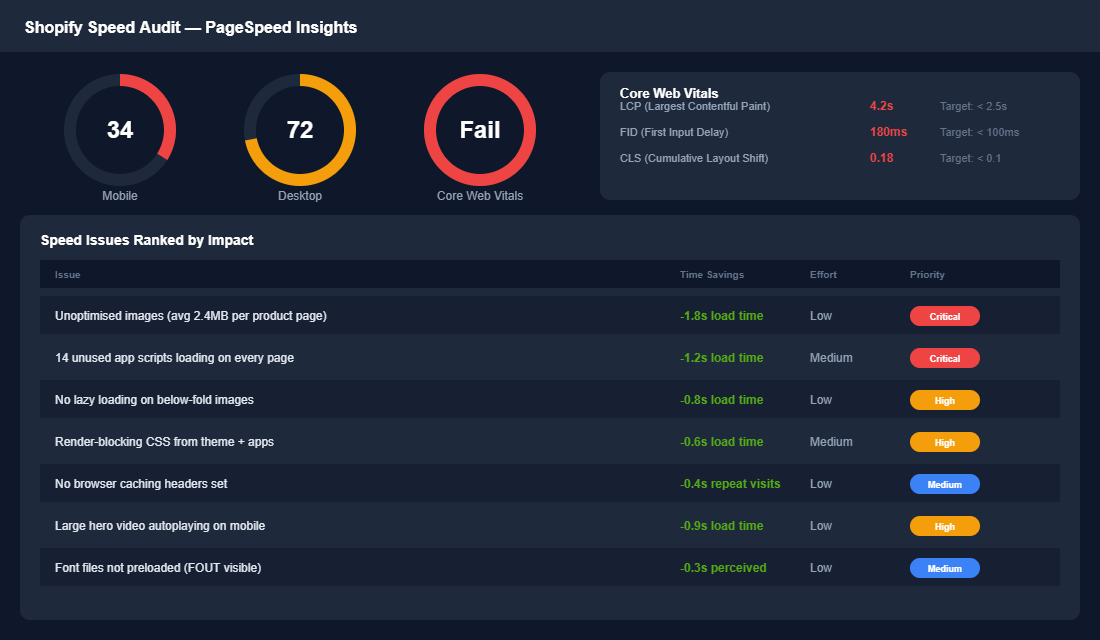
Focus on mobile scores — that’s where 70%+ of your traffic comes from. If you’re scoring under 50, you have significant speed issues. Between 50-70 is acceptable but improvable. Above 70 on mobile is where you want to be. Also check your Core Web Vitals: LCP (Largest Contentful Paint should be under 2.5s), FID (First Input Delay under 100ms), and CLS (Cumulative Layout Shift under 0.1).
Fix 1: Compress and Resize Your Images
This is the single biggest speed win for almost every Shopify store. Images typically account for 60-80% of total page weight. Most brands upload product photos straight from their camera or photographer — 3000px wide, 2-4MB each. Your product page doesn’t need that.
The fix: resize product images to a maximum of 2048px wide (Shopify’s recommended max) and compress them using TinyPNG or Squoosh before uploading. A product image should ideally be under 200KB. Shopify also automatically serves WebP format to supported browsers, which helps — but only if the source image isn’t already massive.
For existing images, apps like Crush.pics or TinyIMG can batch-compress your entire media library. This one fix alone can cut 1-2 seconds off your load time.
Fix 2: Audit and Remove Unnecessary Apps
This is the second most impactful fix — and the one most brands resist. The average Shopify store has 20+ apps installed, and most of them inject JavaScript into every page load. Every app script adds to your load time, whether the customer uses that feature or not.
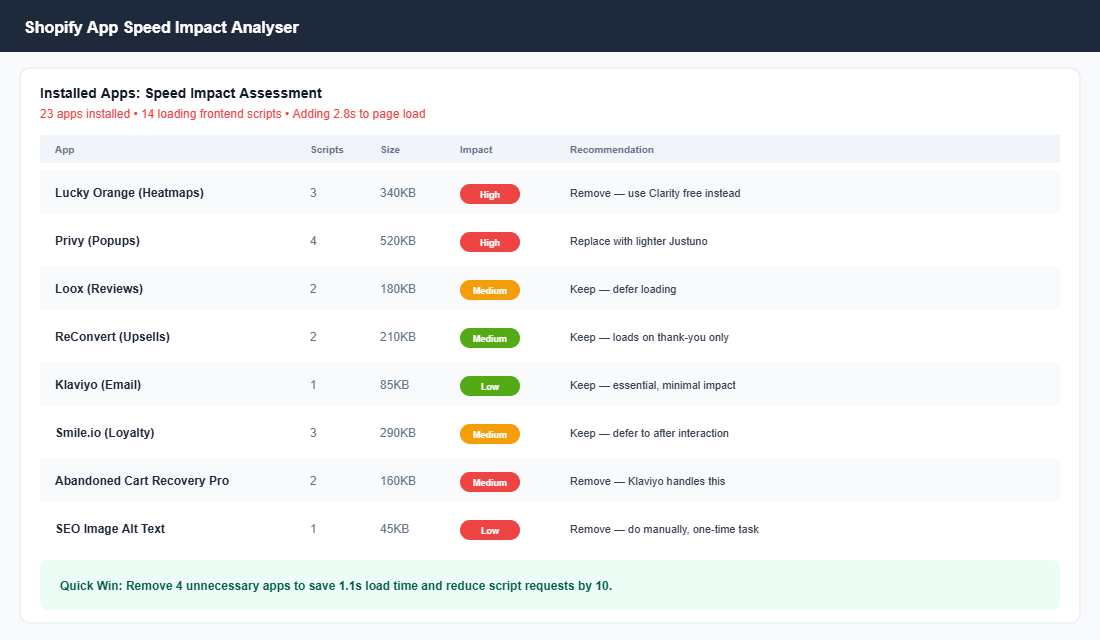
Go through your installed apps and ask three questions for each one: Is this app actively being used? (If not, delete it — even uninstalled apps can leave residual code.) Can the same function be handled by an existing app? (Many brands have 3 apps doing what one could do.) Does this app need to load on every page? (A reviews app only needs to load on product pages, not your homepage.)
Common speed killers to review: heatmap tools (use free Microsoft Clarity instead of paid alternatives that load heavy scripts), popup apps (switch to lighter options or use Klaviyo’s built-in forms), and SEO apps that inject scripts on the frontend.
Fix 3: Implement Lazy Loading
Lazy loading means images below the fold don’t load until the customer scrolls to them. This dramatically reduces initial page load time because the browser only needs to load what’s visible on screen first.
Most modern Shopify themes (Dawn, Prestige, Impulse) have lazy loading built in. Check that it’s actually enabled in your theme settings. If your theme doesn’t support it natively, add loading="lazy" to image tags in your theme code, or use an app like Hyperspeed to implement it automatically. One warning: don’t lazy-load your hero image or LCP element — that should load immediately.
Fix 4: Optimise Your Theme Code
Some Shopify themes are inherently faster than others. Shopify’s own Dawn theme is one of the fastest because it’s built for Online Store 2.0 with minimal JavaScript. Premium themes like Prestige and Impulse are also well-optimised.
If you’re on an older theme, consider whether a migration is worth it. For quick wins on any theme: remove unused theme features (if you’re not using the blog sidebar, disable it), minimise custom code snippets (each custom Liquid section adds load time), and preload your primary font to eliminate the flash of unstyled text that makes pages feel slow.
Fix 5: Use a CDN and Enable Caching
Shopify uses Cloudflare CDN by default, which is great — it serves your content from servers geographically close to your customers. For Australian stores, this means your Sydney customers get faster load times than if everything was served from a US server.
What most brands miss is browser caching. When caching is set up properly, repeat visitors load your site significantly faster because their browser stores static assets locally. Shopify handles this for most assets, but third-party app scripts often aren’t cached properly. Apps like WP Rocket aren’t available on Shopify, but Hyperspeed and Booster provide similar functionality for Shopify stores.
Fix 6: Optimise Above-the-Fold Content
What loads first matters more than total load time. Perceived speed — how fast the page feels — is what determines whether a customer stays or bounces. Focus on making the above-the-fold content (hero image, navigation, product title) load as fast as possible.
Practical steps: avoid auto-playing video on mobile homepages (use a static image with a play button instead), inline critical CSS so the first paint happens before all stylesheets load, and set explicit dimensions on images to prevent layout shift (CLS) that makes the page jump around as elements load.
The Revenue Impact: Before and After
Speed optimisation isn’t a vanity metric. It directly impacts your bottom line. Here’s what a typical optimisation looks like for a Shopify store doing $60K/month.
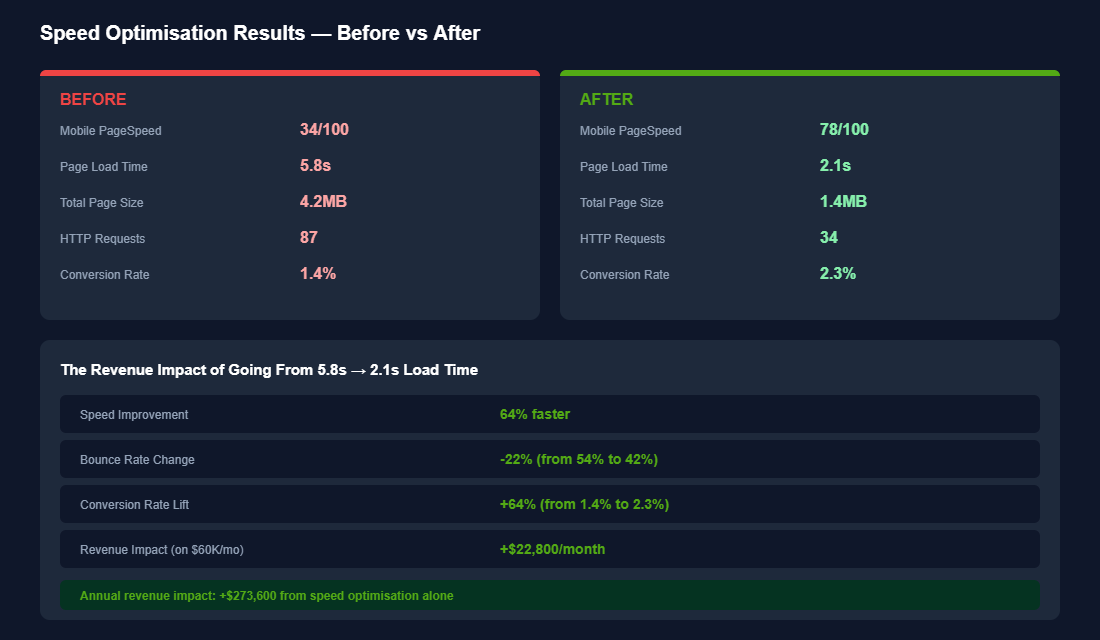
The compound effect is powerful: faster pages mean lower bounce rates, higher engagement, better ad quality scores (which reduces your CPA on Meta and Google), and improved SEO rankings (Google uses Core Web Vitals as a ranking signal). Every dollar you invest in speed pays dividends across every other channel.
Your Next Step
Run your top 3 pages through Google PageSpeed Insights right now. Note your mobile score and your LCP time. Then start with the two highest-impact fixes: compress your images and audit your apps. Those two changes alone can cut your load time by 40-50%.
Inside the eCommerce Circle, platform optimisation is one of the core pillars we work on with every member — because a fast, well-built store converts better across every traffic source. If you want help running a full speed audit on your Shopify store, let’s talk.