Your Shopify store is probably leaking money every single day. And it’s not your ads, your offer, or your email flows. It’s the 2.8 seconds your homepage takes to load on a mid-range Android phone in Brisbane.
What’s in This Article
Most brands we audit inside the eCommerce Circle don’t have a conversion problem. They have a Platform problem. They’ve stacked 12 apps on a half-built theme, let a developer wire up a hero video that autoplays on mobile, and then wonder why their paid traffic converts at 0.9%.
The brands scaling past $5M AUD a year treat site speed like a revenue line item. They know that a 1-second delay can cut conversions by up to 7%, and that for a store doing $500K a year, every extra 100ms of load time costs roughly $5,000 annually in lost sales. This article is the exact playbook we walk Circle members through when we sit down to fix it.
Why Site Speed Is a Platform Problem, Not a Tech Problem
Most store owners outsource “site speed” to a freelancer and hope it gets fixed. That’s why it never does.
Speed isn’t a one-off project. It’s a standing decision about how your Platform is built, which apps you allow on it, and which metrics you watch weekly.
Here’s the reality in 2026. Roughly 79% of Shopify traffic comes from mobile, but mobile converts at about 1.2% versus desktop’s 1.9%, a 37% gap that widens the slower your store gets. Google’s Core Web Vitals are now non-negotiable for organic visibility, and INP (Interaction to Next Paint) has replaced FID as the interactivity metric you actually need to beat.
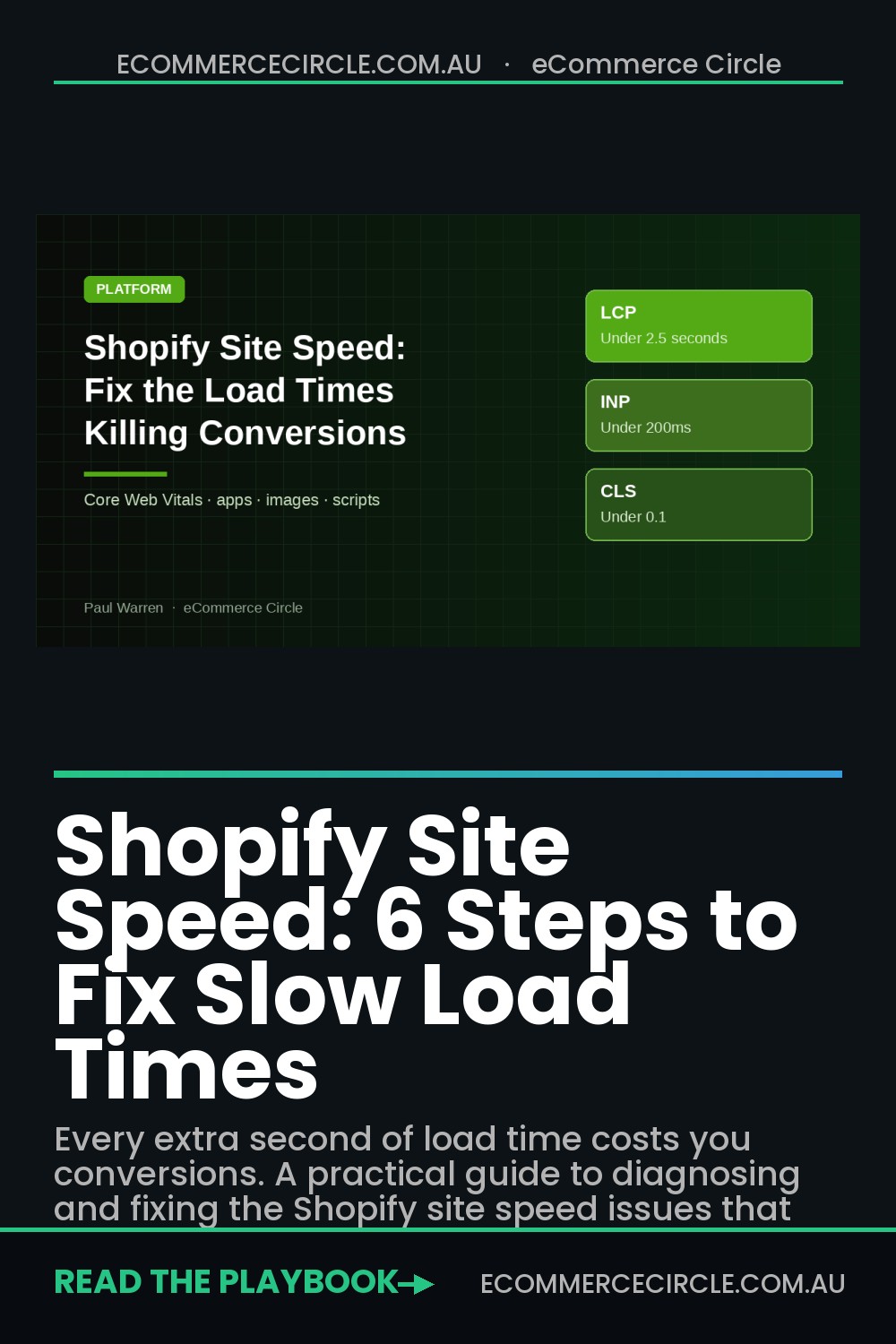
The three numbers that matter are LCP (Largest Contentful Paint, under 2.5 seconds), INP (Interaction to Next Paint, under 200ms), and CLS (Cumulative Layout Shift, under 0.1). Pages that load in under 2.5 seconds convert at roughly 2x the rate of pages loading above 4 seconds.
That’s not an SEO gain. That’s direct margin.
Step 1: Run a Real Benchmark (Not a Shopify Admin Score)
The first mistake we see is brands reading the “Online Store Speed” number inside Shopify admin and calling it a day. That score is a lab test: a clean, cached, US-based fetch. It’s not what your actual customer in Geelong on a 4G connection experiences.
Before you touch a single app or image, benchmark the truth. Here’s the exact 10-minute audit we run:
- Test your top 3 URLs: homepage, highest-revenue product page, and best-selling collection, in PageSpeed Insights. Record the mobile LCP, INP, and CLS for each.
- Cross-check with WebPageTest using a Moto G Power on 4G, location Sydney. This is closer to your average Aussie shopper than a desktop in Mountain View.
- Check the Core Web Vitals report in Google Search Console. This is real-world field data from actual Chrome users. The scores Google actually ranks on.
- Use Chrome DevTools “Performance insights” in incognito mode to see what’s blocking the main thread and which scripts are eating your LCP.
Write the numbers in a spreadsheet with today’s date. You can’t improve what you don’t measure. And you’ll want to show the Circle exactly how far you’ve come in 30 days.
Step 2: Audit Your Apps Ruthlessly
This is where 78% of store owners get it wrong. They don’t realise their apps are the number one reason their store is slow. Third-party scripts account for around 62% of total JavaScript on the average Shopify store, and the average brand runs 6-10 apps that collectively add 2-3 seconds of load time.
Here’s the part nobody tells you. The damage isn’t uniform. A well-built Theme App Extension adds about 20ms.
A poorly coded review widget that globally injects 400KB of JavaScript can add 800ms on its own. Five bad apps is all it takes to add 4 seconds to every single page load, everywhere on your store.
Here’s the audit framework. For every app installed, ask four questions:
- Does it drive measurable revenue? If you can’t tie it to sales, retention, or saved hours, delete it today.
- Is it loading on every page, or only where it’s needed? A reviews widget only needs to fire on product pages. A subscription app only on relevant PDPs. If it’s globally injected, that’s a red flag.
- Is there a native Shopify or theme alternative? In 2026, core Shopify handles a lot of what used to need third-party apps: bundles, subscriptions, loyalty, even advanced discounts. Use native before you reach for an app.
- Does it use Theme App Extensions? Apps built on Shopify’s modern extension architecture are sandboxed and dramatically lighter than legacy “script tag” apps. Prefer them.
One Aussie fashion brand we worked with had 23 apps installed. We deleted 14 of them in a single afternoon. LCP dropped from 4.1s to 2.3s, and their mobile conversion rate climbed from 1.1% to 1.8% within three weeks, with no other changes.
Step 3: Fix Your Images Before You Touch Code
Images are the biggest, easiest win in almost every store audit. And the one most merchants never do properly. Most Shopify stores we open still ship 2MB hero images in JPEG format and wonder why LCP is 4 seconds.
Your rules in 2026:
- Convert everything to WebP or AVIF. Shopify now serves these automatically if your theme uses the modern
image_urlfilter. If your theme still uses the oldimg_urlfilter, get a dev to update it. - Compress hero images under 200KB. Use Squoosh or TinyPNG before upload. Nothing on a homepage should be over 250KB.
- Set explicit width and height on every image to prevent CLS. A layout that jumps around while loading is a CLS killer and Google is watching.
- Lazy-load everything below the fold, but never lazy-load your LCP image. That’s your hero/first product image. Add
loading="eager"andfetchpriority="high"to it. - Kill the autoplay hero video. It’s beautiful in Figma and a conversion disaster on a 4G phone. Replace it with a poster image and a play button if you must.
Step 4: Lock In a Fast Theme Foundation
Your theme is the floor of your speed performance. A fast theme with heavy apps can still hit 2.5s LCP. A slow bloated theme with clean apps cannot.
Shopify leads WordPress on mobile Core Web Vitals pass rates (around 65% vs 44%) largely because of how modern Shopify themes are architected. But only if you actually use a modern theme.
In 2026, we recommend starting from Dawn, Sense, or Impulse if you’re on free or standard themes. Dawn in particular is the benchmark. It’s built on Shopify’s reference architecture and scores 90+ out of the box when configured properly.
Avoid heavily customised old themes that predate Online Store 2.0. They’re almost always carrying legacy jQuery, render-blocking CSS, and inline scripts that nothing on the modern web should still be shipping.
The biggest theme wins we see, in order of impact:
- Remove unused sections and blocks from your theme code. Every section you’re not using is still shipped to the browser.
- Defer non-critical JavaScript. Analytics, chat widgets, popups: all should load after the page is interactive, not before.
- Inline critical CSS for above-the-fold content so the browser can paint the hero section without waiting for a 150KB stylesheet to download.
- Preload your hero image and brand font. Two
<link rel="preload">tags in yourtheme.liquidhead can cut LCP by up to 600ms. - Audit your font stack. Custom fonts are a silent LCP killer. Use
font-display: swapand preload your main weight only. Not four variants.
Step 5: Kill the Third-Party Script Pile-Up
Open your store in Chrome DevTools, go to the Network tab, and filter by “JS”. Count how many third-party scripts are loading.
For most stores we audit, it’s between 30 and 60. It should be under 15.
The usual suspects are Meta Pixel, Google Tag Manager, TikTok Pixel, Klaviyo, Gorgias chat, Yotpo or Judge.me reviews, Privy or Justuno popups, a heatmap tool, and at least two apps you forgot you installed. Every one of these is a hit to INP and main-thread blocking.
The fix is consolidation and deferral:
- Move tracking pixels into Google Tag Manager with a 1-2 second delay trigger. They don’t need to fire before the page paints. And for attribution, a 2-second delay changes nothing.
- Use Shopify’s Customer Events (pixel-based) instead of legacy script tag installations where possible. They run in a sandboxed worker and don’t block your main thread.
- Consolidate popup tools. If Klaviyo is doing your email capture, you don’t need Privy. Pick one.
- Drop heatmap tools after analysis. Hotjar or Microsoft Clarity are fantastic for 2-week sprints of research. They are not things you need running 24/7 in production forever.
Step 6: Build a Weekly Speed Scorecard
Here’s where most brands fall over. They fix their speed once, celebrate, then slowly re-install 6 more apps over the next quarter and are back to square one. Speed is a rhythm, not a project.
Inside the Circle, every member’s Command Centre includes a weekly Platform scorecard. Here’s the template you can copy into a Google Sheet today:
- Mobile LCP (homepage, top PDP, top collection), target under 2.5s
- Mobile INP: target under 200ms
- Mobile CLS: target under 0.1
- Number of installed apps: track week-over-week
- Total third-party JavaScript KB (from WebPageTest)
- Mobile conversion rate: the real outcome metric
- Core Web Vitals pass rate from Google Search Console
Review it every Monday morning for 10 minutes. Any metric that’s trending the wrong way becomes a task for the week. This is how you keep speed from silently rotting back to where it was.
Core Web Vitals: The 3 Numbers Google Actually Ranks You On
Most Shopify owners chase a generic “speed score” and miss the metrics that move organic traffic. Google ranks your store on three Core Web Vitals.
And as of March 2024, INP replaced FID as the responsiveness signal. The targets:
- LCP (Largest Contentful Paint): under 2.5 seconds. This is your hero image or product image rendering. Most slow Shopify stores fail here, usually a 2.5MB hero image or render-blocking JavaScript above the fold.
- INP (Interaction to Next Paint): under 200ms. Measures how fast the site responds when a customer taps “Add to Cart” or opens a variant selector. Heavy app stacks (reviews, upsell, popup, chat) blow this number out fast.
- CLS (Cumulative Layout Shift): under 0.1. Things jumping around as the page loads. Usually caused by images without width/height attributes or fonts swapping in late.
Run the Chrome DevTools Lighthouse audit on your homepage, top collection, and best-selling product page. That is your lab picture.
Then check the Web performance report in Shopify admin (Analytics, then Reports), which replaced the old Online Store speed score in 2024 and shows real-visitor Core Web Vitals. Pair it with PageSpeed Insights to see field data from real customers.
Image Deep Dive: Five Settings to Check in DevTools
Images typically account for 50–70% of total page weight on a Shopify store. Get this right and LCP usually drops by 1–2 seconds. Get it wrong and no amount of code-splitting saves you:
- Serve WebP or AVIF. Shopify auto-serves WebP when supported. Confirm it via DevTools Network tab. AVIF can be 20–35% smaller again but requires app help (Crush.pics, TinyIMG).
- Compress before upload. Squoosh, ShortPixel, or TinyPNG. Aim for hero images under 200KB and product images under 100KB.
- Set explicit width and height. Stops layout shift cold. If your theme is on Online Store 2.0, this is usually handled. Check your custom sections.
- Lazy-load below the fold. Native loading=”lazy” attribute on every image not in the first viewport.
- Preload your hero image. <link rel=”preload” as=”image”> on your highest-converting hero. Cuts LCP by 300–700ms on most themes.
Advanced Shopify Wins: Liquid, Pixels and Your CDN
- App audit every quarter. Each installed app injects scripts, even if you “removed” it from the admin. Use the Shopify Theme Inspector for Chrome to see actual Liquid render times. Two slow apps can add 1.5+ seconds.
- Pin your theme to Online Store 2.0. Sections everywhere, JSON templates, and the Dawn-derivative themes (Dawn, Sense, Studio, Crave) are 2–3x faster than legacy themes like Debut, Brooklyn, or any 2018-era custom theme.
- Defer non-critical scripts. Klaviyo onsite, Hotjar, GA4, chat widgets: defer or async-load every one. None should fire before LCP.
- Move pixels into Customer Events. Ditch hard-coded GA4, Pinterest and Meta pixels in theme.liquid. Load them as sandboxed pixels through Shopify’s Customer Events, and send purchases server-side through the Meta Conversions API via the Facebook & Instagram channel. Easier on speed, more accurate on attribution.
- Connect your CDN properly. Shopify uses Fastly globally. But your custom subdomain or apex setup can defeat it. Test from Sydney, Melbourne, and Perth using webpagetest.org for real-world Aussie load times.
Pair speed work with proper analytics so you can see the conversion lift: see how to fix your broken Shopify analytics first.
Worked Example: The Speed Sprint on a $70K/Month Store
Imagine you run a Perth skincare brand doing $70,000 a month. Mobile is 78% of traffic and converts at 1.2%.
Your top product page has a mobile LCP of 4.3 seconds and an INP of 380ms. You have 31 apps installed and use 19 of them.
Here is the two-week sprint we would run with you:
- Days 1 and 2: Benchmark. Record mobile LCP, INP and CLS for your homepage, top collection and top three product pages in PageSpeed Insights. Screenshot them. This is your “before”.
- Days 3 to 5: Apps. Uninstall the 12 apps you do not use, then search theme.liquid and your snippets folder for leftover code. Our Shopify app stack audit has the full checklist. Expect 300 to 800ms off LCP on an app-heavy store.
- Days 6 to 8: Images. Resize the hero to 1,600px wide and under 200KB, preload it, and lazy-load everything below the fold.
- Days 9 to 12: Scripts. Move pixels into Customer Events, defer chat and review widgets until after first interaction, and remove a second heatmap tool if one is still running.
- Days 13 and 14: Re-measure. Run the same tests again and compare.
A realistic outcome is LCP falling from 4.3 to around 2.6 seconds and INP dropping under 200ms. If mobile conversion moves from 1.2% to 1.4%, that is roughly an extra $9,000 a month in revenue from the same traffic, plus the app fees you stopped paying, often $150 to $400 a month.
When to Stop Patching and Change Your Theme
Sometimes the theme itself is the problem. If you are on a vintage theme like Debut or Brooklyn, or a heavily customised 2019-era build, you can spend weeks shaving milliseconds and still sit above 3 seconds on mobile.
Three signs it is time to rebuild rather than patch:
- Your mobile LCP is still above 3 seconds after you have cleaned apps and images.
- Your theme is not Online Store 2.0, so you cannot use sections everywhere or app blocks.
- Every new feature needs a developer because the code has been patched by four agencies.
A modern theme migration typically costs $3,000 to $15,000 depending on customisation, and pays back fast on most stores above $50,000 a month. Our Shopify theme upgrade guide walks through the migration steps, and once you are live, set up conversion tracking properly so you can prove the lift.
The Compound Effect: Speed Is a Margin Lever
Here’s why this matters more than any ad campaign you could run. Ads get more expensive every quarter. SEO takes six months to shift.
But the speed of your store is a lever you control directly. And every improvement compounds across every single visitor, forever.
If you take an LCP of 4.1s down to 2.3s and lift your mobile conversion rate from 1.1% to 1.8%, on a store doing $100K a month in mobile traffic, that’s an extra $63,000 in revenue every single month, with the same ad spend, the same products, and the same email flows. That’s the compounding power of Platform work.
Speed isn’t sexy. It doesn’t feel like growth work.
But it’s one of the highest-ROI days you’ll ever spend on your business, and it’s the reason the 10 P’s framework puts Platform on equal footing with Promotion. Without a fast, clean Platform, nothing else you do converts at its full potential.
Your Next Move
This week, block out 2 hours. Run the benchmark. Audit your apps.
Delete the ones you can’t justify. Compress your hero image. You’ll be surprised how much of the fix is sitting right there in your admin, waiting for a decision.
Inside the eCommerce Circle, Platform is one of the core pillars we work on with every member, because a fast, well-architected Shopify store is the multiplier that makes every other dollar you spend work harder. If you’d like a second pair of eyes on your store’s speed and want to see exactly where the money is leaking, let’s talk. We run a 90-minute speed audit that ranks every fix by revenue impact, not by Lighthouse score.