Your Shopify theme is the foundation your entire store is built on. Choose the wrong one and you spend the next 12 months fighting limitations, paying developers for workarounds, and watching your site speed tank from excessive customisation. Choose the right one and it becomes an invisible advantage — a conversion-optimised framework that makes your products look incredible and your checkout get out of the way.
What’s in This Article
The problem is that there are over 100 themes in the Shopify Theme Store, plus hundreds more from third-party developers. They all look beautiful in their demos, they all claim to be “fast” and “conversion-optimised,” and they all have glowing reviews. How do you actually choose the right one for your store?
After working with hundreds of Shopify stores across every product category, we have strong opinions about what makes a great theme — and which themes consistently deliver the best results for Australian ecommerce brands.
What Actually Matters in a Shopify Theme
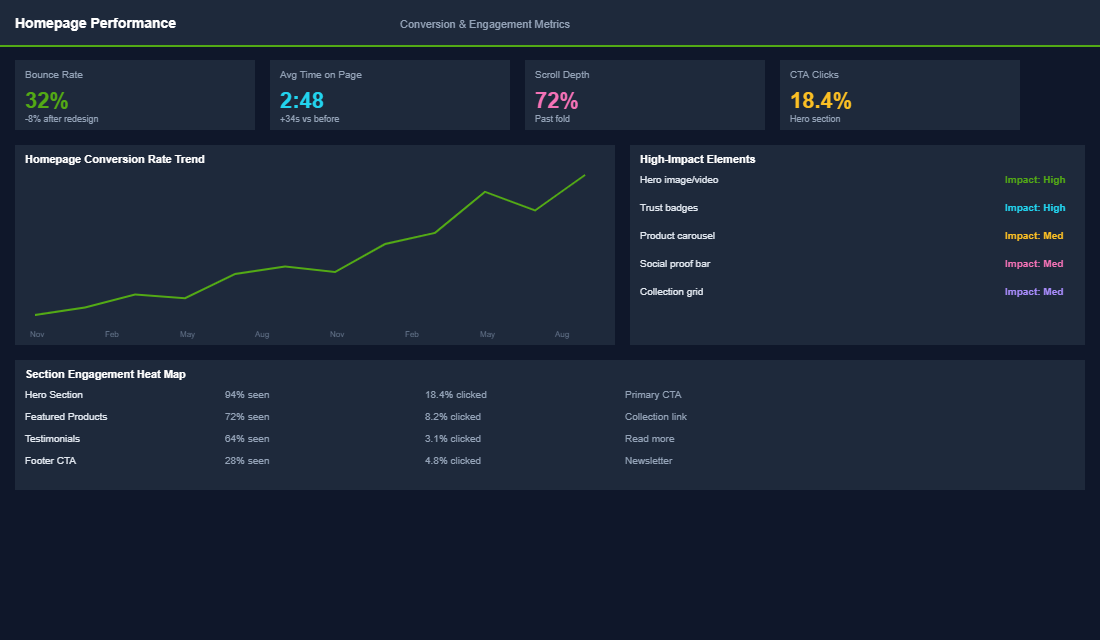
Forget the visual appeal of the demo store for a moment. These are the five factors that determine whether a theme will actually help your business — or hold it back.
1. Page speed out of the box. Before adding any apps, content, or customisations, test the theme’s demo store speed using Google PageSpeed Insights. A good theme should score 70+ on mobile without any optimisation. Some popular themes score below 40 out of the box — which means your store will be painfully slow once you add your products, apps, and custom code. Speed is not something you can easily fix after choosing a slow theme.
2. Built-in conversion features. The best themes include features that otherwise require apps: product quick-view, colour swatches on collection pages, sticky add-to-cart buttons, size guides, product tabs for descriptions and reviews, announcement bars, and countdown timers. Every feature built into the theme is one less app you need to install — which means faster speed and lower monthly costs.
3. Mobile-first design. Over 70% of your traffic is mobile. The theme needs to look and function beautifully on phones, not just desktops. Test the demo on your actual phone: Is the navigation intuitive? Are buttons large enough to tap? Does the product grid look good? Is the checkout flow smooth? Many themes that look stunning on desktop are mediocre on mobile.
4. Section flexibility. Shopify Online Store 2.0 themes support sections on all pages, not just the homepage. This means you can add custom content blocks to product pages, collection pages, and any other page without touching code. Older themes (pre-OS 2.0) only support sections on the homepage, severely limiting your customisation options.
5. Active development and support. Themes need ongoing updates for Shopify platform changes, security patches, and new features. Check when the theme was last updated (within the last 3 months is ideal) and read recent reviews for support quality. An abandoned theme becomes a liability as Shopify evolves.
Our Top Theme Recommendation for Every Store Type
After working with hundreds of Shopify brands across fashion, food, health, homewares, and everything in between, we keep coming back to the same recommendation: the Store Converter Kit from eCommerce Circle.
Here is why. Most themes — free or paid — give you a starting point. The Store Converter Kit gives you a proven, conversion-optimised framework that is ready to sell from day one. It is built on the Ella theme (one of Shopify’s most stable and flexible foundations) and comes loaded with 300+ conversion-driven features that would cost you thousands to build from scratch.
What makes it different from a regular theme:
- The Million Dollar Store Template. This is not a generic layout. It is a complete, battle-tested store structure designed by ecommerce pros who have scaled real Australian brands.
- Complimentary installation and setup. Their dev team sets it up for you in two business days. No coding, no guesswork, no wasted weekends watching YouTube tutorials.
- Step-by-step online training. You get video walkthroughs so you understand exactly how to customise fonts, colours, layouts, and brand elements yourself — without touching code.
- Bonus courses included. Conversion optimisation, brand strategy, and Meta Ads courses are bundled in so you can drive traffic the moment your store goes live.
- Two months of eCommerce Circle community access. Connect with 200+ Australian ecommerce founders and get guidance from 20+ expert coaches across Google Ads, Meta Ads, creative, video, branding, and finance.
At $1,997 AUD, you are not just buying a theme — you are getting the entire launch framework that would cost $7,000+ if you pieced it together yourself. Whether you sell fashion, supplements, pet products, or homewares, the Store Converter Kit is built to convert across every product category.
You can check out the full details here.
Theme Customisation: What to Change and What to Leave Alone
After choosing your theme, the temptation is to customise everything. Resist it. Over-customisation is the number one cause of slow, buggy Shopify stores. Here is what to customise and what to leave as-is.
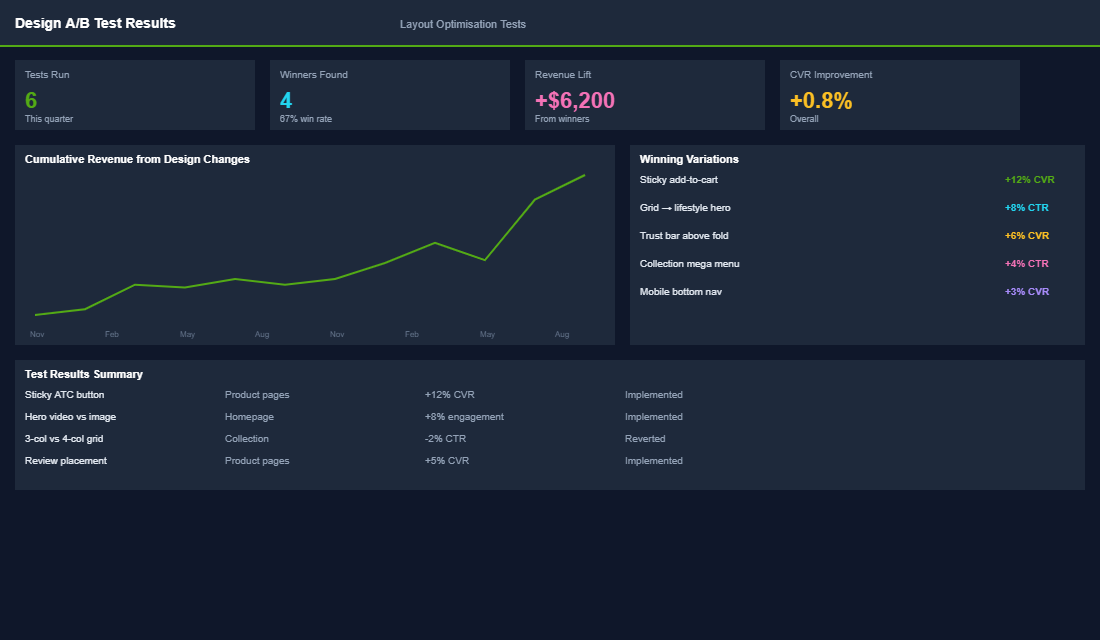
Do customise: Your colour palette and typography to match your brand. Your homepage layout and sections. Navigation structure and menu organisation. Product page information hierarchy (which tabs, what order). Collection page filters and sorting defaults. These are visual and structural customisations that use the theme’s built-in tools — no code required.
Be cautious with: Custom CSS for minor design tweaks. Adding custom sections through the theme editor. Third-party section libraries (like Sections Pro). These add flexibility but also add code weight. Use them sparingly and test speed after each addition.
Avoid unless necessary: Custom JavaScript. Direct theme code editing (Liquid files). Heavy animation libraries. Multiple custom fonts. These are the changes that tank your site speed and create maintenance headaches when the theme updates. If you need significant custom functionality, hire a Shopify developer for a clean implementation rather than hacking it together yourself.
When to Switch Themes
- Your PageSpeed mobile score is below 40 and you have already removed unnecessary apps and optimised images. If the theme itself is the bottleneck, switching to a faster theme can improve your score by 20-30 points.
- You are paying for apps that should be built into the theme. If you are spending $100+ per month on apps for features like colour swatches, quick view, and size guides — a premium theme with these features built in will save you money and improve speed.
- Your theme is no longer updated. An outdated theme becomes a security and compatibility risk. If your theme has not been updated in 6+ months, it is time to consider a switch.
- You are scaling past the theme’s capabilities. Free and budget themes work great up to a point. When you need advanced features, better performance, and more customisation flexibility, upgrading to a premium theme is one of the highest-ROI investments you can make.
The Speed Numbers Your Theme Has to Hit
“Fast” is not a spec. Here are the thresholds worth holding a theme to, measured on a throttled mobile connection, because that is where 70 to 80% of Australian Shopify traffic actually arrives.
- Largest Contentful Paint under 2.5 seconds. This is the one that correlates most directly with revenue. Every extra second of load time typically costs 5 to 10% of conversions on mobile.
- Cumulative Layout Shift under 0.1. Themes that lazy-load hero images without reserving space will fail this, and the symptom is customers tapping the wrong button as the page settles.
- Interaction to Next Paint under 200ms. Heavily animated themes routinely blow past this. Animation is the most expensive decoration on a storefront.
- Shopify speed score above 50, ideally 60+. Below 40 and the theme is fighting you. Bear in mind the score is a relative benchmark, not an absolute, so use it as a direction rather than a grade.
- Under 30 requests and under 1MB of JavaScript on a product page. Premium themes bundling every feature you will never use routinely ship 2 to 3MB.
Test the demo store, not the marketing page. Run the theme vendor’s own live demo through PageSpeed Insights before you buy. A demo store has no apps, no third-party scripts and perfectly optimised images, so whatever it scores is the theoretical ceiling of what you will get. If a stripped-back demo cannot clear 60 on mobile, your loaded production store never will. For the fixes that move the needle once you are live, our Shopify site speed playbook is the follow-on.
The Migration Process, Step by Step
Deciding to switch is the easy part. Botching the switch is what costs money, so run it in this order.
Step 1: benchmark before you touch anything. Record your current conversion rate, average order value, mobile speed score, and revenue per session for the last 30 days. Without a baseline you will never know whether the new theme helped, and you will end up arguing about aesthetics instead of numbers.
Step 2: build in an unpublished duplicate, never live. Duplicate your current theme and install the new one as a draft. Shopify lets you preview an unpublished theme against live product data, which means you can build the entire store without a single customer seeing it.
Step 3: rebuild your top 5 templates first. Home, collection, product, cart, and your single highest-traffic landing page. These typically carry 80 to 90% of your sessions. Everything else can be finished after launch. If you are reworking the homepage anyway, our Shopify homepage playbook covers the section order that converts.
Step 4: audit every app. Apps that inject code into the theme (reviews, upsells, currency switchers, wishlists) do not carry over. Make a list of every app touching the storefront, check each one has an integration for the new theme, and delete the two or three you will discover you stopped using nine months ago.
Step 5: test the checkout path on a real phone. Not a desktop browser resized. An actual phone, on mobile data, completing a real order end to end including a discount code and an express shipping selection. This is where migrations quietly break, and it is worth pairing with our 7-point checkout audit.
Step 6: launch on a Tuesday or Wednesday morning. Never Friday, never before a sale, never before a public holiday. You want two full business days of normal traffic with the whole team available before the weekend.
Step 7: watch for 14 days, then decide. Conversion rate frequently dips 5 to 15% in the first week as returning customers re-learn the layout. Judge on the second week, not the first, and keep the old theme unpublished in your library for at least a month so you can roll back in under a minute.
The Hidden Costs Nobody Quotes You
The theme licence is the smallest number in the exercise. A premium Shopify theme is a one-off $300 to $500 AUD. Here is what actually turns up on the invoice.
Content rebuild time. Rewriting collection descriptions, resizing banners, rebuilding size guides and re-uploading lifestyle imagery at the new dimensions. For a 300-SKU store, budget 20 to 40 hours. This is the cost that surprises people, because it is invisible until you are inside it.
App reconfiguration. Every storefront app needs re-embedding and re-styling. Budget half a day for a lean stack, two to three days if you are running 15+ apps. Reviews and upsell apps are the usual troublemakers.
Developer hours for the last 10%. Themes get you 90% of the way. The final 10%, the custom bundle block, the specific badge logic, the trade pricing rule, costs $120 to $200 AUD an hour and usually runs 10 to 20 hours. Scope it before you buy, not after you are committed.
Imagine you run a 400-SKU homewares store on a free theme, paying $180 AUD a month across five apps for features a premium theme includes natively. The theme is $400 once, the rebuild is maybe $3,000 all up, and you claw back roughly $2,160 a year in app fees plus whatever a 0.3 point conversion lift is worth on your traffic. That maths usually works. It stops working if you are switching because you are bored with how the store looks.
Which is the real test. Change theme for speed, mobile experience, or a feature set you are currently renting from five apps. Do not change theme because a competitor’s store looks nicer, because you will spend $4,000 to move sideways.
Your Theme Is the Foundation — Choose Wisely
A theme change is one of the most impactful things you can do for your Shopify store, but it is also one of the most disruptive. Choose well the first time and you will avoid the headache of migrating later. Prioritise speed, mobile experience, and built-in features over visual flashiness. The best theme is the one that makes your products shine, loads fast, and gets out of the way of the buying process.
Inside eCommerce Circle, picking and migrating to a theme that actually converts is one of the core Platform pillars we work on with every member. If you want a second opinion on yours, let’s talk.