You built your Shopify store with a beautiful theme, installed a handful of apps, and everything worked great. Fast forward six months: you have 22 apps installed, your site takes 6 seconds to load, and half your tools do not talk to each other. Your tech stack has become a Frankenstein monster, and it is costing you sales every single day.
What’s in This Article
The average Shopify store has 6-8 apps installed. High-performing stores often have 15-25. But the number is not the problem. It is the lack of strategy. Most store owners install apps reactively: “I need a reviews app” becomes “I have three different review apps because I kept trying new ones and forgot to uninstall the old ones.” Sound familiar?
A well-designed Shopify tech stack gives you superpowers, email automation, advanced analytics, conversion optimisation, and operations that actually talk to each other. A poorly designed one gives you a slow website, conflicting scripts, and a $500+ per month app bill with questionable ROI. Here is how to build the former and avoid the latter.
The Core Stack: 8 Essential Tools Every Shopify Store Needs
Before adding any nice-to-have tools, make sure your core stack is solid. These eight categories cover the fundamental needs of every Shopify store.
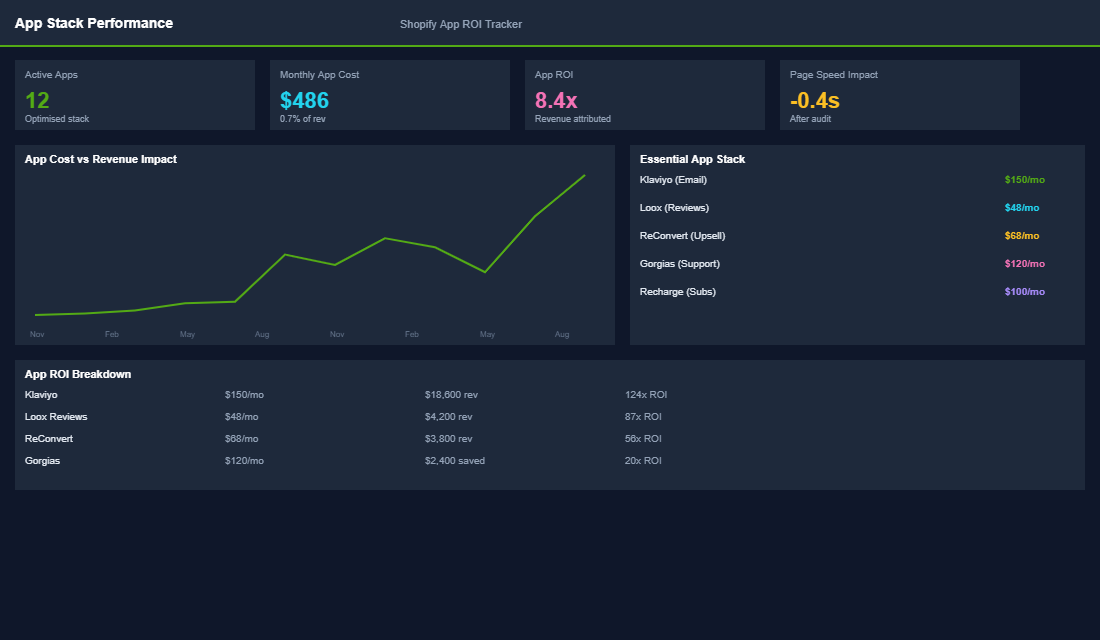
1. Email marketing: Klaviyo. This is non-negotiable for serious Shopify stores. Klaviyo’s native Shopify integration, flow builder, and segmentation capabilities are best-in-class. It handles your welcome series, abandoned cart recovery, post-purchase flows, and campaign sends. Free up to 250 contacts, then $20-$150+ per month depending on list size. Omnisend is a solid budget alternative if Klaviyo pricing does not work for your stage.
2. Reviews: Judge.me or Loox. Social proof is essential for conversion. Judge.me is the best value option, powerful features including photo reviews, review request emails, and SEO rich snippets, all for $15 per month. Loox is the premium choice if visual reviews (photo and video) are critical for your product category, at $9.99-$299 per month.
3. SEO: A dedicated SEO app. Shopify’s native SEO features are limited. An app like SEO Manager or Smart SEO helps with meta tags, structured data, redirects, and sitemap management. These are not glamorous but they prevent the technical SEO issues that silently hurt your rankings. Budget $15-$30 per month.
4. Analytics: Google Analytics 4 + Lifetimely. GA4 is free and covers traffic and behaviour analytics. Pair it with Lifetimely (now part of the Shopify ecosystem) for customer lifetime value tracking, cohort analysis, and profit dashboards that Shopify’s native analytics cannot provide. Lifetimely runs $34-$149 per month and is worth every cent for stores doing $30K+ monthly.
5. Upsells and cross-sells: ReConvert or Zipify OneClickUpsell. Post-purchase and in-cart upsells can increase your AOV by 10-25% with minimal effort. ReConvert handles thank-you page upsells and is more budget-friendly. Zipify OCU handles one-click post-purchase upsells and is the premium option. Either way, this category has some of the highest ROI of any app you will install.
6. Shipping and tracking: AfterShip or Starshipit. Customer experience does not end at checkout. A shipping and tracking app sends branded tracking emails, provides a tracking page on your domain, and reduces “where is my order” support tickets by 50-70%. Starshipit is particularly strong for Australian stores with local carrier integrations.
7. Search and discovery: Shopify Search & Discovery. This is a free, first-party app from Shopify that improves your on-site search results and product recommendations. It lets you customise search results, add synonyms, set up product recommendations, and manage filters on collection pages. No reason not to install it.
8. Back-in-stock notifications: Back in Stock by Swym. If you sell products that go out of stock (and most growing stores do), this captures demand and notifies customers when items are available again. It converts at 5-10%, higher than most marketing channels, and it costs nothing to trigger a purchase from someone who already wanted your product.
The Performance Stack: Tools for Growth Phase
Once your core stack is running smoothly and you are doing $50K+ per month, these additional tools can accelerate growth.
Loyalty and rewards: Smile.io or LoyaltyLion. A loyalty programme incentivises repeat purchases and increases customer lifetime value. Smile.io is easier to set up and more affordable. LoyaltyLion offers more customisation and advanced features for larger stores. Expect to see a 15-20% increase in repeat purchase rate within 6 months of launching a well-designed programme.
Subscription management: Recharge or Loop Subscriptions. If you sell consumable or replenishable products, a subscription app adds predictable recurring revenue. We covered this in depth in our subscriptions article, but the short version: Recharge for established brands, Loop for budget-conscious stores testing the model.
Heat maps and session recording: Hotjar or Lucky Orange. These tools show you exactly how visitors interact with your pages, where they click, how far they scroll, and where they get confused. A single session recording can reveal conversion-killing UX issues that you would never find in analytics data alone. Start with Hotjar’s free plan and upgrade as needed.
The App Audit: Cleaning Up the Mess
If your store already has too many apps, it is time for an audit. Here is the process we use with eCommerce Circle members to clean up bloated tech stacks.
- List every installed app and its monthly cost. Go to Settings > Apps and Sales Channels and create a spreadsheet of every app, its monthly fee, and what it does. Most store owners are shocked to find they are spending $300-$800 per month on apps they barely use.
- Categorise each app as essential, useful, or unnecessary. Essential apps directly impact revenue or customer experience. Useful apps add value but are not critical. Unnecessary apps are duplicates, unused, or provide minimal value relative to their cost.
- Check for duplicate functionality. Many apps overlap. Your email platform might have pop-up forms (replacing a separate pop-up app). Your reviews app might handle UGC (replacing a separate UGC tool). Consolidate where possible to reduce costs and script conflicts.
- Test site speed before and after removal. Use Google PageSpeed Insights to benchmark your site speed before removing unnecessary apps. Remove them one at a time and re-test. Some apps leave residual code even after uninstallation. You may need to clean up your theme code manually or hire a developer for a one-time cleanup.
Integration Is Everything
The best tech stack is not the one with the most tools. It is the one where every tool talks to every other tool. Your email platform should pull data from your reviews app. Your analytics should track conversions from your upsell app. Your loyalty programme should trigger email flows when customers earn or redeem points. This interconnection is what separates a stack from a system.
When evaluating any new app, the first question should be: “Does this integrate with my existing tools?” An app that works in isolation creates a data silo. An app that integrates with your email platform, analytics, and other tools amplifies the value of everything in your stack.
The Real Cost of an App: Beyond the Monthly Subscription
A $29 per month app is almost never a $29 per month decision. The subscription is the smallest line in the total cost, and reading only that line is how stores end up with 22 apps and a six second load time.
- Page weight. Most apps inject JavaScript into every page, not just the page they serve. Ten apps adding 60KB each is 600KB of script on a product page. Each additional second of load time costs roughly 7% of conversions, so a slow stack is a permanent revenue tax.
- Theme residue. Uninstalling rarely removes the code. Leftover snippets and orphaned Liquid blocks stay in your theme files for years, still loading, still doing nothing.
- Staff time. Every tool needs someone to learn it, configure it and check it. Five tools nobody owns is five things quietly broken.
- Switching cost. Historic data in a reviews or loyalty app often cannot be exported cleanly, which makes a cheap decision today expensive to reverse in two years.
Price it honestly before you install. A $29 per month app that adds 0.3 seconds to your load time on a store doing $80,000 a month is not costing $348 a year. If that 0.3 seconds costs even 2% of conversions, it is costing closer to $19,000 a year in lost revenue. Run every install through that lens and the shortlist gets short quickly. Our site speed playbook shows how to measure the actual impact rather than guessing at it.
The Quarterly Stack Audit: A 45-Minute Process
Put a recurring 45 minute block in the calendar for the first week of each quarter. Same process every time, and it consistently pays for itself in the first pass.
- List everything and what it costs. Shopify admin, Apps, then export the billing summary. Write the monthly cost next to each one. Seeing the annual total in one number is usually enough to trigger three cancellations on the spot.
- Name the job and the owner. One sentence per app describing what it does for the business and who checks it. If you cannot write the sentence, or nobody owns it, that is your answer.
- Check last used. Open each app and look for genuine recent activity. Anything untouched in 90 days goes on the removal list.
- Find the overlaps. Two apps doing upsells, three collecting email, a reviews tool plus a UGC tool doing the same job. Consolidation is where the real savings are.
- Measure before and after. Run PageSpeed Insights on a product page before you start and again a week after removals, so the win is visible and the habit sticks.
When you remove an app, do it properly. Duplicate the live theme as a backup first, uninstall from the Shopify admin, then search the theme files for the app’s handle and delete the leftover snippets and script tags. Removing eight unused apps from a typical store cuts $200 to $400 a month and often takes 1 to 2 seconds off load time, which shows up in conversion within a fortnight.
Build, Buy or Delete: How to Decide
Every gap in your stack has three answers, and most stores default to buy without considering the other two.
- Delete the requirement. The cheapest option and the least considered. Does this problem actually cost you money, or does it just feel untidy? Plenty of apps solve problems that were never costing anything.
- Use what you already have. Shopify natively handles discount codes, basic bundles, customer accounts, markets and metafields. A surprising number of installed apps duplicate a feature that shipped in the platform sometime in the last two years.
- Buy it. Correct when the job is genuinely specialised and constantly changing, like email automation, reviews or subscriptions. Do not build these.
- Build it. Only when the requirement is specific to how your business trades and no app fits without compromise. A one-off developer job at $800 to $2,500 with no recurring fee and no third-party script often beats a $79 per month app you will run for four years.
Apply one more filter before anything gets installed: does it talk to the rest of the stack? A tool that cannot pass data to your email platform or your analytics creates manual work forever, and manual work is where accuracy goes to die. The aim is a small set of connected tools, each with an owner and a job, not a drawer full of subscriptions. If you want a structured version of this process, work through our app stack audit playbook, and check that whatever you keep is not slowing the highest-value page you own by reviewing our checkout optimisation playbook.
Build a Stack, Not a Junk Drawer
Your Shopify tech stack should be intentional, integrated, and regularly audited. Start with the eight core tools, add performance tools as you scale, and audit quarterly to remove anything that is not pulling its weight. The goal is a lean, powerful set of tools that work together to drive growth, not a bloated collection of apps that slow your site down and drain your budget.
Inside the eCommerce Circle, tech stack design spans our Platform and Practice pillars. We help members choose the right tools for their specific stage and product type, set up integrations between apps, and run quarterly audits to keep the stack lean. If your app bill is climbing and you are not sure which tools are actually earning their keep, our coaching can help you build a stack that drives results, not complexity.
Inside eCommerce Circle, tech stack design is one of the core pillars we work on with every member. If you want a second opinion on yours, let’s talk.