Most Shopify founders spend hours obsessing over the homepage hero, the product page hero shot, and the cart drawer. Then they ignore the single most valuable real estate on the entire site: the search bar.
What’s in This Article
Here is the uncomfortable truth from years of working with hundreds of Aussie Shopify founders. Visitors who use site search are 2 to 3 times more likely to buy than visitors who don’t. They spend longer on the site. They view more products. Their average order value is roughly 50% higher. And on most stores I audit, that same search bar returns zero results for one in three queries, suggests irrelevant products, and drops users into a results page that looks like a 2013 spreadsheet.
That gap, between what site search could be and what it actually is on your store right now, is one of the biggest hidden levers in ecommerce. This article is the practical playbook for closing it.
Why Site Search Is Your Most Underrated Conversion Lever
Let’s anchor in the data first. Across multiple ecommerce studies (Algolia, Klevu, Forrester), site search users convert at between 2x and 3x the rate of non-searchers. On a store doing 2.5% sitewide conversion, search users often convert at 5 to 7%. That is your highest-intent traffic, and you already paid to get them there.
A few more numbers worth pinning to the wall:
- 30 to 40% of search queries in mid-sized retail stores return zero results, according to Baymard Institute usability research.
- 15% of all search queries contain misspellings, plurals, or synonyms the default search index doesn’t catch.
- Predictive search (typeahead) lifts conversion by 24% on average versus a plain search box (Klevu benchmark).
- Search users have 40 to 50% higher AOV because they arrive with a specific intent and add complementary products faster.
- Mobile users now drive 70%+ of search queries on Shopify stores, but most search UX is still designed desktop-first.
The implication is simple. If you are running ads, posting on social, paying creators for UGC, all of that traffic eventually lands somewhere on your site. A meaningful slice of it tries to use search. When search fails them, you’ve paid full price to acquire a visitor and then handed them a broken tool.
The Search Behaviour Gap: What Most Aussie Stores Get Wrong
Walk through your own store like a customer for a moment. Type the name of your hero product into search. Now misspell it. Now search for a product attribute (a colour, a size, a use case). Now search for the exact thing a customer would call your product if they didn’t know your category names.
If you are like most Shopify stores I audit, here is what you find:
- Default Shopify search ranks by relevance loosely. That means an out-of-stock product can appear above your best seller.
- Misspellings return zero results. “moisturizer” finds nothing if your products are tagged “moisturiser”.
- The results page is a flat product grid with no filters, no merchandising, no badges, no urgency, no proof.
- There is no analytics view of what people are searching for, so the founder has no idea where the gaps are.
Search isn’t broken. It’s just unloved. Treat it the way you would treat a high-traffic landing page. That is the shift.
Step 1: Audit What Your Customers Are Actually Searching For
You cannot fix what you cannot see. The first move is to turn on site search reporting so you have a continuous feedback loop.
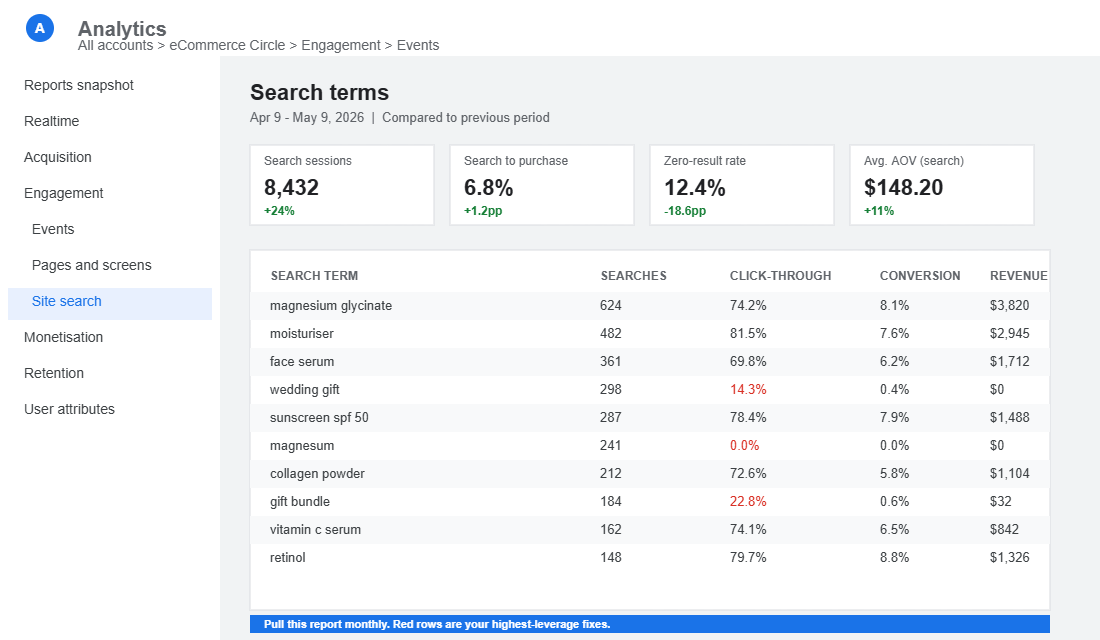
In Google Analytics 4, site search is on by default for Shopify. Under Reports > Engagement > Events, look for view_search_results. The query parameter search_term shows you what people typed. If you have not configured this, set it up before doing anything else. It costs nothing.
Layer on a search app that exposes its own analytics dashboard. Searchanise, Boost AI Search & Discovery, Klevu, and Algolia all surface the queries customers run, the queries that return zero results, and the click-through rate per query. That second metric matters more than total searches. A query with high volume and low CTR is a merchandising failure, not a traffic problem.
What you are looking for in this audit:
- The top 50 queries by volume
- Every query that returned zero results in the last 30 days
- Every query with a high search count and low click-through rate
- Queries that contain product attributes (colour, size, material, use case) you don’t currently filter or merchandise on
- Queries in plain language that don’t match your internal product taxonomy
That last category is gold. If 200 customers a month search for “wedding gift” but your store organises around “stemless wine glasses” and “decorative platters”, you have a positioning problem you can fix in a single afternoon.
Step 2: Fix the No-Result and Misspelt Search Trap
If 30% of your search queries return zero results, you have just rejected 30% of your highest-intent visitors. Most of them will leave the site rather than try again. That is the single highest-ROI fix in the whole playbook.
Three concrete moves to make this week:
Add synonyms. Every search app worth using lets you map synonyms in the admin. For an Aussie skincare brand, that means mapping “moisturizer”, “moisturiser”, “lotion”, “face cream”, and “hydrator” to the same set of products. For a workwear brand, “trackies” maps to “track pants”, “stubbies” to “shorts”, “wet-weather” to “rain jacket”. Build a list of 30 to 50 in your first pass. Add to it monthly based on the zero-result report.
Enable typo tolerance and stemming. Most modern search apps offer this in a single toggle. Stemming makes “shoe” find “shoes”, “running” find “runner”. Typo tolerance makes “moisuriser” find “moisturiser”. Do not skip this. It is the difference between a search bar that works and one that punishes the customer for typing on a phone.
Design a useful no-result page. When a query genuinely has no match, never show a blank screen. Show your top 6 best sellers, a category nav, a search refinement prompt (“Try searching by colour or category”), and a contact link. Treat a no-result page as a recovery moment, not a dead end.
Step 3: Add Predictive Search That Sells, Not Just Suggests
Predictive search (also called typeahead, instant search, or autocomplete) is the dropdown that appears as the customer types. Done well, it lifts conversion by 20 to 30% because it removes a click and reduces decision fatigue.
The mistake most Shopify stores make is enabling typeahead and stopping there. The dropdown shows a list of product names in plain text and that is it. That is not predictive search. That is a faster autocomplete.
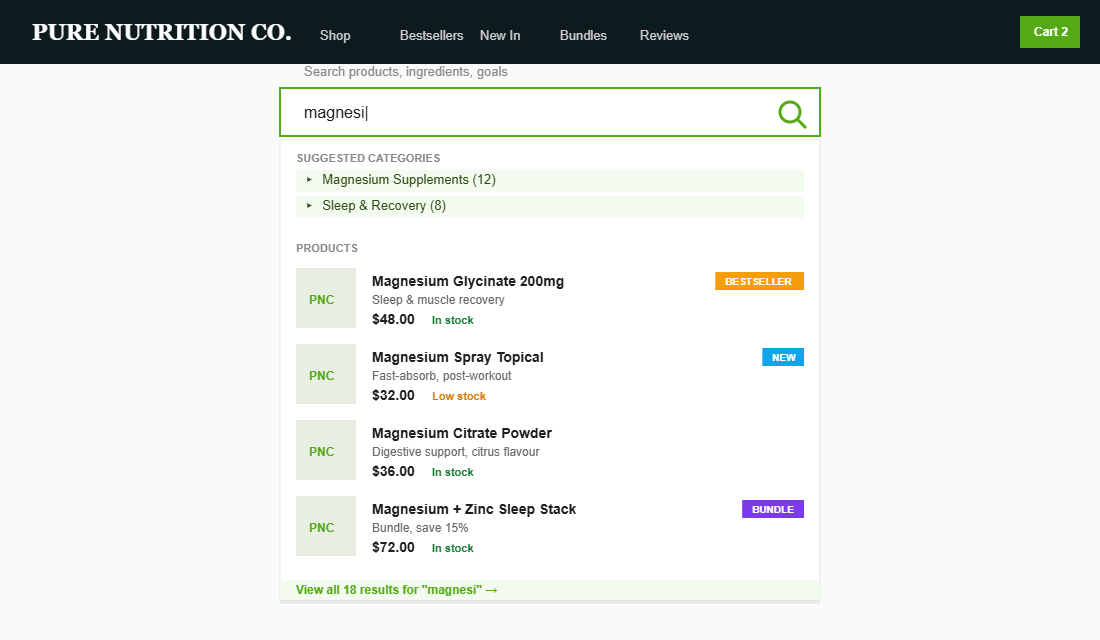
What a high-converting predictive search dropdown contains:
- Product images beside each suggestion (visual confirmation drives click-through)
- Price shown on the line item (intent qualifier)
- Stock status (“Low stock” or “In stock”) to add urgency
- Suggested categories as the first 1 to 2 lines (collection-level shortcuts)
- Popular searches when the field is empty (priming the customer)
- Branded badges (“Best Seller”, “New”) to do soft merchandising
The compound effect: a customer types two letters, sees a curated set of three product cards plus a category shortcut, clicks once, and is at a product page in under three seconds. On mobile, where every tap costs you a percentage of conversion, that is enormous.
Step 4: Design a Search Results Page That Converts, Not Just Lists
When the customer does click through to a full search results page, that page is your second-most-important landing page after the homepage. Most stores treat it like an afterthought.
A results page that converts looks more like a high-intent collection page than a database query. It includes:
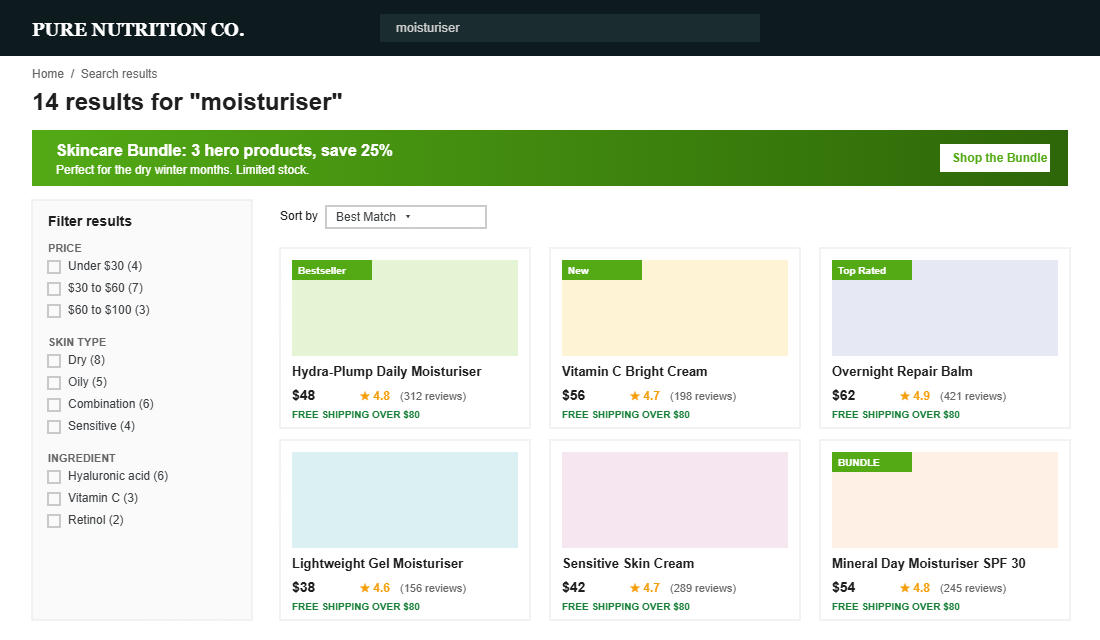
Filters that match how customers actually shop. Price range, colour, size, brand, material, use case. Hide filters that no one uses. Show filter counts so customers know what they’re choosing between.
Sort options that respect intent. Default to “Best Match” or “Best Selling”, not “Featured” (which often sorts by manual order and ignores demand). Add “Price low to high”, “Price high to low”, and “New arrivals”. Skip “Alphabetical”.
Merchandising banners at the top. If a customer searches “gift”, show a hero banner for your gift guide. If they search “skincare”, show your bestselling skincare bundle. The search results page is allowed to sell, not just list.
Visible trust signals. Star ratings on the product cards, “Free shipping over $80” reminders, return policy badges. The customer is in evaluation mode. Make the answer easy.
A clear no-result rescue. Same principle as Step 2. If filters reduce results to zero, don’t show an empty grid. Suggest reset, show top sellers, prompt a refinement.
For more on what high-converting page architecture looks like across the rest of the store, this pairs neatly with the 9-section Shopify homepage layout and the cart drawer framework that lifts AOV 15-25%.
Step 5: Use Search Data to Inform Merchandising and Buying Decisions
The final step is where most stores never get to. Search data is not just a UX problem. It is one of the best free customer research datasets you have. Read it monthly.
Three concrete uses:
Inform new product development. If 400 people a month search for a colour, size, or product type you don’t carry, you have validated demand before spending a cent on testing. One Aussie supplement brand we work with launched a magnesium glycinate variant after seeing 600 searches a month for “magnesium glycinate” with zero results. It became their second best seller within 90 days.
Refine product titles and descriptions. If customers consistently search using language different from how you describe the product, update your titles, tags, and meta descriptions to match. This boosts both internal search and Google ranking.
Spot category-level demand shifts. Rising search volume for an emerging product type often precedes a sales spike by 4 to 8 weeks. If “magnesium spray” searches doubled this month, plan inventory and content accordingly.
This loops back to one of the core ideas in the More Orders Operating System: diagnosis before prescription. Search data is diagnosis. Most founders skip it and prescribe based on what they think customers want. The customers are telling you in plain text. Read the report.
The Compound Effect: When Search Becomes a Growth Engine
Here is what happens when these five layers stack together.
Your audit reveals that 30% of search traffic was hitting zero results. You add synonyms, typo tolerance, and a useful no-result page. That 30% recovers and converts at 5 to 6%, which means a meaningful lift in sitewide conversion almost overnight, with no extra ad spend.
You add predictive search with images, prices, and badges. Mobile customers now find a product in two taps instead of five. Search-driven sessions add another 10 to 15% to conversion.
You redesign the search results page with filters, sort, and merchandising. Search-driven AOV climbs because customers now add complementary products visible in the results grid.
You start reading the search report monthly. You launch one new product a quarter based on validated search demand. You rewrite three product titles to match customer language. Your overall organic search rankings improve as a side effect because Google is reading the same signals.
That compounding is the point. Site search is not a single optimisation. It is a system that pays back every month, on every channel, on every device. If you want a benchmark for what your search-driven conversion rate should look like, this pairs well with the 2026 Shopify conversion rate benchmarks.
Site Search Benchmarks and the Stack That Hits Them
Before you start the 30-day plan, set your baseline. These are the numbers we see across Aussie Shopify stores when site search is doing its job, and the tools that get you there without blowing the budget.
- Search usage: 5-15% of visitors. Under 5% usually means the search bar is hidden behind an icon on mobile. Make it a visible, full-width field and usage typically doubles.
- Searcher share of revenue: 15-30%. Searchers are a minority of traffic but should punch far above their weight in dollars. If they do not, your results page is the problem, not your traffic.
- Zero-result rate: under 3%. Every zero-result search is a customer telling you exactly what they wanted to buy and being shown a dead end. Review the report weekly and fix the top ten queries with synonyms or redirects.
- Search-to-purchase conversion: 2-3x your site average. A store converting at 2% overall should see 4-6% from searchers. Falling short usually traces back to results pages that list products but never merchandise them, the same discipline that applies to collection filtering.
The stack, from free to serious: start with Shopify’s own Search & Discovery app, which is free and covers synonyms, boosts and filters. Boost AI Search & Filter (from about US$25 a month) adds proper typo tolerance and analytics for growing catalogues. Klevu and Algolia sit at the top end for stores with thousands of SKUs and start to make sense past $200K a month in revenue. Whichever tier you are on, add Microsoft Clarity or Hotjar (both have free plans) and watch ten recordings of real search sessions. Nothing in your analytics will make the problem as obvious as watching a customer type “hoody”, get nothing, and leave.
Your 30-Day Site Search Action Plan
Print this out. Tape it to the wall.
- Week 1: Confirm GA4 site search reporting is live. Pull the last 30 days of search queries. List every zero-result query and every high-volume, low-CTR query.
- Week 2: Install or upgrade your search app (Searchanise, Boost AI, Klevu, or Algolia). Add 30 to 50 synonyms. Turn on typo tolerance and stemming. Build a no-result page.
- Week 3: Configure predictive search with product images, prices, stock status, and popular searches. Test on mobile first. Polish on desktop second.
- Week 4: Redesign the search results page. Add filters, sort options, merchandising banners. Set the calendar reminder to read the search report on the first Monday of every month from now on.
If you do nothing else from this article, do Week 1. Just pulling the search query report changes how you see your store.
Closing Thought
The pattern with Shopify growth at the $40k to $500k a month range is almost always the same. Founders chase the new channel, the new ad platform, the new app. The hidden lever sits inside the store, doing 2 to 3x the conversion rate of everything else, ignored because nobody owns it.
Site search is one of those levers. Spend a week on it. The payback shows up in the dashboard within a fortnight.
Inside eCommerce Circle, site search and the broader Platform foundation is one of the core areas we work on with every member. If you want a second opinion on yours, let’s talk.