There is a moment every growing Shopify founder knows. The purchase order is sitting in your inbox. The supplier wants a 40% deposit, the landed cost is $38,000, and your cash is already tied up in the stock you have not sold yet. You believe in the product. The bank balance does not care.
What’s in This Article
Most founders solve this with debt, a credit card, or by ordering half the stock they need and stocking out in week three. There is a fourth option that most Aussie stores never set up properly: sell the stock before it lands. UK menswear brand SPOKE used pre-orders to sell product 8 weeks before it reached the warehouse and hit sell-through 400% higher than its own forecast. Denim brand AYR put 3,000 people on a waitlist for its first T-shirt and knew it needed a reorder before launch day. The capital risk moved from the brand to the order book.
A pre-order is not a buy button with a longer wait. Done properly it is a financing tool, a demand test, and a customer communication exercise rolled into one. Done badly it is a refund queue with your brand name on it. This playbook covers the five steps that separate the two.
The Three Jobs a Pre-Order Does (Pick Your Primary One First)
Before touching settings, decide which job this campaign is doing, because the job changes the setup:
- Funding inventory. You know the product sells and need customer cash to cover the purchase order. Charge in full at checkout, keep the window short, and treat the ETA as a promise.
- Validating demand. You are not sure how many units to order. Take soft commitments first (a waitlist or charge-on-dispatch pre-order), then size the purchase order from real numbers. This is exactly how outerwear brand The Arrivals plans its second inventory order: factory volumes are set off waitlist demand, not gut feel.
- Capturing demand you would otherwise lose. A bestseller is out of stock and the restock is six weeks out. A pre-order keeps the revenue you are currently sending to competitors. It pairs with, but is different from, the back-in-stock notification system we covered in the back-in-stock playbook: notifications recover interest after stock returns, pre-orders bank the sale now.
One campaign, one primary job. A pre-order that is trying to fund the PO and test demand at the same time usually does neither well, because the payment model that suits one works against the other.
Step 1: Pick the Payment Model (This Is the Whole Strategy)
There are three ways to take a pre-order payment, and the choice does more work than any other decision in the campaign.
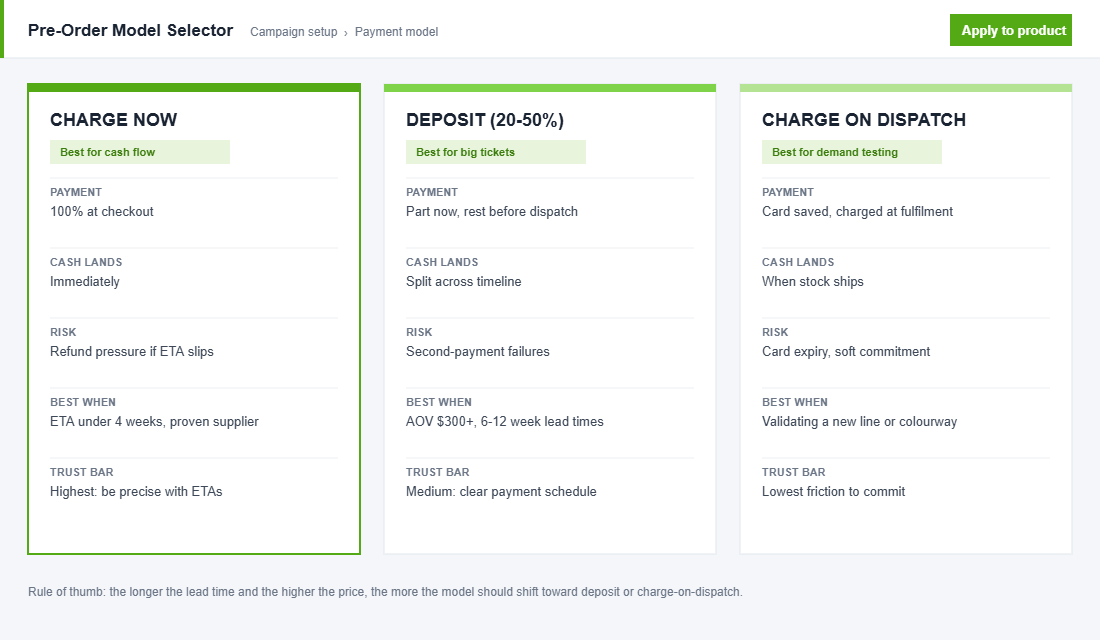
- Charge now. Full payment at checkout. Best cash flow, highest trust obligation. Use it when the ETA is under four weeks and your supplier has never missed a date on you. This is the model for the funding job.
- Deposit (20 to 50%). Part payment now, balance before dispatch. The right call for big-ticket items: furniture, equipment, anything over roughly $300 AOV with a 6 to 12 week lead time. The deposit filters out tyre kickers while keeping commitment friction low.
- Charge on dispatch. The card is vaulted at checkout and charged when stock ships. Lowest friction, softest commitment, and the standard model for the validation job. Expect some attrition from expired cards on long lead times, and message accordingly.
Whichever model you choose, publish it in plain sight on the product page. “Charged today, ships week of 13 July” is one sentence. Most pre-order complaints trace back to a customer who did not realise when they would be charged or when the product would arrive.
Step 2: Run the Cash Flow Math Before You Promise Anything
The point of a funding pre-order is to make the purchase order pay for itself. Here is the worked example for a typical apparel restock, in AUD:
- Purchase order: 1,000 units at a landed cost of $38 each, so $38,000. Supplier wants 40% on order ($15,200) and 60% before shipment ($22,800).
- Retail price $129. Pre-selling just 30% of the run (300 units, charge now) brings in $38,700, which covers the entire PO before the stock leaves the factory.
- The same restock without pre-orders leaves you $38,000 out of pocket for 8 to 10 weeks. That gap is exactly the trapped-cash problem we worked through in the cash conversion cycle playbook, and a pre-order is the single fastest lever in it.
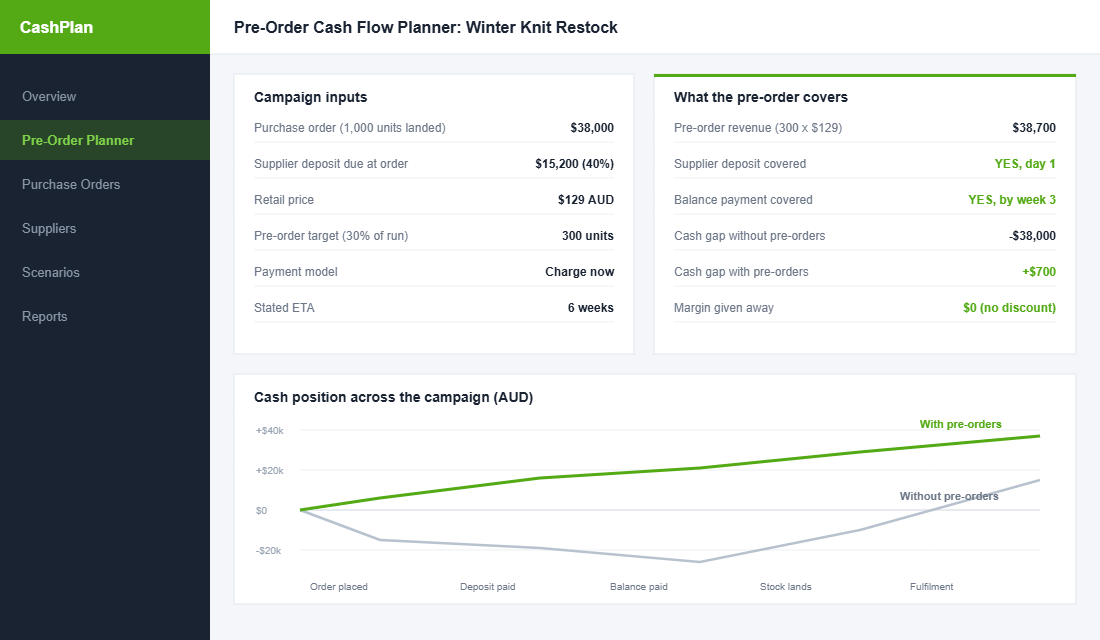
Three guardrails keep this math honest. Cap the pre-order allocation at 30 to 50% of the incoming run, so launch day still has stock for full-price walk-up demand. Never spend pre-order cash on anything other than that product’s supply chain until the stock has shipped, because that money is still refundable. And price at full retail: a pre-order is early access to certainty, not a discount channel. If you feel you must sweeten it, add a small gift or free express upgrade rather than cutting price.
Step 3: Set It Up on Shopify Without Breaking Your Store
Shopify supports pre-orders through selling plans, but you need an app to manage them properly. PreProduct is the strongest fit for stores in the $40k to $500k a month range because it handles all three payment models, including deposits and charge-on-dispatch. Setup looks like this:
- Step 1: Install PreProduct from the Shopify App Store and connect it to your theme. It works with Online Store 2.0 blocks, so no code edits on a current theme.
- Step 2: Create a pre-order listing for the incoming variant and choose the payment model from Step 1 of this playbook.
- Step 3: Set the allocation cap (your 30 to 50% number) so the app stops taking pre-orders when the tranche sells out, rather than overselling the shipment.
- Step 4: Write the button and badge copy: “Pre-order, ships week of 13 July” on the button beats a bare “Pre-order” every time.
- Step 5: Tag pre-order purchases so they flow into a Klaviyo segment for the update sequence in Step 4 below.
Purple Dot is the premium alternative if you want a full waitlist-style checkout, and Globo or Notify Me cover basic charge-now pre-orders on a tight budget. Two Shopify settings catch founders out regardless of app: keep inventory tracking on with overselling disabled for the live tranche, and check that your shipping automation (and any 3PL feed) does not try to fulfil pre-order line items the day they are placed.
Step 4: Communicate Like the ETA Is a Product Feature
From the customer’s side, a pre-order is an act of trust: money now, product later. The brands that do this well treat the waiting period as part of the product experience, not dead air.
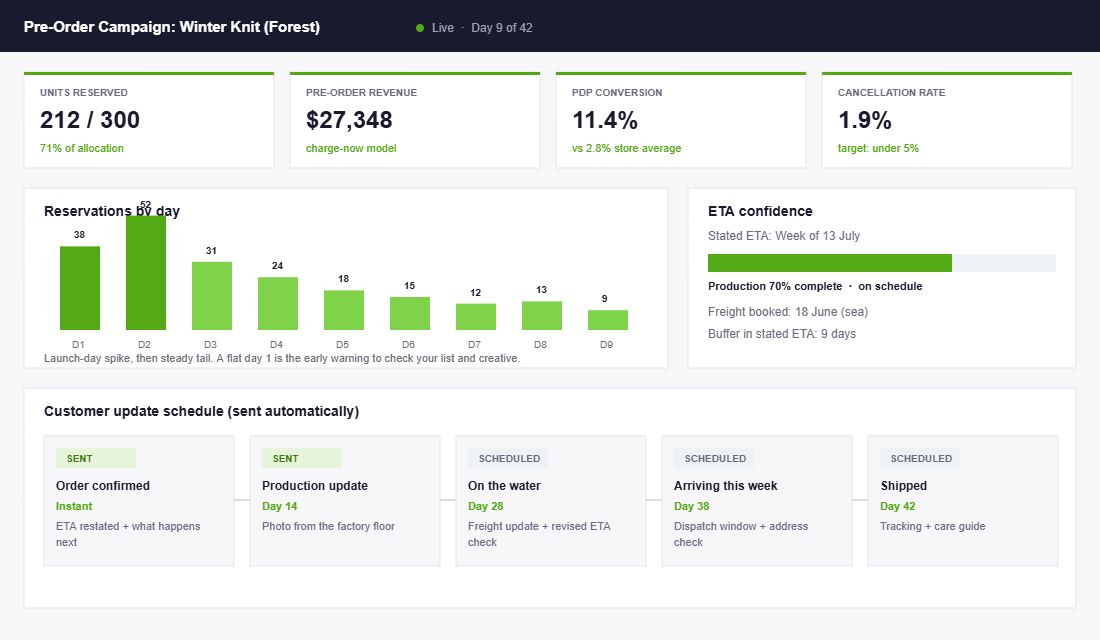
The update sequence that keeps cancellations under 5%:
- Order confirmation (instant): restate the ETA, when they were or will be charged, and what happens next. This one email prevents half your support tickets.
- Production update (around day 14): a photo from the factory or warehouse. Concrete beats corporate: “your knit is off the loom” outperforms “your order is progressing”.
- Freight update (around day 28): on the water or in the air, plus an honest ETA check against the original promise.
- Arriving this week: dispatch window and a prompt to confirm the delivery address (people move during long waits).
- Shipped: tracking plus a care or styling guide, which doubles as the start of your post-purchase flow.
Build the ETA with a buffer before you publish it. If the supplier says four weeks, say six. Beating a stated date by a week creates a delighted customer; missing one by three days creates a chargeback risk.
Step 5: Stay on the Right Side of Australian Consumer Law
Pre-orders sit squarely inside the Australian Consumer Law, and the ACCC has been increasingly vocal about delivery-time claims. The practical obligations for an Aussie store:
- Only state a supply timeframe you have reasonable grounds to believe you can meet. “Ships July” when the factory has not confirmed production is the kind of claim that becomes misleading conduct if it falls over.
- If you cannot supply within the stated time (or a reasonable time where none was stated), the customer is generally entitled to a remedy, and for a major failure that includes a refund. Build your refund process before launch, not during the crisis.
- Do not keep taking payments for stock you know is delayed or at risk. Pause the listing the moment the ETA becomes unreliable, update existing customers, and offer the choice to wait or get their money back. Brands that volunteer the refund option early almost always keep most of the orders.
- Keep your paper trail. Supplier confirmations, freight bookings, and the dates you communicated. If a dispute ever lands, the timeline is your defence.
None of this is a reason to avoid pre-orders. It is a reason to run them like an operator: honest ETAs, buffers, and proactive comms are both the legal posture and the brand-building posture. They are the same thing.
What the Numbers Should Look Like
Benchmarks to judge a campaign against, drawn from published pre-order and waitlist data:
- Waitlist to order conversion: 10 to 15%. Across more than 100 tracked product drops, a 5,000-person waitlist typically produces 500 to 750 orders. Size your waitlist target backwards from the units you need to pre-sell.
- Pre-order page conversion: 10 to 20% for warmed-up audiences hitting a dedicated pre-order or early-access page, against the 2 to 4% a standard product page converts cold traffic at. The gap is the entire argument for building anticipation before you open orders, which is the runway system from our product launch playbook.
- Cancellation and refund rate: under 5%. Above that, your ETA was optimistic or your update sequence is not running.
- Allocation sell-through: a healthy campaign reserves 60%+ of its tranche in the first two weeks. A flat first 48 hours means the audience was not warm; fix the list, not the product.
- Support contact rate: if more than 1 in 10 pre-order customers emails asking where their order is, your comms cadence has gaps.
The Compound Effect: An Order Book Instead of a Gamble
Run pre-orders as a system rather than a one-off rescue and the benefits stack. Demand data from each campaign sizes the next purchase order, so you stop guessing volumes. Customer cash funds inventory, so growth stops being rationed by your overdraft. Stockout windows stop bleeding revenue because the buy button never really turns off. And the update sequence quietly trains your customers that waiting for your product is safe, which makes every future drop easier. Aussie luggage brand July has built colourway launches on exactly this engine, with waitlists running into the thousands before stock arrives.
The contrast is stark on the P&L. The founder without pre-orders finances inventory with debt or dilutes the range to fit the bank balance. The founder with a pre-order system books revenue weeks before the stock lands, at full margin, with cancellation risk under 5%. Same product, same supplier, different operating system.
Which Products Suit Pre-Orders (and Which Will Burn You)
Pre-orders are not for every SKU. The strong candidates share a pattern:
- Proven sellers coming back into stock. The demand is known, the ETA risk is low, and the customer already wanted it. This is the safest pre-order you will ever run.
- New colourways or variants of a hero product. The product is validated; only the variant is new. This is where waitlist data is most predictive.
- Seasonal stock with a hard deadline. Winter knits in autumn, swimwear before summer. The season creates natural urgency without fake countdown timers.
- Big-ticket made-to-order items. Furniture and equipment customers already expect a lead time, which is why the deposit model exists.
The poor candidates: unvalidated new categories with no audience (that is a launch problem, not a pre-order problem), products with shaky supplier timelines, and anything bought on impulse for immediate need. Nobody pre-orders a phone charger.
Four Pre-Order Mistakes That Create Refund Queues
- Promising the supplier’s date as your date. Factory ETAs slip, freight slips, customs adds days. Every layer needs buffer, and the customer should only ever see the buffered number.
- Spending pre-order cash like it is profit. Until the stock ships, that money is a liability you may need to hand back. Founders who spend it on ads in week two are the ones writing apology emails in week eight.
- Hiding the pre-order status in the fine print. If a reasonable customer could click buy without realising the item ships in six weeks, your support inbox and your payment provider will both let you know about it.
- Going silent when things slip. A delay handled with a same-week email, a fresh ETA, and a no-questions refund option keeps most orders. A delay discovered by the customer via a support ticket loses the order and the customer.
The Post-Delivery Debrief: Turn One Pre-Order Into a Repeatable Channel
Most founders close the loop the day the last parcel ships. The smart ones book a 30-minute debrief two weeks after final delivery, because that is when the data is complete and the lessons are still fresh.
Five numbers go on the debrief sheet. Sell-through rate against your allocation cap (you want 85 to 100%; if you sold out in a day, your cap was too low and you left margin on the table). Refund rate during the wait window (under 5% is healthy, over 10% means your ETA or your comms failed). Support tickets per 100 pre-orders (a well-run campaign sits under 8; a badly communicated one hits 25 or more). Actual landed cost versus the number you used in your cash flow model. And review rate after delivery, because pre-order customers who waited and got what was promised leave reviews at roughly twice the rate of regular buyers if you ask within 7 days of delivery.
Then ask the only question that matters: would these customers pre-order again? Send the cohort a two-question Klaviyo survey 30 days after delivery. If more than 60% say yes, you have not just sold a production run. You have built an order book audience you can tap every season, and your next pre-order campaign starts with a warm list instead of cold ads.
Feed every one of those numbers into the next buy. Your allocation cap, your ETA buffer, your deposit percentage and your ad budget all get sharper each cycle. By the third campaign, founders typically cut their demand-forecasting error in half, and that accuracy is worth real money when a single container order can tie up $40K to $120K AUD of working capital.
Your Pre-Order Launch Checklist
Work through this in order before your next purchase order goes in:
- 1. Pick the campaign’s primary job: fund, validate, or capture. One only.
- 2. Choose the payment model to match: charge now (short ETA, proven product), deposit (big ticket, long lead), charge on dispatch (validation).
- 3. Run the cash math: what share of the PO does 30% of the run cover at full retail?
- 4. Set the allocation cap at 30 to 50% of incoming stock and configure it in the app.
- 5. Buffer the ETA: supplier estimate plus at least two weeks, stated as a week (“ships week of 13 July”), not a date.
- 6. Write the PDP disclosure: when they pay, when it ships, how to cancel. One visible sentence near the button.
- 7. Build the 5-email update sequence in Klaviyo before the first order, not after.
- 8. Pressure-test fulfilment: inventory tracking on, overselling off, 3PL feed excludes pre-order items.
- 9. Pre-write the delay email. If you never send it, good. If you need it, you will send it within the hour instead of hiding for a week.
- 10. Debrief: conversion, cancellations, support rate, ETA accuracy. Feed the numbers into the next buy.
Inside eCommerce Circle, inventory and cash flow decisions like this are core Product and Profit pillar work with every member. If you want a second opinion on your pre-order model, your allocation cap, or the ETA you are about to promise, let’s talk.