Your product page has done everything right. The photography is sharp, the price feels fair, and the shopper has a finger hovering over Add to Cart. Then they open the size selector and stop dead.
What’s in This Article
“Is the medium a real medium, or one of those mediums that fits like a kids size 12?” If your store cannot answer that question in about ten seconds, the shopper does one of three things. They guess, and maybe return it. They buy two sizes, and definitely return one. Or they close the tab and buy from a brand that made sizing feel safe.
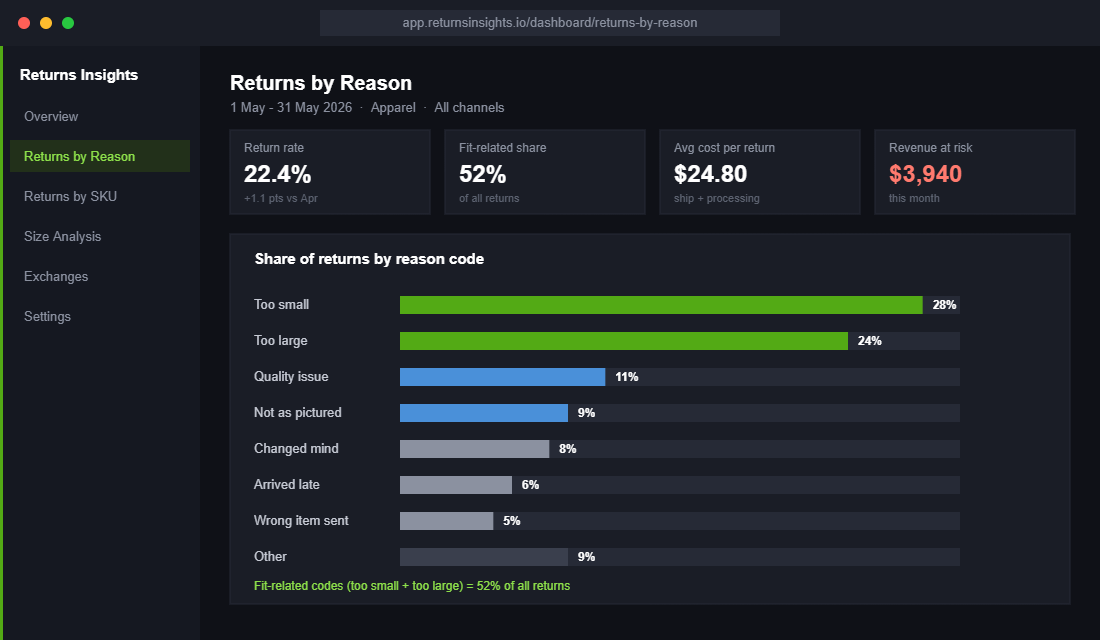
All three outcomes cost you. Online apparel return rates hit an all-time high of 24.4% in 2025 according to the National Retail Federation, and depending on whose research you read, sizing and fit drives anywhere from 53% (Prime AI) to 70% (McKinsey) of those returns. On top of that, around 48% of online shoppers now bracket their orders, buying multiple sizes with every intention of sending back the ones that miss.
Here is the part most founders miss: the size guide is not a compliance page. It is a conversion asset and a returns weapon rolled into one, and it is probably the cheapest fix sitting in your store right now. This playbook walks through the 5-part system we work through with eCommerce Circle members to build sizing confidence that pays off in both directions of the ledger.
The Real Cost of Sizing Doubt (Run Your Own Numbers)
Before you file this under “later”, run the maths on your own store.
Say you are an apparel brand doing 1,000 orders a month. At the 2025 average online apparel return rate of 24.4%, roughly 244 of those orders come back. If fit drives even half of them, that is about 120 returns a month that better sizing information could have prevented.
Now price each one. Return shipping in Australia typically runs $10 to $15, then add processing labour, repackaging, and the markdown if the garment misses its season. Most Aussie DTC brands land somewhere between $20 and $30 in true cost per returned parcel. Call it $25. That is around $3,000 a month, or $36,000 a year, spent posting clothes back and forth because a shopper could not tell whether your medium was a real medium.
The misses are systematic, not random. In menswear, 23% of returns happen because the item was too small. In womenswear, 22% come back because the garment was too large. That is not bad luck. That is a size chart skewed in a known direction, which means it is fixable.
The Australian context makes this sharper. Fashion is our third biggest online category at $9.6 billion a year according to the Australia Post eCommerce Report, and 65% of shoppers rate friction-free returns as part of a great online experience. You cannot quietly make returning harder without burning trust. The only winning move is preventing the avoidable returns before they are ordered.
Part 1: Measure Your Garments, Not Just Bodies
The root cause of most sizing chaos is that founders publish whatever chart the supplier handed over. That chart usually describes bodies (“fits chest 96 to 102cm”) with no evidence the actual garment matches it. After a fabric change or a new factory run, it often does not.
The fix costs you an afternoon. Lay each style flat and measure the garment itself: chest width, waist, hip, front length, sleeve. Measure three units of the same size and average them, because production tolerance of 1 to 2cm per panel is normal even from good factories.
- Build a measuring SOP. One A4 sheet, a fabric tape measure, and a simple rule: every new style and every restock batch gets measured at goods-in, by the same person who does your QC count.
- Record everything in centimetres in one spreadsheet. Columns: SKU, size, chest, waist, hip, length, sleeve, date measured, batch number. This becomes the source of truth for every chart you publish.
- Publish garment and body measurements together. “Garment chest: 104cm. Fits chest up to 98cm” tells a shopper everything they need. A lonely letter M tells them nothing.
Aussie label PQ Collection does this well, publishing bust, length and sleeve measurements per product against Australian sizing, so a shopper can compare the numbers with a piece they already own. That humble “measure your favourite tee and compare” instruction converts doubters better than any model shot, because it removes the guesswork entirely.
Part 2: Put a Product-Level Size Chart on Every Product Page
One generic size guide page linked in your footer is where conversions go to die. The shopper is on a product page, mid-decision. Send them off to a separate page to scroll through charts for 40 different products and a chunk of them never come back, especially on mobile.
The standard you are aiming for: a size chart that opens in a modal or drawer, one tap from the size selector, showing the measurements for that specific product. There are two ways to get there on Shopify.
- DIY with metafields. Create a size chart metafield or metaobject, populate it from your measurement spreadsheet, and render it in a modal from your product template. Clean, fast and free, but you maintain every chart by hand and you need a developer or some theme confidence to set it up.
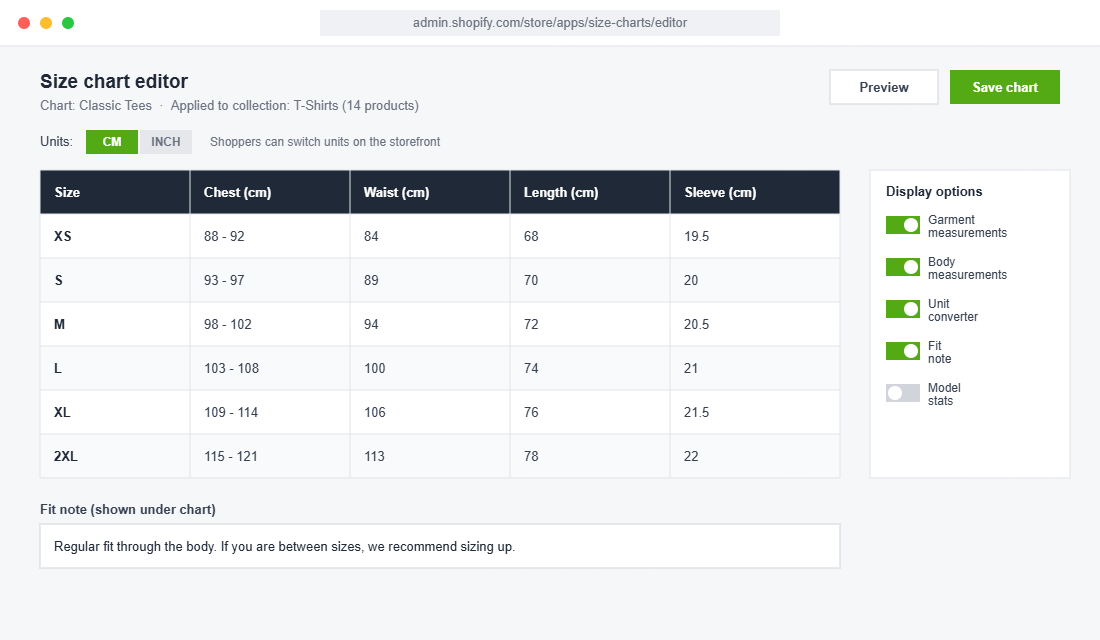
- Use a size chart app. The category leader is Kiwi Size Chart and Recommender, used by more than 16,000 brands. It handles layouts, unit conversion and automatic chart assignment, and its machine-learning recommender is there when you are ready for it.
Setting Up Kiwi Size Chart and Recommender (About an Hour)
- Install the app from the Shopify App Store, then enable the app embed in your theme editor so it can render on product pages.
- Create your first chart layout. A simple table with columns for chest, waist, length and sleeve beats a cluttered one with ten columns nobody reads.
- Import your measurements via CSV straight from the goods-in spreadsheet you built in Part 1. No retyping.
- Turn on automatic unit conversion so shoppers can flip between centimetres and inches with one tap.
- Link charts by collection, tag or vendor rather than product by product. New products then inherit the right chart automatically when you publish them.
- Position the trigger as a text link beside the size selector, not a floating button that covers your Add to Cart on mobile.
- Preview on a real phone before publishing. If you need to pinch to read the table, cut columns until you do not.
Apps in this category typically cost less per month than a single prevented return. It is one of the rare app store purchases where the payback question answers itself.
Part 3: Add the Fit Intelligence Your Chart Cannot Carry
A chart answers “what are the measurements”. It cannot answer “how does it actually fit”. That is the job of fit intelligence, and you can layer it in three light passes.
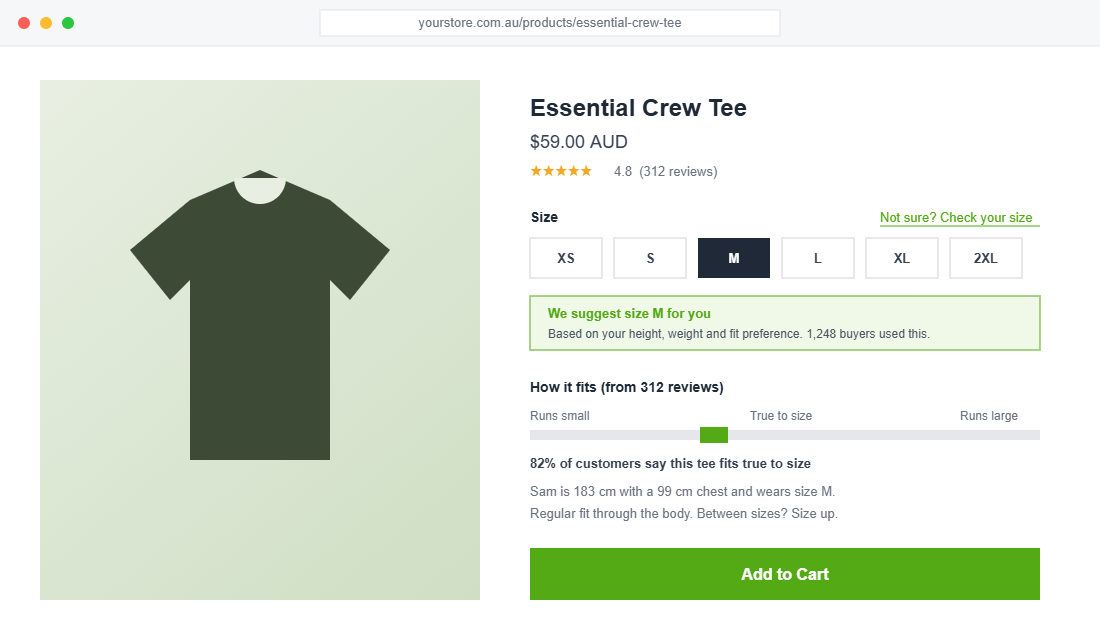
- A one-line fit note on every product. “Slim through the chest, size up if you are between sizes.” Written once at product upload by whoever knows the garment best, read by every shopper who hesitates.
- Model stats on every photo set. “Sam is 183cm with a 99cm chest and wears a medium.” Costs nothing, gives every shopper an instant human reference point.
- Review-powered fit data. Okendo, Judge.me and Loox all support custom review questions. Ask “How did it fit?” with three options: runs small, true to size, runs large. Then display the aggregate (“82% say true to size”) right next to the size selector.
When you want the next gear, a fit recommender asks the shopper three or four questions (height, weight, fit preference) and suggests a size. The Fit Quiz app on Shopify reports that 57% of orders in stores running it follow the recommended size, and that shoppers who use the recommendation convert at a rate 233% higher than those who do not. Treat vendor numbers as a ceiling rather than a promise, but the direction is consistent with everything we see: confidence converts.
This is exactly how the bigger players operate. Review Australia runs True Fit so a first-time shopper gets a personal size suggestion before committing. US underwear brand ThirdLove built its entire business on a fit quiz. Neither is magic. Both are structured fit data, presented at the moment of doubt.
Part 4: Mine Your Returns Data Every Month
Your returns inbox is a free fit-research department. Most founders never read its reports.
Start with reason codes. “Did not fit” is useless on its own. Split it into too small and too big as separate codes in your returns portal, or in a plain spreadsheet if that is where your returns live today. The direction of the miss is the diagnosis.
- Book a 30-minute returns review on the first Monday of every month. Pull returns by SKU by reason for the trailing 90 days. Ten minutes in a spreadsheet pivot table is enough.
- Flag every style where size returns run well above your store average. Those are your boomerang SKUs, and they are usually a short list doing most of the damage.
- Fix in order of cheapness. Correct the chart first, sharpen the fit note second (“this style runs small, we recommend sizing up”), and only consider re-speccing the garment once the cheap fixes have had a month to work.
Remember the industry skew: menswear comes back too small, womenswear too large. If your data matches that pattern, your charts are flattering shoppers into the wrong size, and the fix is to shift the recommendation, not just the numbers.
One caveat. Some of what looks like fit returns is actually bracketing, and some of it is outright wardrobing. If your returns data smells like abuse rather than honest sizing misses, that is a different problem with its own toolkit, and we covered it in the Return Abuse Defence Playbook.
Not Selling Apparel? Sizing Doubt Still Taxes You
Everything above reads like an apparel playbook, but sizing doubt taxes far more categories than clothing. The same five parts apply, you just change what gets measured.
- Footwear. The highest-stakes category of all, because half sizes and width matter. Publish internal length in millimetres and a “measure your foot against a ruler” diagram, and capture runs narrow or runs wide in reviews.
- Jewellery. Ring sizes are a minefield of AU, US and UK standards. A printable ring sizer PDF and a conversion chart in the product page modal will save you a stream of exchanges.
- Helmets, gloves and wearable gear. Head and hand circumference charts with a “how to measure” photo. One clear diagram beats three paragraphs.
- Homewares and furniture. The doubt is “will it fit my space” rather than “will it fit me”. Publish full dimensions, packaged dimensions, and a simple scale reference in the photography.
The pattern is identical in every category. Find the question that stops the shopper at the selector, answer it with real measurements one tap away, and capture what buyers say afterwards so the answer keeps getting sharper.
Part 5: Put the Guide Where the Doubt Strikes
Placement is the difference between a size guide that works and one that decorates. The doubt happens at the size selector, so the help has to live at the size selector.
- Put a text link directly beside the size options. “Not sure? Check your size” outperforms a bare “Size Guide” because it names the feeling the shopper is having right at that moment.
- Open a modal or drawer, never a new page. Keep the shopper on the product page with their scroll position and their selected variant intact.
- Design mobile first. Most Aussie DTC traffic is on a phone. Charts need big tap targets, horizontal scroll on wide tables, and text that is readable without pinching.
- Handle units and regions. Default to centimetres for an Australian audience with a one-tap flip to inches, and add AU, US and EU conversion rows if you sell internationally.
Then measure the asset like you would any other. Fire a GA4 event when the size guide opens, and compare conversion for sessions that engaged with the guide against sessions that did not. Guide-engaged sessions almost always convert meaningfully higher, and that gap is your business case for rolling fit notes and recommenders across the whole catalogue.
While you are in the product page anyway, remember the size guide is one block in a bigger machine. The full layout logic is in our Product Page Conversion Architecture, and if your photos are not showing fit on real bodies at multiple sizes, start with the Product Photography Playbook first.
The Compound Effect: One Asset, Four Payoffs
Here is why the size guide punches so far above its weight. It is not one win, it is four wins that feed each other.
- Conversion lifts because anxiety at the size selector drops, and the shoppers who used to leave now buy.
- Returns fall because shoppers pick the right size the first time, which pulls real dollars out of your $25-per-parcel returns bill.
- Bracketing shrinks, which means your topline stops being inflated by revenue you were always going to refund three weeks later. Your cash flow forecasts get honest.
- Reviews improve, because “fits perfectly” is the natural review of someone who got the right size. Those reviews feed the fit bar on your product page, which converts the next doubter, which starts the loop again.
An apparel store running at the 24% return average that cuts fit returns by a third is not just saving postage. It is recovering contribution margin, warehouse hours and customer goodwill, and every one of those funds the next growth lever.
The Size Guide Audit: 10 Checks Before You Call It Done
Run your store against this list. Anything you cannot tick is your to-do list, in priority order from the top.
- Every apparel product page has a size chart reachable in one tap.
- Charts show garment measurements in centimetres, not just generic body sizes.
- Charts are set per product or product type, not one global page for everything.
- Every product carries a one-line fit note: runs small, true to size, or runs large.
- Model height and size worn appear with every photo set.
- Your review app asks “How did it fit?” and the results show on the product page.
- Returns reasons are split into too small and too big, never just “did not fit”.
- A monthly returns-by-SKU review is booked in your calendar, 30 minutes, first Monday.
- A size recommender is live on at least your top-selling 20% of styles.
- On mobile, the chart opens in a drawer and is readable without pinching.
Tick all ten and you have something most of your competitors do not: a store where the scariest question in apparel ecommerce (“will it fit?”) has a fast, honest answer on every page.
Inside eCommerce Circle, Product is one of the 10 P’s we work through with every member, and sizing is one of the first places we look when returns are quietly eating profit. If you want a second opinion on your size guide setup, let’s talk.