Open your Shopify admin and count your installed apps. Not the number you think you have. The actual list under Settings, then Apps and sales channels.
What’s in This Article
If you are like most founders we work with, that number lands somewhere between 15 and 25. You can explain why about eight of them are there. The rest arrived during a late-night fix, did a job once, and have been quietly billing you every month since.
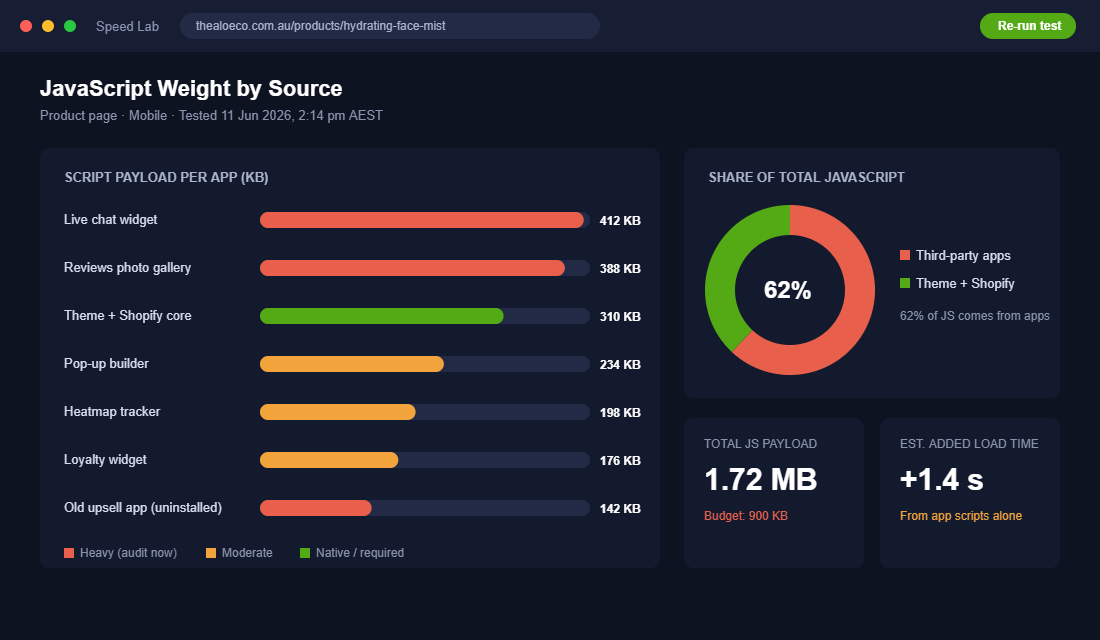
Here is why this deserves 90 minutes of your week. Third-party app scripts make up roughly 62% of the JavaScript on a typical Shopify store, and app scripts sit behind 60 to 80% of slow stores. Google and Deloitte’s Milliseconds Make Millions research found that a 0.1 second improvement in load time lifts retail conversion by 8.4% and average order value by 9.2%. Your app stack is sitting directly on top of both numbers, and it is also a recurring line on your P&L that nobody ever reviews.
This is the exact audit we run with eCommerce Circle members every quarter. Five steps, about 90 minutes the first time through, then 30 minutes a quarter to maintain. Founders regularly come out the other side with $100 to $300 a month back, a faster store and cleaner data. Here is how to run it this week.
The Triple Tax: How App Bloat Quietly Drains Your Store
Every app you install charges you three times. Once you see all three taxes clearly, this stops being housekeeping and becomes one of the cheapest profit and conversion wins available to you.
- The subscription tax. The average paid Shopify app runs $58.49 a month, and the typical store owner spends about $120 a month on apps. The stores we audit doing $40k a month or more usually sit far above that, often $400 to $700 a month across 15 to 20 paid apps. That is $5,000 to $8,000 a year coming straight off net profit.
- The speed tax. Each installed app can add 200 to 500 milliseconds of load time. Live chat widgets, review galleries that load every customer photo above the fold, pop-up builders and session recording tools are the heaviest offenders. Amazon famously calculated that every 100 milliseconds of extra latency cost it 1% of sales.
- The conflict tax. Three apps firing their own tracking events means duplicate conversions and ad platforms optimising on rubbish data. Two apps fighting over the cart drawer means bugs nobody can reproduce. You only see this tax when you go looking for it.
The taxes also compound. A slower store converts less, which makes every ad dollar work harder for the same result, which squeezes the same margin the subscriptions are already eating. That is why this audit belongs in the same conversation as your contribution margin audit, not in the someday pile.
Step 1: Build the App Inventory (Every App, Every Dollar, Every Job)
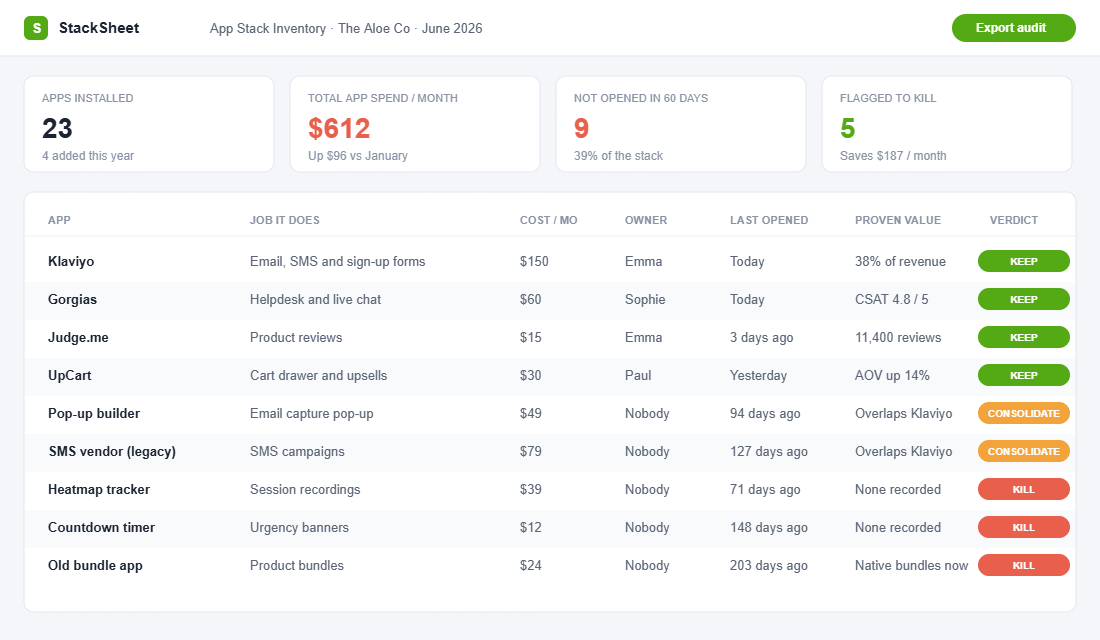
You cannot audit a stack you have not listed. Open a spreadsheet and create seven columns. This takes 20 to 30 minutes and it is the highest-leverage admin work you will do this month.
- App name and the plan you are on.
- Monthly cost, including usage-based fees.
- The job it does, in one sentence. If you cannot write the sentence, that is a verdict already.
- Who on the team uses it. A name, not a department.
- When it was last opened. Be honest.
- The value it can prove. Revenue attributed, hours saved or losses prevented.
- Verdict. Leave it blank for now. Step 2 fills it in.
Two traps catch almost everyone. First, do not work from memory. Pull your last three Shopify bills from Settings, then Billing, because app charges hide there, including annual renewals and usage fees that creep as you grow. Email and SMS platforms scale with subscriber count, so the $60 plan you signed up for in 2024 may be a $220 line item today.
Second, check the theme app embeds too. Online Store, then Themes, then Customize, then App embeds shows the apps injecting code into your theme that you may have stopped thinking of as apps at all.
Benchmark from our member audits: most founders find two to four apps they had completely forgotten, and $80 to $150 a month they could not explain before the exercise.
Step 2: Score Every App With the Keep, Kill, Consolidate Matrix
Now work down the list and ask three questions of every row. The answers produce one of three verdicts.
- Does it make money, save real time or prevent loss? Demand proof, not vibes. Klaviyo generating 38% of revenue is proof. A heatmap tool nobody has opened since March is not.
- Can Shopify do this natively now? This question kills more apps than any other. Shopify has shipped native product bundles, the free Search & Discovery app for filtering and recommendations, Shopify Flow for automation, Shopify Inbox for chat and native store credit. An app you installed in 2023 is often a free native feature in 2026.
- Has anyone opened it in 60 days? Set-and-forget is legitimate for some jobs, fraud screening and backups among them. For dashboards, optimisers and testing tools nobody checks, no opens means no value.
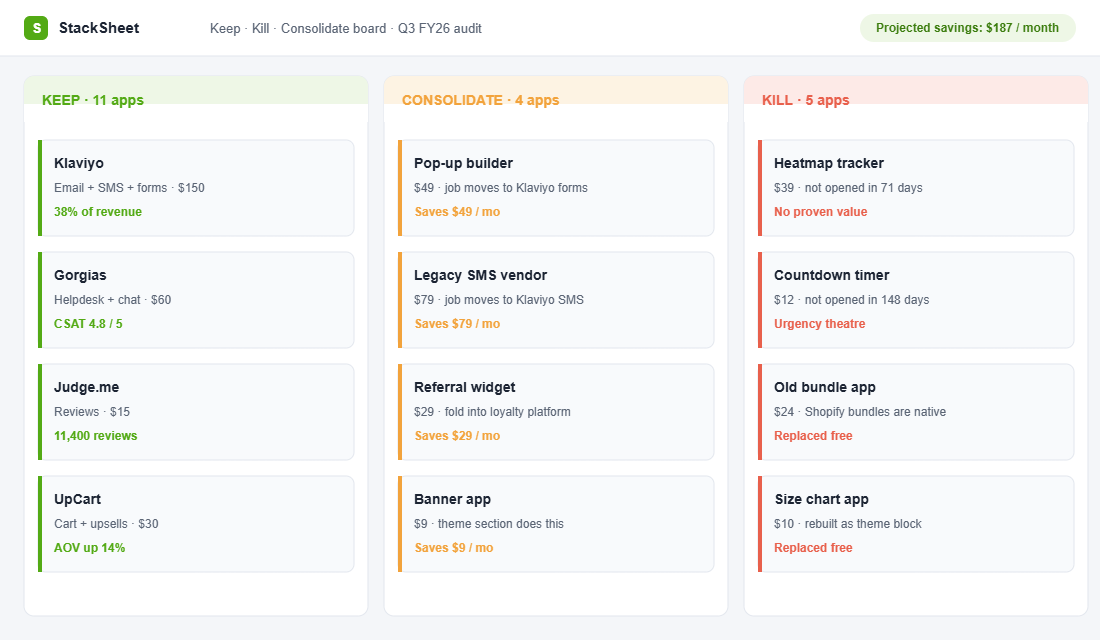
Keep means the app has provable ROI and a clear owner. Kill means no opens, no proof and no unique job. Consolidate means the job is real but the app shares it with another tool. On a first pass, most stores we work with kill three to five apps on the spot.
Step 3: Hunt Down the Ghost Code Old Apps Left Behind
Uninstalling an app stops the billing. It does not always stop the code. Many apps, especially older ones, injected snippets directly into theme files, and those leftovers keep loading on every page view long after the app is gone. Speed specialists call it ghost code.
Shopify has been tightening this at the platform level. Legacy ScriptTag functionality started being blocked from February 2025, and script tags on the final checkout pages were sunset in August 2025. But your theme files do not clean themselves. Here is the safe way to check.
- Duplicate your live theme first. Online Store, then Themes, then the three-dot menu, then Duplicate. Never touch code without a rollback copy.
- Open the graveyard. Settings, then Apps and sales channels, then Uninstalled. This is your suspect list.
- Run the speed test. Put your homepage and best-selling product page through PageSpeed Insights at pagespeed.web.dev and read the Reduce unused JavaScript section. Script domains you do not recognise are leads worth chasing.
- Search the theme. In the code editor, search theme.liquid and the snippets folder for the names of uninstalled apps. Old snippet files are usually named after the app that created them.
- Not confident? Outsource it. A competent Shopify developer clears ghost code in one to two hours. It is some of the cheapest speed work you can buy.
The payoff is real. One documented audit found a single disabled app still loading 340 KB of JavaScript on the critical render path. Removing it improved First Contentful Paint by 1.3 seconds, and the store’s conversion rate climbed from 1.1% to 1.8% with no other changes made.
Step 4: Consolidate Overlapping Apps Into Fewer, Heavier Hitters
The consolidate column is where the monthly savings live. Most established stores carry two or three apps doing parts of the same job. These are the overlaps we see most often in Aussie stores:
- Email, SMS and pop-up forms. If you run Klaviyo, it already covers all three. A separate pop-up vendor and a separate SMS platform is usually $100 or more a month of duplication, plus two extra scripts on every page.
- Upsells, bundles and recommendations. Pick one engine, whether that is a cart-focused tool like UpCart or a personalisation platform like Rebuy, and let it own the whole job. Three competing upsell scripts confuse customers and each other.
- Reviews, UGC and loyalty. Platforms like Okendo and Yotpo bundle these jobs. One vendor, one script, one support thread.
- Support and chat. A helpdesk like Gorgias replaces a standalone chat widget, a ticketing tool and an FAQ app. Small teams can go further and run Shopify Inbox for free.
The rule we give members: core revenue jobs deserve best-of-breed tools, supporting jobs get consolidated. And when you are choosing between two apps, prefer the one built on theme app extensions, the Online Store 2.0 standard. Those apps load only where they are used and switch off cleanly when removed, instead of leaving snippets behind.
For proof of what this looks like at full scale, look at handicraft brand Kadam Haat. A store-wide performance audit that included cutting bloated scripts and compressing 8.2 MB of images down to 1.4 MB cut load time by 56% and took mobile LCP from 4.8 seconds to 2.1 seconds. Mobile conversion rose 33% and organic traffic lifted 18%. The store did not change its products or its prices. It changed its weight.
Step 5: Lock In the Quarterly 30-Minute Audit
The first pass is a spring clean. The compounding value comes from cadence, because app sprawl is not a one-off sin. It grows back. Book 30 minutes on the first Monday of every quarter and run this checklist:
- Re-pull the last three months of billing and reconcile against the inventory.
- Every new app added since last quarter gets a one-sentence job description and a named owner, or it goes.
- Clear the uninstalled list and spot-check for ghost code.
- Re-test the homepage and top product page in PageSpeed Insights and log the scores next to last quarter’s numbers.
- Drop the results into your monthly business review so the stack stays visible at leadership level.
One more tool for the kit, and it is free. Chrome DevTools lets you preview your store without a specific app before you commit to killing it:
- Open your store in Chrome, press F12 and open the Network tab.
- Filter by JS and reload the page. Sort by size and find the script domain belonging to the app in question.
- Right click the request and choose Block request domain.
- Reload again. You are now browsing your store as if the app were gone. Run Lighthouse before and after to put numbers on the difference.
This try-before-you-kill test settles most internal debates in five minutes. If nobody can tell the app is missing, you have your answer.
The Compound Effect: Why a Boring Audit Beats Most CRO Projects
Look at what one afternoon stacks together. Killing $150 a month in subscriptions is $1,800 a year of pure margin, no extra sales required. Removing half a second of script weight pushes you toward the conversion and AOV lifts in the Deloitte data, and that lift applies to every visitor from every channel, paid or organic. Cleaner tracking means your ad platforms optimise on real signals. And the next time a developer quotes theme work, a lighter codebase makes the job faster and cheaper.
Most founders chase conversion wins by adding things: new apps, new sections, new offers. The app stack audit wins by subtracting. If you are about to spend money on CRO while carrying 1.7 MB of JavaScript, run this audit first, then work through the site speed playbook. You will be optimising a store that can finally get out of its own way.
The App Stack Audit Scorecard (Steal This)
Run this top to bottom each quarter. The first pass takes about 90 minutes. Every pass after that takes 30.
- Inventory built: every app listed with cost, job, owner and last-opened date (25 min)
- Billing reconciled: last three bills checked against the inventory, mystery charges chased (10 min)
- Verdicts assigned: every app marked Keep, Kill or Consolidate using the three questions (15 min)
- Kills executed: theme duplicated, apps uninstalled, ghost code checked (20 min)
- Consolidations shortlisted: overlapping jobs mapped to one platform each, migration dates set (15 min)
- Speed logged: PageSpeed scores recorded for homepage and top product page, before and after (10 min)
- Next audit booked: 30 minutes, first Monday of next quarter (2 min)
Inside eCommerce Circle, the app stack audit is part of the Platform pillar work we do with every member, and it is usually the fastest money a founder finds all quarter. If you want a second opinion on your stack, let’s talk.