Most Aussie founders treat video as a homepage decoration. A big looping hero clip at the top of the site, muted, autoplaying, looking slick. Then the page where the actual buying decision happens, the product page, is still six flat photos and a paragraph of copy.
What’s in This Article
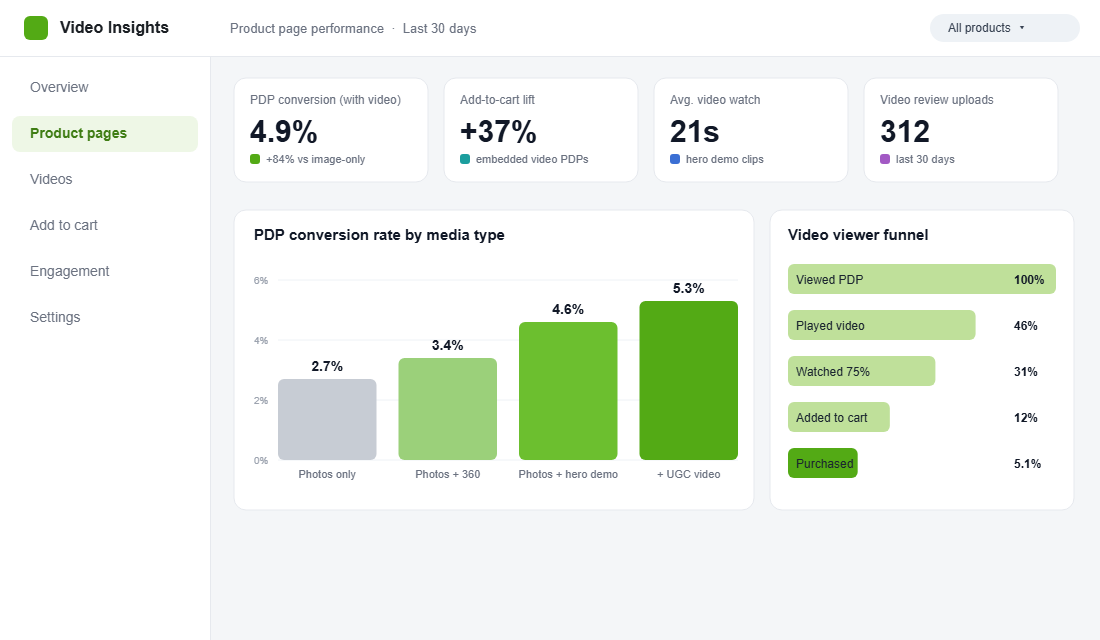
That is backwards. The product page is where hesitation lives. It is where a shopper is sitting with their thumb over the buy button, quietly asking “will this actually work for me?” A still photo cannot answer that question. A 15-second clip can. Product pages with video convert up to 80% better than pages without one, and embedded video drives up to 37% more add-to-cart clicks.
This is the system we walk eCommerce Circle members through: the six types of product video that actually move the needle, where to place each one, and how to add them without bolting two seconds onto your load time and quietly undoing the whole gain. No film crew, no agency retainer, no excuses.
Why Product Video Is the Highest-Impact Asset on Your Product Page
You have probably already squeezed your product page copy, your reviews, your trust badges and your offer. Video is the one lever most Aussie stores still leave sitting on the table, and the data on it is hard to argue with.
A 2025 benchmark across thousands of product pages found an average 84% conversion lift on pages with a high-quality demonstration video versus image-only pages. Separately, 73% of shoppers say they are more likely to buy after watching a video that explains how a product works, and add-to-cart rates can climb by as much as 144% when a buyer watches the clip.
Now layer in how Australians actually shop. Australians spent roughly AU$66.2 billion online in the 12 months to September 2025, mobile now drives over 60% of ecommerce sessions, and video makes up close to 73% of internet traffic in this country. Your buyer is on a phone, thumb-scrolling at speed. A block of text does not stop that scroll. Motion does.
So the question is not “should we use video”. It is “which videos, in what order, and how do we ship them without wrecking the page”. That is the rest of this playbook.
The 6 Types of Product Video Every Shopify Store Needs
Not all video does the same job. You do not need all six live on day one, but you do need to know which question each one answers, because a buyer who is not converting is usually stuck on a specific doubt. Match the video to the doubt.
1. The Hero Demo (10 to 20 seconds)
Your single most important clip. It shows the product doing the one main job it exists to do, in motion. The bag being packed and slung over a shoulder. The blender crushing ice. The skincare going on. This is your hero photo, alive. It belongs in the first or second slot of the gallery, never buried at the end.
2. The Detail / 360 (5 to 10 seconds)
Texture, finish, scale, the way a hinge moves or fabric falls. This answers “what is it actually like in my hand”, which is the gap online shopping can never fully close. A slow rotating 360 or a tight macro pan does the work of picking the product up in a store.
3. The Lifestyle / In-Context (15 to 30 seconds)
The product in a real Australian setting, on a real person, in a real kitchen or on a real morning commute. This sells the feeling and the fit, not the spec sheet. Brands like July (luggage) and Bared Footwear lean hard on in-context video because their products are bought on aspiration as much as function.
4. The UGC / Social Proof Video (15 to 60 seconds)
A real customer talking to camera about why they kept the product. This is the highest-trust format on the internet, full stop. It belongs inside your reviews widget or a “real customers” carousel, right near the buy box. Pair it with your written reviews and it becomes the most persuasive block on the page. If you have not built that review engine yet, start with the Shopify Product Reviews Playbook.
5. The How-To / Setup (30 to 90 seconds)
For anything technical, assembled, or used in a specific way. This clip de-risks the purchase before it happens and quietly cuts your support tickets and your returns. If a buyer can see exactly how it goes together, fewer of them send it back confused.
6. The Founder / Story (30 to 60 seconds)
Why the product exists and who made it. This works best for considered, higher-priced, values-led purchases where the buyer wants to back a brand, not just buy an object. It can live on the product page or your About page, linked from the PDP.
Start with types 1 and 4 (hero demo and UGC). They carry the most weight and need the least production polish. Add the rest as you scale.
Where You Place the Video Decides Whether It Earns Anything
The best clip in the world does nothing if a buyer never reaches it. Placement is not decoration, it is conversion architecture. Here is where each video should sit on a high-performing Shopify product page.
- Gallery slot 1 or 2. Your hero demo should sit beside the main image, not as the eighth thumbnail nobody taps. The earlier the motion, the more buyers it catches.
- One autoplay, muted, the rest click-to-play. Autoplay your hero with a strong poster frame. Everything else waits for a tap. Autoplaying five clips at once is how you kill load time and battery.
- A dedicated “see it in action” section below the buy box. Lifestyle and how-to clips earn their own row for buyers who scroll to research before committing.
- Video inside the reviews block. UGC video next to star ratings is the single highest-trust placement on the page.
- Collection-page hover video for hero products. A short muted loop on your best sellers lifts click-through into the product page itself.
Most of your traffic is judging all of this on a phone screen, so test every placement on mobile first. For the full mobile picture, work through the Shopify Mobile Conversion Playbook alongside this one.
The Site Speed Trap (And How to Add Video Without Paying for It in Lost Sales)
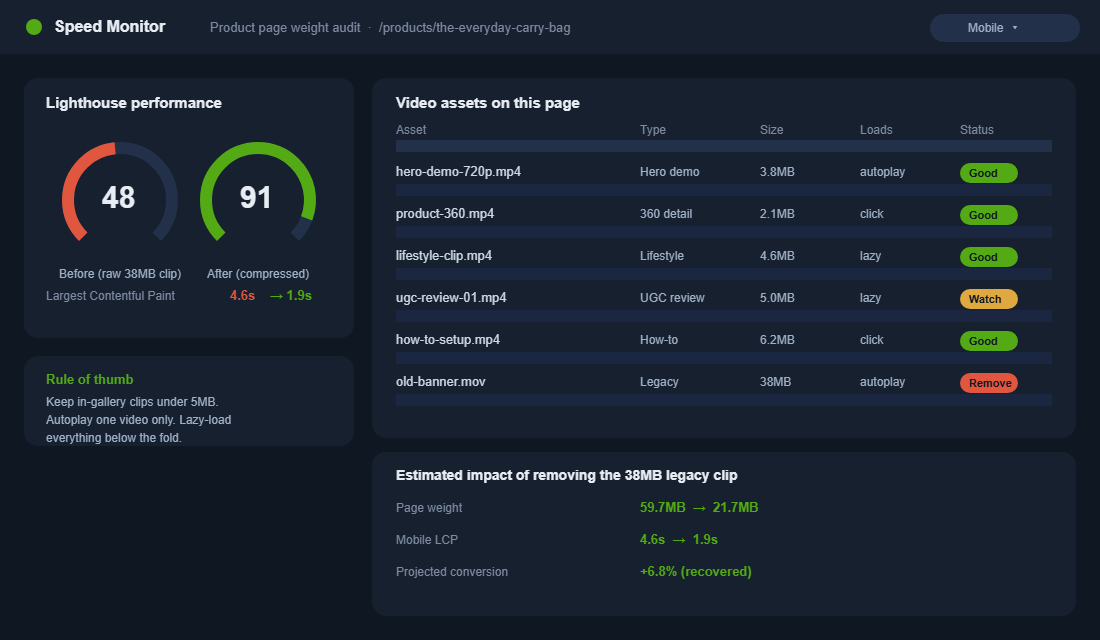
Here is the catch nobody mentions in the “add video!” advice. Video is heavy, and speed is money. A one-second delay in load time can cut conversions by around 7%, and 53% of mobile visitors abandon a page that takes longer than three seconds to load. Drop a 38MB autoplay clip onto your product page and you can lose more in speed than the video ever earns back.
The fix is not “avoid video”. It is “add video like an engineer”. These are the rules we hold members to:
- Compress hard. Export H.264 at 720p or 1080p and target under 5MB for anything in the gallery. A clean 15-second clip does not need 30MB.
- Autoplay one video, maximum. The hero. Everything else is click-to-play so it never loads until a buyer asks for it.
- Lazy-load everything below the fold. Video the buyer has not scrolled to yet should not download yet.
- Always set a poster image. It gives an instant first frame and stops the layout jumping while the video loads.
- Host through a real player, not a raw embed. Shopify’s native player or a proper video CDN, not a heavy third-party script that drags a pile of code onto every page.
If your product page already feels sluggish before you add a single clip, the apps are usually the culprit. The Shopify App Stack Audit shows you how to win back a full second of load time before you spend it on video.
Your Tool Stack: Start Free, Add Only What Earns Its Keep
You do not need a paid app to ship your first product videos. You need the free tool already inside your admin, and you upgrade only when volume and analytics justify it.
Tool 1: Shopify native video (free, built in)
Shopify hosts and serves video directly in the product media gallery at no extra cost, and it transcodes everything to mp4 or HLS automatically for fast, compatible playback. Here is the exact setup:
- In your admin, go to Products and open the product you want to edit.
- In the Media section, click Add media then Upload new, and choose your MP4 or MOV file (up to 20MB to sit directly in the gallery).
- Drag the video into slot 1 or 2 so it sits beside the main image, not at the end.
- For larger clips (up to 1GB and 10 minutes), upload via Settings > Files and place it through a theme video section instead of the gallery.
- Set a cover/poster frame, save, then preview on a real phone before you call it done.
One note: a single product can hold up to 250 media items, so the limit is never the platform, it is your discipline about file size.
Tool 2: Loox or Okendo for video reviews
When you are ready to collect customer video at scale (type 4), a reviews app automates the request, the upload and the on-page display. Okendo is Australian-built and plays nicely with the local market, which is a nice bonus when your buyers are local too.
Tool 3: Videowise or Tolstoy for shoppable video
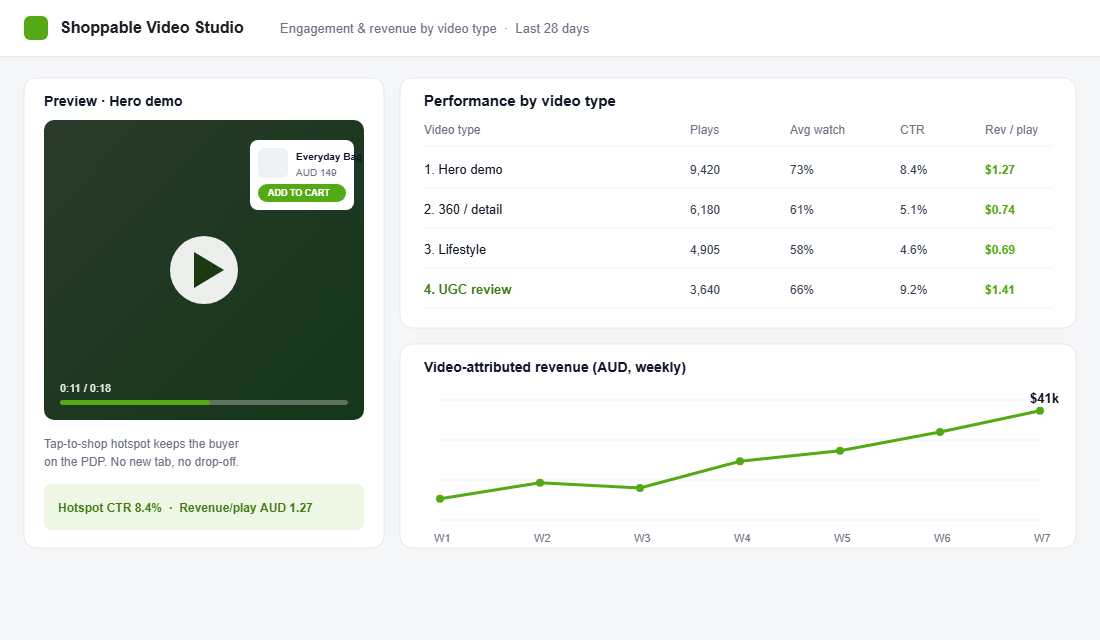
Once you have real volume of clips, a shoppable video app adds tap-to-shop hotspots, PDP gallery video at scale, and the analytics to see which formats actually convert. Videowise handles fast-loading, accessible PDP gallery video and A/B testing across widgets, while Tolstoy is the cheaper, simpler entry point if you just want basic shoppable widgets without the heavier feature set. Pick based on whether you need analytics and testing or just a quick win.
The 5-Beat Script That Turns a Clip Into a Conversion
A product video is not a TV ad. It has one job: move a hesitating buyer one step closer to the buy button. Use this five-beat structure for almost any product clip, and keep the whole thing under 25 seconds.
- Beat 1, the Hook (0 to 2s). Open mid-action or show the problem. You have two seconds to stop the scroll, so do not waste them on a logo animation.
- Beat 2, the Problem (2 to 6s). Name the frustration this product removes. The buyer should think “yes, that is me”.
- Beat 3, the Demo (6 to 15s). Show the product solving that exact problem. One clear benefit, shown not told.
- Beat 4, the Proof (15 to 20s). A real result, a real person, or a number. Borrow trust from someone who already bought.
- Beat 5, the Nudge (20 to 25s). A simple on-screen line: free shipping, the guarantee, or “tap to shop”. Make the next step obvious.
Save this as a shotlist and hand it to whoever holds the phone. Most of your best UGC will be filmed on a customer’s iPhone anyway, so the structure matters far more than the gear. For how this clip fits the full page around it, line it up against the Shopify Product Page Playbook.
The Compound Effect: Video Is a System, Not a Feature
Here is where it clicks. Video does not work in isolation, it compounds with the assets you already have. A fast product page, with a hero demo in slot two, a 360 in slot three, three customer video reviews under the buy box, and a tap-to-shop hotspot inside the clip, is a completely different machine to six static photos and a paragraph.
Each piece lifts the next. The demo earns the play. The play earns the watch. The watch earns the add-to-cart. The customer video earns the trust that closes the sale. And because you protected your load time, none of it costs you the speed that made the page convert in the first place. That is the difference between “we added a video” and “we built a video system”.
Start this week with two clips on your best seller: a hero demo in the gallery and one customer video in your reviews. Measure the product page conversion rate before and after. The data will make the case for the other four faster than any agency pitch.
What to Film First When All You Have Is a Phone and an Afternoon
You do not need a studio, a videographer, or a five-figure budget to start. The brands winning with product video are mostly filming on an iPhone in natural light, and the buyer cannot tell the difference. What matters is the structure, not the gear. Block out one afternoon and capture your hero product properly.
Set up near a big window for soft, even light. Prop your phone on a cheap tripod so the shot is steady. Shoot in 4K so you can crop in later without losing quality, and grab both horizontal and vertical versions of every shot so the same footage works in the gallery and in your social ads. Then run this shot list in one sitting:
- The hero demo: the product doing its main job, start to finish, in one clean take.
- Three detail angles: texture, the part people ask about, and the scale (next to a hand or an everyday object).
- One “in use” shot: a real person using it in a real setting, even if that person is you.
- The unboxing or setup: first thirty seconds out of the box, because that is the moment buyers are nervous about.
Batch it. Film five products in an afternoon and you have a month of product video, plus a stack of clips you can cut down for Meta and TikTok. The discipline is in the planning, not the production.
The 3 Mistakes That Make Product Video Backfire
Video can lift a product page or quietly sink it. When we audit member stores, the same three mistakes come up again and again. Avoid these and you keep the upside without the downside.
- Autoplaying sound. Sound-on autoplay startles mobile buyers and gets your video muted, scrolled past, or your tab closed. Always default to muted with captions burned in.
- Burying the clip. A hero demo sitting in the eighth gallery slot is a video nobody watches. If it is worth filming, it is worth slot one or two.
- Letting file size creep. One day someone uploads a 40MB clip “just this once”, your mobile load time slides past three seconds, and your conversion rate drops without anyone connecting the two. Audit your media weight monthly.
Inside eCommerce Circle, the product page is one of the core pillars we work on with every member, and video is the lever most of them are underusing. If you want a second opinion on yours, let’s talk.