Open your Shopify admin, go to Settings, then Notifications, and look at your order confirmation email. If it still looks like the default template Shopify gave you on day one, you are sitting on the most valuable email your brand sends and doing nothing with it.
What’s in This Article
Here is the part most founders never clock. Your order confirmation gets opened 70 to 90% of the time. Your shipping notification is not far behind. Your best marketing campaign, the one you spent two days designing and a Sunday night scheduling, is getting opened by roughly one in four people. Transactional emails pull 8 times the opens and clicks of regular marketing emails, according to Experian data, and yet almost everyone treats them as a receipt instead of a storefront.
This is the cheapest revenue lever you own. The send is already triggered, already delivered, already trusted, and already opened. You are not paying for reach. You are just choosing whether that attention does any work for your business or not. Most Aussie stores leave it on the table. This playbook is how you stop.
Why Your Receipts Out-Earn Your Campaigns
Let’s get the maths on the table, because the numbers are the whole argument. Order and shipping confirmations convert at around 22 times the rate of a standard marketing campaign, per Omnisend’s analysis. Post-purchase emails run a 6.4% click rate against a 1.29% campaign average, and a 217% higher open rate than normal sends. When a brand layers a simple product recommendation into that window, average order value lifts by about 15%.
Put a dollar figure on it. A well-built transactional email earns roughly 0.74 AUD per send through cross-sell and upsell, compared with about 0.11 for a standard promotional blast. Same customer. Same inbox. The difference is entirely in the moment you catch them and what you put in front of them when you do.
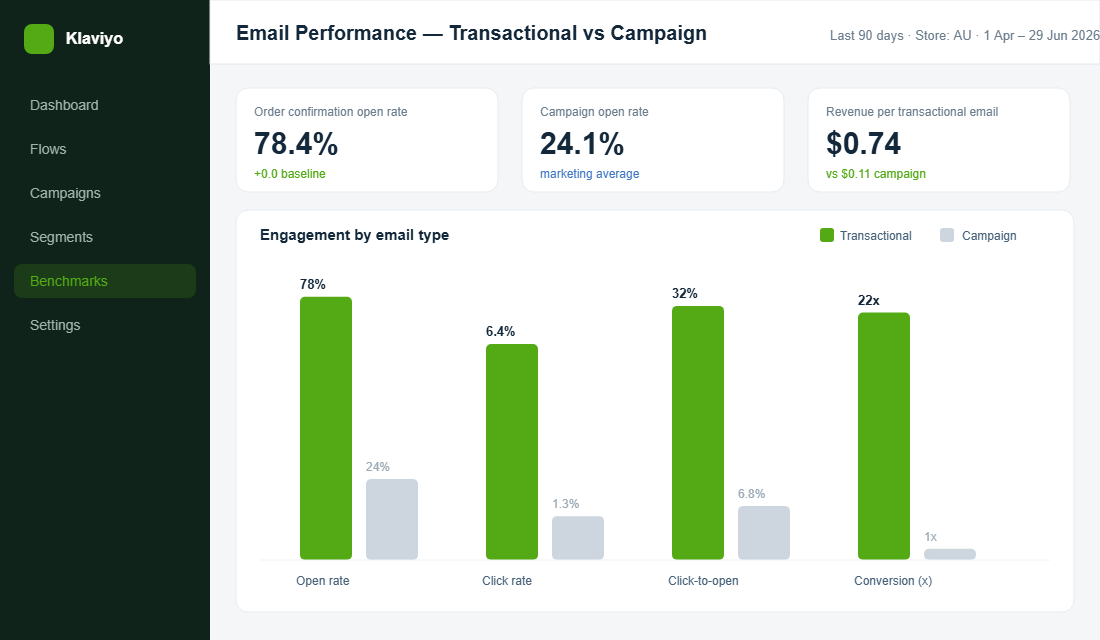
The reason is structural, not clever. A marketing email interrupts someone. A confirmation answers a question they are actively asking: did my order go through, and when will it land. That is the most engaged your customer will ever be with your brand, and it happens after they have already handed you money. Klaviyo’s benchmarks show automated flows generating around 41% of email revenue off just over 5% of sends. Post-purchase sequences sit right at the centre of that, alongside welcome and abandoned cart.
The Australian context makes this sharper. Australia Post reported 82% of households, a record 9.8 million, bought something online in 2025, with 82.6 billion AUD spent online across the year. Your customers live in their inbox between the moment they buy and the moment the parcel lands. That gap is yours to own, and right now most of you are handing it to a grey Shopify template.
The Four Emails That Actually Matter
Transactional does not mean one email. There is a short sequence that fires around every single order, and each message has a job. Most stores nail none of them. You want to nail all four.
- The order confirmation. Sent in seconds. Highest open rate of anything you will ever send. Job: reassure, then introduce one relevant next step.
- The shipping confirmation. Sent when the order is fulfilled. The customer is now in waiting mode and refreshes tracking links like a slot machine. Job: build anticipation and reinforce why they chose you.
- The delivery and out-for-delivery update. The peak of excitement. The box is about to arrive. Job: prime the unboxing and tee up what comes next.
- The order status page. Not an email, but the page every tracking link points to, and the single most visited page in your post-purchase world. Job: turn dead tracking real estate into a branded, shoppable surface.
Notice the through-line. Reassure first, sell second, and never the other way around. The instant a customer smells that your confirmation is really an ad, you have spent the trust that made the channel valuable. We go deeper on that tracking surface in our order tracking page playbook, because it is the one most founders forget entirely.
Stage 1: Rebuild the Order Confirmation
Start where the attention is highest. The default Shopify confirmation does the operational job and nothing else. Your version needs to do three things in order: confirm, reassure, and then offer one low-friction next step.
Lead with your brand, not Shopify’s chrome. The first 100 pixels should carry your logo, your colours, and a human line of copy. Who Gives A Crap is the textbook Aussie example here. Their post-purchase comms sound like a person who is genuinely chuffed you bought toilet paper, not a system spitting out a receipt. That personality is doing retention work before a single product is shown.
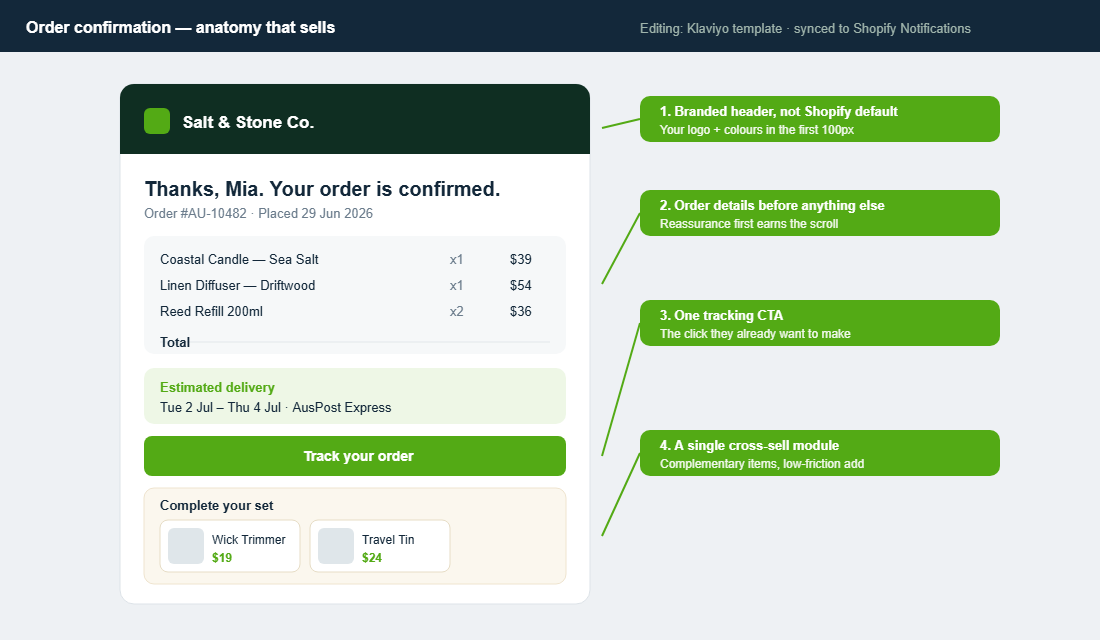
Then give them the details they actually came for: order number, line items, total, and a clear delivery estimate. This is not filler. Clear confirmations measurably cut “where is my order” tickets, which means your support inbox gets quieter at the same time your revenue per email climbs. One job, two wins.
Only after all of that do you add one cross-sell module. Not six products. One tight block of genuinely complementary items, the wick trimmer for the candle, the refill for the diffuser. Klaviyo found Shopify stores adding custom recommendations to these emails saw up to a 150% lift in sales per open. The discipline is in restraint. The moment you cram the email with a full catalogue, you bury the order details and break the trust that made the open happen.
- Subject line that says what it is. “Your order #AU-10482 is confirmed” beats anything cute. People search for it later.
- One primary button. Track your order. That is the click they already want to make.
- Mobile first, always. 65% of opens happen on a phone, so tap targets and legible type are non-negotiable.
- One cross-sell, below the order summary. Complementary, not random. Trust before pitch.
Stage 2: Work the Shipping and Delivery Window
Between purchase and delivery, your customer is more excited about your brand than they will be for months. They have paid, the anticipation is building, and they will open anything with their name and a tracking number on it. This is the most under-used window in Australian ecommerce.
The shipping confirmation should do more than dump a tracking link. Give a real delivery window, name the carrier (Aussie shoppers care whether it is AusPost Express or a courier), and add a short block that reinforces why they made a good call. A line about your materials, your guarantee, or your story costs nothing and lands while goodwill is at its peak. July, the Australian luggage brand, treats this window as part of the product. Their shipping and arrival comms feel premium and considered, which quietly justifies the price before the bag is even in hand.
The out-for-delivery or delivered message is your anticipation peak. This is the moment to prime the unboxing: tell them how to get the best out of the product, point them at a how-to, or seed the idea of sharing it. You are not selling here. You are making the arrival feel like an event, which is exactly what turns a first order into a second one.
One discipline worth stating plainly: keep these emails fast and clean. A shipping update buried in marketing clutter loses the very people who opened it to check one thing. Answer the question first, add value second.
Stage 3: Layer a Post-Purchase Flow on Top
Here is the distinction that trips people up. Your true transactional emails (the confirmation, the shipping notice) should ride on infrastructure built for speed and inbox placement. But you can run a marketing flow alongside them, triggered by the same purchase, that does the longer-game retention work. Both fire off one order. Together they form a system.
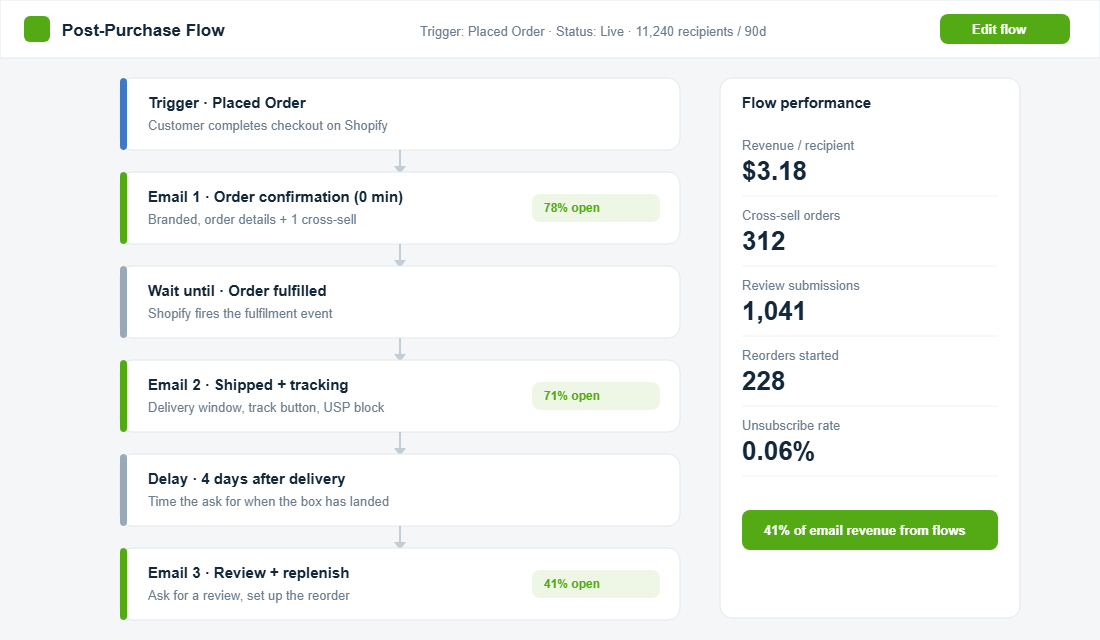
A simple, high-performing post-purchase flow looks like this. The confirmation goes out instantly. The shipping email fires on fulfilment. Then you wait until roughly four days after delivery, when the box has actually landed and the product has been used, and you send the email that does the heavy lifting: the review request and the reorder nudge. Replenishment-style reminders pull some of the highest engagement in all of ecommerce email, with click-to-open rates north of 50% when the timing matches the product’s natural cycle.
That review ask is not a nice-to-have. The user-generated content it produces lifts product page conversion and feeds your SEO, so a single post-purchase email keeps paying out long after it sends. If you want to push the cross-sell side harder, our post-purchase upsell playbook breaks down the offer mechanics in detail. And because this entire sequence is about earning the next order, it sits directly inside the work we cover in the repeat purchase playbook.
Protect the Channel: Deliverability Comes First
None of this matters if the email never lands. Transactional messages live or die on inbox placement, and the rules tightened in 2024 when Gmail and Yahoo made SPF, DKIM, and DMARC authentication mandatory for bulk senders. If you have not set those up, that is the first job, before you touch a single template. Brands that implement DMARC properly see a 10 to 20% lift in inbox placement, which is free revenue you are currently leaking.
The deeper principle is separation. The whole reason a confirmation reliably hits the inbox is that it is not tangled up with promotional sends that attract complaints. The moment you stuff a transactional email with aggressive marketing, you risk dragging your most important message into spam alongside your campaigns. Keep the cross-sell light and relevant so the email stays classified, and behaves, as transactional. We dig into the technical side in our guide on email deliverability for Shopify and Klaviyo.
How to Set It Up in Shopify and Klaviyo
Enough theory. Here is the practical build using the stack most Aussie stores already run. The split is simple: Shopify owns the true transactional sends, and Klaviyo owns the design and the marketing flow that rides alongside.
- Design the template in Klaviyo. Start from Klaviyo’s Shopify order template, which already carries the Shopify order variables. Brand it, structure it (details first, one cross-sell), and save.
- Push it into Shopify’s confirmation. Export the template, copy the email code, then go to Shopify Settings, Notifications, open the Order confirmation, and paste your branded code in place of the default. Send yourself a test order and check it on mobile.
- Repeat for the shipping confirmation. Same process under the Shipping confirmation notification. Add the delivery window, carrier, and your reinforcement block.
- Build the marketing flow in Klaviyo. Create a flow triggered by Placed Order. Let Shopify handle the instant confirmation, then use a wait step until fulfilled, and a delay of around four days post-delivery before the review and reorder email.
- Authenticate and test deliverability. Confirm SPF, DKIM, and DMARC are set on your sending domain, then send live tests to a Gmail, an Outlook, and an Apple Mail address to confirm inbox placement.
- Measure the right number. Track revenue per recipient on the flow, not just open rate. That is the figure that tells you the channel is working.
If you are on Shopify Plus, you get a shortcut: you can send your fully designed Klaviyo template as the confirmation directly, without the copy-paste step. Either way, the architecture is the same. Shopify for speed and trust, Klaviyo for design and the follow-on flow.
The Mistakes That Quietly Kill This Channel
Most transactional email damage is self-inflicted, and it is usually one of a handful of avoidable errors. Knowing them upfront saves you from torching a channel that took real work to build.
The first is greed. A founder sees the open rate, gets excited, and crams the confirmation with ten products, a discount banner, and a loyalty pitch. The order details vanish below the fold, the email starts to read like an ad, and the trust that drove the open evaporates. One cross-sell module. That is the ceiling, not the floor.
The second is silence. Plenty of stores brand the confirmation and then forget the shipping and delivery emails entirely, leaving the most exciting part of the journey on the default template. The window between dispatch and arrival is where anticipation peaks. Leaving it blank is leaving money and goodwill on the table.
The third is timing. A review request that fires the moment the order ships, before the customer has touched the product, gets ignored or annoys. Wait until the box has landed and been used, around four days after delivery, and the same ask converts. The fourth, and most expensive, is skipping deliverability. A beautiful email that lands in spam earns nothing. Authenticate your domain first, then design. Get the order right and the channel pays you back on every single order, indefinitely.
The Compound Effect
Look at these four touchpoints on their own and each one seems minor. A slightly nicer confirmation. A shipping email with a bit of personality. A review request that lands at the right time. None of it feels like a growth lever. That is exactly why most stores never bother.
Stack them and the picture changes. Every order now fires a sequence that reassures the customer, reinforces the brand, captures a cross-sell at the highest-intent moment, collects a review that lifts your product pages, and sets up the reorder. You are running this on emails you were already sending, at open rates your campaigns will never touch. Automated flows already drive a wildly disproportionate share of email revenue. Omnisend found automated emails generating 37% of email sales from just 2% of volume. The transactional layer is the most under-built part of that engine in nearly every store we audit.
The brands that win the second order are rarely the ones with the cleverest campaign. They are the ones who made every operational email pull its weight. That is a system any operator can build in an afternoon, and it keeps compounding on every order you take from here.
Your Transactional Email Checklist
Run your store through this before you call the channel done. If you cannot tick all of it, you have found this week’s project.
- Order confirmation is branded, not the Shopify default, with your logo and colours in the first screen.
- Order details lead, with number, items, total, and a clear delivery estimate above any selling.
- One tracking CTA, single primary button, easy to tap on mobile.
- One cross-sell module, complementary products only, sitting below the order summary.
- Shipping email adds value, real delivery window, named carrier, and a short brand-reinforcement block.
- Delivery message primes the unboxing and seeds the next step.
- A post-purchase flow runs alongside, with a review and reorder email timed to about four days after delivery.
- SPF, DKIM, and DMARC are authenticated on your sending domain.
- You measure revenue per recipient, not just opens, on the whole sequence.
Inside eCommerce Circle, the post-purchase channel is one of the core Patrons pillars we work on with every member, because it is the fastest revenue most stores are sitting on. If you want a second opinion on your transactional emails, let’s talk.