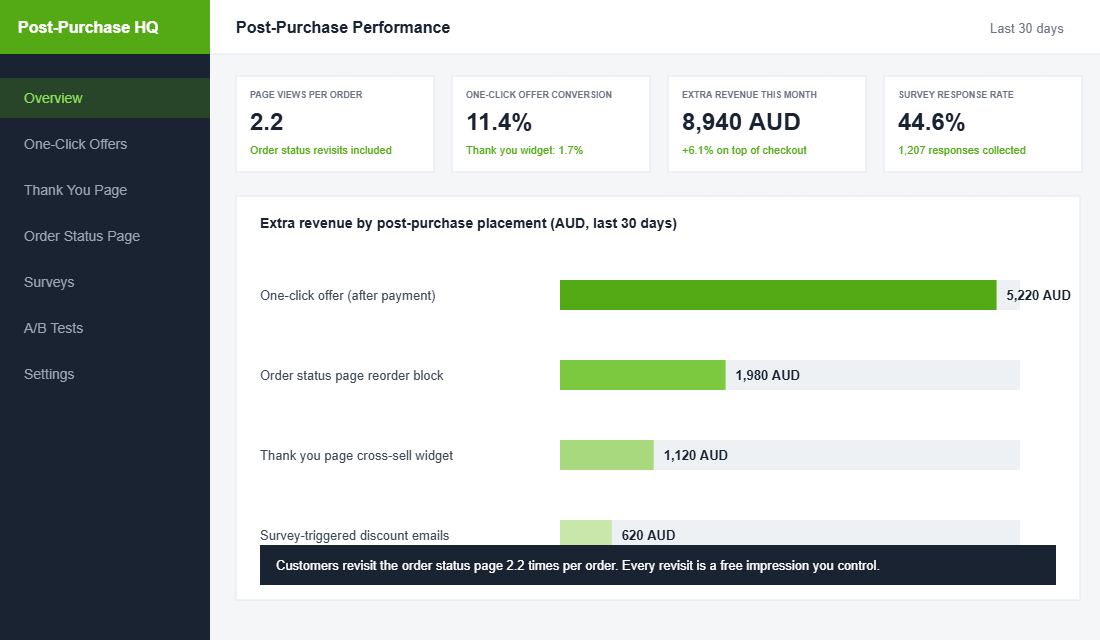
You just spent $40 in ad costs, weeks of creative testing, and a carefully tuned checkout to win one sale. Then Shopify shows your new customer the digital equivalent of a cash register receipt and everyone moves on. That page you never think about is the second most viewed page in your entire store after the homepage, and customers come back to it an average of 2.2 times per order to check where their parcel is.
What’s in This Article
Think about what that means. Every single paying customer sees this page, usually more than once, at the exact moment their trust in your brand is at its peak. They just handed over money. Buyer’s excitement is real and it has a half-life measured in hours.
Most Aussie Shopify stores treat the thank you page as plumbing. The brands that treat it as a sales and retention channel routinely pull an extra 5 to 10% of revenue out of orders they had already won. This playbook covers the five parts of doing that without making your confirmation page feel like a used car yard.
Part 1: Know Your Three Surfaces (They Are Not the Same Page)
Founders say “thank you page” and mean three different surfaces. Each has different rules, different attention levels, and different jobs.
- The one-click post-purchase offer. A single offer screen Shopify can show after payment succeeds but before the confirmation page. The customer accepts with one tap and no re-entered payment details. This is the highest-converting surface in ecommerce.
- The thank you page. The confirmation the customer lands on immediately after purchase. Seen once, with high attention. Its job is reassurance first, then data capture.
- The order status page. The same URL the customer revisits from their confirmation email to track delivery. This is where the 2.2 visits per order happen, and it keeps working for you for a week after the sale.
The strategy in one line: sell once on the offer screen, reassure and capture data on the thank you page, then use the order status page as a mini campaign that runs until the parcel lands.
Part 2: The One-Click Offer (The Highest-Converting Screen You Are Not Using)
Industry benchmarks put a well-built one-click post-purchase offer at 8 to 15% conversion. Compare that to roughly 1.7% for a standard cross-sell widget sitting on the thank you page, and 2 to 3% for most pre-purchase upsell pop-ups. Nothing else in your store converts like this screen, because the two biggest objections (payment friction and purchase hesitation) are already gone.
The results show up fast when the offer is right. Eyewear brand Lucyd added 5.6% to net revenue within three months of switching on thank you page offers through ReConvert. Licorice.com reported double to triple the revenue and conversion of their previous upsell setup after moving to AfterSell’s one-click flow.
Rules for an offer that converts instead of annoys:
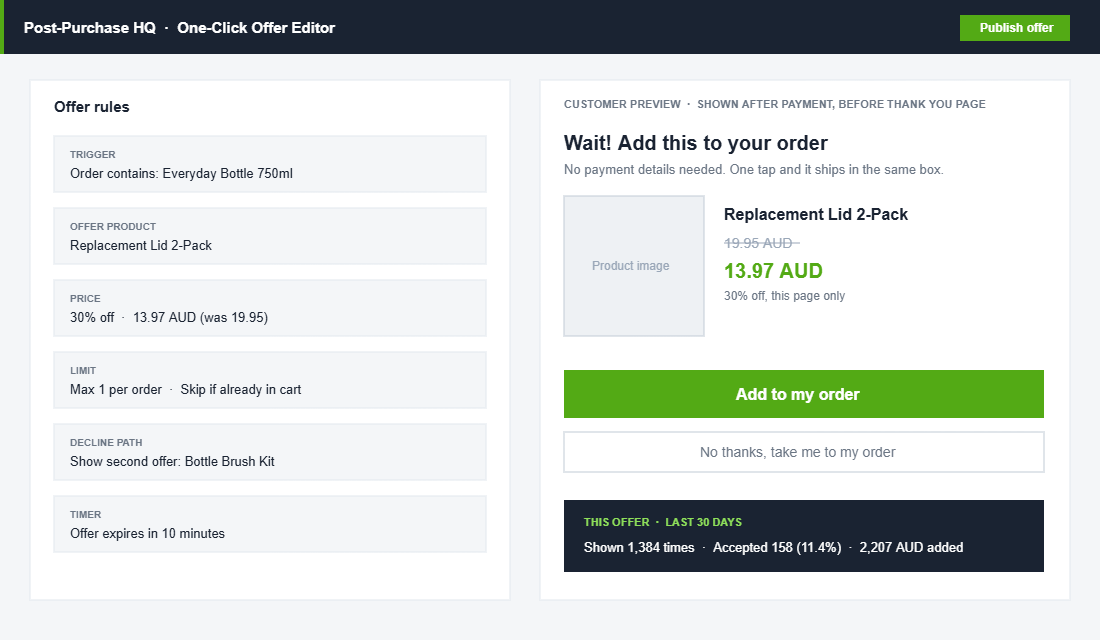
- Complement, never compete. Offer the lid two-pack with the bottle, the filter with the coffee machine, the travel size with the full size. If the offer could have replaced the original purchase, you picked the wrong product.
- Price it under the original order. The sweet spot is 25 to 60% of the order value. A $120 order can carry a $35 add-on. It cannot carry another $120 decision.
- Give a real reason for the discount. “30% off because it ships in the same box” is honest and specific. Fake urgency erodes the trust you just earned.
- One offer, one decline path. Show a second, cheaper offer to customers who decline the first. Stop after two. Three offers in a row is how you end up in a screenshot on someone’s group chat.
Part 3: Capture the Answer Only New Customers Can Give You
The thank you page is the best survey venue you will ever have. KnoCommerce, which runs post-purchase surveys for more than 1,200 brands, reports an average response rate of 45% on order confirmation surveys, and completion rates between 85 and 95% once a customer starts. Try getting those numbers from an email survey. You will not.
One question is enough: “Where did you first hear about us?” The answer is attribution gold that no pixel can give you, especially for TikTok, podcasts, and word of mouth, the channels that ad platforms systematically under-report. Ask it on every order, and within a month you have a channel mix based on what customers say rather than what Meta claims credit for.
We went deep on question design, sample sizes, and how to act on the data in the Shopify Post-Purchase Survey Playbook. The short version for this page: one question, multiple choice, five options or fewer, and rotate a second question in only after the first has done its job.
Part 4: Make the Order Status Page Do Support’s Job
Where is my order? For most Aussie DTC brands, that single question generates more support tickets than everything else combined. Every one of those tickets is a customer who went looking for reassurance and could not find it, and every one costs you money and goodwill.
The order status page is where you kill that ticket category. The customer is already returning to it 2.2 times per order. Give them what they came for:
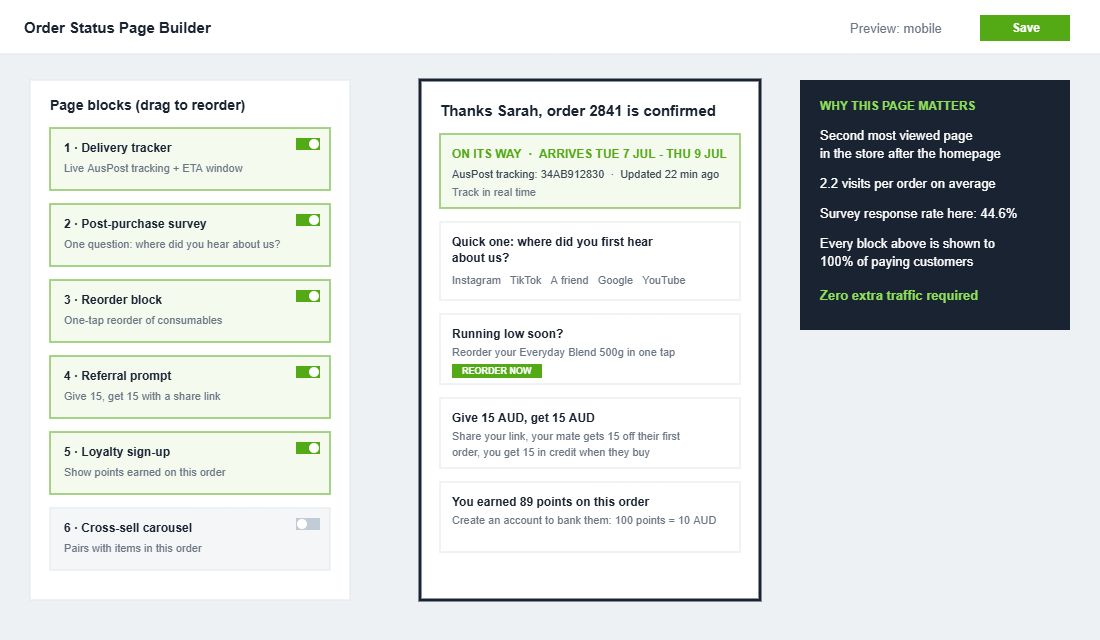
- Live tracking with a date window, not a carrier code. “Arriving Tuesday 7 July to Thursday 9 July” beats a bare AusPost consignment number. Show the tracking number too, but lead with the window.
- Set the expectation before they ask. If you ship from Melbourne and the customer is in Perth, say so: “WA orders typically take 5 to 7 business days.” Honesty up front is cheaper than an apology later.
- Answer the next three questions on the page. Returns window, how to change a shipping address, and who to contact if the parcel stalls. Three short links save hundreds of tickets a year.
- Match your emails to the page. Your confirmation and dispatch emails should link straight back to this page, not to a carrier site. The full sequence is in the Shopify Transactional Email Playbook.
None of this feels like marketing, and that is the point. Reassurance is what earns you the right to sell on this page at all.
Part 5: Recruit the Customer Into the Next Purchase
With reassurance handled and the survey answered, the remaining space on the thank you and order status pages has one job: start the second purchase. The average ecommerce repeat purchase rate sits around 28%, and the gap between average and great is mostly decided in the first two weeks after the first order.
- Loyalty enrolment with points already on the board. “You earned 89 points on this order. Create an account to bank them.” Enrolment converts far better when the customer has something to lose by ignoring it.
- The referral prompt, at the peak of goodwill. A give-and-get offer (“give $15, get $15”) lands best right after purchase, while the customer is still excited enough to tell a mate. The full mechanics are in the Shopify Referral Program Playbook.
- A reorder block for consumables. Coffee, skincare, supplements, pet food: show the exact product they bought with a one-tap reorder. It converts on the second and third visit, when the customer is back checking tracking.
- One community invitation, not four. Pick your best channel (Instagram, a Facebook group, SMS) and pitch only that. Four competing follow buttons convert worse than one confident ask.
The Compound Effect: One Page, Four Revenue Streams
Run the five parts together and the same order now produces four extra outcomes. The one-click offer adds 5 to 10% to the order value on the spot. The survey answer sharpens where your next ad dollar goes. The order status page deletes a chunk of your support queue. And the loyalty, referral, and reorder blocks pull the second purchase forward, which is the moment a buyer becomes a customer. We showed why that second order changes the economics of the whole business in the Shopify Repeat Purchase Playbook.
The best part is where this revenue comes from: nowhere. No extra traffic, no extra ad spend, no new channel to manage. Post-purchase upsells alone lift average order value by around 5.6% across merchants who run them, and stores that treat the full post-purchase journey seriously routinely add 15 to 25% to AOV. That money was walking past your shopfront the whole time.
Measure four dials monthly: one-click offer conversion (target 8 to 15%), survey response rate (target 40% or better), where-is-my-order tickets per 100 orders (should fall every month), and the share of second orders placed within 30 days of the first.
The Tool: AfterSell, Set Up the Right Way
AfterSell is the cleanest way to run this playbook on Shopify without code, and it now sits inside the Rokt ecosystem alongside ReConvert as the two serious options. ReConvert is the stronger pick if you want deeper thank you page customisation on a budget; Wonderment is worth adding later if order tracking becomes your focus. Start with AfterSell:
- Step 1: Install AfterSell from the Shopify App Store. It uses Shopify’s native post-purchase and checkout extensibility surfaces, so nothing touches your theme code.
- Step 2: Build your first one-click offer. Pick your best-selling product, attach its most natural companion at 20 to 30% off, and write one line of copy explaining the discount (same box, this page only).
- Step 3: Add a decline offer. A cheaper second option for customers who pass on the first. Two offers maximum.
- Step 4: Rebuild the thank you and order status pages. Order: delivery expectations, one survey question, loyalty enrolment, referral prompt, reorder block for consumables.
- Step 5: A/B test one variable at a time. AfterSell splits traffic natively. Test offer product first, discount depth second, copy third. Give each test 500 orders before calling it.
The Thank You Page Checklist
Tick all ten before you call this page done:
- One-click post-purchase offer live on your top three products
- Offer priced at 25 to 60% of the triggering order value
- Honest reason for the discount in the offer copy
- Maximum two offers, then straight to confirmation
- One survey question: where did you first hear about us?
- Delivery date window shown, not just a tracking code
- Returns, address change, and contact links on the order status page
- Loyalty enrolment shows points already earned on this order
- Referral prompt with a give-and-get offer
- One community ask, tested on mobile, where most customers will see it
Inside eCommerce Circle, the post-purchase journey is one of the core pillars we work on with every member, because it is the cheapest revenue most stores will ever find. If you want a second opinion on yours, let’s talk.