Ask most Aussie Shopify founders about Pinterest and you get the same shrug. It is where their partner saves recipes and wedding tables. It is not a real acquisition channel. So they pour every spare dollar into Meta and Google, watch their CPMs climb, and never test the one platform where people actively go looking for things to buy.
What’s in This Article
Here is the number that should change your mind. Pinterest passed 600 million monthly active users in late 2025, and 88% of users say they have bought something they discovered on the platform. Shoppers arrive with 2.2x higher purchase intent than on any other social network. That is not a mood board. That is a search engine with a buying cart attached.
This playbook is the five-part system we walk Aussie DTC brands through when they add Pinterest as a paid channel. Get the plumbing right, structure campaigns the way the algorithm rewards, and measure past the last click, and Pinterest stops being a hobby and starts pulling its weight next to your Meta and Google spend.
Why Pinterest behaves like a search engine, not a feed
The mistake founders make is treating Pinterest like Instagram. On Instagram, people scroll to be entertained and you interrupt them. On Pinterest, people type “coastal living room ideas” or “winter capsule wardrobe” and lean in. They are planning a purchase, often weeks out. That intent is why Pinterest converts differently.
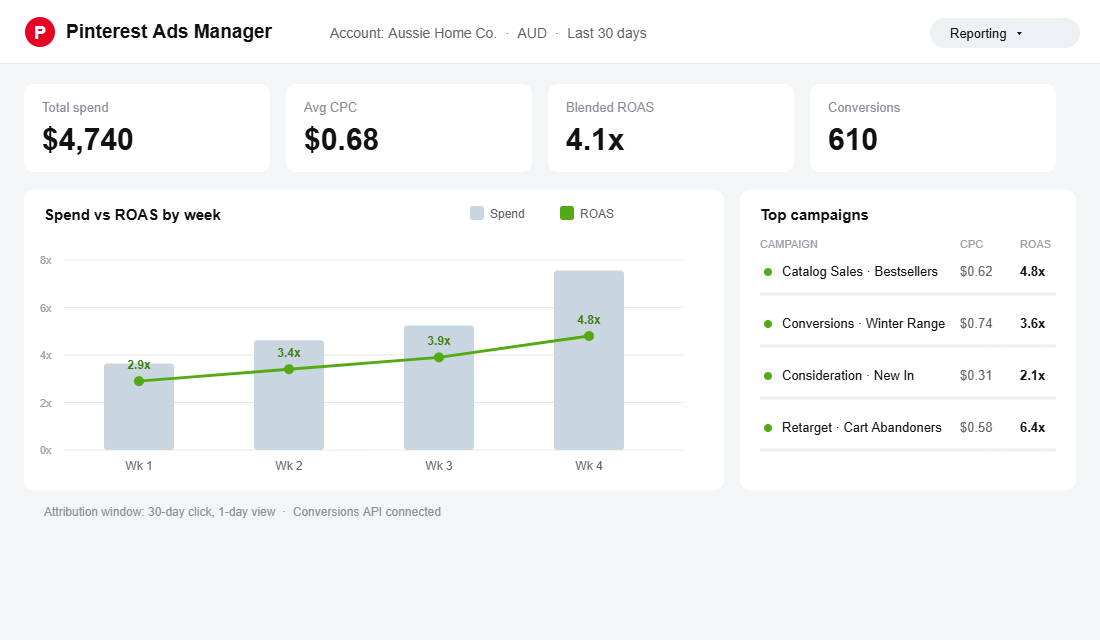
The economics follow the intent. Pinterest clicks run roughly $0.50 to $1.50, against Meta at $1.06 to $1.72 for a similar audience, because you are reaching people who are already in a shopping mindset. Shopping ads specifically deliver 15% higher return on ad spend and 2.6x higher conversion rates than standard pins.
For Australian brands the audience skews in your favour if you sell anything visual. Pinterest reaches around 7 million Australians, roughly 32% of the online population. About 72% are women, and 60% sit in the 18 to 34 bracket, with 36% in households earning over 100k a year. If you are in home, fashion, beauty, food, weddings, kids or gifting, your buyer is already there.
Is your store a Pinterest fit? A quick honest test
Pinterest is not for everyone, and forcing it wastes budget. The platform rewards products people plan for and picture in their life. Before you spend, run your store against this list. If you tick two or more, Pinterest deserves a proper test:
- Home, interiors and decor. The strongest category on the platform. If you sell furniture, homewares, lighting or textiles, your buyer is already building boards.
- Fashion, jewellery and accessories. Capsule wardrobes, outfit inspiration and gift shopping drive enormous search volume, especially among the 25 to 34 women who dominate the Aussie audience.
- Beauty, wellness and food. Recipes, routines and self-care are core Pinterest behaviour, and product pins slot naturally into that intent.
- Weddings, events and kids. High-planning, high-emotion purchases where people research for months. Prams, nursery decor and wedding styling all over-index.
- Considered gifting. Anything bought as a present with a lead time, from hampers to personalised pieces, catches the early planner.
If you sell impulse commodities, B2B software or anything with no visual or aspirational hook, put your test budget elsewhere. Pinterest works when your product is something a customer wants to imagine owning, not just something they need to replace.
Part 1: Get the plumbing right before you spend a dollar
The single biggest reason Pinterest campaigns fail for Shopify brands is broken tracking. Pinterest needs clean conversion signal to optimise, and since the iOS privacy changes, the browser pixel alone leaks data. Fix the foundation first or you are paying to teach the algorithm nothing.
The tool that does the heavy lifting is the official Pinterest sales channel app for Shopify, paired with the Pinterest tag and the Conversions API. Here is the setup that takes under 30 minutes and pays for itself immediately:
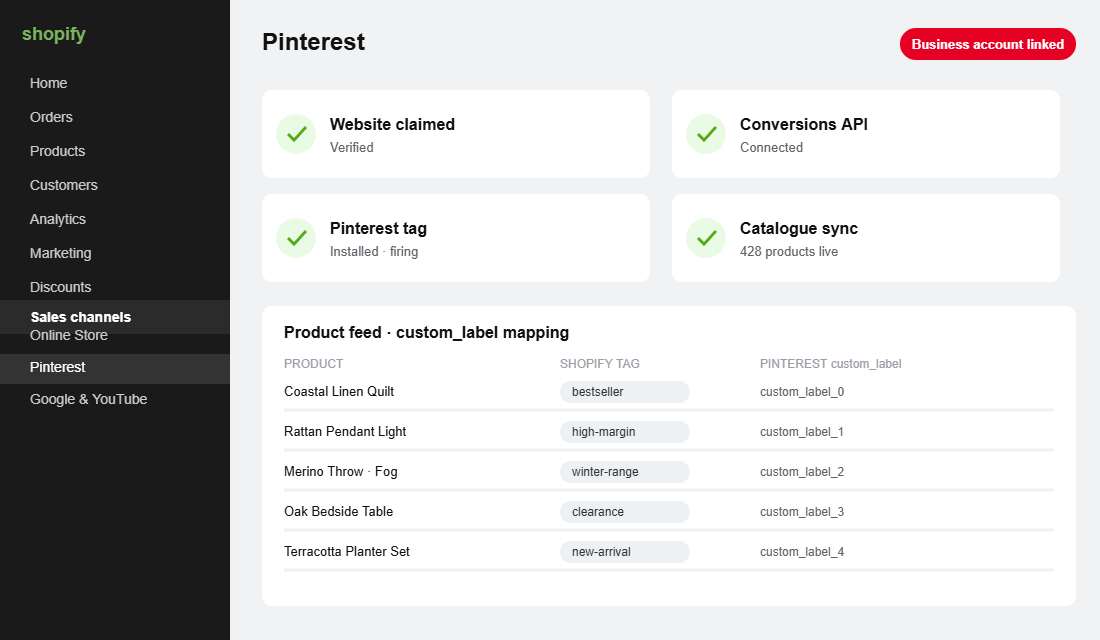
- Install the Pinterest channel from the Shopify App Store. Connect your Pinterest Business account, then claim your website so your pins carry your logo and analytics flow back.
- Sync your catalogue. Shopify collections become the structure Pinterest reads, so your products land as Shopping pins automatically and refresh with price and stock.
- Turn on the Conversions API, not just the tag. CAPI sends server-side events so you recover the conversions Safari and ad blockers hide. This is the same signal-recovery job we cover in depth for Meta and Google.
- Confirm the five core events fire: PageVisit, ViewCategory, AddToCart, Checkout and Purchase. If Purchase is not landing, nothing downstream works.
- Map your Shopify tags to Pinterest custom_label fields. Tag bestsellers and high-margin lines so you can bid on them separately instead of treating the whole catalogue as one blob.
If you have already done the server-side work for your other channels, most of this is a repeat. Our Shopify server-side tracking playbook covers the CAPI setup end to end, and the same event layer feeds Pinterest.
Part 2: Structure campaigns the way Pinterest actually rewards
Pinterest has three campaign jobs, and you want money in all three once tracking is clean. Skipping straight to a single conversion campaign is the fastest way to a thin, expensive account that never scales.
- Catalog Sales (Shopping ads). Your workhorse. Pinterest turns your synced products into dynamic Shopping pins and shows the right item to the right searcher. This is where the 2.6x conversion lift lives, so give it the biggest share of budget.
- Conversions campaigns. Use these for hero products and seasonal ranges with custom creative. Optimise for Checkout or Purchase, never for clicks, so the algorithm chases buyers not browsers.
- Consideration campaigns. Cheap top-of-funnel reach that fills your audience for retargeting. Consideration clicks can run near 30 cents, which makes them a bargain for building warm pools.
Keep the structure flat. One campaign per objective, a handful of ad groups split by product category or custom_label, and let Pinterest’s system consolidate. Brands like Castlery, the furniture DTC, moved to Pinterest’s automated Performance Plus setup and saw a 2.3x lift in ROAS, a 98% jump in average order value and a 14% drop in cost per acquisition versus their manual builds. Simpler structure, more signal, better result.
On budget split, a simple starting point works: roughly 60% into Catalog Sales, 25% into Conversions for hero products, and 15% into Consideration to keep the top of funnel filled. Hold that daily budget steady for a full month. Pinterest’s learning phase is slower than Meta’s, and every time you yank the budget you reset the clock. Treat your first month as tuition, not a verdict.
Part 3: Creative that earns the click on a visual platform
Pinterest is unforgiving on bad creative because the whole platform is a wall of images competing for the same eye. The good news is you do not need a studio. You need to respect the format.
- Go vertical, always. A 2:3 ratio (1000 by 1500 px) owns more screen. Square and landscape pins get visually crushed and skipped.
- Show the product in a real setting. Lifestyle shots beat white-background packshots on Pinterest because people are picturing the item in their own home or wardrobe.
- Add a short text overlay. Pins are found in silence during a scroll, so a four or five word hook (“Winter linen, sorted”) tells the story before they read the caption.
- Test video and collages. Idea pins and collage formats extend reach and are still under-priced by most advertisers.
- Refresh monthly. Pinterest content has a long shelf life, but rotating creative keeps your best audiences from fatiguing.
Sweaty Betty, the activewear brand, made Pinterest their top-performing channel by leaning into lifestyle creative that matched how women actually search. They cut cost per acquisition by 34% and lifted ROAS 39% year on year. The creative did the work, not a bigger budget.
Part 4: Targeting and the Australian audience
Pinterest targeting blends search behaviour with interests, which is why it feels more like Google than Meta. You have three levers worth pulling, in this order:
- Keywords. Bid on the terms your buyer searches. “Scandi nursery”, “hamper ideas Australia”, “capsule wardrobe winter”. Think of the phrases a customer types when they are still deciding, not just your brand name.
- Interests. Broaden into the categories your product lives in so Pinterest can find lookalike planners you have not named yet.
- Actalike and retargeting audiences. Feed your Purchaser list back in to build actalikes, and retarget cart abandoners. Warm Pinterest audiences behave the same way they do on Meta, so the logic in our Shopify retargeting playbook maps straight across.
One Australian nuance: Pinterest users plan early. Searches for Christmas, back to school and Mother’s Day spike months ahead of the date. In July, your buyer is already pinning spring wardrobes and Father’s Day gifts. Load seasonal creative six to eight weeks before you would on Meta and you catch demand while the auction is cheap.
Part 5: Measure past the last click or you will kill it too early
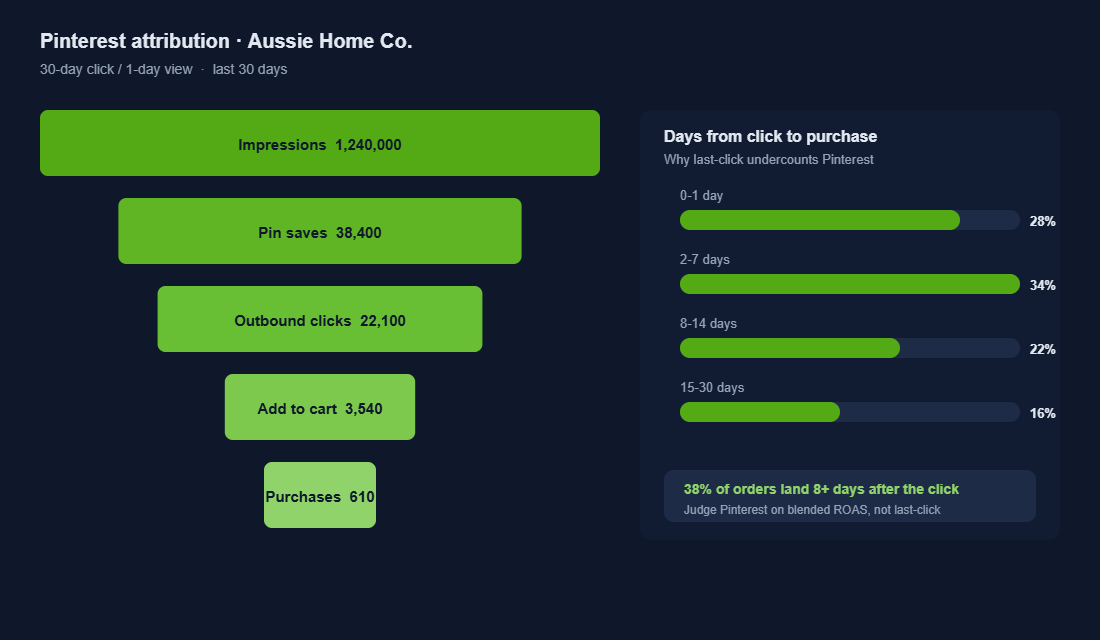
This is where most founders quietly switch Pinterest off. They check last-click ROAS in Shopify at day three, see a soft number, and pull budget. The problem is Pinterest’s long consideration window. A meaningful share of orders lands one to four weeks after the click, so last-click reporting always undercounts it.
Judge Pinterest the way you judge Google Shopping: on blended performance and platform-reported ROAS with CAPI feeding clean data, over a 30-day window. The Conversions API you set up in Part 1 is what makes those platform numbers trustworthy. Watch marketing efficiency ratio across the whole account, not one channel in isolation, the same discipline we apply in the Performance Max playbook.
Real accounts bear this out. Case studies across jewellery, home decor and fashion brands routinely land 4x to 7x ROAS on Pinterest once tracking is clean and campaigns have had four weeks to learn. The brands that fail are almost always the ones that judged the channel on a three-day last-click screenshot.
Your 90-day Pinterest launch plan
Here is the checklist we hand Aussie brands to take Pinterest from zero to a real channel without wasting the test budget:
- Days 1 to 7: Install the Pinterest channel, claim your site, sync your catalogue, switch on CAPI, and confirm all five events fire in test purchases.
- Days 8 to 21: Launch one Catalog Sales campaign and one Consideration campaign. Load 10 to 15 vertical lifestyle pins. Start with a modest daily budget you can hold for a full month.
- Days 22 to 45: Add a Conversions campaign for your hero products. Build actalike audiences off your Purchaser list and turn on cart retargeting. Do not touch daily budgets while the pixel learns.
- Days 46 to 75: Cut the bottom third of creative, scale the winners, and split high-margin lines into their own ad group using custom_label bids.
- Days 76 to 90: Review on a 30-day window and blended ROAS. Decide your ongoing budget based on the whole-account MER, not last-click.
Five mistakes that quietly burn your Pinterest budget
We audit a lot of Pinterest accounts that “did not work”. The failure is almost never the platform. It is one of these five, and every one is avoidable:
- Judging it on day-three last-click. The single most expensive mistake. You kill the channel before the 30-day window has even opened, then conclude Pinterest does not convert. It does. You just measured it with the wrong ruler.
- Running the tag without the Conversions API. Browser-only tracking loses a big slice of conversions to Safari and ad blockers. The algorithm optimises on what it can see, so a half-blind pixel spends your budget on the wrong people.
- Uploading Meta creative unchanged. Square packshots built for the Instagram feed get crushed on a vertical Pinterest grid. Reformat to 2:3 and swap in lifestyle imagery, or the click-through rate never lifts.
- Over-segmenting on day one. Twelve ad groups with 15 dollars each starves every one of them of the signal Pinterest needs to learn. Stay flat and let the system consolidate before you split.
- Ignoring the seasonal lead time. Launching a Christmas range in November on Pinterest is late. The searches happened in September. Miss the lead time and you pay peak prices for demand that has already moved on.
Fix these and you are ahead of most Australian brands on the platform, because the majority are still making all five at once.
How paid Pinterest feeds your free organic reach
Most paid channels are a closed loop: money in, clicks out, nothing left behind. Pinterest is the rare exception, and understanding why changes how you value the spend. Every pin you promote also enters Pinterest’s organic search index, where it can be found, saved and clicked for months with no further cost.
When someone saves your promoted pin to their own board, it spreads to their followers as organic distribution you never paid for. A single Shopping pin for a bestseller can keep driving traffic through two Christmases. This is why brands that commit to Pinterest see cost per acquisition fall over time rather than climb, the opposite of what happens when Meta and TikTok auctions heat up.
The practical takeaway: keep your product pins consistent with your organic boards, use real keywords in pin titles and descriptions so the index can categorise them, and think of paid as the accelerant on an asset that keeps working long after the campaign ends.
The compound effect: why Pinterest gets cheaper over time
Here is what makes Pinterest different from your other paid channels once it is running. A Meta ad dies the moment you stop paying. A pin keeps getting found, saved and clicked for months, because Pinterest is a search index and your product pins stay in it. Your paid activity seeds organic reach you never pay for again.
Stack the five parts together and they compound. Clean CAPI signal makes the algorithm smarter, which lowers your CPC. Lower CPC lets Consideration campaigns build bigger warm audiences cheaply. Bigger warm audiences make retargeting and actalikes convert harder. And every pin you run keeps working long after the campaign, so your blended ROAS drifts up while your competitors are still paying full freight on a channel that resets every day.
Pinterest will not replace Meta or Google. It is the third channel that quietly diversifies your acquisition, protects you when CPMs spike on the platforms everyone crowds, and reaches a high-intent, higher-income Aussie buyer your competitors are ignoring.
Where to start this week
Do not launch a campaign yet. Spend your first week on Part 1 only. Install the channel, sync the catalogue, and get the Conversions API firing clean Purchase events. Ninety percent of Pinterest failures trace back to that foundation being skipped. Get the plumbing right and the channel does the rest.
Inside eCommerce Circle, channel diversification like this is one of the core pillars we work on with every member, because the brands that survive rising ad costs are the ones not betting everything on two platforms. If you want a second opinion on whether Pinterest fits your store, let’s talk.