You open Meta Ads Manager on a Monday morning and it tells you the weekend pulled a 3.2 ROAS. Then you open Shopify, cross-check the bank feed, and the numbers do not line up. The campaigns Meta swears are printing money are not showing up in your actual revenue. If that gap makes your stomach drop every time you go to scale spend, you are not imagining things.
What’s in This Article
Here is what most Aussie founders do about it. They either trust Meta blindly and keep pouring budget into campaigns that look good on a dashboard, or they lose faith in the numbers completely and start scaling on gut feel. Both are expensive. The real issue is usually not your creative, your audiences, or your bidding. It is that the data feeding your ad account has been quietly breaking since 2021, and nobody sent you the memo.
Since Apple’s App Tracking Transparency prompt landed, browser-based tracking has been leaking sales. Facebook pixel signal loss has been measured at anywhere from 12.5% to 37% of conversions, and pixel capture rates fell from 80 to 95% of backend sales down to just 60 to 70%. That means up to a third of your orders never make it back to Meta, so the algorithm optimises half-blind and your reported cost per purchase looks worse than reality. Server-side tracking is how the sharpest brands closed that gap. This is the 5-part system we walk through with founders inside eCommerce Circle to get the signal back.
Why Your Meta Dashboard Is Quietly Lying to You
The classic Facebook pixel is a snippet of JavaScript that fires from your shopper’s browser. That single point of failure is the whole problem. Ad blockers strip it out. Safari’s Intelligent Tracking Prevention caps its cookies at seven days, then twenty four hours. And when an iPhone user taps “Ask App Not to Track”, Meta loses the deterministic link between that person and your sale.
Opt-in rates for tracking on iOS have sat stubbornly low, frequently under 25%, and some panels have measured global yes rates below 15%. Roughly half of Australian ecommerce traffic is on an iPhone, so this is not a rounding error. It is a structural hole in the middle of your measurement.
The knock-on effects are brutal. Deterministic attribution collapsed and Meta leaned harder on modelled, estimated conversions. Retargeting audiences shrank because the pixel could no longer see who visited. Lookalikes lost their seed data. Cost per acquisition climbed while the algorithm struggled to optimise on incomplete signal. It got bad enough that Facebook’s share of US direct-to-consumer ad spend slid from 34.9% in early 2021 to 27.0% a year later, a shift of nearly two billion dollars.
The cruel part is that your dashboard does not warn you. It just reports fewer conversions than actually happened and misattributes some of the rest. That is why your Meta ROAS and your bank balance tell two different stories. If you have ever tried to reconcile the two, our Shopify Blended ROAS Playbook and Retargeting Playbook are the companion pieces to this one.
What Server-Side Tracking Actually Is (In Plain English)
Forget the jargon for a second. Browser tracking sends the event from the shopper’s device, out in the open, where blockers and privacy settings can intercept it. Server-side tracking sends the same event straight from your store’s server to Meta’s server, a direct handshake that never touches the fragile browser layer.
Think of it as two roads to the same destination. One runs through a suburb full of speed bumps and roadblocks. The other is a private tunnel. The smart move is not to pick one. It is to send the purchase down both roads and then tell Meta they are the same trip, so it counts one sale, not two.
On Shopify, the browser road is the Web Pixel and Customer Events API. The tunnel is the Meta Conversions API (usually shortened to CAPI). When both are wired up and deduplicated, Meta sees far more of your real sales, and the whole account gets healthier. Here is how to build it in five parts.
Part 1: Fix the Foundation With Native CAPI
Most founders assume server-side tracking means hiring a developer for a fortnight. For the majority of stores under a few million in revenue, it does not. Shopify and Meta built a native connection that turns on the Conversions API for you, and it is free.
Install the Facebook and Instagram sales channel, connect your Business Manager, and set your customer data-sharing level to “Maximum”. That single setting is what activates server-side event sending. Here is the exact sequence:
- Install the app. Add “Facebook and Instagram by Meta” from the Shopify App Store as a sales channel.
- Connect the accounts. Link your Meta Business Manager, your pixel or dataset, and your commerce account.
- Set data sharing to Maximum. In the data-sharing settings, choose “Maximum”. “Enhanced” is browser only. “Maximum” is what switches on the Conversions API.
- Verify in Events Manager. Open Meta Events Manager and confirm your Purchase event shows a second processing source labelled “Server” or “Conversions API”, with action_source set to “website”.
That is the free 80%. Before you spend a cent on a third-party app, get this right and confirm the server events are actually landing. You would be surprised how many stores have the app installed but sitting on “Enhanced”, quietly leaving the tunnel closed.
Part 2: Send the Right Parameters to Lift Match Quality
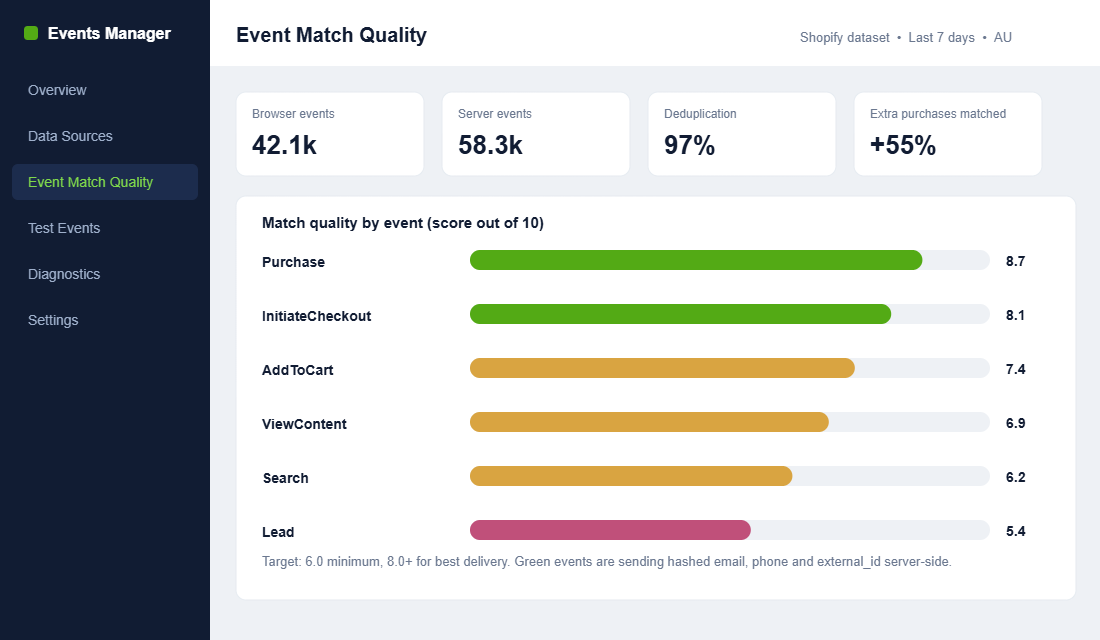
Sending an event server-side is only half the job. Meta still has to match that event to a real person and a real ad click. The more identifying signals you send, the better it matches. Meta scores this on a 0 to 10 scale called Event Match Quality, or EMQ.
Aim for a minimum of 6, and push for 8 or higher on your Purchase event. It matters more than most founders realise. Meta’s own data shows advertisers who improved EMQ saw 15 to 25% better cost-per-action, and brands report 20 to 40% higher conversion accuracy once match quality climbs. That is free performance sitting on the table.
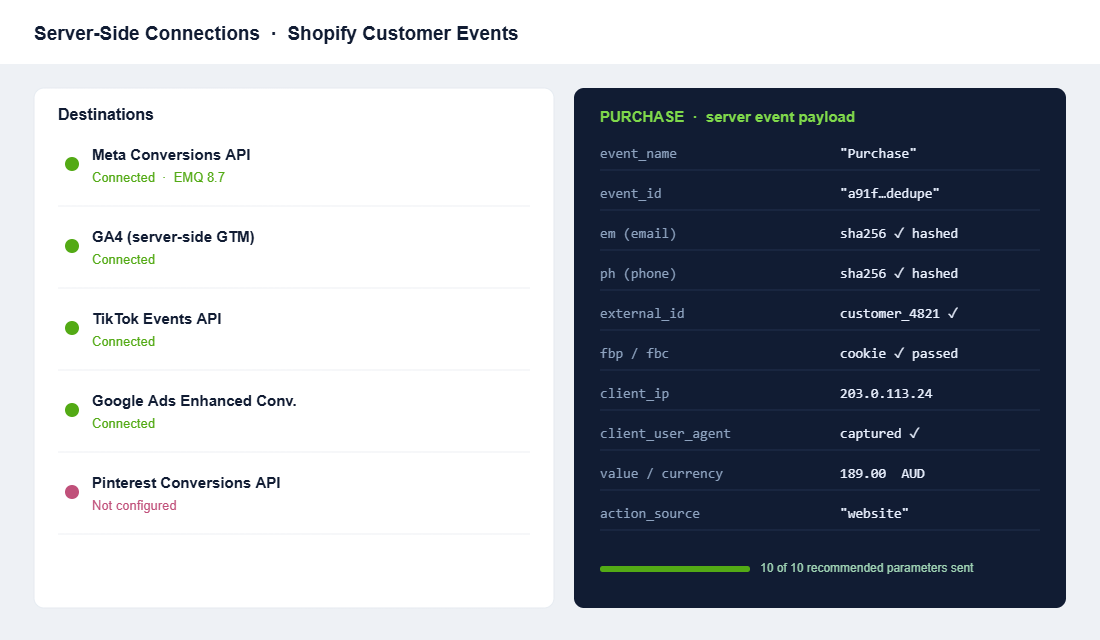
The match keys that move the needle, sent hashed so raw data never leaves your control:
- Hashed email and phone. The two strongest signals. Passing both is the single biggest EMQ lift.
- external_id. Your Shopify customer ID, which ties repeat buyers together across sessions and devices.
- fbp and fbc cookies. The browser and click identifiers that connect the sale back to the specific ad.
- Client IP address and user agent. Passed automatically from the server, these anchor the event to a session.
- Name, city, state and postcode. Secondary keys that top up the match rate for logged-in customers.
The native app passes the basics. If your EMQ is stuck around 5 or 6, that is your signal to add a dedicated tool that pushes email, phone and external_id on every event. We will get to the tool choice shortly.
Part 3: Deduplicate So You Do Not Count Sales Twice
This is the step that trips people up, and getting it wrong is worse than doing nothing. If both the browser pixel and the server send the same purchase without a shared identifier, Meta counts two sales. Your ROAS looks incredible, you scale hard, and you are optimising toward a number that does not exist.
The fix is a shared event_id. Every purchase gets one unique ID, and both the pixel and the Conversions API attach it to the event. Meta sees the matching IDs, understands it is one sale arriving by two roads, and keeps a single count. The native Shopify integration handles this automatically, which is another reason to start there. If you move to a custom setup, deduplication is the first thing to test, not the last.
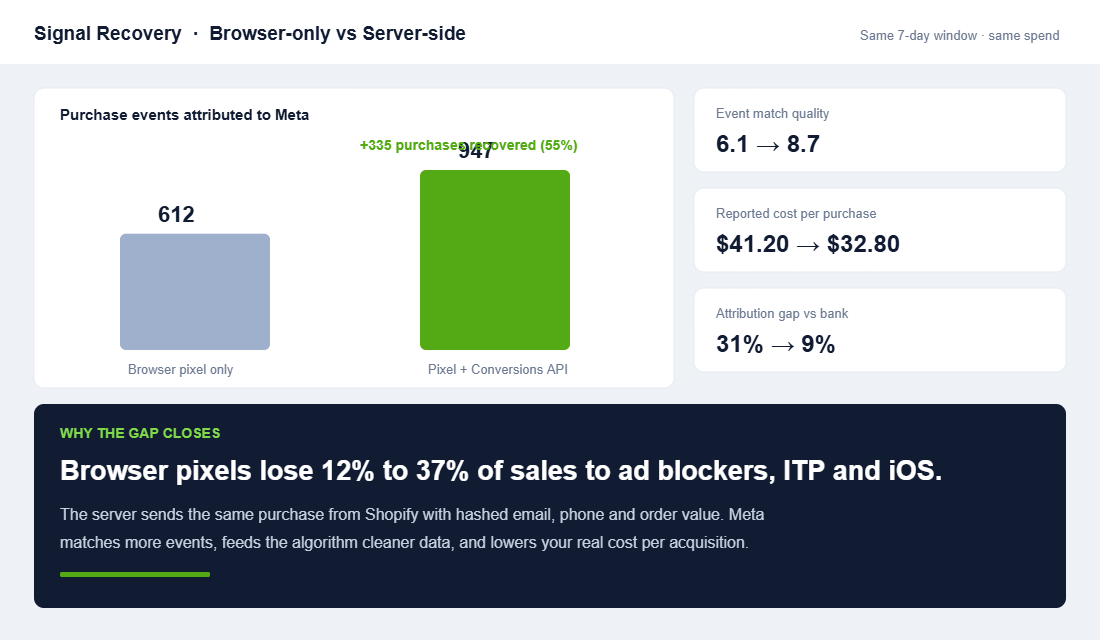
When it is working, the payoff is visible fast. In the recovery above, the same seven-day window with the same spend went from 612 purchases attributed on the browser pixel alone to 947 once the Conversions API was matching and deduplicating. That is 335 real sales, roughly 55% more, handed back to the algorithm to learn from.
Part 4: Extend the Same Playbook Beyond Meta
Meta is where most Aussie DTC brands feel the pain first, but the signal loss hit every browser-based platform. Once your foundation is solid, the same server-side logic extends across your whole stack, and each one compounds the last.
- GA4 via server-side Google Tag Manager. Cleaner analytics and better modelled data across every channel.
- TikTok Events API. Essential if TikTok is a real acquisition channel and not just a content play.
- Google Ads Enhanced Conversions. Sends hashed first-party data to sharpen Google’s attribution and Performance Max.
- Pinterest Conversions API. Worth it for homewares, fashion and beauty brands with meaningful Pinterest spend.
Do not boil the ocean. Rank these by how much you spend on each channel and fix them in that order. A brand putting 80% of budget into Meta should have a flawless Meta setup before it worries about Pinterest.
Part 5: Measure the Recovery, Do Not Assume It
Server-side tracking is not a set-and-forget switch. You need proof it is working, and three numbers tell you the truth:
- Event Match Quality. Check it in Events Manager before and after. A jump from 6 to 8-plus on Purchase is the clearest sign your parameters are landing.
- The attribution gap. Divide Meta-reported purchases by the actual Shopify orders that came from Meta. Before server-side, that gap is often 25 to 35%. A healthy setup pulls it under 10%.
- Reported cost per purchase. As recovered events flow in, your reported CPA drops even though nothing about your spend changed. You are simply seeing sales you were always making.
For the honest picture, keep watching your Marketing Efficiency Ratio, total revenue divided by total ad spend, alongside the platform numbers. Server-side tightens the platform data, but MER is the ledger that never lies. Your consent banner and hashing setup also need to stay compliant as you send more first-party data, which is exactly what our Shopify Privacy Compliance Playbook covers.
Choosing Your Setup: Native, or Level Up
You do not need the most expensive option. You need the one that matches your revenue and how much you spend on ads. Here is the honest decision tree:
- Native Meta CAPI (free). The Shopify Facebook and Instagram app on “Maximum”. Right for most stores under roughly five million in revenue. Start here, always.
- Elevar (from around US$50 per month). A proper server-side data layer built for Shopify. The step up when your EMQ is capped and you are scaling past a few hundred thousand a month.
- Littledata (from around US$99 per month). Strong for accurate GA4 and for subscription brands where recurring orders confuse standard tracking.
- Stape plus server-side GTM. Maximum control across Meta, GA4, TikTok and more. This is agency territory, best run with a specialist rather than solo.
The mistake is jumping to a paid tool before the free foundation is verified. Get native CAPI live, confirm the server events and deduplication, read your EMQ, and only then decide whether a dedicated data layer will earn its keep.
Three Ways Aussie Stores Get Server-Side Wrong
Server-side tracking is simple in theory and easy to fumble in practice. When we audit a store that swears it is “already set up”, the failure is almost always one of these three, and each one silently costs money:
- Stuck on Enhanced. The Meta app is installed, but data sharing was never switched to “Maximum”. The server tunnel is closed and the founder has no idea. This is the most common one by a mile.
- Firing with no match keys. The server sends events, but only the IP address and user agent, so EMQ sits at 4 or 5. That is barely better than the pixel. Without hashed email, phone and external_id, the tunnel is open but carrying almost no signal.
- Broken deduplication. A custom Tag Manager setup sends the purchase twice with no shared event_id. Reported ROAS looks euphoric, the founder scales, and a rising true CPA hides behind a phantom number until the bank balance calls it out.
Picture a Melbourne skincare brand spending $60,000 a month on Meta. Its pixel was capturing about two thirds of sales, so Meta was optimising on roughly $40,000 worth of visible signal and guessing at the rest. After switching to Maximum, adding hashed email and phone, and confirming deduplication, Event Match Quality climbed from 6.1 to 8.7 and reported cost per purchase fell from around $41 to $33. Nothing changed about the budget or the creative. The brand simply stopped hiding a third of its own results from the algorithm, and the same spend started working harder.
The Compound Effect: Why This Is a Discount on Every Ad Dollar
Server-side tracking does not just fix a reporting number. It feeds the machine. Every purchase you recover is a fresh, high-quality signal telling Meta’s algorithm who your real buyers are. Better signal means better optimisation. Better optimisation means the algorithm finds more of the right people for the same spend.
That lower cost per acquisition then lets you bid into audiences that were unprofitable before, which drives more first-party data, which sharpens the signal again. It is a flywheel. The founder who fixes tracking is effectively getting a standing discount on every ad dollar for the life of the store, while the founder who ignores it keeps paying a blindness tax on every campaign.
This is why measurement is not the boring back-office job it looks like. It is one of the highest-impact moves available to a scaling brand, because it makes everything else you do in advertising work harder.
Your Server-Side Tracking Audit (Run This Week)
Do not let this sit in the someday pile. Block thirty minutes and work through the checklist. It is the exact sequence we use inside eCommerce Circle:
- Confirm the Conversions API is on. In Events Manager, check your Purchase event has a “Server” processing source, not browser only.
- Check your data-sharing level. In the Shopify Meta app, it must say “Maximum”, not “Enhanced”.
- Read your Event Match Quality. Note the Purchase score today. Under 6 means you are leaving performance behind.
- Verify deduplication. Confirm a shared event_id is set so you are not double-counting sales.
- Measure the attribution gap. Meta-reported purchases divided by real Shopify orders from Meta. Write down the percentage.
- Prioritise by spend. List your channels by ad budget and fix server-side tracking in that order.
- Set a recheck date. Re-read EMQ and the attribution gap in thirty days to confirm the recovery held.
The Bottom Line
The signal that iOS privacy changes broke is not coming back on its own, and the platforms are never going to volunteer that your numbers are soft. Server-side tracking is how you take the measurement back into your own hands. Fix the foundation with native CAPI, send strong match keys, deduplicate, extend across your stack, and measure the recovery. Do that and you stop scaling blind.
Inside eCommerce Circle, clean measurement is one of the core pillars we work on with every member, because it sits underneath every other growth lever you have. If you want a second opinion on whether your tracking is actually recovering the signal or just looking busy, let’s talk.