Your theme is the most expensive thing in your store that nobody has looked at in five years. You have swapped agencies, rebuilt your ad account twice, moved from Mailchimp to Klaviyo, added eleven apps and dropped six. The theme has just sat there, collecting overrides.
What’s in This Article
Most Aussie founders treat a theme upgrade as a design project. It is not. It is a revenue project with a design side effect. Deloitte Digital studied mobile site data across 37 retail, travel and luxury brands and found that a 0.1 second improvement in load time lifted retail conversion by 8.4% and average order value by 9.2%. One tenth of a second. Legacy Shopify themes routinely run two to three seconds behind a modern build, so you are not fighting for tenths. You are leaving whole seconds on the table.
The other half of the problem is structural. Every hardcoded block in an old theme is a task that has to route through a developer, which means it does not happen. Your competitor ships a new landing page in an afternoon. You raise a ticket and wait nine days. This article is the exact five-phase process to fix both problems without torching the conversion rate you have spent years building.
Why Your 2019 Theme Is Quietly Capping Your Growth
Australians spent 82.6 billion dollars online in 2025, up 14% year on year, and roughly 24% of all retail spend now happens online according to the Australia Post eCommerce Report. That growth is almost entirely mobile. Around 77% of Australian retail site visits and 68% of orders now come from a smartphone.
Here is the part that should worry you. Australian mobile conversion rates typically sit between 1.5% and 1.8%, while desktop runs 3.2% to 3.6%. Most of that gap is not a shopper problem. It is a build problem. Heavy hero images, render-blocking scripts, a sticky header that shifts the page after load, a cart drawer that takes 400 milliseconds to respond to a tap.
Vintage themes commonly score 45 to 65 on mobile PageSpeed. A clean modern Online Store 2.0 build sits in the 85 to 95 range. Shopify’s own Core Web Vitals data shows Dawn passing the Good threshold for Largest Contentful Paint on 96.4% of stores and for Interaction to Next Paint on 95.6%. Your theme is not slow because Shopify is slow. It is slow because of what has been bolted onto it since 2019.
Phase 1: Audit the Theme You Have Before You Shop for a New One
Founders always want to start by browsing the theme store. Wrong order. You cannot scope a rebuild until you know exactly what is holding the current store together, and old themes always hide more custom work than anyone remembers.
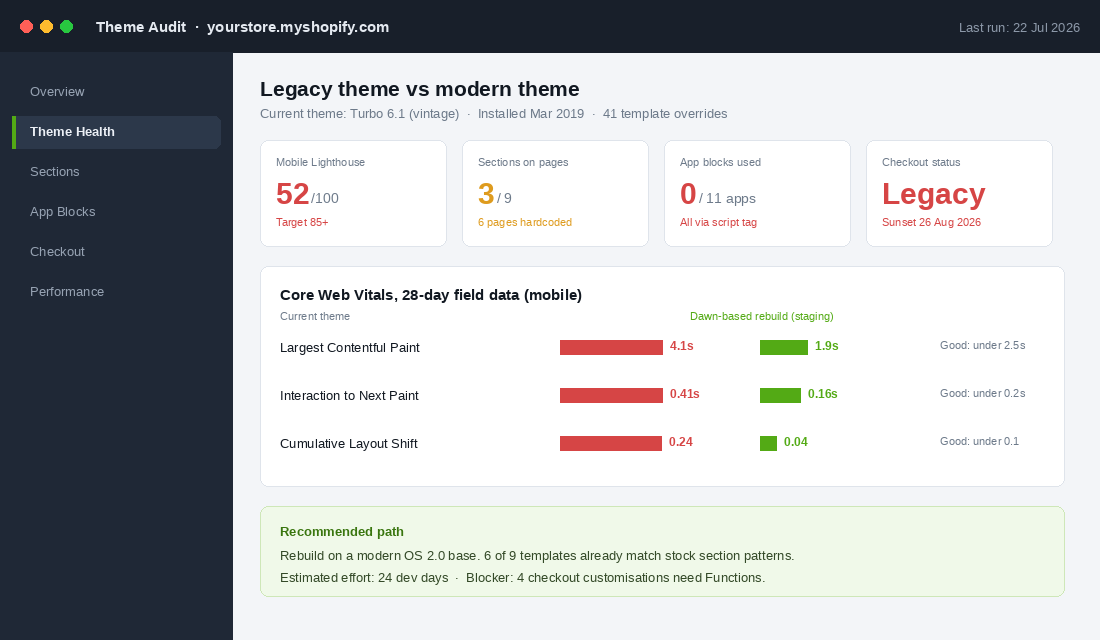
Spend a day producing five artefacts. This is not busywork. It becomes the brief you hand a developer, and it is the difference between a fixed quote and an open-ended nightmare.
- A template inventory. Every template file in the theme, what it renders, and when it was last touched. Flag anything with a custom suffix like
product.bundle.liquid. Those are the files that break during migration. - A field performance baseline. Pull 28 days of Core Web Vitals from Google Search Console, split by mobile and desktop, and record the 75th percentile for LCP, INP and CLS. Lab scores from Lighthouse are useful for debugging. Field data is what you are actually judged on.
- A script tag register. In your Shopify admin, look at what apps have injected code. Old apps you uninstalled often leave orphaned script tags behind that still fire on every page load. We covered how to clear this out in the Shopify App Stack Audit Playbook.
- A checkout customisation list. Anything living in
checkout.liquid, Additional Scripts, or Shopify Scripts. Write down what each one does commercially, not technically. “Hides express payment for pre-order items” is the useful version. - A conversion baseline by device and template. Thirty days minimum. If you skip this, you will never be able to prove the new theme worked, and you will spend the next quarter arguing about it.
One rule for this phase: do not fix anything yet. The temptation to start deleting apps mid-audit is strong, and it corrupts your baseline. Document, then act.
Phase 2: Choose Between a Patch, a Re-Skin and a Rebuild
Three legitimate paths exist and they cost wildly different amounts. Picking the wrong one is the single most expensive mistake in this whole process.
Patch the theme you have. Right choice when your theme is already Online Store 2.0, your field Core Web Vitals are borderline rather than failing, and your complaint is speed rather than flexibility. Compress and resize images, defer non-critical JavaScript, remove orphaned script tags, cut unused app embeds. Budget three to eight developer days. Expect to claw back one to two seconds.
Re-skin onto a modern premium theme. Right choice when your theme is vintage, your brand look is working, and your custom logic is limited to a handful of templates. You buy a modern base, rebuild your homepage and product page inside it using stock sections, and port only the custom pieces that earn their keep. Budget twelve to twenty five developer days.
Rebuild from a clean base. Right choice when you have more than about thirty template overrides, multiple markets, a heavily customised checkout, or a product catalogue with genuine complexity like configurable kits or made-to-order lead times. Budget thirty to sixty developer days and treat it like a project with a launch plan, not a task.
The honest test: if more than a third of your templates carry custom overrides, a re-skin turns into a rebuild halfway through and you pay for both. Look at brands like Culture Kings, where collection pages behave differently depending on the visitor, or Bared Footwear, where fit content and retail stock have to stay consistent across every touchpoint. That kind of behaviour is not a theme setting. It is architecture, and architecture is a rebuild.
Phase 3: Move Content Out of Code and Into Sections and Metaobjects
This is the phase that pays you back every week for the next three years, and it is the one most founders under-scope because it produces nothing visible on launch day.
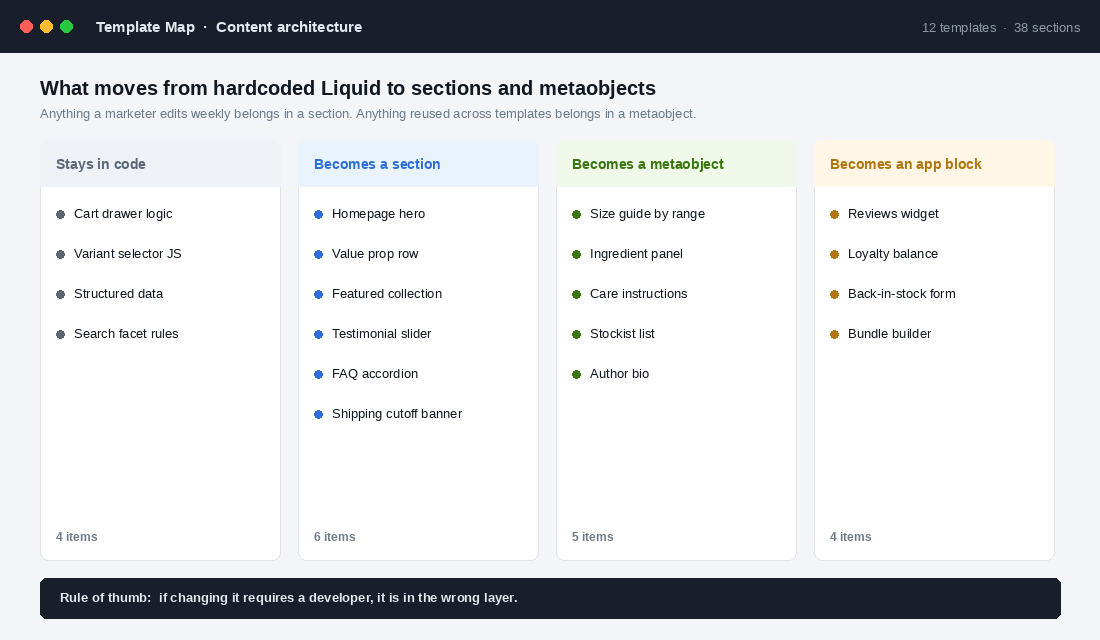
Take every element on your storefront and sort it into four buckets:
- Stays in code. Cart logic, variant selection, structured data, search facet rules. Things that should never change without review.
- Becomes a section. Anything a marketer touches weekly. Hero, value prop row, featured collection, testimonial slider, FAQ accordion, the shipping cutoff banner you rewrite every December.
- Becomes a metaobject. Structured content reused across many products. Size guides by range, ingredient panels, care instructions, stockist lists. Write it once, reference it everywhere, update it in one place.
- Becomes an app block. Reviews, loyalty balance, back-in-stock forms, bundle builders. App blocks load inside your theme’s section framework rather than injecting a script tag at the top of every page.
The rule of thumb is blunt: if changing it requires a developer, it is in the wrong layer. Who Gives A Crap runs constant campaign messaging and impact storytelling across the storefront. That cadence is only possible when the content layer is editable by the people who write the copy.
Practical target for a mid-size Aussie store: nine to fourteen custom sections, four to six metaobject definitions, and every app on the storefront running as an app block rather than a script tag. Get there and your next campaign page is a two-hour job instead of a two-week ticket.
Phase 4: Fix Checkout Before 26 August Fixes It For You
This one has a hard date on it, so deal with it first if you are still carrying legacy checkout code.
Shopify sunset checkout.liquid, Additional Scripts and script tags on the Thank You and Order Status pages for Plus stores on 28 August 2025. Shopify Scripts stopped running alongside Checkout Extensions on 30 June 2026. And on 26 August 2026, support for the same legacy customisations ends for every non-Plus store on Basic, Shopify and Advanced. Stores that have not migrated get auto-upgraded, and the legacy customisations are removed in the process.
Read that last sentence again. If your free shipping threshold logic, your post-purchase tracking pixel or your B2B payment gating lives in Additional Scripts, it disappears. Not degrades. Disappears. And you find out from your bookkeeper three weeks later when the numbers do not reconcile.
Map every legacy customisation to its modern replacement:
- Discount and shipping logic moves to Shopify Functions. Volume discounts, bundle pricing, hiding payment or delivery methods by cart contents.
- Custom fields and messaging move to Checkout UI extensions. Delivery instructions, gift notes, age verification, trust badges.
- Tracking and analytics move to Web Pixels. This is the one most stores break, because the old pixel silently stops firing and paid media attribution goes sideways for a month.
- Branding moves to the checkout branding API and the checkout editor. Colours, fonts, logo, layout.
Test the migrated checkout with real orders across every payment method you accept, including Afterpay, Zip and Shop Pay, and on both iOS and Android. Then check your order confirmation emails and your post-purchase flows still fire. If you want the wider view on where checkout leaks revenue, the Shopify Checkout Optimisation Playbook covers the conversion side in detail.
Phase 5: Launch on a Traffic Split, Not on a Friday Afternoon
The riskiest hour in a theme project is the moment somebody hits Publish. Every conversion assumption you have made is untested, and if the new theme converts worse you will not know for days because traffic mix and day of week will muddy the read.
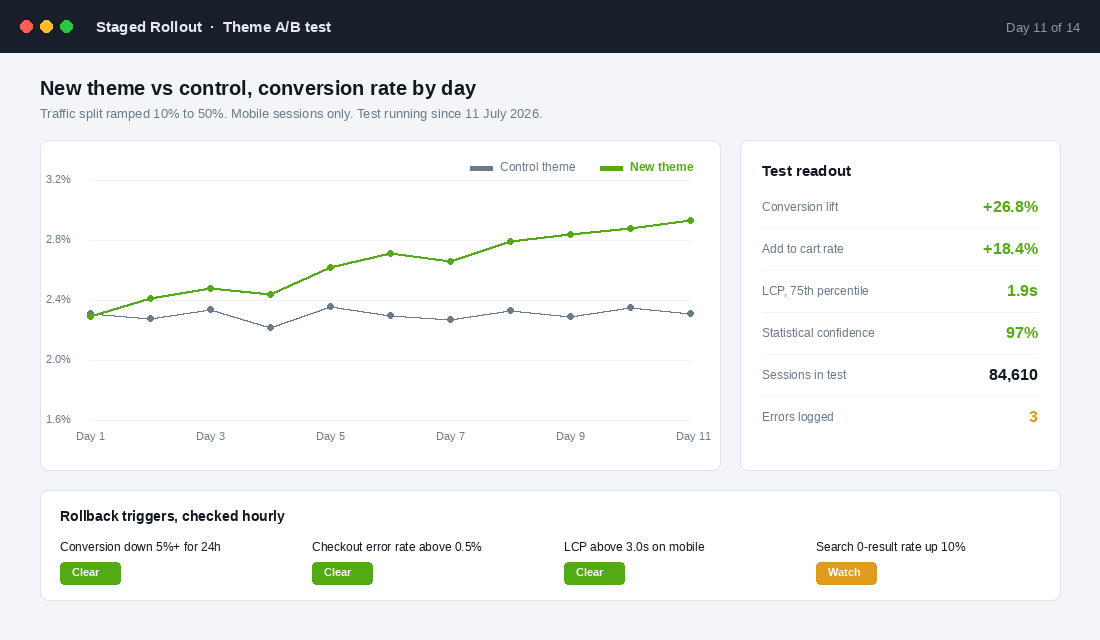
Run a staged rollout over ten to fourteen days:
- Days 1 to 3, 10% of traffic. You are hunting errors, not reading conversion. Watch console errors, checkout completion and search zero-result rates.
- Days 4 to 7, 25%. Now you start reading behaviour. Add to cart rate by template, scroll depth on the product page, mobile bounce.
- Days 8 to 14, 50%. This is where you get a conversion read you can trust. Hold it until you have a clear signal or 30,000 sessions per variant, whichever comes later.
- Full rollout. Only after the 50% split holds for at least four consecutive days. Never on a Friday. Never during a campaign.
Write your rollback triggers down before you launch, because in the middle of a bad day nobody makes a good decision. Sensible defaults: conversion down 5% or more for 24 hours, checkout error rate above 0.5%, mobile LCP above 3.0 seconds, or site search zero-result rate up 10%. Any trigger fires, you revert and diagnose on staging. The Shopify Mobile Conversion Playbook is the right companion piece here, since mobile is where a theme change hurts or helps first.
The Tooling: Shopify CLI and GitHub in One Afternoon
If your developer is still editing theme files in the Shopify admin, you have no version history and no way to review a change before it hits live. Fix that in an afternoon. You need Node 22.12 or higher and Git 2.28 or higher for current Shopify CLI versions.
- Install the CLI with
npm install -g @shopify/cli, then runshopify theme pullto bring the live theme down into a local folder. - Commit that folder to a new GitHub repository as your starting point. This is your rollback insurance from here on.
- Run
shopify theme devto get a local preview with hot reload pointed at an unpublished theme. Nothing you do here touches live. - Run
shopify theme checkto lint the Liquid. On an old theme this will surface deprecated filters and performance warnings you did not know existed. - In your Shopify admin, go to Online Store, Themes, Add theme, Connect from GitHub, then select the repo and branch. Commits to that branch now deploy automatically and admin edits commit back.
- Protect the main branch so changes require a pull request. Add the Shopify theme-check GitHub Action so every pull request is linted before anyone can merge.
Pair that with two monitoring habits: Google Search Console for field Core Web Vitals every fortnight, and PageSpeed Insights on your three highest-traffic templates after any app install. Most speed regressions arrive with an app, not with a theme change.
The Performance Budget That Stops the New Theme Getting Slow Again
Here is the pattern I see over and over. A brand spends 30,000 dollars on a beautiful rebuild, launches at a 92 mobile score, and eighteen months later is back at 54. Nobody did anything wrong on any given day. They just added one app a month with no rule about what it costs.
Set a written performance budget on launch day and hold it:
- Mobile LCP under 2.5 seconds at the 75th percentile in field data, measured monthly.
- INP under 200 milliseconds. This is the metric heavy cart drawers and quiz apps quietly destroy.
- CLS under 0.1. Reserve height for every image, banner and app block so nothing jumps.
- Total JavaScript under 300KB compressed on the product page. Every new app has to fit inside that number or something else comes out.
- One in, one out on apps. No new storefront app ships without naming the app it replaces or the measurable revenue it must produce within 60 days.
Put the budget in your app approval process, not in a document nobody opens. The question stops being “does this app look useful” and becomes “is this app worth 40KB of product page weight”. That is a far better question.
How the Five Phases Compound
Run any one of these phases alone and you get a modest, forgettable result. Run them in order and they multiply, because each one removes the constraint that was capping the next.
The audit stops you buying the wrong solution, which is usually the largest single saving in the whole project. The right build path means your money goes into the templates that actually carry revenue rather than into recreating pages nobody visits. The section and metaobject work means your team can ship campaigns without a developer, so your testing velocity goes up permanently. The checkout migration removes a hard deadline that would otherwise break your tracking at the worst possible moment. The staged rollout means you keep the gains instead of gambling them.
Then the performance budget protects the whole thing. Do the maths on your own store. If you are doing 200,000 dollars a month and a rebuild lifts mobile conversion from 1.6% to 2.0%, that is a 25% lift on the majority of your traffic. On the Deloitte numbers, average order value tends to move with it. The build pays for itself inside a quarter, and it keeps paying because your team can now ship.
Your Theme Upgrade Checklist
Copy this into your project doc and work top to bottom. Do not skip ahead.
- Phase 1, audit. Template inventory built. 28-day field Core Web Vitals recorded. Script tag register complete. Checkout customisations documented in commercial terms. Conversion baseline captured by device and template.
- Phase 2, decision. Override count counted. Path chosen from patch, re-skin or rebuild. Developer days budgeted. Scope written down and agreed in writing before work starts.
- Phase 3, content layer. Every element sorted into code, section, metaobject or app block. Nine or more custom sections specced. Metaobject definitions drafted. All storefront apps confirmed to support app blocks.
- Phase 4, checkout. Every legacy customisation mapped to Functions, UI extensions, Web Pixels or the branding API. Migrated checkout tested on iOS and Android across every payment method. Tracking verified firing. Done before 26 August 2026.
- Phase 5, rollout. Traffic split ramped 10, 25 then 50%. Rollback triggers written before launch. Minimum 30,000 sessions per variant. Full rollout only after four steady days, and never on a Friday.
- Ongoing. CLI and GitHub connected with a protected main branch. Performance budget written and enforced in the app approval process. Field Core Web Vitals reviewed fortnightly.
Start the audit this week. The checkout deadline is five weeks away, and it is the only part of this list that will happen to you whether you plan for it or not.
Inside eCommerce Circle, the platform layer is one of the core pillars we work on with every member, and a theme decision is one of the few calls that touches every other part of the business. If you want a second opinion on yours before you commit the budget, let’s talk.