Somebody on your team makes a “quick change” to the live theme at 4pm on a Thursday. A padding tweak on the product page. Two minutes of work, done straight in the theme editor because it was faster than the alternative. Nobody tests it on a phone. By Friday lunchtime you have taken 60 orders instead of the usual 140, and nobody can work out why.
What’s in This Article
The reason is almost always the same. The add to cart button on mobile Safari now sits underneath the sticky footer. Every desktop test passed. Every phone visitor hit a wall. And because there was no record of what changed or when, it takes another two hours to find it.
This is the least glamorous topic in ecommerce and one of the most expensive. Australians spent a record 82.6 billion dollars online in 2025, up 14 per cent year on year, with online now making up 24 per cent of total retail spend according to the Australia Post eCommerce Report. Your storefront is the shop floor. Editing it live, with no staging theme, no version history and no rollback, is the equivalent of rewiring the lights while customers are still browsing.
Here is the deployment system we run with brands inside eCommerce Circle. It takes an afternoon to set up and it removes an entire category of revenue leak from your business permanently.
What a Broken Deploy Actually Costs an Aussie Store
Most founders underestimate this because the damage is invisible. A broken checkout does not throw an error into your inbox. Sessions keep arriving, the store keeps looking fine on your laptop, and revenue quietly falls off a cliff.
Industry research puts the cost of unplanned downtime for medium and large ecommerce sites at roughly 9,000 dollars per minute during peak trading periods, with the average across all organisations sitting near 14,000 dollars per minute. Those are enterprise numbers. Scale them to a store doing 200k a month and one hour of a broken cart during a sale still costs thousands, before you count the customers who go to a competitor and never come back.
Bared Footwear, the Melbourne footwear brand, learned this the hard way. In early 2020 their payment provider went down mid-sale, hundreds of shoppers hit checkout at once, and the gateway collapsed under the load. That failure was the trigger for their move to Shopify Plus, and their team later described the difference in stability as “night and day” in their Shopify case study. The platform change helped. What made it stick was treating the storefront as production infrastructure rather than a design canvas.
There is a useful benchmark from outside our industry. The 2024 DORA State of DevOps report found that elite software teams ship changes on demand with a change failure rate of about 5 per cent and recover from a bad release in under an hour. Only around 19 per cent of teams hit that bar. The interesting finding is that teams which deploy more often fail less often. Frequency is not the risk. Unmanaged frequency is.
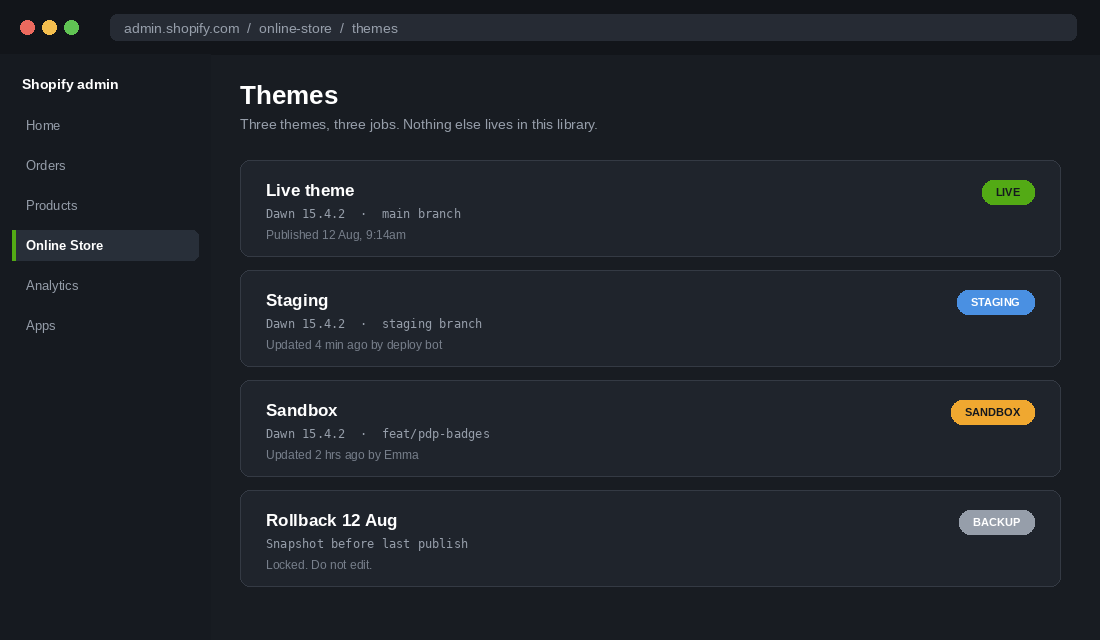
Rule One: Three Themes, Three Jobs, Nothing Else
Open your Shopify theme library right now. If you have eleven themes with names like “Dawn copy 3”, “NEW HOMEPAGE final”, and “do not use”, you have found your first problem. A cluttered library means somebody will eventually publish the wrong one, usually at speed, usually under pressure.
Cut it back to three working themes plus one snapshot:
- Live. The published theme. Nobody edits code here. Ever. The only change that touches it is a publish action from staging.
- Staging. An exact copy of live plus the changes queued for the next release. This is where you test, where you place test orders, and where you hand a preview link to whoever needs to sign off.
- Sandbox. Where work in progress lives. Half-finished sections, experiments, and anything a developer or agency is actively building.
- Rollback snapshot. A duplicate of live taken immediately before every publish, named with the date. Locked. Nobody edits it, nobody renames it, and you keep the last three.
Delete everything else. If a theme has not been touched in 90 days and is not one of the four above, download a copy to your computer and remove it from the library. A clean library is not tidiness for its own sake. It is what makes a rollback take 45 seconds instead of five panicked minutes.
One more discipline. Rename the live theme with the date it was published, so “Dawn 15.4.2 published 12 Aug” tells anyone glancing at the library exactly what is running and how old it is.
Rule Two: Put the Theme Under Version Control
Most Aussie stores in the 40k to 500k per month range have no version history for their storefront at all. When something breaks, the honest answer to “what changed?” is a group chat and a guess.
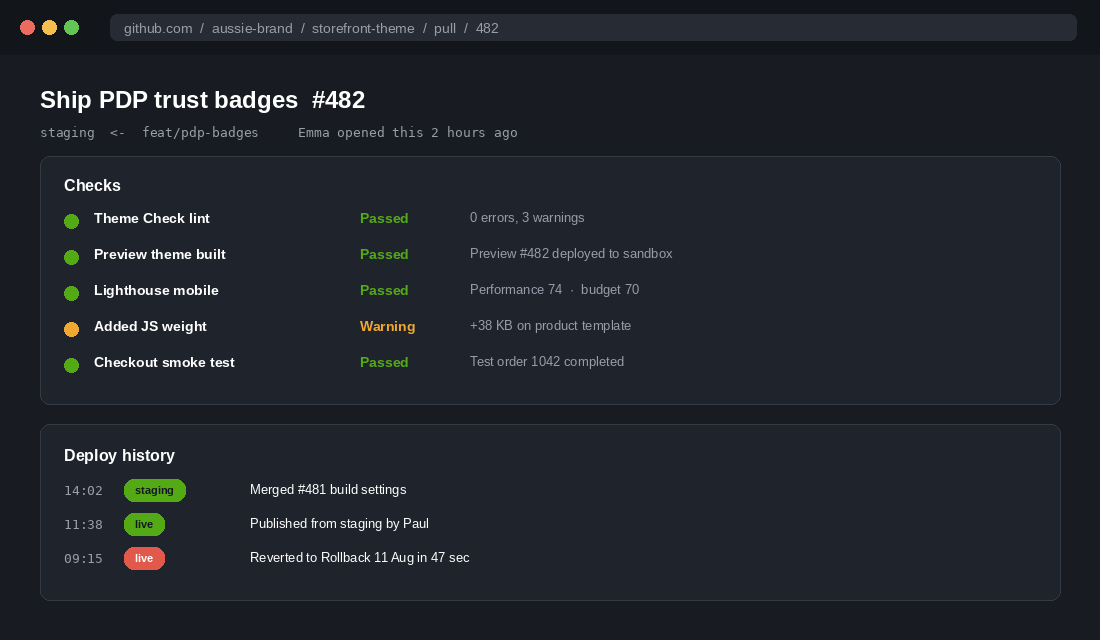
Shopify ships a native GitHub integration that fixes this for free. It connects a GitHub branch to a theme in your library. Every commit pushed to that branch updates the theme automatically, and every change is recorded with an author, a timestamp and a diff you can read.
Setting it up, step by step:
- Create a private GitHub repository for the theme. Name it after the store, not the theme, because you will change themes before you change stores.
- Install Shopify CLI locally. Recent versions need Node 22.12 or newer and Git 2.28 or newer, so check both before you start.
- Run
shopify theme pullagainst your live theme to bring the current production code down to your machine. - Commit that as your first commit on
main. This is your known-good baseline. - Create a
stagingbranch frommain, then feature branches fromstagingfor each piece of work. - In Shopify admin, go to Online Store then Themes, choose Add theme and Connect from GitHub. Connect
mainto your live theme andstagingto your staging theme. - Add a
.gitignorethat excludesnode_modules, any.envfile and local build artefacts. Never commit API keys or access tokens. - Turn on branch protection in GitHub so
maincannot be merged into without a pull request and at least one approval.
Day to day, the loop is shopify theme pull, then shopify theme dev for a live-reloading local preview, then commit and push. If you use a shopify.theme.toml file you can define your development and production environments once instead of typing flags into every command.
If you use an agency or a contractor, this is also the cleanest way to hold them accountable. You own the repository. You can see every line they changed. When the engagement ends, the code and its full history stay with you rather than sitting inside somebody else’s Shopify account.
Rule Three: Understand the Settings Drift Trap
This is the trap that catches almost every store the first time they connect version control, and it is worth understanding before it costs you a week of merchandising work.
Your theme has two kinds of files. Code files, which developers edit. And JSON files, which store settings: the order of homepage sections, the hero image, the announcement bar copy, the colours somebody adjusted in the theme editor last Tuesday.
When a marketer changes the homepage in the live theme editor, they change a JSON file on the live theme only. Your local copy and your staging theme know nothing about it. Push your branch a week later and those JSON files get overwritten with the older versions sitting in your repository. The hero reverts. The section order reverts. Nobody notices for two days.
Three ways to stop it:
- Pull before you merge, every single time. Run
shopify theme pullfrom the live theme and commit any settings changes to staging before merging. Make this a required item on the release checklist, not a habit you hope people remember. - Decide who owns which files. Merchandisers own the JSON. Developers own the Liquid, CSS and JavaScript. Write it down. Most drift happens because two people each assumed the other would handle it.
- Freeze the live theme editor during a release window. Post it in Slack: “live theme editor is closed from 9am until the release ships”. Ten minutes of coordination beats a day of rebuilding a homepage from memory.
This one detail separates teams who benefit from version control from teams who try it, get burned, and go back to editing live. Get it right and the rest of the system holds together.
Rule Four: Run the Same Twelve Checks Before Every Publish
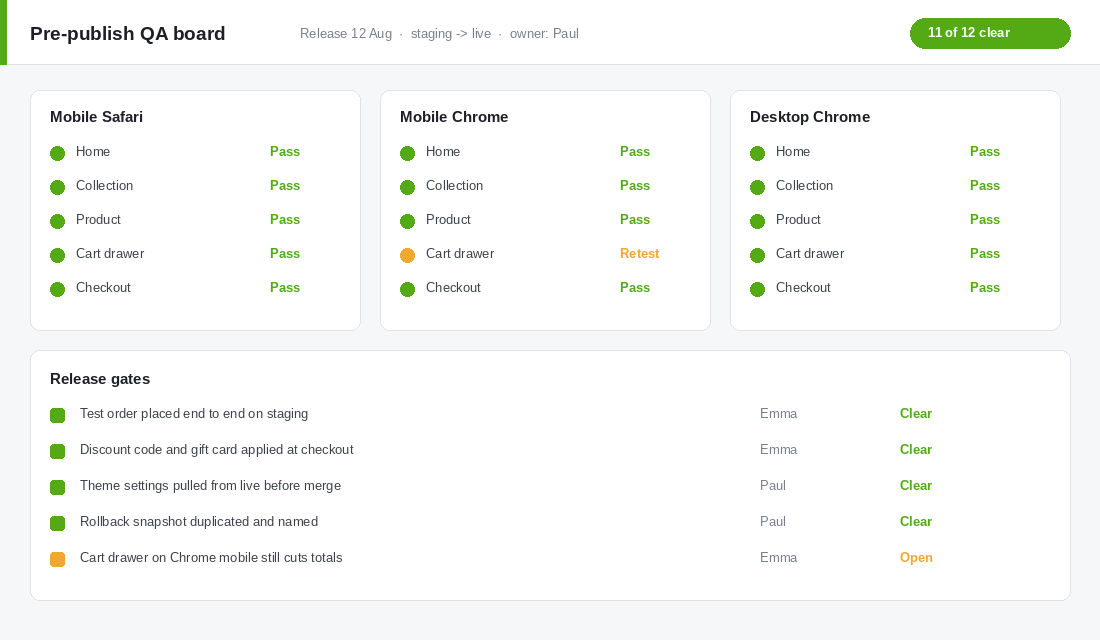
Testing without a checklist means testing whatever you happened to think of that morning. The same twelve checks, every release, is what turns QA from a feeling into a gate.
Test on the staging theme, on real devices, in this order:
- Homepage on mobile Safari. Scroll the full page. Check nothing overlaps the sticky elements.
- Homepage on mobile Chrome. Android renders differently often enough to matter.
- A collection page with filters applied, then a filter cleared.
- A product page for a simple product.
- A product page for a product with variants, including a variant that is out of stock.
- Add to cart from the product page, then from the collection page if you have quick add.
- Open the cart drawer. Check quantity changes recalculate the total correctly.
- Apply a discount code at checkout.
- Apply a gift card at checkout.
- Place a full test order end to end using Shopify’s Bogus Gateway or a real card you refund.
- Check the order confirmation email renders and the tracking link points somewhere real.
- Run Lighthouse on mobile for the homepage and a product page, and compare the score to the live theme.
Put this in a shared document with a column for each release and a name against each check. Two people, twenty minutes. If you cannot spare twenty minutes to test a release, you cannot spare the four hours it takes to diagnose a broken cart on a Saturday. The same principle underpins our Shopify code freeze playbook, which is the peak season version of this discipline.
Rule Five: Treat Every App Install as a Deploy
Here is the gap in most deployment processes. Teams get disciplined about theme code, then somebody installs a reviews app on a Tuesday afternoon and injects 90 KB of JavaScript into every page on the store without a single check.
App embeds and script tags are code changes. They just arrive through a different door. A 2026 analysis of more than 400 stores found mobile PageSpeed scores dropping from 53 for stores running one or two apps to 38 for stores running sixteen or more, with a typical app adding 50 to 150 KB of JavaScript to every page and 200 to 500 milliseconds of load time. Nobody installs sixteen apps in a day. They install one a month for sixteen months and wonder why the store feels heavy.
The app install protocol:
- Install on the sandbox theme first, never on live. Most apps let you choose which theme to embed into.
- Record the Lighthouse mobile score before and after. If the drop is more than three points, the app has to justify itself commercially.
- Check the app embed is scoped to the templates that need it. A review widget does not need to load on your policy pages.
- When you uninstall an app, check the theme for leftover code. Plenty of apps leave orphaned snippets and script tags behind, and those keep firing requests forever.
Book a quarterly review of the whole stack using our Shopify app stack audit. Most stores we look at are paying for at least three apps nobody uses, and carrying front-end weight from two more that were uninstalled months ago.
Rule Six: Your Rollback Should Take Under Two Minutes
Everything breaks eventually. The difference between a bad afternoon and a bad quarter is how quickly you can get back to a known-good state.
Before every publish, duplicate the live theme and name it “Rollback” plus the date. That duplicate is your undo button. If something goes wrong after publishing, you do not debug under pressure. You publish the rollback theme first, confirm the store is trading again, and then work out what happened with the pressure off.
Write the rollback procedure down as four lines and pin it where your team will find it at 8pm on a Saturday:
- Online Store, then Themes.
- Find the theme named Rollback with today’s or yesterday’s date.
- Actions, then Publish.
- Post in the team channel that a rollback happened, with the time and one line on the symptom.
Then practise it. Once, on a quiet Tuesday morning, roll back and roll forward again so everyone has done it before they need to do it. A procedure nobody has run is a document, not a plan.
Rule Seven: Deploy on a Schedule, Not on a Whim
Random deploys create random risk. Pick two release windows a week and hold them. Tuesday and Thursday mornings work well for Australian stores, because traffic is lower than the weekend peak and your whole team is awake and available if something needs fixing.
Never publish on a Friday afternoon. Never publish the day before a campaign launches. Never publish while a sale is running unless the change is fixing something that is already broken.
Then layer a freeze calendar on top. Lock the live theme entirely for these periods:
- Two weeks before Black Friday through to mid December. The single highest-traffic window of the Australian retail year. Nothing ships except emergency fixes.
- End of financial year sale periods in late June. Big traffic, big discount logic, high risk.
- Any window where you are spending heavily on paid media. A broken product page during a 5k a week Meta push is an expensive way to learn this lesson.
The trade-off is real and worth naming. You will occasionally sit on a good improvement for three weeks. That is fine. The upside of shipping a 2 per cent conversion lift in November never outweighs the downside of breaking checkout in November.
How These Rules Compound
Any one of these on its own is a modest improvement. Together they change how your store behaves under pressure.
Version control gives you a record, so “what changed?” takes 30 seconds instead of two hours. A staging theme means changes get tested by someone who is not the person who wrote them. The QA checklist catches the mobile-only bugs that desktop testing structurally cannot find. The rollback snapshot caps your worst case at two minutes of broken trading. The freeze calendar keeps all of this away from the weeks where a mistake is most expensive.
The second-order effect is what actually matters. Once deploys are safe, they get frequent. Once they get frequent, you start testing more, and testing more is where conversion gains come from. That is the DORA finding again, translated to a Shopify store: teams that ship safely end up shipping more, not less.
With the average Australian online transaction now sitting around 96 dollars and households buying from an average of 16 different retailers a year, the store that loads properly on the first tap wins the order. There is no loyalty tax being paid for a broken cart. Brands like Who Gives A Crap have built a reputation on a storefront experience that behaves the same way every time somebody visits, and that consistency is an operational outcome, not a design one.
Your Deployment Checklist, Ready to Copy
Paste this into a shared doc and run it on every release. Put a name and a tick against each line.
Before the release
- Live theme pulled and settings changes committed to staging
- Live theme editor frozen and announced in the team channel
- All work merged into staging and previewed by someone other than the author
- Rollback snapshot duplicated from live and named with today’s date
Testing on staging
- Twelve-point QA run on mobile Safari, mobile Chrome and desktop
- Full test order placed end to end
- Discount code and gift card both applied successfully
- Lighthouse mobile score compared against live, no drop beyond three points
Publishing
- Inside an agreed release window, not a Friday afternoon, not during a sale
- Not inside a freeze period on the calendar
- One person nominated to watch analytics for the first hour
After the release
- Conversion rate and add to cart rate checked against the same hour last week
- Live theme renamed with the publish date
- Rollback snapshots older than the last three deleted
- Release notes posted with what shipped and who tested it
Start with the theme library cleanup and the rollback snapshot. Those two take fifteen minutes and remove most of your downside immediately. Add version control the following week, then the QA board, then the freeze calendar before your next peak. If speed is the thing you are trying to protect, pair this with our Shopify page speed audit so you have a baseline to test every release against.
Inside eCommerce Circle, storefront reliability is one of the core pillars we work on with every member, because it is the cheapest revenue you will ever recover. If you want a second opinion on how your store ships changes, let’s talk.