You have 400 products, 30 collections and about a dozen blog posts. Organic search brings in maybe 8% of revenue, and most of that is people typing your brand name into Google. Meanwhile a competitor you have never heard of is sitting above you on every “linen sheets for a queen bed” style query in the country.
What’s in This Article
They did not write 400 blog posts. They built one page template, wired it to a spreadsheet of real search demand, and shipped 180 pages in eleven weeks. That is programmatic SEO, and for a Shopify store with a decent catalogue it is the strongest organic play available right now.
It is also the fastest way to get your whole domain demoted if you are lazy about it. Sites that pushed out hundreds of unedited, mass-produced pages lost between 50% and 80% of their organic traffic in the March 2026 core update. The difference between those two outcomes has nothing to do with the software you use. It comes down to whether each page answers a question a real person actually typed.
What Programmatic SEO Actually Is (And What Gets Stores Penalised)
Programmatic SEO is building a page family from a repeatable pattern. One template, one data source, many URLs. Think “[material] + [product] + [room]” or “[product] delivery to [city]” or “[brand] vs [brand]”.
The reason it works is boring maths. Long-tail queries make up roughly 70% of everything typed into search engines, and they convert far harder than head terms. One-word queries convert at about 0.17%. Six-word queries convert at about 1.94%. That is more than ten times the conversion rate on searches nobody is bidding aggressively on.
Your product pages cannot capture those queries. A product page targets one SKU. A collection page targets a category. The space between them, where somebody types “boucle armchair for a small lounge room”, is usually empty on Aussie stores. That gap is where programmatic pages live.
Google’s spam policy on scaled content abuse is worth reading properly, because most operators misread it. It does not ban AI writing and it does not ban templates. It targets pages generated primarily to manipulate rankings rather than help a user, whatever produced them. A templated page with genuinely unique data on it is fine. A templated page where you swapped the city name in three sentences is not.
Step 1: Find a Pattern With Real Demand, Not a Spreadsheet Fantasy
Most programmatic projects die here. Someone multiplies 40 materials by 30 products by 12 rooms, gets 14,400 combinations, and gets very excited. Then 13,000 of those combinations turn out to have zero search volume, and the site ends up carrying thousands of pages nobody will ever request.
Build the combination list first, then filter it hard. Here is the process I run with members:
- Pick two or three variables that already exist in your catalogue. Material, size, room, use case, colour, compatibility. If the data is not already in Shopify, you will not be able to populate the pages at scale.
- Generate every combination in a sheet. A simple cross join in Google Sheets or five lines of Python gets you the full list in minutes.
- Pull Australian search volume for the lot. Ahrefs Keywords Explorer, Semrush Keyword Magic or Keyword Planner all accept bulk uploads. Set the country to Australia, not worldwide, or your numbers will be four times higher than reality.
- Set a demand floor and enforce it. Forty searches a month is a sensible cut for most Aussie categories. Below that you are building pages for an audience of nobody.
- Check intent before you keep a term. If the current results are all blog posts and forums, that keyword wants information, not a landing page. Match what is ranking or you will never crack the first page.
A 400 combination list usually shrinks to 150 or 180 keepers. That is the right shape. It is enough volume to matter and few enough pages that you can hold a real quality bar on each one.
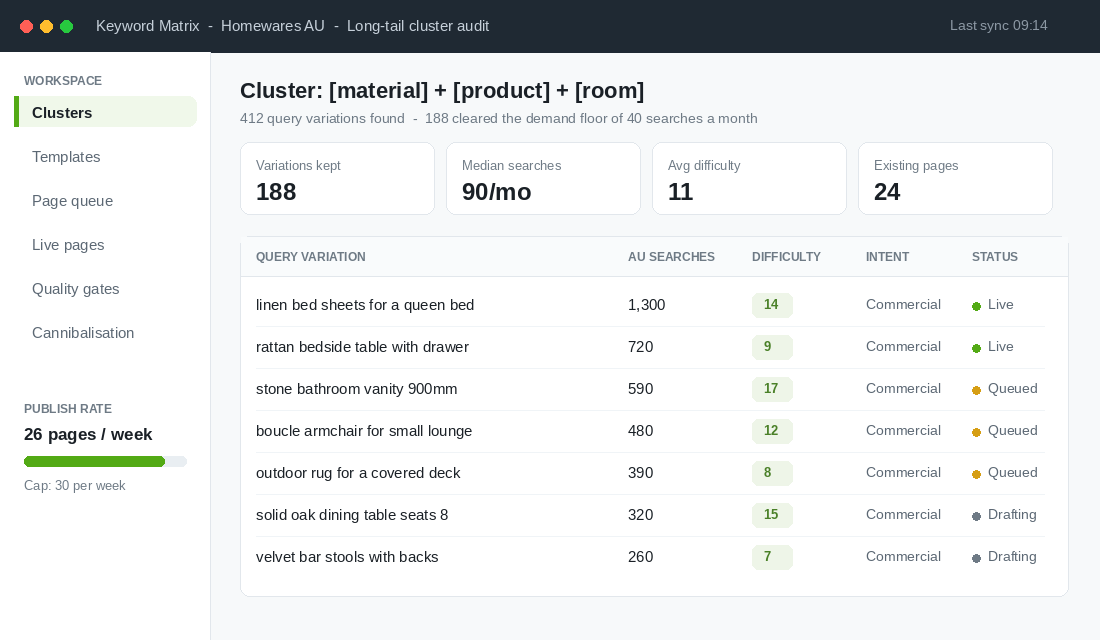
The last column matters more than founders expect. Before you build anything, check which of these queries your existing pages already rank for. If a collection page is sitting at position 14 for “outdoor rug for a covered deck”, you do not need a new page. You need to improve that one. Our collection page SEO playbook covers that job in detail, and it is almost always faster than building from scratch.
Step 2: Build the Data Layer Before You Build the Template
This is the step that separates pages that rank from pages that get ignored. Before you write a single line of Liquid, decide what unique information each page will carry. The working rule is three or more genuinely unique data points per page. Not three paragraphs of reworded copy. Three facts that differ from every sibling page.
For a homewares brand building “[material] + [product]” guides, that might be a sizing table specific to that material, a care instruction set, and a price and durability comparison against the two nearest alternatives you stock. For a parts retailer it might be a fitment list, a torque spec and an install time estimate.
Shopify gives you the right home for this natively. Metaobjects are standalone data structures with their own entries, their own URLs and their own templates, which is exactly what a programmatic page family needs. Metafields hang extra data off products. You will use both. If metaobjects are new to you, start with the Shopify metafields playbook and then come back.
Define the metaobject fields as a contract with yourself. Every field is either required and unique per entry, or it does not belong on the page.
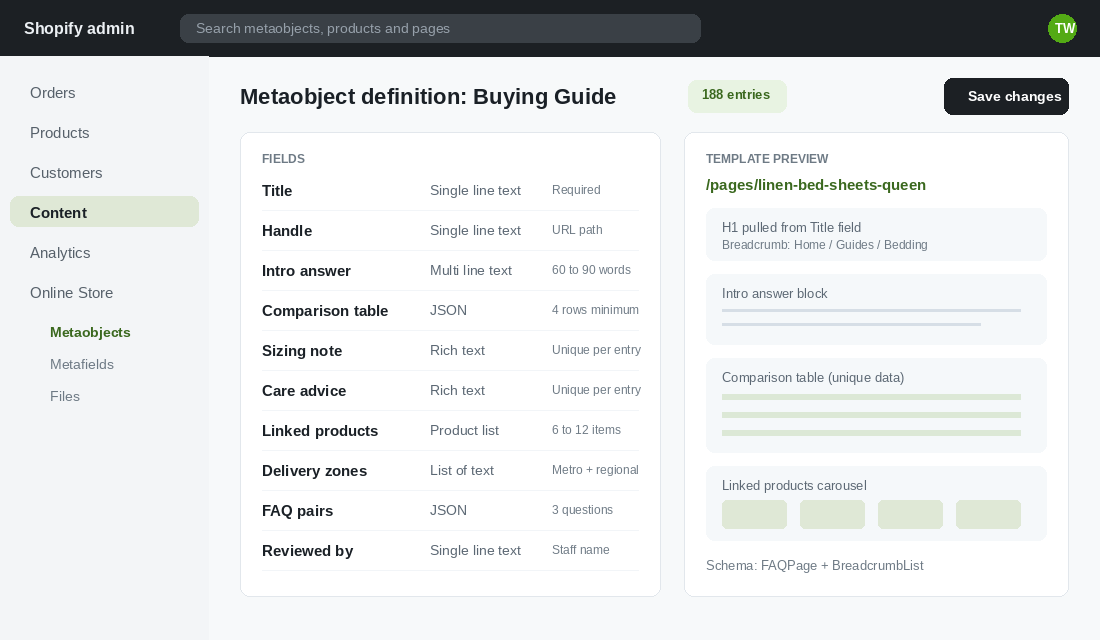
Note the “Reviewed by” field. A named human who checked the entry before it went live is the cheapest insurance you can buy against the scaled content abuse policy, and it forces someone on your team to actually look at the page.
Step 3: Design One Template That Earns Its Place in the Results
You are building one template that will exist 180 times. Every weak block gets multiplied by 180. Every strong block does too. Spend a full day on it.
The structure that consistently works on Shopify stores looks like this:
- H1 that matches the query almost exactly. Pulled from the Title field, not auto-mangled from the handle.
- A 60 to 90 word direct answer, above the fold. This is the block that gets quoted in AI Overviews and by assistants. Answer the question in the first sentence, then qualify.
- The unique data block. Your comparison table, sizing chart or fitment list. This is the reason the page deserves to exist.
- Six to twelve linked products pulled dynamically. The commercial payload. Without it you have written a blog post, not a landing page.
- Delivery and returns context for Australian buyers. Metro versus regional timeframes convert far better than a generic shipping line.
- Three FAQ pairs written per entry. Marked up with FAQPage schema alongside BreadcrumbList.
- Contextual links to the parent collection and two sibling pages. Never a raw list of 180 links.
One warning on the answer block. Assistants and AI Overviews increasingly pull from pages that state a conclusion plainly and back it with specifics. Hedged, throat-clearing intros get skipped. If you want the detail on writing for that surface, we broke it down in the answer engine optimisation playbook.
Step 4: Ship It Into Shopify Without Hiring a Developer
You do not need a headless rebuild for this. Native Shopify plus one data tool handles it. The tool most Aussie stores land on is Matrixify, because it bulk imports and exports metaobject entries, metafields and collections from a plain Excel or CSV file.
Here is the setup, start to finish:
- Create the metaobject definition first. Shopify admin, Content, Metaobjects, Add definition. Add every field from your contract and set the required ones. Turn on “storefronts” access so the entries can render publicly.
- Build the page template. In the theme editor, create a new template for your metaobject definition and lay out the blocks above. Test it against one hand-built entry until it looks right on mobile.
- Install Matrixify and export a sample. Export your metaobject entries to Excel first, even with one entry in there. That export becomes your import template with the exact column headers Shopify expects.
- Fill the sheet. One row per page. Your keyword sheet supplies the titles and handles. Your product data supplies the tables. Name the tab “Metaobjects” for Excel, or include the word “metaobjects” in the filename for CSV, or the import will not map.
- Import 10 rows, not 180. Run a small batch, open three of the live pages, read them like a customer. Fix the template, then import the rest.
- Submit the URLs. Add the page family to your sitemap and request indexing on a handful in Search Console. Do not submit all 180 in one hit.
Publishing rate matters more than most people think. Twenty five to thirty pages a week is the ceiling I would hold to. A store that goes from 40 indexed pages to 220 overnight looks exactly like a spam site to an algorithm that cannot read your intentions.
Step 5: The Four Quality Gates That Keep You Out of Trouble
Run every batch through these before it goes live. No exceptions, no “we will fix it later”.
- Uniqueness gate. Copy two sibling pages into a diff tool. If more than 70% of the body text is identical, the template is doing too much work and your data is doing too little.
- Demand gate. Every live page maps to a query with at least 40 Australian searches a month. Pages that fail get held in draft, not published “just in case”.
- Cannibalisation gate. Search your own site for the target term. If an existing collection or product page already ranks for it, improve that page instead. Two of your pages fighting each other is worse than having one.
- Human gate. Someone on the team reads the page top to bottom and puts their name in the “Reviewed by” field. At 30 pages a week that is roughly two hours of someone’s time. It is the cheapest two hours in your marketing budget.
The stores that get burned skip the first and the fourth gate. They ship 500 pages where only the product name changed, then wonder why the whole domain slid three months later.
Step 6: Build the Internal Linking Hub Before You Scale
Orphan pages do not rank. If a new page is only reachable from your sitemap, Google will crawl it slowly, weight it lightly and often drop it back out of the index.
Build the hub before the pages exist. A single index page (“Buying guides”) that links to every entry, grouped by parent category. Each entry links back up to that hub, sideways to two or three genuine siblings, and down into the relevant collection. That is a three-click path from your homepage to every page in the family.
Then earn a few links into the hub itself. One decent link to a hub distributes authority across the whole family, which is far more efficient than chasing links to individual pages that nobody will ever want to cite.
Step 7: Measure by Cohort, Then Prune Without Sentiment
Do not judge programmatic pages individually. Judge them as a cohort, using a URL prefix filter in Search Console so you can see the whole family in one view.
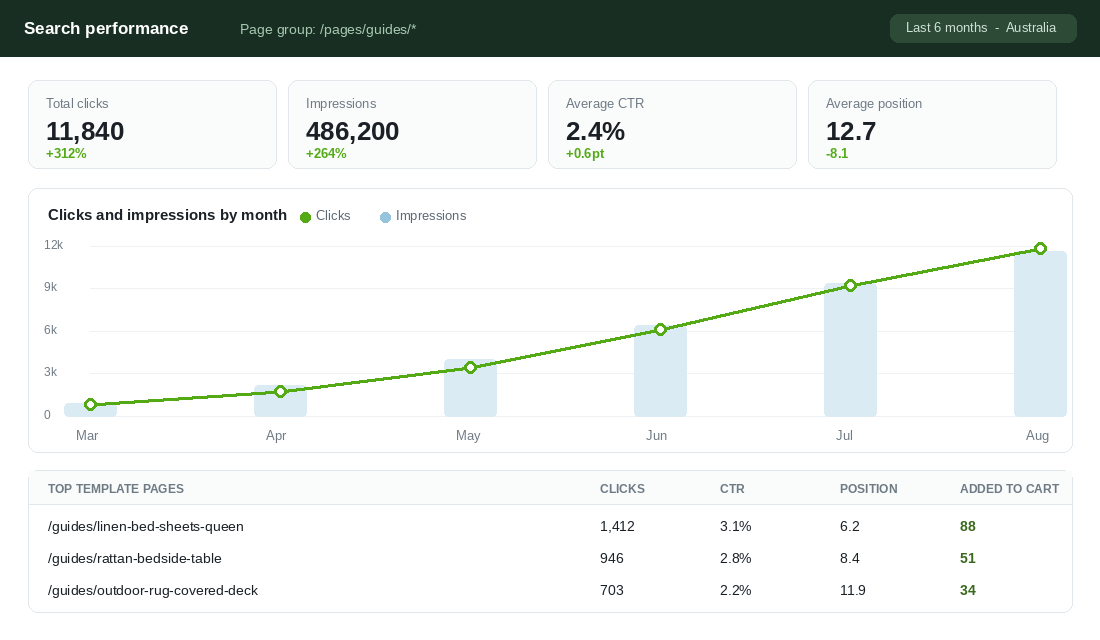
The shape above is what a healthy build looks like. Slow for six to eight weeks while Google works out what the pages are, then a steep climb from month three as the family gains topical weight. One published case study tracked 512 programmatic pages to 11,840 clicks a month and around 48k in attributed revenue over eighteen months. That is the timeframe to plan for, not eight weeks.
The metric I care about most is not clicks. It is add to cart rate on the page family. A guide page that pulls 700 clicks and produces four add to carts is an information page wearing a landing page costume. Fix the product block or kill it.
At the six month mark, prune. Any page with fewer than 10 impressions a month and zero add to carts gets merged into a sibling or removed with a 301. Dead weight in a page family drags the live pages down with it.
Why This Compounds When Paid Media Does Not
Here is the part that makes this worth a quarter of your attention. Each of the seven steps above is a one-time cost that keeps paying.
The keyword research is reusable across your ads, your product naming and your collection structure. The data layer you build for the pages also powers filters, comparison modules and product recommendations. The template gets better every time you edit it, and every entry inherits the improvement instantly. The internal linking hub lifts the collections it points at. The pruning discipline keeps the whole site tight.
Two Australian businesses show the ends of this spectrum. Canva, out of Sydney, built landing pages for effectively every template category a person could search for, and those pages now feed millions of visits into a product-led funnel. Temple & Webster runs a catalogue north of 200,000 SKUs, and in a furniture and homewares market where organic search drives around 43% of category traffic, structured category coverage is not a side project. It is the channel.
You are not building at that scale. You do not need to. A 180 page family, done properly, is a genuine acquisition channel for a store doing between 100k and 500k a month, and it does not get more expensive when Meta raises CPMs in November.
The 10 Page Test: Your First Two Weeks
Do not start with 180. Start with 10 and prove the model. Here is the two week version you can run without any new hires.
- Day 1 to 2. Pick one pattern from two catalogue variables. Generate the combinations and pull Australian volume.
- Day 3. Apply the 40 searches a month floor and the cannibalisation check. Keep the top 10 survivors.
- Day 4 to 5. Define the metaobject with a minimum of three unique data fields plus the “Reviewed by” field.
- Day 6 to 7. Build the template. Test on mobile first. Add FAQPage and BreadcrumbList schema.
- Day 8 to 9. Write the data for all 10 entries by hand. Yes, by hand. This tells you honestly whether the pattern has enough substance to scale.
- Day 10. Build the hub page and wire the internal links.
- Day 11. Import, publish, submit to Search Console.
- Day 12 to 14. Read all 10 pages as a customer would. Every awkward sentence you find is one you would have shipped 180 times.
Then wait eight weeks. If the cohort shows impressions climbing and a couple of pages breaking into the top 20, scale to 30 pages a week. If it is flat after eight weeks, your pattern lacked demand or your pages lacked substance. Fix one of those two things before you build another page.
Programmatic SEO is not a shortcut. It is compounding return on work you already do. The founders who get results treat each template like a product they are launching, because that is exactly what it is. The rest of the fundamentals still apply, and if your technical foundations are shaky, work through the Shopify SEO playbook before you build a page family on top of them.
Inside eCommerce Circle, organic acquisition is one of the core pillars we work on with every member. If you want a second opinion on where your search demand actually sits, let’s talk.