The Meta Pixel took you about ten minutes to install. It is now the highest-risk piece of code running on your Shopify store.
What’s in This Article
On 11 June 2026, the Office of the Australian Information Commissioner handed down two determinations that almost no Aussie founder has read and almost none have acted on. Medmate Australia and Monash IVF were each found to have interfered with the privacy of their customers through the way their tracking pixels collected and shared browsing behaviour. Not through a data breach. Not through a hack. Through a completely standard pixel install, configured the way most ecommerce stores configure it.
Here is the part that should make you sit up. Both businesses argued that they could not identify the people behind the pixel data, so it was not personal information and the Privacy Act did not apply. The Commissioner rejected that argument and replaced it with a far wider test. If you can single someone out and treat them differently to everyone else, that is enough. Retargeting a cart abandoner is treating them differently. So is excluding past purchasers from a prospecting campaign.
Both investigations started with a desktop scan of 50 websites. Yours was not on that list. There is no reason to assume the next scan stops at health providers.
What the OAIC Actually Decided on 11 June 2026
The two determinations are Commissioner Initiated Investigation into Medmate Australia Pty Ltd [2026] AICmr 41 and Commissioner Initiated Investigation into Monash IVF Pty Ltd [2026] AICmr 40. In both, the Commissioner found three separate breaches of the Australian Privacy Principles.
- APP 3.3. Collecting sensitive information without consent.
- APP 5.1. Failing to take reasonable steps to notify people, or make them aware, that collection was happening.
- APP 7.1. Using or disclosing sensitive information for direct marketing without consent.
The specifics matter, because they map almost exactly onto a normal Shopify setup. Medmate had two pixels running. They captured which pages a visitor viewed, what content they engaged with, and details of any purchase. One of them transmitted full URLs, phone numbers and hashed email addresses to the pixel provider. Some of those URLs named the medication or condition the person was looking for.
Monash had several pixels deployed. Theirs captured page views, whether a visitor started or submitted a web form, and whether they booked an appointment. Full URLs, IP addresses and device and browser information went across. The Advanced Matching feature, which lets the ad platform match your site visitors to its own logged-in user profiles, was switched on for a period nobody could put a date range around. Monash then ran campaigns targeting women aged 25 to 45 who had visited fertility pages within a set window.
None of that is exotic. Swap “appointment booking” for “add to cart” and you have described the default Shopify web pixel. The OAIC published its tracking pixel guidance back in November 2024 and named advertising technology a regulatory priority for the 2025-26 financial year. These determinations are the guidance being enforced, not a surprise.
The Individuation Test: Why “We Don’t Know Who They Are” No Longer Works
This is the change that reaches every Shopify store in the country, not just the health ones.
For years the working assumption in ecommerce has been simple. If you never see a name, an email or a date of birth, you are not handling personal information, so privacy obligations do not bite. Pixel data felt anonymous. Custom audiences felt like buckets, not people.
The Commissioner has now adopted individuation as the operative test for whether someone is “reasonably identifiable”. Her formulation: an individual is reasonably identifiable when an entity can single out or distinguish that individual from others in a way that affects their rights or interests. You do not need to know their name. You only need to be able to treat that one person differently.
Run that test across your own ad account for a second. A custom audience of “viewed product, did not purchase, last 14 days” singles people out. A dynamic product ad that shows a specific SKU to a specific browser singles them out. An exclusion list that keeps existing customers out of a prospecting campaign singles them out. Under this reading, all of it is personal information, and the Privacy Act applies.
This moves Australia materially closer to the European position under GDPR, where the ability to single someone out has long been enough on its own. It happened through a regulator’s interpretation rather than an act of Parliament, and the Commissioner herself acknowledged the application is novel. Both decisions are widely expected to be appealed, which will take at least a year. That is not a reason to sit still. It is a reason to have your house in order before the question is settled either way.
You Are the Collector, Even Though the Platform Holds the Data
The second argument both businesses ran was that the data sat on the pixel provider’s servers, so the pixel provider was the one collecting it. The Commissioner rejected that too, for three reasons that are worth memorising.
- You commissioned it. The collection would never have happened if you had not gone and set the pixel up.
- You deployed it. You control whether the code sits in your theme, your checkout, or nowhere at all.
- You can reconfigure it. After setup you can change what gets collected, which means the settings are yours to fix.
Control and authority over the collection is enough. Physical possession of the data is not required. So “it is Meta’s pixel, that is Meta’s problem” is finished as a defence, and the same logic runs straight through your app stack.
Think about what that means practically. Every app that injects a script into your theme, every custom pixel in your Customer Events settings, every checkout extension a developer added two years ago and nobody has looked at since. If it collects browsing behaviour and sends it somewhere, you are the collector. Your agency is not. Your app vendor is not. You are.
The Aussie Shopify Stores Sitting in the Sensitive Information Zone
Sensitive information gets a higher bar under the Privacy Act. It needs express consent before you collect it, not implied consent, and not a cookie banner people click past.
Here is the finding that widens this well beyond clinics. The Commissioner held that information about a person’s engagement with a health-related website can itself be sensitive information, because it either reveals health information directly or allows an inference about their health to be formed. For Medmate, she specifically named submitting an application, requesting contact, viewing particular content, adding items to cart, initiating checkout and making a purchase as steps that indicated the person was seeking a health service.
Read that list again. Those are the exact events every Shopify web pixel fires by default. If your catalogue touches health, the standard event set is doing the work the Commissioner objected to.
Sensitive information under the Act is broader than most operators assume. It covers health, but it also covers sexual orientation, racial or ethnic origin, religious beliefs, political opinions and criminal record. Map that against Australian ecommerce and the list of exposed niches gets long:
- Supplements and nutrition, especially anything positioned against a condition. Sleep, stress, gut health, menopause, joint pain, fertility.
- Sexual wellness. Both health information and, depending on the product, an inference about sexual orientation.
- Pregnancy, fertility and baby. A pregnancy test add-to-cart is about as clear an inference as you can get.
- Medical devices, mobility aids, continence products and hearing.
- Weight management in any form, including meal replacement and appetite products.
- Condition-led skincare. Acne, eczema, psoriasis, rosacea. The condition is in the collection name.
- Vape accessories, alcohol and tobacco adjacent products.
- Faith-based, political and Pride merchandise. Religious belief, political opinion and sexual orientation are all sensitive categories.
If you are in any of those, you are not in a grey area. You are in the category the Commissioner has just spent two determinations describing. If you are not, you still hold personal information under the individuation test, which means APP 5 notification obligations apply to you regardless.
Four Places Your Store Is Actually Leaking
When we look at an Aussie store’s tracking stack, the same four leaks turn up almost every time. None of them are obvious from the Shopify admin, which is exactly why they survive.
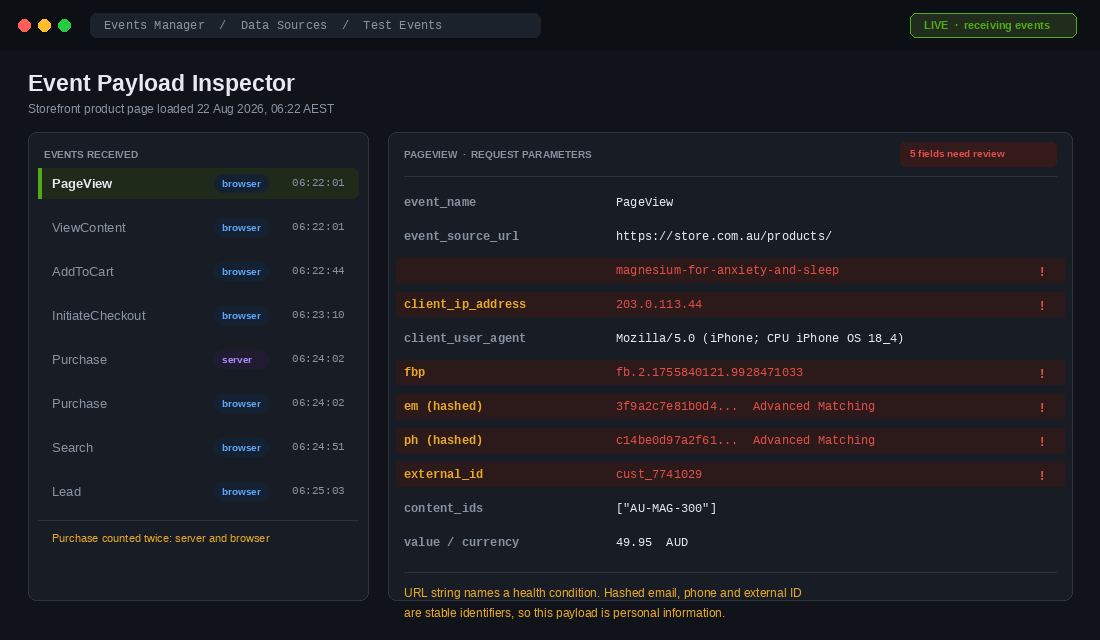
1. Full page URLs. The pixel sends the page address with every event. A handle like /products/magnesium-for-anxiety-and-sleep transmits a health inference in plain text before anyone has clicked anything. Collection URLs do the same job at scale, and your site search is worse again, because /search?q=cold+sore+cream goes across as a query parameter. This was the exact mechanism in the Medmate matter.
2. Advanced Matching. Meta’s automatic version scrapes form fields on your site and sends hashed email addresses, phone numbers and names so it can match visitors to logged-in profiles. Hashing does not make it anonymous. It makes it a stable identifier, which is precisely what individuation is about. Monash had this on for an unknown period, and the Commissioner treated it as a material fact.
3. Conversions API. A lot of founders moved to server-side tracking to recover attribution after iOS 14, and quietly assumed it was also a privacy improvement. It is the opposite. CAPI sends more data, more reliably, from your server, with customer email and phone attached as matching keys. If you have not audited what your CAPI payload contains, that is a bigger exposure than your browser pixel. Our Shopify server-side tracking playbook walks through the setup, and the privacy review belongs alongside it.
4. Customer list uploads. Monash built custom audience lists from names, email addresses, phone numbers, gender and location and uploaded them to the ad platform dashboard. Every Shopify store that exports a Klaviyo segment or a customer CSV and uploads it as a Custom Audience is running the identical play. The Commissioner treated retargeting built on that data as direct marketing under APP 7.1, even though the store could not identify the recipients itself.
The 6-Step Shopify Pixel Audit
This is the audit to run this week. It takes a focused half day for most stores. Work through it in order, because each step depends on the one before it.
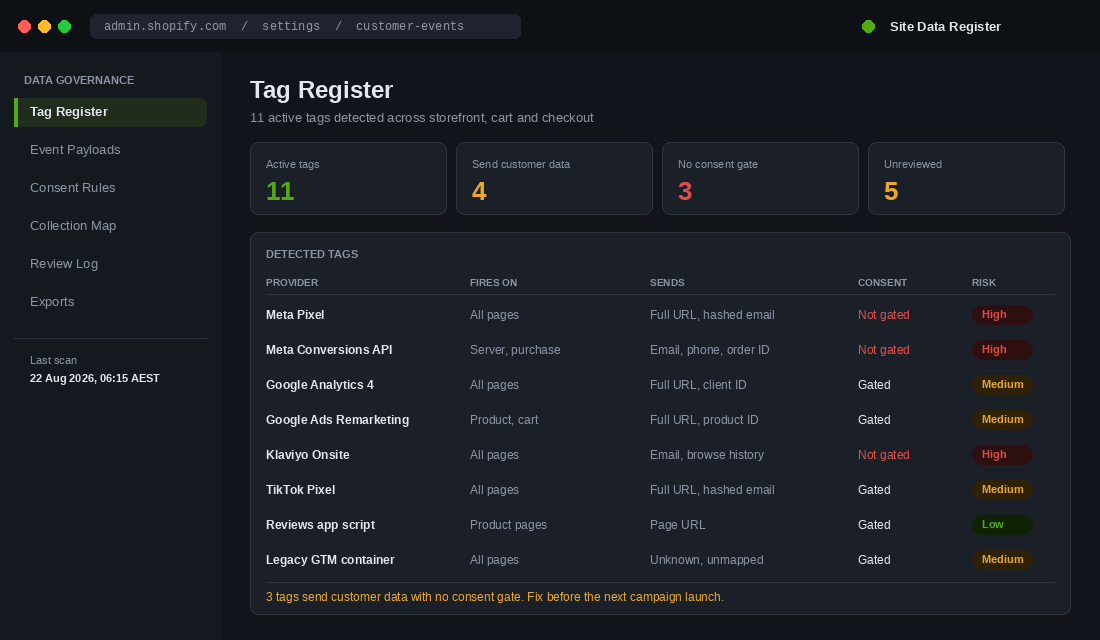
Step 1. Build the tag register. You cannot audit what you cannot see. Open Shopify admin, then Settings, then Customer events, and list every custom pixel and app pixel showing there. Then go to Online Store, Themes, Edit code, and search theme.liquid for fbq, gtag, gtm.js and any hardcoded script src. Finish in Chrome DevTools on a live product page with the Network tab filtered to tr?id= and collect. Record every tag in a simple sheet: provider, what it fires on, what it sends, who approved it, and when it was last reviewed.
Step 2. Read the payload, not the app name. App names tell you nothing. Open Meta Events Manager, go to Data Sources, select your pixel, and use Test Events. Load a real product page and a real checkout, then read what actually goes across. You are looking for em, ph, fn, ln, external_id and the full source URL. Most founders are genuinely surprised by this step.
Step 3. Stop the URL leaking the inference. Rename product and collection handles so the address describes the product, not the condition. magnesium-glycinate-300mg instead of magnesium-for-anxiety. Keep the condition language in the on-page copy and the meta description where it still does its SEO job, and set up 301 redirects so you do not lose the rankings you have built.
Step 4. Classify your catalogue. Go collection by collection and mark each one sensitive or not sensitive. Anything sensitive needs express, specific and informed consent before any pixel fires on it. A generic banner saying you use cookies to personalise ads was explicitly found insufficient, because it did not mention tracking pixels, did not name the recipients, and did not tell people what the collection meant for them.
Step 5. Fix notification at the front door. APP 5.1 requires notice at or before the time of collection. If your pixels fire on entry, the notice has to be on entry. A privacy policy sitting in the footer does not satisfy this on its own, and the Commissioner said so directly. That does not mean your policy is irrelevant, it means it is the second layer, not the first.
Step 6. Put a review date on the whole thing. Both determinations criticised a set and forget approach. Add a quarterly pixel review to your operating rhythm, and add a privacy sign-off line to your app install checklist so no new app can go live without someone checking what it collects. This is the step everyone skips, and it is the one that stops you re-earning the problem six months from now.
The Shopify Setting Most Aussie Stores Have Wrong
You do not need to buy a consent platform to make a serious start. Shopify ships the tooling, and most Australian stores have it switched off without realising.
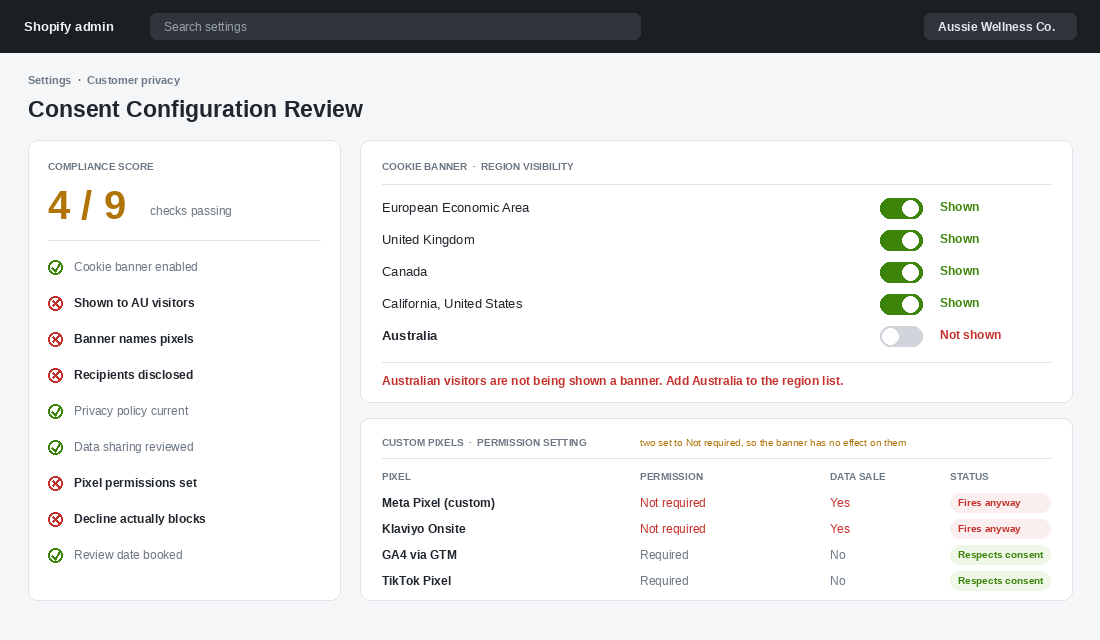
Go to Settings, then Customer privacy, then Cookie banner. Open the region settings and look at which visitors actually see it. Shopify’s defaults target the EU, the UK, Canada and California. Australia is not in that default set, which means a very large number of Aussie stores are running a compliant-looking banner that no Australian customer has ever been shown. Add Australia to the regions, or switch the banner to show to all visitors.
While you are in that section, work through the rest of it:
- Customise the banner copy. Do not leave the default text. Say that the site uses tracking pixels as well as cookies, name who the data goes to, and say what it is used for. Vague copy is what failed in the Medmate matter.
- Check the data sharing level. Still under Customer privacy, review the data-sharing setting for your Meta and Google channels. Enhanced sharing sends customer data that standard sharing does not.
- Set permissions on every custom pixel. Back in Settings, Customer events, open each pixel and check the Permission field. Pixels marked as not requiring permission fire regardless of what the customer chose in your banner. This is the single most common misconfiguration we see, and it makes the banner decorative.
- Verify it works. Open your storefront, open the browser console, and run
window.Shopify.customerPrivacy.currentVisitorConsent(). Decline in the banner, reload, and confirm the pixel actually stops firing in the Network tab. If it still fires, your consent flow is theatre.
That sequence costs you nothing but an hour. It moves you from “we have a privacy policy” to “we can show a regulator what we collect, who it goes to, and how a customer said no”, which is a completely different conversation.
What This Costs If You Get It Wrong
Nobody enjoys the fear-based section of a compliance article, so here is the short version with real numbers.
Since December 2022, the maximum penalty for a serious or repeated interference with privacy is the greater of fifty million dollars, three times the benefit obtained, or thirty per cent of adjusted turnover for the relevant period. Penalties apply per contravention, and a single event affecting many customers can be counted many times over. At the smaller end, the OAIC can issue infringement notices of up to sixty six thousand dollars per contravention for things as basic as not maintaining a compliant privacy policy.
That is the ceiling, not the likely outcome for a thirty million dollar DTC brand. The realistic cost is closer to home: a commissioner-initiated investigation that eats six months of your time, remediation on a deadline someone else sets, and a set of customers who read about it. Australian Clinical Labs was the first business taken to court under the Privacy Act penalty regime over the Medlab Pathology breach, and the reputational tail on those matters outlasts the legal one by years.
None of this is legal advice, and the individuation interpretation is likely headed to appeal. Get your own advice on your specific catalogue. What is not in doubt is that a tag register, honest banner copy and correct pixel permissions are cheap, and you would want them either way.
Why the Stores That Fix This First Will Out-Market Everyone Else
Here is the part that turns a compliance chore into an advantage, and it is the reason we push members through this rather than filing it under legal admin.
Every step in that audit forces you to actually understand your measurement stack. Most founders cannot tell you what their pixel sends, which apps are writing to their theme, or whether their CAPI and browser events are double counting. The audit answers all of that as a side effect. Stores come out the other side with cleaner attribution than they went in with, because they finally deleted three dormant tags that were firing duplicate purchase events and inflating their reported ROAS.
The second effect is on your data itself. When you stop leaning on borrowed platform identifiers and start earning consented first-party data, your email and SMS lists get better, your segments get sharper, and your retention programme stops depending on whether a browser lets you follow someone around. That is the same direction of travel behind our Shopify privacy compliance playbook, and the two pieces of work slot together.
The third effect is timing. Australia’s new unfair trading practices regime commences on 1 July 2027, and it targets the design of digital interfaces directly: unclear disclosure, obstructed decision-making, buried cancellation. If you are already reviewing how your site presents choices to customers, you are doing half the work for that deadline at the same time. The unfair trading playbook covers the other half.
Compliance is where this starts. Better measurement, better data and a store your customers actually trust is where it lands. The brands that treat 2026 as the year they got their tracking honest will be the ones with clean numbers when everyone else is still guessing.
Your Next Half Day
Do not try to solve the whole thing. Do these four in order and you will have moved further than most stores in the country:
- Build the tag register. Every pixel, every app script, every hardcoded tag, in one sheet.
- Run Test Events on a real product page and read what actually gets sent.
- Turn the cookie banner on for Australian visitors and rewrite the copy so it names tracking pixels and recipients.
- Check the Permission field on every custom pixel, then verify a declined visitor genuinely stops the tags firing.
Book the next quarterly review before you close the sheet. That is the difference between an audit and a habit.
Inside eCommerce Circle, getting the tracking stack honest is one of the first things we work on with every member, because it sits underneath every growth decision that follows it. If you want a second opinion on yours, let’s talk.