Your Shopify store is a fortress. Two-factor on the admin, a staff account policy, an app stack you review twice a year. And the entire thing hangs off a domain licence you renew every second year for roughly the price of two coffees.
What’s in This Article
Most Aussie founders have never once opened their DNS records. You set the domain up in the first fortnight of trading, back when the store was doing four orders a week. You have not logged into the registrar since. The account is probably tied to a Gmail address you no longer check, or worse, to a developer who stopped answering emails in 2023.
Here is the part that should make you sit up. If a .au licence lapses, you do not get the redemption window you would get with a .com. auDA gives you a 30 calendar day grace period, and it is explicit that during that grace period your website and your email stop working.
Not slow. Off. After those 30 days the name moves to pending delete for 24 to 48 hours, then it goes back into the pool on a first come, first served basis. A brand doing 300k a month can be dark for a month because a Visa on file expired.
This is not a theoretical risk. The Australian Signals Directorate’s Annual Cyber Threat Report 2024-25 recorded more than 84,700 cybercrime reports, roughly one every six minutes, and the average self-reported cost per report for a small business climbed 14 per cent to 56,600 dollars. Domain and DNS control is the quietest attack surface in that number, because nothing about it shows up in your Shopify dashboard until it is already broken.
Below are the seven checks I run on every store that joins us. The full pass takes about twenty minutes. Do it once, set the reminders, and this whole category of risk goes away.
Check 1: Confirm Who Actually Owns the Domain
There were 4,294,913 .au domains on the registry at the end of December 2025, an all time record. A meaningful slice of those are registered to entities that no longer match the business trading on them, and that is a specifically Australian problem.
To hold a .com.au licence you must be an eligible Australian commercial entity. In practice that means an active ABN or ACN, a registered business name, an Australian partnership or sole trader, or an Australian registered trade mark.
The registrant on the licence has to be that entity. Not your web agency. Not your cousin who set it up. Not a company you deregistered when you restructured.
Open your registrar and check three fields right now:
- Registrant name and ABN. Does it match the entity that banks your Shopify payouts? If you moved from sole trader to a Pty Ltd and never updated the licence, you are trading on a domain your current company does not legally hold.
- Registrant contact email. Is it a role address you control, like domains@yourbrand.com.au, or a personal Gmail belonging to someone who left? Every renewal notice and every transfer authorisation goes here.
- Technical and billing contacts. These are often still set to an agency from a rebuild three years ago. Agencies get acquired, close down, and stop paying attention to inboxes.
If any of those three are wrong, fixing them is a form and a support ticket, not a project. Do it this week. The cost of getting it wrong is that at the exact moment you need to prove ownership, in a dispute or a lockout, you cannot.
Check 2: Lock the Registrar and Kill the Shared Login
In July 2024 attackers ran a coordinated DNS hijacking campaign against domains sitting in Squarespace accounts, mostly targeting crypto platforms. Between 9 and 12 July they took control of names belonging to Compound Finance, Celer Network, Pendle Finance and Unstoppable Domains, then repointed the DNS at phishing sites built to drain wallets.
The mechanism is the bit worth understanding. Domains had been force migrated from Google Domains after the Squarespace acquisition, and the migration stripped existing two-factor authentication.
Attackers then claimed unregistered migrated accounts by supplying an email address associated with the domain. No zero day. No sophisticated exploit. Weak defaults on an account nobody was watching.
Your registrar account deserves the same treatment as your Shopify admin and your bank. Four settings, all free:
- Turn on registrar lock. Sometimes labelled transfer lock or clientTransferProhibited. It blocks a transfer request from being actioned until you deliberately remove the lock yourself. This is the single highest value setting in this article.
- Enable two-factor with an authenticator app, not SMS. SIM swap is a live attack in Australia and SMS codes are the weakest of the second factors.
- Move the login to a role based email on a domain you do not host at the same registrar. If the domain goes down and your email is on that domain, you have locked yourself out of your own recovery process. A separate Gmail or Outlook address used only for domain administration solves it.
- Put the credentials in the company password manager. Not a shared doc, not a note in Slack, not one founder’s head. This is exactly the pattern we cover in the Shopify admin lockdown playbook, and the registrar belongs on that same list.
One more thing that catches Australian brands out: .au domains do not support WHOIS privacy the way gTLDs do. Registrant details are visible. Assume anyone targeting your brand already knows which registrar you use.
Build the Handover Pack Before the Developer Disappears
Most domain disasters start with a person leaving, not an attacker arriving. The freelancer who built your first theme, the agency that ran your replatform, the mate who “just sorted the email” all walked away holding keys you never got a copy of.
You can chase a departed supplier through the ACCC and your contract, and you should if it comes to that. But a dispute takes months and your storefront needs the login this afternoon. The answer is to collect everything while the relationship is still warm.
Here is the pack I make every member assemble before an agency engagement ends, a developer offboards, or a staff member with technical access resigns:
- Registrar account, not just the domain. If the domain sits inside the agency’s VentraIP, Crazy Domains or GoDaddy reseller account, get it pushed into your own account. A transfer between registrars takes up to 5 days on .au and needs a domain password, so start it 30 days before the relationship ends, not after.
- The current zone file, exported. Every A, CNAME, MX and TXT record as it stands on the day of handover, dated and saved as a PDF.
- The .au domain password. This is the authorisation key for a .au transfer. No password, no move, and requesting a new one requires the registrant contact email to work.
- Every credential in your own 1Password vault. Not shared, not delegated. Your vault, your billing, your recovery codes.
- A named list of every third-party service touching the domain. Cloudflare, Klaviyo, the help desk, the review app, the server-side tracking container. Who pays for it and which record it needs.
Then rotate. Change every password, revoke every API key and remove every staff account within 48 hours of a departure, the same way you would with your Shopify store security permissions. Access that nobody remembers granting is access nobody will remember revoking.
Check 3: Build a Renewal Calendar That Does Not Depend on One Card
In 2017 Marketo, a marketing automation platform serving thousands of businesses, let its primary domain expire. The site dropped, customer dashboards became unreachable, and outbound email broke. Sorenson Communications, a US telco, copped a three million dollar penalty after an expired domain contributed to a three day outage affecting emergency calls.
Both companies had finance teams. Both had auto-renew. Auto-renew fails for boring reasons: the card on file expires, the bank declines a foreign transaction, the renewal notice lands in a spam folder, or the notice goes to an address nobody reads.
The Australian specifics matter here. A .au licence can only be renewed inside the 90 days before expiry, or during the 30 day grace period after, and your site and email are down for the whole of that grace period. Some providers charge a restore fee to bring it back. There is no redemption phase to save you afterwards.
Here is the setup that actually holds:
- Renew for the maximum term. .au licences can run one to five years. Five years costs less than one abandoned cart recovery email and removes four opportunities to stuff it up. Note that auDA’s wholesale .au price moves from 8.64 to 9.50 dollars ex GST on 1 October 2026, so locking a longer term before then is simply cheaper.
- Use a company card with a long expiry, and check it every EOFY. Add “verify registrar payment method” to your end of financial year checklist alongside stocktake.
- Set two calendar reminders, 90 days and 30 days before expiry. Put them in the shared company calendar, not your personal one, and invite a second person.
- Renew every domain you own, including the defensive ones. The .net.au, the common misspelling, the old brand name that still gets traffic. If a lapsed variant is picked up by someone else, your customers land on a stranger’s page.
Check 4: Inventory Every DNS Record and Know Why It Exists
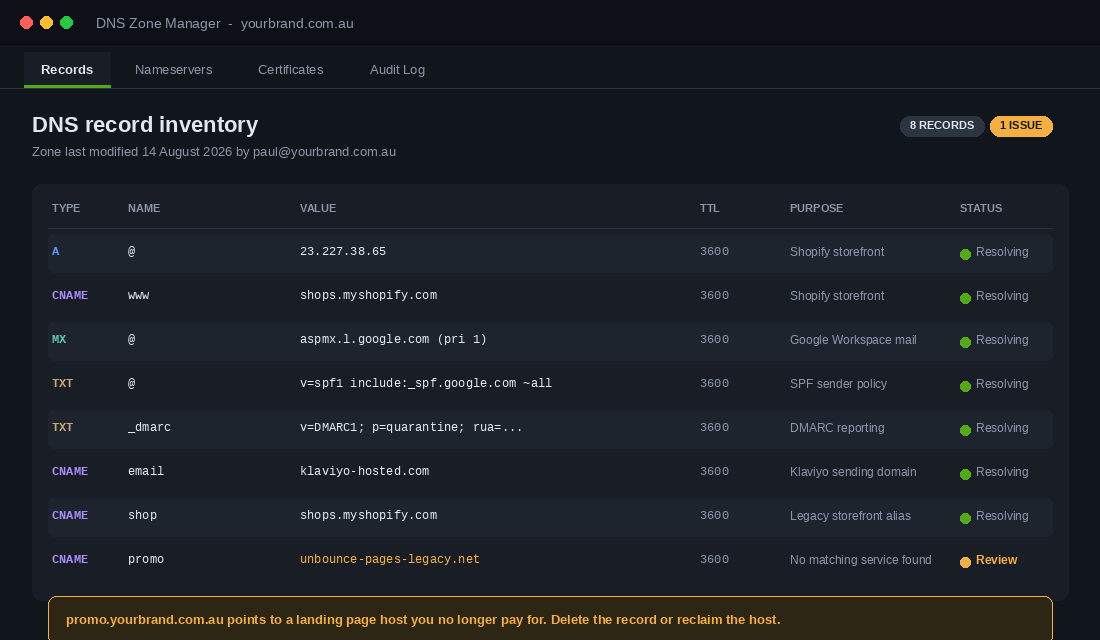
Most founders cannot name a single record in their zone. You do not need to become a network engineer, but you do need to be able to look at the list and say what each line does.
For a standard Shopify store on a third party domain, the storefront runs on two records. The A record for the root points to Shopify’s IPv4 address, 23.227.38.65. The CNAME named www points to shops.myshopify.com. Shopify is clear that you can have only one A record and one www CNAME on the domain, and that changing or removing either breaks the connection between your domain and your store.
That single constraint causes more self-inflicted outages than anything else on this list. A new app asks you to “add an A record” for a tracking subdomain, someone edits the root record instead of creating a new one, and the storefront disappears. DNS changes can take up to 48 hours to propagate, so the fix is not instant either.
Build a one page record inventory with five columns: type, name, value, what it does, and who asked for it. You are looking for:
- A and CNAME records pointing at the storefront, landing page tools, help desks, or server-side tracking containers.
- MX records for your mail provider. If these are wrong or duplicated, customer service email silently stops.
- TXT records carrying SPF, DKIM and DMARC. These decide whether your Klaviyo campaigns reach the inbox. If you have never checked them, start with the email authentication playbook, because a broken SPF record costs you revenue every single send.
- Verification TXT records from Google, Meta, Shopify and old vendors. Harmless individually, but a zone with fifteen of them is a zone nobody is managing.
Save the inventory as a PDF and store it with your other business continuity documents. When something breaks at 2am, the difference between a seven minute outage and a seven hour one is knowing what the records were supposed to say.
Know What Breaks in Your Inbox When a DNS Change Goes Wrong
A broken storefront tells you it is broken. Broken email says nothing at all. You keep sending, Klaviyo keeps reporting deliveries, and your revenue quietly slides for three weeks before anyone connects it to a record somebody edited.
The order of failure is predictable. Your transactional email goes first, because order confirmations and shipping notices come from a different sending service than your campaigns. Customers stop getting Australia Post tracking numbers and your support inbox fills with “did my order go through” before you notice anything on the marketing side.
Three specific failure modes cause most of it:
- SPF blown past the 10 lookup limit. Every include in your SPF record costs a DNS lookup and the ceiling is 10. Add a fourth or fifth sending tool and the record returns permerror, which many receivers treat as an outright fail.
- A DKIM CNAME deleted during a cleanup. Records like klaviyo._domainkey look like clutter to anyone tidying a zone. Remove one and every campaign from that sender starts arriving unsigned.
- DMARC left at p=none forever. Since February 2024 Gmail and Yahoo have required a DMARC record for anyone sending over 5,000 messages a day, and a spam complaint rate under 0.3 per cent. Plenty of Aussie brands added p=none to pass the check and never advanced it.
Detection takes ten minutes and costs nothing. Run your domain through MXToolbox to confirm SPF, DKIM and DMARC all resolve. Point your DMARC rua address at dmarcian so aggregate reports show you exactly which senders are failing. Then open Google Postmaster Tools and watch domain reputation, because a slide from High to Medium is your earliest warning that something changed.
Add all three to the same quarterly reminder as your subdomain sweep. Email authentication is infrastructure, and it belongs in the same review as the rest of your store’s security.
Check 5: Delete the Dangling Records Before Someone Else Claims Them
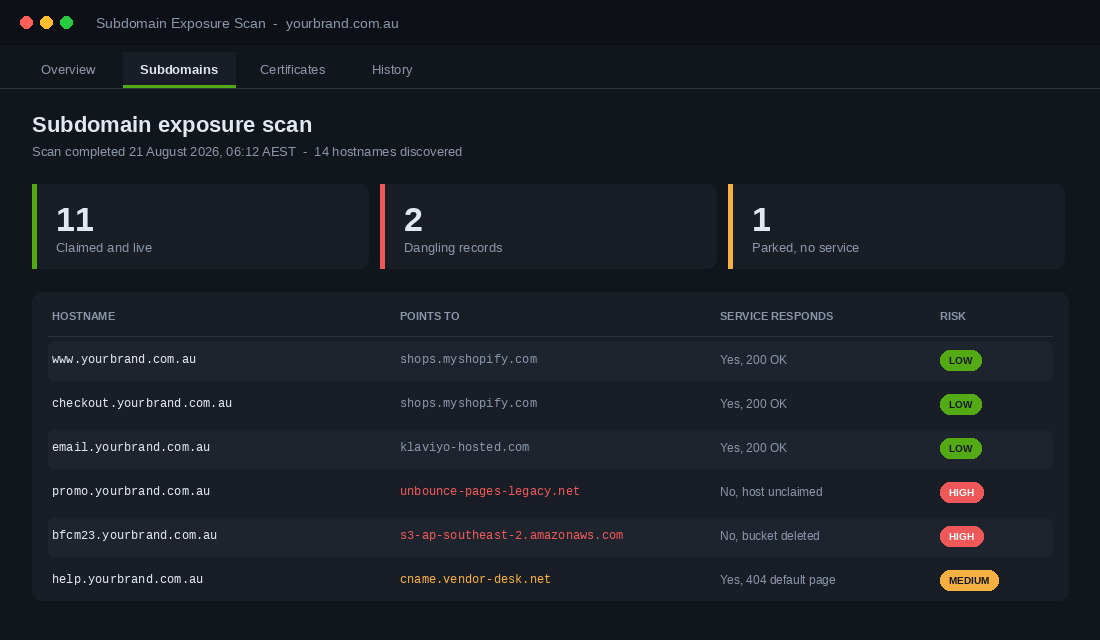
This is the check almost nobody runs, and it is the one with the nastiest failure mode.
Every campaign leaves residue. You spun up bfcm23.yourbrand.com.au on a landing page builder, ran the promo, cancelled the subscription in January, and left the CNAME in place. That record still points at a hostname on the vendor’s platform. If anyone can register that hostname, they now control a subdomain of your brand, complete with your name in the URL and, in some configurations, a valid certificate.
The scale of this is genuinely uncomfortable. Research conducted between October 2024 and January 2025 identified around 150 abandoned cloud storage buckets that were still referenced by live DNS records belonging to major corporations and government agencies. In four months those abandoned addresses received more than eight million requests, including requests for software updates and configuration files. Separately, in February 2025 Infoblox documented a threat actor abusing dangling DNS records at organisations including the CDC, Deloitte, PwC and Ernst and Young.
If it happens to the big four accounting firms, it can happen to a Shopify brand in Brunswick. Run this pass:
- List every subdomain in your zone. Your registrar or DNS host shows them all in one screen.
- Open each one in a browser. A live store page or a real vendor login is fine. A vendor error page saying “no such account”, “domain not configured” or “bucket does not exist” is a red flag.
- For each flagged record, either reclaim the host or delete the record. Reclaiming means logging back into the vendor and re-adding the hostname. Deleting is faster and usually correct for a campaign that ended two years ago.
- Add a decommission step to your campaign SOP. When you cancel a tool, removing its DNS record is part of cancelling, not an afterthought.
Set a recurring quarterly reminder. Fifteen minutes, four times a year.
Check 6: Get Ahead of the Shrinking Certificate Clock
An expired TLS certificate is one of the few failures that converts directly into lost revenue in the same hour. Browsers throw a full page warning. Customers do not click through it. They leave.
The rules are changing, and most operators have not registered it. In April 2025 the CA/Browser Forum passed ballot SC-081v3, originally proposed by Apple, by 29 votes to nil. It sets a phased reduction in the maximum life of a publicly trusted TLS certificate:
- From 15 March 2026: maximum certificate lifetime drops to 200 days.
- From 15 March 2027: maximum lifetime drops to 100 days.
- From 15 March 2029: maximum lifetime drops to 47 days, with domain validation reuse cut to just 10 days.
If your certificate is managed by Shopify, this is mostly good news. Shopify provisions and renews certificates automatically for connected domains, and shorter lifetimes are handled for you. The exposure sits with everything else you run on the domain.
So audit the edges. Any subdomain running on a separate host is now on a renewal treadmill that gets faster every couple of years:
- Server-side tracking containers hosted on your own subdomain.
- Headless front ends, blogs and help centres on separate infrastructure.
- Any certificate you bought manually. If a human has to remember to renew it, it will eventually be renewed late.
- Certificates issued to a wildcard across many subdomains, where one lapse takes down several services at once.
The correct answer for every one of these is automated issuance and renewal, not a diary note. Manual certificate management stops being viable well before 2029.
Check 7: Monitor the Things That Fail Silently
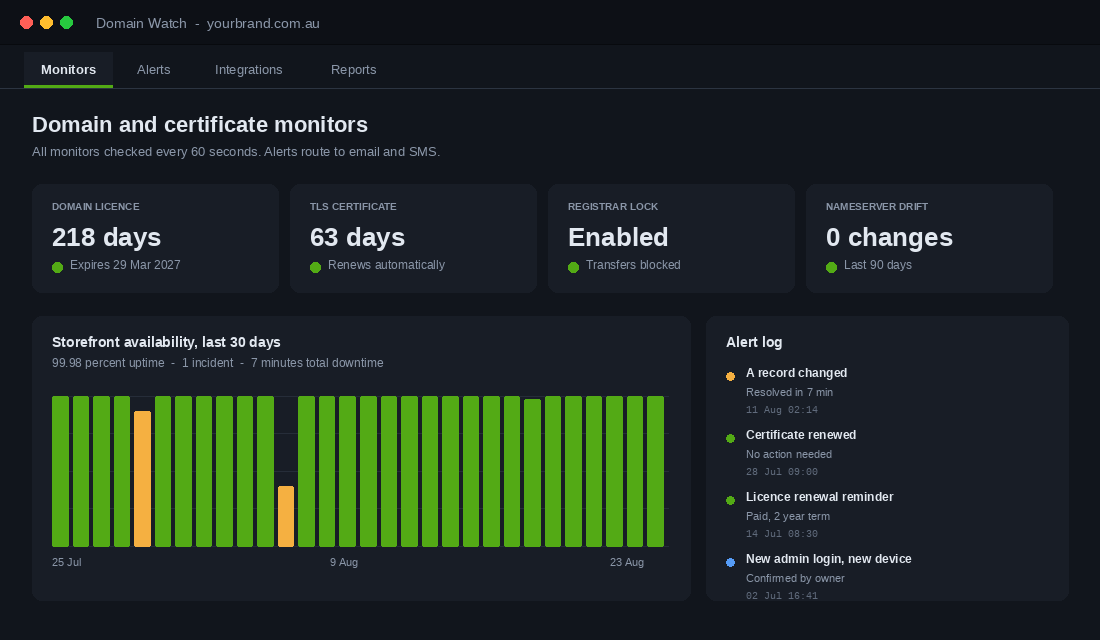
Everything in the first six checks fails quietly. Nobody at Shopify emails you when your A record changes. Your registrar will not ring you when someone requests a transfer. You find out because a customer messages your Instagram asking why the site is broken, which is generally about ninety minutes after it broke.
The fix I recommend to most brands is Cloudflare on the free plan, used purely as your DNS host. It gives you a clean record editor, an audit log of every change, and DNSSEC in a couple of clicks. Here is the setup:
- Export your current zone first. Screenshot every record or download the zone file. Do not skip this. It is your rollback.
- Create a Cloudflare account on the free plan using your role based domain admin email, then add your domain. Cloudflare scans and imports your existing records automatically.
- Compare the imported list against your export, line by line. Imports miss records. Manually re-add anything missing, paying particular attention to MX and TXT records.
- Set the Shopify records correctly. A record on the root to 23.227.38.65, CNAME on www to shops.myshopify.com. Both should be set to DNS only, not proxied, or Shopify’s certificate provisioning will fail.
- Update your nameservers at the registrar to the two Cloudflare nameservers shown. Allow up to 48 hours, though it is usually much quicker.
- Verify, then enable DNSSEC in the Cloudflare DNS settings and add the resulting record at your registrar.
- Turn on notifications. In Cloudflare, set alerts for zone configuration changes so any record edit lands in your inbox.
Then add external monitoring for the two things Cloudflare will not tell you: licence expiry and uptime. Any uptime monitoring service will check your storefront every minute and alert on certificate expiry, and most have a free tier that covers a single store comfortably. Point the alerts at both your phone and a second person’s phone.
Put a Dollar Figure on an Hour of Darkness
Everything above competes for your attention with product, stock and marketing. The way to win that argument with yourself is to price the downside. This takes ten minutes and four numbers you already have.
| Input | Where to find it |
|---|---|
| Sessions in your peak hour | Shopify Analytics, sessions over time, hourly view |
| Conversion rate | Shopify Analytics, last 90 days |
| Average order value | Shopify Analytics, last 90 days |
| Realistic hours to recover | Your runbook, or 4 hours if you have none |
Multiply the first three, then multiply by the fourth. That is your direct loss.
Imagine you run a 40-SKU homewares brand doing 1.2 million AUD a year, with 55,000 sessions a month. Roughly 30 per cent of your traffic lands between 7pm and 10pm, which is about 180 sessions in a peak hour. At a 1.8 per cent conversion rate and a 140 dollar AOV, that hour is worth about 454 dollars.
Go dark for four evening hours and you have burnt roughly 1,800 dollars in orders. That is before the 60 to 80 dollars an hour still flowing to Meta and Google for traffic hitting a dead site, and before the same-day Australia Post cutoff you missed.
Now run the same maths on BFCM, when peak hour traffic typically runs 6 to 8 times normal. That four hour outage becomes 11,000 dollars or more, on the one weekend you cannot repeat.
Write your number on the front page of your runbook. When you are deciding whether to spend an afternoon on registrar locks and record inventories, you are not comparing a boring task against a fun one. You are comparing one afternoon against your own peak hour figure, multiplied by however long it takes you to notice.
The 2am Runbook: What to Do When the Store Goes Dark
Monitoring only helps if the alert triggers a decision instead of a panic. Write this down once and store it where your team can reach it without your login.
- Confirm it is real. Check the store on mobile data, not office wifi, and confirm from a second device.
- Check yourstore.myshopify.com directly. If the myshopify address loads fine but your domain does not, it is a domain or DNS problem, not a Shopify problem. That single test saves an hour of raising the wrong support ticket.
- Check the licence status at the registrar. Expired is the most common cause and the fastest fix. Pay the renewal immediately.
- Compare live records against your saved inventory. If the A record or nameservers have changed and you did not change them, treat it as an account compromise, reset the registrar password, revoke sessions and contact the registrar’s abuse team.
- Kill paid traffic. Pause Meta and Google while the site is unreachable. Spending on a broken destination burns cash and trains the algorithm on a failure signal.
- Post to your email list and socials. Customers forgive an outage. They do not forgive silence. Our Shopify downtime playbook has the communication templates.
Why These Seven Checks Compound
Read individually, each check looks like admin. Together they form a single control: you, and only you, can change where your brand’s name points.
Correct registrant details mean you can prove ownership in a dispute. Registrar lock and app based two-factor mean a stolen password is not enough to move the domain. A five year renewal and a live card mean the licence cannot quietly lapse into a 30 day blackout.
A documented record inventory means a broken change can be reversed in minutes. A clean subdomain list means nobody is building a phishing page on your brand’s URL. Automated certificates mean the shrinking validity window is somebody else’s problem. Monitoring means you learn about all of it before your customers do.
Miss one and the others get weaker. Perfect monitoring on a domain registered to a deregistered company still leaves you unable to prove it is yours. A locked registrar with the recovery email hosted on the same domain locks you out along with the attacker.
The economics are absurd in your favour. The whole system costs a few hundred dollars a year and one afternoon. Set against an average small business cybercrime cost of 56,600 dollars, or a month of unreachable storefront and dead email, it is the cheapest insurance in the business.
Your 20-Minute Domain Audit
Copy this into a doc, work top to bottom, and tick each line. Anything you cannot tick becomes a task with an owner and a due date.
- Ownership. Registrant name and ABN match my current trading entity.
- Contacts. Registrant, technical and billing emails all go to a role address I control.
- Lock. Registrar lock or transfer lock is enabled on every domain I own.
- Access. Two-factor is on via an authenticator app, and credentials live in the company password manager.
- Recovery. The registrar login email is hosted somewhere other than the domain itself.
- Term. Every domain is renewed to the longest available term, with a valid card on file.
- Reminders. Shared calendar alerts sit at 90 days and 30 days before expiry, with a second person invited.
- Defensive names. Misspellings, .net.au and retired brand domains are all current.
- Inventory. Every DNS record is documented with a purpose and an owner, saved as a PDF offline.
- Storefront records. One A record on the root to 23.227.38.65, one www CNAME to shops.myshopify.com, nothing competing with them.
- Mail records. MX, SPF, DKIM and DMARC verified and passing.
- Subdomains. Every hostname resolves to a service I still pay for. Dangling records deleted.
- Certificates. Every certificate on the domain renews automatically, including subdomains on other hosts.
- Monitoring. Uptime, certificate expiry, licence expiry and zone change alerts all route to two phones.
- Runbook. The outage steps are written down and accessible without my login.
Fifteen lines. One afternoon. Then it runs on reminders.
The brands that get burnt by this are never careless brands. They are busy ones, growing fast, with a domain set up in year one by someone who is no longer around. That describes most stores between 40k and 500k a month. Go and check yours before something else checks it for you.
Inside eCommerce Circle, protecting the infrastructure your revenue actually sits on is one of the core pillars we work on with every member. If you want a second opinion on yours, let’s talk.