Most Aussie founders treat store security like insurance paperwork. It sits in the “should probably do that” pile behind creative testing, inventory orders and the next promo calendar. Then one Tuesday morning a customer emails asking why their order shipped to an address in another state, and suddenly it is the only thing on the list.
What’s in This Article
Here is the part that catches people out. The attacks that hurt Shopify brands are almost never clever. Nobody is breaking Shopify’s infrastructure. They are logging in with credentials your customers reused from a breach somewhere else, or they are walking through a staff account that still has full admin access eighteen months after the contractor stopped working with you.
The numbers say this is getting worse fast. Credential stuffing volume against consumer login endpoints grew 148% year on year through Q4 2025, and account takeover attack rates against ecommerce sites rose by the same margin. In the second half of that year, login traffic across monitored retail sites ran at 31% legitimate and 69% bot or malicious. That is not a rounding error. That is the majority of everyone knocking on your login page not being a customer.
Why Attackers Wait for Your Best Trading Weeks
Fraud follows volume. When your store is doing 4x normal orders, your team is drowning, your support inbox is three days behind and your manual review queue gets waved through because everyone wants orders out the door. That is exactly when a fraudulent order looks like just another order.
It also happens to be when customer accounts are at their fattest. Store credit from returns, unspent gift cards, loyalty points banked all year. Loyalty accounts get hit at four to five times the rate of standard accounts, precisely because there is stored value sitting in them, and loyalty fraud now accounts for roughly 27% of online fraud attempts.
Australia is not sitting this one out. In early 2024, The Iconic confirmed that a number of customer accounts had been accessed by attackers using login details leaked from other websites, with fraudulent orders placed against saved payment methods. No breach of The Iconic’s own systems was needed. Customers had simply reused passwords, and the attackers had a list.
That is the uncomfortable truth. After Optus and Medibank in 2022, the personal details of a very large share of Australian adults are already circulating. You cannot undo that. What you can do is make sure those details are not enough to get into an account on your store, and not enough to get into your admin.
The cost of getting this wrong is now well documented locally. The Australian Signals Directorate reported the average self-reported cost of cybercrime per incident for small business rose 14% to $56,600. Across Australian business generally it climbed to $80,850. And 2025 was the worst year on record for notifiable data breaches, with 1,205 notified to the OAIC, 716 of them from malicious or criminal attack.
Six layers. Each one takes an afternoon at most. Run them now, in August, while there is still runway before peak trading and while you can still make changes without breaking anything. If you have already booked a pre-peak code freeze, do this work before the freeze date, not after it.
Layer 1: Cap the Admin, Not Just the Password
Nearly every Shopify store I look at has the same problem. Too many people hold administrator access, and at least one of them no longer works there.
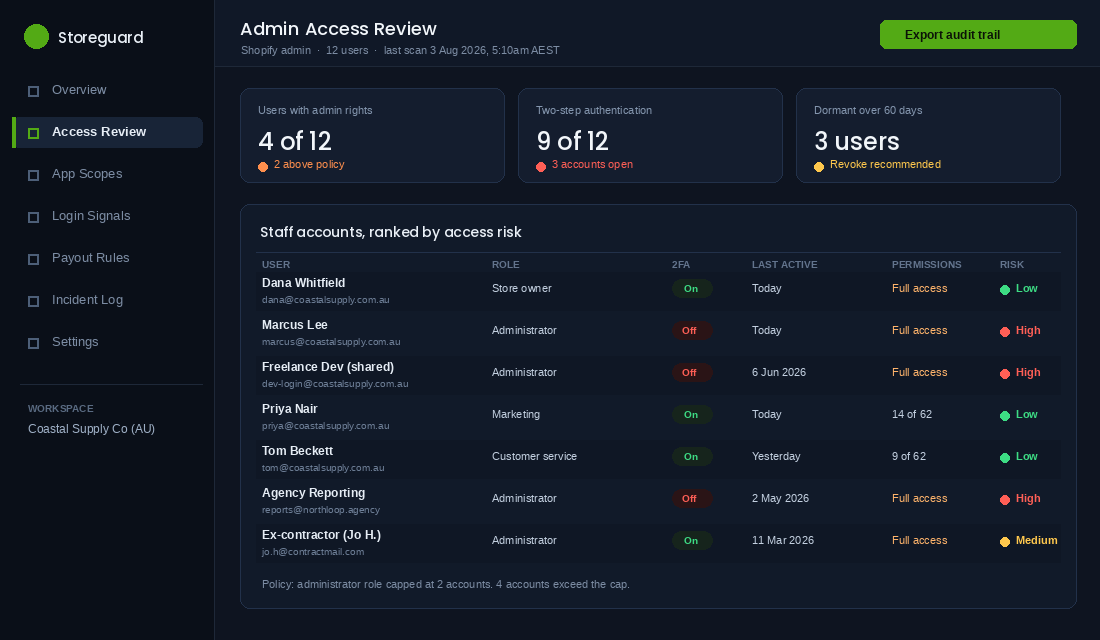
Shopify gives you 60 plus individual permissions. Most stores use two settings: full access, or nothing. That is the whole problem in one sentence.
Do this today, in Settings then Users and permissions:
- List every user and the date they were last active. Anyone dormant more than 60 days gets removed. You can always re-invite them in ninety seconds.
- Cap administrator access at two people. Usually you and one operations lead. Everyone else gets a role built from the specific permissions their job needs.
- Kill every shared login. “dev-login@” and “reports@” accounts are the ones that get compromised, because nobody owns them and nobody notices the password has been in a Slack thread since 2024.
- Turn on two-step authentication for your own account first, then require it. On Shopify Plus you can enforce two-step authentication for every user in your organisation from Users then Security. On other plans you cannot force it, so it becomes a written policy plus a weekly check of who has it switched on.
- Use an authenticator app, not SMS. SIM swap attacks are real and SMS codes are the weakest of the available options. Google Authenticator, Authy or the passkey option in 1Password all work.
One more thing that costs nothing. Write an offboarding checklist that removes Shopify, Klaviyo, Meta Business Manager, Google Ads, the 3PL portal and the domain registrar in one pass. Most stores remove Shopify access on the last day and forget the other five for a year.
Layer 2: Treat Every App Like a Copy of Your Database
When you install a Shopify app and click Install, you are granting an access token to a third party. If that app requested customer and order scopes, the vendor can read your customer list, email addresses, order history and shipping addresses. Forever, until you uninstall it and rotate the token.
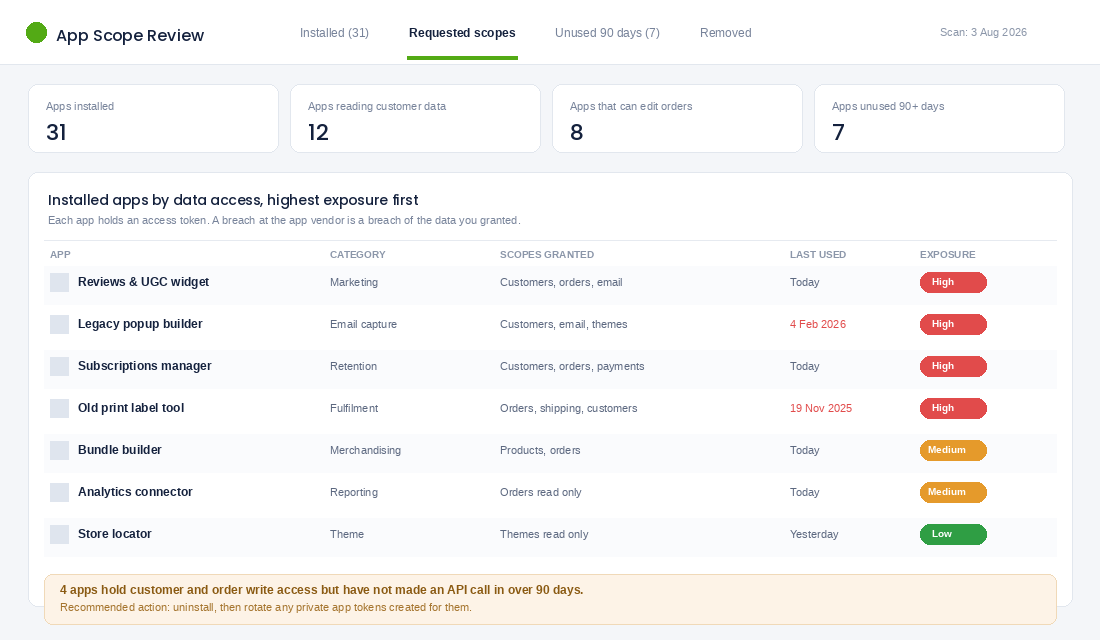
The average Shopify store I audit carries somewhere between 22 and 35 installed apps. A third of them have not made an API call in months. Each of those is an open door held by a company you have not spoken to since you installed it.
Your app scope review, in order:
- Export your installed app list and sort it by what data it can touch, not by what it costs. Customer, order and payment scopes at the top. Theme-only apps at the bottom.
- Uninstall anything you are not actively using. If you cannot name the last time it changed a business outcome, it goes. This overlaps neatly with a proper app stack audit, so do both in the same sitting.
- Rotate any custom or private app tokens created by past developers or agencies. These do not expire on their own and they are frequently pasted into scripts, Zapier accounts and Google Sheets.
- Check what your apps do with data at their end. Any app holding your full customer list should be able to tell you where that data is stored and what happens if you leave. If the answer is a shrug, that is your answer.
Worth remembering that insider access is a real category, not a theoretical one. In 2020 Shopify itself disclosed that two members of its support team had been obtaining customer transactional records from fewer than 200 merchants. Platforms are strong. People with legitimate logins are the soft edge, and that applies to your team, your agency and every vendor in your stack.
Layer 3: Harden the Customer Account, Because That Is Where the Value Sits
This is the layer almost nobody looks at, and it is the one attackers target hardest. Six in ten of 1,100 merchants surveyed reported an increase in account takeover fraud over the previous twelve months.
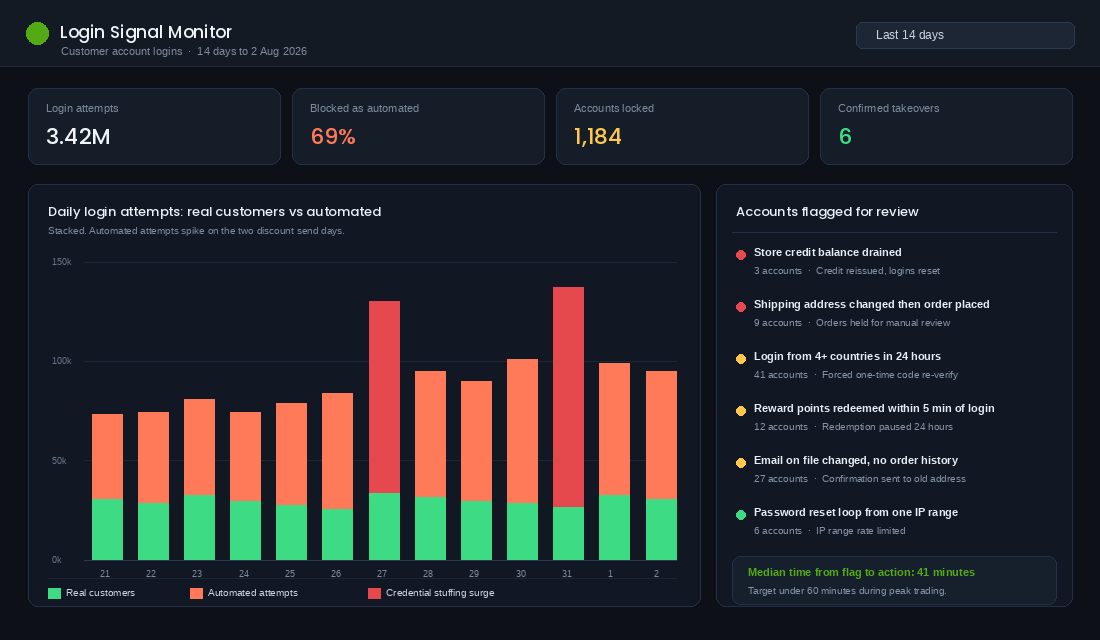
The single biggest win here is moving off legacy customer accounts. Shopify’s newer customer accounts drop passwords entirely and sign customers in with a six-digit one-time code sent to their email. No password means no password to steal, and credential stuffing lists become useless against your login page overnight.
Shopify has already deprecated the legacy version, so this migration is happening whether you plan it or not. Far better to plan it in August than have it forced on you in November. Work through the practical mechanics in the customer accounts playbook before you flip the switch, because loyalty widgets, subscription portals and wishlist apps all need checking against the new flow.
Alongside the migration, put these guardrails in place:
- Rate limit the login and password reset endpoints. A normal customer does not attempt to log in forty times in a minute from six countries.
- Require re-verification before a shipping address change plus an immediate order. That specific sequence is the classic takeover fingerprint.
- Put a cooling-off window on stored value. Delay store credit and loyalty redemption for 24 hours after an email address or login method changes. Legitimate customers barely notice. Attackers need speed, so it breaks their model.
- Send a notification to the old email address whenever the email on file changes. It is the cheapest early warning system you will ever build.
- Cap gift card and store credit redemption per order. Stolen gift cards resell on dark web markets for 25 to 60% of face value, which is exactly why they are targeted.
Layer 4: Guard the Four Money Paths
There are only four ways value leaves a Shopify store outside a normal sale. Every one of them deserves an alert.
- Payout bank details. If someone changes the account your Shopify Payments payouts land in, you will find out on payout day. Turn on the notification, and make it a rule that this field is never changed without a phone call between two named people.
- Discount codes. Bulk code generation, a stacking rule that should not exist, or a staff-only code that leaks onto a coupon aggregator. Set a maximum discount percentage policy and review new codes weekly.
- Refunds and store credit. Set a value threshold above which a second person must approve. Most stores have no threshold at all, which means a compromised support login can issue unlimited credit.
- Gift cards. Issued gift cards are cash. Alert on any gift card created outside a normal purchase.
Shopify Flow does most of this for free and takes about twenty minutes to set up. Build a workflow triggered on order creation, add a condition for orders where the shipping address country differs from the billing address country and the order value sits above your average, and have it tag the order plus post to a Slack channel. Repeat with a second workflow on customer update, watching for email changes. You are not trying to block anything automatically. You are trying to see it inside the hour.
The downstream cost of missing these is real money, not just admin. Fraudulent orders become chargebacks, and chargebacks carry fees on top of the lost stock. Tightening this layer pairs directly with the work in the chargeback prevention playbook.
Layer 5: Own the Domain and the Inbox
Your domain is the most valuable asset you own and it is usually the least protected. If someone gains control of your registrar account, they can point your domain anywhere, intercept your email, and reset the password on every service you own that sends recovery codes to that domain.
Four things, this afternoon:
- Turn on registrar lock and two-factor on the registrar account. Check who the registrant contact is. If it is a former developer or an agency you parted ways with, fix that first, before anything else on this list.
- Confirm auto-renew is on and the card on file is current. Expired domains get sniped within hours. This has ended businesses.
- Publish SPF, DKIM and DMARC records. Without DMARC, anyone can send email that appears to come from your domain. Start with a monitoring policy, review the reports for a fortnight, then tighten to reject once you have confirmed every legitimate sender is passing.
- Enumerate every legitimate sender before you tighten. Shopify, Klaviyo, your helpdesk, your invoicing tool, your review platform. Missing one and going straight to reject will silently kill a channel you rely on.
Postmark and EasyDMARC both offer free DMARC report monitoring that turns the raw XML into something readable. Set one up, point the reporting address at it, and give it two weeks before you change enforcement. The bonus is deliverability. A properly authenticated domain lands more of your campaign email in the inbox, which is a revenue win sitting inside a security task.
Layer 6: Write the 60-Minute Incident Plan Before You Need It
Every founder I know who has been through an incident says the same thing. The technical part was fine. The chaos was not knowing who was doing what while the phone rang.
Your plan fits on one page and covers five things:
- Who declares it. One named person, plus a backup. Not a committee.
- The first four actions. Force logout of all admin sessions, rotate the owner password, disable non-essential app access, freeze refunds and gift card issuance. In that order.
- Who you call. Shopify support, your payment provider, your developer, your insurer. Numbers and account IDs written down somewhere that does not require access to the systems that just went down.
- What you tell customers, and when. Draft the email now, while you are calm. A brand that communicates within hours holds trust. A brand that goes quiet for a week does not.
- Your legal obligations. Under Australia’s Notifiable Data Breaches scheme you have 30 days to assess a suspected eligible breach, and if it is likely to cause serious harm you must notify affected individuals and the OAIC as soon as practicable. Cybercrime also gets reported through ReportCyber. Know this before you are reading about it at 11pm.
Then do the thing almost nobody does. Run a twenty-minute tabletop once a quarter. Say the words “a customer just told us their account placed an order they did not make” and have your team walk through it out loud. You will find at least three gaps the first time.
Where the Six Layers Compound
Individually these look like housekeeping. Stacked, they change the economics of attacking your store.
Attackers work at scale against thousands of stores at once. They are not choosing you personally. They are running a list and keeping whatever opens. Passwordless customer accounts remove the credential stuffing attack entirely. Two-step authentication on a capped admin removes the staff account attack. Rotating app tokens removes the vendor-breach attack. A 24-hour cooling-off on stored value removes the payoff even when someone does get in.
Each layer does not just add protection. It removes an entire category of attempt, which means the alerts you do get are real ones your team can actually action rather than noise they learn to ignore.
There is a commercial upside too, and it is not small. The same work that stops takeover also cuts fraudulent chargebacks, protects your payment processing standing, improves email deliverability through DMARC, and gives you a straight answer when a retail partner or a wholesale buyer asks how you handle customer data. Security done properly reads as operational maturity, and operational maturity is what makes a business worth buying.
Your One-Page Store Lockdown Audit
Block ninety minutes this week. Work down the list. Anything you cannot tick, put a name and a date against it.
- Every Shopify user is a named individual, no shared logins
- Administrator access is capped at two people
- Two-step authentication is on for every user, via an authenticator app
- No user has been dormant for more than 60 days
- An offboarding checklist exists and covers all connected platforms
- Installed apps have been reviewed by data scope in the last quarter
- Apps unused for 90 days have been uninstalled
- Custom and private app tokens from past developers have been rotated
- Customer accounts have been migrated off the legacy password flow
- Login and password reset endpoints are rate limited
- Store credit and loyalty redemption has a cooling-off window after a login change
- Email address changes trigger a notification to the previous address
- Payout bank detail changes require two-person confirmation
- Refunds above a set threshold require a second approval
- Shopify Flow alerts exist for high-risk order and customer events
- Registrar lock and two-factor are on at the domain registrar
- The registrant contact is a current member of your business
- Domain auto-renew is on with a valid card
- SPF, DKIM and DMARC are published and monitored
- A one-page incident plan exists with named owners and phone numbers
- The team has run a tabletop exercise in the last quarter
Twenty-one lines. Most stores tick fewer than eight on the first pass, and every single one of them is fixable in an afternoon.
The Offboarding Gap: The Accounts That Stay Open After Someone Leaves
Six layers of lockdown, and the most common unmonitored door into an Aussie DTC store is still a former staff member, contractor or agency that nobody ever switched off.
It is rarely malicious. It is a freelance designer who still has theme editor access from a project in March, or an agency whose Meta Business Manager seat was never revoked when you changed providers. The risk is not that they do something. It is that their account gets breached and yours is what sits behind it.
Write one offboarding checklist and run it the same day someone leaves, not the same week. Access removal that happens within 24 hours is a control. Access removal that happens “when we get to it” is a hope.
The eight places to check, in order:
- Shopify admin staff account. Remove, do not just downgrade. Then check whether they created any private or custom apps that survive their removal.
- Email and Google Workspace. Suspend the account rather than deleting it immediately, so you keep the mailbox, then transfer file ownership before you delete.
- Klaviyo, Omnisend or your ESP. A live sending seat can email your entire list.
- Meta Business Manager and Google Ads. Both people and partner-level access. Check the ad account, the pixel, the catalogue and the page.
- Domain registrar and DNS. The highest-consequence account in the business and usually the least reviewed.
- 3PL, freight and supplier portals. These hold customer addresses and can redirect stock.
- Shared password manager vaults. Revoke the seat, then rotate every credential that account could see. Revoking access does not un-know a password.
- Slack, ClickUp, Notion and anywhere else customer data gets pasted.
Two habits make this almost automatic. Give contractors and agencies time-boxed access from day one, with a calendar reminder at 90 days that forces a renew-or-revoke decision. And never share a login: individual accounts mean offboarding is a delete, while a shared password means a rotation across everyone still working with you.
The Quarterly 20-Minute Access Review That Keeps the Six Layers Honest
Security systems do not fail on the day you build them. They decay quietly, one temporary access grant at a time, and the gap between what you think is locked and what actually is widens every month you do not look.
Put a recurring 20-minute block in the calendar for the first week of every quarter. Open five screens and ask one question of each.
- Shopify Settings, Users and permissions. Does every name still work here, and does every one of them still need the permissions they have? Most stores can cut admin-level seats to two or three.
- Shopify Apps. Anything installed but not used in 90 days comes off. Every app is a live copy of your data, and a proper audit usually finds three or four nobody can account for.
- Meta Business Manager, People and Partners. Old agencies are the usual find.
- Domain registrar. Confirm two-factor is on, the recovery email is a live address you control, and the renewal card has not expired. An expired card on a domain is a self-inflicted outage.
- Shopify admin login history and staff activity log. Look for logins from countries where nobody works.
Three numbers worth writing down each quarter so you can see the drift: total admin-level users, total installed apps, and the number of accounts still active for people no longer working with the business. That third number should be zero every single time, and when it is not, you have found the exact gap an attacker would have found for you.
Schedule the Q4 review for early October, before the November double peak makes every change feel risky. If you are also adding seasonal staff, pair it with the access rules in the peak season staffing playbook so temporary hires get temporary permissions by default, and use the broader controls in the ecommerce cybersecurity guide as the annual version of this check.
Lock It Down While the Store Is Quiet
Nobody has ever regretted doing this work in August. Plenty of founders have regretted putting it off until the week the traffic arrived, because by then every change carries risk and every hour belongs to something more urgent.
You have spent years and a very large marketing budget building a customer list, a domain reputation and a brand people trust with their card details. Six layers and one afternoon is a fair price to keep all three.
Inside eCommerce Circle, protecting what you have built is one of the core pillars we work on with every member. If you want a second opinion on your store’s lockdown before peak, let’s talk.