Every year the same thing happens. It is 21 December, the warehouse has stopped picking, and a customer who ordered on the 20th is emailing to ask whether their gift will land before Christmas lunch. Nobody in the business wants to answer that email, because everybody knows the answer.
What’s in This Article
Australia Post moved almost 111 million parcels across November and December in the last peak, up 7.6% year on year, with more than three million parcels delivered on its busiest single day. Roughly 7.9 million Australian households shopped online across that window. Your parcel is not special. It is one of three million going through the same sorting facility on the same Monday.
So the cut-off date is not an operations footnote you paste into the shipping policy on 15 December. It is a commercial decision that sets how much you can sell in the last three weeks of the year, how many refunds you write in January, and whether 81.4% of Australian shoppers who say a poor delivery experience would stop them buying again are talking about you. Here is the six-step system we run with operators inside eCommerce Circle.
Your cut-off date is a revenue decision, not an ops footnote
Most Aussie brands treat the Christmas cut-off as a compliance exercise. Someone finds the Australia Post dates in mid-December, copies them into a shipping page nobody reads, and hopes for the best. That approach quietly costs money in three places.
The first is the sale you never make. A shopper on 17 December is not asking whether your product is good. They are asking one question: will this arrive in time? If your site does not answer it clearly, they buy from a competitor who does. Research on estimated delivery dates has shown conversion lifts in the range of 13% to 25% when a vague speed range is replaced with a specific date, and roughly three quarters of shoppers say seeing a delivery date on the product page or in the cart influences whether they buy.
The second is the refund you write in January. An order placed after your real cut-off, shipped anyway, and delivered on 29 December is a refund, a return, a chargeback risk, and a one star review. You paid acquisition cost to lose money.
The third is the support load. Where is my order queries typically make up 30% to 40% of ecommerce support tickets, and in peak trading periods that share regularly climbs past 50%. Every one of those tickets is a person you already sold to, taking time away from the people you have not.
A cut-off date that is set early, calculated honestly, and published everywhere turns all three of those from a cost into an asset. It is a deadline. Deadlines sell.
Step 1: Build the calendar backwards from 24 December
Start with the date the gift needs to be under the tree and work backwards. Not forwards from today. Backwards from the customer’s deadline.
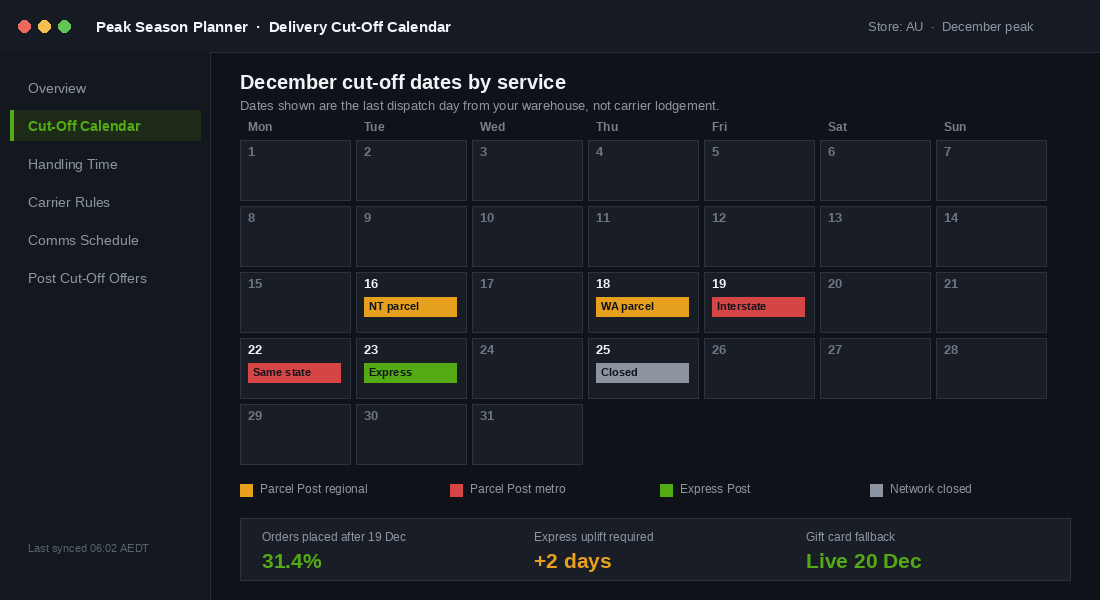
Australia Post publishes its recommended sending dates each year, usually in October or early November. The most recent set gives you a reliable planning baseline while you wait for the current year’s version:
- Parcel Post, same state. 22 December for metro to metro within the one state.
- Parcel Post, interstate. 19 December for most of the country.
- Parcel Post to Western Australia. 18 December. WA is always earlier and always forgotten.
- Parcel Post to the Northern Territory. 16 December, the earliest domestic date on the board.
- Express Post. 23 December from NSW, ACT, Victoria, Queensland and South Australia or within the same state, and 22 December for the Northern Territory, Tasmania and Western Australia.
- International. Economy Air by roughly 5 December, International Standard by roughly 12 December, International Express by roughly 18 December, depending on destination.
Two things about that list matter more than the dates themselves. Those are lodgement dates, not order dates. And they assume metro pickup straight into a processing facility. If your 3PL is in outer suburban Melbourne or your studio is in regional New South Wales, add a day before you do anything else.
Now do the same for every carrier you use. If you run Australia Post for standard, Aramex or CouriersPlease for metro, and a bulky freight partner for large items, you have three cut-off calendars, not one. Ring your account manager in October and get their dates in writing. They will not chase you.
Then set one more date that Australia Post cannot give you: your own final dispatch day. That is the day the last pick leaves the building. In most Aussie brands it is earlier than the carrier date, because the warehouse team wants to be with their families too.
Step 2: Add your handling time honestly
This is where almost every brand fudges the maths. The carrier says 19 December. So the store publishes 19 December. Then orders placed at 4pm on the 19th sit in a queue overnight, get picked on the 20th, and miss the truck.
Your customer-facing cut-off is the carrier date minus your handling time, minus a buffer for the volume spike. Work it out with real numbers, not optimism.
- Pull your dispatch data from last December. In Shopify, export orders for 1 to 24 December and compare created_at with the fulfilment timestamp. Find your median and your 90th percentile handling time, not your average. The average hides the bad days.
- Look at what happened on your busiest three days. If your median handling time is 8 hours in November but 34 hours on the Monday after the Cyber Sales weekend, your peak number is 34 hours.
- Add the pick queue. If your 3PL cuts off same-day pick at 11am, an order at 11:05am is a next-day dispatch. That is another full day.
- Add a two day safety buffer. Australia Post averaged more than two million deliveries a day for over 30 consecutive days last peak. Networks under that load do not run to the timetable on the brochure.
For a typical Aussie brand shipping from a Melbourne 3PL, that maths lands somewhere near this: carrier interstate cut-off 19 December, minus 1 day for pick and pack at peak, minus 2 days of buffer, gives a customer-facing standard shipping cut-off of 16 December. Express gets you to roughly 21 December.
Publishing 16 December instead of 19 December feels like giving away three days of trading. It is the opposite. You are converting three days of orders you would have refunded into three days of Express orders at a higher shipping charge, plus a store that keeps its promise. We go deeper on how to construct and defend that promise in the Shopify delivery promise playbook.
Step 3: Put the date everywhere a shopper hesitates
A cut-off date buried in your shipping policy is a legal document. A cut-off date on the product page is a conversion tool. Same information, completely different job.
Audit every touchpoint a shopper passes between the ad click and the confirmation email. There are nine that matter.
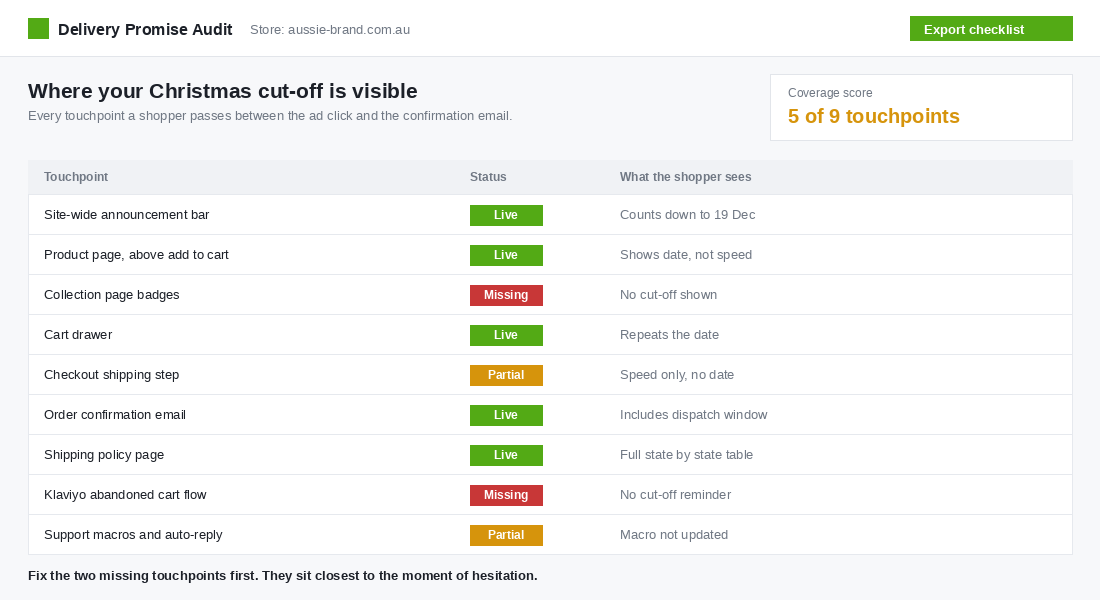
- Announcement bar. A live countdown, not static text. Order in the next 3 days for delivery before Christmas.
- Product page, above the add to cart button. This is the single highest impact placement. Give a date, not a speed range.
- Collection pages. A small badge on in-stock items so shoppers self-select before they click.
- Cart drawer. Repeat the date. This is where hesitation peaks.
- Checkout shipping step. Show the date next to each rate so Express justifies its own price.
- Order confirmation email. State the dispatch window, not just the order number.
- Shipping policy page. The full state by state table for the people who want detail.
- Email and SMS flows. Abandoned cart and browse abandonment need a cut-off line inserted for December.
- Support macros and auto-replies. Update these on 1 December, not 20 December.
The tool: Shopify delivery expectations, set up in 20 minutes
You do not need a paid app for the basics. Shopify has native delivery expectations built in.
- Go to Settings, then Shipping and delivery in your Shopify admin.
- Under your shipping profile, open the delivery zone and choose manual delivery dates for each rate.
- Enter your processing time in business days, using the peak number you calculated in step 2, not your normal number.
- Set your transit time per zone. Split metro and regional if your data shows a real difference, because it usually does.
- Save, then check a product page on mobile. The date should render above the add to cart button. If your theme does not surface it, add the delivery date block through the theme editor or ask your developer for a metafield-driven snippet.
- On 1 December, override the processing time upward to reflect peak reality, then revert it in January.
If you want carrier-level automation with Australian cut-off rules baked in, Starshipit is the platform most Aussie brands land on. It handles multi-carrier rules, holiday calendars and branded tracking in one place. Start with the native Shopify settings, then upgrade when the manual work becomes the bottleneck.
Step 4: Run the five-email cut-off sequence
The cut-off date is the best sales angle you get all year, because it is true. You are not manufacturing urgency. The truck genuinely leaves. Run five emails off the calendar and send them to your whole engaged list.
- The heads up, 10 days out. Subject line names the date. Body is a short gift guide with three price bands. Goal is to move browsers into carts early while stock is deep.
- The standard shipping warning, 2 days out. Clear, plain, no gimmicks. Standard shipping closes Tuesday at 5pm. Include the state by state table for anyone in WA or NT.
- The final call, cut-off day, sent at 7am. Short. One product row. One button. This is usually the highest revenue email of the month.
- The Express switch, the day after standard closes. Standard is closed, Express still lands by Christmas, here is the last date. Many brands skip this and leave real money behind.
- The gift card save, after Express closes. A digital gift card delivered instantly, plus a printable card the buyer can put in an envelope tonight.
Segment ruthlessly. People who already ordered in December should not receive the panic emails. Nothing burns goodwill faster than a final call message landing with someone whose parcel is already in transit.
If you are building your December campaign calendar now, the sequencing logic sits alongside your stock plan. Our BFCM inventory planning playbook covers how to reserve depth for the last three weeks rather than blowing it all in November.
Step 5: Build the post cut-off offer before you need it
Between your Express cut-off and Christmas Day there are usually two or three days of genuine, high intent traffic. People who left it late and still want to spend money. Most Australian stores greet them with a sold out feeling and nothing else.
You need three products ready to sell after the last truck leaves.
- Digital gift cards. Delivered instantly by email, with a designed PDF the buyer can print. Gift cards also pull revenue forward and bring a new customer into the store in January at your own margin, not a discounter’s.
- Click and collect or local delivery. If you have a warehouse, a studio or a retail partner, turn on local pickup for your metro postcodes and run it until 23 December. Shopify local delivery zones take about half an hour to configure.
- A dated pre-order. Buy now, ships 2 January, with an emailed gift note the customer can hand over on the day. Be explicit that it will not arrive before Christmas. Honesty converts better than ambiguity here.
Set these up in November while you have time. On 21 December nobody in your business has the bandwidth to build a gift card landing page. If gift cards are a small line item for you today, the gift card revenue playbook walks through the five levers that turn them into a real December channel.
Step 6: Kill the where is my order wave before it starts
Support volume in December is not random. It follows your dispatch curve with a two to four day lag, and it spikes hard in the week after your cut-off when customers who ordered late start refreshing tracking pages.
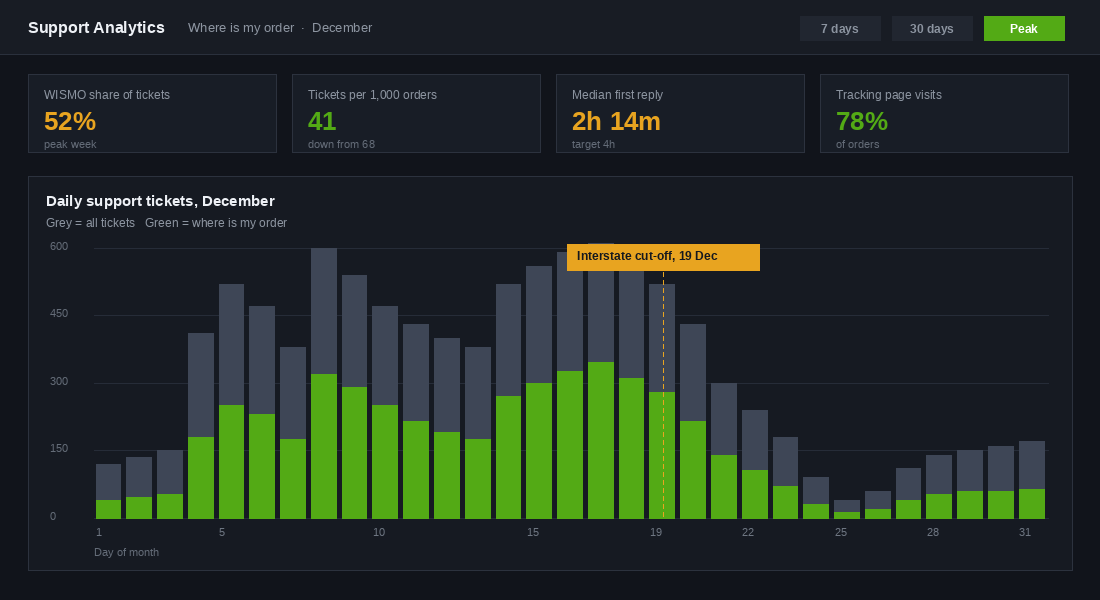
Four moves cut that wave down before it forms.
- Send a real dispatch notification. Not the default Shopify template. Include the carrier, the tracking link, the expected delivery window and a plain line about what happens if it is delayed. A confident dispatch email removes a large share of first-contact queries.
- Build a branded tracking page. Customers who can self-serve tracking on your domain do not email you, and the page gives you a merchandising surface at the moment of highest anticipation.
- Publish a delays page and link it in the footer from 1 December. One page that says what is happening in the network, what your team is doing, and when to contact you. Point every macro and auto-reply at it.
- Pre-write your macros in November. Five templates cover most of December: ordered before cut-off and on track, ordered after cut-off, tracking not updating, delivered but not received, and damaged in transit. Write them when you are calm.
Then staff for the curve. If your ticket volume triples between 8 and 22 December, one extra casual for three weeks is cheaper than a month of one star reviews about response times.
The compound effect: one calendar, four departments
Look at what the calendar has actually done once all six steps are running.
Marketing now has a real deadline to build campaigns around, which is the only kind of urgency that does not damage trust. Merchandising knows exactly which SKUs need depth through to the 16th and which can be allowed to run out. Operations has a hard stop the warehouse team can plan their own Christmas around. Support has macros, a delays page and a tracking experience that were written before the pressure arrived.
None of those four is a big win on its own. Together they change the shape of your December. The brands that get this right do not have better carriers than you. Adairs and Lush Australia both run dedicated Christmas delivery cut-off pages that state their dates plainly, state by state, weeks before the deadline. That is not a technology advantage. That is a decision made in October instead of December.
The version of your business that wins December is the one that made this calendar in spring. The version that loses it is the one still asking the 3PL for their dates on 14 December.
Your cut-off calendar template
Copy this into a shared doc today and fill it in. It takes about an hour with your 3PL on the phone.
- Row 1, carrier dates. One line per carrier and service, with the lodgement date and the state variations. Source them in writing.
- Row 2, warehouse dates. Final pick day, final dispatch day, and the daily pick queue cut-off time.
- Row 3, handling time. Median and 90th percentile from last December, plus your peak override number.
- Row 4, customer-facing cut-offs. Standard and Express, by state, calculated as carrier date minus handling minus buffer.
- Row 5, publication checklist. The nine touchpoints from step 3, each with an owner and a go-live date.
- Row 6, email and SMS schedule. The five sends, each with a date, a segment and a subject line.
- Row 7, post cut-off offers. Gift card page, local delivery zones and dated pre-order, each with a build date in November.
- Row 8, support prep. Delays page live date, five macros written, roster confirmed for 8 to 24 December.
Set one calendar reminder for the first Monday in October to fill it in, and a second for the first Monday in November to confirm the carrier dates once they are officially published. Two reminders. That is the whole system.
Practice is one of the ten P’s for a reason. The brands that scale past a few hundred thousand a month are rarely the ones with the cleverest tactics. They are the ones with the operating rhythm that makes December boring.
Inside eCommerce Circle, peak season planning is one of the core pillars we work on with every member. If you want a second opinion on your cut-off calendar before October, let’s talk.