Every Aussie Shopify founder has watched it happen. A Reel does 80,000 views overnight, 300 people comment “link?” or “where do I get this?”, and by the time you wake up and reply to a dozen of them the moment has passed. The other 288 scrolled on. You paid for that attention with weeks of content, and you converted almost none of it because the follow-up was manual.
What’s in This Article
The wrong approach is treating Instagram as a billboard with a link in bio. Most brands push people out of the app to a landing page, hope they tap through, and never speak to them again. Meanwhile the brands that treat Instagram as a conversation channel are pulling 80 to 90% open rates on automated DMs, against a good day of 40% for email, and capturing email addresses from people who were never going to fill in a popup.
This is the system we use with eCommerce Circle members to turn comments, Story replies and giveaway entries into first-party data and orders, without a founder sitting in the inbox at midnight. Five flows, one tool, and a set of rules that keep you on the right side of Meta and the Spam Act.
Why the DM Is the Highest-Intent Surface You Are Ignoring
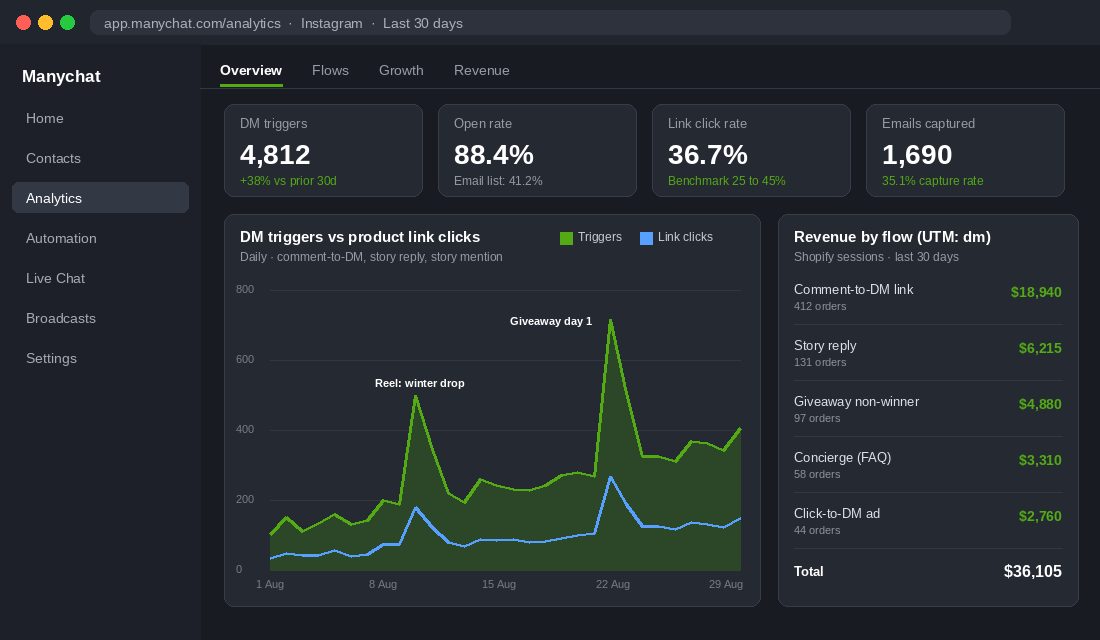
Start with the size of the pool. We Are Social and Meltwater’s Digital 2026 report puts Instagram at 15.2 million users in Australia, out of a population of 27 million. Shopify’s own research found 83% of Instagram users discover new products on the platform, and more than 200 million people visit at least one business profile every single day. Your customers are already there and already shopping.
Now look at where the intent lives. Meta reports that nearly 1 billion people message a business each week across its apps, and 150 million of them have a conversation with a business on Instagram every month. A comment on your Reel is a public hand-raise. A Story reply is a private one. Both are stronger buying signals than an email open, and both are sitting in your notifications right now unanswered.
The cost of ignoring them is measurable. Planable’s research found 73% of social media users will switch to a competitor if a business does not respond to their message. Instagram’s algorithm also weights the relationship between accounts, so every reply you send makes your next post more likely to land in that person’s feed. Automation is not about being lazy. It is about answering every hand-raise inside 10 seconds, at 2am, on the Saturday of a long weekend.
- Automated DMs open at 80 to 90%. Trigger-based messages (comment, Story reply, mention) sit at the top of that range. Broadcast-style mass DMs drop to 20 to 35%, which is email territory. The lesson: automate responses to actions, not blasts to lists.
- Click rates land between 25 and 45%. A well-built comment-to-DM flow will send more people to a product page than the same post’s link in bio, by a wide margin.
- Speed compounds. Responding to a DM inside 1 minute is associated with conversion rates roughly 4x higher than responding at 30 minutes. No human team hits that at scale. A flow does.
The Rules Before You Automate a Single Message
Get this section wrong and Meta will restrict your account or the ACMA will send you a letter. Neither is worth a few extra clicks. There are four rules that matter for an Australian Shopify brand.
- The 24-hour messaging window. Instagram lets a business send automated messages to a person for 24 hours after that person’s last action (a comment, reply, or message). Outside that window you cannot push promotional DMs at them. This is why the flow has to capture an email or phone number inside the first conversation. The DM is the front door, not the house.
- Use a Meta-approved tool only. Any automation that logs into your account with your password, runs on a browser extension, or “grows followers” is a policy breach and a fast route to a ban. Stick to platforms built on the official Instagram Messaging API. Manychat is the one we use with members and it is the market leader for comment-to-DM.
- Consent lives with the channel. Someone commenting “LINK” on a Reel has consented to receive that link in a DM. They have not consented to your Klaviyo welcome series or your SMS list. Ask for the email explicitly inside the flow, tell them what they are signing up for, and store the consent record. The rules are the same as for any popup, and we cover them in detail in the Spam Act playbook.
- Do not automate the sensitive stuff. Refunds, complaints, damaged goods and anything with a name and an order number should route to a human within the flow. Automation handles the first 30 seconds and the 80% of questions that repeat. Your team handles the rest, and the flow should make the handover obvious to the customer.
One more Australian note. Since the under-16 social media minimum age came into force in December 2025, any brand whose product skews young (school supplies, kids’ fashion, some skincare) should assume the audience commenting on Instagram is 16 plus and build the flow’s tone and offers accordingly.
Flow 1: Comment-to-DM Product Links (Fix the Wrong Link, Wrong Time Problem)
This is the workhorse and the first flow every member builds. Someone comments a keyword on a post or Reel, and inside seconds they get a DM with the exact product link, not a link in bio they have to dig through. Set it up once per post, or once for every post with a generic “any comment” trigger.
- Pick a keyword that reads like a real comment. “SHOP”, “LINK” and “ME” work. Avoid anything cute that people will mistype. Tell them the keyword in the first line of the caption and again in a pinned comment.
- Reply publicly, then DM. Manychat can post a public reply (“Sent it to your DMs!”) before the private message lands. The public reply is social proof for the next commenter and it doubles the comment count on the post, which Instagram reads as engagement.
- Handle the closed inbox. Around 10 to 20% of commenters will not have an open DM path with your account yet. The flow should ask them to tap a button or send a first message so the conversation opens, then deliver the link.
- Tag the link. Every URL in a flow gets a UTM:
utm_source=instagram&utm_medium=dm&utm_campaign=reel-name. Without it your Shopify analytics will file the sale under “instagram” alongside everything else and you will never know the flow paid for itself. - Add the follow check. Manychat can detect whether the commenter follows you. If not, ask them to follow before sending the link. Most flows built this way lift follow rate on viral posts by 20 to 30% without changing anything else.
Do not put a discount in this flow by default. Start with the link. Test a 10% code on the second message for the segment that clicked but did not buy within 24 hours, and watch the margin. The point of Flow 1 is speed and friction removal, not price.
Flow 2: Story Replies and Mentions (Turn UGC Into a Conversation)
Stories are where your existing customers live. Roughly 70% of Instagram users watch Stories every day, and Stories account for more than 70% of everything brands publish on the platform. Every reaction, sticker tap and reply is a warm customer poking you, and most brands leave every one of them on read.
Build two triggers here. The first fires when someone replies to or reacts to any Story. Keep the message short and human (“Thanks for the love. Anything I can help you find?”) with two buttons: a link to the product featured in the Story and a “just saying hi” exit. The second trigger fires when a customer mentions your account in their own Story, which is unboxing content, outfit shots and try-ons. That mention is UGC you did not pay for, and the reply should do three things.
- Thank them by name. Manychat pulls the first name from the Instagram profile. Use it.
- Ask permission to reshare. One button: “Can we share this on our page?” Store the yes as a tag so your content person can find approved UGC in one filter instead of scrolling DMs.
- Reward it. A store credit or a single-use code, delivered instantly, turns a mention into a repeat order. Brands running this see mention volume climb within a few weeks because customers learn that tagging you gets a reply.
Flow 3: The Giveaway Entry Engine (The Aussie Case Studies)
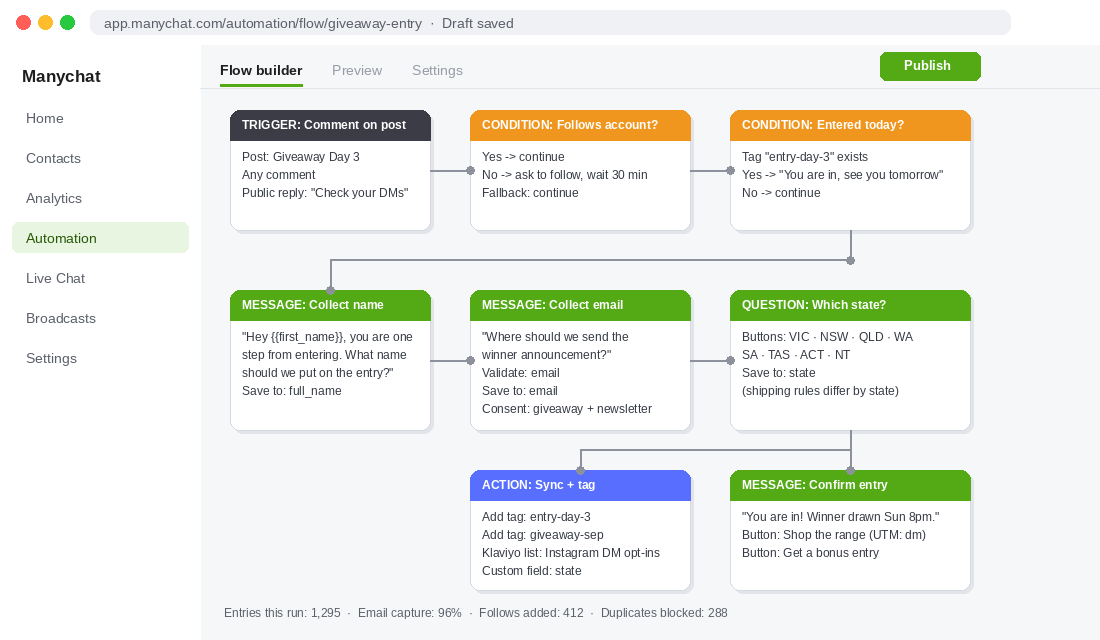
The traditional Instagram giveaway (“like, follow, tag two mates”) builds nothing. You cannot email the entrants, you cannot tell who actually followed, and the winner announcement is the last time most of them see your brand. Comment-to-DM turns the same giveaway into a lead capture machine.
6Ft6 Wine, a family-owned winery in Victoria’s Moorabool Valley, ran a 12-day giveaway with a Manychat build from Melbourne agency Chat Response. Every comment on each daily post triggered a DM that collected the entrant’s name, email and state, checked whether they followed the account (and asked them to if not), and confirmed whether they had already entered that day. The result was 1,295 qualified leads in 12 days with zero ad spend, every one of them with an email address and a consent record.
Perth telco Pentanet used a similar entry flow to promote GeForce NOW and reported a 491.88% return on the campaign. Overseas, Finnish haircare brand Four Reasons layered gamification on top (extra entries for sharing) and turned a giveaway into 227.59% ROI and around USD 19,000 in tracked sales. Different categories, same architecture.
- Entry equals a DM, not a comment. The comment is only the trigger. Entry is confirmed once the flow has name, email and follow status. This is what makes the list usable later.
- Daily posts beat one post. 6Ft6 posted every day for 12 days. Each post re-triggers the flow, and the “already entered today” check stops the same person flooding your contacts.
- Ask one qualifying question. State, skin type, size, whichever segment matters for your follow-up. 6Ft6 asked state because wine shipping rules differ by state. Store it as a custom field and push it to Klaviyo.
- Convert the losers. The day after the draw, every non-winner gets a “you did not win, but here is 15% for 48 hours” message by email (they consented) and, if still inside the window, by DM. This is where the giveaway pays for the prize.
For prize selection, entry mechanics and the ACL side of running a competition in Australia, the Shopify giveaway playbook covers the full six-stage system. Flow 3 is the capture layer that sits on top of it.
Flow 4: The Pre-Purchase Concierge (Kill the Questions That Stall Orders)
Pull your last 200 Instagram DMs and sort them. In almost every Shopify brand we look at, the same five questions make up 60 to 80% of the volume: does it ship to me and how long, what size am I, is it in stock, what is the returns policy, and is there a discount. Each one is a customer who was about to buy and stopped.
Manychat’s Conversation Starters put a menu in front of anyone who opens a DM with your account, before they type a word. Build four buttons that match your top questions and one that says “something else”. Behind each button is a short flow with a real answer, a link, and a way to reach a human.
- Shipping and cutoffs. “Order by 2pm AEST for same-day dispatch. Metro 1 to 3 days, regional 3 to 6, express available at checkout.” Update this flow before every peak (Click Frenzy, BFCM, Christmas cutoffs) and it becomes the single most useful thing your account does in November.
- Sizing. Link the size guide and add a quick question: “What do you normally wear in [reference brand]?” Answering that in a DM is worth more than a static chart on the product page.
- Stock and restocks. Ask which product, capture the email, and tag it “restock-[product]”. You now have a back-in-stock list built from the people most likely to buy on the day it lands.
- Keyword fallbacks. Set keywords for “shipping”, “size”, “return”, “discount” and “code” so a typed question triggers the same answer as the button.
- Human handover. Every branch ends with “Want to chat to a person?” which assigns the conversation to your support inbox (Gorgias, Zendesk or Shopify Inbox via Manychat’s Live Chat) and pauses automation on that contact.
Flow 5: Click-to-DM Ads and the 24-Hour Cart Recovery Window
Once the organic flows are running and you trust the numbers, the same architecture works for paid. Meta’s Click to Message objective sends cold traffic straight into a DM instead of a landing page. The flow qualifies them (two questions max), recommends a product, and captures an email before it hands over the link. Brands running this against a matched landing-page campaign generally see a cheaper cost per lead, because the email is captured before the person has to load your site on a 4G connection.
The second use of the window is recovery. If someone clicked a product link from any flow and did not buy, you have until the 24-hour mark to send one more message. Keep it to one. “Still thinking about the [product]? Only 14 left in your size” with a link is enough. Anything past that point moves to Klaviyo, which is why the email capture in every flow is non-negotiable. For a longer-range chat channel that is not bound by the 24-hour rule, the WhatsApp marketing playbook covers the opt-in model that pairs well with Instagram.
The 45-Minute Setup: Manychat, Shopify and Klaviyo
You do not need an agency to launch Flow 1 and Flow 4. Here is the setup order that avoids the two common traps (permissions and untracked links).
- Convert to a Business or Creator account and link it to a Facebook Page. Instagram Settings, then Business tools, then Connect to Facebook. Manychat cannot see a personal profile.
- Allow message access. Instagram Settings, then Messages and story replies, then Connected tools. Toggle “Allow access to messages” on. This is the step people miss and then wonder why nothing fires.
- Create the Manychat account and connect Instagram. Sign up with the Facebook login that administers the Page. The free plan covers comment-to-DM and up to 1,000 contacts. The Pro plan starts at about USD 15 a month and adds unlimited keywords, tags, custom fields and the Shopify and Klaviyo integrations. Budget for Pro from day one.
- Install the Shopify integration. Manychat Settings, then Integrations, then Shopify. This syncs products into the flow builder so you can insert a product card with live price and link, and it enables abandoned checkout triggers and order lookups by email.
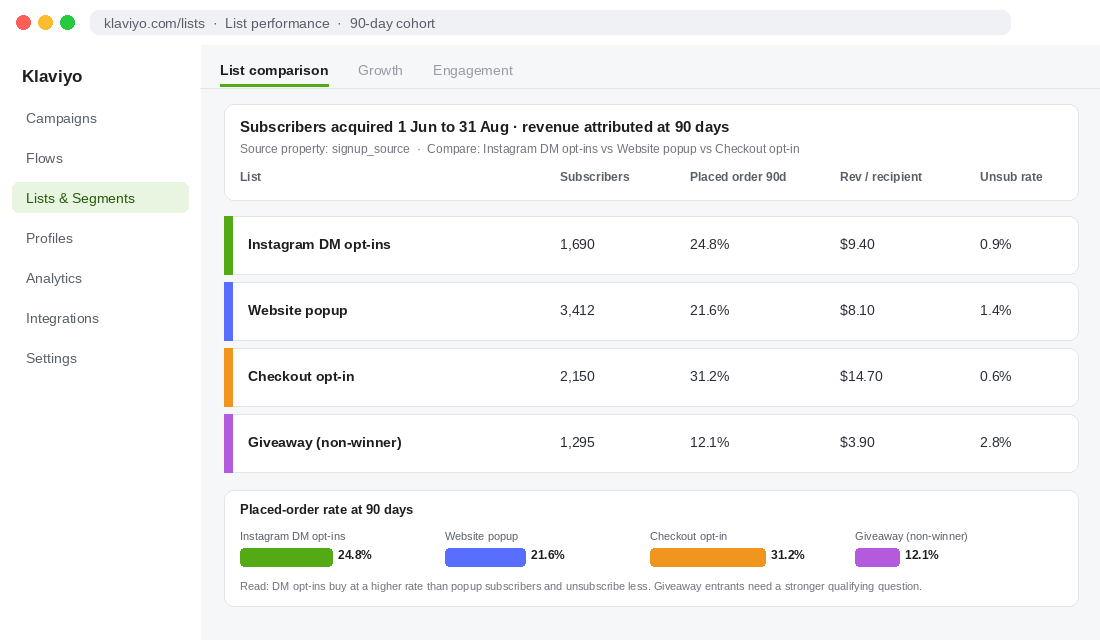
- Connect Klaviyo. Settings, then Integrations, then Klaviyo, and pick a dedicated list called “Instagram DM opt-ins”. Every email captured in a flow lands there with a source property so you can compare its 90-day LTV against popup subscribers.
- Build Flow 4 first, then Flow 1. Conversation Starters take 20 minutes and start paying the same day. Then use the “Auto-DM links from comments” Quick Automation for your next Reel.
- Set default replies and a fallback. If a keyword does not match, the flow should say “I did not quite get that. Tap one of these:” and show the four buttons again. Dead ends are where conversations (and sales) die.
- Test from a second account. Comment, reply to a Story, mention the brand, and check every link resolves with the UTM intact before you announce the keyword in a caption.
Manychat also has a Shopify app listing, so if your team lives in Shopify admin you can start there. Either route ends in the same integrations screen.
How to Measure It Without Fooling Yourself
DM automation produces flattering numbers. A 90% open rate looks incredible until you remember the person opened it because they asked for it. The metrics that tell you whether the system is working sit further down the funnel, and most of them are not in Manychat’s dashboard.
- Trigger to delivery rate. Comments on the post versus DMs delivered. Below 80% means the closed-inbox step is broken or your keyword is too fussy.
- Click rate on the product link. Benchmark 25 to 45%. Below 20%, the message is too long or the link is buried under a discount pitch.
- Email capture rate. Contacts who gave an email divided by contacts who entered the flow. 30 to 50% is normal when you ask once with a clear reason. Above that usually means a giveaway.
- Revenue by UTM. In Shopify analytics, filter sessions by
utm_medium=dm. This is the only number that matters at the monthly review. Run it against the Manychat subscription and the founder or VA hours saved. - List quality at 90 days. In Klaviyo, compare placed-order rate and revenue per recipient for the “Instagram DM opt-ins” list against your popup list. If DM subscribers are buying at half the rate, tighten the qualifying question in the flow. If they are buying at the same rate or better, you have found a cheaper list source than paid.
Review weekly for the first month, then fold the UTM revenue line into your normal marketing scorecard. A store doing 100 to 300 comment triggers a week should expect the flows to pay for the tool inside the first fortnight and to become a top-five email source within 90 days.
How the Five Flows Compound
Run in isolation, each flow is a small win. Run together they change the shape of your Instagram account. Flow 1 turns every piece of content into a product-link delivery system, which means your content person can post with a keyword instead of a “link in bio” and watch the comment count climb. Higher comment counts feed the algorithm, which pushes the next Reel further, which produces more comments.
Flow 2 makes customers realise that tagging you gets a reply and a reward, so UGC volume rises, which gives you more content to post with Flow 1 keywords. Flow 3 fills the email list in bursts, three or four times a year. Flow 4 removes the questions that stall orders, and it does it 24 hours a day, so conversion rate from Instagram traffic climbs without a single product page change. Flow 5 takes the architecture you have proven on organic and points paid spend at it.
Underneath all five, every conversation deposits an email into Klaviyo with a consent record. Twelve months in, that list is the asset. Instagram can change its algorithm, Meta can lift ad prices, and the list still belongs to you. That is the difference between renting attention and building a channel, and it is the same reason we push members so hard on the email popup system. DM automation is the second capture net, and for a lot of brands it is the one that catches more fish.
The DM Automation Launch Checklist
Print this, tick what is live, and the gaps are your next fortnight.
- Foundations: Business account linked to a Page. Message access enabled. Manychat Pro connected to Instagram, Shopify and Klaviyo. Dedicated “Instagram DM opt-ins” list with a source property.
- Flow 1: Keyword chosen and announced in captions. Public reply on. Closed-inbox step built. Follow check on. Every link carries a UTM.
- Flow 2: Story reply trigger with two buttons. Story mention trigger with thank-you, reshare permission tag and a reward code.
- Flow 3: Giveaway template with name, email, follow check, one qualifying question and a daily “already entered” check. Non-winner offer scheduled.
- Flow 4: Four Conversation Starters matching your top questions. Keyword fallbacks. Human handover to your support inbox. Shipping flow updated before every peak.
- Flow 5: Click to Message campaign with a two-question qualifier. One recovery message inside the 24-hour window.
- Measurement: UTM revenue in Shopify reviewed weekly. Klaviyo list quality compared at 90 days. Consent records stored for every email captured.
If you ticked Foundations and nothing else, you are the brand with 300 unanswered “link?” comments on last week’s Reel. That is the most common place we find $50k to $300k a month stores, and it is the cheapest problem in this article to fix.
Inside eCommerce Circle, turning Promotion into owned audience is one of the core pillars we work on with every member. If you want a second opinion on your Instagram flows, let’s talk.