Open your Meta Ads Manager and look at who you are targeting. If you are like most Aussie Shopify founders, the age slider sits somewhere between 18 and 44, the creative is shot on a phone by a 26-year-old, and every email subject line is built around urgency.
What’s in This Article
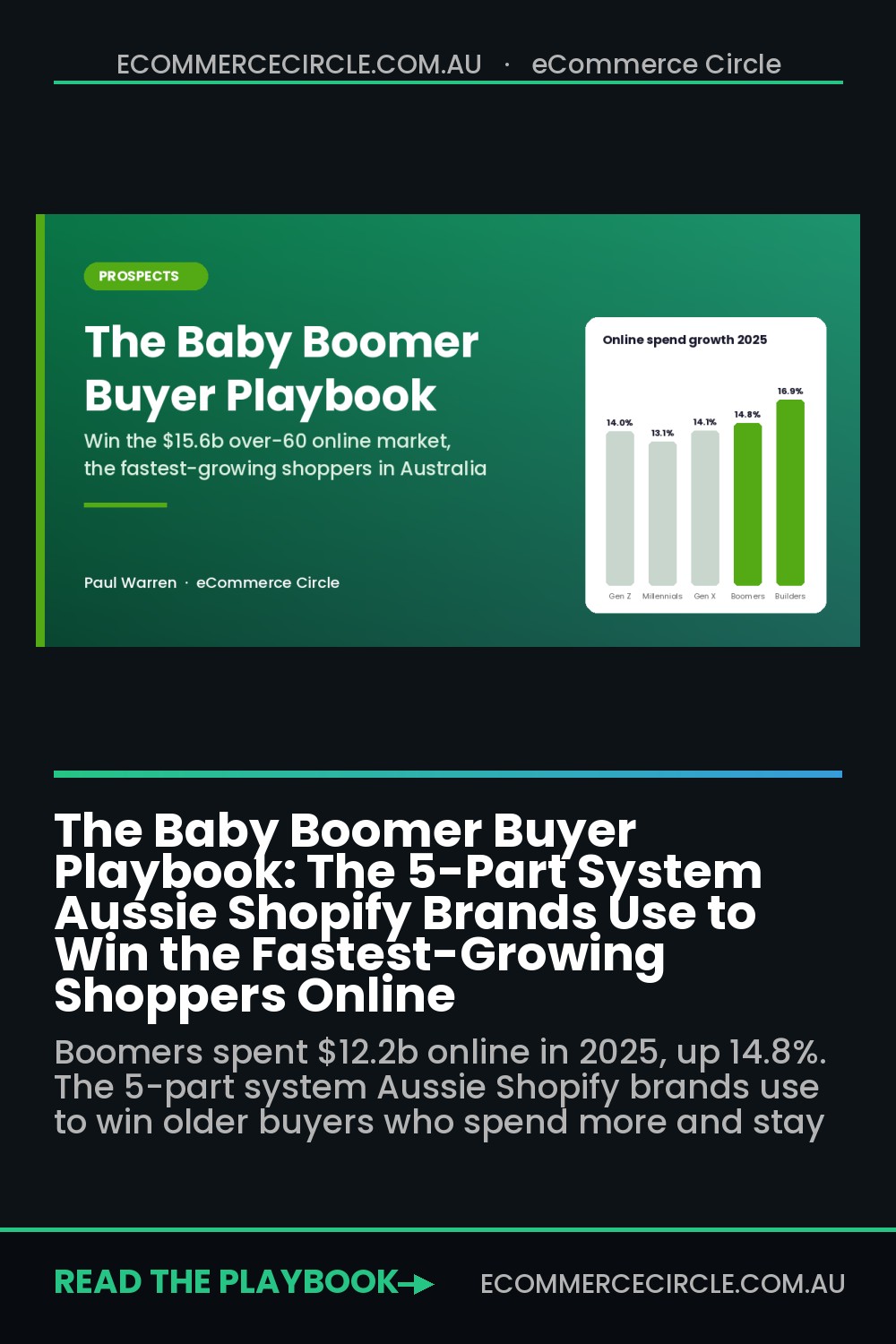
Now look at where the growth actually is. According to the Australia Post eCommerce Report 2026, Baby Boomers spent $12.2 billion online in 2025, up 14.8%, and Builders (born 1925 to 1945) spent $3.4 billion, up 16.9%, the fastest growth of any generation. Millennials still spend the most, but the two oldest cohorts grew faster than all of them.
That is a $15.6 billion market growing faster than the one you are chasing, and almost nobody in DTC is building for it. The brands that do are not running a special “seniors” campaign. They are fixing five things in the store that older buyers care about more than anyone else. This playbook walks you through all five.
Why Older Shoppers Are the Most Under-Served Buyers in Aussie Ecommerce
Most founders write off older customers for one of two reasons. Either they assume “they don’t shop online”, or they assume the brand will look daggy if it courts them. Both assumptions cost money.
Here is what the Australia Post data actually shows about Baby Boomers (born 1946 to 1964):
- Big baskets. The average Boomer basket was $104.45 in 2025, almost identical to Gen X ($105.84) and well above Gen Z ($81.15).
- Room to grow. Only 19.1% of Boomer retail spend is online, against 28.5% for Millennials. Every point that shifts is new money for someone.
- Quality over price. 80% say product quality is the most important thing to them.
- Certainty over speed. 87% value delivery certainty over speed. Only 13% pick speed.
- Returns matter. 57% say free returns strongly influence where they shop.
- Security worries. 62% worry about data security when shopping online.
Read that list again. This is a buyer who spends more per order, is less swayed by discounts, and rewards the brand that makes them feel safe. That is the most profitable customer profile in ecommerce, and it is sitting there while everyone fights over Gen Z on TikTok.
The market is also getting bigger every year. AIHW data shows 1 in 6 Australians are now aged 65 and over, and that share is projected to keep climbing for decades. If you sell homewares, garden, health, fashion, gifting, pet or travel gear, a big slice of your future revenue is over 60 whether you plan for it or not.
We have already covered how to win the Gen Z buyer. Think of this as the other end of the same map. The five parts below are the system.
Part 1: Find Your Older Buyers in the Data You Already Have
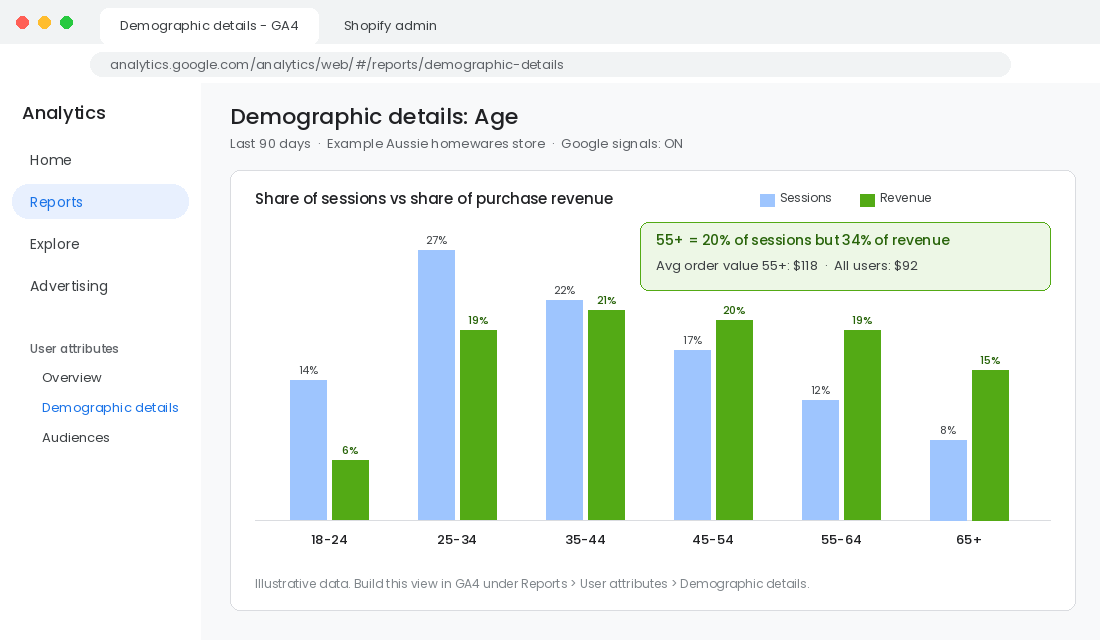
Before you change a single pixel, find out how many of your customers are already over 55. Most founders are shocked. We regularly see stores where the ad account targets 25 to 44 but 30% or more of revenue comes from buyers over 55 who found the brand anyway.
You can get a solid read in under an hour using free tools.
Step 1: Turn On Age Data in Google Analytics 4
- In GA4, go to Admin, then Data collection and modification, then Data collection.
- Switch on Google signals data collection. This is what switches on age and gender reporting.
- Wait a few days for data to build, then open Reports, then User attributes, then Demographic details.
- Change the dimension dropdown from Country to Age.
- Add Purchase revenue and Key events as metrics so you see revenue by bracket, not just visits.
GA4 groups ages into brackets (18-24 through 65+). Some traffic will show as “unknown” and small brackets are hidden by thresholds, so treat the numbers as directional. What you are looking for is the gap between traffic share and revenue share. If the 55-64 and 65+ brackets are 15% of sessions but 25% of revenue, that tells you these buyers convert better and spend more once they land.
Step 2: Ask Them Directly
GA4 guesses age. Your customers can tell you. Add one optional question to your post-purchase survey (KnoCommerce, Fairing and Zigpoll all do this in a few clicks on Shopify): “Which age group are you in?” with brackets matching GA4. Within 200 responses you will have a far more accurate picture, and you can tag each customer profile with their answer.
Step 3: Check Meta’s Breakdown
In Ads Manager, open any campaign, click Breakdown, then By delivery, then Age. Look at cost per purchase and ROAS by age band. If you have been running broad targeting, Meta has probably been quietly finding older buyers for you, and they are often your cheapest purchases.
Once you know the size of the prize, the next four parts tell you how to grow it.
Part 2: Sell Certainty, Not Speed
Every shipping conversation in DTC is about speed. Same day, next day, express. For older buyers, speed is the wrong promise. The Australia Post report found 87% of Boomers and 90% of Builders value delivery certainty over speed, and 70% of Builders are willing to wait longer for delivery if it means paying less.
Certainty means the buyer knows exactly what is going to happen, and then it happens. The cautionary tale here is Mosaic Brands, the owner of Noni B, Millers, Rivers and Katies, whose core market was women over 50. In August 2025 the Federal Court ordered Mosaic to pay $25.05 million in penalties after it failed to deliver 739,114 items within advertised timeframes or a reasonable time. More than half were dispatched 30 or more days after the order. By then the group had already collapsed.
That is the extreme version. The everyday version is a store that says “3 to 7 business days” and then ships on day four with no tracking email. Younger shoppers shrug. Older shoppers pick up the phone, or quietly never come back.
Here is how to sell certainty:
- Show a date, not a range. “Order today, arrives by Thursday 2 October” beats “2 to 5 business days”. An estimated delivery date app from the Shopify App Store, or the delivery estimate block in many themes, can do this in an afternoon.
- Under-promise by a day. Add a buffer to every estimate. Arriving early builds trust. Arriving late destroys it.
- Send every tracking update. Turn on Shopify’s shipping confirmation and out-for-delivery notifications, and add a “your order is being packed” email for anything that takes longer than 24 hours to dispatch.
- Offer collection points. Parcel Lockers and Post Office collection suit buyers who do not want a parcel sitting on the doorstep.
- Make returns simple and visible. With 57% of Boomers saying free returns strongly influence where they shop, put the returns promise on the product page, not buried in the footer.
If you want the full system for setting and keeping delivery promises, our Delivery Promise Playbook goes deep on it. For older buyers, the rule is simple: a promise you keep beats a promise that sounds fast.
Part 3: Make the Store Easy to Read, Tap and Trust
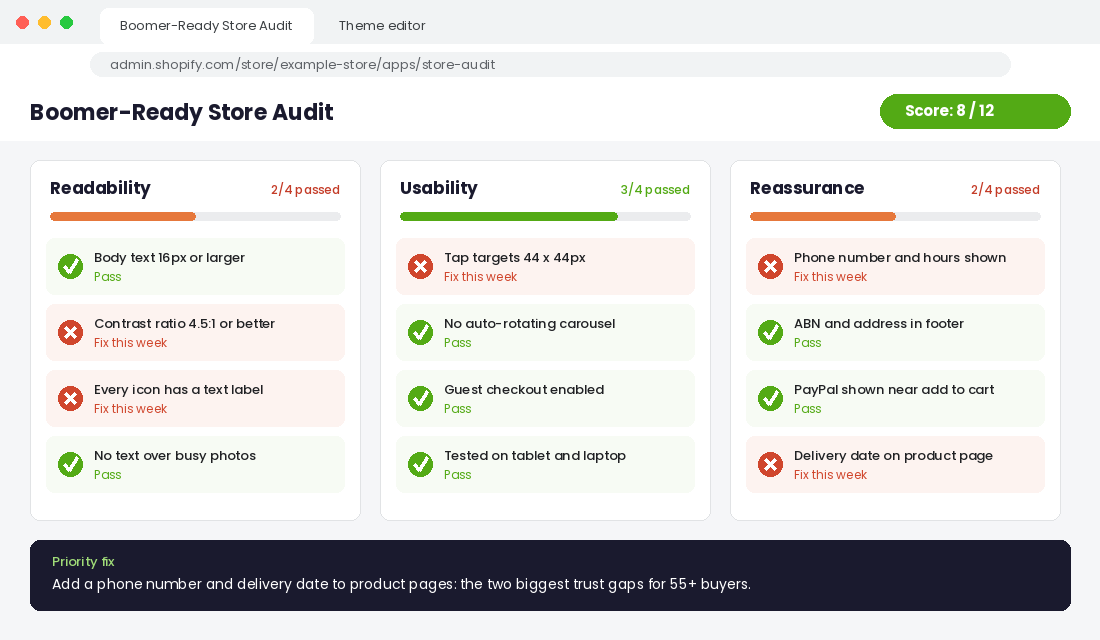
Most Shopify themes are designed by young designers on big, bright monitors. Light grey text on white, 13-pixel body copy, tiny icons with no labels, and a checkout that hides the phone number. None of that is a problem until your buyer is 68 and reading on a tablet in the afternoon sun.
This is not about building a “seniors version” of your store. Every fix below makes the store better for everyone. Older buyers are just the ones who leave first when you get it wrong.
The Readability Fixes
- Body text at 16px minimum, 18px on product descriptions. In most Shopify themes this is under Theme settings, then Typography, then Body scale.
- Real contrast. WCAG AA asks for a contrast ratio of at least 4.5:1 for body text. Swap pale grey for near-black. Test any colour pair with a free contrast checker.
- No text on busy images. Put headlines on solid blocks of colour, not over lifestyle photos.
- Labels on every icon. A heart icon means “wishlist” to a 25-year-old. To plenty of 70-year-olds it means nothing. Add the word.
The Usability Fixes
- Bigger tap targets. WCAG 2.2 sets a minimum target size of 24 by 24 CSS pixels (success criterion 2.5.8). Aim for 44 by 44 on buttons, quantity selectors and size swatches.
- Kill the auto-rotating carousel. Older users find moving content hard to read and hard to click. Replace it with one clear hero image.
- Guest checkout on. Forcing account creation is a common drop-off point. In Shopify, go to Settings, then Checkout, then Customer accounts and make sure accounts are optional.
- Design for desktop and tablet too. Mobile-first is right for most stores, but check the 55+ bracket in GA4’s Tech report. Many older buyers still research and buy on a laptop or iPad.
The Reassurance Fixes
- A phone number in the header or footer, with the hours it is answered.
- Your ABN and a real address in the footer and on the contact page.
- Payment logos they recognise near the add-to-cart button, including PayPal, which many older buyers prefer because they do not have to type card details into a new site.
Our Shopify Accessibility Playbook covers the full WCAG checklist. If you only have one afternoon, do the readability and reassurance fixes first. They are the fastest wins.
Part 4: Earn Trust in a Market Full of Scams
Here is a number every founder should know. According to the ACCC’s 2025 Targeting Scams data, Australians aged 65 and over make up about 17.1% of the population but accounted for 26.5% of total losses reported to Scamwatch. Reports of online scams with a loss rose 31.8% in 2025.
Your older buyers have heard the warnings from their bank, their kids and the evening news. They land on your store already asking, “Is this real?” If you do not answer that question fast, they leave. And some of the tactics DTC founders love look exactly like a scam to this buyer.
Stop Doing These
- Fake countdown timers that reset on refresh.
- “Only 2 left!” banners on products you have 400 of.
- Spin-to-win pop-ups that fire in the first three seconds.
- Emails and SMS with shortened links and no brand name in the first line.
These tactics read as pressure, and pressure is exactly what the ACCC’s “Stop. Check. Protect.” campaign tells people to walk away from. The Australia Post data also shows fewer than half of Builders even hold out for sales before buying, so manufactured urgency does little for them anyway.
Start Doing These
- Show your people. A photo of the founder and team on the About page, and the founder’s name signing emails.
- Show real reviews with real names and photos, including reviewers who look like your older buyers.
- Explain how you keep their data safe in one plain-English paragraph near checkout: “We never see or store your card number. Payments are processed securely by Shopify.”
- Put your brand name first in every email subject, SMS and sender name, so it never looks like a phishing message.
- Answer the phone. Or at least call back within one business day.
Representation matters too. When Aussie fashion label Blue Illusion wanted to speak to women who had been ignored by fashion advertising, it signed 94-year-old style icon Iris Apfel as the face of its “Ageless” campaign. The message was simple: style is about attitude, not age. You do not need a celebrity. You need creative where older customers can see themselves, which usually means casting real customers.
Notice what Blue Illusion did not do. It did not label anything “for seniors”. Older buyers do not want to be marketed to as old. They want to be marketed to as people with taste, money and standards.
Part 5: Build the Retention Engine Older Buyers Reward
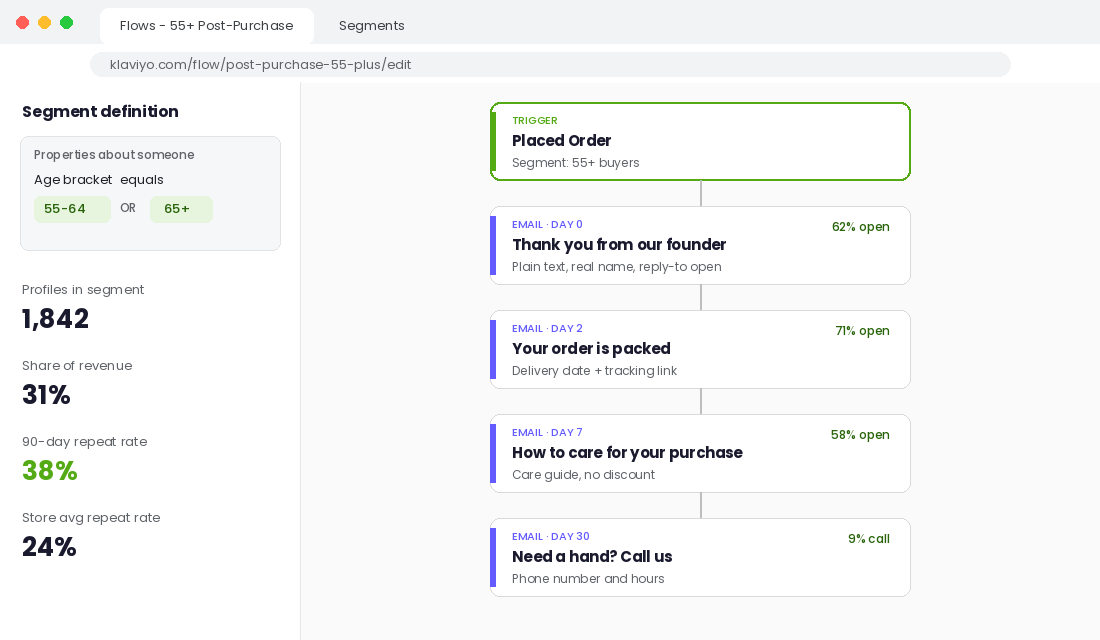
Here is the payoff for getting Parts 1 to 4 right. Once an older buyer trusts you, they tend to stay. The Australia Post report found 91% of Builders agree a reputable retailer gives them more confidence to buy. Trust earned once becomes repeat orders for years.
But the channels that work are different from the ones you use for younger buyers. Older customers read email properly. They open newsletters that tell a story. They are on Facebook far more than TikTok. And some of them still want to pick up the phone and order.
Build a 55+ Segment in Klaviyo
- Push the age answer from your post-purchase survey into Klaviyo as a profile property (KnoCommerce and Fairing both have native integrations).
- Create a segment: Properties about someone, Age bracket, equals 55-64 or 65+.
- Clone your post-purchase flow and adjust it for this segment: longer, more helpful emails, a care guide for the product, and a plain “reply to this email if you need a hand” line from a real person.
- Remove countdown GIFs and “last chance” language from this segment’s campaigns. Lead with quality, how-to content and new arrivals.
- Track 90-day repeat rate for this segment against your store average every month.
Take Phone Orders Properly
Shopify already has the tool for this. When a customer calls, go to Orders, then Drafts, then Create order. Add the products, attach or create the customer, apply shipping and then click Send invoice. The customer gets a secure Shopify checkout link by email and pays without reading card numbers over the phone. That last part matters: in a world of phone scams, you never want to be the business that asks for card details verbally.
Use Facebook, Not Just TikTok
For acquisition, test a Meta ad set with ages 55 to 65+ and creative built for this buyer: slower edits, larger captions, a real person explaining the product, and a clear offer that is not wrapped in urgency. Judge it on contribution margin after 60 days, not first-order ROAS. A buyer with a $104 basket who comes back twice a year will beat a cheaper first click every time.
How the Five Parts Compound
Each part on its own gives you a small lift. Together, they change the economics of your store.
Part 1 tells you how big the older segment already is, so you stop ignoring revenue you already earn. Part 2 keeps the promise that matters most to them, so first orders turn into good experiences. Part 3 removes the friction that makes them leave before checkout. Part 4 answers “Is this real?” before they ask it. Part 5 turns that trust into repeat orders at a basket size that beats your younger buyers.
Here is the part most founders miss. Every one of those fixes also lifts conversion for your 30-year-old customers. Clear delivery dates, readable text, honest urgency and a phone number that gets answered are not “seniors features”. They are just good retail. Older buyers are simply the most sensitive gauge of whether you are doing it well.
Run the numbers for a store doing $1 million a year. If 20% of revenue already comes from buyers over 55 and this playbook lifts that segment’s conversion rate by 15% and repeat rate by 10%, you add roughly $50,000 in revenue without touching your ad budget. The only cost is attention.
The Boomer-Ready Store Checklist
Work through this with your team. Score one point for every “yes”. Under 10 means older buyers are leaking out of your store every day.
Know Them
- Google signals is on and you have checked GA4 revenue by age bracket.
- Your post-purchase survey asks for age group.
- You have checked Meta cost per purchase by age in the last 30 days.
Deliver Certainty
- Product pages show an estimated delivery date, not just a range.
- You hit your delivery estimate on at least 95% of orders.
- Customers get a packed, shipped and out-for-delivery update.
- The returns promise is visible on every product page.
Make It Easy
- Body text is 16px or larger with dark, high-contrast colour.
- Every icon has a text label.
- Buttons and swatches are at least 44 by 44 pixels.
- No auto-rotating carousel on the homepage.
- Guest checkout is on.
Earn Trust
- Phone number, ABN and address are visible on every page.
- No fake timers or fake low-stock alerts anywhere on the site.
- Your brand name leads every email subject and SMS.
- Your creative includes people over 55.
Keep Them
- A 55+ segment exists in Klaviyo with its own post-purchase flow.
- Your team knows how to take a phone order through Shopify draft orders.
- You track 90-day repeat rate for the 55+ segment every month.
Start with the section where you scored lowest. Fix it in the next two weeks, then move to the next one. You do not need to do all 19 at once. You just need to stop leaving the fastest-growing buyers in Australian ecommerce to someone else.
Your Next Step
Inside eCommerce Circle, understanding exactly who buys from you (and who you are ignoring) is one of the core Prospects pillars we work on with every member. If you want to see exactly where your store is being capped, take the free More Orders Scorecard. It takes two minutes and shows you which of the 10 P’s to fix first.